"7e6fc58c410f2894"{"id":"24145","slug":"enviro-3-uber-shader","title":"Enviro 3 - UBER Shader","category":"Shaders","engine":"Original Unity version: 2021.3.23","assetVersion":"Original Unity version: 2021.3.23","engineVersion":"Asset Version:1.1.1","tag":"Shaders","accent":"cyan","visual":"character","summary":"Enviro 3 - UBER Shader is a PBR shader for Unity surfaces that need rain, puddles, snow, and wetness to change in step with weather. It works with Enviro 3 integration, fog, and volume lighting, while covering Built-in, HDRP, and URP pipelines.","platform":"Unity","publishedAt":"2026-04-12T09:58:47.000Z","updatedAt":"2026-04-19T15:34:58.000Z","sourceNotes":[],"fileContents":[],"compatibility":["Unity","Original Unity version: 2021.3.23","Asset Version: 1.1.1"],"featuredImage":{"alt":"Enviro 3 - UBER Shader","src":"https://3dcghub.com/wp-content/uploads/2026/04/b64026198eee_ce8e96e6-43bd-476b-9fcc-9195e26e2587_1280x720_stretch.webp"},"hasDownloadLink":true,"downloads":2,"terms":[{"taxonomy":"category","slug":"shaders-vfx-unity-2","name":"Shaders"},{"taxonomy":"post_tag","slug":"materials","name":"Materials"},{"taxonomy":"post_tag","slug":"unity","name":"Unity"},{"taxonomy":"post_tag","slug":"vfx","name":"VFX"}],"galleryImages":[{"src":"https://3dcghub.com/wp-content/uploads/2026/04/73a91ed537fe_87245587-9c2a-4e2d-91a9-4b446ab64f1a_scaled.webp","alt":"Enviro 3 - UBER Shader"},{"src":"https://3dcghub.com/wp-content/uploads/2026/04/27bc03e71a81_00572ff1-8f7c-45a2-ae5a-5c68a594b883_scaled.webp","alt":"Enviro 3 - UBER Shader"},{"src":"https://3dcghub.com/wp-content/uploads/2026/04/b308990a7e8c_aadf9aa1-5568-4da4-a424-23a8f2e517a8_scaled.webp","alt":"Enviro 3 - UBER Shader"},{"src":"https://3dcghub.com/wp-content/uploads/2026/04/5bc84b784935_2f9c4480-643d-4682-ba40-c9588bb33fc8_scaled.webp","alt":"Enviro 3 - UBER Shader"},{"src":"https://3dcghub.com/wp-content/uploads/2026/04/4796b8579570_0eb1bd6a-1033-402f-8754-551bcddb0ba5_scaled.webp","alt":"Enviro 3 - UBER Shader"},{"src":"https://3dcghub.com/wp-content/uploads/2026/04/1ef6c189d42c_d1c38b8b-3ba2-43f9-8a6e-f121c9be3279_scaled.webp","alt":"Enviro 3 - UBER Shader"}],"accessPanel":{"kind":"resource","title":"Access this resource","eyebrow":"Free Download","message":"Log in or create a free account to start your download.","fileName":"Enviro 3 - UBER Shader v1.1.1.7z","safetyNote":"All resources are 100% manually reviewed to eliminate all risks.","actionLabel":"Download Free","resourceType":"Resource archive"},"contentHtml":"\u003ch2\u003eShader layers, weather sync, and render pipeline support\u003c/h2\u003e\u003cp\u003eEnviro 3 - UBER Shader is a PBR UBER shader for Unity projects that need surface changes tied to weather. It connects with Enviro 3 weather syncing and includes fog plus volume lighting support, so the shader fits into scenes where atmosphere and materials need to react together rather than as separate systems.\u003c/p\u003e\u003cp\u003eThe package supports all render pipelines and lists Unity 6 support. It also covers the main surface modes used in production work: opaque, fade, transparent, and cutout. That gives the shader room to serve anything from solid environment materials to surfaces that need partial visibility or softer blending.\u003c/p\u003e\u003cp\u003eFor teams working in longer-running projects, the compatibility range matters as much as the weather effects themselves. The shader is marked for Built-in, HDRP, and URP, and the current release notes add support for Unity 6.1 and 6.2 while updating URP 17 support. The package also notes that it is not intended for mobiles.\u003c/p\u003e\u003ch2\u003eRain, snow, puddles, and wetness on the surface\u003c/h2\u003e\u003cp\u003eThe main draw is how the shader handles changing surface conditions. Dynamic snow is included with lighting that behaves in a âsubsurface scatteringâ style. Dynamic puddles bring waves and rain ripples, while dynamic wetness adds rain streaks, flow, and splotches. These effects make the material react like an outdoor surface that has actually been exposed to weather, rather than a static shader with a single wet mask.\u003c/p\u003e\u003cp\u003eThere is also triplanar detail normal support, which helps detail layers stay useful across different surface directions. A secondary texture layer is included as well, and it can be blended using a mask, procedural noise, or height-based blending. That gives the shader a second pass of material variation without forcing the surface into a flat, repeated look.\u003c/p\u003e\u003cp\u003eOptional tessellation is part of the feature set too. When used, it adds another layer of surface shaping for materials that need more structure. The package also includes support for additional PBR detail behavior, so the material setup can carry more than one layer of surface information.\u003c/p\u003e\u003ch2\u003eMaterial setup and scene conversion\u003c/h2\u003e\u003cp\u003eBeyond the shader itself, the package includes a simple texture channel packer and a material converter tool. The converter is meant to move scene objects from standard or lit shaders to Enviro UBER in a two-click, non-destructive workflow. That makes it useful in production when a scene already has material work in place and needs to be shifted into a weather-aware setup without rebuilding every surface from scratch.\u003c/p\u003e\u003cp\u003eThis is the part that places the shader into a real project workflow. A team can keep existing objects, convert them, and then use the weather features on top of the established scene. The release notes also mention support for Enviro effect removal zones, which expands how the shader interacts with areas where weather effects need to be controlled differently.\u003c/p\u003e\u003cp\u003eThe 1.1.0 update added the material converter tool, support for Unity 6 URP/HDRP 17, and a fix for tessellation not being fully deactivated when not used. It also improved performance when certain features are disabled and refined puddle waves, rain drops, and ripples with world-space UV behavior. The current 1.2.0 release adds a world space / triplanar sampling option for detail layers.\u003c/p\u003e\u003ch2\u003eWhere it fits in a production scene\u003c/h2\u003e\u003cp\u003eEnviro 3 - UBER Shader fits best in environments where weather is part of the visual language of the scene: outdoor terrain, exposed structures, roads, props, and other surfaces that need to show rain, snow, or dampness as the conditions change. The shader is not just for a single effect. It combines weather response, surface layering, and pipeline support in one place, which keeps material behavior closer to the rest of the scene systems.\u003c/p\u003e\u003cp\u003eBecause it is fully integrated with Enviro 3 out of the box, the shader is set up to work alongside weather syncing, fog, and volume lighting rather than acting as a separate material experiment. That makes it a practical fit for projects that already rely on Enviro 3 and want the materials to follow the same weather state.\u003c/p\u003e\u003cp\u003eThe package also gives room for different material states through opaque, fade, transparent, and cutout support, which helps the shader cover more than one kind of environment asset. Combined with dynamic puddles, wetness, snow, and detail layering, it is aimed at scenes that need surfaces to read as active parts of the weather system.\u003c/p\u003e\u003ch3\u003eWhat it is ready to handle\u003c/h3\u003e\u003cp\u003eIn practice, Enviro 3 - UBER Shader is prepared for projects that need weather-driven surfaces, integrated environment lighting, and a direct path from standard or lit materials into a weather-aware shader setup. It is a focused tool for scenes where rain, snow, puddles, and wetness have to show up on the material itself, not just in the sky or post effects.\u003c/p\u003e\n\n\u003ch2\u003eExplore Similar Assets\u003c/h2\u003e\n\u003cul\u003e\n\u003cli\u003e\u003ca href=\"https://3dcghub.com/toolkit-for-unity-physics-2026/\" title=\"Toolkit for Unity Physics 2026\"\u003eToolkit for Unity Physics 2026\u003c/a\u003e\u003c/li\u003e\n\u003cli\u003e\u003ca href=\"https://3dcghub.com/opencv-for-unity/\" title=\"OpenCV for Unity\"\u003eOpenCV for Unity\u003c/a\u003e\u003c/li\u003e\n\u003cli\u003e\u003ca href=\"https://3dcghub.com/exporter-for-unreal-to-for-unity-2026/\" title=\"Exporter for Unreal to/for Unity 2026\"\u003eExporter for Unreal to/for Unity 2026\u003c/a\u003e\u003c/li\u003e\n\u003cli\u003e\u003ca href=\"https://3dcghub.com/dialogue-system-for-unity/\" title=\"Dialogue System for Unity\"\u003eDialogue System for Unity\u003c/a\u003e\u003c/li\u003e\n\u003cli\u003e\u003ca href=\"https://3dcghub.com/ambient-sounds-interactive-soundscapes-for-unity-6/\" title=\"Ambient Sounds – Interactive Soundscapes for Unity 6\"\u003eAmbient Sounds – Interactive Soundscapes for Unity 6\u003c/a\u003e\u003c/li\u003e\n\u003c/ul\u003e","contentTextLength":5103,"navigation":{"current":3603,"total":3618,"previous":{"id":"24158","slug":"flat-kit-toon-shading-and-water","title":"Flat Kit: Toon Shading and Water","category":"Shaders","platform":"Unity","updatedAt":"2026-04-19T15:34:58.000Z"},"next":{"id":"24136","slug":"enviro-3-terrain-shader","title":"Enviro 3 - Terrain Shader","category":"Shaders","platform":"Unity","updatedAt":"2026-04-19T15:34:58.000Z"}},"relatedResources":[{"id":"24136","slug":"enviro-3-terrain-shader","title":"Enviro 3 - Terrain Shader","category":"Shaders","engine":"Original Unity version: 2021.3.45","assetVersion":"Original Unity version: 2021.3.45","engineVersion":"Asset Version:1.1.2","tag":"Shaders","accent":"cyan","visual":"audio","summary":"Enviro 3 - Terrain Shader is a PBR terrain shader for Unity that focuses on weather-driven surface changes. It covers dynamic snow, puddles, wetness, blending control, and terrain hole support across supported render pipelines.","platform":"Unity","publishedAt":"2026-04-12T09:54:37.000Z","updatedAt":"2026-04-19T15:34:58.000Z","sourceNotes":[],"fileContents":[],"compatibility":["Unity","Original Unity version: 2021.3.45","Asset Version: 1.1.2"],"featuredImage":{"alt":"Enviro 3 - Terrain Shader","src":"https://3dcghub.com/wp-content/uploads/2026/04/85056b4933d5_c948eb4b-7e79-4b63-a5f1-ee65186a1e93_1280x720_stretch.webp"},"hasDownloadLink":true,"downloads":3},{"id":"24040","slug":"advanced-edge-detection","title":"Advanced Edge Detection","category":"Shaders","engine":"Original Unity version: 6000.0.56","assetVersion":"Original Unity version: 6000.0.56","engineVersion":"Asset Version:1.0","tag":"Shaders","accent":"cyan","visual":"mech","summary":"Advanced Edge Detection adds clear outlines through normals, depth buffer detection, and URP-only custom data options. It also includes masking, sketch-style effects, and support for transparent shader behaviors such as water effects. The package targets Un...","platform":"Unity","publishedAt":"2026-04-12T09:32:04.000Z","updatedAt":"2026-04-19T15:35:01.000Z","sourceNotes":[],"fileContents":[],"compatibility":["Unity","Original Unity version: 6000.0.56","Asset Version: 1.0"],"featuredImage":{"alt":"Advanced Edge Detection","src":"https://3dcghub.com/wp-content/uploads/2026/04/35059a61cc0a_b81ab469-50c3-47fd-9d2b-0dd39f9680f6_1280x720_stretch.webp"},"hasDownloadLink":true,"downloads":0},{"id":"24316","slug":"omnishade-pbr-physically-based-uber-shader","title":"OmniShade PBR - Physically Based Uber Shader","category":"Shaders","engine":"Original Unity version: 2022.3.62","assetVersion":"Original Unity version: 2022.3.62","engineVersion":"Asset Version:1.3.0","tag":"Shaders","accent":"cyan","visual":"city","summary":"OmniShade PBR extends Unityâs Standard Lit workflow with a physically based shader that adds stylized lighting, layered materials, and texture painting support. It also supports Built-In, URP, and HDRP, with adaptive shader variants and Shader Graph imple...","platform":"Unity","publishedAt":"2026-04-14T11:19:12.000Z","updatedAt":"2026-04-20T06:12:50.000Z","sourceNotes":[],"fileContents":[],"compatibility":["Unity","Original Unity version: 2022.3.62","Asset Version: 1.3.0"],"featuredImage":{"alt":"OmniShade PBR - Physically Based Uber Shader","src":"https://3dcghub.com/wp-content/uploads/2026/04/aae2db2ec3cf_b94cd628-98ea-4e8a-8a50-b0cd480024a8_1280x720_stretch.webp"},"hasDownloadLink":true,"downloads":0}]}
Shaders
Enviro 3 - UBER Shader
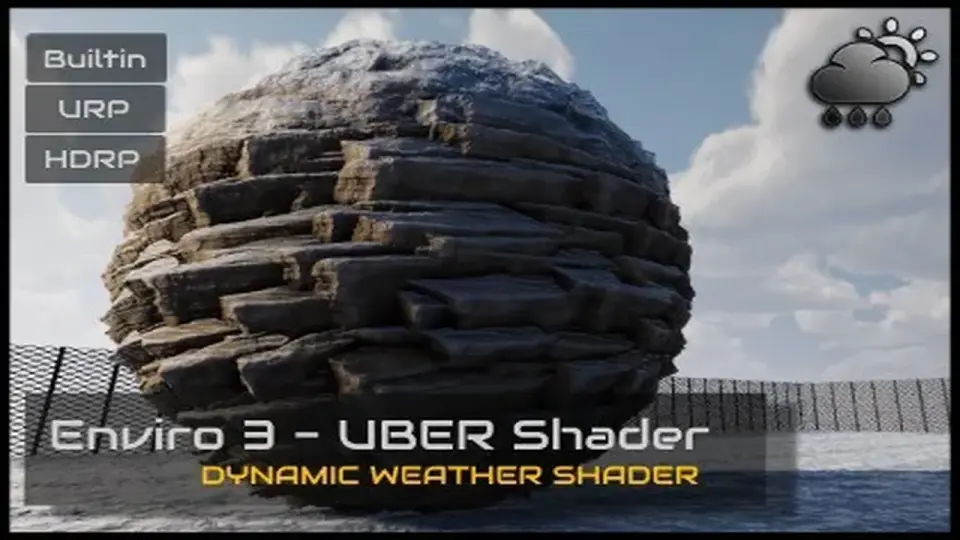
Enviro 3 - UBER Shader is a PBR shader for Unity surfaces that need rain, puddles, snow, and wetness to change in step with weather. It works with Enviro 3 integration, fog, and volume lighting, while covering Built-in, HDRP, and URP pipelines.
Shader layers, weather sync, and render pipeline support
Enviro 3 - UBER Shader is a PBR UBER shader for Unity projects that need surface changes tied to weather. It connects with Enviro 3 weather syncing and includes fog plus volume lighting support, so the shader fits into scenes where atmosphere and materials need to react together rather than as separate systems.
The package supports all render pipelines and lists Unity 6 support. It also covers the main surface modes used in production work: opaque, fade, transparent, and cutout. That gives the shader room to serve anything from solid environment materials to surfaces that need partial visibility or softer blending.
For teams working in longer-running projects, the compatibility range matters as much as the weather effects themselves. The shader is marked for Built-in, HDRP, and URP, and the current release notes add support for Unity 6.1 and 6.2 while updating URP 17 support. The package also notes that it is not intended for mobiles.
Rain, snow, puddles, and wetness on the surface
The main draw is how the shader handles changing surface conditions. Dynamic snow is included with lighting that behaves in a âsubsurface scatteringâ style. Dynamic puddles bring waves and rain ripples, while dynamic wetness adds rain streaks, flow, and splotches. These effects make the material react like an outdoor surface that has actually been exposed to weather, rather than a static shader with a single wet mask.
There is also triplanar detail normal support, which helps detail layers stay useful across different surface directions. A secondary texture layer is included as well, and it can be blended using a mask, procedural noise, or height-based blending. That gives the shader a second pass of material variation without forcing the surface into a flat, repeated look.
Optional tessellation is part of the feature set too. When used, it adds another layer of surface shaping for materials that need more structure. The package also includes support for additional PBR detail behavior, so the material setup can carry more than one layer of surface information.
Material setup and scene conversion
Beyond the shader itself, the package includes a simple texture channel packer and a material converter tool. The converter is meant to move scene objects from standard or lit shaders to Enviro UBER in a two-click, non-destructive workflow. That makes it useful in production when a scene already has material work in place and needs to be shifted into a weather-aware setup without rebuilding every surface from scratch.
This is the part that places the shader into a real project workflow. A team can keep existing objects, convert them, and then use the weather features on top of the established scene. The release notes also mention support for Enviro effect removal zones, which expands how the shader interacts with areas where weather effects need to be controlled differently.
The 1.1.0 update added the material converter tool, support for Unity 6 URP/HDRP 17, and a fix for tessellation not being fully deactivated when not used. It also improved performance when certain features are disabled and refined puddle waves, rain drops, and ripples with world-space UV behavior. The current 1.2.0 release adds a world space / triplanar sampling option for detail layers.
Where it fits in a production scene
Enviro 3 - UBER Shader fits best in environments where weather is part of the visual language of the scene: outdoor terrain, exposed structures, roads, props, and other surfaces that need to show rain, snow, or dampness as the conditions change. The shader is not just for a single effect. It combines weather response, surface layering, and pipeline support in one place, which keeps material behavior closer to the rest of the scene systems.
Because it is fully integrated with Enviro 3 out of the box, the shader is set up to work alongside weather syncing, fog, and volume lighting rather than acting as a separate material experiment. That makes it a practical fit for projects that already rely on Enviro 3 and want the materials to follow the same weather state.
The package also gives room for different material states through opaque, fade, transparent, and cutout support, which helps the shader cover more than one kind of environment asset. Combined with dynamic puddles, wetness, snow, and detail layering, it is aimed at scenes that need surfaces to read as active parts of the weather system.
What it is ready to handle
In practice, Enviro 3 - UBER Shader is prepared for projects that need weather-driven surfaces, integrated environment lighting, and a direct path from standard or lit materials into a weather-aware shader setup. It is a focused tool for scenes where rain, snow, puddles, and wetness have to show up on the material itself, not just in the sky or post effects.
 Shaders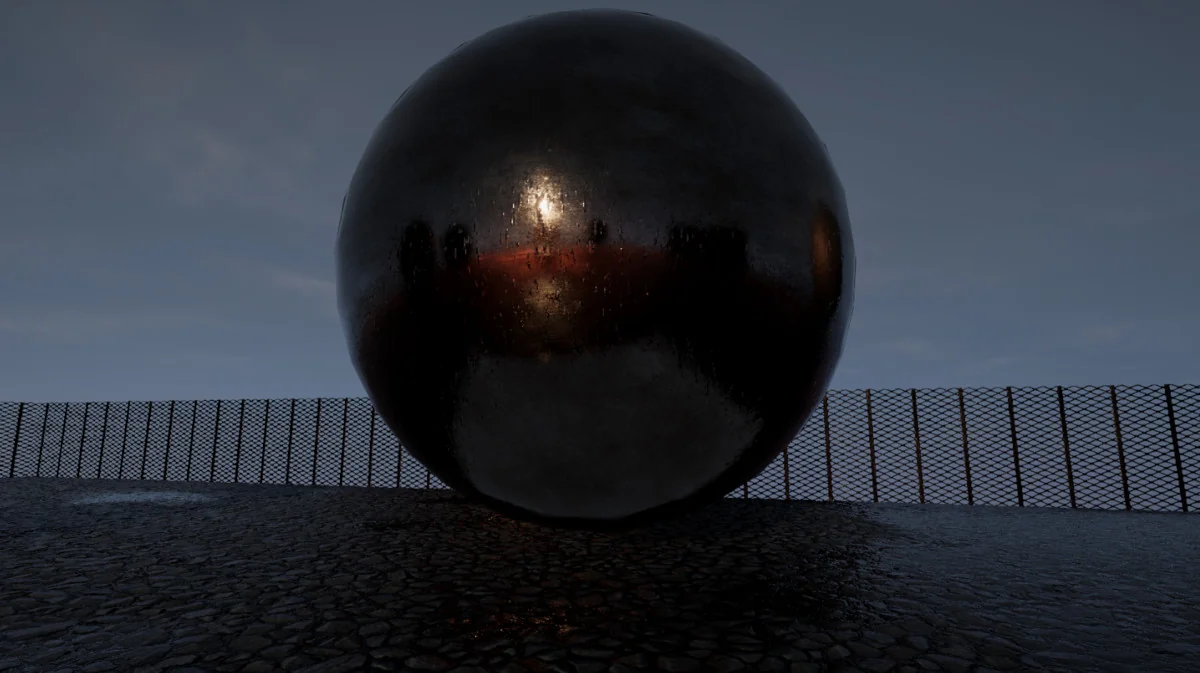
 Shaders
 Shaders
 Shaders