"f813c18d2170b1f6"{"id":"24484","slug":"make-a-2d-platformer-in-unreal-engine-5-c","title":"Make a 2D platformer in Unreal engine 5 C++","category":"Unreal Engine","engine":"Video language: English","assetVersion":"Video language: English","engineVersion":"File content: video + supporting files + English subtitles","tag":"Unreal Engine","accent":"blue","visual":"animation","summary":"This Unreal Engine 5 C++ course follows a practical build path from environment setup into 2D map creation, player logic, and interaction systems. It also moves into enemy structure, moving platforms, user widgets, and dynamic sound FX. With step-by-step gu...","platform":"Unreal Engine","publishedAt":"2026-04-14T14:14:49.000Z","updatedAt":"2026-04-20T06:12:47.000Z","sourceNotes":[],"fileContents":[],"compatibility":["Unreal Engine","Video language: English","File content: video + supporting files + English subtitles"],"featuredImage":{"alt":"Make a 2D platformer in Unreal engine 5 C++","src":"https://3dcghub.com/wp-content/uploads/2026/04/33bf45b4cf8f_6009420_a9a5_4.webp"},"hasDownloadLink":true,"downloads":0,"terms":[{"taxonomy":"category","slug":"tutoriallibrary-unrealengine","name":"Unreal Engine"},{"taxonomy":"post_tag","slug":"animation","name":"Animation"},{"taxonomy":"post_tag","slug":"environment","name":"Environment"},{"taxonomy":"post_tag","slug":"unreal-engine-5","name":"Unreal Engine 5"}],"galleryImages":[],"accessPanel":{"kind":"video-resource","title":"Access this video resource","eyebrow":"Free Download","message":"Log in or create a free account to start your download.","fileName":"Make a 2D platformer in Unreal engine 5 C .7z","safetyNote":"All resources are 100% manually reviewed to eliminate all risks.","actionLabel":"Download Free","resourceType":"Video package"},"contentHtml":"\u003cp\u003eBuilding a 2D platformer in Unreal Engine 5 with C++ starts with setup, then moves into the systems that make the project playable. The workflow runs from environment setup and configuration into base classes, player logic, interaction systems, enemies, and dynamic sound FX, keeping every stage tied to the actual game loop.\u003c/p\u003e \u003ch2\u003eSetting up the Unreal Engine 5 workflow\u003c/h2\u003e\n\u003cp\u003eThe course begins with the groundwork needed to work in Unreal Engine 5. It covers mastering Unreal Engine 5 setup and configuration, along with setting up environments and setting up Unreal environments. That opening stage gives the project a stable starting point before any platforming systems are built.\u003c/p\u003e\n\u003cp\u003eIt is framed as master C++ game development in Unreal Engine 5, so the setup stage is not treated as a side note. The environment comes first because the rest of the course depends on it, from the base classes to the player and enemy interactions later in the build.\u003c/p\u003e\n\u003cp\u003eThe material runs for 6h 14m and is marked for all levels. It is also published Dec 09, 2025. That makes the structure easy to read as a compact build path rather than a long-form theory series, with step-by-step guidance and hands-on projects carrying the project forward.\u003c/p\u003e\n\u003cp\u003eThe audience is broad on purpose. It is aimed at aspiring game developers, hobbyists, and professionals who want to create a 2D platformer using Unreal Engine 5 and C++. It also fits complete beginners who want to get into game development, programming enthusiasts looking to expand their skills, and experienced developers who want to explore Unreal Engine 5âs capabilities.\u003c/p\u003e \u003ch2\u003eBase classes, the 2D map, and player structure\u003c/h2\u003e\n\u003cp\u003eOnce the project environment is in place, the course shifts into the core code structure. The curriculum includes creating base class C++, creating a 2D map with Unreal Engine, player base C++, and an animation state machine. Those pieces give the platformer a working skeleton before the more detailed interaction work begins.\u003c/p\u003e\n\u003cul\u003e \u003cli\u003eCreating base class C++\u003c/li\u003e \u003cli\u003eCreating a 2D Map with Unreal Engine\u003c/li\u003e \u003cli\u003ePlayer Base C++\u003c/li\u003e \u003cli\u003eAnimation State Machine\u003c/li\u003e\n\u003c/ul\u003e\n\u003cp\u003eThat sequence matters because it moves from shared foundation to player-specific behavior. A base class gives the project a coded starting point. The 2D map establishes the space the player moves through. Player Base C++ keeps movement and behavior tied to code, and the animation state machine connects motion with the character state.\u003c/p\u003e\n\u003cp\u003eThis is where the platformer starts taking shape as an actual game build instead of a collection of isolated exercises. The player logic, level structure, and animation system all connect to the same workflow, which is a practical way to learn how Unreal Engine 5 and C++ fit together in a 2D project.\u003c/p\u003e \u003ch2\u003ePlatform interactions and player response\u003c/h2\u003e\n\u003cp\u003eThe middle of the curriculum focuses on how the player meets the level. It includes building platform interaction, crafting a functional ladder interaction, player damage and interaction, and creating user widget. Those items shape how movement is handled, how the player responds to hazards, and how information appears on screen.\u003c/p\u003e\n\u003cp\u003ePlatform interaction and ladder interaction make the level more than a flat path. They add specific movement tasks that the player must handle inside the platformer space. Player damage and interaction bring response into the system, so the project can account for what happens when the player is affected by the game world.\u003c/p\u003e\n\u003cp\u003eThe user widget work adds a visible interface layer to that gameplay flow. It sits alongside the movement and interaction systems rather than replacing them, which keeps the course focused on building a complete platformer loop. The material also aligns with the stated goal of advanced player and enemy interactions, so the player side is not limited to basic movement alone.\u003c/p\u003e\n\u003cp\u003eThe course description emphasizes that participants get practical knowledge they can use to bring game ideas to life. In this part of the curriculum, that shows up as a direct sequence of implementation work: handle the platform, handle the ladder, handle damage, and then present information through a widget.\u003c/p\u003e \u003ch2\u003eEnemies, moving platforms, and sound\u003c/h2\u003e\n\u003cp\u003eLater modules extend the world with an enemy base class, a moving platform, and dynamic sound FX in Unreal Engine C++. These additions give the 2D platformer more activity and more moving parts without drifting away from the core structure established earlier.\u003c/p\u003e\n\u003cp\u003eAn enemy base class creates the foundation for adversary logic. A moving platform adds motion to the level itself. Dynamic sound FX brings audio into the same C++ workflow, so the project does not stop at movement and interaction alone.\u003c/p\u003e\n\u003cp\u003eThis section is important because it closes the loop between level design and gameplay response. Enemies change how the player approaches the stage. Moving platforms change how the space behaves. Sound FX adds another layer of feedback as the game runs. Together, those modules support the goal stated at the start of the course: moving from environment setup to advanced player and enemy interactions in Unreal Engine 5.\u003c/p\u003e\n\u003cp\u003eFor anyone working through a 2D platformer in Unreal Engine 5 and C++, the course stays centered on production-oriented pieces rather than abstract theory. It begins with the workspace, builds the player and map structure, adds interactions and UI, then finishes with enemies, moving platforms, and dynamic sound FX as the final gameplay layer.\u003c/p\u003e\n\n\u003ch2\u003eMore From The Same Workflow\u003c/h2\u003e\n\u003cul\u003e\n\u003cli\u003e\u003ca href=\"https://3dcghub.com/embergen-volumetric-unreal-engine-5/\" title=\"EmberGen Volumetric \u0026amp;amp; Unreal Engine 5\"\u003eEmberGen Volumetric \u0026amp; Unreal Engine 5\u003c/a\u003e\u003c/li\u003e\n\u003cli\u003e\u003ca href=\"https://3dcghub.com/ambient-fx-in-unreal-engine/\" title=\"Ambient Fx in Unreal Engine\"\u003eAmbient Fx in Unreal Engine\u003c/a\u003e\u003c/li\u003e\n\u003cli\u003e\u003ca href=\"https://3dcghub.com/rodinbridge-unreal-engine-add-on/\" title=\"RodinBridge – Unreal Engine Add-on\"\u003eRodinBridge – Unreal Engine Add-on\u003c/a\u003e\u003c/li\u003e\n\u003cli\u003e\u003ca href=\"https://3dcghub.com/extile-plus-ultimate-non-tiling-material-toolkit-for-unreal-engine-environments/\" title=\"EXTILE PLUS -Ultimate Non-Tiling Material Toolkit for Unreal Engine Environments\"\u003eEXTILE PLUS -Ultimate Non-Tiling Material Toolkit for Unreal Engine Environments\u003c/a\u003e\u003c/li\u003e\n\u003cli\u003e\u003ca href=\"https://3dcghub.com/ultimate-template-unrealengine-2d-dialogue-inventory-system-save/\" title=\"ULTIMATE Template UnrealEngine || 2D + Dialogue + Inventory system + Save | |\"\u003eULTIMATE Template UnrealEngine || 2D + Dialogue + Inventory system + Save | |\u003c/a\u003e\u003c/li\u003e\n\u003c/ul\u003e","contentTextLength":5706,"navigation":{"current":1940,"total":3651,"previous":{"id":"24487","slug":"procedural-terrain-generation-with-unity","title":"Procedural Terrain Generation with Unity","category":"Unity","platform":"Unity","updatedAt":"2026-04-20T06:12:47.000Z"},"next":{"id":"24480","slug":"learn-to-create-a-2d-action-zombie-game-in-unity","title":"Learn to create a 2D Action Zombie Game in Unity","category":"Unity","platform":"Unity","updatedAt":"2026-04-20T06:12:47.000Z"}},"relatedResources":[{"id":"24581","slug":"make-a-2d-action-platformer-in-unreal-engine-5","title":"Make a 2D Action Platformer in Unreal Engine 5","category":"Unreal Engine","engine":"Video language: English","assetVersion":"Video language: English","engineVersion":"File content: video + supporting files + English subtitles","tag":"Unreal Engine","accent":"blue","visual":"audio","summary":"A side-scrolling action game in Unreal Engine 5 needs responsive movement, readable enemy behavior, and levels that support fast platforming. This training walks through that workflow with Paper 2D, from basics and Blueprints to combat, AI, UI, and level cr...","platform":"Unreal Engine","publishedAt":"2026-04-15T13:51:52.000Z","updatedAt":"2026-04-20T06:12:43.000Z","sourceNotes":[],"fileContents":[],"compatibility":["Unreal Engine","Video language: English","File content: video + supporting files + English subtitles"],"featuredImage":{"alt":"Make a 2D Action Platformer in Unreal Engine 5","src":"https://3dcghub.com/wp-content/uploads/2026/04/269b76c038ae_5706222_3889.webp"},"hasDownloadLink":true,"downloads":1},{"id":"24575","slug":"the-ultimate-2d-top-down-unreal-engine-course","title":"The Ultimate 2D Top Down Unreal Engine Course","category":"Unreal Engine","engine":"Video language: English","assetVersion":"Video language: English","engineVersion":"File content: video + supporting files + English subtitles","tag":"Unreal Engine","accent":"blue","visual":"audio","summary":"This Unreal Engine 5 course focuses on Paper 2D and PaperZD for building 2D top-down games and 2D/3D hybrid top-down projects. It moves through Paper 2D basics, three project builds, Sequencer cutscenes, dialogue systems, and Blueprint usage from the basics...","platform":"Unreal Engine","publishedAt":"2026-04-15T13:45:13.000Z","updatedAt":"2026-04-20T06:12:44.000Z","sourceNotes":[],"fileContents":[],"compatibility":["Unreal Engine","Video language: English","File content: video + supporting files + English subtitles"],"featuredImage":{"alt":"The Ultimate 2D Top Down Unreal Engine Course","src":"https://3dcghub.com/wp-content/uploads/2026/04/e485d7881def_6155939_4d44.webp"},"hasDownloadLink":true,"downloads":2},{"id":"24572","slug":"unreal-engine-5-c-make-your-own-action-combat-game","title":"Unreal Engine 5 C++: Make Your Own Action Combat Game","category":"Unreal Engine","engine":"Video language: English","assetVersion":"Video language: English","engineVersion":"File content: video + supporting files + English subtitles","tag":"Unreal Engine","accent":"blue","visual":"mech","summary":"This Unreal Engine 5 C++ course walks through a combat-game build from setup and character movement to lock-on, player combat, stats, and enemy behaviour. It also covers interfaces, design patterns, and debugging practices for a cleaner C++ workflow.","platform":"Unreal Engine","publishedAt":"2026-04-15T13:39:57.000Z","updatedAt":"2026-04-20T06:12:44.000Z","sourceNotes":[],"fileContents":[],"compatibility":["Unreal Engine","Video language: English","File content: video + supporting files + English subtitles"],"featuredImage":{"alt":"Unreal Engine 5 C++: Make Your Own Action Combat Game","src":"https://3dcghub.com/wp-content/uploads/2026/04/1832d3b2ca64_6079077_9a3c.webp"},"hasDownloadLink":true,"downloads":0}]}
Unreal Engine
Make a 2D platformer in Unreal engine 5 C++
This Unreal Engine 5 C++ course follows a practical build path from environment setup into 2D map creation, player logic, and interaction systems. It also moves into enemy structure, moving platforms, user widgets, and dynamic sound FX. With step-by-step gu...
Category:Unreal EnginePlatform: Unreal EngineVideo language: EnglishFile content: video + supporting files + English subtitlesPublished: Apr 14, 2026Updated: Apr 20, 2026
Unreal Engine
Resource overview
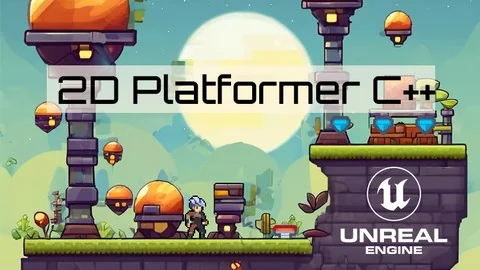
Building a 2D platformer in Unreal Engine 5 with C++ starts with setup, then moves into the systems that make the project playable. The workflow runs from environment setup and configuration into base classes, player logic, interaction systems, enemies, and dynamic sound FX, keeping every stage tied to the actual game loop.
Setting up the Unreal Engine 5 workflow
The course begins with the groundwork needed to work in Unreal Engine 5. It covers mastering Unreal Engine 5 setup and configuration, along with setting up environments and setting up Unreal environments. That opening stage gives the project a stable starting point before any platforming systems are built.
It is framed as master C++ game development in Unreal Engine 5, so the setup stage is not treated as a side note. The environment comes first because the rest of the course depends on it, from the base classes to the player and enemy interactions later in the build.
The material runs for 6h 14m and is marked for all levels. It is also published Dec 09, 2025. That makes the structure easy to read as a compact build path rather than a long-form theory series, with step-by-step guidance and hands-on projects carrying the project forward.
The audience is broad on purpose. It is aimed at aspiring game developers, hobbyists, and professionals who want to create a 2D platformer using Unreal Engine 5 and C++. It also fits complete beginners who want to get into game development, programming enthusiasts looking to expand their skills, and experienced developers who want to explore Unreal Engine 5âs capabilities.
Base classes, the 2D map, and player structure
Once the project environment is in place, the course shifts into the core code structure. The curriculum includes creating base class C++, creating a 2D map with Unreal Engine, player base C++, and an animation state machine. Those pieces give the platformer a working skeleton before the more detailed interaction work begins.
Creating base class C++
Creating a 2D Map with Unreal Engine
Player Base C++
Animation State Machine
That sequence matters because it moves from shared foundation to player-specific behavior. A base class gives the project a coded starting point. The 2D map establishes the space the player moves through. Player Base C++ keeps movement and behavior tied to code, and the animation state machine connects motion with the character state.
This is where the platformer starts taking shape as an actual game build instead of a collection of isolated exercises. The player logic, level structure, and animation system all connect to the same workflow, which is a practical way to learn how Unreal Engine 5 and C++ fit together in a 2D project.
Platform interactions and player response
The middle of the curriculum focuses on how the player meets the level. It includes building platform interaction, crafting a functional ladder interaction, player damage and interaction, and creating user widget. Those items shape how movement is handled, how the player responds to hazards, and how information appears on screen.
Platform interaction and ladder interaction make the level more than a flat path. They add specific movement tasks that the player must handle inside the platformer space. Player damage and interaction bring response into the system, so the project can account for what happens when the player is affected by the game world.
The user widget work adds a visible interface layer to that gameplay flow. It sits alongside the movement and interaction systems rather than replacing them, which keeps the course focused on building a complete platformer loop. The material also aligns with the stated goal of advanced player and enemy interactions, so the player side is not limited to basic movement alone.
The course description emphasizes that participants get practical knowledge they can use to bring game ideas to life. In this part of the curriculum, that shows up as a direct sequence of implementation work: handle the platform, handle the ladder, handle damage, and then present information through a widget.
Enemies, moving platforms, and sound
Later modules extend the world with an enemy base class, a moving platform, and dynamic sound FX in Unreal Engine C++. These additions give the 2D platformer more activity and more moving parts without drifting away from the core structure established earlier.
An enemy base class creates the foundation for adversary logic. A moving platform adds motion to the level itself. Dynamic sound FX brings audio into the same C++ workflow, so the project does not stop at movement and interaction alone.
This section is important because it closes the loop between level design and gameplay response. Enemies change how the player approaches the stage. Moving platforms change how the space behaves. Sound FX adds another layer of feedback as the game runs. Together, those modules support the goal stated at the start of the course: moving from environment setup to advanced player and enemy interactions in Unreal Engine 5.
For anyone working through a 2D platformer in Unreal Engine 5 and C++, the course stays centered on production-oriented pieces rather than abstract theory. It begins with the workspace, builds the player and map structure, adds interactions and UI, then finishes with enemies, moving platforms, and dynamic sound FX as the final gameplay layer.
 Unreal Engine
 Unreal Engine
 Unreal Engine
 Unreal Engine