"f813c18d2170b1f6"{"id":"24581","slug":"make-a-2d-action-platformer-in-unreal-engine-5","title":"Make a 2D Action Platformer in Unreal Engine 5","category":"Unreal Engine","engine":"Video language: English","assetVersion":"Video language: English","engineVersion":"File content: video + supporting files + English subtitles","tag":"Unreal Engine","accent":"blue","visual":"audio","summary":"A side-scrolling action game in Unreal Engine 5 needs responsive movement, readable enemy behavior, and levels that support fast platforming. This training walks through that workflow with Paper 2D, from basics and Blueprints to combat, AI, UI, and level cr...","platform":"Unreal Engine","publishedAt":"2026-04-15T13:51:52.000Z","updatedAt":"2026-04-20T06:12:43.000Z","sourceNotes":[],"fileContents":[],"compatibility":["Unreal Engine","Video language: English","File content: video + supporting files + English subtitles"],"featuredImage":{"alt":"Make a 2D Action Platformer in Unreal Engine 5","src":"https://3dcghub.com/wp-content/uploads/2026/04/269b76c038ae_5706222_3889.webp"},"hasDownloadLink":true,"downloads":1,"terms":[{"taxonomy":"category","slug":"tutoriallibrary-unrealengine","name":"Unreal Engine"},{"taxonomy":"post_tag","slug":"characters","name":"Characters"},{"taxonomy":"post_tag","slug":"environment","name":"Environment"},{"taxonomy":"post_tag","slug":"unreal-engine-5","name":"Unreal Engine 5"}],"galleryImages":[],"accessPanel":{"kind":"video-resource","title":"Access this video resource","eyebrow":"Free Download","message":"Log in or create a free account to start your download.","fileName":"Make a 2D Action Platformer in Unreal Engine 5.rar","safetyNote":"All resources are 100% manually reviewed to eliminate all risks.","actionLabel":"Download Free","resourceType":"Video package"},"contentHtml":"\u003ch2\u003eBuilt for side-scrolling action projects\u003c/h2\u003e\u003cp\u003eA side-scrolling action platformer in Unreal Engine 5 needs more than a character that can move left and right. It needs movement that feels responsive, a camera that stays useful in fast play, enemies that are easy to read, and levels that support both platforming and combat. This training is aimed at that exact kind of project: a 2D Action Platformer similar to the Mega Man series, made with Paper 2D in Unreal Engine 5.\u003c/p\u003e\u003cp\u003eIt is a practical fit for developers who want to work through the full structure of a playable 2D game rather than jump straight to isolated mechanics. The material runs for 13h 15m, is marked All Levels, and was published on Jan 29, 2026. The pace starts with the basics and moves into advanced Blueprint usage, so the workflow is not limited to a single feature or a short demo.\u003c/p\u003e\u003cp\u003eThe training was created by Cobra Code and is aimed at beginner and intermediate Unreal Engine developers, as well as game designers who want to make action platformers.\u003c/p\u003e\u003ch2\u003eStarting with the engine and Paper 2D basics\u003c/h2\u003e\u003cp\u003eThe opening part of the workflow sets up the foundation. It begins with a course orientation, then moves into an Unreal Engine 5 crash course and Paper 2D basics. That sequence matters in a real production context because the rest of the project depends on understanding how the engine handles the 2D approach before the player, enemies, and level systems are built.\u003c/p\u003e\u003cp\u003ePaper 2D is the core of the setup, so the early material gives the project a 2D frame before any advanced gameplay systems are layered in. From there, the course moves into character movement, which becomes the base for everything that follows. For a platformer, this is where the feel of the game starts to take shape.\u003c/p\u003e\u003ch2\u003eMovement and player abilities that shape the game feel\u003c/h2\u003e\u003cp\u003eThe course places a strong focus on player control. The listed topics include basics and character movement, then advanced player abilities, which cover actions such as wall jumping and sliding. Those are the kinds of abilities that define how a platformer plays moment to moment, especially in a project inspired by Mega Man.\u003c/p\u003e\u003cp\u003eThat progression from movement fundamentals to advanced abilities is useful in a production workflow because it mirrors how a playable prototype is usually assembled. First comes a controllable character, then the moves that make the character interesting. Wall jumping and sliding are not treated as separate extras; they are part of the platforming language that lets the level design and enemy placement matter more.\u003c/p\u003e\u003cp\u003eThe shooting side of the project is handled alongside movement. The curriculum includes making the player projectile and working with different types of 2D projectiles and shooting. That means the player is not only moving through the level but also interacting with enemies through dedicated combat actions.\u003c/p\u003e\u003ch2\u003eCombat, health, and enemy behavior\u003c/h2\u003e\u003cp\u003eOnce the player can move and attack, the course shifts into systems that make combat matter. A health and damage system is included, which gives the game a way to track outcomes when the player or enemies are hit. Checkpoints and respawn are part of that structure too, which is important in an action platformer where failure and recovery are part of the loop.\u003c/p\u003e\u003cp\u003eEnemy work is covered in a dedicated section, with enemies and AI listed in the curriculum and four different types of enemies mentioned in the overview. That gives the project a broader combat setup than a single obstacle pattern. Enemy variety also supports level pacing, since different behaviors can be placed to change how each area plays.\u003c/p\u003e\u003cp\u003eThis part of the workflow connects directly to the style of game being built. A Mega Man-like platformer depends on clear patterns, quick reactions, and repeated action across multiple screens. Player projectiles, damage handling, enemy AI, and respawn systems all contribute to that structure.\u003c/p\u003e\u003ch2\u003eLevels, tiles, and camera control\u003c/h2\u003e\u003cp\u003eLevel creation gets its own place in the curriculum, which fits the needs of a 2D platformer very well. The overview specifically mentions creating 2D levels with tile sets and tile maps. That is the layer where the game stops being a collection of mechanics and becomes a place the player can move through.\u003c/p\u003e\u003cp\u003eThe course also includes best practices for 2D and 2D/3D hybrid games in Unreal Engine, which makes the material relevant beyond a purely flat presentation. That point is useful for projects that want to stay rooted in 2D while still taking advantage of the engineâs broader capabilities.\u003c/p\u003e\u003cp\u003eA dynamic camera system is another part of the training. In a platformer, the camera is not just a passive view; it has to support jumping, combat, and fast movement without making the action hard to follow. A camera that tracks the play space properly helps level design feel deliberate and keeps the player focused on the next obstacle or enemy.\u003c/p\u003e\u003ch2\u003ePolish, UI, sound, and the last systems that make it playable\u003c/h2\u003e\u003cp\u003eThe later curriculum topics cover the systems that help the project feel complete. User interface is included, along with adding sound effects. Ladder climbing appears as an extra topic, which adds another movement option to the platforming toolkit. These are the kinds of pieces that support the main loop instead of replacing it.\u003c/p\u003e\u003cp\u003eThe overall curriculum moves through a clear build order:\u003c/p\u003e\u003cul\u003e\u003cli\u003eCourse Orientation\u003c/li\u003e\u003cli\u003eUnreal Engine 5 Crash Course\u003c/li\u003e\u003cli\u003ePaper 2D Basics\u003c/li\u003e\u003cli\u003eBasics and Character Movement\u003c/li\u003e\u003cli\u003eMaking the Player Projectile\u003c/li\u003e\u003cli\u003eHealth and Damage System\u003c/li\u003e\u003cli\u003eAdvanced Player Abilities\u003c/li\u003e\u003cli\u003eCheckpoints and Respawn\u003c/li\u003e\u003cli\u003eEnemies and AI\u003c/li\u003e\u003cli\u003eUser Interface\u003c/li\u003e\u003cli\u003eAdding Sound Effects\u003c/li\u003e\u003cli\u003eLevel Creation\u003c/li\u003e\u003cli\u003eExtra: Ladder Climbing\u003c/li\u003e\u003cli\u003eBonus: Whatâs next?\u003c/li\u003e\u003c/ul\u003e\u003cp\u003eThat sequence shows how the project grows from setup to gameplay, then into support systems and level construction. It is especially useful for anyone who wants to see how a 2D action platformer comes together in a practical order rather than as disconnected mechanics.\u003c/p\u003e\u003ch2\u003eWho gets the most from it\u003c/h2\u003e\u003cp\u003eThis training fits beginner and intermediate Unreal Engine developers, along with game designers who want to make action platformers. It is also a strong match for anyone looking for a guided path through Paper 2D in Unreal Engine 5, especially if the goal is a fast-moving side-scroller with player abilities, projectile combat, enemy AI, checkpoints, and tile-based levels.\u003c/p\u003e\u003cp\u003eFor a project that needs a clear workflow from Paper 2D basics to a playable Mega Man-style game, this is a focused starting point. It covers the main systems a 2D action platformer needs and shows how they connect inside Unreal Engine 5.\u003c/p\u003e\n\n\u003ch2\u003eExplore Similar Assets\u003c/h2\u003e\n\u003cul\u003e\n\u003cli\u003e\u003ca href=\"https://3dcghub.com/master-unreal-engine-5-advanced-door-systems-blueprints/\" title=\"Master Unreal Engine 5 Advanced Door Systems Blueprints\"\u003eMaster Unreal Engine 5 Advanced Door Systems Blueprints\u003c/a\u003e\u003c/li\u003e\n\u003cli\u003e\u003ca href=\"https://3dcghub.com/the-ultimate-2d-top-down-unreal-engine-course/\" title=\"The Ultimate 2D Top Down Unreal Engine Course\"\u003eThe Ultimate 2D Top Down Unreal Engine Course\u003c/a\u003e\u003c/li\u003e\n\u003cli\u003e\u003ca href=\"https://3dcghub.com/unreal-engine-5-c-make-your-own-action-combat-game/\" title=\"Unreal Engine 5 C++: Make Your Own Action Combat Game\"\u003eUnreal Engine 5 C++: Make Your Own Action Combat Game\u003c/a\u003e\u003c/li\u003e\n\u003cli\u003e\u003ca href=\"https://3dcghub.com/unreal-engine-5-for-beginners-create-your-first-game/\" title=\"Unreal Engine 5 for Beginners – Create your first game\"\u003eUnreal Engine 5 for Beginners – Create your first game\u003c/a\u003e\u003c/li\u003e\n\u003cli\u003e\u003ca href=\"https://3dcghub.com/unreal-engine-5-one-course-solution-for-material/\" title=\"Unreal Engine 5: One Course Solution For Material\"\u003eUnreal Engine 5: One Course Solution For Material\u003c/a\u003e\u003c/li\u003e\n\u003c/ul\u003e","contentTextLength":6852,"navigation":{"current":1960,"total":3651,"previous":{"id":"24590","slug":"create-zelda-like-skills-with-c-in-unreal-engine-5","title":"Create Zelda-like skills with C++ in unreal engine 5","category":"Unreal Engine","platform":"Unreal Engine","updatedAt":"2026-04-20T06:12:43.000Z"},"next":{"id":"24578","slug":"master-unreal-engine-5-advanced-door-systems-blueprints","title":"Master Unreal Engine 5 Advanced Door Systems Blueprints","category":"Unreal Engine","platform":"Unreal Engine","updatedAt":"2026-04-20T06:12:43.000Z"}},"relatedResources":[{"id":"24572","slug":"unreal-engine-5-c-make-your-own-action-combat-game","title":"Unreal Engine 5 C++: Make Your Own Action Combat Game","category":"Unreal Engine","engine":"Video language: English","assetVersion":"Video language: English","engineVersion":"File content: video + supporting files + English subtitles","tag":"Unreal Engine","accent":"blue","visual":"mech","summary":"This Unreal Engine 5 C++ course walks through a combat-game build from setup and character movement to lock-on, player combat, stats, and enemy behaviour. It also covers interfaces, design patterns, and debugging practices for a cleaner C++ workflow.","platform":"Unreal Engine","publishedAt":"2026-04-15T13:39:57.000Z","updatedAt":"2026-04-20T06:12:44.000Z","sourceNotes":[],"fileContents":[],"compatibility":["Unreal Engine","Video language: English","File content: video + supporting files + English subtitles"],"featuredImage":{"alt":"Unreal Engine 5 C++: Make Your Own Action Combat Game","src":"https://3dcghub.com/wp-content/uploads/2026/04/1832d3b2ca64_6079077_9a3c.webp"},"hasDownloadLink":true,"downloads":0},{"id":"24575","slug":"the-ultimate-2d-top-down-unreal-engine-course","title":"The Ultimate 2D Top Down Unreal Engine Course","category":"Unreal Engine","engine":"Video language: English","assetVersion":"Video language: English","engineVersion":"File content: video + supporting files + English subtitles","tag":"Unreal Engine","accent":"blue","visual":"audio","summary":"This Unreal Engine 5 course focuses on Paper 2D and PaperZD for building 2D top-down games and 2D/3D hybrid top-down projects. It moves through Paper 2D basics, three project builds, Sequencer cutscenes, dialogue systems, and Blueprint usage from the basics...","platform":"Unreal Engine","publishedAt":"2026-04-15T13:45:13.000Z","updatedAt":"2026-04-20T06:12:44.000Z","sourceNotes":[],"fileContents":[],"compatibility":["Unreal Engine","Video language: English","File content: video + supporting files + English subtitles"],"featuredImage":{"alt":"The Ultimate 2D Top Down Unreal Engine Course","src":"https://3dcghub.com/wp-content/uploads/2026/04/e485d7881def_6155939_4d44.webp"},"hasDownloadLink":true,"downloads":2},{"id":"24484","slug":"make-a-2d-platformer-in-unreal-engine-5-c","title":"Make a 2D platformer in Unreal engine 5 C++","category":"Unreal Engine","engine":"Video language: English","assetVersion":"Video language: English","engineVersion":"File content: video + supporting files + English subtitles","tag":"Unreal Engine","accent":"blue","visual":"animation","summary":"This Unreal Engine 5 C++ course follows a practical build path from environment setup into 2D map creation, player logic, and interaction systems. It also moves into enemy structure, moving platforms, user widgets, and dynamic sound FX. With step-by-step gu...","platform":"Unreal Engine","publishedAt":"2026-04-14T14:14:49.000Z","updatedAt":"2026-04-20T06:12:47.000Z","sourceNotes":[],"fileContents":[],"compatibility":["Unreal Engine","Video language: English","File content: video + supporting files + English subtitles"],"featuredImage":{"alt":"Make a 2D platformer in Unreal engine 5 C++","src":"https://3dcghub.com/wp-content/uploads/2026/04/33bf45b4cf8f_6009420_a9a5_4.webp"},"hasDownloadLink":true,"downloads":0}]}
Unreal Engine
Make a 2D Action Platformer in Unreal Engine 5
A side-scrolling action game in Unreal Engine 5 needs responsive movement, readable enemy behavior, and levels that support fast platforming. This training walks through that workflow with Paper 2D, from basics and Blueprints to combat, AI, UI, and level cr...
Category:Unreal EnginePlatform: Unreal EngineVideo language: EnglishFile content: video + supporting files + English subtitlesPublished: Apr 15, 2026Updated: Apr 20, 2026
Unreal Engine
Resource overview
Built for side-scrolling action projects
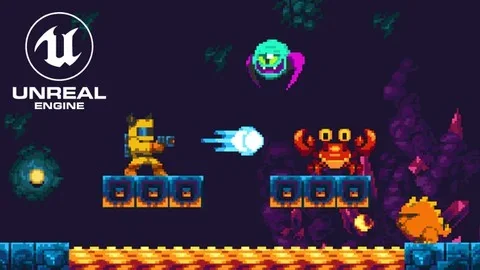
A side-scrolling action platformer in Unreal Engine 5 needs more than a character that can move left and right. It needs movement that feels responsive, a camera that stays useful in fast play, enemies that are easy to read, and levels that support both platforming and combat. This training is aimed at that exact kind of project: a 2D Action Platformer similar to the Mega Man series, made with Paper 2D in Unreal Engine 5.
It is a practical fit for developers who want to work through the full structure of a playable 2D game rather than jump straight to isolated mechanics. The material runs for 13h 15m, is marked All Levels, and was published on Jan 29, 2026. The pace starts with the basics and moves into advanced Blueprint usage, so the workflow is not limited to a single feature or a short demo.
The training was created by Cobra Code and is aimed at beginner and intermediate Unreal Engine developers, as well as game designers who want to make action platformers.
Starting with the engine and Paper 2D basics
The opening part of the workflow sets up the foundation. It begins with a course orientation, then moves into an Unreal Engine 5 crash course and Paper 2D basics. That sequence matters in a real production context because the rest of the project depends on understanding how the engine handles the 2D approach before the player, enemies, and level systems are built.
Paper 2D is the core of the setup, so the early material gives the project a 2D frame before any advanced gameplay systems are layered in. From there, the course moves into character movement, which becomes the base for everything that follows. For a platformer, this is where the feel of the game starts to take shape.
Movement and player abilities that shape the game feel
The course places a strong focus on player control. The listed topics include basics and character movement, then advanced player abilities, which cover actions such as wall jumping and sliding. Those are the kinds of abilities that define how a platformer plays moment to moment, especially in a project inspired by Mega Man.
That progression from movement fundamentals to advanced abilities is useful in a production workflow because it mirrors how a playable prototype is usually assembled. First comes a controllable character, then the moves that make the character interesting. Wall jumping and sliding are not treated as separate extras; they are part of the platforming language that lets the level design and enemy placement matter more.
The shooting side of the project is handled alongside movement. The curriculum includes making the player projectile and working with different types of 2D projectiles and shooting. That means the player is not only moving through the level but also interacting with enemies through dedicated combat actions.
Combat, health, and enemy behavior
Once the player can move and attack, the course shifts into systems that make combat matter. A health and damage system is included, which gives the game a way to track outcomes when the player or enemies are hit. Checkpoints and respawn are part of that structure too, which is important in an action platformer where failure and recovery are part of the loop.
Enemy work is covered in a dedicated section, with enemies and AI listed in the curriculum and four different types of enemies mentioned in the overview. That gives the project a broader combat setup than a single obstacle pattern. Enemy variety also supports level pacing, since different behaviors can be placed to change how each area plays.
This part of the workflow connects directly to the style of game being built. A Mega Man-like platformer depends on clear patterns, quick reactions, and repeated action across multiple screens. Player projectiles, damage handling, enemy AI, and respawn systems all contribute to that structure.
Levels, tiles, and camera control
Level creation gets its own place in the curriculum, which fits the needs of a 2D platformer very well. The overview specifically mentions creating 2D levels with tile sets and tile maps. That is the layer where the game stops being a collection of mechanics and becomes a place the player can move through.
The course also includes best practices for 2D and 2D/3D hybrid games in Unreal Engine, which makes the material relevant beyond a purely flat presentation. That point is useful for projects that want to stay rooted in 2D while still taking advantage of the engineâs broader capabilities.
A dynamic camera system is another part of the training. In a platformer, the camera is not just a passive view; it has to support jumping, combat, and fast movement without making the action hard to follow. A camera that tracks the play space properly helps level design feel deliberate and keeps the player focused on the next obstacle or enemy.
Polish, UI, sound, and the last systems that make it playable
The later curriculum topics cover the systems that help the project feel complete. User interface is included, along with adding sound effects. Ladder climbing appears as an extra topic, which adds another movement option to the platforming toolkit. These are the kinds of pieces that support the main loop instead of replacing it.
The overall curriculum moves through a clear build order:
Course Orientation
Unreal Engine 5 Crash Course
Paper 2D Basics
Basics and Character Movement
Making the Player Projectile
Health and Damage System
Advanced Player Abilities
Checkpoints and Respawn
Enemies and AI
User Interface
Adding Sound Effects
Level Creation
Extra: Ladder Climbing
Bonus: Whatâs next?
That sequence shows how the project grows from setup to gameplay, then into support systems and level construction. It is especially useful for anyone who wants to see how a 2D action platformer comes together in a practical order rather than as disconnected mechanics.
Who gets the most from it
This training fits beginner and intermediate Unreal Engine developers, along with game designers who want to make action platformers. It is also a strong match for anyone looking for a guided path through Paper 2D in Unreal Engine 5, especially if the goal is a fast-moving side-scroller with player abilities, projectile combat, enemy AI, checkpoints, and tile-based levels.
For a project that needs a clear workflow from Paper 2D basics to a playable Mega Man-style game, this is a focused starting point. It covers the main systems a 2D action platformer needs and shows how they connect inside Unreal Engine 5.
 Unreal Engine
 Unreal Engine
 Unreal Engine
 Unreal Engine