"f813c18d2170b1f6"{"id":"24563","slug":"unreal-engine-5-one-course-solution-for-material","title":"Unreal Engine 5: One Course Solution For Material","category":"Unreal Engine","engine":"Video language: English","assetVersion":"Video language: English","engineVersion":"File content: video + supporting files + English subtitles","tag":"Unreal Engine","accent":"blue","visual":"luts","summary":"This course follows Unreal Engine 5 material creation through a node-by-node workflow. It moves from graph basics into master materials, scene setup, and landscape work.","platform":"Unreal Engine","publishedAt":"2026-04-15T13:26:37.000Z","updatedAt":"2026-04-20T06:12:44.000Z","sourceNotes":[],"fileContents":[],"compatibility":["Unreal Engine","Video language: English","File content: video + supporting files + English subtitles"],"featuredImage":{"alt":"Unreal Engine 5: One Course Solution For Material","src":"https://3dcghub.com/wp-content/uploads/2026/04/7b04eadd4d0a_4685938_b991_7.webp"},"hasDownloadLink":true,"downloads":0,"terms":[{"taxonomy":"category","slug":"tutoriallibrary-unrealengine","name":"Unreal Engine"},{"taxonomy":"post_tag","slug":"environment","name":"Environment"},{"taxonomy":"post_tag","slug":"materials","name":"Materials"},{"taxonomy":"post_tag","slug":"unreal-engine-5","name":"Unreal Engine 5"}],"galleryImages":[],"accessPanel":{"kind":"video-resource","title":"Access this video resource","eyebrow":"Free Download","message":"Log in or create a free account to start your download.","fileName":"unreal-engin5-one-course-solution-for-material.7z","safetyNote":"All resources are 100% manually reviewed to eliminate all risks.","actionLabel":"Download Free","resourceType":"Video package"},"contentHtml":"\u003ch2\u003eNode-by-node material work in Unreal Engine 5\u003c/h2\u003e\n\u003cp\u003eUnreal Engine 5 materials can feel abstract when the graph is full of connected nodes, so this course keeps the process grounded in small steps. It was published on Mar 03, 2026 and is marked for All Levels. The work begins with the Material Graph and moves through the basic setup before getting into more involved combinations. The lessons point to UV, Sine, Component Mask, Panner, Saturate, Lerp, World Position Offset, and other nodes, giving the training a very specific focus on how the graph is assembled.\u003c/p\u003e\n\u003cp\u003eThat approach is useful for learners who want to understand what each part of the graph is doing instead of only following a finished result. The course stays centered on material creation in Unreal Engine 5 from the ground up, with a clear step-by-step flow that matches the subject matter. At 14h 5m, it has enough room to slow down the material workflow and keep each part visible as it is introduced.\u003c/p\u003e \u003ch2\u003eTurning a graph into a master material\u003c/h2\u003e\n\u003cp\u003eOne of the main deliverables is a master material that can be used in any project. That makes the training practical in a production sense, because the work is not limited to a single isolated shader. The lessons move from node handling into a reusable material setup, which is the kind of structure that helps when a project needs consistency across multiple surfaces.\u003c/p\u003e\n\u003cp\u003eThe course also covers how bitmaps such as Base Color, Roughness, Normal, and Ambient Occlusion fit into the material process. Those map types appear alongside the node-based workflow rather than as separate theory, so the focus stays on building the material step by step. The curriculumâs middle section, Create a Master Material, is where those ideas come together most clearly.\u003c/p\u003e \u003ch2\u003eScene work with blend, decals, and paint puddles\u003c/h2\u003e\n\u003cp\u003eThe course does not stop at the material graph. It also includes creating a scene from scratch, which places the material lessons into a visible environment workflow. Material Blend, Vertex Painting, Decals, and Paint Puddles are all part of that section, so the training connects surface logic with the way a scene gets finished.\u003c/p\u003e\n\u003cp\u003eThat matters for learners who want to see how materials are used once they leave the graph. Scene creation brings the techniques into a broader layout, where the same material thinking can be applied to layered surfaces and added details. For artists learning Unreal Engine 5 from the ground up, this is the section that links the technical part of the course to practical scene building.\u003c/p\u003e \u003ch2\u003eLandscape creation and auto foliage\u003c/h2\u003e\n\u003cp\u003eAnother major branch of the course is landscape creation from scratch. The landscape lessons include Slope Blend, Height Blend, Auto Foliage, and Run Time Virtual Texture, which keeps the work focused on terrain and the material behavior that supports it. The curriculum calls out Create an Auto Landscape Material, so the landscape portion is built as a dedicated workflow rather than a side note.\u003c/p\u003e\n\u003cp\u003eThis is the part of the course that will matter most when a project needs terrain variation or a landscape material setup that can respond to changes in slope and height. Auto Foliage adds another layer of usefulness for terrain presentation, while Run Time Virtual Texture ties the material work into the landscape pipeline. It is a direct fit for anyone who wants to move from plain surfaces into a more complete terrain setup in Unreal Engine 5.\u003c/p\u003e \u003ch2\u003eWho gets the most out of it\u003c/h2\u003e\n\u003cp\u003eThe target audience is clear: beginners who want to understand material in Unreal Engine, learners who want to create materials from scratch, learners who want to create a scene from scratch, and learners who want to create a landscape from scratch. The course outline matches those goals closely, with a short curriculum that moves from Introduction to Material Graph Basic, then Create a Master Material, then Create an Auto Landscape Material.\u003c/p\u003e\n\u003cp\u003eBecause the work stays centered on those tasks, the course fits best in early Unreal Engine production when a project needs a material foundation, a reusable master setup, or a first landscape pass. It also works as a practical reference for anyone who wants to practice the node graph before moving into scene assembly and terrain work.\u003c/p\u003e\n\n\u003ch2\u003eMore From The Same Workflow\u003c/h2\u003e\n\u003cul\u003e\n\u003cli\u003e\u003ca href=\"https://3dcghub.com/unreal-engine-5-c-advanced-action-rpg/\" title=\"Unreal Engine 5 C++: Advanced Action RPG\"\u003eUnreal Engine 5 C++: Advanced Action RPG\u003c/a\u003e\u003c/li\u003e\n\u003cli\u003e\u003ca href=\"https://3dcghub.com/unreal-engine-5-one-course-solution-for-niagara-vfx/\" title=\"Unreal Engine 5: One Course Solution For Niagara VFX\"\u003eUnreal Engine 5: One Course Solution For Niagara VFX\u003c/a\u003e\u003c/li\u003e\n\u003cli\u003e\u003ca href=\"https://3dcghub.com/make-a-2d-platformer-in-unreal-engine-5-c/\" title=\"Make a 2D platformer in Unreal engine 5 C++\"\u003eMake a 2D platformer in Unreal engine 5 C++\u003c/a\u003e\u003c/li\u003e\n\u003cli\u003e\u003ca href=\"https://3dcghub.com/embergen-volumetric-unreal-engine-5/\" title=\"EmberGen Volumetric \u0026amp;amp; Unreal Engine 5\"\u003eEmberGen Volumetric \u0026amp; Unreal Engine 5\u003c/a\u003e\u003c/li\u003e\n\u003cli\u003e\u003ca href=\"https://3dcghub.com/ambient-fx-in-unreal-engine/\" title=\"Ambient Fx in Unreal Engine\"\u003eAmbient Fx in Unreal Engine\u003c/a\u003e\u003c/li\u003e\n\u003c/ul\u003e","contentTextLength":4477,"navigation":{"current":1957,"total":3651,"previous":{"id":"24568","slug":"unreal-engine-5-for-beginners-create-your-first-game","title":"Unreal Engine 5 for Beginners - Create your first game","category":"Unreal Engine","platform":"Unreal Engine","updatedAt":"2026-04-20T06:12:44.000Z"},"next":{"id":"24560","slug":"unreal-engine-5-c-advanced-action-rpg","title":"Unreal Engine 5 C++: Advanced Action RPG","category":"Unreal Engine","platform":"Unreal Engine","updatedAt":"2026-04-20T06:12:44.000Z"}},"relatedResources":[{"id":"24557","slug":"unreal-engine-5-one-course-solution-for-niagara-vfx","title":"Unreal Engine 5: One Course Solution For Niagara VFX","category":"Unreal Engine","engine":"Video language: English","assetVersion":"Video language: English","engineVersion":"File content: video + supporting files + English subtitles","tag":"Unreal Engine","accent":"blue","visual":"luts","summary":"This course moves through Niagara in a practical order, starting with basic usage and continuing into custom modules and blueprint-driven behavior. It also covers VFX materials, noise texture baking in Unreal, and examples such as rain, waterfalls, lightnin...","platform":"Unreal Engine","publishedAt":"2026-04-15T13:06:55.000Z","updatedAt":"2026-04-20T06:12:45.000Z","sourceNotes":[],"fileContents":[],"compatibility":["Unreal Engine","Video language: English","File content: video + supporting files + English subtitles"],"featuredImage":{"alt":"Unreal Engine 5: One Course Solution For Niagara VFX","src":"https://3dcghub.com/wp-content/uploads/2026/04/233a8c785bc3_4915192_86f5_8.webp"},"hasDownloadLink":true,"downloads":1},{"id":"1000596","slug":"unreal-engine-5-all-in-one-ue5-master-blueprint","title":"Unreal Engine 5 : All in one UE5 master Blueprint","category":"Unreal Engine","engine":"File Content: video + English subtitles","assetVersion":"Video Language: English","engineVersion":"File Content: video + English subtitles","tag":"Unreal Engine","accent":"blue","visual":"mech","summary":"A beginner-level Unreal Engine 5 course covering Niagara, Control Rig, AI, animation, materials, landscape, and Blueprints across 42 hours of structured learnin","platform":"Unreal Engine","publishedAt":"2026-07-17T17:35:41.823Z","updatedAt":"2026-07-17T17:35:41.823Z","sourceNotes":[],"fileContents":[],"compatibility":["Unreal Engine","Video Language: English","File Content: video + English subtitles"],"featuredImage":{"alt":"Unreal Engine 5 : All in one UE5 master Blueprint","src":"/wp-content/uploads/published/2026/07/6c6d072cba24-4953792-d34a-5-60c376937e.webp"},"hasDownloadLink":true,"downloads":1},{"id":"24587","slug":"create-zelda-like-skills-with-c-in-unreal-engine-5-2","title":"Create Zelda-like skills with C++ in unreal engine 5","category":"Unreal Engine","engine":"Video language: English","assetVersion":"Video language: English","engineVersion":"File content: video + supporting files + English subtitles","tag":"Unreal Engine","accent":"blue","visual":"animation","summary":"This Unreal Engine 5 C++ course focuses on the problem of keeping skills, movement states, and interactable scene actors in one working system. It walks through a Zelda-like setup with named abilities, stamina-based locomotion, and blueprint communication.","platform":"Unreal Engine","publishedAt":"2026-04-15T14:07:16.000Z","updatedAt":"2026-04-20T06:12:42.000Z","sourceNotes":[],"fileContents":[],"compatibility":["Unreal Engine","Video language: English","File content: video + supporting files + English subtitles"],"featuredImage":{"alt":"Create Zelda-like skills with C++ in unreal engine 5","src":"https://3dcghub.com/wp-content/uploads/2026/04/4a5e864b1691_6210843_6075.webp"},"hasDownloadLink":true,"downloads":0}]}
Unreal Engine
Unreal Engine 5: One Course Solution For Material
This course follows Unreal Engine 5 material creation through a node-by-node workflow. It moves from graph basics into master materials, scene setup, and landscape work.
Category:Unreal EnginePlatform: Unreal EngineVideo language: EnglishFile content: video + supporting files + English subtitlesPublished: Apr 15, 2026Updated: Apr 20, 2026
Unreal Engine
Resource overview
Node-by-node material work in Unreal Engine 5
Unreal Engine 5 materials can feel abstract when the graph is full of connected nodes, so this course keeps the process grounded in small steps. It was published on Mar 03, 2026 and is marked for All Levels. The work begins with the Material Graph and moves through the basic setup before getting into more involved combinations. The lessons point to UV, Sine, Component Mask, Panner, Saturate, Lerp, World Position Offset, and other nodes, giving the training a very specific focus on how the graph is assembled.
That approach is useful for learners who want to understand what each part of the graph is doing instead of only following a finished result. The course stays centered on material creation in Unreal Engine 5 from the ground up, with a clear step-by-step flow that matches the subject matter. At 14h 5m, it has enough room to slow down the material workflow and keep each part visible as it is introduced.
Turning a graph into a master material
One of the main deliverables is a master material that can be used in any project. That makes the training practical in a production sense, because the work is not limited to a single isolated shader. The lessons move from node handling into a reusable material setup, which is the kind of structure that helps when a project needs consistency across multiple surfaces.
The course also covers how bitmaps such as Base Color, Roughness, Normal, and Ambient Occlusion fit into the material process. Those map types appear alongside the node-based workflow rather than as separate theory, so the focus stays on building the material step by step. The curriculumâs middle section, Create a Master Material, is where those ideas come together most clearly.
Scene work with blend, decals, and paint puddles
The course does not stop at the material graph. It also includes creating a scene from scratch, which places the material lessons into a visible environment workflow. Material Blend, Vertex Painting, Decals, and Paint Puddles are all part of that section, so the training connects surface logic with the way a scene gets finished.
That matters for learners who want to see how materials are used once they leave the graph. Scene creation brings the techniques into a broader layout, where the same material thinking can be applied to layered surfaces and added details. For artists learning Unreal Engine 5 from the ground up, this is the section that links the technical part of the course to practical scene building.
Landscape creation and auto foliage
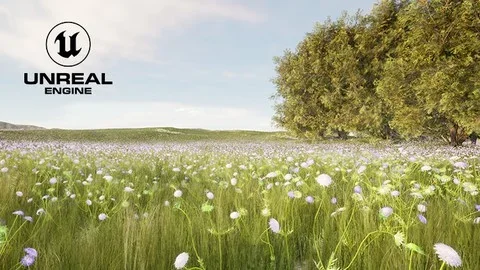
Another major branch of the course is landscape creation from scratch. The landscape lessons include Slope Blend, Height Blend, Auto Foliage, and Run Time Virtual Texture, which keeps the work focused on terrain and the material behavior that supports it. The curriculum calls out Create an Auto Landscape Material, so the landscape portion is built as a dedicated workflow rather than a side note.
This is the part of the course that will matter most when a project needs terrain variation or a landscape material setup that can respond to changes in slope and height. Auto Foliage adds another layer of usefulness for terrain presentation, while Run Time Virtual Texture ties the material work into the landscape pipeline. It is a direct fit for anyone who wants to move from plain surfaces into a more complete terrain setup in Unreal Engine 5.
Who gets the most out of it
The target audience is clear: beginners who want to understand material in Unreal Engine, learners who want to create materials from scratch, learners who want to create a scene from scratch, and learners who want to create a landscape from scratch. The course outline matches those goals closely, with a short curriculum that moves from Introduction to Material Graph Basic, then Create a Master Material, then Create an Auto Landscape Material.
Because the work stays centered on those tasks, the course fits best in early Unreal Engine production when a project needs a material foundation, a reusable master setup, or a first landscape pass. It also works as a practical reference for anyone who wants to practice the node graph before moving into scene assembly and terrain work.
 Unreal Engine
 Unreal Engine
 Unreal Engine
 Unreal Engine