"f813c18d2170b1f6"{"id":"24568","slug":"unreal-engine-5-for-beginners-create-your-first-game","title":"Unreal Engine 5 for Beginners - Create your first game","category":"Unreal Engine","engine":"Video language: English","assetVersion":"Video language: English","engineVersion":"File content: video + supporting files + English subtitles","tag":"Unreal Engine","accent":"blue","visual":"city","summary":"This beginner course walks through Unreal Engine 5 basics, then moves into Blueprints, character animation, UI widgets, and the steps needed to create a real 3D game. It is aimed at beginner game developers who want a practical starting point.","platform":"Unreal Engine","publishedAt":"2026-04-15T13:30:22.000Z","updatedAt":"2026-04-20T06:12:44.000Z","sourceNotes":[],"fileContents":[],"compatibility":["Unreal Engine","Video language: English","File content: video + supporting files + English subtitles"],"featuredImage":{"alt":"Unreal Engine 5 for Beginners - Create your first game","src":"https://3dcghub.com/wp-content/uploads/2026/04/d35b769681b1_5098972_a916_5.webp"},"hasDownloadLink":true,"downloads":0,"terms":[{"taxonomy":"category","slug":"tutoriallibrary-unrealengine","name":"Unreal Engine"},{"taxonomy":"post_tag","slug":"characters","name":"Characters"},{"taxonomy":"post_tag","slug":"environment","name":"Environment"},{"taxonomy":"post_tag","slug":"unreal-engine-5","name":"Unreal Engine 5"}],"galleryImages":[],"accessPanel":{"kind":"video-resource","title":"Access this video resource","eyebrow":"Free Download","message":"Log in or create a free account to start your download.","fileName":"Unreal Engine 5 for Beginners - Create your first game.7z","safetyNote":"All resources are 100% manually reviewed to eliminate all risks.","actionLabel":"Download Free","resourceType":"Video package"},"contentHtml":"\u003ch2\u003eBuilding a first game scene in Unreal Engine 5\u003c/h2\u003e\u003cp\u003eThis course fits naturally into the moment when a beginner game developer wants to move from curiosity to a working project. It focuses on Unreal Engine 5 basics and keeps the path practical: levels, actors, components, and collisions are introduced as the foundation for the kind of scene a first game needs. That makes it useful for learning how the pieces of a project fit together before moving into the parts that make the game feel alive.\u003c/p\u003e\u003cp\u003eThe subject matter points toward a hands-on learning flow rather than a purely theoretical one. The course is aimed at beginner game developers, and the structure reflects that starting point. Instead of asking the learner to already know how Unreal Engine works, it begins with the core elements that shape a playable environment and then expands into the tools used to control behavior, motion, and the user interface.\u003c/p\u003e\u003ch2\u003eUsing Blueprints as the main gameplay tool\u003c/h2\u003e\u003cp\u003eBlueprints sit at the center of the course. The training moves from theory to practice and includes the creation of 10+ blueprints, giving learners repeated exposure to how Blueprint logic can be used in an actual game workflow. For anyone learning Unreal Engine 5 for the first time, that practical repetition matters. It turns Blueprints from a concept into something that can be used to build game behavior step by step.\u003c/p\u003e\u003cp\u003eThis part of the course is especially relevant for developers who want to understand how a first project comes together without jumping straight into more advanced development paths. The Blueprints section is not isolated from the rest of the material. It connects to the environment, the character, and the game elements, so the logic being built has a direct place in the project.\u003c/p\u003e\u003cp\u003eThat makes the course a useful starting point for turning a blank project into something interactive. A beginner can learn the basic structure of Unreal Engine 5 and then apply it through Blueprint-driven gameplay elements rather than treating the system as a separate topic.\u003c/p\u003e\u003ch2\u003eCharacter motion and animation for a playable feel\u003c/h2\u003e\u003cp\u003eThe animation section focuses on the movements that give a character a clear sense of action: idle, walk, run, and jump. These are the kinds of animations that shape a simple game character into something that responds to player input. For a first game, those motions matter because they establish the difference between a static scene and a playable one.\u003c/p\u003e\u003cp\u003eBy covering idle, walk, run, and jump, the course gives attention to the basic movement set that most beginner projects need. The emphasis stays on practical use rather than extra complexity. A learner can see how animation fits into the broader project alongside the level setup and Blueprint logic, which helps connect character motion to the rest of the game.\u003c/p\u003e\u003cp\u003eThis section also supports creative testing. Once a character can idle, walk, run, and jump, a beginner developer has the core ingredients needed to experiment with pacing, movement, and simple interaction inside a 3D scene.\u003c/p\u003e\u003ch2\u003eUI widgets for coins, trigger boxes, and menus\u003c/h2\u003e\u003cp\u003eThe UI widget material is tied to game functions that are easy to understand and useful in a first project. The course covers widgets for collectables such as coins, trigger boxes, and a menu. These are not abstract interface topics; they are connected to concrete game events and player-facing elements.\u003c/p\u003e\u003cp\u003eCoins suggest collection and progress. Trigger boxes point to event-based interaction inside the level. Menus help frame the playable experience and give the game a structured start or pause point. Together, these UI widgets support a beginner project that feels complete enough to play through rather than simply observe.\u003c/p\u003e\u003cp\u003eBecause the UI content is presented alongside the other course elements, it can be used as part of a connected workflow. A learner can place gameplay objects in the level, link them through logic, and present the results through simple interface elements. That makes the course more than a set of disconnected lessons; it functions as a guided path through the pieces that make a small game readable and playable.\u003c/p\u003e\u003ch2\u003eFrom core systems to a finished 3D game\u003c/h2\u003e\u003cp\u003eThe course closes the loop by showing how to create a real 3D game in Unreal Engine and export it. That final step gives the course a clear purpose: the learner is not only studying isolated systems, but working toward a complete result. Levels, actors, components, collisions, Blueprints, animation, and UI all point toward this end.\u003c/p\u003e\u003cp\u003eThe curriculum reflects that progression in a straightforward order: Introduction, Unreal Engine Basics, Blueprints in Unreal Engine 5, Animation for a character, Game Elements, Final Touches, and Thank you! Each part supports the next, so the project can move from basic engine familiarity to character motion and interface elements before reaching the finishing stage. The total workload is 5h 19m, which places the material in a focused format suitable for a beginner who wants a contained starting project.\u003c/p\u003e\u003cp\u003ePublished on Jan 21, 2023 and presented at beginner level, the course is shaped for learners who need a guided introduction without extra detours. It is led by Ekaterina Usova, and its practical scope makes it especially relevant for anyone who wants to understand how Unreal Engine 5 can be used to assemble a first playable 3D game.\u003c/p\u003e\u003cp\u003eFor beginner game developers, the strongest fit is clear: learn the engine basics, practice with Blueprints, animate a character, add simple UI, and bring the pieces together into a complete exportable project.\u003c/p\u003e\n\n\u003ch2\u003eExplore Similar Assets\u003c/h2\u003e\n\u003cul\u003e\n\u003cli\u003e\u003ca href=\"https://3dcghub.com/unreal-engine-5-one-course-solution-for-material/\" title=\"Unreal Engine 5: One Course Solution For Material\"\u003eUnreal Engine 5: One Course Solution For Material\u003c/a\u003e\u003c/li\u003e\n\u003cli\u003e\u003ca href=\"https://3dcghub.com/unreal-engine-5-c-advanced-action-rpg/\" title=\"Unreal Engine 5 C++: Advanced Action RPG\"\u003eUnreal Engine 5 C++: Advanced Action RPG\u003c/a\u003e\u003c/li\u003e\n\u003cli\u003e\u003ca href=\"https://3dcghub.com/unreal-engine-5-one-course-solution-for-niagara-vfx/\" title=\"Unreal Engine 5: One Course Solution For Niagara VFX\"\u003eUnreal Engine 5: One Course Solution For Niagara VFX\u003c/a\u003e\u003c/li\u003e\n\u003cli\u003e\u003ca href=\"https://3dcghub.com/make-a-2d-platformer-in-unreal-engine-5-c/\" title=\"Make a 2D platformer in Unreal engine 5 C++\"\u003eMake a 2D platformer in Unreal engine 5 C++\u003c/a\u003e\u003c/li\u003e\n\u003cli\u003e\u003ca href=\"https://3dcghub.com/embergen-volumetric-unreal-engine-5/\" title=\"EmberGen Volumetric \u0026amp;amp; Unreal Engine 5\"\u003eEmberGen Volumetric \u0026amp; Unreal Engine 5\u003c/a\u003e\u003c/li\u003e\n\u003c/ul\u003e","contentTextLength":5825,"navigation":{"current":1956,"total":3651,"previous":{"id":"24572","slug":"unreal-engine-5-c-make-your-own-action-combat-game","title":"Unreal Engine 5 C++: Make Your Own Action Combat Game","category":"Unreal Engine","platform":"Unreal Engine","updatedAt":"2026-04-20T06:12:44.000Z"},"next":{"id":"24563","slug":"unreal-engine-5-one-course-solution-for-material","title":"Unreal Engine 5: One Course Solution For Material","category":"Unreal Engine","platform":"Unreal Engine","updatedAt":"2026-04-20T06:12:44.000Z"}},"relatedResources":[{"id":"1000744","slug":"how-to-create-a-movie-in-unreal-engine-5-beginners-edition","title":"How to create a movie in Unreal Engine 5 Beginners Edition","category":"Unreal Engine","engine":"File Content: video + English subtitles","assetVersion":"Video Language: English","engineVersion":"File Content: video + English subtitles","tag":"Unreal Engine","accent":"blue","visual":"mech","summary":"A beginner-level UE5 course on creating CG animation, migrating projects, importing motion capture, and working with MetaHumans.","platform":"Unreal Engine","publishedAt":"2026-07-27T12:07:40.122Z","updatedAt":"2026-07-27T12:07:40.122Z","sourceNotes":[],"fileContents":[],"compatibility":["Unreal Engine","Video Language: English","File Content: video + English subtitles"],"featuredImage":{"alt":"How to create a movie in Unreal Engine 5 Beginners Edition","src":"/wp-content/uploads/published/2026/07/a207ba37646d-4192342-4b9b-11-973394dbfe.webp"},"hasDownloadLink":true,"downloads":4},{"id":"1000742","slug":"create-a-first-person-shooter-fps-game-in-unreal-engine-5","title":"Create a First Person Shooter (FPS) Game in Unreal Engine 5","category":"Unreal Engine","engine":"File Content: video + English subtitles","assetVersion":"Video Language: English","engineVersion":"File Content: video + English subtitles","tag":"Unreal Engine","accent":"blue","visual":"mech","summary":"A beginner Unreal Engine 5 course covering FPS character movement, enemy AI, timer systems, abandoned environments, and realistic lighting in 3h 22m.","platform":"Unreal Engine","publishedAt":"2026-07-27T11:57:43.213Z","updatedAt":"2026-07-27T11:57:43.213Z","sourceNotes":[],"fileContents":[],"compatibility":["Unreal Engine","Video Language: English","File Content: video + English subtitles"],"featuredImage":{"alt":"Create a First Person Shooter (FPS) Game in Unreal Engine 5","src":"/wp-content/uploads/published/2026/07/00b4a46b8f07-6649245-5dcd-4-d1bc87e858.webp"},"hasDownloadLink":true,"downloads":2},{"id":"1000113","slug":"the-ultimate-guide-to-unreal-engine-5-for-complete-beginners","title":"The Ultimate Guide to Unreal Engine 5 For Complete Beginners","category":"Unreal Engine","engine":"File Content: video + English subtitles","assetVersion":"Video Language: English","engineVersion":"File Content: video + English subtitles","tag":"Unreal Engine","accent":"blue","visual":"mech","summary":"Master Unreal Engine 5 by building a first-person platformer. Learn Blueprint Visual Scripting, level design, physics, and UI through hands-on challenges.","platform":"Unreal Engine","publishedAt":"2026-06-08T16:22:45.027Z","updatedAt":"2026-06-08T16:22:45.027Z","sourceNotes":[],"fileContents":[],"compatibility":["Unreal Engine","Video Language: English","File Content: video + English subtitles"],"featuredImage":{"alt":"The Ultimate Guide to Unreal Engine 5 For Complete Beginners","src":"/wp-content/uploads/published/2026/06/9aa36f09b994-4642016-7b3f-8-bbd28ea887.webp"},"hasDownloadLink":true,"downloads":2}]}
Unreal Engine
Unreal Engine 5 for Beginners - Create your first game
This beginner course walks through Unreal Engine 5 basics, then moves into Blueprints, character animation, UI widgets, and the steps needed to create a real 3D game. It is aimed at beginner game developers who want a practical starting point.
Category:Unreal EnginePlatform: Unreal EngineVideo language: EnglishFile content: video + supporting files + English subtitlesPublished: Apr 15, 2026Updated: Apr 20, 2026
Unreal Engine
Resource overview
Building a first game scene in Unreal Engine 5
This course fits naturally into the moment when a beginner game developer wants to move from curiosity to a working project. It focuses on Unreal Engine 5 basics and keeps the path practical: levels, actors, components, and collisions are introduced as the foundation for the kind of scene a first game needs. That makes it useful for learning how the pieces of a project fit together before moving into the parts that make the game feel alive.
The subject matter points toward a hands-on learning flow rather than a purely theoretical one. The course is aimed at beginner game developers, and the structure reflects that starting point. Instead of asking the learner to already know how Unreal Engine works, it begins with the core elements that shape a playable environment and then expands into the tools used to control behavior, motion, and the user interface.
Using Blueprints as the main gameplay tool
Blueprints sit at the center of the course. The training moves from theory to practice and includes the creation of 10+ blueprints, giving learners repeated exposure to how Blueprint logic can be used in an actual game workflow. For anyone learning Unreal Engine 5 for the first time, that practical repetition matters. It turns Blueprints from a concept into something that can be used to build game behavior step by step.
This part of the course is especially relevant for developers who want to understand how a first project comes together without jumping straight into more advanced development paths. The Blueprints section is not isolated from the rest of the material. It connects to the environment, the character, and the game elements, so the logic being built has a direct place in the project.
That makes the course a useful starting point for turning a blank project into something interactive. A beginner can learn the basic structure of Unreal Engine 5 and then apply it through Blueprint-driven gameplay elements rather than treating the system as a separate topic.
Character motion and animation for a playable feel
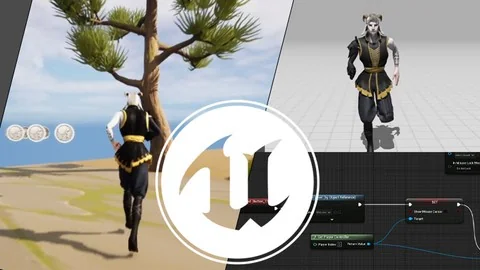
The animation section focuses on the movements that give a character a clear sense of action: idle, walk, run, and jump. These are the kinds of animations that shape a simple game character into something that responds to player input. For a first game, those motions matter because they establish the difference between a static scene and a playable one.
By covering idle, walk, run, and jump, the course gives attention to the basic movement set that most beginner projects need. The emphasis stays on practical use rather than extra complexity. A learner can see how animation fits into the broader project alongside the level setup and Blueprint logic, which helps connect character motion to the rest of the game.
This section also supports creative testing. Once a character can idle, walk, run, and jump, a beginner developer has the core ingredients needed to experiment with pacing, movement, and simple interaction inside a 3D scene.
UI widgets for coins, trigger boxes, and menus
The UI widget material is tied to game functions that are easy to understand and useful in a first project. The course covers widgets for collectables such as coins, trigger boxes, and a menu. These are not abstract interface topics; they are connected to concrete game events and player-facing elements.
Coins suggest collection and progress. Trigger boxes point to event-based interaction inside the level. Menus help frame the playable experience and give the game a structured start or pause point. Together, these UI widgets support a beginner project that feels complete enough to play through rather than simply observe.
Because the UI content is presented alongside the other course elements, it can be used as part of a connected workflow. A learner can place gameplay objects in the level, link them through logic, and present the results through simple interface elements. That makes the course more than a set of disconnected lessons; it functions as a guided path through the pieces that make a small game readable and playable.
From core systems to a finished 3D game
The course closes the loop by showing how to create a real 3D game in Unreal Engine and export it. That final step gives the course a clear purpose: the learner is not only studying isolated systems, but working toward a complete result. Levels, actors, components, collisions, Blueprints, animation, and UI all point toward this end.
The curriculum reflects that progression in a straightforward order: Introduction, Unreal Engine Basics, Blueprints in Unreal Engine 5, Animation for a character, Game Elements, Final Touches, and Thank you! Each part supports the next, so the project can move from basic engine familiarity to character motion and interface elements before reaching the finishing stage. The total workload is 5h 19m, which places the material in a focused format suitable for a beginner who wants a contained starting project.
Published on Jan 21, 2023 and presented at beginner level, the course is shaped for learners who need a guided introduction without extra detours. It is led by Ekaterina Usova, and its practical scope makes it especially relevant for anyone who wants to understand how Unreal Engine 5 can be used to assemble a first playable 3D game.
For beginner game developers, the strongest fit is clear: learn the engine basics, practice with Blueprints, animate a character, add simple UI, and bring the pieces together into a complete exportable project.
 Unreal Engine
 Unreal Engine
 Unreal Engine
 Unreal Engine