"f813c18d2170b1f6"{"id":"24578","slug":"master-unreal-engine-5-advanced-door-systems-blueprints","title":"Master Unreal Engine 5 Advanced Door Systems Blueprints","category":"Unreal Engine","engine":"Video language: English","assetVersion":"Video language: English","engineVersion":"File content: video + supporting files + English subtitles","tag":"Unreal Engine","accent":"blue","visual":"mech","summary":"This Unreal Engine 5 training focuses on Blueprint-driven doors, portals, and related environmental mechanics. It moves from a basic rotating door setup into teleportation, save states, puzzle behavior, animations, particle effects, and modular sci-fi assets.","platform":"Unreal Engine","publishedAt":"2026-04-15T13:45:41.000Z","updatedAt":"2026-04-20T06:12:43.000Z","sourceNotes":[],"fileContents":[],"compatibility":["Unreal Engine","Video language: English","File content: video + supporting files + English subtitles"],"featuredImage":{"alt":"Master Unreal Engine 5 Advanced Door Systems Blueprints","src":"https://3dcghub.com/wp-content/uploads/2026/04/b7ce8eb89743_6332285_f9c8.webp"},"hasDownloadLink":true,"downloads":0,"terms":[{"taxonomy":"category","slug":"tutoriallibrary-unrealengine","name":"Unreal Engine"},{"taxonomy":"post_tag","slug":"environment","name":"Environment"},{"taxonomy":"post_tag","slug":"game-systems","name":"Game Systems"},{"taxonomy":"post_tag","slug":"unreal-engine-5","name":"Unreal Engine 5"}],"galleryImages":[],"accessPanel":{"kind":"video-resource","title":"Access this video resource","eyebrow":"Free Download","message":"Log in or create a free account to start your download.","fileName":"Master Unreal Engine 5 Advanced Door Systems Blueprints.rar","safetyNote":"All resources are 100% manually reviewed to eliminate all risks.","actionLabel":"Download Free","resourceType":"Video package"},"contentHtml":"\u003cp\u003eRotating doors, teleportation portals, save-state handling, puzzle mechanics, cinematic animation work, particle effects, and a modular sci-fi asset pack sit at the center of this Unreal Engine 5 Blueprint training. It is marked for all levels and runs 8h 56m, with an early curriculum that starts in Unreal Engine 5, moves into Blueprint and UI, and then opens on a basic rotating door setup.\u003c/p\u003e \u003ch2\u003eBlueprint systems for doors, portals, and environmental mechanics\u003c/h2\u003e\n\u003cp\u003eThe main goal is clear: master Unreal Engine 5âs Blueprint programming so doors, portals, and environmental mechanics can behave as interactive systems instead of static props. The training does not stay with one narrow interaction. It moves from basic rotating doors into more complex systems that require player interaction, which gives the material a practical range for different kinds of scenes.\u003c/p\u003e\n\u003cp\u003eThat progression matters because the same kind of logic can support several kinds of gameplay moments. A door can be simple and readable, or it can become part of a larger mechanic that the player has to trigger, unlock, or respond to through interaction. The focus stays on systems that feel active inside the level rather than isolated pieces of scenery.\u003c/p\u003e\n\u003cp\u003eThe opening lessons also set up the technical path in a straightforward order. After the introduction, the material moves through Unreal Engine 5 and Blueprint and UI before reaching Level 1: Basic Rotating Door. That gives the training a practical starting point before the more advanced portal and puzzle work begins.\u003c/p\u003e \u003ch2\u003eTeleportation portals and save-state handling\u003c/h2\u003e\n\u003cp\u003eTeleportation is a major part of the setup here. The training covers seamless teleportation portals that allow players to move between levels or areas, which makes portals useful as part of level flow rather than a one-off effect. The aim is not just to move the player, but to do it in a way that stays consistent with the rest of the interactive environment.\u003c/p\u003e\n\u003cp\u003ePersistent door and portal states across multiple levels add another layer of continuity. A door does not need to reset simply because the player has moved on, and a portal can keep its state as the game progresses through different areas. That gives the work a clear place in projects where state needs to carry over instead of starting fresh every time a new level is reached.\u003c/p\u003e\n\u003cp\u003eFor game logic, that combination of teleportation and persistence creates a useful foundation. Doors and portals can remain part of the playerâs path over time, and the interaction can be tracked as part of the larger world structure. The training keeps those systems tied to gameplay flow, not just to a single animation or trigger event.\u003c/p\u003e \u003ch2\u003ePuzzle doors, inventory mechanics, and visual feedback\u003c/h2\u003e\n\u003cp\u003eInventory-based mechanics are part of the puzzle side of the training. Puzzle doors can depend on player interaction with inventory systems, which gives them a more deliberate role in the level. Instead of opening automatically or responding to a basic input alone, they can become obstacles that connect what the player has collected with what the level asks the player to do.\u003c/p\u003e\n\u003cp\u003eCinematic animations and particle effects help those interactions feel more complete. Doors and portals can be enhanced with custom animations and visual effects, which gives them clearer motion and stronger feedback when they activate. The result is a more expressive interaction layer that can support both gameplay and presentation.\u003c/p\u003e\n\u003cp\u003ePhysics-based doors and mechanisms are also included, with behavior that reacts naturally to player actions and environmental changes. That keeps the systems grounded in movement and response. A mechanism can feel like part of the world it belongs to, rather than a separate scripted event that only exists to open or close something.\u003c/p\u003e \u003ch2\u003eModular sci-fi assets for faster setup\u003c/h2\u003e\n\u003cp\u003eThe workflow also includes a sci-fi modular asset pack, along with interactive switches, levers, and VFX. Those pieces are important because they give the door and portal systems a reusable environment to live in. When the same interaction language needs to appear across several rooms or areas, modular elements help keep the setup consistent.\u003c/p\u003e\n\u003cp\u003eThat makes the training especially relevant for scenes that rely on repeated interactive components. A switch can lead to a door state change, a lever can sit inside a puzzle chain, and visual effects can reinforce the moment something activates. The modular side of the material supports the Blueprint work rather than sitting apart from it.\u003c/p\u003e\n\u003cp\u003eBecause the pack is tied to doors, portals, switches, levers, and VFX, it fits naturally with the courseâs emphasis on environmental mechanics. The focus stays on interactive pieces that can be arranged into functional spaces, not just on isolated assets.\u003c/p\u003e \u003ch2\u003eWho this training fits best\u003c/h2\u003e\n\u003cp\u003eThe target audience is broad, but it stays centered on people building interactive game systems. Game designers and developers are a natural fit, especially if they want to work with Unreal Engine 5 doors, teleportation, and puzzles. Indie developers and solo creators can use the Blueprint-based workflow to streamline how these mechanics are implemented.\u003c/p\u003e\n\u003cp\u003e3D environment artists and level designers are also called out directly. For them, the value is in placing doors, portals, switches, and other interactive elements into levels in a way that supports gameplay. Unreal Engine enthusiasts who want to deepen their understanding of Blueprint tools can also follow the material, even without prior coding experience.\u003c/p\u003e\n\u003cp\u003eStudents interested in interactive systems design have a clear path here as well. The training stays focused on dynamic mechanics: doors that move, portals that transfer players, puzzle systems tied to inventory, and mechanisms that respond to the world around them. It is set up for projects that need those pieces to work together inside an Unreal Engine 5 environment.\u003c/p\u003e\n\u003cp\u003eIn practical terms, the resource is ready for projects that need playable door logic, portal travel, persistent states, and puzzle-driven interactions inside modular sci-fi spaces.\u003c/p\u003e\n\n\u003ch2\u003eContinue Browsing Similar Packs\u003c/h2\u003e\n\u003cul\u003e\n\u003cli\u003e\u003ca href=\"https://3dcghub.com/unreal-engine-5-c-make-your-own-action-combat-game/\" title=\"Unreal Engine 5 C++: Make Your Own Action Combat Game\"\u003eUnreal Engine 5 C++: Make Your Own Action Combat Game\u003c/a\u003e\u003c/li\u003e\n\u003cli\u003e\u003ca href=\"https://3dcghub.com/unreal-engine-5-for-beginners-create-your-first-game/\" title=\"Unreal Engine 5 for Beginners – Create your first game\"\u003eUnreal Engine 5 for Beginners – Create your first game\u003c/a\u003e\u003c/li\u003e\n\u003cli\u003e\u003ca href=\"https://3dcghub.com/unreal-engine-5-one-course-solution-for-material/\" title=\"Unreal Engine 5: One Course Solution For Material\"\u003eUnreal Engine 5: One Course Solution For Material\u003c/a\u003e\u003c/li\u003e\n\u003cli\u003e\u003ca href=\"https://3dcghub.com/unreal-engine-5-c-advanced-action-rpg/\" title=\"Unreal Engine 5 C++: Advanced Action RPG\"\u003eUnreal Engine 5 C++: Advanced Action RPG\u003c/a\u003e\u003c/li\u003e\n\u003cli\u003e\u003ca href=\"https://3dcghub.com/unreal-engine-5-one-course-solution-for-niagara-vfx/\" title=\"Unreal Engine 5: One Course Solution For Niagara VFX\"\u003eUnreal Engine 5: One Course Solution For Niagara VFX\u003c/a\u003e\u003c/li\u003e\n\u003c/ul\u003e","contentTextLength":6358,"navigation":{"current":1961,"total":3651,"previous":{"id":"24581","slug":"make-a-2d-action-platformer-in-unreal-engine-5","title":"Make a 2D Action Platformer in Unreal Engine 5","category":"Unreal Engine","platform":"Unreal Engine","updatedAt":"2026-04-20T06:12:43.000Z"},"next":{"id":"24596","slug":"advanced-unreal-engine-5-multiplayer-gameplay-programming","title":"Advanced Unreal Engine 5 Multiplayer Gameplay Programming","category":"Unreal Engine","platform":"Unreal Engine","updatedAt":"2026-04-20T06:12:42.000Z"}},"relatedResources":[{"id":"1001155","slug":"unreal-engine-5-blueprint-fundamentals","title":"Unreal Engine 5 Blueprint Fundamentals","category":"Unreal Engine","engine":"File Content: video + English subtitles","assetVersion":"Video Language: English","engineVersion":"File Content: video + English subtitles","tag":"Unreal Engine","accent":"blue","visual":"mech","summary":"Master Unreal Engine 5 visual scripting, editor navigation, Actors, Components, variables, and player input with Ian Bradley's hands-on fundamentals course.","platform":"Unreal Engine","publishedAt":"2026-09-11T00:33:21.500Z","updatedAt":"2026-09-11T00:33:21.500Z","sourceNotes":[],"fileContents":[],"compatibility":["Unreal Engine","Video Language: English","File Content: video + English subtitles"],"featuredImage":{"alt":"Unreal Engine 5 Blueprint Fundamentals","src":"/wp-content/uploads/published/2026/09/f9681cb67c9c-6362431-6459-17b3522341.webp"},"hasDownloadLink":true,"downloads":1},{"id":"1000596","slug":"unreal-engine-5-all-in-one-ue5-master-blueprint","title":"Unreal Engine 5 : All in one UE5 master Blueprint","category":"Unreal Engine","engine":"File Content: video + English subtitles","assetVersion":"Video Language: English","engineVersion":"File Content: video + English subtitles","tag":"Unreal Engine","accent":"blue","visual":"mech","summary":"A beginner-level Unreal Engine 5 course covering Niagara, Control Rig, AI, animation, materials, landscape, and Blueprints across 42 hours of structured learnin","platform":"Unreal Engine","publishedAt":"2026-07-17T17:35:41.823Z","updatedAt":"2026-07-17T17:35:41.823Z","sourceNotes":[],"fileContents":[],"compatibility":["Unreal Engine","Video Language: English","File Content: video + English subtitles"],"featuredImage":{"alt":"Unreal Engine 5 : All in one UE5 master Blueprint","src":"/wp-content/uploads/published/2026/07/6c6d072cba24-4953792-d34a-5-60c376937e.webp"},"hasDownloadLink":true,"downloads":1},{"id":"1000557","slug":"unreal-engine-5-blueprint-scripting-101","title":"Unreal Engine 5 - Blueprint Scripting 101","category":"Unreal Engine","engine":"File Content: video + English subtitles","assetVersion":"Video Language: English","engineVersion":"File Content: video + English subtitles","tag":"Unreal Engine","accent":"blue","visual":"mech","summary":"Master Unreal Engine 5 Blueprint Scripting through a 20-hour course covering project setup, variables, events, flow control, inheritance, and debugging techniqu","platform":"Unreal Engine","publishedAt":"2026-07-15T17:08:10.823Z","updatedAt":"2026-07-15T17:08:10.823Z","sourceNotes":[],"fileContents":[],"compatibility":["Unreal Engine","Video Language: English","File Content: video + English subtitles"],"featuredImage":{"alt":"Unreal Engine 5 - Blueprint Scripting 101","src":"/wp-content/uploads/published/2026/07/4a645ef0c9e2-1790974-edc1-3-d13d407438.webp"},"hasDownloadLink":true,"downloads":1}]}
Unreal Engine
Master Unreal Engine 5 Advanced Door Systems Blueprints
This Unreal Engine 5 training focuses on Blueprint-driven doors, portals, and related environmental mechanics. It moves from a basic rotating door setup into teleportation, save states, puzzle behavior, animations, particle effects, and modular sci-fi assets.
Category:Unreal EnginePlatform: Unreal EngineVideo language: EnglishFile content: video + supporting files + English subtitlesPublished: Apr 15, 2026Updated: Apr 20, 2026
Unreal Engine
Resource overview
Rotating doors, teleportation portals, save-state handling, puzzle mechanics, cinematic animation work, particle effects, and a modular sci-fi asset pack sit at the center of this Unreal Engine 5 Blueprint training. It is marked for all levels and runs 8h 56m, with an early curriculum that starts in Unreal Engine 5, moves into Blueprint and UI, and then opens on a basic rotating door setup.
Blueprint systems for doors, portals, and environmental mechanics
The main goal is clear: master Unreal Engine 5âs Blueprint programming so doors, portals, and environmental mechanics can behave as interactive systems instead of static props. The training does not stay with one narrow interaction. It moves from basic rotating doors into more complex systems that require player interaction, which gives the material a practical range for different kinds of scenes.
That progression matters because the same kind of logic can support several kinds of gameplay moments. A door can be simple and readable, or it can become part of a larger mechanic that the player has to trigger, unlock, or respond to through interaction. The focus stays on systems that feel active inside the level rather than isolated pieces of scenery.
The opening lessons also set up the technical path in a straightforward order. After the introduction, the material moves through Unreal Engine 5 and Blueprint and UI before reaching Level 1: Basic Rotating Door. That gives the training a practical starting point before the more advanced portal and puzzle work begins.
Teleportation portals and save-state handling
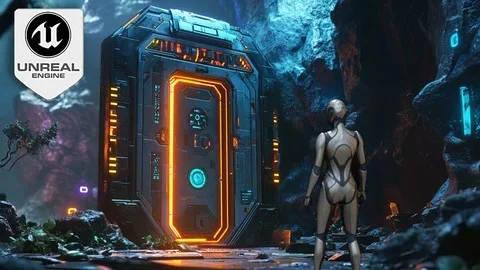
Teleportation is a major part of the setup here. The training covers seamless teleportation portals that allow players to move between levels or areas, which makes portals useful as part of level flow rather than a one-off effect. The aim is not just to move the player, but to do it in a way that stays consistent with the rest of the interactive environment.
Persistent door and portal states across multiple levels add another layer of continuity. A door does not need to reset simply because the player has moved on, and a portal can keep its state as the game progresses through different areas. That gives the work a clear place in projects where state needs to carry over instead of starting fresh every time a new level is reached.
For game logic, that combination of teleportation and persistence creates a useful foundation. Doors and portals can remain part of the playerâs path over time, and the interaction can be tracked as part of the larger world structure. The training keeps those systems tied to gameplay flow, not just to a single animation or trigger event.
Puzzle doors, inventory mechanics, and visual feedback
Inventory-based mechanics are part of the puzzle side of the training. Puzzle doors can depend on player interaction with inventory systems, which gives them a more deliberate role in the level. Instead of opening automatically or responding to a basic input alone, they can become obstacles that connect what the player has collected with what the level asks the player to do.
Cinematic animations and particle effects help those interactions feel more complete. Doors and portals can be enhanced with custom animations and visual effects, which gives them clearer motion and stronger feedback when they activate. The result is a more expressive interaction layer that can support both gameplay and presentation.
Physics-based doors and mechanisms are also included, with behavior that reacts naturally to player actions and environmental changes. That keeps the systems grounded in movement and response. A mechanism can feel like part of the world it belongs to, rather than a separate scripted event that only exists to open or close something.
Modular sci-fi assets for faster setup
The workflow also includes a sci-fi modular asset pack, along with interactive switches, levers, and VFX. Those pieces are important because they give the door and portal systems a reusable environment to live in. When the same interaction language needs to appear across several rooms or areas, modular elements help keep the setup consistent.
That makes the training especially relevant for scenes that rely on repeated interactive components. A switch can lead to a door state change, a lever can sit inside a puzzle chain, and visual effects can reinforce the moment something activates. The modular side of the material supports the Blueprint work rather than sitting apart from it.
Because the pack is tied to doors, portals, switches, levers, and VFX, it fits naturally with the courseâs emphasis on environmental mechanics. The focus stays on interactive pieces that can be arranged into functional spaces, not just on isolated assets.
Who this training fits best
The target audience is broad, but it stays centered on people building interactive game systems. Game designers and developers are a natural fit, especially if they want to work with Unreal Engine 5 doors, teleportation, and puzzles. Indie developers and solo creators can use the Blueprint-based workflow to streamline how these mechanics are implemented.
3D environment artists and level designers are also called out directly. For them, the value is in placing doors, portals, switches, and other interactive elements into levels in a way that supports gameplay. Unreal Engine enthusiasts who want to deepen their understanding of Blueprint tools can also follow the material, even without prior coding experience.
Students interested in interactive systems design have a clear path here as well. The training stays focused on dynamic mechanics: doors that move, portals that transfer players, puzzle systems tied to inventory, and mechanisms that respond to the world around them. It is set up for projects that need those pieces to work together inside an Unreal Engine 5 environment.
In practical terms, the resource is ready for projects that need playable door logic, portal travel, persistent states, and puzzle-driven interactions inside modular sci-fi spaces.
 Unreal Engine
 Unreal Engine
 Unreal Engine
 Unreal Engine