"c9cd02dc7f6a2008"{"id":"24477","slug":"learn-to-create-advance-metroidvania-game-with-unity-c","title":"Learn to create advance Metroidvania game with Unity \u0026 C#","category":"Unity","engine":"Video language: English","assetVersion":"Video language: English","engineVersion":"File content: video + supporting files + English subtitles","tag":"Unity","accent":"cyan","visual":"audio","summary":"This Unity and C# course follows a Metroidvania-style workflow through 2D game setup, side-scroller design, dialogue, and timeline work. It also moves through named project sections such as a prison scene, a Paralex Background segment, and a second game.","platform":"Unity","publishedAt":"2026-04-14T12:43:01.000Z","updatedAt":"2026-04-20T06:12:48.000Z","sourceNotes":[],"fileContents":[],"compatibility":["Unity","Video language: English","File content: video + supporting files + English subtitles"],"featuredImage":{"alt":"Learn to create advance Metroidvania game with Unity \u0026 C#","src":"https://3dcghub.com/wp-content/uploads/2026/04/438fcf7078c3_5620336_44d4_4.webp"},"hasDownloadLink":true,"downloads":1,"terms":[{"taxonomy":"category","slug":"tutoriallibrary-unity","name":"Unity"},{"taxonomy":"post_tag","slug":"environment","name":"Environment"},{"taxonomy":"post_tag","slug":"game-systems","name":"Game Systems"},{"taxonomy":"post_tag","slug":"unity","name":"Unity"}],"galleryImages":[],"accessPanel":{"kind":"video-resource","title":"Access this video resource","eyebrow":"Free Download","message":"Log in or create a free account to start your download.","fileName":"Learn to create advance Metroidvania game with Unity \u0026 C#.7z","safetyNote":"All resources are 100% manually reviewed to eliminate all risks.","actionLabel":"Download Free","resourceType":"Video package"},"contentHtml":"\u003ch2\u003e2D scenes that give the project its shape\u003c/h2\u003e\n\u003cp\u003eThe course starts with the kind of work that gives a Metroidvania project its structure: building a 2D Unity game and shaping it as a 2D side scroller. Those two points set the tone for the rest of the workflow. Instead of focusing on a single isolated mechanic, the project moves through scene-based work that fits a side-scrolling format and keeps the player moving through a connected environment.\u003c/p\u003e\n\u003cp\u003eTwo named project sections stand out here. A prison scene appears in the curriculum, and so does a Paralex Background segment. Both point to scene construction as part of the process, not just scripting. The prison scene suggests a defined game space to work through, while the Paralex Background item shows that background treatment is part of the build sequence. That mix makes the course feel practical for anyone who wants to see how a 2D Metroidvania-style project is assembled step by step in Unity.\u003c/p\u003e\n\u003cp\u003eThe curriculum does not stop at setup. It moves from introduction into scene work, which gives the project a clear path. That structure is useful because side-scroller projects depend on more than one layer working together: the scene must read clearly, the game must move in a controlled way, and the build has to support the kind of progression a Metroidvania game usually asks for. The course keeps those parts in the same workflow instead of separating them into unrelated lessons.\u003c/p\u003e \u003ch2\u003eC# sits beside the game build, not apart from it\u003c/h2\u003e\n\u003cp\u003eProgramming with C# is listed directly among the learning goals, so the course is not only about arranging visuals or setting up scenes. The scripting side is part of the same process. That matters in a Unity project because movement, interaction, and scene flow all depend on code working alongside the game layout. By placing C# in the core learning goals, the course makes the implementation side part of the main path.\u003c/p\u003e\n\u003cp\u003eThe course also includes making dialogue and a Dialog System section in the curriculum. That gives dialogue a distinct place in the build, rather than treating it as a minor add-on. For a Metroidvania project, dialogue can sit naturally alongside movement and exploration, so having it as a dedicated part of the course makes the workflow more complete. It means the project is not limited to just building a side-scrolling frame; it also reaches into the interaction layer that gives a game more structure.\u003c/p\u003e\n\u003cp\u003eBecause both C# and dialogue appear in the stated learning goals, the course connects implementation with presentation. The learner is not only setting up a 2D game, but also shaping how the project communicates with the player. That combination is one of the clearest signs that the training is meant to move through real project assembly rather than isolated theory.\u003c/p\u003e \u003ch2\u003eTimeline work adds sequence to the project\u003c/h2\u003e\n\u003cp\u003eTimeline is another explicit part of the course. It appears in the learning goals and again in the curriculum, which makes it one of the more concrete pieces of the build. Its place in the sequence suggests timing or progression work within the project, adding another layer to the 2D game beyond scene setup and dialogue. For a course centered on an advanced Metroidvania game, that kind of sequence-based work fits naturally into the overall workflow.\u003c/p\u003e\n\u003cp\u003eThe order of topics gives the course a practical rhythm. It begins with Introduction, moves into Dialog System, includes Paralex Background, shifts into the prison scene, then reaches Timeline, and later continues into Second game. That progression matters because it shows how the project develops over time. Instead of jumping from one unrelated topic to another, the course keeps the learner moving forward through connected stages of implementation.\u003c/p\u003e\n\u003cp\u003eThe Second game item is especially useful as a sign of continuation. It shows that the course does not end at the first setup pass. After the earlier parts of the project are in place, the learner moves on to another game stage. That gives the workflow a sense of forward motion and reinforces the idea that the training is about building a complete project path, not a single feature demo.\u003c/p\u003e \u003ch2\u003eScope, pace, and who it fits\u003c/h2\u003e\n\u003cp\u003eThe course workload is listed as 23h 2m, the level is All Levels, and the target audience is Everyone. It was published on Feb 08, 2024, and the instructor is Paul Hadizad. Those details place it as a broad learning resource rather than something reserved for a narrow group. The stated level and audience make the course accessible to different starting points while still covering a project that reaches into scene work, dialogue, C#, and timeline use.\u003c/p\u003e\n\u003cp\u003eThat combination of scope and subject matter is what gives the course its shape. The named curriculum items are specific enough to show where the learner will spend time, while the overall course details show that the material is meant to be approachable. A project that includes a side scroller, a prison scene, a Paralex Background section, dialogue, and timeline work has enough moving parts to feel substantial, but the course keeps those parts in a clear sequence.\u003c/p\u003e\n\u003cp\u003eFor a learner who wants a structured path through a 2D Metroidvania-style Unity project, the course points to a workflow that starts with setup, moves through implementation, and keeps building toward the next stage. It fits projects that need the scene, dialogue, and timing pieces handled in one continuous process.\u003c/p\u003e\n\n\u003ch2\u003eRelated Resources Worth Checking\u003c/h2\u003e\n\u003cul\u003e\n\u003cli\u003e\u003ca href=\"https://3dcghub.com/make-a-multiplayer-game-in-unity/\" title=\"Make a Multiplayer Game in Unity\"\u003eMake a Multiplayer Game in Unity\u003c/a\u003e\u003c/li\u003e\n\u003cli\u003e\u003ca href=\"https://3dcghub.com/stylized-grass-shader-for-unity-2021-2023/\" title=\"Stylized Grass Shader (for Unity 2021-2023)\"\u003eStylized Grass Shader (for Unity 2021-2023)\u003c/a\u003e\u003c/li\u003e\n\u003cli\u003e\u003ca href=\"https://3dcghub.com/make-a-horror-survival-game-in-unity/\" title=\"Make a horror survival game in Unity\"\u003eMake a horror survival game in Unity\u003c/a\u003e\u003c/li\u003e\n\u003cli\u003e\u003ca href=\"https://3dcghub.com/unity-shader-programming-beginners-to-advanced-techniques/\" title=\"Unity Shader Programming: Beginners to Advanced Techniques\"\u003eUnity Shader Programming: Beginners to Advanced Techniques\u003c/a\u003e\u003c/li\u003e\n\u003cli\u003e\u003ca href=\"https://3dcghub.com/mastering-editor-scripting-in-unity/\" title=\"Mastering Editor Scripting in Unity\"\u003eMastering Editor Scripting in Unity\u003c/a\u003e\u003c/li\u003e\n\u003c/ul\u003e","contentTextLength":5657,"navigation":{"current":2141,"total":3860,"previous":{"id":"24340","slug":"polyverse-skies-low-poly-skybox-shaders","title":"Polyverse Skies | Low Poly Skybox Shaders","category":"Shaders","platform":"Unity","updatedAt":"2026-04-20T06:12:49.000Z"},"next":{"id":"24474","slug":"make-a-multiplayer-game-in-unity","title":"Make a Multiplayer Game in Unity","category":"Unity","platform":"Unity","updatedAt":"2026-04-20T06:12:48.000Z"}},"relatedResources":[{"id":"24480","slug":"learn-to-create-a-2d-action-zombie-game-in-unity","title":"Learn to create a 2D Action Zombie Game in Unity","category":"Unity","engine":"Video language: English","assetVersion":"Video language: English","engineVersion":"File content: video + supporting files + English subtitles","tag":"Unity","accent":"cyan","visual":"character","summary":"This beginner Unity course walks through the main parts of a 2D action zombie game: player setup, enemies, health, portals between levels, and level design. It is built for learners who want a guided path through a playable game project rather than disconne...","platform":"Unity","publishedAt":"2026-04-14T13:06:41.000Z","updatedAt":"2026-04-20T06:12:47.000Z","sourceNotes":[],"fileContents":[],"compatibility":["Unity","Video language: English","File content: video + supporting files + English subtitles"],"featuredImage":{"alt":"Learn to create a 2D Action Zombie Game in Unity","src":"https://3dcghub.com/wp-content/uploads/2026/04/4aae367ee741_5884848_cdbb_2.webp"},"hasDownloadLink":true,"downloads":0},{"id":"24554","slug":"learn-how-to-create-a-2d-action-game-with-unity","title":"Learn how to create a 2D Action game with Unity","category":"Unity","engine":"Video language: English","assetVersion":"Video language: English","engineVersion":"File content: video + supporting files + English subtitles","tag":"Unity","accent":"cyan","visual":"city","summary":"A structured Unity course for making a Soul Knight-style 2D action game, from player setup and dungeon generation to weapons, enemies, and boss encounters. It also covers C#, clean code, and object-oriented programming in practice.","platform":"Unity","publishedAt":"2026-04-15T13:01:12.000Z","updatedAt":"2026-04-20T06:12:45.000Z","sourceNotes":[],"fileContents":[],"compatibility":["Unity","Video language: English","File content: video + supporting files + English subtitles"],"featuredImage":{"alt":"Learn how to create a 2D Action game with Unity","src":"https://3dcghub.com/wp-content/uploads/2026/04/7dc5c1d14c37_5572298_b8ce.webp"},"hasDownloadLink":true,"downloads":0},{"id":"24514","slug":"create-2d-multiplayer-game-with-photon-in-unity","title":"Create 2D Multiplayer Game with photon in unity","category":"Unity","engine":"Video language: English","assetVersion":"Video language: English","engineVersion":"File content: video + supporting files + English subtitles","tag":"Unity","accent":"cyan","visual":"mech","summary":"This Unity workflow follows the build of a 2D multiplayer game with Photon from the first menu screens through player setup, UI, enemies, and progression systems. It also includes mobile joystick support, game sound, and a range character type.","platform":"Unity","publishedAt":"2026-04-14T15:47:41.000Z","updatedAt":"2026-04-20T06:12:47.000Z","sourceNotes":[],"fileContents":[],"compatibility":["Unity","Video language: English","File content: video + supporting files + English subtitles"],"featuredImage":{"alt":"Create 2D Multiplayer Game with photon in unity","src":"https://3dcghub.com/wp-content/uploads/2026/04/d0bd75435e19_4751476_9c73.webp"},"hasDownloadLink":true,"downloads":1}]}
Unity
Learn to create advance Metroidvania game with Unity & C#
This Unity and C# course follows a Metroidvania-style workflow through 2D game setup, side-scroller design, dialogue, and timeline work. It also moves through named project sections such as a prison scene, a Paralex Background segment, and a second game.
Category:UnityPlatform: UnityVideo language: EnglishFile content: video + supporting files + English subtitlesPublished: Apr 14, 2026Updated: Apr 20, 2026
Unity
Resource overview
2D scenes that give the project its shape
The course starts with the kind of work that gives a Metroidvania project its structure: building a 2D Unity game and shaping it as a 2D side scroller. Those two points set the tone for the rest of the workflow. Instead of focusing on a single isolated mechanic, the project moves through scene-based work that fits a side-scrolling format and keeps the player moving through a connected environment.
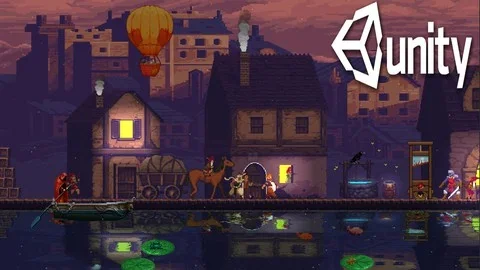
Two named project sections stand out here. A prison scene appears in the curriculum, and so does a Paralex Background segment. Both point to scene construction as part of the process, not just scripting. The prison scene suggests a defined game space to work through, while the Paralex Background item shows that background treatment is part of the build sequence. That mix makes the course feel practical for anyone who wants to see how a 2D Metroidvania-style project is assembled step by step in Unity.
The curriculum does not stop at setup. It moves from introduction into scene work, which gives the project a clear path. That structure is useful because side-scroller projects depend on more than one layer working together: the scene must read clearly, the game must move in a controlled way, and the build has to support the kind of progression a Metroidvania game usually asks for. The course keeps those parts in the same workflow instead of separating them into unrelated lessons.
C# sits beside the game build, not apart from it
Programming with C# is listed directly among the learning goals, so the course is not only about arranging visuals or setting up scenes. The scripting side is part of the same process. That matters in a Unity project because movement, interaction, and scene flow all depend on code working alongside the game layout. By placing C# in the core learning goals, the course makes the implementation side part of the main path.
The course also includes making dialogue and a Dialog System section in the curriculum. That gives dialogue a distinct place in the build, rather than treating it as a minor add-on. For a Metroidvania project, dialogue can sit naturally alongside movement and exploration, so having it as a dedicated part of the course makes the workflow more complete. It means the project is not limited to just building a side-scrolling frame; it also reaches into the interaction layer that gives a game more structure.
Because both C# and dialogue appear in the stated learning goals, the course connects implementation with presentation. The learner is not only setting up a 2D game, but also shaping how the project communicates with the player. That combination is one of the clearest signs that the training is meant to move through real project assembly rather than isolated theory.
Timeline work adds sequence to the project
Timeline is another explicit part of the course. It appears in the learning goals and again in the curriculum, which makes it one of the more concrete pieces of the build. Its place in the sequence suggests timing or progression work within the project, adding another layer to the 2D game beyond scene setup and dialogue. For a course centered on an advanced Metroidvania game, that kind of sequence-based work fits naturally into the overall workflow.
The order of topics gives the course a practical rhythm. It begins with Introduction, moves into Dialog System, includes Paralex Background, shifts into the prison scene, then reaches Timeline, and later continues into Second game. That progression matters because it shows how the project develops over time. Instead of jumping from one unrelated topic to another, the course keeps the learner moving forward through connected stages of implementation.
The Second game item is especially useful as a sign of continuation. It shows that the course does not end at the first setup pass. After the earlier parts of the project are in place, the learner moves on to another game stage. That gives the workflow a sense of forward motion and reinforces the idea that the training is about building a complete project path, not a single feature demo.
Scope, pace, and who it fits
The course workload is listed as 23h 2m, the level is All Levels, and the target audience is Everyone. It was published on Feb 08, 2024, and the instructor is Paul Hadizad. Those details place it as a broad learning resource rather than something reserved for a narrow group. The stated level and audience make the course accessible to different starting points while still covering a project that reaches into scene work, dialogue, C#, and timeline use.
That combination of scope and subject matter is what gives the course its shape. The named curriculum items are specific enough to show where the learner will spend time, while the overall course details show that the material is meant to be approachable. A project that includes a side scroller, a prison scene, a Paralex Background section, dialogue, and timeline work has enough moving parts to feel substantial, but the course keeps those parts in a clear sequence.
For a learner who wants a structured path through a 2D Metroidvania-style Unity project, the course points to a workflow that starts with setup, moves through implementation, and keeps building toward the next stage. It fits projects that need the scene, dialogue, and timing pieces handled in one continuous process.
 Unity
Unity Unity
Unity Unity
Unity Unity
Unity