"c14ff6bd758dadb1"{"id":"24538","slug":"making-an-ai-eight-ball-pool-game-in-unity","title":"Making an AI Eight-Ball Pool Game in Unity","category":"Unity","engine":"Video language: English","assetVersion":"Video language: English","engineVersion":"File content: video + supporting files + English subtitles","tag":"Unity","accent":"cyan","visual":"mech","summary":"This Unity course follows the build of a 3D physics-based eight-ball pool game from controls and physics through UI, audio, AI, and mobile deployment. It keeps the workflow practical, with incremental prototyping and realistic physics tuning at the center....","platform":"Unity","publishedAt":"2026-04-15T09:56:59.000Z","updatedAt":"2026-04-20T06:12:46.000Z","sourceNotes":[],"fileContents":[],"compatibility":["Unity","Video language: English","File content: video + supporting files + English subtitles"],"featuredImage":{"alt":"Making an AI Eight-Ball Pool Game in Unity","src":"https://3dcghub.com/wp-content/uploads/2026/04/9403259fa050_4404990_cbd8_7.webp"},"hasDownloadLink":true,"downloads":0,"terms":[{"taxonomy":"category","slug":"tutoriallibrary-unity","name":"Unity"},{"taxonomy":"post_tag","slug":"environment","name":"Environment"},{"taxonomy":"post_tag","slug":"ui","name":"UI"},{"taxonomy":"post_tag","slug":"unity","name":"Unity"}],"galleryImages":[],"accessPanel":{"kind":"video-resource","title":"Access this video resource","eyebrow":"Free Download","message":"Log in or create a free account to start your download.","fileName":"Making an AI Eight-Ball Pool Game in Unity.rar","safetyNote":"All resources are 100% manually reviewed to eliminate all risks.","actionLabel":"Download Free","resourceType":"Video package"},"contentHtml":"\u003ch2\u003ePhysics, controls, and the feel of an eight-ball table\u003c/h2\u003e\n\u003cp\u003eMaking an AI Eight-Ball Pool Game in Unity focuses on a familiar gameplay space: a 3D pool table where the movement of each shot matters. The course is centered on creating publishable 3D physics-based mobile games, so the pool game becomes a practical way to work through motion, timing, and interaction in Unity. Rather than jumping straight to a finished game, it starts from the systems that make the table feel playable.\u003c/p\u003e\n\u003cp\u003eThe workflow moves through adding game controls and adding physics, then returns to controls again in a second pass. That structure is useful for a pool project because cue control, ball response, and playability are tightly connected. The course also includes fine-tuning the physics settings to create realistic behavior, which is especially important in a game where small changes in speed or bounce can change the way a match reads on screen.\u003c/p\u003e \u003ch2\u003eBuilding in layers instead of chasing the final scene at once\u003c/h2\u003e\n\u003cp\u003eA notable part of the course is the emphasis on prototyping incrementally. For a developer, that means the pool game is approached as a series of small playable steps rather than one large build. The curriculum begins with an introduction and getting started, then moves into the pieces that make the game function: controls, physics, logic, and presentation.\u003c/p\u003e\n\u003cp\u003eThat method works well for a project like an eight-ball pool game because each addition can be tested against the last. A basic table can become interactive before the visuals are fully tuned. The UI can be improved after the game logic is in place. Audio can be added once the core loop is already working. The course frames the build as a gradual process, which makes the project easier to shape into something playable instead of treating every part as a separate task.\u003c/p\u003e \u003ch2\u003eUI, visuals, and feedback that support play\u003c/h2\u003e\n\u003cp\u003eThe course gives attention to the parts that help a mobile game read clearly in motion. It includes fine-tuning the visuals and the UI, improving the UI/UX, adding audio, and fine-tuning the graphics. For a pool game, these pieces matter because the player needs to understand the state of the table, the effect of each shot, and the result of each turn without confusion.\u003c/p\u003e\n\u003cp\u003eBecause the project is aimed at mobile games, the presentation side is not just decorative. The UI has to support play on a smaller screen, while the visuals and audio help the table feel responsive. The course does not treat these elements as an afterthought; they appear alongside logic and physics as part of the full build process.\u003c/p\u003e \u003ch2\u003eAI, ads, and the mobile release path\u003c/h2\u003e\n\u003cp\u003eAnother major thread is the addition of an AI player. The course specifically covers creating a reasonably challenging player AI and then adding an AI player to the project. In an eight-ball pool game, that gives the project a competitive structure that fits the overall goal of making a playable mobile game.\u003c/p\u003e\n\u003cp\u003eThe release side is also part of the workflow. The curriculum includes building the game to Android and iOS, along with integrating ads into the Unity project. That combination places the course firmly in the mobile-game pipeline rather than only in a prototype stage. Developers looking to understand how a physics-based game can move toward a publishable form will find the structure especially relevant.\u003c/p\u003e\n\u003cul\u003e \u003cli\u003eAdding an AI player\u003c/li\u003e \u003cli\u003eIntegrating ads\u003c/li\u003e \u003cli\u003eBuilding the game to Android and iOS\u003c/li\u003e\n\u003c/ul\u003e \u003ch2\u003eA course path that stays practical from start to finish\u003c/h2\u003e\n\u003cp\u003eThe full curriculum shows how the project is organized: introduction, getting started, adding game controls, adding physics, adding game controls Pt. 2, fine-tuning the visuals and the UI, building the game to Android and iOS, adding game logic, improving the UI/UX, adding audio, adding an AI player, integrating ads, fine-tuning the graphics, and wrap up. For a developer, that path is useful because it does not isolate one discipline from another. Controls, physics, interface, AI, and release preparation all appear in the same build flow.\u003c/p\u003e\n\u003cp\u003eThe course workload is 24h 7m and it is marked for all levels. That makes it a long-form guided project rather than a short demo walkthrough. The overall focus stays on transferable skills: planning a project, using prototyping to create games incrementally, applying realistic physics settings, and working through the steps needed for a 3D mobile game that can be taken toward release.\u003c/p\u003e \u003ch2\u003eWhere this project approach fits best\u003c/h2\u003e\n\u003cp\u003eThis is a good fit for developers who want to study how a compact game concept can be carried through a full Unity workflow. The eight-ball pool setup gives the course a clear gameplay identity, while the lessons around physics, AI, UI, audio, ads, and mobile builds make it useful beyond a single template. It is especially relevant if the goal is to understand how a physics-based game can be built in stages and prepared for Android and iOS without losing focus on playability.\u003c/p\u003e\n\n\u003ch2\u003eContinue Browsing Similar Packs\u003c/h2\u003e\n\u003cul\u003e\n\u003cli\u003e\u003ca href=\"https://3dcghub.com/the-complete-guide-to-unity-2d-platformer-development/\" title=\"The Complete Guide to Unity 2D : Platformer Development\"\u003eThe Complete Guide to Unity 2D : Platformer Development\u003c/a\u003e\u003c/li\u003e\n\u003cli\u003e\u003ca href=\"https://3dcghub.com/the-ultimate-unity-game-developer-course-from-zero-to-hero/\" title=\"The Ultimate Unity Game Developer Course: From Zero to Hero\"\u003eThe Ultimate Unity Game Developer Course: From Zero to Hero\u003c/a\u003e\u003c/li\u003e\n\u003cli\u003e\u003ca href=\"https://3dcghub.com/unity-bootcamp-3d-game-development/\" title=\"Unity Bootcamp: 3D Game Development\"\u003eUnity Bootcamp: 3D Game Development\u003c/a\u003e\u003c/li\u003e\n\u003cli\u003e\u003ca href=\"https://3dcghub.com/unity-visual-scripting-build-2d-and-3d-games-in-unity-with-no-coding/\" title=\"Unity Visual Scripting: Build 2D and 3D games in Unity with no coding.\"\u003eUnity Visual Scripting: Build 2D and 3D games in Unity with no coding.\u003c/a\u003e\u003c/li\u003e\n\u003cli\u003e\u003ca href=\"https://3dcghub.com/mastering-unity-muse/\" title=\"Mastering Unity Muse\"\u003eMastering Unity Muse\u003c/a\u003e\u003c/li\u003e\n\u003c/ul\u003e","contentTextLength":5204,"navigation":{"current":2012,"total":3719,"previous":{"id":"24541","slug":"make-a-match-three-puzzle-game-in-unity","title":"Make a Match-Three Puzzle Game in Unity","category":"Unity","platform":"Unity","updatedAt":"2026-04-20T06:12:46.000Z"},"next":{"id":"24535","slug":"the-complete-guide-to-unity-2d-platformer-development","title":"The Complete Guide to Unity 2D : Platformer Development","category":"Unity","platform":"Unity","updatedAt":"2026-04-20T06:12:46.000Z"}},"relatedResources":[{"id":"24545","slug":"build-a-poker-game-in-unity-complete-development-course","title":"Build a Poker Game in Unity: Complete Development Course","category":"Unity","engine":"Video language: English","assetVersion":"Video language: English","engineVersion":"File content: video + supporting files + English subtitles","tag":"Unity","accent":"cyan","visual":"character","summary":"This Unity course follows the full path of a poker game build, from the table layout and interface to card handling, AI opponents, and game flow control. It is aimed at learners who want a practical card-game project with state management at its core.","platform":"Unity","publishedAt":"2026-04-15T12:54:25.000Z","updatedAt":"2026-04-20T06:12:45.000Z","sourceNotes":[],"fileContents":[],"compatibility":["Unity","Video language: English","File content: video + supporting files + English subtitles"],"featuredImage":{"alt":"Build a Poker Game in Unity: Complete Development Course","src":"https://3dcghub.com/wp-content/uploads/2026/04/69ba638adcd1_6024782_39d8_2.webp"},"hasDownloadLink":true,"downloads":0},{"id":"24535","slug":"the-complete-guide-to-unity-2d-platformer-development","title":"The Complete Guide to Unity 2D : Platformer Development","category":"Unity","engine":"Video language: English","assetVersion":"Video language: English","engineVersion":"File content: video + supporting files + English subtitles","tag":"Unity","accent":"cyan","visual":"city","summary":"This course follows the process of making a 2D platformer in Unity, starting with C# and Unity basics and moving into character work, level creation, gameplay systems, and polish. It also extends into co-op play, gamepad support, and an optional mobile vers...","platform":"Unity","publishedAt":"2026-04-15T09:46:03.000Z","updatedAt":"2026-04-20T06:12:46.000Z","sourceNotes":[],"fileContents":[],"compatibility":["Unity","Video language: English","File content: video + supporting files + English subtitles"],"featuredImage":{"alt":"The Complete Guide to Unity 2D : Platformer Development","src":"https://3dcghub.com/wp-content/uploads/2026/04/33eb152dfd65_5927092_552c.webp"},"hasDownloadLink":true,"downloads":1},{"id":"24518","slug":"mastering-unity-muse","title":"Mastering Unity Muse","category":"Unity","engine":"Video language: English","assetVersion":"Video language: English","engineVersion":"File content: video + supporting files + English subtitles","tag":"Unity","accent":"cyan","visual":"audio","summary":"Mastering Unity Muse focuses on Unityâs generative AI tools through a beginner-friendly path that moves from setup to prompt writing and short projects. The course covers Muse packages for textures, sprites, animation, behaviour, and chat, then follows th...","platform":"Unity","publishedAt":"2026-04-14T15:59:40.000Z","updatedAt":"2026-04-20T06:12:47.000Z","sourceNotes":[],"fileContents":[],"compatibility":["Unity","Video language: English","File content: video + supporting files + English subtitles"],"featuredImage":{"alt":"Mastering Unity Muse","src":"https://3dcghub.com/wp-content/uploads/2026/04/91d5a2d8f144_5940238_1a14.webp"},"hasDownloadLink":true,"downloads":0}]}
Unity
Making an AI Eight-Ball Pool Game in Unity
This Unity course follows the build of a 3D physics-based eight-ball pool game from controls and physics through UI, audio, AI, and mobile deployment. It keeps the workflow practical, with incremental prototyping and realistic physics tuning at the center....
Category:UnityPlatform: UnityVideo language: EnglishFile content: video + supporting files + English subtitlesPublished: Apr 15, 2026Updated: Apr 20, 2026
Unity
Resource overview
Physics, controls, and the feel of an eight-ball table
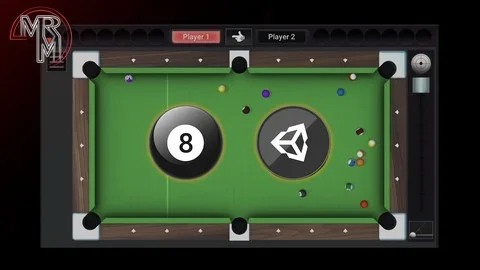
Making an AI Eight-Ball Pool Game in Unity focuses on a familiar gameplay space: a 3D pool table where the movement of each shot matters. The course is centered on creating publishable 3D physics-based mobile games, so the pool game becomes a practical way to work through motion, timing, and interaction in Unity. Rather than jumping straight to a finished game, it starts from the systems that make the table feel playable.
The workflow moves through adding game controls and adding physics, then returns to controls again in a second pass. That structure is useful for a pool project because cue control, ball response, and playability are tightly connected. The course also includes fine-tuning the physics settings to create realistic behavior, which is especially important in a game where small changes in speed or bounce can change the way a match reads on screen.
Building in layers instead of chasing the final scene at once
A notable part of the course is the emphasis on prototyping incrementally. For a developer, that means the pool game is approached as a series of small playable steps rather than one large build. The curriculum begins with an introduction and getting started, then moves into the pieces that make the game function: controls, physics, logic, and presentation.
That method works well for a project like an eight-ball pool game because each addition can be tested against the last. A basic table can become interactive before the visuals are fully tuned. The UI can be improved after the game logic is in place. Audio can be added once the core loop is already working. The course frames the build as a gradual process, which makes the project easier to shape into something playable instead of treating every part as a separate task.
UI, visuals, and feedback that support play
The course gives attention to the parts that help a mobile game read clearly in motion. It includes fine-tuning the visuals and the UI, improving the UI/UX, adding audio, and fine-tuning the graphics. For a pool game, these pieces matter because the player needs to understand the state of the table, the effect of each shot, and the result of each turn without confusion.
Because the project is aimed at mobile games, the presentation side is not just decorative. The UI has to support play on a smaller screen, while the visuals and audio help the table feel responsive. The course does not treat these elements as an afterthought; they appear alongside logic and physics as part of the full build process.
AI, ads, and the mobile release path
Another major thread is the addition of an AI player. The course specifically covers creating a reasonably challenging player AI and then adding an AI player to the project. In an eight-ball pool game, that gives the project a competitive structure that fits the overall goal of making a playable mobile game.
The release side is also part of the workflow. The curriculum includes building the game to Android and iOS, along with integrating ads into the Unity project. That combination places the course firmly in the mobile-game pipeline rather than only in a prototype stage. Developers looking to understand how a physics-based game can move toward a publishable form will find the structure especially relevant.
Adding an AI player
Integrating ads
Building the game to Android and iOS
A course path that stays practical from start to finish
The full curriculum shows how the project is organized: introduction, getting started, adding game controls, adding physics, adding game controls Pt. 2, fine-tuning the visuals and the UI, building the game to Android and iOS, adding game logic, improving the UI/UX, adding audio, adding an AI player, integrating ads, fine-tuning the graphics, and wrap up. For a developer, that path is useful because it does not isolate one discipline from another. Controls, physics, interface, AI, and release preparation all appear in the same build flow.
The course workload is 24h 7m and it is marked for all levels. That makes it a long-form guided project rather than a short demo walkthrough. The overall focus stays on transferable skills: planning a project, using prototyping to create games incrementally, applying realistic physics settings, and working through the steps needed for a 3D mobile game that can be taken toward release.
Where this project approach fits best
This is a good fit for developers who want to study how a compact game concept can be carried through a full Unity workflow. The eight-ball pool setup gives the course a clear gameplay identity, while the lessons around physics, AI, UI, audio, ads, and mobile builds make it useful beyond a single template. It is especially relevant if the goal is to understand how a physics-based game can be built in stages and prepared for Android and iOS without losing focus on playability.
 Unity
Unity Unity
Unity Unity
Unity Unity
Unity