"f813c18d2170b1f6"{"id":"24551","slug":"egg-snatchers-fun-local-multiplayer-game-in-unity-netcode","title":"Egg Snatchers - Fun Local Multiplayer Game in Unity Netcode","category":"Unity","engine":"Video language: English","assetVersion":"Video language: English","engineVersion":"File content: video + supporting files + English subtitles","tag":"Unity","accent":"cyan","visual":"luts","summary":"Egg Snatchers focuses on a local multiplayer game flow where players connect on the same network, move through shared scenes, and interact with systems like eggs, fills, powerups, and combat. It also folds in object-oriented principles, clean code, and Unit...","platform":"Unity","publishedAt":"2026-04-15T13:00:48.000Z","updatedAt":"2026-04-20T06:12:45.000Z","sourceNotes":[],"fileContents":[],"compatibility":["Unity","Video language: English","File content: video + supporting files + English subtitles"],"featuredImage":{"alt":"Egg Snatchers - Fun Local Multiplayer Game in Unity Netcode","src":"https://3dcghub.com/wp-content/uploads/2026/04/4ef93fa18069_6112557_404e_5.webp"},"hasDownloadLink":true,"downloads":0,"terms":[{"taxonomy":"category","slug":"tutoriallibrary-unity","name":"Unity"},{"taxonomy":"post_tag","slug":"animation","name":"Animation"},{"taxonomy":"post_tag","slug":"environment","name":"Environment"},{"taxonomy":"post_tag","slug":"unity","name":"Unity"}],"galleryImages":[],"accessPanel":{"kind":"video-resource","title":"Access this video resource","eyebrow":"Free Download","message":"Log in or create a free account to start your download.","fileName":"Egg Snatchers - Fun Local Multiplayer Game in Unity Netcode.rar","safetyNote":"All resources are 100% manually reviewed to eliminate all risks.","actionLabel":"Download Free","resourceType":"Video package"},"contentHtml":"\u003ch2\u003eA local multiplayer project with family-and-friends play in mind\u003c/h2\u003e\u003cp\u003eEgg Snatchers centers on the kind of game scene where local players can connect, jump into the action, and share the same play space with friends or family. The project is aimed at creating a fun local multiplayer game in Unity Netcode, with an emphasis on connecting to a local device after scanning the network. That makes it a practical fit for anyone who wants to work on a compact multiplayer setup instead of a broad, general-purpose framework.\u003c/p\u003e\u003cp\u003eThe course runs for 8h 49m and is marked at beginner level, so the pace stays tied to the core systems that make the game work. The focus is not only on getting players into the scene, but also on building the structure behind the scenes: clean code, reusable logic, and a clear approach to how different gameplay pieces connect.\u003c/p\u003e\u003cp\u003eAt the center of that setup is a local play experience that can support quick sessions and shared screen-style gameplay. The goal is simple and specific: create a unique local multiplayer game that can be played with people nearby, while learning how Unity Netcode for GameObjects fits into that workflow.\u003c/p\u003e\u003ch2\u003ePlayer control, animation, and camera work come first\u003c/h2\u003e\u003cp\u003eThe early part of the curriculum moves through the player controller and player animations, which gives the project a solid foundation before the larger systems appear. That matters in a local multiplayer game, where movement and animation need to feel readable as soon as players start interacting with the scene. The controller work is paired with some quick camera work, helping the game feel more put together before the more game-specific logic is added.\u003c/p\u003e\u003cp\u003eThis is also where the course leans into object-oriented programming principles and clean, reusable code. Those topics are listed as part of the learning path, and they shape how the project is approached from the start. Rather than treating gameplay as a collection of isolated scripts, the workflow points toward code that can be applied to other games as well.\u003c/p\u003e\u003cp\u003eFor learners who want more than a one-off prototype, that emphasis is useful. The player controller, animation setup, and camera adjustments are the kind of systems that often define whether a local multiplayer project feels responsive. Here, they are treated as core building blocks rather than side details.\u003c/p\u003e\u003ch2\u003eEgg logic, fills, powerups, and the gameâs main systems\u003c/h2\u003e\u003cp\u003eOnce the movement and presentation are in place, the project shifts into the gameâs central mechanics. The curriculum includes egg logic, general logic, the fill logic, and later a better fill management pass. Those names point to the main structure of the game itself, where different systems need to work together in a controlled way.\u003c/p\u003e\u003cp\u003ePowerups are also part of the project, adding another layer to the local multiplayer flow. They sit alongside the main mechanics rather than replacing them, which suggests a game loop that keeps players active while the core egg-related systems continue to drive the match. The inclusion of a combat system later in the curriculum adds even more interaction to the mix.\u003c/p\u003e\u003cp\u003eThe sequence of these topics is useful because it shows how the game grows in stages. After learning the network setup and basic player handling, the project moves into the logic that gives the game its identity. That includes the local scene, launching the game, and then a round of final core touches that refine how the systems work together.\u003c/p\u003e\u003cp\u003eFor someone trying to understand how a small multiplayer game is assembled, these pieces are the practical heart of the course. They show how a single project can move from control and presentation into a complete gameplay loop with fills, powerups, and combat layered on top.\u003c/p\u003e\u003ch2\u003eLocal netcode setup, scene flow, and the later polish passes\u003c/h2\u003e\u003cp\u003eUnity Netcode for local use is one of the clearest technical threads running through the curriculum. The course includes a netcode introduction and a section on learning how to set up Unity Netcode for local use, followed by learning how to scan the network and connect to a local device. That keeps the networking work grounded in the specific goal of local multiplayer, rather than drifting into unrelated online systems.\u003c/p\u003e\u003cp\u003eThe scene work continues with the local scene and launching the game, which are the practical steps that help the project move from pieces on a timeline into something usable. After that, the later sections add a better fill management pass, more camera work, improvements, and final core touches. Those topics suggest a process of tightening the game rather than leaving it at a rough stage.\u003c/p\u003e\u003cp\u003eThe curriculum also includes an extra section, AdMob, and a bonus section. Those entries appear after the main gameplay and polish topics, so the main project still remains focused on local multiplayer systems, player flow, and the gameâs core logic.\u003c/p\u003e\u003cp\u003eThis course fits learners who want a beginner-friendly path into Unity Netcode while also practicing object-oriented programming, clean code, and a complete local multiplayer loop. It is especially relevant for creators who want to make a game for family and friends and learn how the scene, logic, and network setup come together in one project.\u003c/p\u003e\n\n\u003ch2\u003eRelated Resources Worth Checking\u003c/h2\u003e\n\u003cul\u003e\n\u003cli\u003e\u003ca href=\"https://3dcghub.com/coding-in-unity-mastering-procedural-mesh-generation/\" title=\"Coding in Unity: Mastering Procedural Mesh Generation\"\u003eCoding in Unity: Mastering Procedural Mesh Generation\u003c/a\u003e\u003c/li\u003e\n\u003cli\u003e\u003ca href=\"https://3dcghub.com/build-a-poker-game-in-unity-complete-development-course/\" title=\"Build a Poker Game in Unity: Complete Development Course\"\u003eBuild a Poker Game in Unity: Complete Development Course\u003c/a\u003e\u003c/li\u003e\n\u003cli\u003e\u003ca href=\"https://3dcghub.com/make-a-match-three-puzzle-game-in-unity/\" title=\"Make a Match-Three Puzzle Game in Unity\"\u003eMake a Match-Three Puzzle Game in Unity\u003c/a\u003e\u003c/li\u003e\n\u003cli\u003e\u003ca href=\"https://3dcghub.com/making-an-ai-eight-ball-pool-game-in-unity/\" title=\"Making an AI Eight-Ball Pool Game in Unity\"\u003eMaking an AI Eight-Ball Pool Game in Unity\u003c/a\u003e\u003c/li\u003e\n\u003cli\u003e\u003ca href=\"https://3dcghub.com/the-complete-guide-to-unity-2d-platformer-development/\" title=\"The Complete Guide to Unity 2D : Platformer Development\"\u003eThe Complete Guide to Unity 2D : Platformer Development\u003c/a\u003e\u003c/li\u003e\n\u003c/ul\u003e","contentTextLength":5508,"navigation":{"current":1951,"total":3651,"previous":{"id":"24554","slug":"learn-how-to-create-a-2d-action-game-with-unity","title":"Learn how to create a 2D Action game with Unity","category":"Unity","platform":"Unity","updatedAt":"2026-04-20T06:12:45.000Z"},"next":{"id":"24548","slug":"coding-in-unity-mastering-procedural-mesh-generation","title":"Coding in Unity: Mastering Procedural Mesh Generation","category":"Unity","platform":"Unity","updatedAt":"2026-04-20T06:12:45.000Z"}},"relatedResources":[{"id":"24514","slug":"create-2d-multiplayer-game-with-photon-in-unity","title":"Create 2D Multiplayer Game with photon in unity","category":"Unity","engine":"Video language: English","assetVersion":"Video language: English","engineVersion":"File content: video + supporting files + English subtitles","tag":"Unity","accent":"cyan","visual":"mech","summary":"This Unity workflow follows the build of a 2D multiplayer game with Photon from the first menu screens through player setup, UI, enemies, and progression systems. It also includes mobile joystick support, game sound, and a range character type.","platform":"Unity","publishedAt":"2026-04-14T15:47:41.000Z","updatedAt":"2026-04-20T06:12:47.000Z","sourceNotes":[],"fileContents":[],"compatibility":["Unity","Video language: English","File content: video + supporting files + English subtitles"],"featuredImage":{"alt":"Create 2D Multiplayer Game with photon in unity","src":"https://3dcghub.com/wp-content/uploads/2026/04/d0bd75435e19_4751476_9c73.webp"},"hasDownloadLink":true,"downloads":1},{"id":"24474","slug":"make-a-multiplayer-game-in-unity","title":"Make a Multiplayer Game in Unity","category":"Unity","engine":"Video language: English","assetVersion":"Video language: English","engineVersion":"File content: video + supporting files + English subtitles","tag":"Unity","accent":"cyan","visual":"mech","summary":"This Unity course walks through building a multiplayer game that connects to Photon Unity Network, spawns players over a network, and keeps key stats synchronized. It also covers menus, game modes, multiple levels, and room handling in a single project flow.","platform":"Unity","publishedAt":"2026-04-14T12:09:26.000Z","updatedAt":"2026-04-20T06:12:48.000Z","sourceNotes":[],"fileContents":[],"compatibility":["Unity","Video language: English","File content: video + supporting files + English subtitles"],"featuredImage":{"alt":"Make a Multiplayer Game in Unity","src":"https://3dcghub.com/wp-content/uploads/2026/04/7d16db9eaddb_5539734_b95e.webp"},"hasDownloadLink":true,"downloads":0},{"id":"22374","slug":"tanks-multiplayer-netcode-photon","title":"Tanks Multiplayer (Netcode, Photon)","category":"Tutorials","engine":"Original Unity version: 6000.0.23","assetVersion":"Original Unity version: 6000.0.23","engineVersion":"Asset Version:1.7.1","tag":"Tutorials","accent":"cyan","visual":"city","summary":"This template provides a robust framework for fast-paced arena battles, offering developers a choice between multiple networking backends and offline AI functionality.","platform":"Unity","publishedAt":"2026-04-06T07:50:08.000Z","updatedAt":"2026-04-19T15:37:21.000Z","sourceNotes":[],"fileContents":[],"compatibility":["Unity","Original Unity version: 6000.0.23","Asset Version: 1.7.1"],"featuredImage":{"alt":"Tanks Multiplayer (Netcode, Photon)","src":"https://3dcghub.com/wp-content/uploads/2026/04/087231f2be0a_59698eae-d631-4117-aae9-3e260bc4b5bb_1280x720_stretch.webp"},"hasDownloadLink":true,"downloads":0}]}
Unity
Egg Snatchers - Fun Local Multiplayer Game in Unity Netcode
Egg Snatchers focuses on a local multiplayer game flow where players connect on the same network, move through shared scenes, and interact with systems like eggs, fills, powerups, and combat. It also folds in object-oriented principles, clean code, and Unit...
Category:UnityPlatform: UnityVideo language: EnglishFile content: video + supporting files + English subtitlesPublished: Apr 15, 2026Updated: Apr 20, 2026
Unity
Resource overview
A local multiplayer project with family-and-friends play in mind
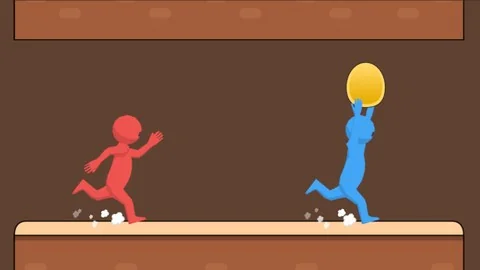
Egg Snatchers centers on the kind of game scene where local players can connect, jump into the action, and share the same play space with friends or family. The project is aimed at creating a fun local multiplayer game in Unity Netcode, with an emphasis on connecting to a local device after scanning the network. That makes it a practical fit for anyone who wants to work on a compact multiplayer setup instead of a broad, general-purpose framework.
The course runs for 8h 49m and is marked at beginner level, so the pace stays tied to the core systems that make the game work. The focus is not only on getting players into the scene, but also on building the structure behind the scenes: clean code, reusable logic, and a clear approach to how different gameplay pieces connect.
At the center of that setup is a local play experience that can support quick sessions and shared screen-style gameplay. The goal is simple and specific: create a unique local multiplayer game that can be played with people nearby, while learning how Unity Netcode for GameObjects fits into that workflow.
Player control, animation, and camera work come first
The early part of the curriculum moves through the player controller and player animations, which gives the project a solid foundation before the larger systems appear. That matters in a local multiplayer game, where movement and animation need to feel readable as soon as players start interacting with the scene. The controller work is paired with some quick camera work, helping the game feel more put together before the more game-specific logic is added.
This is also where the course leans into object-oriented programming principles and clean, reusable code. Those topics are listed as part of the learning path, and they shape how the project is approached from the start. Rather than treating gameplay as a collection of isolated scripts, the workflow points toward code that can be applied to other games as well.
For learners who want more than a one-off prototype, that emphasis is useful. The player controller, animation setup, and camera adjustments are the kind of systems that often define whether a local multiplayer project feels responsive. Here, they are treated as core building blocks rather than side details.
Egg logic, fills, powerups, and the gameâs main systems
Once the movement and presentation are in place, the project shifts into the gameâs central mechanics. The curriculum includes egg logic, general logic, the fill logic, and later a better fill management pass. Those names point to the main structure of the game itself, where different systems need to work together in a controlled way.
Powerups are also part of the project, adding another layer to the local multiplayer flow. They sit alongside the main mechanics rather than replacing them, which suggests a game loop that keeps players active while the core egg-related systems continue to drive the match. The inclusion of a combat system later in the curriculum adds even more interaction to the mix.
The sequence of these topics is useful because it shows how the game grows in stages. After learning the network setup and basic player handling, the project moves into the logic that gives the game its identity. That includes the local scene, launching the game, and then a round of final core touches that refine how the systems work together.
For someone trying to understand how a small multiplayer game is assembled, these pieces are the practical heart of the course. They show how a single project can move from control and presentation into a complete gameplay loop with fills, powerups, and combat layered on top.
Local netcode setup, scene flow, and the later polish passes
Unity Netcode for local use is one of the clearest technical threads running through the curriculum. The course includes a netcode introduction and a section on learning how to set up Unity Netcode for local use, followed by learning how to scan the network and connect to a local device. That keeps the networking work grounded in the specific goal of local multiplayer, rather than drifting into unrelated online systems.
The scene work continues with the local scene and launching the game, which are the practical steps that help the project move from pieces on a timeline into something usable. After that, the later sections add a better fill management pass, more camera work, improvements, and final core touches. Those topics suggest a process of tightening the game rather than leaving it at a rough stage.
The curriculum also includes an extra section, AdMob, and a bonus section. Those entries appear after the main gameplay and polish topics, so the main project still remains focused on local multiplayer systems, player flow, and the gameâs core logic.
This course fits learners who want a beginner-friendly path into Unity Netcode while also practicing object-oriented programming, clean code, and a complete local multiplayer loop. It is especially relevant for creators who want to make a game for family and friends and learn how the scene, logic, and network setup come together in one project.
 Unity
Unity Unity
Unity Unity
Unity Tutorials