"db867bbc47e6c7d0"{"id":"22374","slug":"tanks-multiplayer-netcode-photon","title":"Tanks Multiplayer (Netcode, Photon)","category":"Tutorials","engine":"Original Unity version: 6000.0.23","assetVersion":"Original Unity version: 6000.0.23","engineVersion":"Asset Version:1.7.1","tag":"Tutorials","accent":"cyan","visual":"city","summary":"This template provides a robust framework for fast-paced arena battles, offering developers a choice between multiple networking backends and offline AI functionality.","platform":"Unity","publishedAt":"2026-04-06T07:50:08.000Z","updatedAt":"2026-04-19T15:37:21.000Z","sourceNotes":[],"fileContents":[],"compatibility":["Unity","Original Unity version: 6000.0.23","Asset Version: 1.7.1"],"featuredImage":{"alt":"Tanks Multiplayer (Netcode, Photon)","src":"https://3dcghub.com/wp-content/uploads/2026/04/087231f2be0a_59698eae-d631-4117-aae9-3e260bc4b5bb_1280x720_stretch.webp"},"hasDownloadLink":true,"downloads":0,"terms":[{"taxonomy":"category","slug":"tutorials","name":"Tutorials"},{"taxonomy":"post_tag","slug":"templates","name":"Templates"},{"taxonomy":"post_tag","slug":"ui","name":"UI"},{"taxonomy":"post_tag","slug":"unity","name":"Unity"}],"galleryImages":[{"src":"https://3dcghub.com/wp-content/uploads/2026/04/1405e7a3936a_89c563a7-078d-43e1-b2a0-f64690a129cf_scaled.webp","alt":"Tanks Multiplayer (Netcode, Photon)"},{"src":"https://3dcghub.com/wp-content/uploads/2026/04/5551a327f38d_6ec13b4a-92ac-402a-a227-51a41f645f56_scaled.webp","alt":"Tanks Multiplayer (Netcode, Photon)"},{"src":"https://3dcghub.com/wp-content/uploads/2026/04/1ad45fbe903c_59880b70-4ba2-4657-a420-02efced932c0_scaled.webp","alt":"Tanks Multiplayer (Netcode, Photon)"},{"src":"https://3dcghub.com/wp-content/uploads/2026/04/5b08eb97eb27_d088ff1e-569c-4c32-b952-eacbd6d65fb9_scaled.webp","alt":"Tanks Multiplayer (Netcode, Photon)"},{"src":"https://3dcghub.com/wp-content/uploads/2026/04/b12d837cecdb_050f4d2e-8723-4882-bc88-ef32f204f09d_scaled.webp","alt":"Tanks Multiplayer (Netcode, Photon)"}],"accessPanel":{"kind":"resource","title":"Access this resource","eyebrow":"Free Download","message":"Log in or create a free account to start your download.","fileName":"Tanks Multiplayer Netcode Photon v1.7.1.7z","safetyNote":"All resources are 100% manually reviewed to eliminate all risks.","actionLabel":"Download Free","resourceType":"Resource archive"},"contentHtml":"\u003ch2\u003eSynchronized Arena Combat Mechanics\u003c/h2\u003e\n\nThe Tanks Multiplayer template is designed as a high-speed arena battle framework that supports up to 12 players per room. At its core, the system handles the complexities of real-time synchronization, ensuring that player movement, projectile fire, and health states remain consistent across all clients. For developers focusing on the flow of combat, the template includes a built-in Killcam system that shifts the camera perspective to follow the attacker upon a player's death, providing immediate feedback during gameplay.\n\nBeyond basic movement, the template manages the lifecycle of a match through automated systems. This includes synchronized player respawning and a character selection phase where model choices are updated across the network. To maintain competitive integrity in larger matches, an automatic team balancing system is included, which can distribute players across up to four distinct teams. These mechanics are supported by networked object pooling, an essential integration for managing high-frequency entities like bullets and collectible powerups without incurring the performance costs of constant instantiation and destruction.\n\n\u003ch2\u003eNetworking Architectures and Connectivity\u003c/h2\u003e\n\nOne of the primary features of this resource is its dual-backend compatibility. Developers have the choice between implementing Unity Netcode or Photon PUN2, allowing for flexibility based on specific project requirements or existing server infrastructure. The template covers a wide range of networking scenarios, from standard online matchmaking to specialized connection types. \n\nFor environments where a constant internet connection is not available, the package includes a local area network (LAN) mode supported by a local network discovery system. This allows devices on the same subnet to find and join games without external matchmaking services. Additionally, the template features host migration, which helps maintain game continuity if the original host disconnects. For testing or solo play, an offline mode is available that utilizes AI bots to simulate a multiplayer environment, ensuring the game is functional even in single-player contexts.\n\n\u003ch2\u003eGame Modes and Rulesets\u003c/h2\u003e\n\nThe framework comes pre-configured with two staple multiplayer modes: Team Deathmatch and Capture The Flag. These modes utilize the template's scoring systems to track player and team progress throughout a session. The logic for these modes is integrated with the team balancing and respawn systems, providing a structured environment for competitive play. \n\nInteraction within these modes is enhanced by various collectible powerups and different bullet types, which are synchronized across the network. This ensures that when a player picks up an item or changes their weapon state, the visual and functional effects are reflected for every other participant in the room. The inclusion of AI Navigation dependencies allows the bots to navigate these game modes intelligently, providing a consistent challenge in both offline and filled-out online matches.\n\n\u003ch2\u003eTechnical Integration and Pipeline Requirements\u003c/h2\u003e\n\nBuilt for modern Unity workflows, the template is fully compatible with the Universal Render Pipeline (URP). This ensures that the visual elements, including the 124 included assets, are optimized for performance across different hardware tiers. The template relies on several core Unity Package Manager dependencies to function, including the newer Input System for handling cross-platform controls and AI Navigation for bot pathfinding. \n\nFor the user interface, the system utilizes Unity UI and TextMeshPro, providing a clear and scalable display for scores, team status, and menus. The template is also prepared for mobile and desktop development, featuring dedicated input support for both platforms. Developers looking to extend the functionality of the template can refer to the extensive documentation and Scripting API hosted on GitLab, which explains various network approaches and implementation details. \n\n\u003ch2\u003eProject Structure and Compatibility\u003c/h2\u003e\n\nThe asset package, totaling approximately 10.8 MB, is structured to work with Unity version 6000.0.23 and above. It integrates with Unity Services, specifically providing hooks for In-App Purchases (IAP) and Ads, which are common requirements for mobile deployment. The resource is categorized as a tutorial-based template, emphasizing its role as an educational tool for understanding networked game logic. Through its step-by-step documentation, the template outlines how to manage complex networking tasks such as synchronized shots and state management, making it a functional starting point for arena-based multiplayer projects.\n\n\u003ch2\u003eRelated Resources Worth Checking\u003c/h2\u003e\n\u003cul\u003e\n\u003cli\u003e\u003ca href=\"https://3dcghub.com/sliding-puzzle-game-template/\" title=\"Sliding Puzzle Game Template\"\u003eSliding Puzzle Game Template\u003c/a\u003e\u003c/li\u003e\n\u003cli\u003e\u003ca href=\"https://3dcghub.com/universal-fighting-engine-2-pro/\" title=\"Universal Fighting Engine 2 (PRO)\"\u003eUniversal Fighting Engine 2 (PRO)\u003c/a\u003e\u003c/li\u003e\n\u003cli\u003e\u003ca href=\"https://3dcghub.com/turn-based-strategy-framework/\" title=\"Turn Based Strategy Framework\"\u003eTurn Based Strategy Framework\u003c/a\u003e\u003c/li\u003e\n\u003cli\u003e\u003ca href=\"https://3dcghub.com/train-controller-railroad-system-ultimate-collection/\" title=\"Train Controller (Railroad System) ULTIMATE COLLECTION\"\u003eTrain Controller (Railroad System) ULTIMATE COLLECTION\u003c/a\u003e\u003c/li\u003e\n\u003cli\u003e\u003ca href=\"https://3dcghub.com/topdown-engine/\" title=\"TopDown Engine\"\u003eTopDown Engine\u003c/a\u003e\u003c/li\u003e\n\u003c/ul\u003e","contentTextLength":4937,"navigation":{"current":3247,"total":3444,"previous":{"id":"22324","slug":"topdown-engine","title":"TopDown Engine","category":"Systems","platform":"Unity","updatedAt":"2026-04-19T15:37:22.000Z"},"next":{"id":"22366","slug":"sliding-puzzle-game-template","title":"Sliding Puzzle Game Template","category":"Tutorials","platform":"Unity","updatedAt":"2026-04-19T15:37:21.000Z"}},"relatedResources":[{"id":"24514","slug":"create-2d-multiplayer-game-with-photon-in-unity","title":"Create 2D Multiplayer Game with photon in unity","category":"Unity","engine":"Video language: English","assetVersion":"Video language: English","engineVersion":"File content: video + supporting files + English subtitles","tag":"Unity","accent":"cyan","visual":"mech","summary":"This Unity workflow follows the build of a 2D multiplayer game with Photon from the first menu screens through player setup, UI, enemies, and progression systems. It also includes mobile joystick support, game sound, and a range character type.","platform":"Unity","publishedAt":"2026-04-14T15:47:41.000Z","updatedAt":"2026-04-20T06:12:47.000Z","sourceNotes":[],"fileContents":[],"compatibility":["Unity","Video language: English","File content: video + supporting files + English subtitles"],"featuredImage":{"alt":"Create 2D Multiplayer Game with photon in unity","src":"https://3dcghub.com/wp-content/uploads/2026/04/d0bd75435e19_4751476_9c73.webp"},"hasDownloadLink":true,"downloads":1},{"id":"24474","slug":"make-a-multiplayer-game-in-unity","title":"Make a Multiplayer Game in Unity","category":"Unity","engine":"Video language: English","assetVersion":"Video language: English","engineVersion":"File content: video + supporting files + English subtitles","tag":"Unity","accent":"cyan","visual":"mech","summary":"This Unity course walks through building a multiplayer game that connects to Photon Unity Network, spawns players over a network, and keeps key stats synchronized. It also covers menus, game modes, multiple levels, and room handling in a single project flow.","platform":"Unity","publishedAt":"2026-04-14T12:09:26.000Z","updatedAt":"2026-04-20T06:12:48.000Z","sourceNotes":[],"fileContents":[],"compatibility":["Unity","Video language: English","File content: video + supporting files + English subtitles"],"featuredImage":{"alt":"Make a Multiplayer Game in Unity","src":"https://3dcghub.com/wp-content/uploads/2026/04/7d16db9eaddb_5539734_b95e.webp"},"hasDownloadLink":true,"downloads":0},{"id":"24551","slug":"egg-snatchers-fun-local-multiplayer-game-in-unity-netcode","title":"Egg Snatchers - Fun Local Multiplayer Game in Unity Netcode","category":"Unity","engine":"Video language: English","assetVersion":"Video language: English","engineVersion":"File content: video + supporting files + English subtitles","tag":"Unity","accent":"cyan","visual":"luts","summary":"Egg Snatchers focuses on a local multiplayer game flow where players connect on the same network, move through shared scenes, and interact with systems like eggs, fills, powerups, and combat. It also folds in object-oriented principles, clean code, and Unit...","platform":"Unity","publishedAt":"2026-04-15T13:00:48.000Z","updatedAt":"2026-04-20T06:12:45.000Z","sourceNotes":[],"fileContents":[],"compatibility":["Unity","Video language: English","File content: video + supporting files + English subtitles"],"featuredImage":{"alt":"Egg Snatchers - Fun Local Multiplayer Game in Unity Netcode","src":"https://3dcghub.com/wp-content/uploads/2026/04/4ef93fa18069_6112557_404e_5.webp"},"hasDownloadLink":true,"downloads":0}]}
Tutorials
Tanks Multiplayer (Netcode, Photon)
This template provides a robust framework for fast-paced arena battles, offering developers a choice between multiple networking backends and offline AI functionality.
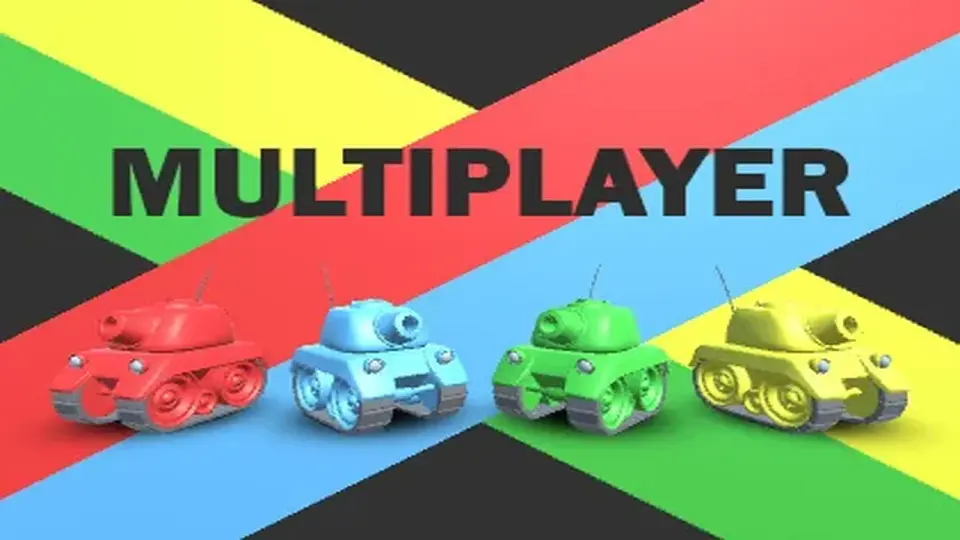
The Tanks Multiplayer template is designed as a high-speed arena battle framework that supports up to 12 players per room. At its core, the system handles the complexities of real-time synchronization, ensuring that player movement, projectile fire, and health states remain consistent across all clients. For developers focusing on the flow of combat, the template includes a built-in Killcam system that shifts the camera perspective to follow the attacker upon a player's death, providing immediate feedback during gameplay.
Beyond basic movement, the template manages the lifecycle of a match through automated systems. This includes synchronized player respawning and a character selection phase where model choices are updated across the network. To maintain competitive integrity in larger matches, an automatic team balancing system is included, which can distribute players across up to four distinct teams. These mechanics are supported by networked object pooling, an essential integration for managing high-frequency entities like bullets and collectible powerups without incurring the performance costs of constant instantiation and destruction.
Networking Architectures and Connectivity
One of the primary features of this resource is its dual-backend compatibility. Developers have the choice between implementing Unity Netcode or Photon PUN2, allowing for flexibility based on specific project requirements or existing server infrastructure. The template covers a wide range of networking scenarios, from standard online matchmaking to specialized connection types.
For environments where a constant internet connection is not available, the package includes a local area network (LAN) mode supported by a local network discovery system. This allows devices on the same subnet to find and join games without external matchmaking services. Additionally, the template features host migration, which helps maintain game continuity if the original host disconnects. For testing or solo play, an offline mode is available that utilizes AI bots to simulate a multiplayer environment, ensuring the game is functional even in single-player contexts.
Game Modes and Rulesets
The framework comes pre-configured with two staple multiplayer modes: Team Deathmatch and Capture The Flag. These modes utilize the template's scoring systems to track player and team progress throughout a session. The logic for these modes is integrated with the team balancing and respawn systems, providing a structured environment for competitive play.
Interaction within these modes is enhanced by various collectible powerups and different bullet types, which are synchronized across the network. This ensures that when a player picks up an item or changes their weapon state, the visual and functional effects are reflected for every other participant in the room. The inclusion of AI Navigation dependencies allows the bots to navigate these game modes intelligently, providing a consistent challenge in both offline and filled-out online matches.
Technical Integration and Pipeline Requirements
Built for modern Unity workflows, the template is fully compatible with the Universal Render Pipeline (URP). This ensures that the visual elements, including the 124 included assets, are optimized for performance across different hardware tiers. The template relies on several core Unity Package Manager dependencies to function, including the newer Input System for handling cross-platform controls and AI Navigation for bot pathfinding.
For the user interface, the system utilizes Unity UI and TextMeshPro, providing a clear and scalable display for scores, team status, and menus. The template is also prepared for mobile and desktop development, featuring dedicated input support for both platforms. Developers looking to extend the functionality of the template can refer to the extensive documentation and Scripting API hosted on GitLab, which explains various network approaches and implementation details.
Project Structure and Compatibility
The asset package, totaling approximately 10.8 MB, is structured to work with Unity version 6000.0.23 and above. It integrates with Unity Services, specifically providing hooks for In-App Purchases (IAP) and Ads, which are common requirements for mobile deployment. The resource is categorized as a tutorial-based template, emphasizing its role as an educational tool for understanding networked game logic. Through its step-by-step documentation, the template outlines how to manage complex networking tasks such as synchronized shots and state management, making it a functional starting point for arena-based multiplayer projects.
 Tutorials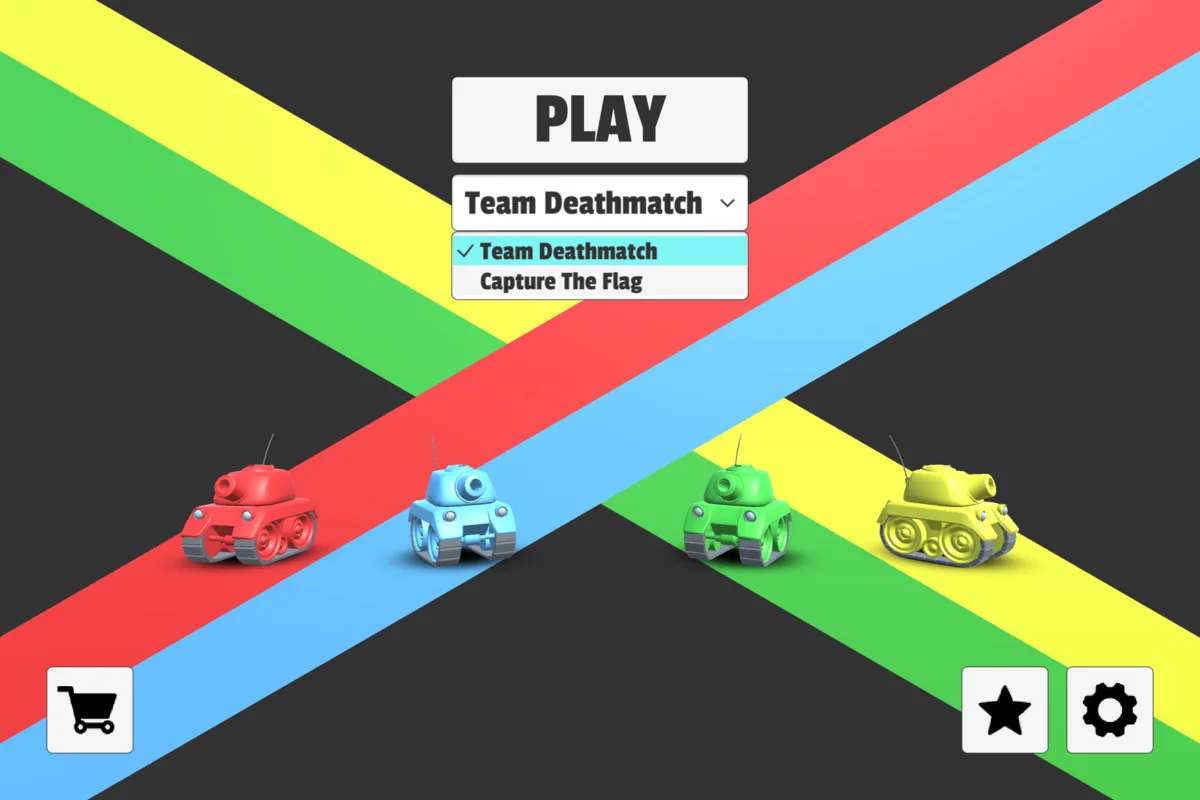
 Unity
Unity Unity
Unity Unity
Unity