"c14ff6bd758dadb1"{"id":"24746","slug":"particle-rings","title":"Particle Rings","category":"Variety","engine":"4.27,5.0+","assetVersion":"Engine version: 4.27,5.0+","engineVersion":"","tag":"Variety","accent":"blue","visual":"animation","summary":"Particle Rings centers on Niagara-based ring effects with broad control through 17 custom attributes. The effects are optimized and loop continuously, making them a practical fit for repeating visual moments in scenes or gameplay.","platform":"Unreal Engine","publishedAt":"2026-04-16T17:33:11.000Z","updatedAt":"2026-04-20T06:12:38.000Z","sourceNotes":[],"fileContents":[],"compatibility":["Unreal Engine","Engine version: 4.27,5.0+"],"featuredImage":{"alt":"Particle Rings","src":"https://3dcghub.com/wp-content/uploads/2026/04/17afd6cdc66c_ebe96c3b-dcfc-4acd-8d8d-48b994cf06be.webp"},"hasDownloadLink":true,"downloads":0,"terms":[{"taxonomy":"category","slug":"variety-vfx","name":"Variety"},{"taxonomy":"post_tag","slug":"characters","name":"Characters"},{"taxonomy":"post_tag","slug":"environment","name":"Environment"},{"taxonomy":"post_tag","slug":"vfx","name":"VFX"}],"galleryImages":[{"src":"https://3dcghub.com/wp-content/uploads/2026/04/ba916e26bd4f_c6ba2bee-5e2c-430d-ae43-b7b28cca9eb8.webp","alt":"Particle Rings"},{"src":"https://3dcghub.com/wp-content/uploads/2026/04/8d2a10697b3a_fc97c874-dfdb-4809-82c7-adca17fb6af2.webp","alt":"Particle Rings"},{"src":"https://3dcghub.com/wp-content/uploads/2026/04/1ed447dc8ad2_0e77b745-8e13-4aa4-9bc0-f3049f2f6430.webp","alt":"Particle Rings"},{"src":"https://3dcghub.com/wp-content/uploads/2026/04/2d6ef5054c46_d2761771-3f50-4f94-8ec4-58d290a0b088.webp","alt":"Particle Rings"},{"src":"https://3dcghub.com/wp-content/uploads/2026/04/1fcb5afe929a_ea4abc9e-598e-46a9-b76e-355d2cc207a0.webp","alt":"Particle Rings"},{"src":"https://3dcghub.com/wp-content/uploads/2026/04/75a1f537efa1_afa6698e-f8de-4a1d-b636-7a21383d32d2.webp","alt":"Particle Rings"},{"src":"https://3dcghub.com/wp-content/uploads/2026/04/11568bff583b_30c6b23d-8418-47c2-acc3-60e537be686d.webp","alt":"Particle Rings"},{"src":"https://3dcghub.com/wp-content/uploads/2026/04/abd4662d51ef_d135170a-a618-4968-a04c-ab8c1d4d5b40.webp","alt":"Particle Rings"},{"src":"https://3dcghub.com/wp-content/uploads/2026/04/9bf24e0da3b6_6713d80b-7bb8-41b0-b123-35426d303307.webp","alt":"Particle Rings"},{"src":"https://3dcghub.com/wp-content/uploads/2026/04/c54ea28e7d9e_b30cf206-a8e2-4339-9d87-d4b410a6384a.webp","alt":"Particle Rings"}],"accessPanel":{"kind":"resource","title":"Access this resource","eyebrow":"Free Download","message":"Log in or create a free account to start your download.","fileName":"Content.7z","safetyNote":"All resources are 100% manually reviewed to eliminate all risks.","actionLabel":"Download Free","resourceType":"Resource archive"},"contentHtml":"\u003ch2\u003eNiagara-based particle rings\u003c/h2\u003e\u003cp\u003eParticle Rings brings together ring-shaped visual effects created in Niagara, with the focus kept on the motion and appearance of the rings themselves. The package is built around a clear visual idea: layered particle rings that can read as bright, colorful, magical, or even more grounded depending on how they are used in a scene.\u003c/p\u003e\u003cp\u003eThat makes the asset easy to think about in terms of moments rather than just standalone effects. A ring can frame an object, mark a transition, signal a teleport event, or sit in the background as a repeating visual accent. Because the effects are ring-based, they naturally lend themselves to circular motion, center-focused compositions, and scenes where a visual pulse needs to feel contained and readable.\u003c/p\u003e\u003ch2\u003e17 custom attributes for broad control\u003c/h2\u003e\u003cp\u003eA major part of the setup is the set of 17 custom attributes, which are there to control almost everything about the effect. That level of control gives the rings room to shift within a project without needing a completely different effect for every use case. Instead of treating each ring as fixed, the attributes make the effect feel adjustable at the level of color, timing, shape behavior, and presentation in a broader creative sense.\u003c/p\u003e\u003cp\u003eFor artists, that kind of control is useful when one visual needs to serve several roles. A ring effect can be pushed toward a bright magical look for one scene, then adjusted into something more portal-like or teleport-focused in another. The assetâs own tags point to that range clearly: visual, bright, customizable, colorful, time, effect, fantasy, real, portal, teleport, magical, particle, vortex, and customization. Those labels fit the way the package is positioned, with flexibility at the center of the workflow.\u003c/p\u003e\u003ch3\u003eWhat that flexibility supports\u003c/h3\u003e\u003cul\u003e\u003cli\u003eRepeated ring moments that need variation without changing the core effect\u003c/li\u003e\u003cli\u003eScene accents that rely on color and brightness to stand out\u003c/li\u003e\u003cli\u003eMagic or fantasy visuals where circular motion helps define the effect\u003c/li\u003e\u003cli\u003eTeleport or portal beats where a ring can serve as the visual anchor\u003c/li\u003e\u003cli\u003eVortex-like motion where the ring shape carries the movement\u003c/li\u003e\u003c/ul\u003e\u003ch2\u003eOptimized and set to loop continuously\u003c/h2\u003e\u003cp\u003eThe effects are optimized and loop continuously, which gives them a practical role in projects where the same visual needs to appear more than once or stay active for longer stretches. Continuous looping matters for effects that need to hold a space visually instead of appearing only once and disappearing. That can be especially useful for ambient energy, ongoing spell effects, repeated gameplay signals, or any scene where the ring needs to maintain its presence.\u003c/p\u003e\u003cp\u003eOptimization also points to a setup that is meant to be used directly rather than treated as a one-off showcase piece. When an effect is already arranged to loop continuously, it can sit in a scene as a stable visual element. That makes it easier to think about the rings as part of a larger composition, where the effect supports timing, atmosphere, or action without needing constant manual resets.\u003c/p\u003e\u003ch2\u003eHow the ring style can fit scenes and gameplay\u003c/h2\u003e\u003cp\u003eBecause the package is focused on rings, it naturally fits moments where a clear circular cue is helpful. A portal can be framed by a ring. A teleport event can be marked by one. A magical cast can build around one. A vortex can be suggested through the same ring language. The asset does not need to change its identity to cover those situations; the ring form already carries a strong visual signal that can be adapted through the available attributes.\u003c/p\u003e\u003cp\u003eThe âbrightâ and âcolorfulâ character also matters. A bright ring tends to hold attention quickly, which is helpful in fast-moving gameplay scenes or stylized visuals where the effect should be readable at a glance. Color gives the ring more room to blend into a fantasy setting, while still keeping enough contrast to stand out as a distinct effect. That balance makes the package useful in both expressive and functional contexts.\u003c/p\u003e\u003cp\u003eThere is also a direct link between the ring shape and the idea of time-based motion. The tags include time as one of the identified qualities, and that fits the way a looping effect works in practice. A ring can build, pulse, hold, or repeat without losing its central form. That gives the creator space to use the effect as a beat in an animation or as a visual loop that stays present throughout a scene.\u003c/p\u003e\u003ch2\u003eA practical fit for repeated visual moments\u003c/h2\u003e\u003cp\u003eParticle Rings is set up for creators who want a controllable circular effect with a clear visual identity and a looping behavior that keeps it usable in active scenes. The Niagara setup, the 17 custom attributes, and the continuous loop all point in the same direction: a particle effect that can be adjusted, reused, and kept active without losing its core shape.\u003c/p\u003e\u003cp\u003eFor projects that need a ring to do more than sit in the background, that combination gives the effect a clear role. It can mark a portal, support a teleport sequence, reinforce a magical moment, or add a bright vortex-like accent while staying consistent from one use to the next.\u003c/p\u003e\n\n\u003ch2\u003eExplore Similar Assets\u003c/h2\u003e\n\u003cul\u003e\n\u003cli\u003e\u003ca href=\"https://3dcghub.com/unreal-engine-5-one-course-solution-for-niagara-vfx/\" title=\"Unreal Engine 5: One Course Solution For Niagara VFX\"\u003eUnreal Engine 5: One Course Solution For Niagara VFX\u003c/a\u003e\u003c/li\u003e\n\u003cli\u003e\u003ca href=\"https://3dcghub.com/vfx-graph-level-up-effects-vol-1/\" title=\"VFX Graph – Level Up Effects – Vol. 1\"\u003eVFX Graph – Level Up Effects – Vol. 1\u003c/a\u003e\u003c/li\u003e\n\u003cli\u003e\u003ca href=\"https://3dcghub.com/stylized-vfx/\" title=\"Stylized VFX\"\u003eStylized VFX\u003c/a\u003e\u003c/li\u003e\n\u003cli\u003e\u003ca href=\"https://3dcghub.com/uni-vfx-ultimate-pack-for-visual-effect-graph/\" title=\"UNI VFX: Ultimate pack for Visual Effect Graph\"\u003eUNI VFX: Ultimate pack for Visual Effect Graph\u003c/a\u003e\u003c/li\u003e\n\u003cli\u003e\u003ca href=\"https://3dcghub.com/slash-barrage-wave-vfx/\" title=\"Slash Barrage Wave VFX\"\u003eSlash Barrage Wave VFX\u003c/a\u003e\u003c/li\u003e\n\u003c/ul\u003e\n\n\u003ch2\u003eAsset Gallery\u003c/h2\u003e","contentTextLength":5325,"navigation":{"current":2051,"total":3719,"previous":{"id":"24757","slug":"military-animation-pack-i-unarmed","title":"Military Animation Pack I (Unarmed)","category":"Variety","platform":"Unreal Engine","updatedAt":"2026-04-20T06:12:38.000Z"},"next":{"id":"24733","slug":"post-apocalyptic-melee-weapons","title":"Post Apocalyptic Melee Weapons","category":"Weapons \u0026 Combat","platform":"Unreal Engine","updatedAt":"2026-04-20T06:12:38.000Z"}},"relatedResources":[{"id":"17417","slug":"ring-aura-vfx","title":"Ring Aura VFX","category":"Variety","engine":"5.0+","assetVersion":"Engine version: 5.0+","engineVersion":"5.0","tag":"Variety","accent":"blue","visual":"animation","summary":"Enhance your project with Ring Aura VFX, a collection of 20 unique and high-quality visual effects. These assets are optimized for efficiency and offer easy customization without requiring deep knowledge of the Niagara System.","platform":"Unreal Engine","publishedAt":"2026-03-13T14:31:52.000Z","updatedAt":"2026-04-19T15:43:32.000Z","sourceNotes":[],"fileContents":[],"compatibility":["Unreal Engine","Engine version: 5.0+"],"featuredImage":{"alt":"Ring Aura VFX","src":"https://3dcghub.com/wp-content/uploads/2026/03/21a4270e-5f24-45c0-bfd5-eabf331aad3f.webp"},"hasDownloadLink":true,"downloads":2},{"id":"17185","slug":"lightning-electricity-vfx-pack","title":"Lightning / Electricity VFX Pack","category":"Variety","engine":"4.26+,5.0+","assetVersion":"Engine version: 4.26+,5.0+","engineVersion":"4.24","tag":"Variety","accent":"blue","visual":"city","summary":"Enhance your project with the Lightning / Electricity VFX Pack, a versatile collection of Niagara effects ranging from electric arcs to storms. This pack includes turnkey examples and VR-optimized maps for high-performance development.","platform":"Unreal Engine","publishedAt":"2026-03-13T13:55:56.000Z","updatedAt":"2026-04-19T15:43:36.000Z","sourceNotes":[],"fileContents":[],"compatibility":["Unreal Engine","Engine version: 4.26+,5.0+"],"featuredImage":{"alt":"Lightning / Electricity VFX Pack","src":"https://3dcghub.com/wp-content/uploads/2026/03/7fdd3a51-39bb-4954-9f95-8abd86e3500c.webp"},"hasDownloadLink":true,"downloads":3},{"id":"28427","slug":"500-ultimate-luts-pack-post-processing-filters","title":"500+ Ultimate LUTs Pack - Post-Processing Filters","category":"Variety","engine":"4.26+,5.0+","assetVersion":"Engine version: 4.26+,5.0+","engineVersion":"","tag":"Variety","accent":"blue","visual":"luts","summary":"500+ Ultimate LUTs Pack - Post-Processing Filters centers on quick color grading with a wide range of preset looks. The collection covers warm, dramatic, vintage, cinematic, and correction-focused LUT groups that can be applied in only a few clicks.","platform":"Unreal Engine","publishedAt":"2026-05-15T16:25:21.000Z","updatedAt":"2026-05-15T16:51:07.000Z","sourceNotes":[],"fileContents":[],"compatibility":["Unreal Engine","Engine version: 4.26+,5.0+"],"featuredImage":{"alt":"500+ Ultimate LUTs Pack - Post-Processing Filters","src":"https://3dcghub.com/wp-content/uploads/2026/05/0f800e413d24_9e5acf1b-7c72-4a81-a7ea-a91a846cc9be.webp"},"hasDownloadLink":true,"downloads":0}]}
Variety
Particle Rings
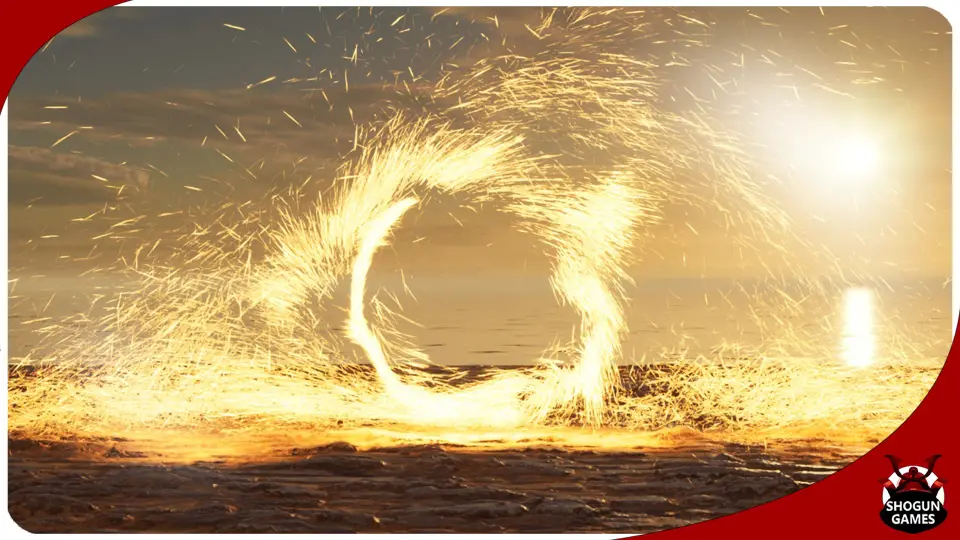
Particle Rings centers on Niagara-based ring effects with broad control through 17 custom attributes. The effects are optimized and loop continuously, making them a practical fit for repeating visual moments in scenes or gameplay.
Particle Rings brings together ring-shaped visual effects created in Niagara, with the focus kept on the motion and appearance of the rings themselves. The package is built around a clear visual idea: layered particle rings that can read as bright, colorful, magical, or even more grounded depending on how they are used in a scene.
That makes the asset easy to think about in terms of moments rather than just standalone effects. A ring can frame an object, mark a transition, signal a teleport event, or sit in the background as a repeating visual accent. Because the effects are ring-based, they naturally lend themselves to circular motion, center-focused compositions, and scenes where a visual pulse needs to feel contained and readable.
17 custom attributes for broad control
A major part of the setup is the set of 17 custom attributes, which are there to control almost everything about the effect. That level of control gives the rings room to shift within a project without needing a completely different effect for every use case. Instead of treating each ring as fixed, the attributes make the effect feel adjustable at the level of color, timing, shape behavior, and presentation in a broader creative sense.
For artists, that kind of control is useful when one visual needs to serve several roles. A ring effect can be pushed toward a bright magical look for one scene, then adjusted into something more portal-like or teleport-focused in another. The assetâs own tags point to that range clearly: visual, bright, customizable, colorful, time, effect, fantasy, real, portal, teleport, magical, particle, vortex, and customization. Those labels fit the way the package is positioned, with flexibility at the center of the workflow.
What that flexibility supports
Repeated ring moments that need variation without changing the core effect
Scene accents that rely on color and brightness to stand out
Magic or fantasy visuals where circular motion helps define the effect
Teleport or portal beats where a ring can serve as the visual anchor
Vortex-like motion where the ring shape carries the movement
Optimized and set to loop continuously
The effects are optimized and loop continuously, which gives them a practical role in projects where the same visual needs to appear more than once or stay active for longer stretches. Continuous looping matters for effects that need to hold a space visually instead of appearing only once and disappearing. That can be especially useful for ambient energy, ongoing spell effects, repeated gameplay signals, or any scene where the ring needs to maintain its presence.
Optimization also points to a setup that is meant to be used directly rather than treated as a one-off showcase piece. When an effect is already arranged to loop continuously, it can sit in a scene as a stable visual element. That makes it easier to think about the rings as part of a larger composition, where the effect supports timing, atmosphere, or action without needing constant manual resets.
How the ring style can fit scenes and gameplay
Because the package is focused on rings, it naturally fits moments where a clear circular cue is helpful. A portal can be framed by a ring. A teleport event can be marked by one. A magical cast can build around one. A vortex can be suggested through the same ring language. The asset does not need to change its identity to cover those situations; the ring form already carries a strong visual signal that can be adapted through the available attributes.
The âbrightâ and âcolorfulâ character also matters. A bright ring tends to hold attention quickly, which is helpful in fast-moving gameplay scenes or stylized visuals where the effect should be readable at a glance. Color gives the ring more room to blend into a fantasy setting, while still keeping enough contrast to stand out as a distinct effect. That balance makes the package useful in both expressive and functional contexts.
There is also a direct link between the ring shape and the idea of time-based motion. The tags include time as one of the identified qualities, and that fits the way a looping effect works in practice. A ring can build, pulse, hold, or repeat without losing its central form. That gives the creator space to use the effect as a beat in an animation or as a visual loop that stays present throughout a scene.
A practical fit for repeated visual moments
Particle Rings is set up for creators who want a controllable circular effect with a clear visual identity and a looping behavior that keeps it usable in active scenes. The Niagara setup, the 17 custom attributes, and the continuous loop all point in the same direction: a particle effect that can be adjusted, reused, and kept active without losing its core shape.
For projects that need a ring to do more than sit in the background, that combination gives the effect a clear role. It can mark a portal, support a teleport sequence, reinforce a magical moment, or add a bright vortex-like accent while staying consistent from one use to the next.
 Variety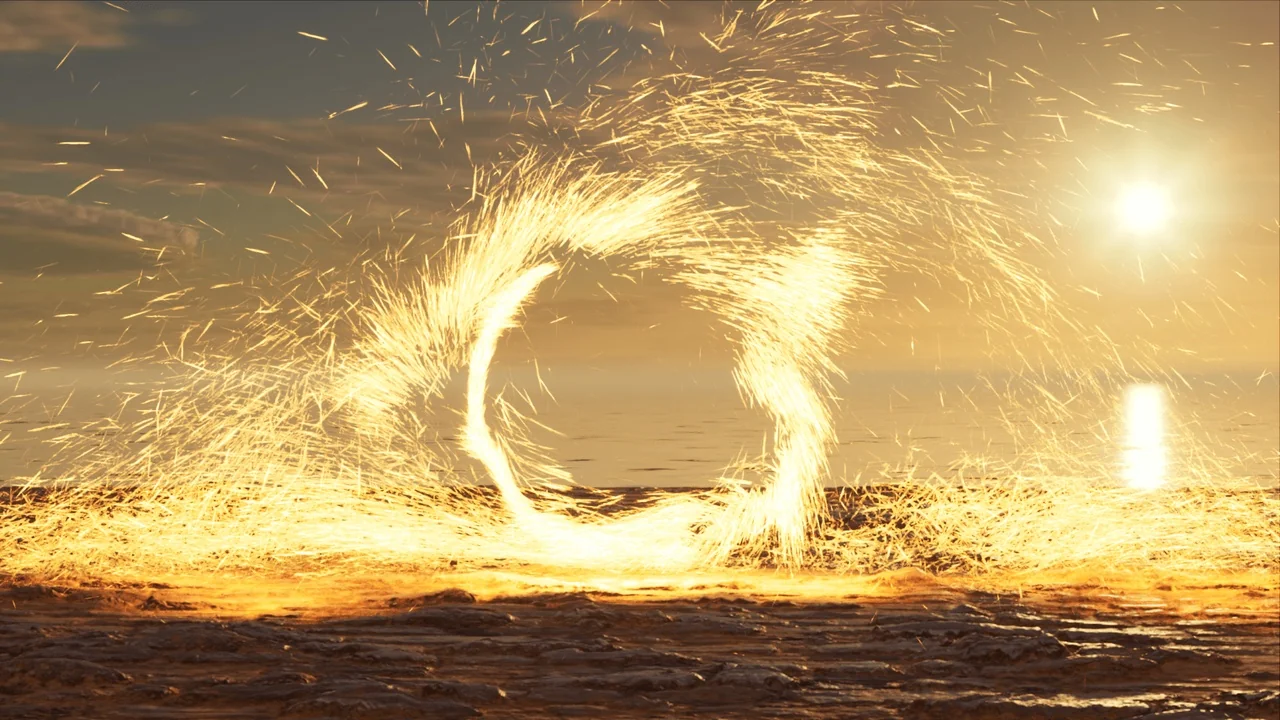
 Variety
 Variety
 Variety