"f813c18d2170b1f6"{"id":"24458","slug":"vfx-graph-level-up-effects-vol-1","title":"VFX Graph - Level Up Effects - Vol. 1","category":"VFX","engine":"Original Unity version: 2021.3.45","assetVersion":"Original Unity version: 2021.3.45","engineVersion":"Asset Version:1.0","tag":"VFX","accent":"cyan","visual":"city","summary":"This package focuses on level-up moments for characters using skinned mesh renderers in Unity. It includes 12 effects made with Visual Effect Graph, plus a glow shader and documentation, with URP and HDRP support.","platform":"Unity","publishedAt":"2026-04-14T12:01:58.000Z","updatedAt":"2026-04-20T06:12:48.000Z","sourceNotes":[],"fileContents":[],"compatibility":["Unity","Original Unity version: 2021.3.45","Asset Version: 1.0"],"featuredImage":{"alt":"VFX Graph - Level Up Effects - Vol. 1","src":"https://3dcghub.com/wp-content/uploads/2026/04/88e9415586c8_650b2f48-cf39-4f16-abe5-ef1ce3f22413_1280x720_stretch.webp"},"hasDownloadLink":true,"downloads":1,"terms":[{"taxonomy":"category","slug":"vfx-unity-2","name":"VFX"},{"taxonomy":"post_tag","slug":"environment","name":"Environment"},{"taxonomy":"post_tag","slug":"unity","name":"Unity"},{"taxonomy":"post_tag","slug":"vfx","name":"VFX"}],"galleryImages":[{"src":"https://3dcghub.com/wp-content/uploads/2026/04/056c11a5058e_4f33f5d1-ce2f-4014-a8e4-5ee77946e3a1_scaled.webp","alt":"VFX Graph - Level Up Effects - Vol. 1"},{"src":"https://3dcghub.com/wp-content/uploads/2026/04/ae0f9e32d54b_c7a3229d-d62b-4001-9f50-53291b3ad9c9_scaled.webp","alt":"VFX Graph - Level Up Effects - Vol. 1"},{"src":"https://3dcghub.com/wp-content/uploads/2026/04/6f2e449e81cb_0b38a27b-bc9f-4b23-8344-13c2013f3bfe_scaled.webp","alt":"VFX Graph - Level Up Effects - Vol. 1"},{"src":"https://3dcghub.com/wp-content/uploads/2026/04/f1ead63a724c_e217a248-3206-423b-80ba-eb7cece9a21b_scaled.webp","alt":"VFX Graph - Level Up Effects - Vol. 1"},{"src":"https://3dcghub.com/wp-content/uploads/2026/04/ad9c03f27fca_acaafe61-7890-4987-b49e-db4a86fd22e9_scaled.webp","alt":"VFX Graph - Level Up Effects - Vol. 1"},{"src":"https://3dcghub.com/wp-content/uploads/2026/04/6641c5aa61cd_2c33683e-570e-45ae-9d3b-bbf342b02292_scaled.webp","alt":"VFX Graph - Level Up Effects - Vol. 1"},{"src":"https://3dcghub.com/wp-content/uploads/2026/04/86c4c62beae8_35409da4-13a7-4fe0-a5e4-6909da459475_scaled.webp","alt":"VFX Graph - Level Up Effects - Vol. 1"},{"src":"https://3dcghub.com/wp-content/uploads/2026/04/45f806000c91_ad1c3d88-68e6-4e0d-ab64-fcd22797f757_scaled.webp","alt":"VFX Graph - Level Up Effects - Vol. 1"},{"src":"https://3dcghub.com/wp-content/uploads/2026/04/bbbf92d181e0_e8e67915-f12b-4c89-8644-1f4784019fff_scaled.webp","alt":"VFX Graph - Level Up Effects - Vol. 1"},{"src":"https://3dcghub.com/wp-content/uploads/2026/04/e45218300e76_69d3bcb3-bd59-4ebe-a775-925b3951311a_scaled.webp","alt":"VFX Graph - Level Up Effects - Vol. 1"}],"accessPanel":{"kind":"resource","title":"Access this resource","eyebrow":"Free Download","message":"Log in or create a free account to start your download.","fileName":"VFX Graph - Level Up Effects - Vol 1 v1.0.7z","safetyNote":"All resources are 100% manually reviewed to eliminate all risks.","actionLabel":"Download Free","resourceType":"Resource archive"},"contentHtml":"\u003ch2\u003eCharacter upgrades that read clearly on skinned meshes\u003c/h2\u003e\u003cp\u003e\u003cstrong\u003eVFX Graph - Level Up Effects - Vol. 1\u003c/strong\u003e Focuses on one specific kind of gameplay moment: the visual cue that tells players a character has gained a level, powered up, or unlocked a new ability. The effects are made entirely with Visual Effect Graph and are intended for skinned mesh renderer setups, which makes the package relevant for character-driven scenes instead of broad environment decoration.\u003c/p\u003e\u003cp\u003eThe collection sits inside \u003cem\u003eVFX Graph - Mega Pack - Vol. 4\u003c/em\u003e, but it also stands on its own as a compact set of level-up visuals. That makes it useful when a project needs a focused effect library for RPG-style progression, skill unlocks, ability feedback, or other character upgrades where the effect needs to attach to a living model rather than a static prop.\u003c/p\u003e\u003ch2\u003eWhat is included for implementation\u003c/h2\u003e\u003cp\u003eThe package includes 12 level up effects, along with 2 customizable VFX Graph setups. A Glow Shader is also part of the package, which adds another layer for projects that want a brighter outline or accent around the effect. Documentation is included as well, giving the package a clearer starting point for setup and use inside Unity.\u003c/p\u003e\u003cp\u003eBecause the effects are built in Visual Effect Graph, the package depends on that system being available through the Package Manager. It is not a standalone effect dump; it assumes a project already working with Unity's VFX Graph workflow. For teams already using that pipeline, the asset can fit into the existing setup without changing the broader direction of the project.\u003c/p\u003e\u003cul\u003e\u003cli\u003e12 level up effects for skinned mesh renderers\u003c/li\u003e\u003cli\u003e2 customizable VFX Graph setups\u003c/li\u003e\u003cli\u003eGlow Shader\u003c/li\u003e\u003cli\u003eDocumentation\u003c/li\u003e\u003c/ul\u003e\u003ch2\u003eURP, HDRP, and the limits of the setup\u003c/h2\u003e\u003cp\u003eThe effects were originally made in URP and later adapted to HDRP. Support is listed for HDRP and URP only, so the package is aimed at projects working within those render pipelines. Mobile support is limited and intended for high-end mobile devices only, which keeps the focus on more capable hardware rather than a broad mobile rollout.\u003c/p\u003e\u003cp\u003eSupported Unity versions are listed as 2021.3.45, 2022.3.62, 6000.0.68, and 6000.3.9. Render pipeline compatibility is also noted across those versions, with both HDRP and URP supported in the listed builds. For teams working across recent Unity releases, that gives the package a defined range instead of a vague compatibility claim.\u003c/p\u003e\u003ch2\u003eUpdate history and practical fit\u003c/h2\u003e\u003cp\u003eVersion 1.2 added 6 new level up VFX and support for Unity 6.3. Version 1.1 focused on asset refactoring. Those notes suggest the package has been adjusted over time rather than left frozen after its first release.\u003c/p\u003e\u003cp\u003eThe strongest fit is a project that already uses skinned mesh renderers, VFX Graph, and either URP or HDRP. It is a targeted set for level-up feedback, power-up moments, skill unlocks, and similar character progression cues. If the project matches that workflow, the package gives a ready-made set of effects with enough structure to support direct use and limited customization.\u003c/p\u003e\n\n\u003ch2\u003eExplore Similar Assets\u003c/h2\u003e\n\u003cul\u003e\n\u003cli\u003e\u003ca href=\"https://3dcghub.com/stylized-grass-shader-for-unity-2021-2023/\" title=\"Stylized Grass Shader (for Unity 2021-2023)\"\u003eStylized Grass Shader (for Unity 2021-2023)\u003c/a\u003e\u003c/li\u003e\n\u003cli\u003e\u003ca href=\"https://3dcghub.com/make-a-horror-survival-game-in-unity/\" title=\"Make a horror survival game in Unity\"\u003eMake a horror survival game in Unity\u003c/a\u003e\u003c/li\u003e\n\u003cli\u003e\u003ca href=\"https://3dcghub.com/unity-shader-programming-beginners-to-advanced-techniques/\" title=\"Unity Shader Programming: Beginners to Advanced Techniques\"\u003eUnity Shader Programming: Beginners to Advanced Techniques\u003c/a\u003e\u003c/li\u003e\n\u003cli\u003e\u003ca href=\"https://3dcghub.com/mastering-editor-scripting-in-unity/\" title=\"Mastering Editor Scripting in Unity\"\u003eMastering Editor Scripting in Unity\u003c/a\u003e\u003c/li\u003e\n\u003cli\u003e\u003ca href=\"https://3dcghub.com/altos-volumetric-clouds-skybox-and-weather-for-unity-urp/\" title=\"Altos – Volumetric Clouds, Skybox, and Weather for Unity URP\"\u003eAltos – Volumetric Clouds, Skybox, and Weather for Unity URP\u003c/a\u003e\u003c/li\u003e\n\u003c/ul\u003e","contentTextLength":3303,"navigation":{"current":1932,"total":3651,"previous":{"id":"24474","slug":"make-a-multiplayer-game-in-unity","title":"Make a Multiplayer Game in Unity","category":"Unity","platform":"Unity","updatedAt":"2026-04-20T06:12:48.000Z"},"next":{"id":"24445","slug":"stylized-vfx","title":"Stylized VFX","category":"VFX","platform":"Unity","updatedAt":"2026-04-20T06:12:48.000Z"}},"relatedResources":[{"id":"23718","slug":"flipbook-vfx-urp","title":"Flipbook VFX - URP","category":"VFX","engine":"Original Unity version: 2020.3.14","assetVersion":"Original Unity version: 2020.3.14","engineVersion":"Asset Version:1.0.231","tag":"VFX","accent":"cyan","visual":"character","summary":"Flipbook VFX - URP brings stylized effects into URP projects with a setup that stays close to Shuriken Particle Systems. It includes SFX, custom flipbook shaders, and a wide set of effects for combat, magic, impact, fire, water, and dust scenes.","platform":"Unity","publishedAt":"2026-04-11T16:35:19.000Z","updatedAt":"2026-04-19T15:35:13.000Z","sourceNotes":[],"fileContents":[],"compatibility":["Unity","Original Unity version: 2020.3.14","Asset Version: 1.0.231"],"featuredImage":{"alt":"Flipbook VFX - URP","src":"https://3dcghub.com/wp-content/uploads/2026/04/88ad2b996c3d_6caf0230-c3bc-4fa8-8bec-c826c811fb4d_1280x720_stretch.webp"},"hasDownloadLink":true,"downloads":9},{"id":"24259","slug":"highlight-plus-2-all-in-one-outline-selection-effects","title":"Highlight Plus 2 - All in One Outline \u0026 Selection Effects","category":"Shaders","engine":"Original Unity version: 2022.3.24","assetVersion":"Original Unity version: 2022.3.24","engineVersion":"Asset Version:22.0.1","tag":"Shaders","accent":"cyan","visual":"luts","summary":"Highlight Plus 2 adds a single workflow for outlining, glowing, overlaying, and marking objects inside Unity scenes. It works across objects, characters, sprites, and several other scene elements while keeping the original materials and meshes intact.","platform":"Unity","publishedAt":"2026-04-12T10:26:01.000Z","updatedAt":"2026-04-19T15:34:55.000Z","sourceNotes":[],"fileContents":[],"compatibility":["Unity","Original Unity version: 2022.3.24","Asset Version: 22.0.1"],"featuredImage":{"alt":"Highlight Plus 2 - All in One Outline \u0026 Selection Effects","src":"https://3dcghub.com/wp-content/uploads/2026/04/48ad2b2744b8_03106861-a5bb-414a-bb34-8ea70794f46f_1280x720_stretch.webp"},"hasDownloadLink":true,"downloads":2},{"id":"23365","slug":"see-through-shader","title":"See-through Shader","category":"Particles \u0026 Effects","engine":"Original Unity version: 2021.3.45","assetVersion":"Original Unity version: 2021.3.45","engineVersion":"Asset Version:1.8.6","tag":"Particles","accent":"cyan","visual":"city","summary":"The See-through Shader keeps playable characters visible even when they move behind walls, structures, or other meshes. It works without modifying the mesh and comes with tools that make the effect quick to set up in a project.","platform":"Unity","publishedAt":"2026-04-09T16:48:23.000Z","updatedAt":"2026-04-19T15:35:28.000Z","sourceNotes":[],"fileContents":[],"compatibility":["Unity","Original Unity version: 2021.3.45","Asset Version: 1.8.6"],"featuredImage":{"alt":"See-through Shader","src":"https://3dcghub.com/wp-content/uploads/2026/04/84b3e554d99e_4c3b4d7f-1c87-4855-b7d6-f6a2d3ca7f88_1280x720_stretch.webp"},"hasDownloadLink":true,"downloads":1}]}
VFX
VFX Graph - Level Up Effects - Vol. 1
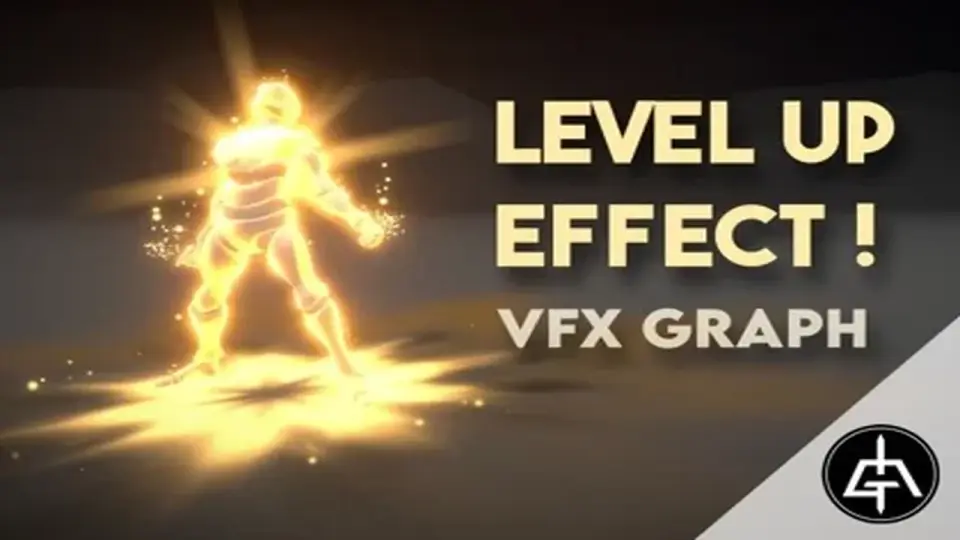
This package focuses on level-up moments for characters using skinned mesh renderers in Unity. It includes 12 effects made with Visual Effect Graph, plus a glow shader and documentation, with URP and HDRP support.
Character upgrades that read clearly on skinned meshes
VFX Graph - Level Up Effects - Vol. 1 Focuses on one specific kind of gameplay moment: the visual cue that tells players a character has gained a level, powered up, or unlocked a new ability. The effects are made entirely with Visual Effect Graph and are intended for skinned mesh renderer setups, which makes the package relevant for character-driven scenes instead of broad environment decoration.
The collection sits inside VFX Graph - Mega Pack - Vol. 4, but it also stands on its own as a compact set of level-up visuals. That makes it useful when a project needs a focused effect library for RPG-style progression, skill unlocks, ability feedback, or other character upgrades where the effect needs to attach to a living model rather than a static prop.
What is included for implementation
The package includes 12 level up effects, along with 2 customizable VFX Graph setups. A Glow Shader is also part of the package, which adds another layer for projects that want a brighter outline or accent around the effect. Documentation is included as well, giving the package a clearer starting point for setup and use inside Unity.
Because the effects are built in Visual Effect Graph, the package depends on that system being available through the Package Manager. It is not a standalone effect dump; it assumes a project already working with Unity's VFX Graph workflow. For teams already using that pipeline, the asset can fit into the existing setup without changing the broader direction of the project.
12 level up effects for skinned mesh renderers
2 customizable VFX Graph setups
Glow Shader
Documentation
URP, HDRP, and the limits of the setup
The effects were originally made in URP and later adapted to HDRP. Support is listed for HDRP and URP only, so the package is aimed at projects working within those render pipelines. Mobile support is limited and intended for high-end mobile devices only, which keeps the focus on more capable hardware rather than a broad mobile rollout.
Supported Unity versions are listed as 2021.3.45, 2022.3.62, 6000.0.68, and 6000.3.9. Render pipeline compatibility is also noted across those versions, with both HDRP and URP supported in the listed builds. For teams working across recent Unity releases, that gives the package a defined range instead of a vague compatibility claim.
Update history and practical fit
Version 1.2 added 6 new level up VFX and support for Unity 6.3. Version 1.1 focused on asset refactoring. Those notes suggest the package has been adjusted over time rather than left frozen after its first release.
The strongest fit is a project that already uses skinned mesh renderers, VFX Graph, and either URP or HDRP. It is a targeted set for level-up feedback, power-up moments, skill unlocks, and similar character progression cues. If the project matches that workflow, the package gives a ready-made set of effects with enough structure to support direct use and limited customization.
 VFX
VFX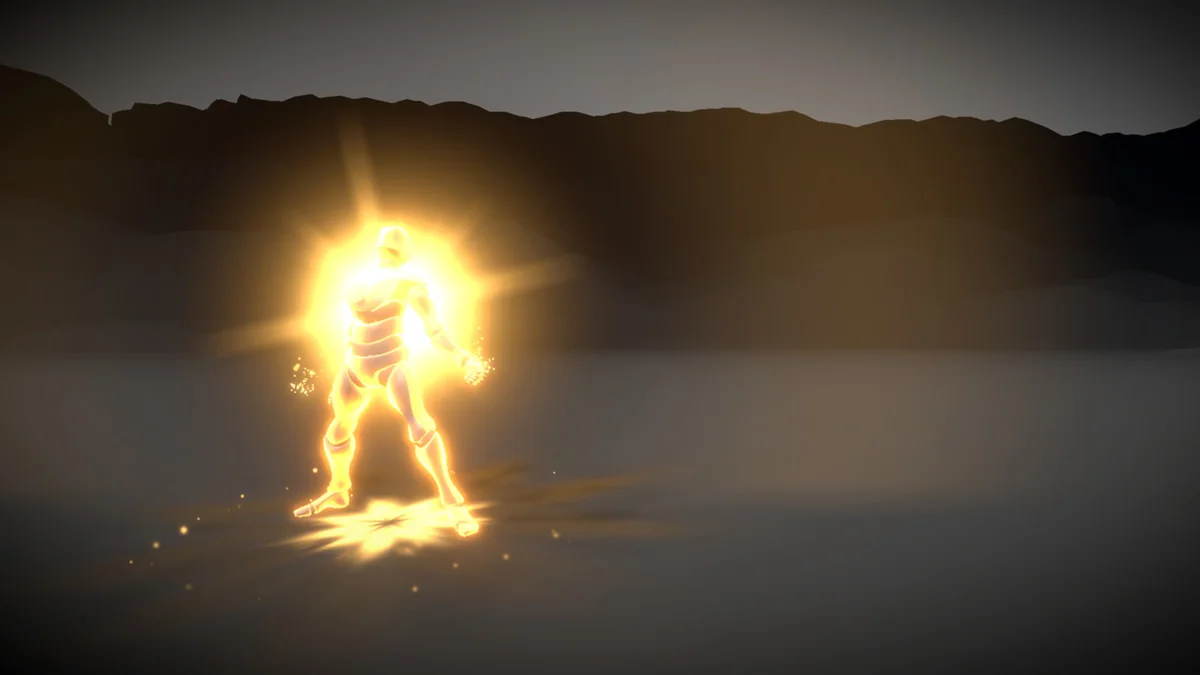
 VFX
VFX Shaders
 Particles