"7e6fc58c410f2894"{"id":"24006","slug":"uni-vfx-ultimate-pack-for-visual-effect-graph","title":"UNI VFX: Ultimate pack for Visual Effect Graph","category":"Particles","engine":"Original Unity version: 2021.3.11","assetVersion":"Original Unity version: 2021.3.11","engineVersion":"Asset Version:1.0.1","tag":"Particles","accent":"cyan","visual":"character","summary":"UNI VFX brings event-driven visual effects into Unity URP with GPU particle systems, custom shaders, and a large set of prefabs, textures, and meshes. It is set up for quick inspection-level control, so colors, spawn rates, and pattern textures can be adjus...","platform":"Unity","publishedAt":"2026-04-12T09:22:40.000Z","updatedAt":"2026-04-19T15:35:02.000Z","sourceNotes":[],"fileContents":[],"compatibility":["Unity","Original Unity version: 2021.3.11","Asset Version: 1.0.1"],"featuredImage":{"alt":"UNI VFX: Ultimate pack for Visual Effect Graph","src":"https://3dcghub.com/wp-content/uploads/2026/04/4dcafbdf9ff9_69eb0deb-9ccc-4a04-abf8-19073a7d9752_1280x720_stretch.webp"},"hasDownloadLink":true,"downloads":2,"terms":[{"taxonomy":"category","slug":"particles","name":"Particles"},{"taxonomy":"post_tag","slug":"materials","name":"Materials"},{"taxonomy":"post_tag","slug":"unity","name":"Unity"},{"taxonomy":"post_tag","slug":"vfx","name":"VFX"}],"galleryImages":[{"src":"https://3dcghub.com/wp-content/uploads/2026/04/fc53c8d99ac2_3cdb497b-8fbd-4875-8d7b-75dd470224e1_scaled.webp","alt":"UNI VFX: Ultimate pack for Visual Effect Graph"},{"src":"https://3dcghub.com/wp-content/uploads/2026/04/2b5a5407a71d_91423b9c-06af-4655-9563-b54eac7368ab_scaled.webp","alt":"UNI VFX: Ultimate pack for Visual Effect Graph"},{"src":"https://3dcghub.com/wp-content/uploads/2026/04/cce7b7dc9919_214bf3cd-0ae0-45f9-b3eb-8f7fd0c5f5aa_scaled.webp","alt":"UNI VFX: Ultimate pack for Visual Effect Graph"},{"src":"https://3dcghub.com/wp-content/uploads/2026/04/a91e62141663_842a0c39-ca0d-4f90-92a1-ad5842556afe_scaled.webp","alt":"UNI VFX: Ultimate pack for Visual Effect Graph"},{"src":"https://3dcghub.com/wp-content/uploads/2026/04/6e97eefb12b0_00cc8aad-7597-47f1-8b2c-66e8ee63ba95_scaled.webp","alt":"UNI VFX: Ultimate pack for Visual Effect Graph"},{"src":"https://3dcghub.com/wp-content/uploads/2026/04/c9a27be6e2a9_36b76e24-e4dc-49f6-88bb-81439fc807d0_scaled.webp","alt":"UNI VFX: Ultimate pack for Visual Effect Graph"},{"src":"https://3dcghub.com/wp-content/uploads/2026/04/3cefcf1563be_4e2b5e13-54f4-4578-9fde-06f55f3a37e8_scaled.webp","alt":"UNI VFX: Ultimate pack for Visual Effect Graph"},{"src":"https://3dcghub.com/wp-content/uploads/2026/04/e009c28eb76e_b404fdff-0ff8-48be-ada9-c4b818e09638_scaled.webp","alt":"UNI VFX: Ultimate pack for Visual Effect Graph"},{"src":"https://3dcghub.com/wp-content/uploads/2026/04/b3b0bfd009f2_470e09f1-d95a-429f-9997-27673cd5128f_scaled.webp","alt":"UNI VFX: Ultimate pack for Visual Effect Graph"},{"src":"https://3dcghub.com/wp-content/uploads/2026/04/e476ee1ab0cc_ffbbca87-bccd-46f1-b9ae-150d3da29eb4_scaled.webp","alt":"UNI VFX: Ultimate pack for Visual Effect Graph"}],"accessPanel":{"kind":"resource","title":"Access this resource","eyebrow":"Free Download","message":"Log in or create a free account to start your download.","fileName":"UNI VFX Ultimate pack for Visual Effect Graph v1.0.1.7z","safetyNote":"All resources are 100% manually reviewed to eliminate all risks.","actionLabel":"Download Free","resourceType":"Resource archive"},"contentHtml":"\u003ch2\u003eGetting the project into Unity\u003c/h2\u003e\n\u003cp\u003eUNI VFX starts with a specific workflow: Unity 2021.3 or newer, Visual Effect Graph, Shader Graph, and URP. Those packages need to be installed through Package Manager before the pack is imported, and the editor should be restarted after the install. That keeps the pipeline aligned before any of the effects are brought into a scene.\u003c/p\u003e\n\u003cp\u003eThe pack uses highly performant GPU particle systems in Visual Effect Graph, with advanced shaders made in Shader Graph. It is organized for use in Unity URP and includes special effects for shields, dissolve, and characters, along with a larger set of effects for missiles, explosions, and artifacts.\u003c/p\u003e \u003ch2\u003eHow the effects are triggered\u003c/h2\u003e\n\u003cp\u003eThe central workflow is based on \u003cstrong\u003eVFX Events\u003c/strong\u003e. One GameObject stores multiple effects, and those effects can be triggered through C# or Visual Scripting. That makes the pack useful when a single object needs to carry a full effect sequence instead of a one-off burst.\u003c/p\u003e\n\u003cp\u003eA clear example is the Barrier effect. It uses a chain of events: create, loop, hit, end, and stop. The create event begins the sequence, loop keeps it running, hit plays the damage response, and end finishes the effect before stopping the loop. The same event-driven structure can be used to keep other gameplay moments organized in a similar way.\u003c/p\u003e\n\u003cp\u003eThe pack includes a total of 145 VFX Events, not counting stop events. It also includes 96 prefabs, 114 textures, and 48 meshes optimized for VFX. Those assets are split across five packs: Essentials, Shields \u0026amp; Defense, Dissolve \u0026amp; Teleport, Missiles \u0026amp; Explosions, and Characters \u0026amp; Artifacts.\u003c/p\u003e \u003ch2\u003eWhat can be changed in the Inspector\u003c/h2\u003e\n\u003cp\u003eThe effects are set up so important properties stay exposed in the Inspector. That means color, spawn rate, pattern texture, and similar settings can be adjusted directly without entering the Visual Effect Graph Editor. For artists working on scene iteration, that keeps the effect visible and editable from the same place where it is being tested.\u003c/p\u003e\n\u003cp\u003eSeveral rendering choices are called out as part of the setup. HDR colors are used, and when they are combined with Bloom in post processing, the glow amount can be controlled more precisely. Where it makes sense, world-space is used so moving objects or characters leave trails and particles behind. Optimized meshes are included to reduce overdraw.\u003c/p\u003e\n\u003cp\u003eMost of the VFX use a custom uber effect shader made in Shader Graph. Shields and Dissolve/Materialize also use custom shaders, so those effects have their own shader treatment rather than relying on a single shared look. Character particles can spawn directly on an animated skinned mesh using a newer Visual Effect Graph feature, and connecting the mesh is done in the Inspector.\u003c/p\u003e \u003ch2\u003eWhere the pack fits in scenes and gameplay\u003c/h2\u003e\n\u003cp\u003eThe included packs point to practical uses in gameplay scenes. Shields \u0026amp; Defense supports barriers and impact responses. Dissolve \u0026amp; Teleport fits transitions, disappearing characters, or teleport-style changes. Missiles \u0026amp; Explosions covers moving projectiles and impact moments. Characters \u0026amp; Artifacts gives effects that can follow animated characters or enhance scene objects. Essentials provides a starting layer for the rest of the pack.\u003c/p\u003e\n\u003cp\u003eThis mix makes it easier to keep a consistent visual language across different kinds of moments. A shield can react to a hit, a character can leave particles in world space, and a teleport or dissolve effect can use the same event-driven logic to move from one state to another. Since one GameObject can store multiple effects, a single gameplay object can carry a full sequence without splitting everything into separate setups.\u003c/p\u003e\n\u003cp\u003eThe pack is also geared toward quick iteration. Because important properties are exposed, the visual response can be adjusted while keeping the underlying graph structure intact. That is especially useful when tuning how a burst behaves, how long a loop remains active, or how a materialize-style change should read on screen.\u003c/p\u003e \u003ch2\u003eCompatibility and maintenance notes\u003c/h2\u003e\n\u003cp\u003eUNI VFX works in URP and has limited compatibility with mobile devices, including the WebGL platform. If a VFX does not appear, it needs to be recompiled. The editor menu includes a rebuild path: Edit \u0026rarr; VFX \u0026rarr; Rebuild and Save All VFX Graphs.\u003c/p\u003e\n\u003cp\u003eThe texture set is mostly based on 1k textures, with a few exceptions for tiny elements such as sparks and embers. That detail matters when effects need small highlights without pushing into unrelated texture sizes. The combination of exposed controls, event-driven triggering, custom shaders, and optimized meshes makes the pack practical for production scenes that need repeatable visual effects without constant graph editing.\u003c/p\u003e\n\n\u003ch2\u003eContinue Browsing Similar Packs\u003c/h2\u003e\n\u003cul\u003e\n\u003cli\u003e\u003ca href=\"https://3dcghub.com/slash-barrage-wave-vfx/\" title=\"Slash Barrage Wave VFX\"\u003eSlash Barrage Wave VFX\u003c/a\u003e\u003c/li\u003e\n\u003cli\u003e\u003ca href=\"https://3dcghub.com/rpg-vfx-bundle/\" title=\"RPG VFX Bundle\"\u003eRPG VFX Bundle\u003c/a\u003e\u003c/li\u003e\n\u003cli\u003e\u003ca href=\"https://3dcghub.com/epic-toon-vfx-2/\" title=\"Epic Toon VFX 2\"\u003eEpic Toon VFX 2\u003c/a\u003e\u003c/li\u003e\n\u003cli\u003e\u003ca href=\"https://3dcghub.com/lightning-vfx-birp/\" title=\"Lightning VFX (BiRP)\"\u003eLightning VFX (BiRP)\u003c/a\u003e\u003c/li\u003e\n\u003cli\u003e\u003ca href=\"https://3dcghub.com/flipbook-vfx-urp/\" title=\"Flipbook VFX – URP\"\u003eFlipbook VFX – URP\u003c/a\u003e\u003c/li\u003e\n\u003c/ul\u003e","contentTextLength":4875,"navigation":{"current":3591,"total":3618,"previous":{"id":"24018","slug":"quibli-anime-shaders-and-tools","title":"Quibli: Anime Shaders and Tools","category":"VFX","platform":"Unity","updatedAt":"2026-04-19T15:35:02.000Z"},"next":{"id":"24052","slug":"all-in-1-sprite-shader","title":"All In 1 Sprite Shader","category":"Shaders","platform":"Unity","updatedAt":"2026-04-19T15:35:01.000Z"}},"relatedResources":[{"id":"23858","slug":"master-stylized-projectile","title":"Master Stylized Projectile","category":"Particles","engine":"Original Unity version: 2022.3.55","assetVersion":"Original Unity version: 2022.3.55","engineVersion":"Asset Version:1.0","tag":"Particles","accent":"cyan","visual":"animation","summary":"Master Stylized Projectile brings together stylized shots, beams, arrows, bullets, and explosions for combat scenes that need clear motion and impact. The set also includes Shader Graph-based materials, textures, meshes, and a sample scene for previewing th...","platform":"Unity","publishedAt":"2026-04-11T17:28:42.000Z","updatedAt":"2026-04-19T15:35:09.000Z","sourceNotes":[],"fileContents":[],"compatibility":["Unity","Original Unity version: 2022.3.55","Asset Version: 1.0"],"featuredImage":{"alt":"Master Stylized Projectile","src":"https://3dcghub.com/wp-content/uploads/2026/04/e1d22d157312_dca0ae7f-e171-4c73-9ddd-5d9c89f04f1a_1280x720_stretch.webp"},"hasDownloadLink":true,"downloads":2},{"id":"23756","slug":"cyber-effects-sonar","title":"Cyber Effects - Sonar","category":"Particles","engine":"Original Unity version: 2019.4.11","assetVersion":"Original Unity version: 2019.4.11","engineVersion":"Asset Version:1.1","tag":"Particles","accent":"cyan","visual":"animation","summary":"Cyber Effects - Sonar centers on a sonar-style particle prefab that spreads across all three axes in six directions and spawns subparticles on collision. It also includes sub-emitted particle prefabs, particle presets, geometries, textures, and documentatio...","platform":"Unity","publishedAt":"2026-04-11T17:02:27.000Z","updatedAt":"2026-04-19T15:35:11.000Z","sourceNotes":[],"fileContents":[],"compatibility":["Unity","Original Unity version: 2019.4.11","Asset Version: 1.1"],"featuredImage":{"alt":"Cyber Effects - Sonar","src":"https://3dcghub.com/wp-content/uploads/2026/04/4c21808bad2c_92e25d33-da84-4fee-b66f-21c853ce9c0f_1280x720_stretch.webp"},"hasDownloadLink":true,"downloads":0},{"id":"23733","slug":"blood-effects-pack","title":"Blood Effects Pack","category":"Particles","engine":"Original Unity version: 2022.3.62","assetVersion":"Original Unity version: 2022.3.62","engineVersion":"Asset Version:5.1.1","tag":"Particles","accent":"cyan","visual":"mech","summary":"Blood Effects Pack gives action, horror, and stylized projects a set of blood splashes, decals, dripping effects, gut visuals, and screen overlays. It works across Built-in RP, URP, HDRP, and mobile-friendly workflows, with modular prefabs and texture sets...","platform":"Unity","publishedAt":"2026-04-11T16:49:48.000Z","updatedAt":"2026-04-19T15:35:12.000Z","sourceNotes":[],"fileContents":[],"compatibility":["Unity","Original Unity version: 2022.3.62","Asset Version: 5.1.1"],"featuredImage":{"alt":"Blood Effects Pack","src":"https://3dcghub.com/wp-content/uploads/2026/04/664965335742_66b08ab1-31ae-451a-b16f-5543d0ef0230_1280x720_stretch.webp"},"hasDownloadLink":true,"downloads":6}]}
Particles
UNI VFX: Ultimate pack for Visual Effect Graph
UNI VFX brings event-driven visual effects into Unity URP with GPU particle systems, custom shaders, and a large set of prefabs, textures, and meshes. It is set up for quick inspection-level control, so colors, spawn rates, and pattern textures can be adjus...
UNI VFX starts with a specific workflow: Unity 2021.3 or newer, Visual Effect Graph, Shader Graph, and URP. Those packages need to be installed through Package Manager before the pack is imported, and the editor should be restarted after the install. That keeps the pipeline aligned before any of the effects are brought into a scene.
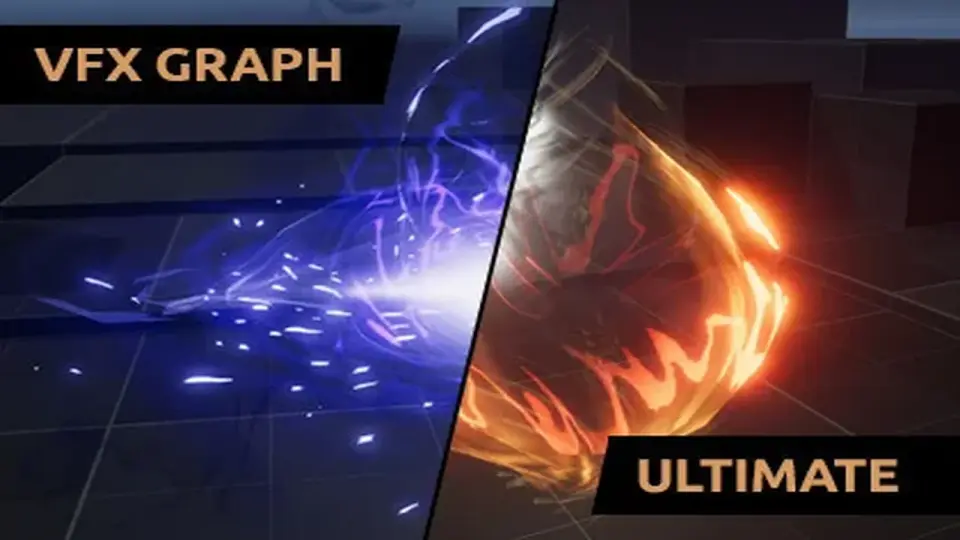
The pack uses highly performant GPU particle systems in Visual Effect Graph, with advanced shaders made in Shader Graph. It is organized for use in Unity URP and includes special effects for shields, dissolve, and characters, along with a larger set of effects for missiles, explosions, and artifacts.
How the effects are triggered
The central workflow is based on VFX Events. One GameObject stores multiple effects, and those effects can be triggered through C# or Visual Scripting. That makes the pack useful when a single object needs to carry a full effect sequence instead of a one-off burst.
A clear example is the Barrier effect. It uses a chain of events: create, loop, hit, end, and stop. The create event begins the sequence, loop keeps it running, hit plays the damage response, and end finishes the effect before stopping the loop. The same event-driven structure can be used to keep other gameplay moments organized in a similar way.
The pack includes a total of 145 VFX Events, not counting stop events. It also includes 96 prefabs, 114 textures, and 48 meshes optimized for VFX. Those assets are split across five packs: Essentials, Shields & Defense, Dissolve & Teleport, Missiles & Explosions, and Characters & Artifacts.
What can be changed in the Inspector
The effects are set up so important properties stay exposed in the Inspector. That means color, spawn rate, pattern texture, and similar settings can be adjusted directly without entering the Visual Effect Graph Editor. For artists working on scene iteration, that keeps the effect visible and editable from the same place where it is being tested.
Several rendering choices are called out as part of the setup. HDR colors are used, and when they are combined with Bloom in post processing, the glow amount can be controlled more precisely. Where it makes sense, world-space is used so moving objects or characters leave trails and particles behind. Optimized meshes are included to reduce overdraw.
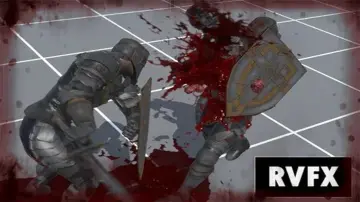
Most of the VFX use a custom uber effect shader made in Shader Graph. Shields and Dissolve/Materialize also use custom shaders, so those effects have their own shader treatment rather than relying on a single shared look. Character particles can spawn directly on an animated skinned mesh using a newer Visual Effect Graph feature, and connecting the mesh is done in the Inspector.
Where the pack fits in scenes and gameplay
The included packs point to practical uses in gameplay scenes. Shields & Defense supports barriers and impact responses. Dissolve & Teleport fits transitions, disappearing characters, or teleport-style changes. Missiles & Explosions covers moving projectiles and impact moments. Characters & Artifacts gives effects that can follow animated characters or enhance scene objects. Essentials provides a starting layer for the rest of the pack.
This mix makes it easier to keep a consistent visual language across different kinds of moments. A shield can react to a hit, a character can leave particles in world space, and a teleport or dissolve effect can use the same event-driven logic to move from one state to another. Since one GameObject can store multiple effects, a single gameplay object can carry a full sequence without splitting everything into separate setups.
The pack is also geared toward quick iteration. Because important properties are exposed, the visual response can be adjusted while keeping the underlying graph structure intact. That is especially useful when tuning how a burst behaves, how long a loop remains active, or how a materialize-style change should read on screen.
Compatibility and maintenance notes
UNI VFX works in URP and has limited compatibility with mobile devices, including the WebGL platform. If a VFX does not appear, it needs to be recompiled. The editor menu includes a rebuild path: Edit → VFX → Rebuild and Save All VFX Graphs.
The texture set is mostly based on 1k textures, with a few exceptions for tiny elements such as sparks and embers. That detail matters when effects need small highlights without pushing into unrelated texture sizes. The combination of exposed controls, event-driven triggering, custom shaders, and optimized meshes makes the pack practical for production scenes that need repeatable visual effects without constant graph editing.
 Particles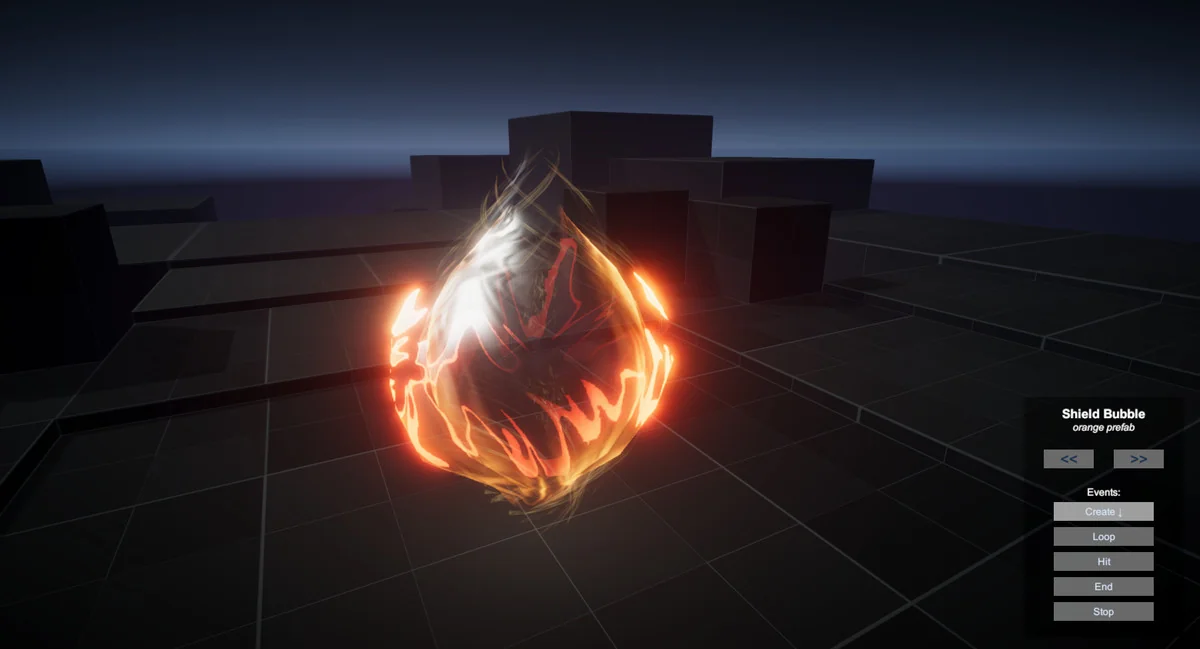
 Particles
 Particles
 Particles