"7e6fc58c410f2894"{"id":"23858","slug":"master-stylized-projectile","title":"Master Stylized Projectile","category":"Particles","engine":"Original Unity version: 2022.3.55","assetVersion":"Original Unity version: 2022.3.55","engineVersion":"Asset Version:1.0","tag":"Particles","accent":"cyan","visual":"animation","summary":"Master Stylized Projectile brings together stylized shots, beams, arrows, bullets, and explosions for combat scenes that need clear motion and impact. The set also includes Shader Graph-based materials, textures, meshes, and a sample scene for previewing th...","platform":"Unity","publishedAt":"2026-04-11T17:28:42.000Z","updatedAt":"2026-04-19T15:35:09.000Z","sourceNotes":[],"fileContents":[],"compatibility":["Unity","Original Unity version: 2022.3.55","Asset Version: 1.0"],"featuredImage":{"alt":"Master Stylized Projectile","src":"https://3dcghub.com/wp-content/uploads/2026/04/e1d22d157312_dca0ae7f-e171-4c73-9ddd-5d9c89f04f1a_1280x720_stretch.webp"},"hasDownloadLink":true,"downloads":2,"terms":[{"taxonomy":"category","slug":"particles","name":"Particles"},{"taxonomy":"post_tag","slug":"materials","name":"Materials"},{"taxonomy":"post_tag","slug":"unity","name":"Unity"},{"taxonomy":"post_tag","slug":"vfx","name":"VFX"}],"galleryImages":[{"src":"https://3dcghub.com/wp-content/uploads/2026/04/dd7eabb4ee45_79a48757-b448-4b6f-8bd9-4a32000307f4_scaled.webp","alt":"Master Stylized Projectile"},{"src":"https://3dcghub.com/wp-content/uploads/2026/04/78142598b035_44945687-126d-41fe-8590-aaa5052c7e18_scaled.webp","alt":"Master Stylized Projectile"},{"src":"https://3dcghub.com/wp-content/uploads/2026/04/4f153944c45a_3ed04aef-0701-4e2d-8e01-943e47967737_scaled.webp","alt":"Master Stylized Projectile"},{"src":"https://3dcghub.com/wp-content/uploads/2026/04/2e13707eb0bf_3b987b91-7de3-454f-a2ca-573d70d92d99_scaled.webp","alt":"Master Stylized Projectile"},{"src":"https://3dcghub.com/wp-content/uploads/2026/04/c59f8246e5f3_33f1c5fc-fa2f-4ab3-b218-cfe44cfe6b3b_scaled.webp","alt":"Master Stylized Projectile"},{"src":"https://3dcghub.com/wp-content/uploads/2026/04/ea6e73b23171_cf7494aa-240a-41a9-b9aa-cdb4471e070f_scaled.webp","alt":"Master Stylized Projectile"},{"src":"https://3dcghub.com/wp-content/uploads/2026/04/6bd3d274fb64_e7a22871-fbf8-4f4e-8150-ce1f459656b6_scaled.webp","alt":"Master Stylized Projectile"}],"accessPanel":{"kind":"resource","title":"Access this resource","eyebrow":"Free Download","message":"Log in or create a free account to start your download.","fileName":"Master Stylized Projectile v1.0 (06 Apr 2025).7z","safetyNote":"All resources are 100% manually reviewed to eliminate all risks.","actionLabel":"Download Free","resourceType":"Resource archive"},"contentHtml":"\u003ch2\u003eStylized combat scenes with readable motion\u003c/h2\u003e\u003cp\u003eMaster Stylized Projectile covers the kind of effects that sit between a weapon firing and the moment it lands. It fits scenes built around quick shots, energy bursts, sword beams, arrows, bullets, and elemental impacts, so the same package can support spellcasting, hit reactions, and explosion moments inside a stylized combat setup.\u003c/p\u003e\u003cp\u003eEach projectile is presented as a carefully made visual element, and the set is intended to look good even without a post processing stack. That gives it a practical role in projects where the projectile itself needs to stay readable on screen and still carry a stylized look.\u003c/p\u003e\u003cp\u003eThe overall focus stays narrow: projectile motion, hit effects, and explosions rather than broad environment work. That makes the pack easy to place inside a combat-heavy scene without forcing a different visual language for every attack type.\u003c/p\u003e\u003ch2\u003eThe included projectile set\u003c/h2\u003e\u003cp\u003eThe package contains 13 projectiles and 25 prefabs. The naming shows a mix of fantasy, elemental, and cartoon-style effects, which gives the set a wide enough spread for different kinds of attacks while still staying within one art direction.\u003c/p\u003e\u003cul\u003e\u003cli\u003eStar shoot\u003c/li\u003e\u003cli\u003eFire explosion shoot\u003c/li\u003e\u003cli\u003eEver green shoot\u003c/li\u003e\u003cli\u003eEnergy shoot\u003c/li\u003e\u003cli\u003eSword beam\u003c/li\u003e\u003cli\u003eIce shoot\u003c/li\u003e\u003cli\u003eLight shoot\u003c/li\u003e\u003cli\u003ePurple squid shoot\u003c/li\u003e\u003cli\u003eRed bullet shoot\u003c/li\u003e\u003cli\u003eBlue bullet shoot\u003c/li\u003e\u003cli\u003eGreen arrow shoot\u003c/li\u003e\u003cli\u003eWind shoot\u003c/li\u003e\u003cli\u003ePurple star shoot\u003c/li\u003e\u003c/ul\u003e\u003cp\u003eThose projectile names point to a usable range of scene beats. A sword beam reads differently from a blue bullet, and a fire explosion shoot gives a different impact shape than an ice shoot or wind shot. The pack keeps all of those variations inside the same stylized family, which is useful when a project needs several attack types without breaking visual consistency.\u003c/p\u003e\u003cp\u003eBecause the effects are already separated into named projectiles and prefabs, it is straightforward to think of them as parts of a combat library. A character can use one visual identity for a magical attack, another for a bullet-like shot, and another for a beam or arrow, while the effects still feel related.\u003c/p\u003e\u003ch2\u003eMaterials, textures, and the shader graph workflow\u003c/h2\u003e\u003cp\u003eThe supporting content includes 16 materials, 37 textures, and 16 meshes. The shaders are mainly based on Shader Graph, and the textures can be used to quickly make more similar particles. That gives the package a clear implementation path: use the included projectiles as they are, or build related variations from the same shader and texture setup.\u003c/p\u003e\u003cp\u003eMost of the textures are 256x256, while the flipbook textures are larger. That detail is helpful when comparing the projectiles against any new particles made to sit beside them, since the texture scale and flipbook use already point to how the effects are structured.\u003c/p\u003e\u003cp\u003eThe package is not trying to hide its building blocks. It shows the materials and textures openly enough that the same visual style can be extended instead of copied in isolation. For projects that need a consistent set of projectile visuals, that is often the most useful part of the workflow.\u003c/p\u003e\u003ch2\u003ePreviewing and fitting the package into Unity\u003c/h2\u003e\u003cp\u003eAll particles can be previewed in the sample scene, which makes it easier to inspect the projectiles before placing them into a larger setup. The package is delivered as a unitypackage, with a file size of 43.6 MB and an asset count of 558. The current listed version is 1.0.\u003c/p\u003e\u003cp\u003eThe original Unity version is 2022.3.55, and the render pipeline compatibility covers Built-in and URP. That keeps the pack anchored to a specific Unity base while still covering the two render pipeline options named for it.\u003c/p\u003e\u003cp\u003eThe technical details also place it in the Particles category path under vfx/particles. Combined with the sample scene preview, that makes the workflow simple: check the included effects, see how each projectile reads in Unity, and use the provided materials and textures when a matching visual variation is needed.\u003c/p\u003e\u003cp\u003eFor projects that need stylized projectile motion, clear hit reactions, and compact explosion effects, this set fits best when the goal is to keep combat visuals consistent without moving away from a stylized look.\u003c/p\u003e\n\n\u003ch2\u003eRelated Resources Worth Checking\u003c/h2\u003e\n\u003cul\u003e\n\u003cli\u003e\u003ca href=\"https://3dcghub.com/toolkit-for-unity-physics-2026/\" title=\"Toolkit for Unity Physics 2026\"\u003eToolkit for Unity Physics 2026\u003c/a\u003e\u003c/li\u003e\n\u003cli\u003e\u003ca href=\"https://3dcghub.com/opencv-for-unity/\" title=\"OpenCV for Unity\"\u003eOpenCV for Unity\u003c/a\u003e\u003c/li\u003e\n\u003cli\u003e\u003ca href=\"https://3dcghub.com/exporter-for-unreal-to-for-unity-2026/\" title=\"Exporter for Unreal to/for Unity 2026\"\u003eExporter for Unreal to/for Unity 2026\u003c/a\u003e\u003c/li\u003e\n\u003cli\u003e\u003ca href=\"https://3dcghub.com/dialogue-system-for-unity/\" title=\"Dialogue System for Unity\"\u003eDialogue System for Unity\u003c/a\u003e\u003c/li\u003e\n\u003cli\u003e\u003ca href=\"https://3dcghub.com/ambient-sounds-interactive-soundscapes-for-unity-6/\" title=\"Ambient Sounds – Interactive Soundscapes for Unity 6\"\u003eAmbient Sounds – Interactive Soundscapes for Unity 6\u003c/a\u003e\u003c/li\u003e\n\u003c/ul\u003e","contentTextLength":4328,"navigation":{"current":3572,"total":3618,"previous":{"id":"23772","slug":"sand-effects-pack","title":"Sand Effects Pack","category":"Environment","platform":"Unity","updatedAt":"2026-04-19T15:35:10.000Z"},"next":{"id":"23848","slug":"lightning-vfx-birp","title":"Lightning VFX (BiRP)","category":"Particles","platform":"Unity","updatedAt":"2026-04-19T15:35:09.000Z"}},"relatedResources":[{"id":"23980","slug":"stylized-chain-skills","title":"Stylized Chain Skills","category":"Particles","engine":"Original Unity version: 2021.3.31","assetVersion":"Original Unity version: 2021.3.31","engineVersion":"Asset Version:1.0","tag":"Particles","accent":"cyan","visual":"audio","summary":"Stylized Chain Skills gives a chain-themed combo attack setup for Unity projects, with prefabs, meshes, materials, shaders, and textures already grouped for use. It also includes clear import and camera checks for Built-in, URP, and HDRP workflows.","platform":"Unity","publishedAt":"2026-04-12T09:22:32.000Z","updatedAt":"2026-04-19T15:35:03.000Z","sourceNotes":[],"fileContents":[],"compatibility":["Unity","Original Unity version: 2021.3.31","Asset Version: 1.0"],"featuredImage":{"alt":"Stylized Chain Skills","src":"https://3dcghub.com/wp-content/uploads/2026/04/354be8a6162b_61775781-2cd3-4241-9160-f75d9bc25a8e_1280x720_stretch.webp"},"hasDownloadLink":true,"downloads":0},{"id":"24445","slug":"stylized-vfx","title":"Stylized VFX","category":"VFX","engine":"Original Unity version: 2021.3.1","assetVersion":"Original Unity version: 2021.3.1","engineVersion":"Asset Version:1.0.2023","tag":"VFX","accent":"cyan","visual":"luts","summary":"Stylized VFX centers on elemental slashes, circular cuts, piercing strikes, and projectiles wrapped in a cartoon-styled look. It also includes SFX, custom shaders, and a workflow that supports 2D scenes on a 3D render pipeline.","platform":"Unity","publishedAt":"2026-04-14T11:59:45.000Z","updatedAt":"2026-04-20T06:12:48.000Z","sourceNotes":[],"fileContents":[],"compatibility":["Unity","Original Unity version: 2021.3.1","Asset Version: 1.0.2023"],"featuredImage":{"alt":"Stylized VFX","src":"https://3dcghub.com/wp-content/uploads/2026/04/b84ce2a34ed8_4238ddf7-d0df-40c8-b907-a6929589f0f0_1280x720_stretch.webp"},"hasDownloadLink":true,"downloads":3},{"id":"23733","slug":"blood-effects-pack","title":"Blood Effects Pack","category":"Particles","engine":"Original Unity version: 2022.3.62","assetVersion":"Original Unity version: 2022.3.62","engineVersion":"Asset Version:5.1.1","tag":"Particles","accent":"cyan","visual":"mech","summary":"Blood Effects Pack gives action, horror, and stylized projects a set of blood splashes, decals, dripping effects, gut visuals, and screen overlays. It works across Built-in RP, URP, HDRP, and mobile-friendly workflows, with modular prefabs and texture sets...","platform":"Unity","publishedAt":"2026-04-11T16:49:48.000Z","updatedAt":"2026-04-19T15:35:12.000Z","sourceNotes":[],"fileContents":[],"compatibility":["Unity","Original Unity version: 2022.3.62","Asset Version: 5.1.1"],"featuredImage":{"alt":"Blood Effects Pack","src":"https://3dcghub.com/wp-content/uploads/2026/04/664965335742_66b08ab1-31ae-451a-b16f-5543d0ef0230_1280x720_stretch.webp"},"hasDownloadLink":true,"downloads":6}]}
Particles
Master Stylized Projectile
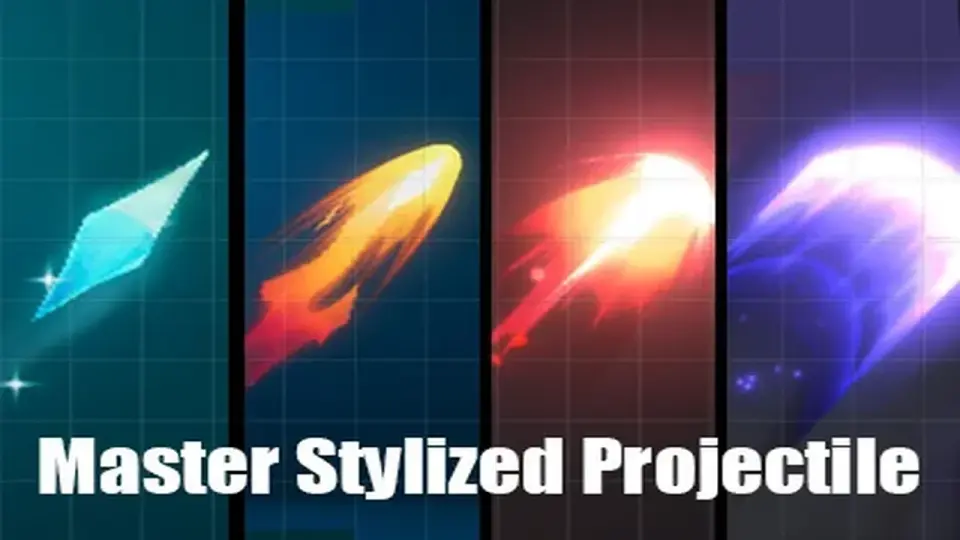
Master Stylized Projectile brings together stylized shots, beams, arrows, bullets, and explosions for combat scenes that need clear motion and impact. The set also includes Shader Graph-based materials, textures, meshes, and a sample scene for previewing th...
Master Stylized Projectile covers the kind of effects that sit between a weapon firing and the moment it lands. It fits scenes built around quick shots, energy bursts, sword beams, arrows, bullets, and elemental impacts, so the same package can support spellcasting, hit reactions, and explosion moments inside a stylized combat setup.
Each projectile is presented as a carefully made visual element, and the set is intended to look good even without a post processing stack. That gives it a practical role in projects where the projectile itself needs to stay readable on screen and still carry a stylized look.
The overall focus stays narrow: projectile motion, hit effects, and explosions rather than broad environment work. That makes the pack easy to place inside a combat-heavy scene without forcing a different visual language for every attack type.
The included projectile set
The package contains 13 projectiles and 25 prefabs. The naming shows a mix of fantasy, elemental, and cartoon-style effects, which gives the set a wide enough spread for different kinds of attacks while still staying within one art direction.
Star shoot
Fire explosion shoot
Ever green shoot
Energy shoot
Sword beam
Ice shoot
Light shoot
Purple squid shoot
Red bullet shoot
Blue bullet shoot
Green arrow shoot
Wind shoot
Purple star shoot
Those projectile names point to a usable range of scene beats. A sword beam reads differently from a blue bullet, and a fire explosion shoot gives a different impact shape than an ice shoot or wind shot. The pack keeps all of those variations inside the same stylized family, which is useful when a project needs several attack types without breaking visual consistency.
Because the effects are already separated into named projectiles and prefabs, it is straightforward to think of them as parts of a combat library. A character can use one visual identity for a magical attack, another for a bullet-like shot, and another for a beam or arrow, while the effects still feel related.
Materials, textures, and the shader graph workflow
The supporting content includes 16 materials, 37 textures, and 16 meshes. The shaders are mainly based on Shader Graph, and the textures can be used to quickly make more similar particles. That gives the package a clear implementation path: use the included projectiles as they are, or build related variations from the same shader and texture setup.
Most of the textures are 256x256, while the flipbook textures are larger. That detail is helpful when comparing the projectiles against any new particles made to sit beside them, since the texture scale and flipbook use already point to how the effects are structured.
The package is not trying to hide its building blocks. It shows the materials and textures openly enough that the same visual style can be extended instead of copied in isolation. For projects that need a consistent set of projectile visuals, that is often the most useful part of the workflow.
Previewing and fitting the package into Unity
All particles can be previewed in the sample scene, which makes it easier to inspect the projectiles before placing them into a larger setup. The package is delivered as a unitypackage, with a file size of 43.6 MB and an asset count of 558. The current listed version is 1.0.
The original Unity version is 2022.3.55, and the render pipeline compatibility covers Built-in and URP. That keeps the pack anchored to a specific Unity base while still covering the two render pipeline options named for it.
The technical details also place it in the Particles category path under vfx/particles. Combined with the sample scene preview, that makes the workflow simple: check the included effects, see how each projectile reads in Unity, and use the provided materials and textures when a matching visual variation is needed.
For projects that need stylized projectile motion, clear hit reactions, and compact explosion effects, this set fits best when the goal is to keep combat visuals consistent without moving away from a stylized look.
 Particles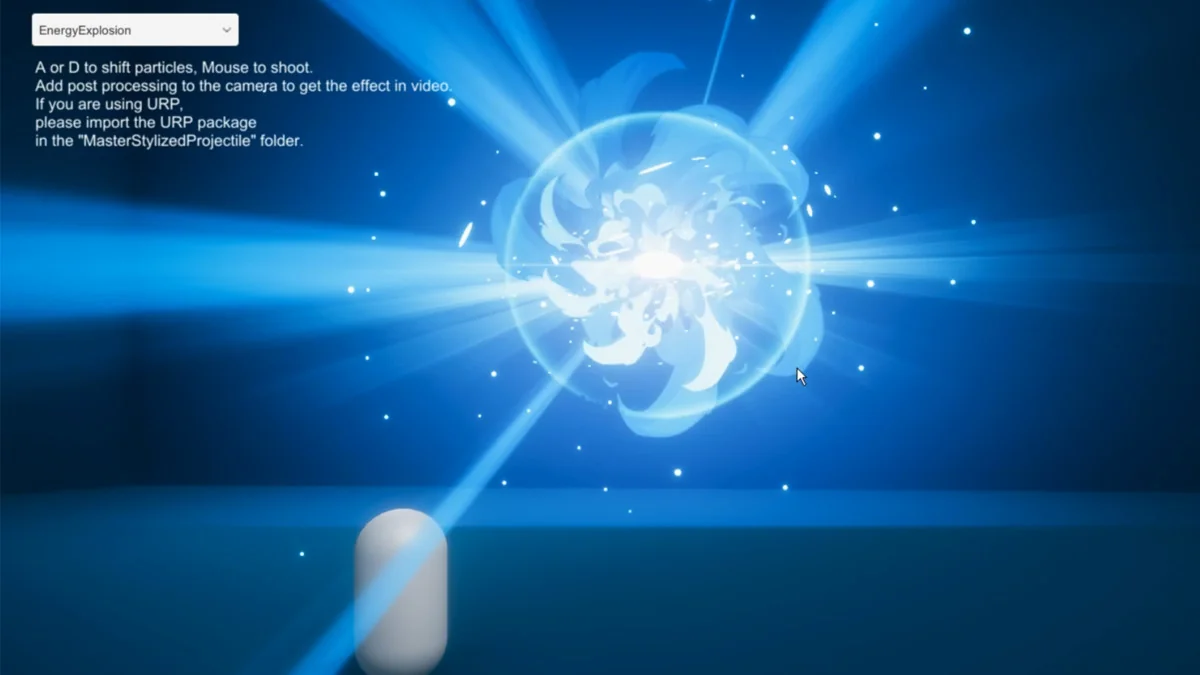
 Particles
 VFX
VFX Particles