"7e6fc58c410f2894"{"id":"23772","slug":"sand-effects-pack","title":"Sand Effects Pack","category":"Environment","engine":"Original Unity version: 2020.3.18","assetVersion":"Original Unity version: 2020.3.18","engineVersion":"Asset Version:3.2.3","tag":"Environment","accent":"cyan","visual":"city","summary":"Sand Effects Pack focuses on sand movement, dust, and storm-style motion for Unity scenes. It includes 10 effects, with 9 of them set up as fully 3D particle systems with sound and ready-to-place prefabs.","platform":"Unity","publishedAt":"2026-04-11T17:08:43.000Z","updatedAt":"2026-04-19T15:35:10.000Z","sourceNotes":[],"fileContents":[],"compatibility":["Unity","Original Unity version: 2020.3.18","Asset Version: 3.2.3"],"featuredImage":{"alt":"Sand Effects Pack","src":"https://3dcghub.com/wp-content/uploads/2026/04/d36a1f228011_5de2307a-15f0-417d-a5a2-3aca00cff3df_1280x720_stretch.webp"},"hasDownloadLink":true,"downloads":0,"terms":[{"taxonomy":"category","slug":"unity-vfx-particles-environment","name":"Environment"},{"taxonomy":"post_tag","slug":"game-systems","name":"Game Systems"},{"taxonomy":"post_tag","slug":"unity","name":"Unity"},{"taxonomy":"post_tag","slug":"vfx","name":"VFX"}],"galleryImages":[{"src":"https://3dcghub.com/wp-content/uploads/2026/04/fbfa6d74b448_52e48fa6-3f14-4601-9abf-5157a0572ffa_scaled.webp","alt":"Sand Effects Pack"},{"src":"https://3dcghub.com/wp-content/uploads/2026/04/253535d839e3_5d6d376b-be54-4ed2-bf04-c317ef2eaa9c_scaled.webp","alt":"Sand Effects Pack"}],"accessPanel":{"kind":"resource","title":"Access this resource","eyebrow":"Free Download","message":"Log in or create a free account to start your download.","fileName":"Sand Effects Pack v3.2.3.7z","safetyNote":"All resources are 100% manually reviewed to eliminate all risks.","actionLabel":"Download Free","resourceType":"Resource archive"},"contentHtml":"\u003ch2\u003eSand movement for deserts, dust, and storm scenes\u003c/h2\u003e\u003cp\u003eDesert wind, drifting dust, and fast-moving sand need effects that read clearly the moment they appear on screen. Sand Effects Pack focuses on that kind of motion. It includes 10 sand effects, and 9 of those are completely 3D particle systems with sound effects, so the visuals and audio work together instead of feeling separate. That makes the pack a practical fit for scenes where sand needs to feel active rather than decorative.\u003c/p\u003e\u003cp\u003eThe overall set matches the kind of environments suggested by the tags and effect style: deserts, dust, storms, sandstorms, and sand tornadoes. Those situations can be difficult to stage cleanly, especially when the scene needs movement that is noticeable without becoming complicated to manage. Here, the effects are already organized as prefabs, so they can be placed directly into a game and used as scene dressing, atmospheric motion, or a more focused environmental event.\u003c/p\u003e\u003cp\u003eBecause the effects are simple and immediate, they can support both background detail and moments that call attention to changing conditions in the world. A sand drift can sit quietly in the distance, while a stronger effect can help a storm scene feel more forceful. The pack stays centered on that kind of practical visual use.\u003c/p\u003e\u003ch2\u003eDrop-in prefabs with no scripts attached\u003c/h2\u003e\u003cp\u003eThe setup is straightforward. The effects are described as very simple to use: take the prefabs and drop them into the game. No scripts were used to create the effects, so the package is focused on direct placement rather than custom logic. That can make it easier to try different sand variations in a scene without building extra systems around them first.\u003c/p\u003e\u003cp\u003eResizing is also handled through standard size values, which keeps adjustment work familiar. Instead of forcing a custom workflow, the effects stay close to normal Unity usage. That matters when an artist or developer wants to tune the look of the sand quickly, especially during level dressing or while checking how the effect sits against terrain, props, or sky lighting.\u003c/p\u003e\u003cp\u003eThe package is built for all platforms supported by the project. It also works with BiRP, URP, and HDRP, so the same set can fit different rendering setups without changing the basic intent of the effects. The package comes as a unitypackage and contains 45 assets.\u003c/p\u003e\u003ch2\u003eRender pipeline support and Unity version notes\u003c/h2\u003e\u003cp\u003ePipeline support is one of the more specific parts of the pack. BiRP uses Shader Graph, and Shader Graph is included with the resource. The effects can also be changed to built-in render using Tools\u0026gt;RPchanger. For HDRP and URP, a Support package from Unity 2020.3 is needed, while Unity 2022 and later no longer require that Support package.\u003c/p\u003e\u003cp\u003eThe compatibility range is listed for Unity 2020.3.18, 2022.3.12, and 6000.0.67. The original Unity version is 2020.3.18. That gives a clear picture of where the pack sits in the Unity timeline and helps explain why the shader updates in later versions matter. Version 4.0 updated all shaders and optimized the effects, while earlier updates addressed issues such as shader behavior in Unity 2022+, hard borders on HDRP and URP, and depth handling for Deferred render paths or orthographic cameras.\u003c/p\u003e\u003cp\u003eThere is also a version history behind the current setup. Earlier updates added URP and HDRP support, replaced shaders with Shader Graph, and fixed shader issues such as broken connections and opacity bugs. That history matters because the pack is not just a single visual set; it is a shader-driven resource that has been adjusted to keep the same sand look working across different pipeline changes.\u003c/p\u003e\u003ch2\u003eShader control and texture detail\u003c/h2\u003e\u003cp\u003eThe sand shader includes various customization options, which gives the pack room to fit different scene styles instead of locking everything into one fixed look. That kind of flexibility is useful when the same sand effect needs to appear softer in one environment and more aggressive in another. The shader work is paired with several texture sizes: 1024x1024, 512x512, 256x256, and 64x512.\u003c/p\u003e\u003cp\u003eThose sizes suggest a mix of detailed and narrower texture use within the pack, which lines up with an effects set that relies on sand motion and surface variation. Since the effects are already prepared as prefabs and do not depend on scripts, the shader and texture side carries more of the visual work. The result is a resource that stays focused on sand presentation rather than on procedural setup.\u003c/p\u003e\u003cp\u003eFor artists and developers working on storms, deserts, or any scene that needs moving sand and dust, the main advantage is directness. The effects can be placed quickly, resized with standard values, and used across supported Unity pipelines without needing to build the visuals from scratch. Projects that want sand movement with matching sound effects will get the most immediate use from it.\u003c/p\u003e\n\n\u003ch2\u003eMore From The Same Workflow\u003c/h2\u003e\n\u003cul\u003e\n\u003cli\u003e\u003ca href=\"https://3dcghub.com/toolkit-for-unity-physics-2026/\" title=\"Toolkit for Unity Physics 2026\"\u003eToolkit for Unity Physics 2026\u003c/a\u003e\u003c/li\u003e\n\u003cli\u003e\u003ca href=\"https://3dcghub.com/opencv-for-unity/\" title=\"OpenCV for Unity\"\u003eOpenCV for Unity\u003c/a\u003e\u003c/li\u003e\n\u003cli\u003e\u003ca href=\"https://3dcghub.com/exporter-for-unreal-to-for-unity-2026/\" title=\"Exporter for Unreal to/for Unity 2026\"\u003eExporter for Unreal to/for Unity 2026\u003c/a\u003e\u003c/li\u003e\n\u003cli\u003e\u003ca href=\"https://3dcghub.com/dialogue-system-for-unity/\" title=\"Dialogue System for Unity\"\u003eDialogue System for Unity\u003c/a\u003e\u003c/li\u003e\n\u003cli\u003e\u003ca href=\"https://3dcghub.com/ambient-sounds-interactive-soundscapes-for-unity-6/\" title=\"Ambient Sounds – Interactive Soundscapes for Unity 6\"\u003eAmbient Sounds – Interactive Soundscapes for Unity 6\u003c/a\u003e\u003c/li\u003e\n\u003c/ul\u003e","contentTextLength":5080,"navigation":{"current":3571,"total":3618,"previous":{"id":"23784","slug":"epic-lootbox-effects","title":"Epic LootBox Effects","category":"Environment","platform":"Unity","updatedAt":"2026-04-19T15:35:10.000Z"},"next":{"id":"23858","slug":"master-stylized-projectile","title":"Master Stylized Projectile","category":"Particles","platform":"Unity","updatedAt":"2026-04-19T15:35:09.000Z"}},"relatedResources":[{"id":"23797","slug":"epic-toon-fx","title":"Epic Toon FX","category":"Environment","engine":"Original Unity version: 5.3.0","assetVersion":"Original Unity version: 5.3.0","engineVersion":"Asset Version:1.5","tag":"Environment","accent":"cyan","visual":"city","summary":"Epic Toon FX centers on cartoon particle work that can move from combat hits to magic bursts, weather, and interactive reward effects. The library is organized into combat, environment, and interactive groups, with Shuriken-based prefabs that can be recolor...","platform":"Unity","publishedAt":"2026-04-11T17:15:11.000Z","updatedAt":"2026-04-19T15:35:10.000Z","sourceNotes":[],"fileContents":[],"compatibility":["Unity","Original Unity version: 5.3.0","Asset Version: 1.5"],"featuredImage":{"alt":"Epic Toon FX","src":"https://3dcghub.com/wp-content/uploads/2026/04/401c2a016550_12be0a82-beeb-4118-a9cf-ccae6e80c932_1280x720_stretch.webp"},"hasDownloadLink":true,"downloads":7},{"id":"23784","slug":"epic-lootbox-effects","title":"Epic LootBox Effects","category":"Environment","engine":"Original Unity version: 5.6.2","assetVersion":"Original Unity version: 5.6.2","engineVersion":"Asset Version:1.0","tag":"Environment","accent":"cyan","visual":"city","summary":"Epic LootBox Effects adds stylized particle work for lootbox reveals, with rarity variants for common, uncommon, rare, and epic outcomes. It fits both 2D and 3D Unity projects and includes a demo scene and manual for setup.","platform":"Unity","publishedAt":"2026-04-11T17:09:23.000Z","updatedAt":"2026-04-19T15:35:10.000Z","sourceNotes":[],"fileContents":[],"compatibility":["Unity","Original Unity version: 5.6.2","Asset Version: 1.0"],"featuredImage":{"alt":"Epic LootBox Effects","src":"https://3dcghub.com/wp-content/uploads/2026/04/2d7983674cd0_7e6f19f4-828c-44f3-8618-e0c3bc832529_1280x720_stretch.webp"},"hasDownloadLink":true,"downloads":0},{"id":"23263","slug":"expanse-volumetric-skies-clouds-and-atmospheres-in-hdrp","title":"Expanse - Volumetric Skies, Clouds, and Atmospheres in HDRP","category":"Particles \u0026 Effects","engine":"Original Unity version: 2020.1.17","assetVersion":"Original Unity version: 2020.1.17","engineVersion":"Asset Version:1.7.0b","tag":"Particles","accent":"cyan","visual":"luts","summary":"Expanse is a volumetric sky tool for HDRP that helps shape skies, clouds, and fog banks directly in the editor. It combines physically based rendering, realtime adjustment, and animated weather controls for scenes that need changing atmospheres.","platform":"Unity","publishedAt":"2026-04-09T16:08:06.000Z","updatedAt":"2026-04-19T15:36:47.000Z","sourceNotes":[],"fileContents":[],"compatibility":["Unity","Original Unity version: 2020.1.17","Asset Version: 1.7.0b"],"featuredImage":{"alt":"Expanse - Volumetric Skies, Clouds, and Atmospheres in HDRP","src":"https://3dcghub.com/wp-content/uploads/2026/04/af7ee660ab60_117677bb-0c45-4601-8791-43191c7fc291_1280x720_stretch.webp"},"hasDownloadLink":true,"downloads":0}]}
Environment
Sand Effects Pack
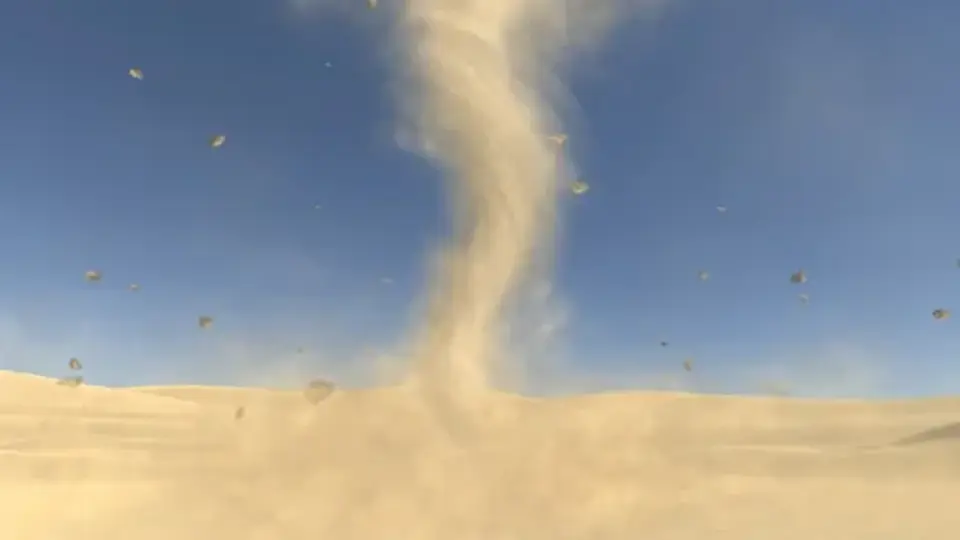
Sand Effects Pack focuses on sand movement, dust, and storm-style motion for Unity scenes. It includes 10 effects, with 9 of them set up as fully 3D particle systems with sound and ready-to-place prefabs.
Desert wind, drifting dust, and fast-moving sand need effects that read clearly the moment they appear on screen. Sand Effects Pack focuses on that kind of motion. It includes 10 sand effects, and 9 of those are completely 3D particle systems with sound effects, so the visuals and audio work together instead of feeling separate. That makes the pack a practical fit for scenes where sand needs to feel active rather than decorative.
The overall set matches the kind of environments suggested by the tags and effect style: deserts, dust, storms, sandstorms, and sand tornadoes. Those situations can be difficult to stage cleanly, especially when the scene needs movement that is noticeable without becoming complicated to manage. Here, the effects are already organized as prefabs, so they can be placed directly into a game and used as scene dressing, atmospheric motion, or a more focused environmental event.
Because the effects are simple and immediate, they can support both background detail and moments that call attention to changing conditions in the world. A sand drift can sit quietly in the distance, while a stronger effect can help a storm scene feel more forceful. The pack stays centered on that kind of practical visual use.
Drop-in prefabs with no scripts attached
The setup is straightforward. The effects are described as very simple to use: take the prefabs and drop them into the game. No scripts were used to create the effects, so the package is focused on direct placement rather than custom logic. That can make it easier to try different sand variations in a scene without building extra systems around them first.
Resizing is also handled through standard size values, which keeps adjustment work familiar. Instead of forcing a custom workflow, the effects stay close to normal Unity usage. That matters when an artist or developer wants to tune the look of the sand quickly, especially during level dressing or while checking how the effect sits against terrain, props, or sky lighting.
The package is built for all platforms supported by the project. It also works with BiRP, URP, and HDRP, so the same set can fit different rendering setups without changing the basic intent of the effects. The package comes as a unitypackage and contains 45 assets.
Render pipeline support and Unity version notes
Pipeline support is one of the more specific parts of the pack. BiRP uses Shader Graph, and Shader Graph is included with the resource. The effects can also be changed to built-in render using Tools>RPchanger. For HDRP and URP, a Support package from Unity 2020.3 is needed, while Unity 2022 and later no longer require that Support package.
The compatibility range is listed for Unity 2020.3.18, 2022.3.12, and 6000.0.67. The original Unity version is 2020.3.18. That gives a clear picture of where the pack sits in the Unity timeline and helps explain why the shader updates in later versions matter. Version 4.0 updated all shaders and optimized the effects, while earlier updates addressed issues such as shader behavior in Unity 2022+, hard borders on HDRP and URP, and depth handling for Deferred render paths or orthographic cameras.
There is also a version history behind the current setup. Earlier updates added URP and HDRP support, replaced shaders with Shader Graph, and fixed shader issues such as broken connections and opacity bugs. That history matters because the pack is not just a single visual set; it is a shader-driven resource that has been adjusted to keep the same sand look working across different pipeline changes.
Shader control and texture detail
The sand shader includes various customization options, which gives the pack room to fit different scene styles instead of locking everything into one fixed look. That kind of flexibility is useful when the same sand effect needs to appear softer in one environment and more aggressive in another. The shader work is paired with several texture sizes: 1024x1024, 512x512, 256x256, and 64x512.
Those sizes suggest a mix of detailed and narrower texture use within the pack, which lines up with an effects set that relies on sand motion and surface variation. Since the effects are already prepared as prefabs and do not depend on scripts, the shader and texture side carries more of the visual work. The result is a resource that stays focused on sand presentation rather than on procedural setup.
For artists and developers working on storms, deserts, or any scene that needs moving sand and dust, the main advantage is directness. The effects can be placed quickly, resized with standard values, and used across supported Unity pipelines without needing to build the visuals from scratch. Projects that want sand movement with matching sound effects will get the most immediate use from it.
 Environment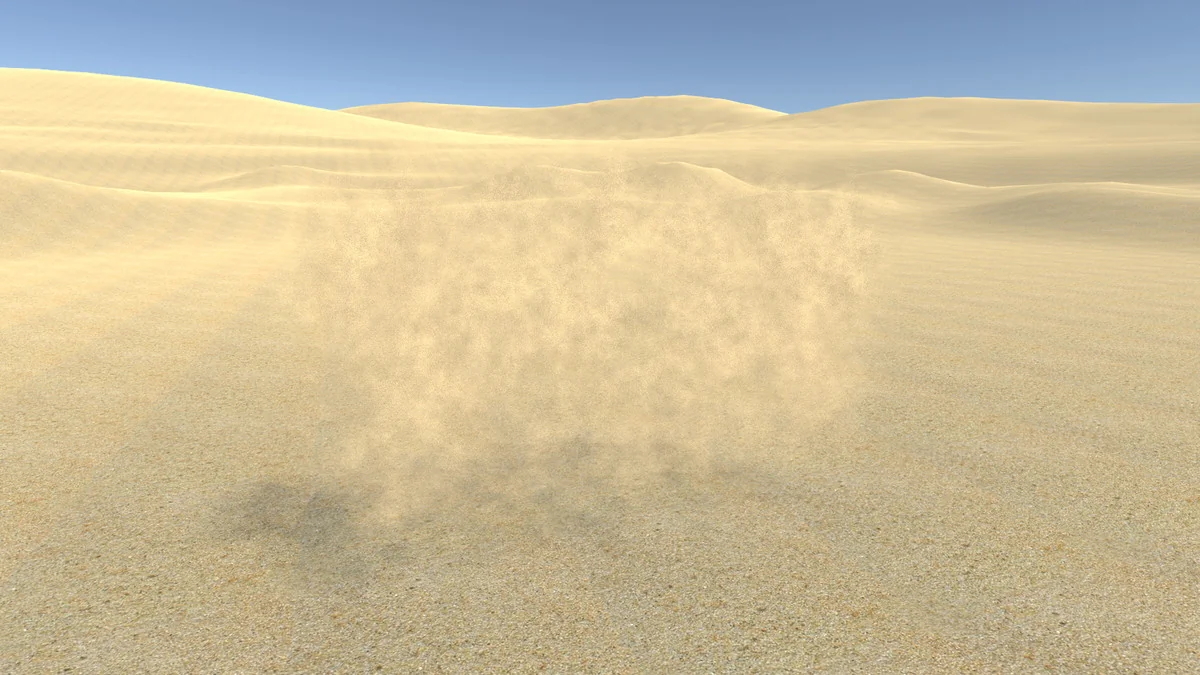
 Environment
 Environment
 Particles