"7e6fc58c410f2894"{"id":"23784","slug":"epic-lootbox-effects","title":"Epic LootBox Effects","category":"Environment","engine":"Original Unity version: 5.6.2","assetVersion":"Original Unity version: 5.6.2","engineVersion":"Asset Version:1.0","tag":"Environment","accent":"cyan","visual":"city","summary":"Epic LootBox Effects adds stylized particle work for lootbox reveals, with rarity variants for common, uncommon, rare, and epic outcomes. It fits both 2D and 3D Unity projects and includes a demo scene and manual for setup.","platform":"Unity","publishedAt":"2026-04-11T17:09:23.000Z","updatedAt":"2026-04-19T15:35:10.000Z","sourceNotes":[],"fileContents":[],"compatibility":["Unity","Original Unity version: 5.6.2","Asset Version: 1.0"],"featuredImage":{"alt":"Epic LootBox Effects","src":"https://3dcghub.com/wp-content/uploads/2026/04/2d7983674cd0_7e6f19f4-828c-44f3-8618-e0c3bc832529_1280x720_stretch.webp"},"hasDownloadLink":true,"downloads":0,"terms":[{"taxonomy":"category","slug":"unity-vfx-particles-environment","name":"Environment"},{"taxonomy":"post_tag","slug":"environment","name":"Environment"},{"taxonomy":"post_tag","slug":"unity","name":"Unity"},{"taxonomy":"post_tag","slug":"vfx","name":"VFX"}],"galleryImages":[{"src":"https://3dcghub.com/wp-content/uploads/2026/04/6de5bc6378d2_270b657d-71e5-4613-93f9-fcda13e2edf4_scaled.webp","alt":"Epic LootBox Effects"},{"src":"https://3dcghub.com/wp-content/uploads/2026/04/868be7c687b8_539b4ac5-5f15-45d9-8c44-d6f0912dc634_scaled.webp","alt":"Epic LootBox Effects"},{"src":"https://3dcghub.com/wp-content/uploads/2026/04/715ebdb6c384_8f097c59-4de1-449e-b29a-b3f49a551320_scaled.webp","alt":"Epic LootBox Effects"},{"src":"https://3dcghub.com/wp-content/uploads/2026/04/b7ff3df415dd_5b50b118-2b00-4767-b800-a565acb1ae22_scaled.webp","alt":"Epic LootBox Effects"},{"src":"https://3dcghub.com/wp-content/uploads/2026/04/c8a83da5388d_ea84da78-b94c-4ad8-aa5a-ef520ce9c9d9_scaled.webp","alt":"Epic LootBox Effects"},{"src":"https://3dcghub.com/wp-content/uploads/2026/04/093f584a7600_c2d4f523-c969-4160-864a-95b4aa91eb1e_scaled.webp","alt":"Epic LootBox Effects"},{"src":"https://3dcghub.com/wp-content/uploads/2026/04/ea1526955801_c15dbafe-7f30-428a-accf-4add1ea3b878_scaled.webp","alt":"Epic LootBox Effects"},{"src":"https://3dcghub.com/wp-content/uploads/2026/04/59506bb322a3_3195f7dd-a9b0-40ae-845b-3f3d37eb3c29_scaled.webp","alt":"Epic LootBox Effects"},{"src":"https://3dcghub.com/wp-content/uploads/2026/04/18ffa8bda065_39221c9a-d77b-43d3-ad0d-2ea7e71a57dc_scaled.webp","alt":"Epic LootBox Effects"}],"accessPanel":{"kind":"resource","title":"Access this resource","eyebrow":"Free Download","message":"Log in or create a free account to start your download.","fileName":"Epic_LootBox_Effects_v1_0.7z","safetyNote":"All resources are 100% manually reviewed to eliminate all risks.","actionLabel":"Download Free","resourceType":"Resource archive"},"contentHtml":"\u003cp\u003eLootbox openings need a clear visual payoff, and \u003cstrong\u003eEpic LootBox Effects\u003c/strong\u003e Gives that moment a stylized particle treatment. The pack is centered on lootbox reveal effects, with separate rarity handling for \u003cem\u003eCommon\u003c/em\u003e, \u003cem\u003eUncommon\u003c/em\u003e, \u003cem\u003eRare\u003c/em\u003e, and \u003cem\u003eEpic\u003c/em\u003e Outcomes.\u003c/p\u003e \u003cp\u003eIt comes from Mixture Art and sits in the Particles category under \u003ccode\u003eVfx/particles\u003c/code\u003e. The package is set up as a Unity asset for projects that want a ready-made lootbox effect set rather than a one-off particle.\u003c/p\u003e \u003ch2\u003eRarity-based effects for reward moments\u003c/h2\u003e\n\u003cp\u003eThe core idea is simple: each lootbox effect includes rarity variations. That makes it easier to match the visual response to the reward tier without having to build separate particle setups from scratch for every opening animation.\u003c/p\u003e \u003cp\u003eThe available rarity layers are \u003cstrong\u003eCommon\u003c/strong\u003e, \u003cstrong\u003eUncommon\u003c/strong\u003e, \u003cstrong\u003eRare\u003c/strong\u003e, and \u003cstrong\u003eEpic\u003c/strong\u003e. Because the rarity treatment is built into the effect set itself, the visual language stays consistent across different reward levels while still giving each result its own feel. For projects with repeated lootbox interactions, that kind of separation can keep the presentation organized and easier to manage inside the project.\u003c/p\u003e \u003ch2\u003eWhat the package includes\u003c/h2\u003e\n\u003cp\u003eThe pack includes \u003cstrong\u003e25 lootbox effects\u003c/strong\u003e With \u003cstrong\u003e4 rarity effects\u003c/strong\u003e Across the common, uncommon, rare, and epic tiers. It also includes a \u003cstrong\u003eDemo scene\u003c/strong\u003e And a \u003cstrong\u003eManual\u003c/strong\u003e, giving a starting point for checking how the effects behave and how they can be brought into a project.\u003c/p\u003e \u003cul\u003e \u003cli\u003e25 lootbox effects\u003c/li\u003e \u003cli\u003e4 rarity effects: Common, Uncommon, Rare, Epic\u003c/li\u003e \u003cli\u003eWorks with 2D and 3D games\u003c/li\u003e \u003cli\u003eSuitable for mobile and desktop\u003c/li\u003e \u003cli\u003eDemo scene and manual included\u003c/li\u003e\n\u003c/ul\u003e \u003cp\u003eThe asset count is listed at \u003cstrong\u003e158\u003c/strong\u003e, and the package type is \u003cstrong\u003eUnitypackage\u003c/strong\u003e. The file size is \u003cstrong\u003e5.7 MB\u003c/strong\u003e. Those details make it easier to see how the asset is packaged before it is brought into a project.\u003c/p\u003e \u003ch2\u003eSetup details that matter before import\u003c/h2\u003e\n\u003cp\u003eThe original Unity version is \u003cstrong\u003e5.6.2\u003c/strong\u003e, and the latest version is also listed as \u003cstrong\u003e1.0\u003c/strong\u003e. The asset was first published on \u003cstrong\u003eApr 19, 2018\u003c/strong\u003e, with the latest release date also on \u003cstrong\u003eApr 19, 2018\u003c/strong\u003e. Release notes indicate a \u003cstrong\u003eFirst release\u003c/strong\u003e.\u003c/p\u003e \u003cp\u003eThat gives the pack a very direct setup profile: a Unity package, a demo scene, a manual, and a clear original Unity version reference. For teams checking fit before implementation, those are the practical pieces that define how the asset enters the project. The package is meant to be brought into Unity as a unit rather than assembled from separate pieces.\u003c/p\u003e \u003ch2\u003eUsing it in 2D and 3D projects\u003c/h2\u003e\n\u003cp\u003eEpic LootBox Effects is marked for both \u003cstrong\u003e2D and 3D games\u003c/strong\u003e, which keeps the same effect set usable across different project types. It is also listed as suitable for \u003cstrong\u003eMobile and desktop\u003c/strong\u003e, so the pack is not limited to one target device range.\u003c/p\u003e \u003cp\u003eThat broad use case matters when the lootbox flow appears in more than one part of a project. A team can keep the reward animation language consistent whether the game is presenting the effect in a 2D interface or in a 3D scene. The same applies to platform planning: mobile and desktop are both covered, so the asset can sit in projects that need the lootbox moment to read in either environment.\u003c/p\u003e \u003cp\u003eBecause the effect set is stylized, it is a fit for projects that want a noticeable visual reaction without shifting away from the particle-driven look of the pack. The rarity split also makes the effect set more useful in systems where reward tiers are already part of gameplay flow.\u003c/p\u003e \u003ch2\u003eWhere it fits in production\u003c/h2\u003e\n\u003cp\u003eIn a production pipeline, this pack belongs wherever lootbox reveals need a consistent particle response. The demo scene and manual provide the practical starting point, while the 25 effects and four rarity layers give enough room to match different reward states without leaving the lootbox sequence visually flat.\u003c/p\u003e \u003cp\u003eFor Unity projects that need a ready particle set for common reward moments, Epic LootBox Effects slots into the Particles workflow as a focused asset for opening animations, tiered outcomes, and 2D or 3D presentation.\u003c/p\u003e\n\n\u003ch2\u003eExplore Similar Assets\u003c/h2\u003e\n\u003cul\u003e\n\u003cli\u003e\u003ca href=\"https://3dcghub.com/toolkit-for-unity-physics-2026/\" title=\"Toolkit for Unity Physics 2026\"\u003eToolkit for Unity Physics 2026\u003c/a\u003e\u003c/li\u003e\n\u003cli\u003e\u003ca href=\"https://3dcghub.com/opencv-for-unity/\" title=\"OpenCV for Unity\"\u003eOpenCV for Unity\u003c/a\u003e\u003c/li\u003e\n\u003cli\u003e\u003ca href=\"https://3dcghub.com/exporter-for-unreal-to-for-unity-2026/\" title=\"Exporter for Unreal to/for Unity 2026\"\u003eExporter for Unreal to/for Unity 2026\u003c/a\u003e\u003c/li\u003e\n\u003cli\u003e\u003ca href=\"https://3dcghub.com/dialogue-system-for-unity/\" title=\"Dialogue System for Unity\"\u003eDialogue System for Unity\u003c/a\u003e\u003c/li\u003e\n\u003cli\u003e\u003ca href=\"https://3dcghub.com/ambient-sounds-interactive-soundscapes-for-unity-6/\" title=\"Ambient Sounds – Interactive Soundscapes for Unity 6\"\u003eAmbient Sounds – Interactive Soundscapes for Unity 6\u003c/a\u003e\u003c/li\u003e\n\u003c/ul\u003e","contentTextLength":4132,"navigation":{"current":3570,"total":3618,"previous":{"id":"23797","slug":"epic-toon-fx","title":"Epic Toon FX","category":"Environment","platform":"Unity","updatedAt":"2026-04-19T15:35:10.000Z"},"next":{"id":"23772","slug":"sand-effects-pack","title":"Sand Effects Pack","category":"Environment","platform":"Unity","updatedAt":"2026-04-19T15:35:10.000Z"}},"relatedResources":[{"id":"23797","slug":"epic-toon-fx","title":"Epic Toon FX","category":"Environment","engine":"Original Unity version: 5.3.0","assetVersion":"Original Unity version: 5.3.0","engineVersion":"Asset Version:1.5","tag":"Environment","accent":"cyan","visual":"city","summary":"Epic Toon FX centers on cartoon particle work that can move from combat hits to magic bursts, weather, and interactive reward effects. The library is organized into combat, environment, and interactive groups, with Shuriken-based prefabs that can be recolor...","platform":"Unity","publishedAt":"2026-04-11T17:15:11.000Z","updatedAt":"2026-04-19T15:35:10.000Z","sourceNotes":[],"fileContents":[],"compatibility":["Unity","Original Unity version: 5.3.0","Asset Version: 1.5"],"featuredImage":{"alt":"Epic Toon FX","src":"https://3dcghub.com/wp-content/uploads/2026/04/401c2a016550_12be0a82-beeb-4118-a9cf-ccae6e80c932_1280x720_stretch.webp"},"hasDownloadLink":true,"downloads":7},{"id":"23772","slug":"sand-effects-pack","title":"Sand Effects Pack","category":"Environment","engine":"Original Unity version: 2020.3.18","assetVersion":"Original Unity version: 2020.3.18","engineVersion":"Asset Version:3.2.3","tag":"Environment","accent":"cyan","visual":"city","summary":"Sand Effects Pack focuses on sand movement, dust, and storm-style motion for Unity scenes. It includes 10 effects, with 9 of them set up as fully 3D particle systems with sound and ready-to-place prefabs.","platform":"Unity","publishedAt":"2026-04-11T17:08:43.000Z","updatedAt":"2026-04-19T15:35:10.000Z","sourceNotes":[],"fileContents":[],"compatibility":["Unity","Original Unity version: 2020.3.18","Asset Version: 3.2.3"],"featuredImage":{"alt":"Sand Effects Pack","src":"https://3dcghub.com/wp-content/uploads/2026/04/d36a1f228011_5de2307a-15f0-417d-a5a2-3aca00cff3df_1280x720_stretch.webp"},"hasDownloadLink":true,"downloads":0},{"id":"23910","slug":"epic-toon-vfx-2","title":"Epic Toon VFX 2","category":"Spells","engine":"Original Unity version: 2020.3.18","assetVersion":"Original Unity version: 2020.3.18","engineVersion":"Asset Version:1.3","tag":"Spells","accent":"cyan","visual":"city","summary":"Epic Toon VFX 2 brings together 10 toon effects with SFX, prefab-based setup, and support for BiRP, URP, and HDRP. The package also includes adjustable timing, scale, and color, with a note that the effects may be too heavy for mobile use.","platform":"Unity","publishedAt":"2026-04-12T09:04:05.000Z","updatedAt":"2026-04-19T15:35:05.000Z","sourceNotes":[],"fileContents":[],"compatibility":["Unity","Original Unity version: 2020.3.18","Asset Version: 1.3"],"featuredImage":{"alt":"Epic Toon VFX 2","src":"https://3dcghub.com/wp-content/uploads/2026/04/01ad3897b30f_72ea6e93-8935-4f31-a8d3-92ff78420091_1280x720_stretch.webp"},"hasDownloadLink":true,"downloads":6}]}
Environment
Epic LootBox Effects
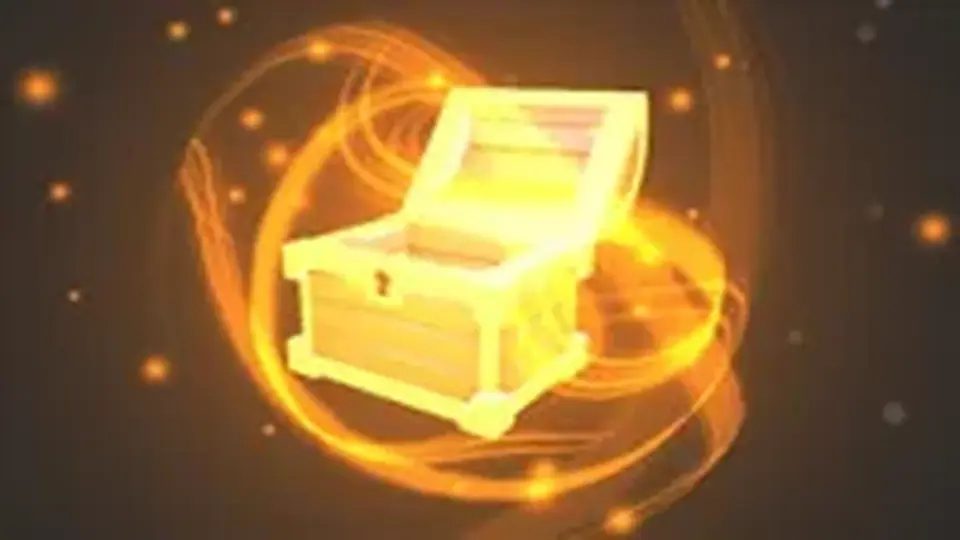
Epic LootBox Effects adds stylized particle work for lootbox reveals, with rarity variants for common, uncommon, rare, and epic outcomes. It fits both 2D and 3D Unity projects and includes a demo scene and manual for setup.
Lootbox openings need a clear visual payoff, and Epic LootBox Effects Gives that moment a stylized particle treatment. The pack is centered on lootbox reveal effects, with separate rarity handling for Common, Uncommon, Rare, and Epic Outcomes.
It comes from Mixture Art and sits in the Particles category under Vfx/particles. The package is set up as a Unity asset for projects that want a ready-made lootbox effect set rather than a one-off particle.
Rarity-based effects for reward moments
The core idea is simple: each lootbox effect includes rarity variations. That makes it easier to match the visual response to the reward tier without having to build separate particle setups from scratch for every opening animation.
The available rarity layers are Common, Uncommon, Rare, and Epic. Because the rarity treatment is built into the effect set itself, the visual language stays consistent across different reward levels while still giving each result its own feel. For projects with repeated lootbox interactions, that kind of separation can keep the presentation organized and easier to manage inside the project.
What the package includes
The pack includes 25 lootbox effects With 4 rarity effects Across the common, uncommon, rare, and epic tiers. It also includes a Demo scene And a Manual, giving a starting point for checking how the effects behave and how they can be brought into a project.
25 lootbox effects
4 rarity effects: Common, Uncommon, Rare, Epic
Works with 2D and 3D games
Suitable for mobile and desktop
Demo scene and manual included
The asset count is listed at 158, and the package type is Unitypackage. The file size is 5.7 MB. Those details make it easier to see how the asset is packaged before it is brought into a project.
Setup details that matter before import
The original Unity version is 5.6.2, and the latest version is also listed as 1.0. The asset was first published on Apr 19, 2018, with the latest release date also on Apr 19, 2018. Release notes indicate a First release.
That gives the pack a very direct setup profile: a Unity package, a demo scene, a manual, and a clear original Unity version reference. For teams checking fit before implementation, those are the practical pieces that define how the asset enters the project. The package is meant to be brought into Unity as a unit rather than assembled from separate pieces.
Using it in 2D and 3D projects
Epic LootBox Effects is marked for both 2D and 3D games, which keeps the same effect set usable across different project types. It is also listed as suitable for Mobile and desktop, so the pack is not limited to one target device range.
That broad use case matters when the lootbox flow appears in more than one part of a project. A team can keep the reward animation language consistent whether the game is presenting the effect in a 2D interface or in a 3D scene. The same applies to platform planning: mobile and desktop are both covered, so the asset can sit in projects that need the lootbox moment to read in either environment.
Because the effect set is stylized, it is a fit for projects that want a noticeable visual reaction without shifting away from the particle-driven look of the pack. The rarity split also makes the effect set more useful in systems where reward tiers are already part of gameplay flow.
Where it fits in production
In a production pipeline, this pack belongs wherever lootbox reveals need a consistent particle response. The demo scene and manual provide the practical starting point, while the 25 effects and four rarity layers give enough room to match different reward states without leaving the lootbox sequence visually flat.
For Unity projects that need a ready particle set for common reward moments, Epic LootBox Effects slots into the Particles workflow as a focused asset for opening animations, tiered outcomes, and 2D or 3D presentation.
 Environment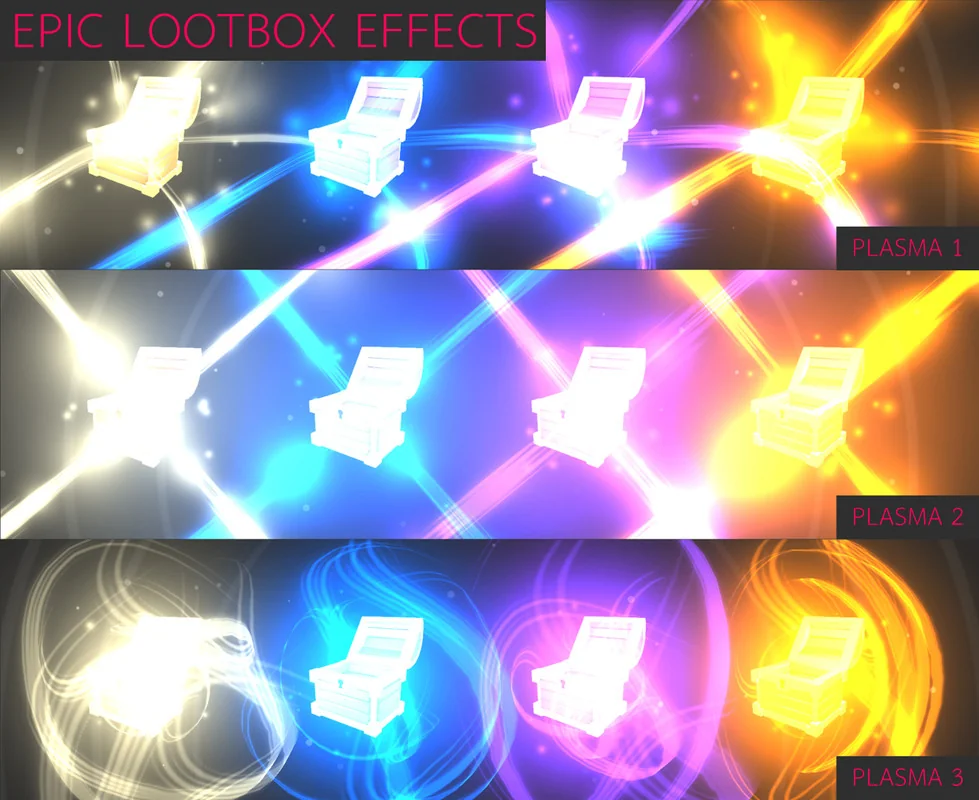
 Environment
 Environment
 Spells