"7e6fc58c410f2894"{"id":"23733","slug":"blood-effects-pack","title":"Blood Effects Pack","category":"Particles","engine":"Original Unity version: 2022.3.62","assetVersion":"Original Unity version: 2022.3.62","engineVersion":"Asset Version:5.1.1","tag":"Particles","accent":"cyan","visual":"mech","summary":"Blood Effects Pack gives action, horror, and stylized projects a set of blood splashes, decals, dripping effects, gut visuals, and screen overlays. It works across Built-in RP, URP, HDRP, and mobile-friendly workflows, with modular prefabs and texture sets...","platform":"Unity","publishedAt":"2026-04-11T16:49:48.000Z","updatedAt":"2026-04-19T15:35:12.000Z","sourceNotes":[],"fileContents":[],"compatibility":["Unity","Original Unity version: 2022.3.62","Asset Version: 5.1.1"],"featuredImage":{"alt":"Blood Effects Pack","src":"https://3dcghub.com/wp-content/uploads/2026/04/664965335742_66b08ab1-31ae-451a-b16f-5543d0ef0230_1280x720_stretch.webp"},"hasDownloadLink":true,"downloads":6,"terms":[{"taxonomy":"category","slug":"particles","name":"Particles"},{"taxonomy":"post_tag","slug":"textures","name":"Textures"},{"taxonomy":"post_tag","slug":"unity","name":"Unity"},{"taxonomy":"post_tag","slug":"vfx","name":"VFX"}],"galleryImages":[{"src":"https://3dcghub.com/wp-content/uploads/2026/04/ab873affe60d_e094b43e-0c55-4c33-9b43-a654e5af6387_scaled.webp","alt":"Blood Effects Pack"},{"src":"https://3dcghub.com/wp-content/uploads/2026/04/6b043b03b24c_51671051-90ac-4324-b96c-083c5a2f2a6b_scaled.webp","alt":"Blood Effects Pack"},{"src":"https://3dcghub.com/wp-content/uploads/2026/04/d71ad890c9a6_7c43d0e1-09ce-4b13-91fc-c1e05067359b_scaled.webp","alt":"Blood Effects Pack"},{"src":"https://3dcghub.com/wp-content/uploads/2026/04/8387d19205d6_38b6169a-dea1-414c-bb4c-b723a8af896d_scaled.webp","alt":"Blood Effects Pack"},{"src":"https://3dcghub.com/wp-content/uploads/2026/04/718c22c4f78f_38eea2de-0df6-4dd8-b539-18df98c9c1d5_scaled.webp","alt":"Blood Effects Pack"}],"accessPanel":{"kind":"resource","title":"Access this resource","eyebrow":"Free Download","message":"Log in or create a free account to start your download.","fileName":"Blood Effects Pack v5.1.1 (15 May 2025).7z","safetyNote":"All resources are 100% manually reviewed to eliminate all risks.","actionLabel":"Download Free","resourceType":"Resource archive"},"contentHtml":"\u003ch2\u003eBlood marks for combat beats and aftermath shots\u003c/h2\u003e\u003cp\u003eBlood Effects Pack is the kind of visual set that can sit behind a hit reaction just as easily as it can carry a full aftermath shot. The package covers blood splashes, dripping effects, decals, and gut visuals, so it can be used for fast combat feedback, lingering environmental damage, or heavier gore moments in action, horror, and stylized games.\u003c/p\u003e\u003cp\u003eThat range matters because the effects are not locked into one type of scene. Ambient blood decals can stay in the world as a trace of damage, while responsive combat VFX can appear at the exact moment a strike lands. The same pack can also support more direct close-up storytelling through the gut visuals, giving artists room to move between subtle damage indicators and more intense gore without switching to a different visual language.\u003c/p\u003e\u003cp\u003eThe overall emphasis stays on practical blood presentation rather than a single dramatic effect. That makes it easier to shape the mood of a scene with the right amount of visual weight, whether the goal is a restrained mark on the floor or a more obvious burst of blood during combat.\u003c/p\u003e\u003ch2\u003eRender pipeline fit without changing the effect set\u003c/h2\u003e\u003cp\u003eThe pack is compatible with Built-in RP, Universal RP, and HDRP, with HDRP using a Shadergraph shader. It is also listed as mobile-friendly and supported across built-in, URP, and HDRP Decal Projectors, which gives it a wide range of scene setups without forcing the blood effects into one rendering path.\u003c/p\u003e\u003cp\u003eUnity 6 is included in the compatibility notes as well. Combined with support for both mobile and desktop platforms, the pack is set up for projects that need blood visuals to appear consistently in more than one build target. The effects are described as lightweight, PBR-based, and performance-optimized, which suits games where blood may appear often and still needs to stay readable in motion.\u003c/p\u003e\u003cp\u003eThat mix of compatibility and performance focus gives developers a clear workflow: keep the visual style consistent, place the effect in the right pipeline, and use the same blood language across different scenes and platform targets.\u003c/p\u003e\u003ch2\u003eWhat comes in the pack\u003c/h2\u003e\u003cp\u003eThe contents lean toward modular pieces rather than one fixed visual. That makes it easier to combine the assets in different ways and keep blood effects adaptable to the scene.\u003c/p\u003e\u003cul\u003e\u003cli\u003e12 blood decal effect prefabs, each featuring albedo and normal textures\u003c/li\u003e\u003cli\u003e12 blood decal projector effect prefabs, each featuring albedo and normal textures\u003c/li\u003e\u003cli\u003e4 blood UI screen effects\u003c/li\u003e\u003cli\u003e1 blood screen effect texture at 2048 x 1024\u003c/li\u003e\u003cli\u003e4 static decal albedo textures at 512x512\u003c/li\u003e\u003cli\u003e4 static decal normal textures at 512x512\u003c/li\u003e\u003cli\u003e4 spritesheet decal albedo textures at 2048x2048\u003c/li\u003e\u003cli\u003e4 spritesheet decal normal textures at 2048x2048\u003c/li\u003e\u003cli\u003e8 blood splash effect prefabs, each featuring albedo and normal textures\u003c/li\u003e\u003cli\u003e6 spritesheet splash albedo textures at 1024x1024\u003c/li\u003e\u003cli\u003e6 spritesheet splash normal textures at 1024x1024\u003c/li\u003e\u003cli\u003e2 gut effect prefabs\u003c/li\u003e\u003cli\u003e5 static gut prefabs, each featuring albedo with smoothness and normal textures\u003c/li\u003e\u003cli\u003e5 gut albedo with smoothness textures at 2048x2048\u003c/li\u003e\u003cli\u003e5 gut normal textures at 2048x2048\u003c/li\u003e\u003cli\u003eA variety of shaders and materials\u003c/li\u003e\u003c/ul\u003e\u003cp\u003eThat spread of prefabs and textures gives the pack several points of entry. Some effects are built for direct placement, some are tied to projector-style use, and others are set up as screen effects or texture-driven elements. The blood visuals therefore cover both world-space presentation and player-facing overlays.\u003c/p\u003e\u003ch2\u003eUsing the pack as a flexible blood layer\u003c/h2\u003e\u003cp\u003eThe modular prefabs and texture sets make the pack useful as a layer that can be swapped in where needed rather than treated as one fixed gore system. A scene can use static decals for blood left on surfaces, splashes for impact moments, and UI screen effects when the blood needs to register directly on the player view. Because the content includes both static and spritesheet texture sets, the pack can support visuals that sit still in the world as well as effects that animate over time.\u003c/p\u003e\u003cp\u003eThe texture data also gives the blood effects enough material detail to sit naturally beside the rest of a projectâs surfaces. Albedo, normal, and smoothness data are all present in the pack where relevant, and the effect set includes shaders and materials to support that workflow. For artists, that means the blood can be adjusted as part of the scene instead of feeling detached from it.\u003c/p\u003e\u003cp\u003eThis asset includes visual effects only. Gameplay systems such as weapon logic, damage handling, spawning systems, or pooling systems are not included.\u003c/p\u003e\u003ch2\u003eWhere it lands best\u003c/h2\u003e\u003cp\u003eBlood Effects Pack fits best in projects that already have their gameplay systems in place and need a blood layer that can be placed quickly across different situations. It is especially useful for developers building action, horror, or stylized scenes who want decals, splashes, gut visuals, and screen effects in one modular set, with support for Built-in RP, URP, HDRP, mobile, desktop, and Unity 6.\u003c/p\u003e\n\n\u003ch2\u003eMore From The Same Workflow\u003c/h2\u003e\n\u003cul\u003e\n\u003cli\u003e\u003ca href=\"https://3dcghub.com/toolkit-for-unity-physics-2026/\" title=\"Toolkit for Unity Physics 2026\"\u003eToolkit for Unity Physics 2026\u003c/a\u003e\u003c/li\u003e\n\u003cli\u003e\u003ca href=\"https://3dcghub.com/opencv-for-unity/\" title=\"OpenCV for Unity\"\u003eOpenCV for Unity\u003c/a\u003e\u003c/li\u003e\n\u003cli\u003e\u003ca href=\"https://3dcghub.com/exporter-for-unreal-to-for-unity-2026/\" title=\"Exporter for Unreal to/for Unity 2026\"\u003eExporter for Unreal to/for Unity 2026\u003c/a\u003e\u003c/li\u003e\n\u003cli\u003e\u003ca href=\"https://3dcghub.com/dialogue-system-for-unity/\" title=\"Dialogue System for Unity\"\u003eDialogue System for Unity\u003c/a\u003e\u003c/li\u003e\n\u003cli\u003e\u003ca href=\"https://3dcghub.com/ambient-sounds-interactive-soundscapes-for-unity-6/\" title=\"Ambient Sounds – Interactive Soundscapes for Unity 6\"\u003eAmbient Sounds – Interactive Soundscapes for Unity 6\u003c/a\u003e\u003c/li\u003e\n\u003c/ul\u003e","contentTextLength":5172,"navigation":{"current":3563,"total":3618,"previous":{"id":"23741","slug":"bonfire-asset-for-zibra-smoke-fire","title":"Bonfire - [Asset for Zibra Smoke \u0026 Fire]","category":"Particles","platform":"Unity","updatedAt":"2026-04-19T15:35:12.000Z"},"next":{"id":"23725","slug":"3d-games-effects-bundle-1","title":"3D Games Effects Bundle 1","category":"Particles","platform":"Unity","updatedAt":"2026-04-19T15:35:12.000Z"}},"relatedResources":[{"id":"23993","slug":"sword-slashes-pro","title":"Sword slashes PRO","category":"Particles","engine":"Original Unity version: 2020.3.18","assetVersion":"Original Unity version: 2020.3.18","engineVersion":"Asset Version:2.3.3","tag":"Particles","accent":"cyan","visual":"character","summary":"Sword Slashes PRO brings separate sword-slash particle effects into Unity rather than tying the motion to the blade itself. It includes 22 unique slash effects, 11 combo skills, and support across BiRP, URP, and HDRP.","platform":"Unity","publishedAt":"2026-04-12T09:19:31.000Z","updatedAt":"2026-04-19T15:35:03.000Z","sourceNotes":[],"fileContents":[],"compatibility":["Unity","Original Unity version: 2020.3.18","Asset Version: 2.3.3"],"featuredImage":{"alt":"Sword slashes PRO","src":"https://3dcghub.com/wp-content/uploads/2026/04/45960f043abe_e9f18a17-c835-4c9d-993f-1c6f56cb347b_1280x720_stretch.webp"},"hasDownloadLink":true,"downloads":6},{"id":"24006","slug":"uni-vfx-ultimate-pack-for-visual-effect-graph","title":"UNI VFX: Ultimate pack for Visual Effect Graph","category":"Particles","engine":"Original Unity version: 2021.3.11","assetVersion":"Original Unity version: 2021.3.11","engineVersion":"Asset Version:1.0.1","tag":"Particles","accent":"cyan","visual":"character","summary":"UNI VFX brings event-driven visual effects into Unity URP with GPU particle systems, custom shaders, and a large set of prefabs, textures, and meshes. It is set up for quick inspection-level control, so colors, spawn rates, and pattern textures can be adjus...","platform":"Unity","publishedAt":"2026-04-12T09:22:40.000Z","updatedAt":"2026-04-19T15:35:02.000Z","sourceNotes":[],"fileContents":[],"compatibility":["Unity","Original Unity version: 2021.3.11","Asset Version: 1.0.1"],"featuredImage":{"alt":"UNI VFX: Ultimate pack for Visual Effect Graph","src":"https://3dcghub.com/wp-content/uploads/2026/04/4dcafbdf9ff9_69eb0deb-9ccc-4a04-abf8-19073a7d9752_1280x720_stretch.webp"},"hasDownloadLink":true,"downloads":2},{"id":"23869","slug":"portals-package-2","title":"Portals package 2","category":"Particles","engine":"Original Unity version: 2017.1.0","assetVersion":"Original Unity version: 2017.1.0","engineVersion":"Asset Version:1.0","tag":"Particles","accent":"cyan","visual":"luts","summary":"Portals package 2 centers on portal visuals that can be placed quickly into a scene and used across 2D and 3D projects. It includes a demo scene, HDR Bloom particles and effects, and support for all platforms, including PC, consoles, mobiles, and VR.","platform":"Unity","publishedAt":"2026-04-11T17:34:47.000Z","updatedAt":"2026-04-19T15:35:08.000Z","sourceNotes":[],"fileContents":[],"compatibility":["Unity","Original Unity version: 2017.1.0","Asset Version: 1.0"],"featuredImage":{"alt":"Portals package 2","src":"https://3dcghub.com/wp-content/uploads/2026/04/c8e4ea065da4_fa8111ea-8580-4366-9818-d61aca33a6be_1280x720_stretch.webp"},"hasDownloadLink":true,"downloads":1}]}
Particles
Blood Effects Pack
Blood Effects Pack gives action, horror, and stylized projects a set of blood splashes, decals, dripping effects, gut visuals, and screen overlays. It works across Built-in RP, URP, HDRP, and mobile-friendly workflows, with modular prefabs and texture sets...
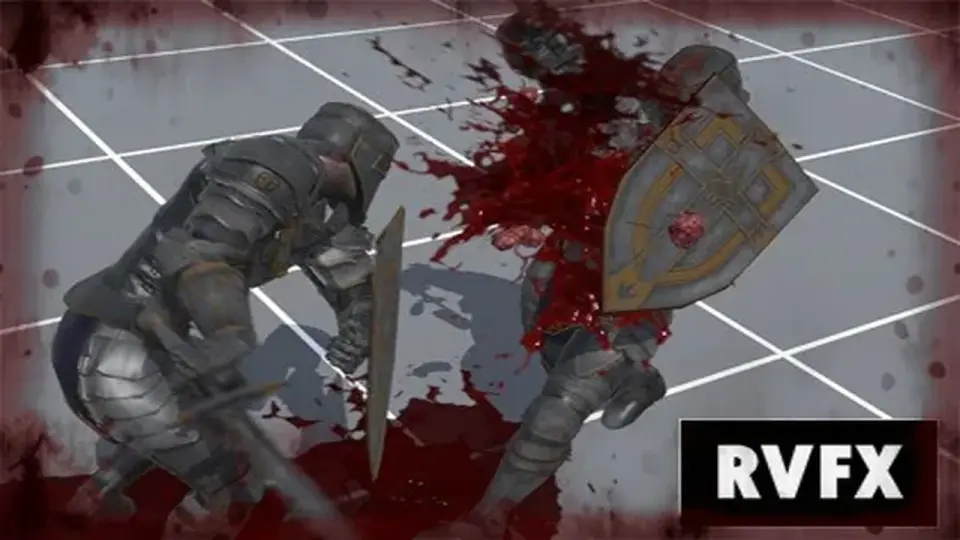
Blood Effects Pack is the kind of visual set that can sit behind a hit reaction just as easily as it can carry a full aftermath shot. The package covers blood splashes, dripping effects, decals, and gut visuals, so it can be used for fast combat feedback, lingering environmental damage, or heavier gore moments in action, horror, and stylized games.
That range matters because the effects are not locked into one type of scene. Ambient blood decals can stay in the world as a trace of damage, while responsive combat VFX can appear at the exact moment a strike lands. The same pack can also support more direct close-up storytelling through the gut visuals, giving artists room to move between subtle damage indicators and more intense gore without switching to a different visual language.
The overall emphasis stays on practical blood presentation rather than a single dramatic effect. That makes it easier to shape the mood of a scene with the right amount of visual weight, whether the goal is a restrained mark on the floor or a more obvious burst of blood during combat.
Render pipeline fit without changing the effect set
The pack is compatible with Built-in RP, Universal RP, and HDRP, with HDRP using a Shadergraph shader. It is also listed as mobile-friendly and supported across built-in, URP, and HDRP Decal Projectors, which gives it a wide range of scene setups without forcing the blood effects into one rendering path.
Unity 6 is included in the compatibility notes as well. Combined with support for both mobile and desktop platforms, the pack is set up for projects that need blood visuals to appear consistently in more than one build target. The effects are described as lightweight, PBR-based, and performance-optimized, which suits games where blood may appear often and still needs to stay readable in motion.
That mix of compatibility and performance focus gives developers a clear workflow: keep the visual style consistent, place the effect in the right pipeline, and use the same blood language across different scenes and platform targets.
What comes in the pack
The contents lean toward modular pieces rather than one fixed visual. That makes it easier to combine the assets in different ways and keep blood effects adaptable to the scene.
12 blood decal effect prefabs, each featuring albedo and normal textures
12 blood decal projector effect prefabs, each featuring albedo and normal textures
4 blood UI screen effects
1 blood screen effect texture at 2048 x 1024
4 static decal albedo textures at 512x512
4 static decal normal textures at 512x512
4 spritesheet decal albedo textures at 2048x2048
4 spritesheet decal normal textures at 2048x2048
8 blood splash effect prefabs, each featuring albedo and normal textures
6 spritesheet splash albedo textures at 1024x1024
6 spritesheet splash normal textures at 1024x1024
2 gut effect prefabs
5 static gut prefabs, each featuring albedo with smoothness and normal textures
5 gut albedo with smoothness textures at 2048x2048
5 gut normal textures at 2048x2048
A variety of shaders and materials
That spread of prefabs and textures gives the pack several points of entry. Some effects are built for direct placement, some are tied to projector-style use, and others are set up as screen effects or texture-driven elements. The blood visuals therefore cover both world-space presentation and player-facing overlays.
Using the pack as a flexible blood layer
The modular prefabs and texture sets make the pack useful as a layer that can be swapped in where needed rather than treated as one fixed gore system. A scene can use static decals for blood left on surfaces, splashes for impact moments, and UI screen effects when the blood needs to register directly on the player view. Because the content includes both static and spritesheet texture sets, the pack can support visuals that sit still in the world as well as effects that animate over time.
The texture data also gives the blood effects enough material detail to sit naturally beside the rest of a projectâs surfaces. Albedo, normal, and smoothness data are all present in the pack where relevant, and the effect set includes shaders and materials to support that workflow. For artists, that means the blood can be adjusted as part of the scene instead of feeling detached from it.
This asset includes visual effects only. Gameplay systems such as weapon logic, damage handling, spawning systems, or pooling systems are not included.
Where it lands best
Blood Effects Pack fits best in projects that already have their gameplay systems in place and need a blood layer that can be placed quickly across different situations. It is especially useful for developers building action, horror, or stylized scenes who want decals, splashes, gut visuals, and screen effects in one modular set, with support for Built-in RP, URP, HDRP, mobile, desktop, and Unity 6.
 Particles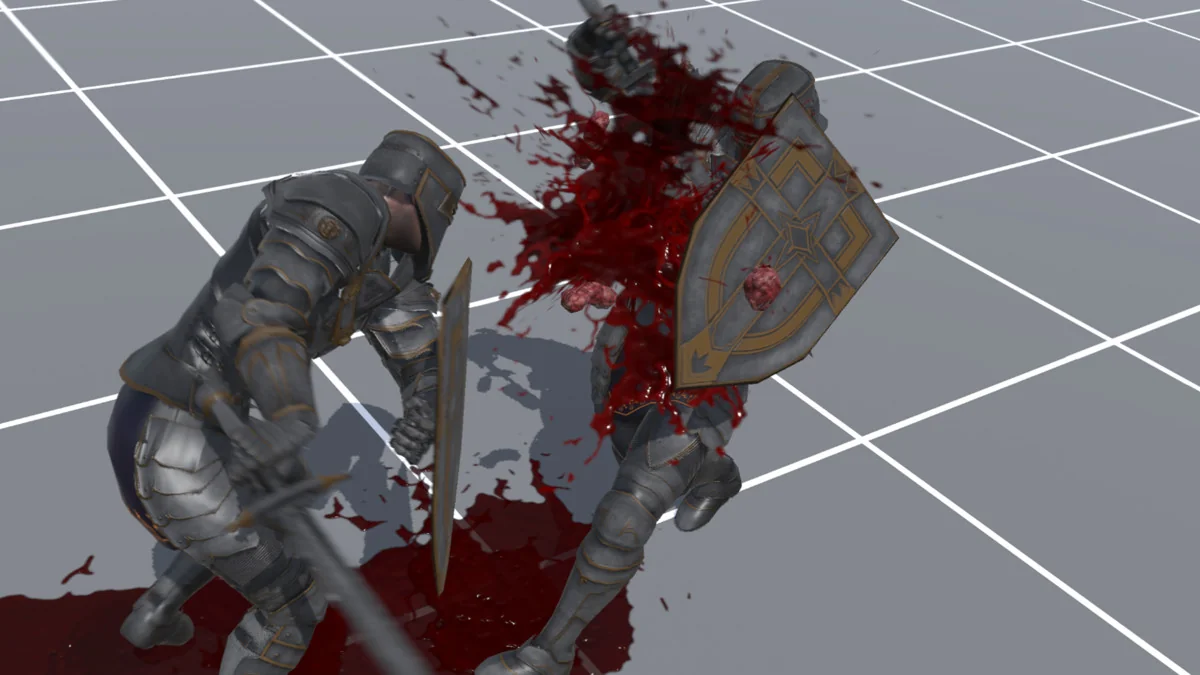
 Particles
 Particles
 Particles