"7e6fc58c410f2894"{"id":"23741","slug":"bonfire-asset-for-zibra-smoke-fire","title":"Bonfire - [Asset for Zibra Smoke \u0026 Fire]","category":"Particles","engine":"Original Unity version: 2021.3.26","assetVersion":"Original Unity version: 2021.3.26","engineVersion":"Asset Version:1.0.0","tag":"Particles","accent":"cyan","visual":"audio","summary":"Bonfire fits scenes that need an interactive fire element without extra animation work. It uses Zibra Smoke \u0026 Fire for real-time smoke simulation and can act as either a VFX piece or a gameplay object.","platform":"Unity","publishedAt":"2026-04-11T17:02:02.000Z","updatedAt":"2026-04-19T15:35:12.000Z","sourceNotes":[],"fileContents":[],"compatibility":["Unity","Original Unity version: 2021.3.26","Asset Version: 1.0.0"],"featuredImage":{"alt":"Bonfire - [Asset for Zibra Smoke \u0026 Fire]","src":"https://3dcghub.com/wp-content/uploads/2026/04/c1f4ff60b660_84d270b6-355d-457a-aca5-c62009aa28ee_1280x720_stretch.webp"},"hasDownloadLink":true,"downloads":1,"terms":[{"taxonomy":"category","slug":"particles","name":"Particles"},{"taxonomy":"post_tag","slug":"environment","name":"Environment"},{"taxonomy":"post_tag","slug":"unity","name":"Unity"},{"taxonomy":"post_tag","slug":"vfx","name":"VFX"}],"galleryImages":[{"src":"https://3dcghub.com/wp-content/uploads/2026/04/b85d27bc5158_96356d51-59d7-4ff3-811d-bd32aef08bc6_scaled.webp","alt":"Bonfire - [Asset for Zibra Smoke \u0026 Fire]"},{"src":"https://3dcghub.com/wp-content/uploads/2026/04/092a329f90cf_84d75b76-288e-442f-8950-ba1b912dcf99_scaled.webp","alt":"Bonfire - [Asset for Zibra Smoke \u0026 Fire]"},{"src":"https://3dcghub.com/wp-content/uploads/2026/04/1e6c15d0babd_588f2320-6961-40f7-8054-3bf6b4e0cb7c_scaled.webp","alt":"Bonfire - [Asset for Zibra Smoke \u0026 Fire]"},{"src":"https://3dcghub.com/wp-content/uploads/2026/04/cd577ce5dc2b_0ed2a761-1e1f-469d-8a34-115f59816f64_scaled.webp","alt":"Bonfire - [Asset for Zibra Smoke \u0026 Fire]"},{"src":"https://3dcghub.com/wp-content/uploads/2026/04/48feb9256894_834789d3-2d6d-4c3d-bdc4-50d1584f5875_scaled.webp","alt":"Bonfire - [Asset for Zibra Smoke \u0026 Fire]"}],"accessPanel":{"kind":"resource","title":"Access this resource","eyebrow":"Free Download","message":"Log in or create a free account to start your download.","fileName":"Bonfire - Asset for Zibra Smoke Fire v1.0.0.7z","safetyNote":"All resources are 100% manually reviewed to eliminate all risks.","actionLabel":"Download Free","resourceType":"Resource archive"},"contentHtml":"\u003ch2\u003eScenes that need an interactive fire element\u003c/h2\u003e\n\u003cp\u003eBonfire is useful in projects where a fireplace, campfire, or other environmental flame needs to do more than sit in the background. It can serve as a VFX element or as part of gameplay, which makes it relevant for visual storytelling, custom mechanics, and moments where a scene needs more presence and realism.\u003c/p\u003e\n\u003cp\u003eThe asset uses Zibra Smoke \u0026 Fire for real-time smoke simulation, so the fire is not just a static prop. That makes it a practical fit for situations where the flame needs to feel active in the world instead of appearing as a prebuilt effect with no interaction.\u003c/p\u003e \u003ch2\u003eGetting it into a project\u003c/h2\u003e\n\u003cp\u003eSetup is straightforward. The asset is meant to be dropped directly into a scene, and no additional animations are needed for it to work. That gives it a simple implementation path for projects that want a working fire element without building motion or behavior from scratch.\u003c/p\u003e\n\u003cp\u003eOne important requirement is that Zibra Smoke \u0026 Fire must already be available. Bonfire depends on that functionality, so the asset is tied to that workflow rather than operating as a standalone fire system.\u003c/p\u003e\n\u003cp\u003eUnity 6 is not fully supported. The asset is listed as compatible with the original Unity version 2021.3.26, and the render pipeline compatibility includes Built-in, HDRP, URP, and Custom SRP. That makes the pipeline side fairly broad, while still keeping the Unity version note important for anyone planning a newer project.\u003c/p\u003e \u003ch2\u003eWhat can be adjusted in the fire\u003c/h2\u003e\n\u003cp\u003eBonfire includes built-in controls that let the creator change the fire color, the fire emission intensity, and the ashes emission intensity. It also allows control over the amount of particles, including the number of fire sparks in the simulation. Those parameters give the asset enough range to shift between different looks without requiring a separate effect setup.\u003c/p\u003e\n\u003cp\u003eThe adjustment options are presented as easy to use, with the parameters intended to avoid a steep learning curve. That matters for projects where the effect has to be tuned quickly to match a scene rather than held in a fixed state.\u003c/p\u003e\n\u003cp\u003eThe asset is also described as highly customizable, with settings that can be modified to fit a specific visual direction. The practical takeaway is that it is meant to change in appearance and behavior while staying within the same Zibra-based workflow.\u003c/p\u003e \u003ch2\u003eHow the simulation side supports the look\u003c/h2\u003e\n\u003cp\u003eThe smoke and fire behavior comes from Zibra Smoke \u0026 Fire, which is described as an extension for creating volumetric effects based on real-time simulated smoke and fire. It uses custom physics simulation and AI-driven technology for neural object representation.\u003c/p\u003e\n\u003cp\u003eThat combination is aimed at realistic VFX, custom game mechanics, and faster scene prototyping. In other words, Bonfire sits inside a toolset that is meant to support both presentation and interaction, not only visual output.\u003c/p\u003e\n\u003cp\u003eThe asset can therefore be used when a scene needs a flame effect that contributes to the mood of the environment while also leaving room for interactivity. It is not limited to a decorative role, since the smoke simulation is part of the functioning effect.\u003c/p\u003e \u003ch2\u003ePerformance notes and the kind of project it suits\u003c/h2\u003e\n\u003cp\u003eBonfire was tested on desktop with an RTX 2060 at Full HD 1080p in the Built-in Render Pipeline. The recorded result was 100 FPS with a frame time of 10.0 ms for the scene with the effect. That gives a concrete reference point for the package in one measured setup.\u003c/p\u003e\n\u003cp\u003eZibra Smoke \u0026 Fire is also positioned as working across a wide range of devices, from mobile hardware such as the iPhone 6s to high-end desktop GPUs like the RTX 4090. Since Bonfire depends on that system, the asset sits inside a broader performance-oriented technology stack rather than a fixed one-device showcase.\u003c/p\u003e\n\u003cp\u003eThe package includes 21 assets and comes as a unitypackage. It is categorized as VFX, which matches its role as a fire and smoke effect that can be placed into a scene and adjusted through the available controls.\u003c/p\u003e \u003ch3\u003eA practical fit for scene builders\u003c/h3\u003e\n\u003cp\u003eBonfire is most relevant for developers who want an environmental fire element that is interactive, adjustable, and ready to place into a Unity scene. It suits projects that already use Zibra Smoke \u0026 Fire and need a bonfire effect that can support atmosphere, gameplay, or both. The strongest parts of the workflow are the direct setup, the built-in controls for color and emission, and the support for several render pipelines.\u003c/p\u003e\n\n\u003ch2\u003eRelated Resources Worth Checking\u003c/h2\u003e\n\u003cul\u003e\n\u003cli\u003e\u003ca href=\"https://3dcghub.com/toolkit-for-unity-physics-2026/\" title=\"Toolkit for Unity Physics 2026\"\u003eToolkit for Unity Physics 2026\u003c/a\u003e\u003c/li\u003e\n\u003cli\u003e\u003ca href=\"https://3dcghub.com/opencv-for-unity/\" title=\"OpenCV for Unity\"\u003eOpenCV for Unity\u003c/a\u003e\u003c/li\u003e\n\u003cli\u003e\u003ca href=\"https://3dcghub.com/exporter-for-unreal-to-for-unity-2026/\" title=\"Exporter for Unreal to/for Unity 2026\"\u003eExporter for Unreal to/for Unity 2026\u003c/a\u003e\u003c/li\u003e\n\u003cli\u003e\u003ca href=\"https://3dcghub.com/dialogue-system-for-unity/\" title=\"Dialogue System for Unity\"\u003eDialogue System for Unity\u003c/a\u003e\u003c/li\u003e\n\u003cli\u003e\u003ca href=\"https://3dcghub.com/ambient-sounds-interactive-soundscapes-for-unity-6/\" title=\"Ambient Sounds – Interactive Soundscapes for Unity 6\"\u003eAmbient Sounds – Interactive Soundscapes for Unity 6\u003c/a\u003e\u003c/li\u003e\n\u003c/ul\u003e","contentTextLength":4690,"navigation":{"current":3562,"total":3618,"previous":{"id":"23718","slug":"flipbook-vfx-urp","title":"Flipbook VFX - URP","category":"VFX","platform":"Unity","updatedAt":"2026-04-19T15:35:13.000Z"},"next":{"id":"23733","slug":"blood-effects-pack","title":"Blood Effects Pack","category":"Particles","platform":"Unity","updatedAt":"2026-04-19T15:35:12.000Z"}},"relatedResources":[{"id":"23806","slug":"fire-smoke-dynamic-nature","title":"Fire \u0026 Smoke - Dynamic Nature","category":"Fire \u0026 Explosions","engine":"Original Unity version: 2021.2.0","assetVersion":"Original Unity version: 2021.2.0","engineVersion":"Asset Version:1.2.5","tag":"Fire \u0026 Explosions","accent":"cyan","visual":"audio","summary":"Fire \u0026 Smoke - Dynamic Nature gathers smoke, fire, and explosion prefabs with shader setups that respond to wind speed, direction, shiver, and gust. It also includes HD RP, URP, and Built-in support across a wide range of Unity versions.","platform":"Unity","publishedAt":"2026-04-11T17:15:31.000Z","updatedAt":"2026-04-19T15:35:10.000Z","sourceNotes":[],"fileContents":[],"compatibility":["Unity","Original Unity version: 2021.2.0","Asset Version: 1.2.5"],"featuredImage":{"alt":"Fire \u0026 Smoke - Dynamic Nature","src":"https://3dcghub.com/wp-content/uploads/2026/04/2c373a3ad14b_d6362422-3d33-4654-98d9-8f78f5d6274b_1280x720_stretch.webp"},"hasDownloadLink":true,"downloads":3},{"id":"23384","slug":"volumetric-shadows-for-particles","title":"Volumetric Shadows for Particles","category":"Particles \u0026 Effects","engine":"Original Unity version: 5.5.0","assetVersion":"Original Unity version: 5.5.0","engineVersion":"Asset Version:1.5","tag":"Particles","accent":"cyan","visual":"audio","summary":"Volumetric Shadows for Particles combines slice-based particle rendering with a volumetric shadow map for smoke, steam, dust, and fire. It gives a Unity workflow for shaping particle shadows with light type, slice count, and surface shading controls.","platform":"Unity","publishedAt":"2026-04-09T16:55:01.000Z","updatedAt":"2026-04-19T15:35:28.000Z","sourceNotes":[],"fileContents":[],"compatibility":["Unity","Original Unity version: 5.5.0","Asset Version: 1.5"],"featuredImage":{"alt":"Volumetric Shadows for Particles","src":"https://3dcghub.com/wp-content/uploads/2026/04/90d65ab79c7d_94c1bf3a-d050-4242-8500-940d754f38e1_1280x720_stretch.webp"},"hasDownloadLink":true,"downloads":0},{"id":"23869","slug":"portals-package-2","title":"Portals package 2","category":"Particles","engine":"Original Unity version: 2017.1.0","assetVersion":"Original Unity version: 2017.1.0","engineVersion":"Asset Version:1.0","tag":"Particles","accent":"cyan","visual":"luts","summary":"Portals package 2 centers on portal visuals that can be placed quickly into a scene and used across 2D and 3D projects. It includes a demo scene, HDR Bloom particles and effects, and support for all platforms, including PC, consoles, mobiles, and VR.","platform":"Unity","publishedAt":"2026-04-11T17:34:47.000Z","updatedAt":"2026-04-19T15:35:08.000Z","sourceNotes":[],"fileContents":[],"compatibility":["Unity","Original Unity version: 2017.1.0","Asset Version: 1.0"],"featuredImage":{"alt":"Portals package 2","src":"https://3dcghub.com/wp-content/uploads/2026/04/c8e4ea065da4_fa8111ea-8580-4366-9818-d61aca33a6be_1280x720_stretch.webp"},"hasDownloadLink":true,"downloads":1}]}
Particles
Bonfire - [Asset for Zibra Smoke & Fire]
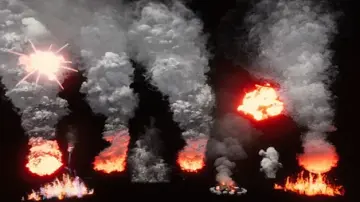
Bonfire fits scenes that need an interactive fire element without extra animation work. It uses Zibra Smoke & Fire for real-time smoke simulation and can act as either a VFX piece or a gameplay object.
Bonfire is useful in projects where a fireplace, campfire, or other environmental flame needs to do more than sit in the background. It can serve as a VFX element or as part of gameplay, which makes it relevant for visual storytelling, custom mechanics, and moments where a scene needs more presence and realism.
The asset uses Zibra Smoke & Fire for real-time smoke simulation, so the fire is not just a static prop. That makes it a practical fit for situations where the flame needs to feel active in the world instead of appearing as a prebuilt effect with no interaction.
Getting it into a project
Setup is straightforward. The asset is meant to be dropped directly into a scene, and no additional animations are needed for it to work. That gives it a simple implementation path for projects that want a working fire element without building motion or behavior from scratch.
One important requirement is that Zibra Smoke & Fire must already be available. Bonfire depends on that functionality, so the asset is tied to that workflow rather than operating as a standalone fire system.
Unity 6 is not fully supported. The asset is listed as compatible with the original Unity version 2021.3.26, and the render pipeline compatibility includes Built-in, HDRP, URP, and Custom SRP. That makes the pipeline side fairly broad, while still keeping the Unity version note important for anyone planning a newer project.
What can be adjusted in the fire
Bonfire includes built-in controls that let the creator change the fire color, the fire emission intensity, and the ashes emission intensity. It also allows control over the amount of particles, including the number of fire sparks in the simulation. Those parameters give the asset enough range to shift between different looks without requiring a separate effect setup.
The adjustment options are presented as easy to use, with the parameters intended to avoid a steep learning curve. That matters for projects where the effect has to be tuned quickly to match a scene rather than held in a fixed state.
The asset is also described as highly customizable, with settings that can be modified to fit a specific visual direction. The practical takeaway is that it is meant to change in appearance and behavior while staying within the same Zibra-based workflow.
How the simulation side supports the look
The smoke and fire behavior comes from Zibra Smoke & Fire, which is described as an extension for creating volumetric effects based on real-time simulated smoke and fire. It uses custom physics simulation and AI-driven technology for neural object representation.
That combination is aimed at realistic VFX, custom game mechanics, and faster scene prototyping. In other words, Bonfire sits inside a toolset that is meant to support both presentation and interaction, not only visual output.
The asset can therefore be used when a scene needs a flame effect that contributes to the mood of the environment while also leaving room for interactivity. It is not limited to a decorative role, since the smoke simulation is part of the functioning effect.
Performance notes and the kind of project it suits
Bonfire was tested on desktop with an RTX 2060 at Full HD 1080p in the Built-in Render Pipeline. The recorded result was 100 FPS with a frame time of 10.0 ms for the scene with the effect. That gives a concrete reference point for the package in one measured setup.
Zibra Smoke & Fire is also positioned as working across a wide range of devices, from mobile hardware such as the iPhone 6s to high-end desktop GPUs like the RTX 4090. Since Bonfire depends on that system, the asset sits inside a broader performance-oriented technology stack rather than a fixed one-device showcase.
The package includes 21 assets and comes as a unitypackage. It is categorized as VFX, which matches its role as a fire and smoke effect that can be placed into a scene and adjusted through the available controls.
A practical fit for scene builders
Bonfire is most relevant for developers who want an environmental fire element that is interactive, adjustable, and ready to place into a Unity scene. It suits projects that already use Zibra Smoke & Fire and need a bonfire effect that can support atmosphere, gameplay, or both. The strongest parts of the workflow are the direct setup, the built-in controls for color and emission, and the support for several render pipelines.
![Bonfire - [Asset for Zibra Smoke & Fire]](/_img/960/wp-content/uploads/2026/04/c1f4ff60b660_84d270b6-355d-457a-aca5-c62009aa28ee_1280x720_stretch.webp) Particles
Particles![Bonfire - [Asset for Zibra Smoke & Fire]](/_img/960/wp-content/uploads/2026/04/b85d27bc5158_96356d51-59d7-4ff3-811d-bd32aef08bc6_scaled.webp)
 Fire & Explosions
 Particles
 Particles