"7e6fc58c410f2894"{"id":"23384","slug":"volumetric-shadows-for-particles","title":"Volumetric Shadows for Particles","category":"Particles \u0026 Effects","engine":"Original Unity version: 5.5.0","assetVersion":"Original Unity version: 5.5.0","engineVersion":"Asset Version:1.5","tag":"Particles","accent":"cyan","visual":"audio","summary":"Volumetric Shadows for Particles combines slice-based particle rendering with a volumetric shadow map for smoke, steam, dust, and fire. It gives a Unity workflow for shaping particle shadows with light type, slice count, and surface shading controls.","platform":"Unity","publishedAt":"2026-04-09T16:55:01.000Z","updatedAt":"2026-04-19T15:35:28.000Z","sourceNotes":[],"fileContents":[],"compatibility":["Unity","Original Unity version: 5.5.0","Asset Version: 1.5"],"featuredImage":{"alt":"Volumetric Shadows for Particles","src":"https://3dcghub.com/wp-content/uploads/2026/04/90d65ab79c7d_94c1bf3a-d050-4242-8500-940d754f38e1_1280x720_stretch.webp"},"hasDownloadLink":true,"downloads":0,"terms":[{"taxonomy":"category","slug":"particles-and-effects","name":"Particles \u0026 Effects"},{"taxonomy":"post_tag","slug":"environment","name":"Environment"},{"taxonomy":"post_tag","slug":"unity","name":"Unity"},{"taxonomy":"post_tag","slug":"vfx","name":"VFX"}],"galleryImages":[{"src":"https://3dcghub.com/wp-content/uploads/2026/04/af060469cdac_25b93ebd-23d1-4767-a5e1-b535ca126fe2_scaled.webp","alt":"Volumetric Shadows for Particles"},{"src":"https://3dcghub.com/wp-content/uploads/2026/04/2a4b29af6476_07e3f4e4-8881-44d9-9c92-4594c437d303_scaled.webp","alt":"Volumetric Shadows for Particles"},{"src":"https://3dcghub.com/wp-content/uploads/2026/04/bec0404c8cb2_807ca8a1-d8ef-4e65-852e-4037087ed407_scaled.webp","alt":"Volumetric Shadows for Particles"}],"accessPanel":{"kind":"resource","title":"Access this resource","eyebrow":"Free Download","message":"Log in or create a free account to start your download.","fileName":"Volumetric Shadows for Particles v1.5.7z","safetyNote":"All resources are 100% manually reviewed to eliminate all risks.","actionLabel":"Download Free","resourceType":"Resource archive"},"contentHtml":"\u003ch2\u003eVolumetric shadow map, slice rendering, and the light-facing pass\u003c/h2\u003e\n\u003cp\u003eVolumetric Shadows for Particles centers on a render path that draws animated particle effects such as smoke, steam, and dust with volumetric shadows from a dynamic light source. A volumetric shadow map is built before the particles are drawn, then the particles are rendered from the viewpoint of the light using multiple render targets. The setup uses a modern approach to the conventional slice-based technique in order to achieve high performance, flexibility, and quality.\u003c/p\u003e\n\u003cp\u003eThe render flow is direct. For 6 and 12 slices, the particles are drawn once. For 24 slices, they are drawn one additional time. The shadow map is then used to draw both the particles and the surfaces in the scene with volumetric shadows. That makes the package useful when particle motion needs to stay connected to the light rather than appearing as a flat overlay.\u003c/p\u003e \u003ch2\u003eSlice counts and light types\u003c/h2\u003e\n\u003cp\u003eThe asset gives a choice between 6, 12, and 24 slices, along with two light setups: an orthographic directional light or a perspective spotlight. Those options shape how the volumetric effect is built and how the shadowing behaves around the particle volume. The same workflow can therefore be adjusted to match a lighter or more detailed shadow setup without changing the overall rendering approach.\u003c/p\u003e\n\u003cp\u003eSeveral demo scenes are included to show the supported combinations in action: 12SliceFire, 12SliceFireOrtho, and 24SliceSmoke on Windows, plus matching versions for Mac. The scene names reflect the slice counts and light types available in the package and give a clear view of how the effect is intended to be used in practice.\u003c/p\u003e \u003ch2\u003eParticle looks: smoke, fire, and shaded surfaces\u003c/h2\u003e\n\u003cp\u003eVolumetric shadows are only part of the visual result here. The package also supports soft particles, emissive effects like fire, custom surface shading with normal mapping, and Unity's soft and hard shadows for shadowing surfaces. A solution is included for casting solid surface shadows on particles, which gives the effect a stronger link to the environment around it.\u003c/p\u003e\n\u003cp\u003eThese pieces make the tool relevant for effects that need depth and light response at the same time. Smoke and steam can carry the shadow information, dust can sit more convincingly in a lit space, and fire can keep an emissive look while still fitting into the same shading workflow. The combination of volumetric shadows and surface shading is what gives the package its practical range.\u003c/p\u003e\n\u003cul\u003e\n\u003cli\u003eSoft particles\u003c/li\u003e\n\u003cli\u003eEmissive effects like fire\u003c/li\u003e\n\u003cli\u003eCustom surface shading with normal mapping\u003c/li\u003e\n\u003cli\u003eUnity soft and hard shadows for surfaces\u003c/li\u003e\n\u003cli\u003eSolid surface shadows on particles\u003c/li\u003e\n\u003c/ul\u003e \u003ch2\u003eUnity version, platform support, and update history\u003c/h2\u003e\n\u003cp\u003eThe package is compatible with and tested on Windows and Mac operating systems. It is compatible with Direct3D 9 and above, as well as OpenGL 2.1 and above. Shader Model 3.0 is required, and it is not recommended for most mobile devices. The original Unity version is 5.5.0, and the supported Unity versions listed are 5.5.0 and 2017.1.1.\u003c/p\u003e\n\u003cp\u003eTechnical details also place the asset in the Particles \u0026amp; Effects category, with the category path tools/particles-effects. The package type is unitypackage. Its file size is 6.0 MB, the asset count is 118, the latest version is 1.5, and the latest release date is Oct 24, 2017. It was first published on Mar 29, 2016.\u003c/p\u003e\n\u003ch3\u003eUpdates carried into version 1.5\u003c/h3\u003e\n\u003cp\u003eVersion 1.5 updated scenes to make them more appropriate for the highest version of Unity and for smoother upgrades in the future. It also removed deprecated GUI Layer components. Earlier changes added a smoothScale with a smoothing function to reduce jittering, and a shadowClipOffset field for adjusting clipping of volumetric shadows between the light and the particle volume.\u003c/p\u003e\n\u003cp\u003eThat leaves the package focused on a clear task: rendering particle effects with volumetric shadows while keeping the light setup, slice count, and surface response available for adjustment in a Unity project.\u003c/p\u003e\n\n\u003ch2\u003eRelated Resources Worth Checking\u003c/h2\u003e\n\u003cul\u003e\n\u003cli\u003e\u003ca href=\"https://3dcghub.com/opencv-for-unity/\" title=\"OpenCV for Unity\"\u003eOpenCV for Unity\u003c/a\u003e\u003c/li\u003e\n\u003cli\u003e\u003ca href=\"https://3dcghub.com/exporter-for-unreal-to-for-unity-2026/\" title=\"Exporter for Unreal to/for Unity 2026\"\u003eExporter for Unreal to/for Unity 2026\u003c/a\u003e\u003c/li\u003e\n\u003cli\u003e\u003ca href=\"https://3dcghub.com/dialogue-system-for-unity/\" title=\"Dialogue System for Unity\"\u003eDialogue System for Unity\u003c/a\u003e\u003c/li\u003e\n\u003cli\u003e\u003ca href=\"https://3dcghub.com/ambient-sounds-interactive-soundscapes-for-unity-6/\" title=\"Ambient Sounds – Interactive Soundscapes for Unity 6\"\u003eAmbient Sounds – Interactive Soundscapes for Unity 6\u003c/a\u003e\u003c/li\u003e\n\u003cli\u003e\u003ca href=\"https://3dcghub.com/pegasus-flythroughs-for-unity-6/\" title=\"Pegasus – Flythroughs for Unity 6\"\u003ePegasus – Flythroughs for Unity 6\u003c/a\u003e\u003c/li\u003e\n\u003c/ul\u003e\n\n\u003ch2\u003eAsset Gallery\u003c/h2\u003e","contentTextLength":4213,"navigation":{"current":3526,"total":3618,"previous":{"id":"23389","slug":"arcade-vehicle-physics","title":"Arcade Vehicle Physics","category":"Physics","platform":"Unity","updatedAt":"2026-04-19T15:35:28.000Z"},"next":{"id":"23378","slug":"sky-master-ultimate-volumetric-skies-clouds-weather","title":"Sky Master ULTIMATE: Volumetric Skies, Clouds \u0026 Weather","category":"Particles \u0026 Effects","platform":"Unity","updatedAt":"2026-04-19T15:35:28.000Z"}},"relatedResources":[{"id":"23250","slug":"ethereal-urp-2021-volumetric-lighting-fog","title":"Ethereal URP 2021 - Volumetric Lighting \u0026 Fog","category":"Particles \u0026 Effects","engine":"Original Unity version: 2019.4.22","assetVersion":"Original Unity version: 2019.4.22","engineVersion":"Asset Version:1.7.0b","tag":"Particles","accent":"cyan","visual":"luts","summary":"Ethereal URP 2021 focuses on atmosphere: fog, volumetric lighting, and the look of illuminated particles suspended in the air. It also includes extra demos, Atrium and Forest scenes, and a bonus URP foliage shader with wind and subsurface scattering.","platform":"Unity","publishedAt":"2026-04-09T16:06:05.000Z","updatedAt":"2026-04-19T15:36:48.000Z","sourceNotes":[],"fileContents":[],"compatibility":["Unity","Original Unity version: 2019.4.22","Asset Version: 1.7.0b"],"featuredImage":{"alt":"Ethereal URP 2021 - Volumetric Lighting \u0026 Fog","src":"https://3dcghub.com/wp-content/uploads/2026/04/ce7bbed84197_c2124dbb-d237-443a-bb2d-1bcb7d8a3368_1280x720_stretch.webp"},"hasDownloadLink":true,"downloads":1},{"id":"23332","slug":"magic-mirror-pro-recursive-edition","title":"Magic Mirror Pro - Recursive Edition","category":"Particles \u0026 Effects","engine":"Original Unity version: 2018.4.36","assetVersion":"Original Unity version: 2018.4.36","engineVersion":"Asset Version:1.0.5","tag":"Particles","accent":"cyan","visual":"character","summary":"Magic Mirror Pro - Recursive Edition brings recursive reflections into Unity with support for mirror surfaces, a fix for recursive water reflections, and shadow rendering across recursion layers. It also includes tuning options for performance and layer con...","platform":"Unity","publishedAt":"2026-04-09T16:42:15.000Z","updatedAt":"2026-04-19T15:35:30.000Z","sourceNotes":[],"fileContents":[],"compatibility":["Unity","Original Unity version: 2018.4.36","Asset Version: 1.0.5"],"featuredImage":{"alt":"Magic Mirror Pro - Recursive Edition","src":"https://3dcghub.com/wp-content/uploads/2026/04/b07d38d4e685_ad753928-db93-4c48-b292-3aef98ed77a4_1280x720_stretch.webp"},"hasDownloadLink":true,"downloads":1},{"id":"23345","slug":"mudbun-volumetric-vfx-modeling","title":"MudBun: Volumetric VFX \u0026 Modeling","category":"Particles \u0026 Effects","engine":"Original Unity version: 2019.4.15","assetVersion":"Original Unity version: 2019.4.15","engineVersion":"Asset Version:1.6.52","tag":"Particles","accent":"cyan","visual":"animation","summary":"MudBun focuses on localized volumetric effects that need real-time mesh generation, surface distortion, and flexible shaping. It also reaches into volumetric modeling, with meshing modes, auto-rigging, and export options that fit into Unity workflows.","platform":"Unity","publishedAt":"2026-04-09T16:44:14.000Z","updatedAt":"2026-04-19T15:35:29.000Z","sourceNotes":[],"fileContents":[],"compatibility":["Unity","Original Unity version: 2019.4.15","Asset Version: 1.6.52"],"featuredImage":{"alt":"MudBun: Volumetric VFX \u0026 Modeling","src":"https://3dcghub.com/wp-content/uploads/2026/04/2854ec81944f_9c045921-5f8b-4126-aa34-cdef8b35be29_1280x720_stretch.webp"},"hasDownloadLink":true,"downloads":1}]}
Particles
Volumetric Shadows for Particles
Volumetric Shadows for Particles combines slice-based particle rendering with a volumetric shadow map for smoke, steam, dust, and fire. It gives a Unity workflow for shaping particle shadows with light type, slice count, and surface shading controls.
Volumetric shadow map, slice rendering, and the light-facing pass
Volumetric Shadows for Particles centers on a render path that draws animated particle effects such as smoke, steam, and dust with volumetric shadows from a dynamic light source. A volumetric shadow map is built before the particles are drawn, then the particles are rendered from the viewpoint of the light using multiple render targets. The setup uses a modern approach to the conventional slice-based technique in order to achieve high performance, flexibility, and quality.
The render flow is direct. For 6 and 12 slices, the particles are drawn once. For 24 slices, they are drawn one additional time. The shadow map is then used to draw both the particles and the surfaces in the scene with volumetric shadows. That makes the package useful when particle motion needs to stay connected to the light rather than appearing as a flat overlay.
Slice counts and light types
The asset gives a choice between 6, 12, and 24 slices, along with two light setups: an orthographic directional light or a perspective spotlight. Those options shape how the volumetric effect is built and how the shadowing behaves around the particle volume. The same workflow can therefore be adjusted to match a lighter or more detailed shadow setup without changing the overall rendering approach.
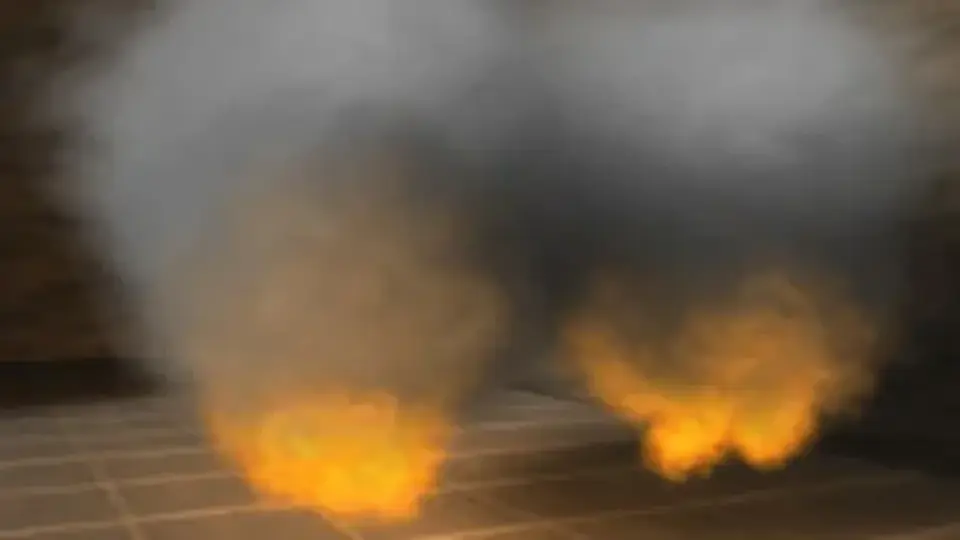
Several demo scenes are included to show the supported combinations in action: 12SliceFire, 12SliceFireOrtho, and 24SliceSmoke on Windows, plus matching versions for Mac. The scene names reflect the slice counts and light types available in the package and give a clear view of how the effect is intended to be used in practice.
Particle looks: smoke, fire, and shaded surfaces
Volumetric shadows are only part of the visual result here. The package also supports soft particles, emissive effects like fire, custom surface shading with normal mapping, and Unity's soft and hard shadows for shadowing surfaces. A solution is included for casting solid surface shadows on particles, which gives the effect a stronger link to the environment around it.
These pieces make the tool relevant for effects that need depth and light response at the same time. Smoke and steam can carry the shadow information, dust can sit more convincingly in a lit space, and fire can keep an emissive look while still fitting into the same shading workflow. The combination of volumetric shadows and surface shading is what gives the package its practical range.
Soft particles
Emissive effects like fire
Custom surface shading with normal mapping
Unity soft and hard shadows for surfaces
Solid surface shadows on particles
Unity version, platform support, and update history
The package is compatible with and tested on Windows and Mac operating systems. It is compatible with Direct3D 9 and above, as well as OpenGL 2.1 and above. Shader Model 3.0 is required, and it is not recommended for most mobile devices. The original Unity version is 5.5.0, and the supported Unity versions listed are 5.5.0 and 2017.1.1.
Technical details also place the asset in the Particles & Effects category, with the category path tools/particles-effects. The package type is unitypackage. Its file size is 6.0 MB, the asset count is 118, the latest version is 1.5, and the latest release date is Oct 24, 2017. It was first published on Mar 29, 2016.
Updates carried into version 1.5
Version 1.5 updated scenes to make them more appropriate for the highest version of Unity and for smoother upgrades in the future. It also removed deprecated GUI Layer components. Earlier changes added a smoothScale with a smoothing function to reduce jittering, and a shadowClipOffset field for adjusting clipping of volumetric shadows between the light and the particle volume.
That leaves the package focused on a clear task: rendering particle effects with volumetric shadows while keeping the light setup, slice count, and surface response available for adjustment in a Unity project.
 Particles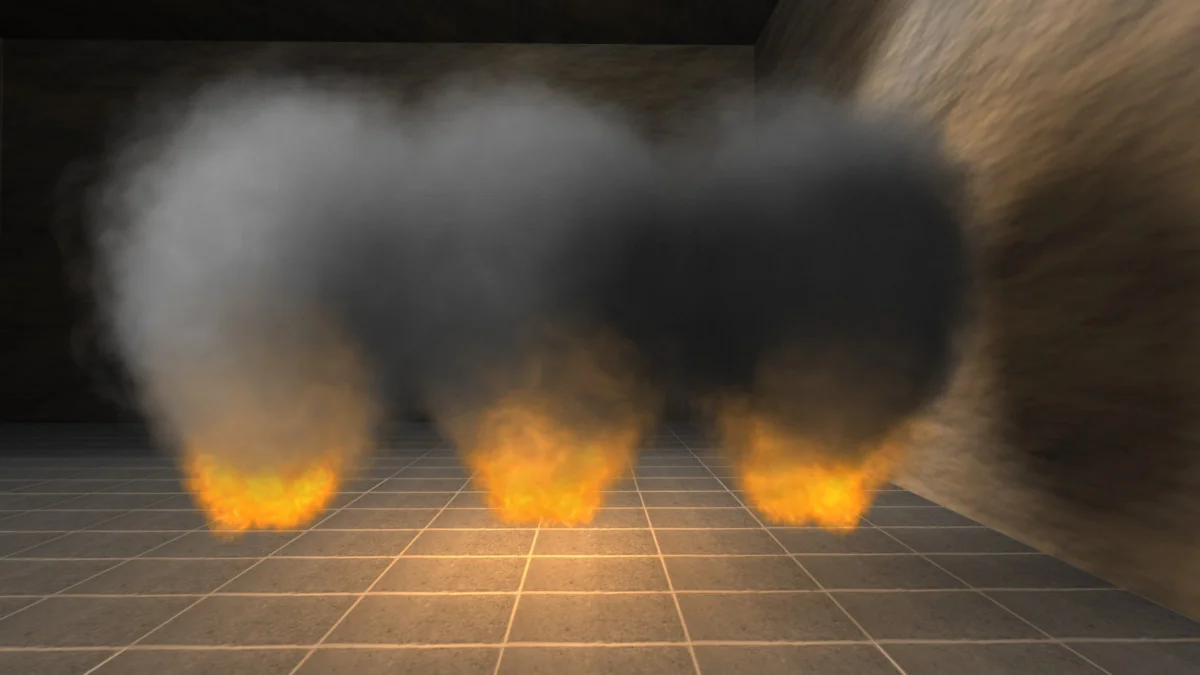
 Particles
 Particles
 Particles