"7e6fc58c410f2894"{"id":"23869","slug":"portals-package-2","title":"Portals package 2","category":"Particles","engine":"Original Unity version: 2017.1.0","assetVersion":"Original Unity version: 2017.1.0","engineVersion":"Asset Version:1.0","tag":"Particles","accent":"cyan","visual":"luts","summary":"Portals package 2 centers on portal visuals that can be placed quickly into a scene and used across 2D and 3D projects. It includes a demo scene, HDR Bloom particles and effects, and support for all platforms, including PC, consoles, mobiles, and VR.","platform":"Unity","publishedAt":"2026-04-11T17:34:47.000Z","updatedAt":"2026-04-19T15:35:08.000Z","sourceNotes":[],"fileContents":[],"compatibility":["Unity","Original Unity version: 2017.1.0","Asset Version: 1.0"],"featuredImage":{"alt":"Portals package 2","src":"https://3dcghub.com/wp-content/uploads/2026/04/c8e4ea065da4_fa8111ea-8580-4366-9818-d61aca33a6be_1280x720_stretch.webp"},"hasDownloadLink":true,"downloads":1,"terms":[{"taxonomy":"category","slug":"particles","name":"Particles"},{"taxonomy":"post_tag","slug":"environment","name":"Environment"},{"taxonomy":"post_tag","slug":"unity","name":"Unity"},{"taxonomy":"post_tag","slug":"vfx","name":"VFX"}],"galleryImages":[{"src":"https://3dcghub.com/wp-content/uploads/2026/04/92ab0728ddd0_19930234-ee45-4cc6-94f5-b17179471703_scaled.webp","alt":"Portals package 2"},{"src":"https://3dcghub.com/wp-content/uploads/2026/04/f50fde5a7c7c_d94902f9-8561-463d-9599-f6005a0daba8_scaled.webp","alt":"Portals package 2"},{"src":"https://3dcghub.com/wp-content/uploads/2026/04/440271ac01d7_53356734-5f1f-46d3-b7af-ca3c0d9d68a4_scaled.webp","alt":"Portals package 2"},{"src":"https://3dcghub.com/wp-content/uploads/2026/04/9621a5138cd1_dbad0a47-a606-4c27-b650-f83b865fffa4_scaled.webp","alt":"Portals package 2"},{"src":"https://3dcghub.com/wp-content/uploads/2026/04/9eebbd4297fb_8286f408-76d7-4ceb-a37f-fb97f4bd1e8f_scaled.webp","alt":"Portals package 2"},{"src":"https://3dcghub.com/wp-content/uploads/2026/04/05837f0b911e_3db90739-43e0-4c1c-949b-54a577afcd15_scaled.webp","alt":"Portals package 2"},{"src":"https://3dcghub.com/wp-content/uploads/2026/04/9197b34caba4_c8de1f3c-f504-4b53-aefe-27077363913a_scaled.webp","alt":"Portals package 2"},{"src":"https://3dcghub.com/wp-content/uploads/2026/04/d3a5f1434fc7_fcb354c2-79c2-4ab8-96fd-52a402c5a9d7_scaled.webp","alt":"Portals package 2"}],"accessPanel":{"kind":"resource","title":"Access this resource","eyebrow":"Free Download","message":"Log in or create a free account to start your download.","fileName":"Portals package 2 1.0.7z","safetyNote":"All resources are 100% manually reviewed to eliminate all risks.","actionLabel":"Download Free","resourceType":"Resource archive"},"contentHtml":"\u003ch2\u003ePortal visuals that can carry a scene quickly\u003c/h2\u003e \u003cp\u003ePortal effects tend to work best when they read clearly the moment they appear, and Portals package 2 stays focused on that need. The package includes 8 portal effects, giving a project a compact set of visual options centered on one theme rather than a wide mix of unrelated effects. That narrow scope makes the package easier to place in a scene without having to sort through extra material that does not serve the same visual purpose.\u003c/p\u003e \u003cp\u003eThe package also works with both 2D and 3D, which keeps the portal effects usable across different scene structures. A flat composition can use the effect as a strong graphic element, while a three-dimensional scene can place it into a more spatial setup. The resource does not try to solve every visual problem in a project; it stays with portal imagery and lets that visual carry the scene where needed.\u003c/p\u003e \u003ch2\u003eSetup stays direct instead of heavy\u003c/h2\u003e \u003cp\u003eOne of the clearest implementation notes is the setup itself: the package works out of the box with drag and drop. That means the first step is simple placement rather than a long chain of setup work. For a portal effect, that matters because the visual often needs to be tested quickly in context, especially when a scene is being assembled or a prototype is being checked for pacing and readability.\u003c/p\u003e \u003cp\u003eA demo scene is included, which gives the package a practical reference point. The demo scene also includes HDR Bloom particles and effects, so the sample environment shows the portal visuals alongside bloom-based elements instead of leaving them isolated. That makes the package easier to understand as a working scene element, not just a collection of files waiting to be arranged.\u003c/p\u003e \u003cp\u003eBecause the workflow starts with drag and drop, the package fits projects that prefer a direct setup path. There is no need to read between the lines for a hidden system; the asset is presented as something that can be placed into a scene and used immediately. For teams or solo creators working on fast scene assembly, that is the most practical part of the package.\u003c/p\u003e \u003ch2\u003eRendering and platform coverage\u003c/h2\u003e \u003cp\u003ePlatform support is broad. The package supports all platforms, including PC, consoles, mobiles, and VR. That range matters when a portal visual has to live inside more than one deployment target, because the same effect is not locked to a single device family. A portal effect may be used in one scene, but that scene can still be headed toward different targets, and the package accounts for that wider path.\u003c/p\u003e \u003cp\u003eThe rendering notes are just as direct. HDRP and LWRP are both supported, which places the package inside Unity workflows that use those pipelines. Together with the platform support, those pipeline notes make the package easier to place into a project that already has a defined rendering direction. The effect is still a portal-focused particle package, but it is not framed as something limited to one narrow technical lane.\u003c/p\u003e \u003cp\u003eSupport for both 2D and 3D sits alongside the platform notes and gives the package a wider scene fit. That does not turn it into a general-purpose effect library; it simply means the portal visuals can be placed into more than one kind of environment. For projects that mix scene styles or target multiple build types, that flexibility is one of the most relevant details.\u003c/p\u003e \u003ch2\u003eWhat comes with the package\u003c/h2\u003e \u003cp\u003eThe technical details are specific and help define the package as a Unity asset rather than an open-ended bundle of content. It is delivered as a unitypackage and lists 179 assets. The file size is 190.5 MB. The original Unity version is 2017.1.0, and the latest version is 1.0. The first published date and the latest release date are both Feb 01, 2019.\u003c/p\u003e \u003cp\u003eThose details do not change the look of the portal effects, but they do give useful context before the package goes into a build. A defined asset count, a stated package type, and an original Unity version tell you what kind of project structure it was prepared for. The release information also shows that the package arrived as a first release rather than a long-running line of revisions.\u003c/p\u003e \u003cul\u003e \u003cli\u003e8 portal effects\u003c/li\u003e \u003cli\u003e179 assets\u003c/li\u003e \u003cli\u003e190.5 MB file size\u003c/li\u003e \u003cli\u003eUnitypackage format\u003c/li\u003e \u003cli\u003eOriginal Unity version: 2017.1.0\u003c/li\u003e \u003cli\u003eLatest version: 1.0\u003c/li\u003e \u003cli\u003eFirst published and latest release date: Feb 01, 2019\u003c/li\u003e \u003c/ul\u003e \u003cp\u003eThat combination keeps the package easy to identify in a project plan. It is a portal-effect asset with a defined structure, a clear Unity baseline, and a direct setup style. If a scene needs a portal visual that can be placed quickly, shown in a demo scene, and carried across 2D, 3D, HDRP, LWRP, and multiple platform targets, Portals package 2 stays tightly aligned with that job.\u003c/p\u003e\n\n\u003ch2\u003eRelated Resources Worth Checking\u003c/h2\u003e\n\u003cul\u003e\n\u003cli\u003e\u003ca href=\"https://3dcghub.com/toolkit-for-unity-physics-2026/\" title=\"Toolkit for Unity Physics 2026\"\u003eToolkit for Unity Physics 2026\u003c/a\u003e\u003c/li\u003e\n\u003cli\u003e\u003ca href=\"https://3dcghub.com/opencv-for-unity/\" title=\"OpenCV for Unity\"\u003eOpenCV for Unity\u003c/a\u003e\u003c/li\u003e\n\u003cli\u003e\u003ca href=\"https://3dcghub.com/exporter-for-unreal-to-for-unity-2026/\" title=\"Exporter for Unreal to/for Unity 2026\"\u003eExporter for Unreal to/for Unity 2026\u003c/a\u003e\u003c/li\u003e\n\u003cli\u003e\u003ca href=\"https://3dcghub.com/dialogue-system-for-unity/\" title=\"Dialogue System for Unity\"\u003eDialogue System for Unity\u003c/a\u003e\u003c/li\u003e\n\u003cli\u003e\u003ca href=\"https://3dcghub.com/ambient-sounds-interactive-soundscapes-for-unity-6/\" title=\"Ambient Sounds – Interactive Soundscapes for Unity 6\"\u003eAmbient Sounds – Interactive Soundscapes for Unity 6\u003c/a\u003e\u003c/li\u003e\n\u003c/ul\u003e","contentTextLength":4888,"navigation":{"current":3577,"total":3618,"previous":{"id":"23819","slug":"hq-realistic-explosions","title":"HQ Realistic explosions","category":"Fire \u0026 Explosions","platform":"Unity","updatedAt":"2026-04-19T15:35:09.000Z"},"next":{"id":"23889","slug":"character-auras-3","title":"Character Auras 3","category":"Spells","platform":"Unity","updatedAt":"2026-04-19T15:35:07.000Z"}},"relatedResources":[{"id":"23842","slug":"ktk-fireworks-effects-volume1","title":"KTK Fireworks Effects Volume1","category":"Particles","engine":"Original Unity version: 2017.1.1","assetVersion":"Original Unity version: 2017.1.1","engineVersion":"Asset Version:2.0.0","tag":"Particles","accent":"cyan","visual":"audio","summary":"KTK Fireworks Effects Volume1 focuses on fireworks motion for Unity scenes, with sample effects data aimed at mobile devices. The package separates FireWorks, loop, and OneShot entries, then expands the set with sound updates and more fireworks in later ver...","platform":"Unity","publishedAt":"2026-04-11T17:26:12.000Z","updatedAt":"2026-04-19T15:35:09.000Z","sourceNotes":[],"fileContents":[],"compatibility":["Unity","Original Unity version: 2017.1.1","Asset Version: 2.0.0"],"featuredImage":{"alt":"KTK Fireworks Effects Volume1","src":"https://3dcghub.com/wp-content/uploads/2026/04/7d46ecdcdc89_5c4b921d-4811-434a-8842-78746907a05e_1280x720_stretch.webp"},"hasDownloadLink":true,"downloads":0},{"id":"23748","slug":"confetti-fx","title":"Confetti FX","category":"Particles","engine":"Original Unity version: 5.5.0","assetVersion":"Original Unity version: 5.5.0","engineVersion":"Asset Version:1.2","tag":"Particles","accent":"cyan","visual":"character","summary":"Confetti FX packages 40 festive prefabs as shuriken particle systems, with Cartoony and Realistic styles available from the start. It includes directional explosion, spherical explosion, and fountain emitters, plus easy scaling for different celebration mom...","platform":"Unity","publishedAt":"2026-04-11T17:02:17.000Z","updatedAt":"2026-04-19T15:35:11.000Z","sourceNotes":[],"fileContents":[],"compatibility":["Unity","Original Unity version: 5.5.0","Asset Version: 1.2"],"featuredImage":{"alt":"Confetti FX","src":"https://3dcghub.com/wp-content/uploads/2026/04/f98f9eb49c01_e90db8fa-4cfe-4714-9b38-e7eeaa185f16_1280x720_stretch.webp"},"hasDownloadLink":true,"downloads":1},{"id":"23725","slug":"3d-games-effects-bundle-1","title":"3D Games Effects Bundle 1","category":"Particles","engine":"Original Unity version: 2020.3.16","assetVersion":"Original Unity version: 2020.3.16","engineVersion":"Asset Version:1.6","tag":"Particles","accent":"cyan","visual":"city","summary":"3D Games Effects Bundle 1 brings 97 sprite-sheet animations into one Unity package, with six volumes and a small showroom level included. It fits HUD work, 2D and 3D games, mobile projects, VR, and other scenes that need direct visual impact without particl...","platform":"Unity","publishedAt":"2026-04-11T16:49:35.000Z","updatedAt":"2026-04-19T15:35:12.000Z","sourceNotes":[],"fileContents":[],"compatibility":["Unity","Original Unity version: 2020.3.16","Asset Version: 1.6"],"featuredImage":{"alt":"3D Games Effects Bundle 1","src":"https://3dcghub.com/wp-content/uploads/2026/04/dcdac1791029_32db77c9-71f3-4100-b67e-706f8c9a8fe0_1280x720_stretch.webp"},"hasDownloadLink":true,"downloads":0}]}
Particles
Portals package 2
Portals package 2 centers on portal visuals that can be placed quickly into a scene and used across 2D and 3D projects. It includes a demo scene, HDR Bloom particles and effects, and support for all platforms, including PC, consoles, mobiles, and VR.
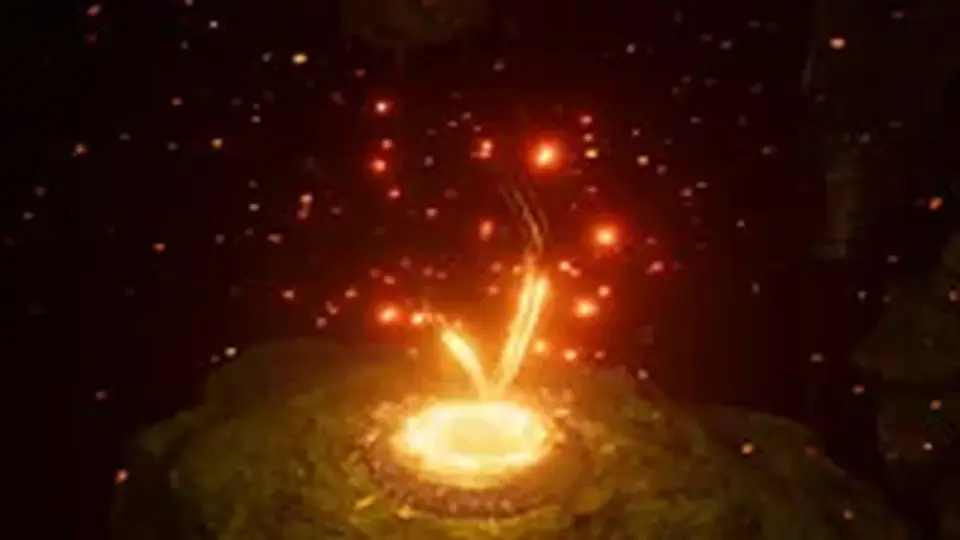
Portal effects tend to work best when they read clearly the moment they appear, and Portals package 2 stays focused on that need. The package includes 8 portal effects, giving a project a compact set of visual options centered on one theme rather than a wide mix of unrelated effects. That narrow scope makes the package easier to place in a scene without having to sort through extra material that does not serve the same visual purpose.
The package also works with both 2D and 3D, which keeps the portal effects usable across different scene structures. A flat composition can use the effect as a strong graphic element, while a three-dimensional scene can place it into a more spatial setup. The resource does not try to solve every visual problem in a project; it stays with portal imagery and lets that visual carry the scene where needed.
Setup stays direct instead of heavy
One of the clearest implementation notes is the setup itself: the package works out of the box with drag and drop. That means the first step is simple placement rather than a long chain of setup work. For a portal effect, that matters because the visual often needs to be tested quickly in context, especially when a scene is being assembled or a prototype is being checked for pacing and readability.
A demo scene is included, which gives the package a practical reference point. The demo scene also includes HDR Bloom particles and effects, so the sample environment shows the portal visuals alongside bloom-based elements instead of leaving them isolated. That makes the package easier to understand as a working scene element, not just a collection of files waiting to be arranged.
Because the workflow starts with drag and drop, the package fits projects that prefer a direct setup path. There is no need to read between the lines for a hidden system; the asset is presented as something that can be placed into a scene and used immediately. For teams or solo creators working on fast scene assembly, that is the most practical part of the package.
Rendering and platform coverage
Platform support is broad. The package supports all platforms, including PC, consoles, mobiles, and VR. That range matters when a portal visual has to live inside more than one deployment target, because the same effect is not locked to a single device family. A portal effect may be used in one scene, but that scene can still be headed toward different targets, and the package accounts for that wider path.
The rendering notes are just as direct. HDRP and LWRP are both supported, which places the package inside Unity workflows that use those pipelines. Together with the platform support, those pipeline notes make the package easier to place into a project that already has a defined rendering direction. The effect is still a portal-focused particle package, but it is not framed as something limited to one narrow technical lane.
Support for both 2D and 3D sits alongside the platform notes and gives the package a wider scene fit. That does not turn it into a general-purpose effect library; it simply means the portal visuals can be placed into more than one kind of environment. For projects that mix scene styles or target multiple build types, that flexibility is one of the most relevant details.
What comes with the package
The technical details are specific and help define the package as a Unity asset rather than an open-ended bundle of content. It is delivered as a unitypackage and lists 179 assets. The file size is 190.5 MB. The original Unity version is 2017.1.0, and the latest version is 1.0. The first published date and the latest release date are both Feb 01, 2019.
Those details do not change the look of the portal effects, but they do give useful context before the package goes into a build. A defined asset count, a stated package type, and an original Unity version tell you what kind of project structure it was prepared for. The release information also shows that the package arrived as a first release rather than a long-running line of revisions.
8 portal effects
179 assets
190.5 MB file size
Unitypackage format
Original Unity version: 2017.1.0
Latest version: 1.0
First published and latest release date: Feb 01, 2019
That combination keeps the package easy to identify in a project plan. It is a portal-effect asset with a defined structure, a clear Unity baseline, and a direct setup style. If a scene needs a portal visual that can be placed quickly, shown in a demo scene, and carried across 2D, 3D, HDRP, LWRP, and multiple platform targets, Portals package 2 stays tightly aligned with that job.
 Particles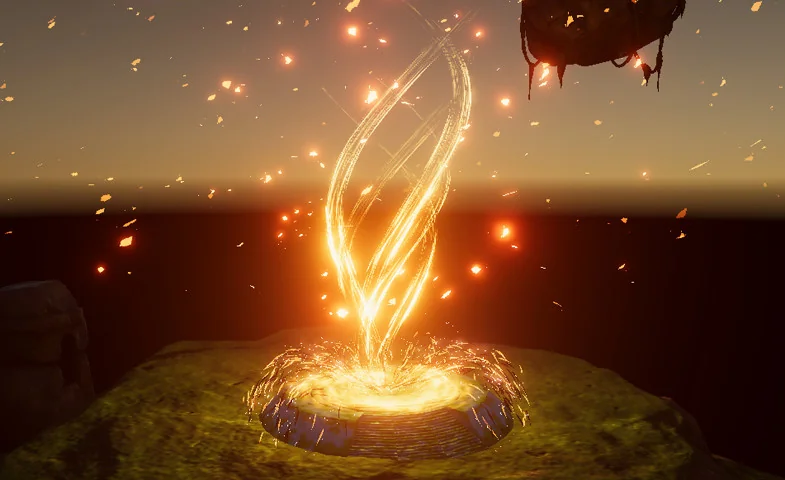
 Particles
 Particles
 Particles