"7e6fc58c410f2894"{"id":"23876","slug":"sparkle-fx","title":"Sparkle FX","category":"Particles","engine":"Original Unity version: 5.4.0","assetVersion":"Original Unity version: 5.4.0","engineVersion":"Asset Version:2.01","tag":"Particles","accent":"cyan","visual":"character","summary":"Sparkle FX is a Unity particle pack built around twinkling effects that can sit around a 3D mesh or travel along its surface. It also includes explosion and trail emitters, demo scenes, and a tutorial for mesh emitters, scaling, and recoloring.","platform":"Unity","publishedAt":"2026-04-11T17:35:04.000Z","updatedAt":"2026-04-19T15:35:07.000Z","sourceNotes":[],"fileContents":[],"compatibility":["Unity","Original Unity version: 5.4.0","Asset Version: 2.01"],"featuredImage":{"alt":"Sparkle FX","src":"https://3dcghub.com/wp-content/uploads/2026/04/6ee1cb90e12a_09972556-7534-4c33-8774-c728a9ac12a4_1280x720_stretch.webp"},"hasDownloadLink":true,"downloads":0,"terms":[{"taxonomy":"category","slug":"particles","name":"Particles"},{"taxonomy":"post_tag","slug":"environment","name":"Environment"},{"taxonomy":"post_tag","slug":"unity","name":"Unity"},{"taxonomy":"post_tag","slug":"vfx","name":"VFX"}],"galleryImages":[{"src":"https://3dcghub.com/wp-content/uploads/2026/04/10638bac1833_91ee6960-fc81-414a-8912-b6d9ca9af8d7_scaled.webp","alt":"Sparkle FX"},{"src":"https://3dcghub.com/wp-content/uploads/2026/04/f2ce434ecd7b_97e87a8c-f8d5-4577-8503-a94f873c8327_scaled.webp","alt":"Sparkle FX"},{"src":"https://3dcghub.com/wp-content/uploads/2026/04/aa1450480ee3_50a67475-ba74-4cc4-8b0e-fa16dc216591_scaled.webp","alt":"Sparkle FX"},{"src":"https://3dcghub.com/wp-content/uploads/2026/04/0b6fe6093916_d6d6677a-0dba-4458-9917-d0eab078b0db_scaled.webp","alt":"Sparkle FX"}],"accessPanel":{"kind":"resource","title":"Access this resource","eyebrow":"Free Download","message":"Log in or create a free account to start your download.","fileName":"Sparkle FX v2.01.7z","safetyNote":"All resources are 100% manually reviewed to eliminate all risks.","actionLabel":"Download Free","resourceType":"Resource archive"},"contentHtml":"\u003ch2\u003eTwinkling motion that stays attached to a mesh\u003c/h2\u003e\n\u003cp\u003eSparkle FX focuses on particle effects that can emit around a 3D mesh or along its surface. That gives it a clear place in scenes where the effect needs to feel anchored to the object itself, not separated from it by distance or scale. The motion is light and decorative, but it still has enough structure to sit on top of a modeled prop and read as part of the asset.\u003c/p\u003e\n\u003cp\u003eThe pack includes explosion and trail effects as well, so it covers more than one kind of sparkle behavior. A scene can use the same visual language for a mesh-bound shimmer, a quick burst, or a moving streak without switching to a different effect style.\u003c/p\u003e\n\u003cp\u003eThe newer effect set is meant to look strong with bloom post-processing, while still working without it. That makes the pack useful in both post-processed scenes and simpler setups where the particles need to carry the look on their own.\u003c/p\u003e \u003ch2\u003eWhat comes with the effect library\u003c/h2\u003e\n\u003cp\u003eThe package is delivered as a unitypackage and lists 51 total prefabs, 167 assets, and a file size of 25.4 MB. The particle textures are 512x512 px, and the set includes a diamond mesh. A v1.0 version is included alongside the newer version, which gives the package two stages of the effect set in one place.\u003c/p\u003e\n\u003cp\u003eFive sparkle variations are spread across three emitter types, giving the pack a compact but focused range of options. Those emitters cover the most visible parts of the library:\u003c/p\u003e\n\u003cul\u003e \u003cli\u003eExplosion emitter\u003c/li\u003e \u003cli\u003eSphere / Mesh emitter\u003c/li\u003e \u003cli\u003eTrail emitter\u003c/li\u003e\n\u003c/ul\u003e\n\u003cp\u003eThe textures include five pre-colored variations for more color depth. There is also a modular version that can be customized through the particle system, which is practical when the same sparkle family needs different colors or subtle adjustments without rebuilding the effect from scratch.\u003c/p\u003e\n\u003cp\u003eDemo scenes are included, along with a tutorial for mesh-emitters, scaling, and recoloring. Two WebGL demos are also available, one for v1.0 and one for v2.0, making it easier to inspect how the effect sets behave in motion.\u003c/p\u003e \u003ch2\u003eHow the 2.0 update changes the look\u003c/h2\u003e\n\u003cp\u003eVersion 2.0 adds a new set of effects especially made for bloom post-processing. These effects are easier to recolor and use less texture resources than the earlier version, so the newer set moves toward a cleaner workflow while staying within the same sparkle theme.\u003c/p\u003e\n\u003cp\u003eThe update adds 15 new FX and introduces new Sparkle v2.0 Mesh FX, Sparkle v2.0 Explosion FX, and Sparkle v2.0 Trail FX. Demo scenes were updated too, along with the particle materials. A normal map was also added to the included gem.\u003c/p\u003e\n\u003cp\u003eVersion 2.01 later added an URP Upgrade package for Unity 2019.3 and up. The latest release date is Aug 05, 2020, and the package lists an original Unity version of 5.4.0. Supported Unity versions are 5.4.0, 2018.3.0, and 2019.3.1.\u003c/p\u003e \u003ch2\u003eWhere it fits in a Unity production workflow\u003c/h2\u003e\n\u003cp\u003eSparkle FX sits in the particle-effects part of a project, where small animated details need to support a scene rather than dominate it. Because the pack includes mesh-based emitters, trail emitters, and explosion emitters, it can support effects that stay attached to a model as well as effects that move away from it.\u003c/p\u003e\n\u003cp\u003eThe mesh-emitter tutorial points to a very practical workflow: take the prefab, adjust the scale, and recolor the effect to match the scene. The modular version reinforces that approach by keeping the particle system open to customization. That is useful when the same sparkle needs to appear in several places but should not look identical in every shot.\u003c/p\u003e\n\u003cp\u003eOne specific note matters when working with the older material: the v1.0 diamond sample scene uses a free shader that is not included. That means the sample scene depends on a separate shader outside the package itself.\u003c/p\u003e\n\u003cp\u003eFor projects that need mesh-following sparkles, a few related emitter types, bloom-ready updates, and demo content for quick inspection, Sparkle FX gives a focused set of particle tools. It is a straightforward choice when the effect should stay small, readable, and closely tied to the object it surrounds.\u003c/p\u003e\n\n\u003ch2\u003eExplore Similar Assets\u003c/h2\u003e\n\u003cul\u003e\n\u003cli\u003e\u003ca href=\"https://3dcghub.com/toolkit-for-unity-physics-2026/\" title=\"Toolkit for Unity Physics 2026\"\u003eToolkit for Unity Physics 2026\u003c/a\u003e\u003c/li\u003e\n\u003cli\u003e\u003ca href=\"https://3dcghub.com/opencv-for-unity/\" title=\"OpenCV for Unity\"\u003eOpenCV for Unity\u003c/a\u003e\u003c/li\u003e\n\u003cli\u003e\u003ca href=\"https://3dcghub.com/exporter-for-unreal-to-for-unity-2026/\" title=\"Exporter for Unreal to/for Unity 2026\"\u003eExporter for Unreal to/for Unity 2026\u003c/a\u003e\u003c/li\u003e\n\u003cli\u003e\u003ca href=\"https://3dcghub.com/dialogue-system-for-unity/\" title=\"Dialogue System for Unity\"\u003eDialogue System for Unity\u003c/a\u003e\u003c/li\u003e\n\u003cli\u003e\u003ca href=\"https://3dcghub.com/ambient-sounds-interactive-soundscapes-for-unity-6/\" title=\"Ambient Sounds – Interactive Soundscapes for Unity 6\"\u003eAmbient Sounds – Interactive Soundscapes for Unity 6\u003c/a\u003e\u003c/li\u003e\n\u003c/ul\u003e\n\n\u003ch2\u003eAsset Gallery\u003c/h2\u003e","contentTextLength":4244,"navigation":{"current":3579,"total":3618,"previous":{"id":"23889","slug":"character-auras-3","title":"Character Auras 3","category":"Spells","platform":"Unity","updatedAt":"2026-04-19T15:35:07.000Z"},"next":{"id":"23930","slug":"magic-circle-fx-pack","title":"Magic Circle Fx Pack","category":"Spells","platform":"Unity","updatedAt":"2026-04-19T15:35:06.000Z"}},"relatedResources":[{"id":"23748","slug":"confetti-fx","title":"Confetti FX","category":"Particles","engine":"Original Unity version: 5.5.0","assetVersion":"Original Unity version: 5.5.0","engineVersion":"Asset Version:1.2","tag":"Particles","accent":"cyan","visual":"character","summary":"Confetti FX packages 40 festive prefabs as shuriken particle systems, with Cartoony and Realistic styles available from the start. It includes directional explosion, spherical explosion, and fountain emitters, plus easy scaling for different celebration mom...","platform":"Unity","publishedAt":"2026-04-11T17:02:17.000Z","updatedAt":"2026-04-19T15:35:11.000Z","sourceNotes":[],"fileContents":[],"compatibility":["Unity","Original Unity version: 5.5.0","Asset Version: 1.2"],"featuredImage":{"alt":"Confetti FX","src":"https://3dcghub.com/wp-content/uploads/2026/04/f98f9eb49c01_e90db8fa-4cfe-4714-9b38-e7eeaa185f16_1280x720_stretch.webp"},"hasDownloadLink":true,"downloads":1},{"id":"23741","slug":"bonfire-asset-for-zibra-smoke-fire","title":"Bonfire - [Asset for Zibra Smoke \u0026 Fire]","category":"Particles","engine":"Original Unity version: 2021.3.26","assetVersion":"Original Unity version: 2021.3.26","engineVersion":"Asset Version:1.0.0","tag":"Particles","accent":"cyan","visual":"audio","summary":"Bonfire fits scenes that need an interactive fire element without extra animation work. It uses Zibra Smoke \u0026 Fire for real-time smoke simulation and can act as either a VFX piece or a gameplay object.","platform":"Unity","publishedAt":"2026-04-11T17:02:02.000Z","updatedAt":"2026-04-19T15:35:12.000Z","sourceNotes":[],"fileContents":[],"compatibility":["Unity","Original Unity version: 2021.3.26","Asset Version: 1.0.0"],"featuredImage":{"alt":"Bonfire - [Asset for Zibra Smoke \u0026 Fire]","src":"https://3dcghub.com/wp-content/uploads/2026/04/c1f4ff60b660_84d270b6-355d-457a-aca5-c62009aa28ee_1280x720_stretch.webp"},"hasDownloadLink":true,"downloads":1},{"id":"23869","slug":"portals-package-2","title":"Portals package 2","category":"Particles","engine":"Original Unity version: 2017.1.0","assetVersion":"Original Unity version: 2017.1.0","engineVersion":"Asset Version:1.0","tag":"Particles","accent":"cyan","visual":"luts","summary":"Portals package 2 centers on portal visuals that can be placed quickly into a scene and used across 2D and 3D projects. It includes a demo scene, HDR Bloom particles and effects, and support for all platforms, including PC, consoles, mobiles, and VR.","platform":"Unity","publishedAt":"2026-04-11T17:34:47.000Z","updatedAt":"2026-04-19T15:35:08.000Z","sourceNotes":[],"fileContents":[],"compatibility":["Unity","Original Unity version: 2017.1.0","Asset Version: 1.0"],"featuredImage":{"alt":"Portals package 2","src":"https://3dcghub.com/wp-content/uploads/2026/04/c8e4ea065da4_fa8111ea-8580-4366-9818-d61aca33a6be_1280x720_stretch.webp"},"hasDownloadLink":true,"downloads":1}]}
Particles
Sparkle FX
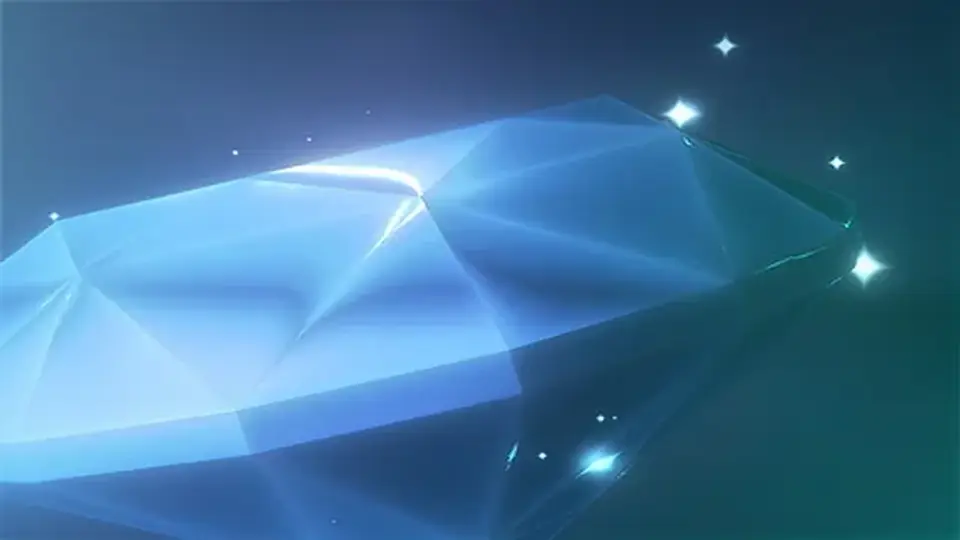
Sparkle FX is a Unity particle pack built around twinkling effects that can sit around a 3D mesh or travel along its surface. It also includes explosion and trail emitters, demo scenes, and a tutorial for mesh emitters, scaling, and recoloring.
Sparkle FX focuses on particle effects that can emit around a 3D mesh or along its surface. That gives it a clear place in scenes where the effect needs to feel anchored to the object itself, not separated from it by distance or scale. The motion is light and decorative, but it still has enough structure to sit on top of a modeled prop and read as part of the asset.
The pack includes explosion and trail effects as well, so it covers more than one kind of sparkle behavior. A scene can use the same visual language for a mesh-bound shimmer, a quick burst, or a moving streak without switching to a different effect style.
The newer effect set is meant to look strong with bloom post-processing, while still working without it. That makes the pack useful in both post-processed scenes and simpler setups where the particles need to carry the look on their own.
What comes with the effect library
The package is delivered as a unitypackage and lists 51 total prefabs, 167 assets, and a file size of 25.4 MB. The particle textures are 512x512 px, and the set includes a diamond mesh. A v1.0 version is included alongside the newer version, which gives the package two stages of the effect set in one place.
Five sparkle variations are spread across three emitter types, giving the pack a compact but focused range of options. Those emitters cover the most visible parts of the library:
Explosion emitter
Sphere / Mesh emitter
Trail emitter
The textures include five pre-colored variations for more color depth. There is also a modular version that can be customized through the particle system, which is practical when the same sparkle family needs different colors or subtle adjustments without rebuilding the effect from scratch.
Demo scenes are included, along with a tutorial for mesh-emitters, scaling, and recoloring. Two WebGL demos are also available, one for v1.0 and one for v2.0, making it easier to inspect how the effect sets behave in motion.
How the 2.0 update changes the look
Version 2.0 adds a new set of effects especially made for bloom post-processing. These effects are easier to recolor and use less texture resources than the earlier version, so the newer set moves toward a cleaner workflow while staying within the same sparkle theme.
The update adds 15 new FX and introduces new Sparkle v2.0 Mesh FX, Sparkle v2.0 Explosion FX, and Sparkle v2.0 Trail FX. Demo scenes were updated too, along with the particle materials. A normal map was also added to the included gem.
Version 2.01 later added an URP Upgrade package for Unity 2019.3 and up. The latest release date is Aug 05, 2020, and the package lists an original Unity version of 5.4.0. Supported Unity versions are 5.4.0, 2018.3.0, and 2019.3.1.
Where it fits in a Unity production workflow
Sparkle FX sits in the particle-effects part of a project, where small animated details need to support a scene rather than dominate it. Because the pack includes mesh-based emitters, trail emitters, and explosion emitters, it can support effects that stay attached to a model as well as effects that move away from it.
The mesh-emitter tutorial points to a very practical workflow: take the prefab, adjust the scale, and recolor the effect to match the scene. The modular version reinforces that approach by keeping the particle system open to customization. That is useful when the same sparkle needs to appear in several places but should not look identical in every shot.
One specific note matters when working with the older material: the v1.0 diamond sample scene uses a free shader that is not included. That means the sample scene depends on a separate shader outside the package itself.
For projects that need mesh-following sparkles, a few related emitter types, bloom-ready updates, and demo content for quick inspection, Sparkle FX gives a focused set of particle tools. It is a straightforward choice when the effect should stay small, readable, and closely tied to the object it surrounds.
 Particles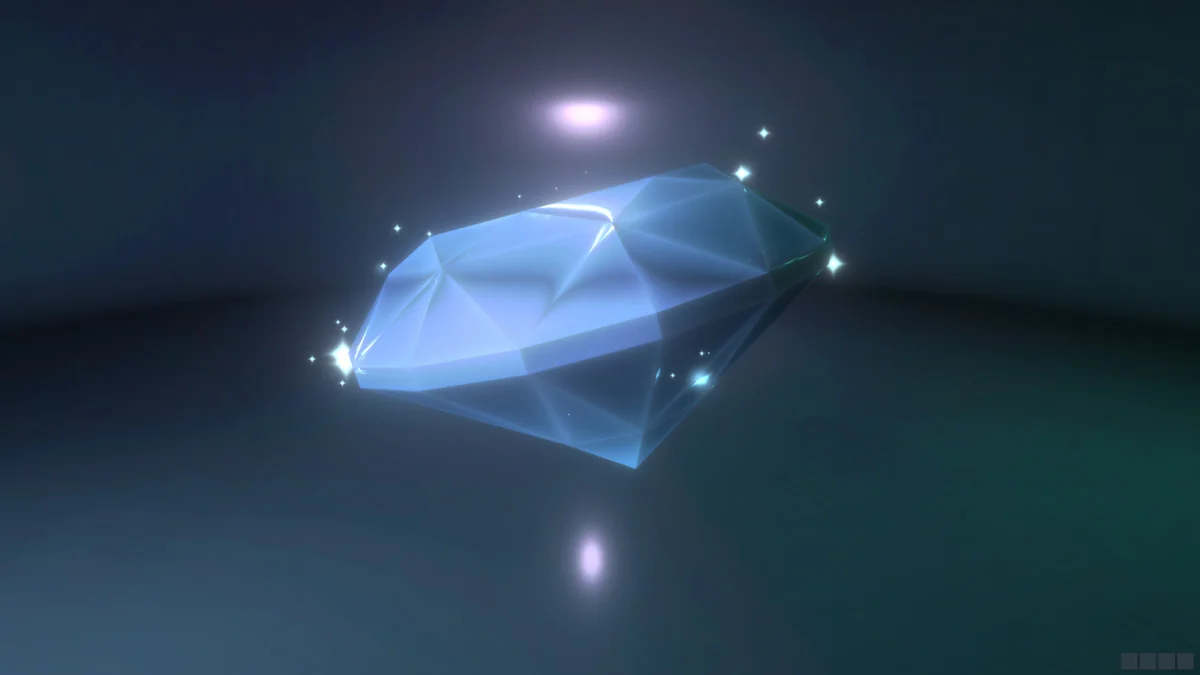
 Particles
![Bonfire - [Asset for Zibra Smoke & Fire]](/_img/360/wp-content/uploads/2026/04/c1f4ff60b660_84d270b6-355d-457a-aca5-c62009aa28ee_1280x720_stretch.webp) Particles
Particles Particles