"fa182e0cd0a6ea73"{"id":"1000632","slug":"kronos-matchmaking","title":"Kronos Matchmaking","category":"Network \u0026 Multiplayer","engine":"5.2,5.5","assetVersion":"Asset Version: 1.9.0 - 2.6.0","engineVersion":"Engine Version: 5.2,5.5","tag":"Network","accent":"blue","visual":"mech","summary":"Complete Unreal Engine matchmaking plugin with skill-based pairing, party and reservation systems, Steam and EOS support, and listen-server hosting.","platform":"Unreal Engine","publishedAt":"2026-07-21T14:46:21.329Z","updatedAt":"2026-07-21T14:46:21.329Z","sourceNotes":[],"fileContents":[],"compatibility":["Unreal Engine","Asset Version: 1.9.0 - 2.6.0","Engine Version: 5.2,5.5"],"featuredImage":{"alt":"Kronos Matchmaking","src":"/wp-content/uploads/published/2026/07/3bf316672af3-3dc1eaef-3090-47e4-9779-b8a8509d071a-31efec86de.webp"},"hasDownloadLink":true,"downloads":0,"terms":[{"taxonomy":"category","slug":"network-and-multiplayer-tools-and-plugins","name":"Network \u0026 Multiplayer"}],"galleryImages":[{"src":"/wp-content/uploads/published/2026/07/2d929c2143b2-aeed49a4-cbce-42d9-a328-82a462d92729-1a684056cf.webp","alt":"Kronos Matchmaking"},{"src":"/wp-content/uploads/published/2026/07/e2afbeae1701-d2070b4e-62fa-4b70-b1b6-64b4d36e1471-be9678d2ec.webp","alt":"Kronos Matchmaking"},{"src":"/wp-content/uploads/published/2026/07/b3fa316ffbf2-bc781f43-9c99-464e-9d0b-221796c6e90b-20f1febe2b.webp","alt":"Kronos Matchmaking"},{"src":"/wp-content/uploads/published/2026/07/a1d5a9311e3c-cb9cb3e5-98bf-4313-8ecc-54440175863f-1a87cfe971.webp","alt":"Kronos Matchmaking"},{"src":"/wp-content/uploads/published/2026/07/284123533c92-c5e24930-db29-48d6-933e-759aa3bdc7f4-4f683a20bb.webp","alt":"Kronos Matchmaking"},{"src":"/wp-content/uploads/published/2026/07/588aecbe279a-14cfc5b3-edb3-46de-a0d3-775eb9ffa7f4-aac19ef63e.webp","alt":"Kronos Matchmaking"},{"src":"/wp-content/uploads/published/2026/07/064a5d75b03d-882f6e74-ce60-4a96-b592-05e61e113a3d-5d8e2a1d8a.webp","alt":"Kronos Matchmaking"},{"src":"/wp-content/uploads/published/2026/07/4a2a30ec73dd-3f55d07f-6a84-4ffb-accc-8f2ba75a6705-a5265bb950.webp","alt":"Kronos Matchmaking"}],"accessPanel":{"kind":"resource","title":"Download this resource","eyebrow":"Free Download","message":"Log in or create a free account to start your download.","fileName":"Kronos Matchmaking.7z","safetyNote":"Resources are manually reviewed before listing to improve quality and reduce obvious risks.","actionLabel":"Download Free","resourceType":"Resource archive"},"contentHtml":"\u003cp\u003eOnce a player triggers a single Blueprint node, the entire matchmaking cycle runs without further intervention. Sessions are queried automatically, and the player is placed into the best available match. If the search returns nothing, the system evaluates parameters that the developer has configured and makes a structural decision: either widen the search range and try again, or switch the player into a hosting role and create a new session from scratch. This continuous skill-based matchmaking handles every step from finding and joining sessions through resolving connections, requesting reservations, and finally establishing the connection to the desired host.\u003c/p\u003e \u003ch2\u003eHow Kronos Skill-Based Matchmaking and Session Queries Work\u003c/h2\u003e \u003cp\u003eThe matchmaking logic is based on a fully automated loop. When the process starts, the plugin queries all existing sessions advertised through the active online platform and ranks them to find the best fit for the requesting player. If a suitable session exists, the player is routed into it. If not, the system faces a fork in the road based on the parameters set during project configuration.\u003c/p\u003e \u003cp\u003eOne option is to widen the search range and run another query, relaxing the skill or distance constraints to capture more candidates. The other option is to abandon the search and switch the player to a hosting role, spinning up a new session on the player's machine. This decision is not random; it is governed entirely by settings the developer defines, allowing precise control over whether the game favors broader matches or more frequent session creation.\u003c/p\u003e \u003cp\u003eThis continuous approach means the matchmaker is never waiting for a single manual action. It resolves connections on its own, requests reservations through the platform backend, and hands the player off to a host once the slot is secured.\u003c/p\u003e \u003ch2\u003eParty, Lobby, and Reservation Systems for Group Play\u003c/h2\u003e \u003cp\u003eGroup matchmaking introduces complexity around a single question: how do multiple players enter the same session together without losing their slot during the connection delay? Kronos addresses this through its built-in party and reservation systems.\u003c/p\u003e \u003cp\u003eThe party system allows groups of players to start matchmaking as a unit and join games together. While in the party and sitting in the main menu, players maintain a lightweight connection directly with the party host. This connection supports replication and RPCs, meaning party state and data can be synchronized before anyone even enters a match.\u003c/p\u003e \u003cp\u003eWhen the party does find and join a game, the reservation system ensures that every player entering together will have an open slot waiting for them during the connection process. This prevents a common failure mode in group matchmaking where one player makes it in and the rest are left behind because the session filled up mid-transfer.\u003c/p\u003e \u003ch3\u003eThe Nature of Party Connections and Persistence\u003c/h3\u003e \u003cp\u003eParty connections in Kronos are established through Online Beacons, which provide the lightweight direct connection to the party host in the main menu. A consequence of this architecture is that parties are not persistent. When players join a game session, the party is disbanded. After the match concludes and players return to the main menu, the party can be reconnected. This means the party framework is menu-oriented by design.\u003c/p\u003e \u003ch2\u003eSteam and EOS Support Through the Online Subsystem\u003c/h2\u003e \u003cp\u003eKronos is built on Unreal Engine's Online Subsystem framework. The Online Subsystem acts as a common interface for accessing the functionality of various online services, and Kronos leverages this to provide support for Steam and Epic Online Services (EOS) without requiring any code changes. Once the Online Subsystem is configured for a target platform, the matchmaking, party, and reservation features work through that platform's backend out of the box.\u003c/p\u003e \u003cp\u003eSession data itself, such as session advertisements and listings, is pushed through the online platform's own backend servers-for example, Steam's session servers. This is how other players discover available games to join.\u003c/p\u003e \u003ch3\u003eEOS Integration Kit Compatibility\u003c/h3\u003e \u003cp\u003eBeyond native Steam and EOS support through the Online Subsystem, Kronos maintains an ongoing collaboration that has resulted in full support for the EOS Integration Kit (EIK). This allows teams already using or planning to use EIK within their Unreal projects to integrate Kronos-matchmaking alongside it.\u003c/p\u003e \u003ch2\u003eListen-Server Hosting and No External Service Costs\u003c/h2\u003e \u003cp\u003eOne defining structural detail of the plugin is its hosting model. Sessions are hosted directly on player machines in a regular P2P listen-server fashion. There are no server fees and no external service costs associated with running the matchmaking itself. The session's data is advertised through the online platform's backend that the project has been configured to use, but the actual game session is hosted and maintained on a player's machine rather than on rented dedicated infrastructure.\u003c/p\u003e \u003ch3\u003eThe Dedicated Server and Split-Screen Limitations\u003c/h3\u003e \u003cp\u003eBecause the plugin is made for the P2P listen-server model, it does not support dedicated servers. This is a structural limitation, not a configuration option. Similarly, the plugin does not support split-screen functionality. It expects only a single local player to exist at all times. Projects requiring local multiplayer or dedicated server hosting will need to account for this constraint.\u003c/p\u003e \u003ch2\u003eIntegrating Kronos Matchmaking Into Existing Projects\u003c/h2\u003e \u003cp\u003eThe plugin was built as a standalone component from the ground up with seamless project integration as a priority. It does not have any dependencies on what happens inside actual matches, which makes it largely agnostic to the game's logic, rules, or content.\u003c/p\u003e \u003cp\u003eThe integration process assumes the Online Subsystem for the project is already configured. Once that prerequisite is met, the primary technical step is overriding the Online Session class. After that override is in place, the project is ready to begin using Kronos matchmaking. For teams working with existing templates or established codebases, the replacement pattern is straightforward: in most cases, developers only need to replace the standard Create, Find, or Join Session nodes with their Kronos counterparts in Blueprint graphs.\u003c/p\u003e \u003ch2\u003ePlugin Update History and Long-Term Viability\u003c/h2\u003e \u003cp\u003eKronos has been available on the market for several years. In that time, it has received over 20 updates, which have included new features, fixes, and improvements. A new update is typically released every few months. This cadence suggests that teams adopting the plugin can expect it to continue receiving maintenance and feature growth rather than being a static, abandoned asset.\u003c/p\u003e \u003ch2\u003eWho Benefits Most From This Matchmaking Package\u003c/h2\u003e \u003cp\u003eThis plugin is suited for Unreal Engine developers building multiplayer projects around a P2P listen-server architecture who need automated, skill-based pairing without standing up dedicated server infrastructure. Teams targeting Steam or EOS, or those already using the EOS Integration Kit, gain immediate platform support without custom code. Projects relying on single-local-player sessions, group party play, and reservation-secured joining will find the most direct utility here. Teams requiring dedicated server support, split-screen local multiplayer, or persistent parties that survive across game sessions without reconnection will encounter structural limitations that require a different approach.\u003c/p\u003e\n\n\u003ch2\u003eContinue Browsing Similar Packs\u003c/h2\u003e\n\u003cul\u003e\n\u003cli\u003e\u003ca href=\"https://3dcghub.com/eos-integration-kit/\" title=\"EOS Integration Kit\"\u003eEOS Integration Kit\u003c/a\u003e\u003c/li\u003e\n\u003cli\u003e\u003ca href=\"https://3dcghub.com/host-migration-system-v2/\" title=\"Host Migration System V2\"\u003eHost Migration System V2\u003c/a\u003e\u003c/li\u003e\n\u003cli\u003e\u003ca href=\"https://3dcghub.com/mysql-and-mariadb-integration/\" title=\"MySQL and MariaDB Integration\"\u003eMySQL and MariaDB Integration\u003c/a\u003e\u003c/li\u003e\n\u003cli\u003e\u003ca href=\"https://3dcghub.com/fps-first-person-shooter-framework-skg-shooter-framework-v2/\" title=\"FPS First Person Shooter Framework (SKG Shooter Framework V2)\"\u003eFPS First Person Shooter Framework (SKG Shooter Framework V2)\u003c/a\u003e\u003c/li\u003e\n\u003cli\u003e\u003ca href=\"https://3dcghub.com/skills-indicators-customizable/\" title=\"Skills Indicators (Customizable)\"\u003eSkills Indicators (Customizable)\u003c/a\u003e\u003c/li\u003e\n\u003c/ul\u003e","contentTextLength":7607,"navigation":{"current":1302,"total":3789,"previous":{"id":"1000634","slug":"medieval-italian-village-environment","title":"Medieval Italian Village Environment","category":"Medieval","platform":"Unreal Engine","updatedAt":"2026-07-21T15:28:08.126Z"},"next":{"id":"1000631","slug":"kick-up-fx","title":"Kick Up FX","category":"Variety","platform":"Unreal Engine","updatedAt":"2026-07-21T14:39:46.079Z"}},"relatedResources":[{"id":"1000154","slug":"eos-integration-kit","title":"EOS Integration Kit","category":"Network \u0026 Multiplayer","engine":"5.5 - 5.6","assetVersion":"Asset Version:4.6.2 - 4.8.5","engineVersion":"Engine Version: 5.5 - 5.6","tag":"Network","accent":"blue","visual":"mech","summary":"An Unreal Engine plugin for Epic Online Services that brings authentication, matchmaking, voice chat, storage, stats, leaderboards, and more into one workflow.","platform":"Unreal Engine","publishedAt":"2026-06-18T21:44:15.499Z","updatedAt":"2026-06-18T21:44:15.499Z","sourceNotes":[],"fileContents":[],"compatibility":["Unreal Engine","Asset Version:4.6.2 - 4.8.5","Engine Version: 5.5 - 5.6"],"featuredImage":{"alt":"EOS Integration Kit","src":"/wp-content/uploads/published/2026/06/d23399efa666-8ac3c106-13e9-405f-803e-82cc6e8e7f48-e62b93acec.webp"},"hasDownloadLink":true,"downloads":0},{"id":"1001823","slug":"n00dinteract","title":"n00dInteract","category":"Network \u0026 Multiplayer","engine":"5.7","assetVersion":"Asset Version: 1.0.3","engineVersion":"Engine Version: 5.7","tag":"Network","accent":"blue","visual":"mech","summary":"Explore n00dInteract, a network-replicated interaction framework for desktop platforms featuring four distinct interaction types and conditional handling.","platform":"Unreal Engine","publishedAt":"2026-10-21T08:16:16.707Z","updatedAt":"2026-10-21T08:16:16.707Z","sourceNotes":[],"fileContents":[],"compatibility":["Unreal Engine","Asset Version: 1.0.3","Engine Version: 5.7"],"featuredImage":{"alt":"n00dInteract","src":"/wp-content/uploads/published/2026/10/a0427d38698b-07865053-9aa4-4296-bcf2-40b9855fca88-f9c12817cb.webp"},"hasDownloadLink":true,"downloads":0},{"id":"1001325","slug":"network-clock","title":"Network Clock","category":"Network \u0026 Multiplayer","engine":"5.2 - 5.4","assetVersion":"Asset Version: 1.0.1","engineVersion":"Engine Version: 5.2 - 5.4","tag":"Network","accent":"blue","visual":"mech","summary":"Network Clock is an open-source Unreal Engine plugin designed to synchronize client and server time, compensating for network latency across multiplayer games.","platform":"Unreal Engine","publishedAt":"2026-10-02T09:54:03.857Z","updatedAt":"2026-10-02T09:54:03.857Z","sourceNotes":[],"fileContents":[],"compatibility":["Unreal Engine","Asset Version: 1.0.1","Engine Version: 5.2 - 5.4"],"featuredImage":{"alt":"Network Clock","src":"/wp-content/uploads/published/2026/10/1141f81ad01b-8fcc2205-a0ea-4f78-8f41-d5f6170fde51-4c0f489913.webp"},"hasDownloadLink":true,"downloads":0}]}
Network
Kronos Matchmaking
Complete Unreal Engine matchmaking plugin with skill-based pairing, party and reservation systems, Steam and EOS support, and listen-server hosting.
Once a player triggers a single Blueprint node, the entire matchmaking cycle runs without further intervention. Sessions are queried automatically, and the player is placed into the best available match. If the search returns nothing, the system evaluates parameters that the developer has configured and makes a structural decision: either widen the search range and try again, or switch the player into a hosting role and create a new session from scratch. This continuous skill-based matchmaking handles every step from finding and joining sessions through resolving connections, requesting reservations, and finally establishing the connection to the desired host.
How Kronos Skill-Based Matchmaking and Session Queries Work
The matchmaking logic is based on a fully automated loop. When the process starts, the plugin queries all existing sessions advertised through the active online platform and ranks them to find the best fit for the requesting player. If a suitable session exists, the player is routed into it. If not, the system faces a fork in the road based on the parameters set during project configuration.
One option is to widen the search range and run another query, relaxing the skill or distance constraints to capture more candidates. The other option is to abandon the search and switch the player to a hosting role, spinning up a new session on the player's machine. This decision is not random; it is governed entirely by settings the developer defines, allowing precise control over whether the game favors broader matches or more frequent session creation.
This continuous approach means the matchmaker is never waiting for a single manual action. It resolves connections on its own, requests reservations through the platform backend, and hands the player off to a host once the slot is secured.
Party, Lobby, and Reservation Systems for Group Play
Group matchmaking introduces complexity around a single question: how do multiple players enter the same session together without losing their slot during the connection delay? Kronos addresses this through its built-in party and reservation systems.
The party system allows groups of players to start matchmaking as a unit and join games together. While in the party and sitting in the main menu, players maintain a lightweight connection directly with the party host. This connection supports replication and RPCs, meaning party state and data can be synchronized before anyone even enters a match.
When the party does find and join a game, the reservation system ensures that every player entering together will have an open slot waiting for them during the connection process. This prevents a common failure mode in group matchmaking where one player makes it in and the rest are left behind because the session filled up mid-transfer.
The Nature of Party Connections and Persistence
Party connections in Kronos are established through Online Beacons, which provide the lightweight direct connection to the party host in the main menu. A consequence of this architecture is that parties are not persistent. When players join a game session, the party is disbanded. After the match concludes and players return to the main menu, the party can be reconnected. This means the party framework is menu-oriented by design.
Steam and EOS Support Through the Online Subsystem
Kronos is built on Unreal Engine's Online Subsystem framework. The Online Subsystem acts as a common interface for accessing the functionality of various online services, and Kronos leverages this to provide support for Steam and Epic Online Services (EOS) without requiring any code changes. Once the Online Subsystem is configured for a target platform, the matchmaking, party, and reservation features work through that platform's backend out of the box.
Session data itself, such as session advertisements and listings, is pushed through the online platform's own backend servers-for example, Steam's session servers. This is how other players discover available games to join.
EOS Integration Kit Compatibility
Beyond native Steam and EOS support through the Online Subsystem, Kronos maintains an ongoing collaboration that has resulted in full support for the EOS Integration Kit (EIK). This allows teams already using or planning to use EIK within their Unreal projects to integrate Kronos-matchmaking alongside it.
Listen-Server Hosting and No External Service Costs
One defining structural detail of the plugin is its hosting model. Sessions are hosted directly on player machines in a regular P2P listen-server fashion. There are no server fees and no external service costs associated with running the matchmaking itself. The session's data is advertised through the online platform's backend that the project has been configured to use, but the actual game session is hosted and maintained on a player's machine rather than on rented dedicated infrastructure.
The Dedicated Server and Split-Screen Limitations
Because the plugin is made for the P2P listen-server model, it does not support dedicated servers. This is a structural limitation, not a configuration option. Similarly, the plugin does not support split-screen functionality. It expects only a single local player to exist at all times. Projects requiring local multiplayer or dedicated server hosting will need to account for this constraint.
Integrating Kronos Matchmaking Into Existing Projects
The plugin was built as a standalone component from the ground up with seamless project integration as a priority. It does not have any dependencies on what happens inside actual matches, which makes it largely agnostic to the game's logic, rules, or content.
The integration process assumes the Online Subsystem for the project is already configured. Once that prerequisite is met, the primary technical step is overriding the Online Session class. After that override is in place, the project is ready to begin using Kronos matchmaking. For teams working with existing templates or established codebases, the replacement pattern is straightforward: in most cases, developers only need to replace the standard Create, Find, or Join Session nodes with their Kronos counterparts in Blueprint graphs.
Plugin Update History and Long-Term Viability
Kronos has been available on the market for several years. In that time, it has received over 20 updates, which have included new features, fixes, and improvements. A new update is typically released every few months. This cadence suggests that teams adopting the plugin can expect it to continue receiving maintenance and feature growth rather than being a static, abandoned asset.
Who Benefits Most From This Matchmaking Package
This plugin is suited for Unreal Engine developers building multiplayer projects around a P2P listen-server architecture who need automated, skill-based pairing without standing up dedicated server infrastructure. Teams targeting Steam or EOS, or those already using the EOS Integration Kit, gain immediate platform support without custom code. Projects relying on single-local-player sessions, group party play, and reservation-secured joining will find the most direct utility here. Teams requiring dedicated server support, split-screen local multiplayer, or persistent parties that survive across game sessions without reconnection will encounter structural limitations that require a different approach.
 Network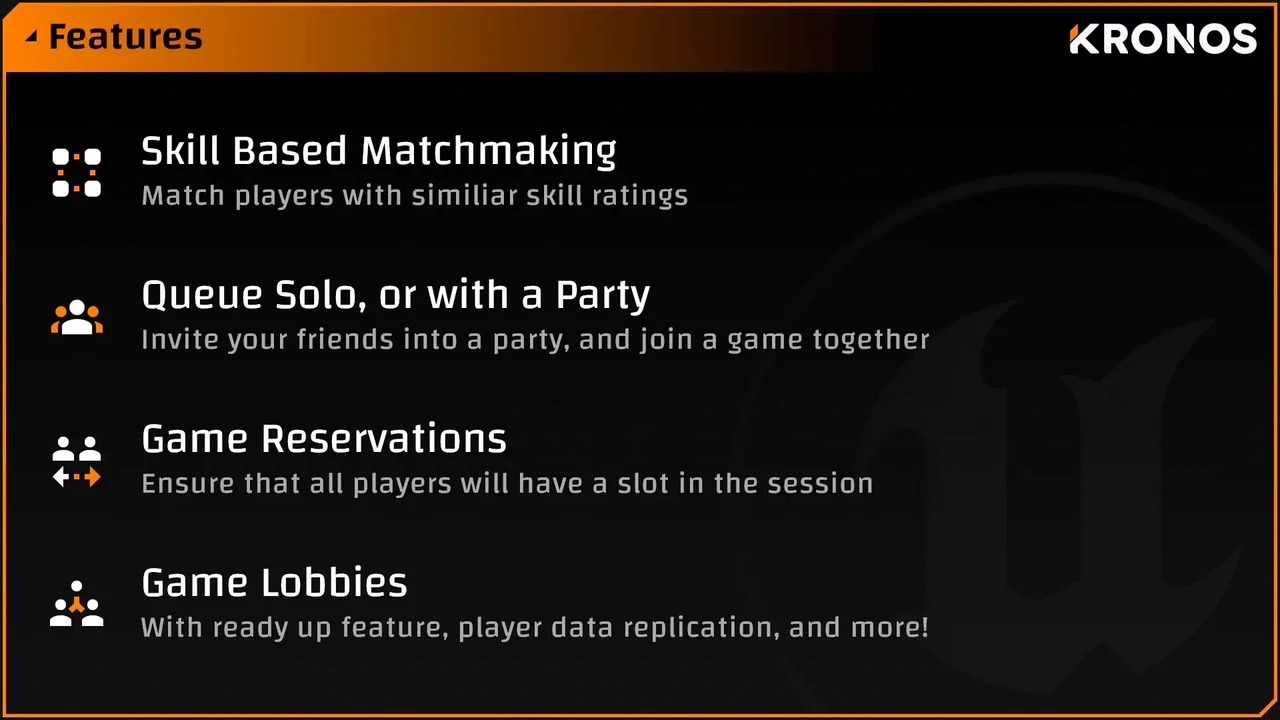
 Network
 Network
 Network