"4481da9c895ef786"{"id":"1001325","slug":"network-clock","title":"Network Clock","category":"Network \u0026 Multiplayer","engine":"5.2 - 5.4","assetVersion":"Asset Version: 1.0.1","engineVersion":"Engine Version: 5.2 - 5.4","tag":"Network","accent":"blue","visual":"mech","summary":"Network Clock is an open-source Unreal Engine plugin designed to synchronize client and server time, compensating for network latency across multiplayer games.","platform":"Unreal Engine","publishedAt":"2026-10-02T09:54:03.857Z","updatedAt":"2026-10-02T09:54:03.857Z","sourceNotes":[],"fileContents":[],"compatibility":["Unreal Engine","Asset Version: 1.0.1","Engine Version: 5.2 - 5.4"],"featuredImage":{"alt":"Network Clock","src":"/wp-content/uploads/published/2026/10/1141f81ad01b-8fcc2205-a0ea-4f78-8f41-d5f6170fde51-4c0f489913.webp"},"hasDownloadLink":true,"downloads":0,"terms":[{"taxonomy":"category","slug":"network-and-multiplayer-tools-and-plugins","name":"Network \u0026 Multiplayer"}],"galleryImages":[{"src":"/wp-content/uploads/published/2026/10/5a8559685f64-7759b04c-d3d2-471c-9c20-93a136d83df9-1669d87f48.webp","alt":"Network Clock"},{"src":"/wp-content/uploads/published/2026/10/535bb917fead-4ca018c3-d8b3-452a-b5e0-bfc346076bb2-f864f4d83e.webp","alt":"Network Clock"}],"accessPanel":{"kind":"resource","title":"Download this resource","eyebrow":"Free Download","message":"Log in or create a free account to start your download.","fileName":"Network Clock.7z","safetyNote":"Resources are manually reviewed before listing to improve quality and reduce obvious risks.","actionLabel":"Download Free","resourceType":"Resource archive"},"contentHtml":"\u003cp\u003eMultiplayer game development frequently encounters timing discrepancies between the central server authority and individual connected clients. When players connect across varying distances and connection qualities, network delay naturally introduces drift and lag into how game events are registered. Network Clock provides an open-source code plugin solution built for Unreal Engine to resolve these time synchronization challenges, keeping the client simulation tightly aligned with the server state.\u003c/p\u003e \u003ch2\u003eAddressing Unreal Engine GetServerWorldTimeSeconds Discrepancies\u003c/h2\u003e\n\u003cp\u003eUnreal Engine provides native functions to retrieve server time, most notably \u003ccode\u003eGetServerWorldTimeSeconds\u003c/code\u003e. While this function serves as a basic reference point for time across a session, raw network latency can introduce measurable inaccuracies between what the server calculates and what the client perceives. Without active correction, timestamps can fluctuate or lag behind the actual server frame, creating inconsistencies in gameplay that relies on shared temporal accuracy.\u003c/p\u003e\n\u003cp\u003eNetwork Clock works directly as an improvement over the standard \u003ccode\u003eGetServerWorldTimeSeconds\u003c/code\u003e Implementation. Instead of relying purely on intermittent updates or uncompensated server pings, the plugin monitors and updates the relationship between local machine time and server authority. This focus on improving the base engine call gives developers a more reliable timing foundation across all network gameplay systems that query world time.\u003c/p\u003e \u003ch2\u003eActive Client Clock Synchronization and Latency Compensation\u003c/h2\u003e\n\u003cp\u003eEstablishing true synchronization across distinct machines requires ongoing management not just one handshake at connection time. Network Clock relies on active synchronization, continuously managing the client clock so that it stays anchored to the server clock throughout the duration of a match. This steady tracking prevents the client from drifting forward or backward as network conditions shift during an active play session.\u003c/p\u003e\n\u003cp\u003eTo handle the physical delay of packet transmission, the plugin implements client-side techniques specifically engineered to compensate for network latency. Instead of presenting abrupt jumps or stuttering when receiving updated time updates from the host, client-side compensation smooths the adjustments. This gives a steadier timeline on the player side, removing the friction and visual or logical hitches that often accompany delayed network packets.\u003c/p\u003e \u003ch2\u003eCustom Settings for Precise Time Synchronization\u003c/h2\u003e\n\u003cp\u003eNot every multiplayer game requires the exact same timing tolerances. Fast-paced titles might need tight, frequent adjustments to keep interaction windows exact, while slower-paced projects might prioritize broader smoothing to maintain visual stability. Network Clock includes customizable settings that allow creators to fine-tune the precision of the time synchronization process.\u003c/p\u003e\n\u003cp\u003eThese configuration options give teams direct control over how the client clock behaves relative to the incoming server data. By adjusting synchronization parameters, developers can dial in the ideal balance between raw precision and smooth compensation based on the specific network demands of their gameplay systems.\u003c/p\u003e \u003ch2\u003eMaintaining Fair and Consistent Multiplayer Gameplay\u003c/h2\u003e\n\u003cp\u003eWhen time synchronization breaks down in a multiplayer environment, the immediate consequence is an uneven playing field. Players with higher latency or jittery connections can experience desynchronized states, where interactive events, hit registration, or timed interactions do not match the server authority. Network Clock targets these exact inaccuracies, removing the discrepancies introduced by variable ping so that all participants operate under the same temporal baseline.\u003c/p\u003e\n\u003cp\u003eBy delivering a smoother and more responsive multiplayer gaming experience, the plugin ensures that game events are evaluated fairly across diverse network environments. Eliminating timing drift makes server validation more dependable, allowing gameplay logic to resolve predictable interactions regardless of how far apart clients are physically located.\u003c/p\u003e \u003ch2\u003eOpen Source Code for Network Pipelines\u003c/h2\u003e\n\u003cp\u003eDistributed as an open-source code plugin, Network Clock integrates straight into Unreal Engine projects where network timing demands transparent, inspectable systems. Having access to the underlying code allows engineering teams to study how the latency compensation operates and integrate the clock cleanly into custom netcode pipelines without dealing with black-box logic.\u003c/p\u003e\n\u003cp\u003eTeams building competitive, cooperative, or large-scale multiplayer titles benefit most from this implementation. By providing active client clock correction, direct latency compensation techniques, and flexible configuration settings, Network Clock supplies a solid solution for developers striving to achieve reliable, synchronized game sessions in Unreal Engine.\u003c/p\u003e\n\n\u003ch2\u003eMore From The Same Workflow\u003c/h2\u003e\n\u003cul\u003e\n\u003cli\u003e\u003ca href=\"https://3dcghub.com/netobject/\" title=\"NetObject\"\u003eNetObject\u003c/a\u003e\u003c/li\u003e\n\u003cli\u003e\u003ca href=\"https://3dcghub.com/mysql-and-mariadb-integration/\" title=\"MySQL and MariaDB Integration\"\u003eMySQL and MariaDB Integration\u003c/a\u003e\u003c/li\u003e\n\u003cli\u003e\u003ca href=\"https://3dcghub.com/advanced-crafting-system-plugin/\" title=\"Advanced Crafting System - Plugin\"\u003eAdvanced Crafting System - Plugin\u003c/a\u003e\u003c/li\u003e\n\u003cli\u003e\u003ca href=\"https://3dcghub.com/kronos-matchmaking/\" title=\"Kronos Matchmaking\"\u003eKronos Matchmaking\u003c/a\u003e\u003c/li\u003e\n\u003cli\u003e\u003ca href=\"https://3dcghub.com/fps-first-person-shooter-framework-skg-shooter-framework-v2/\" title=\"FPS First Person Shooter Framework (SKG Shooter Framework V2)\"\u003eFPS First Person Shooter Framework (SKG Shooter Framework V2)\u003c/a\u003e\u003c/li\u003e\n\u003c/ul\u003e","contentTextLength":5046,"navigation":{"current":15,"total":3269,"previous":{"id":"1001326","slug":"replicated-tickable-uobjects","title":"Replicated Tickable UObjects","category":"Engine Tools","platform":"Unreal Engine","updatedAt":"2026-10-02T09:56:00.531Z"},"next":{"id":"1001324","slug":"flipwidget","title":"FlipWidget","category":"Engine Tools","platform":"Unreal Engine","updatedAt":"2026-10-02T09:52:09.334Z"}},"relatedResources":[{"id":"1001278","slug":"netobject","title":"NetObject","category":"Network \u0026 Multiplayer","engine":"5.2 - 5.4","assetVersion":"Asset Version: 1.0","engineVersion":"Engine Version: 5.2 - 5.4","tag":"Network","accent":"blue","visual":"mech","summary":"NetObject brings network replication and RPC support directly to UObjects without requiring dedicated actor spawning in Unreal Engine projects.","platform":"Unreal Engine","publishedAt":"2026-09-30T06:13:08.529Z","updatedAt":"2026-09-30T06:13:08.529Z","sourceNotes":[],"fileContents":[],"compatibility":["Unreal Engine","Asset Version: 1.0","Engine Version: 5.2 - 5.4"],"featuredImage":{"alt":"NetObject","src":"/wp-content/uploads/published/2026/09/7f3423b35d44-9258d5b5-fe24-4322-8ba6-e6a0de903265-5ee28427f6.webp"},"hasDownloadLink":true,"downloads":0},{"id":"15144","slug":"mysql-and-mariadb-integration","title":"MySQL and MariaDB Integration","category":"Network \u0026 Multiplayer","engine":"5.1 - 5.8","assetVersion":"Asset Version:4.1 - 4.3","engineVersion":"Engine version: 5.1 - 5.8","tag":"Network","accent":"blue","visual":"mech","summary":"The MySQL and MariaDB Integration plugin bridges the gap between game development and database management. It enables creators to build dynamic, data-driven applications within Unreal Engine.","platform":"Unreal Engine","publishedAt":"2026-03-12T08:03:21.000Z","updatedAt":"2026-09-30T04:34:24.995Z","sourceNotes":[],"fileContents":[],"compatibility":["Unreal Engine","Asset Version:4.1 - 4.3","Engine version: 5.1 - 5.8"],"featuredImage":{"alt":"MySQL and MariaDB Integration","src":"https://3dcghub.com/wp-content/uploads/2026/03/b9903b50-a5f5-4840-ab32-cd62e363c7a5.webp"},"hasDownloadLink":true,"downloads":0},{"id":"1000785","slug":"advanced-crafting-system-plugin","title":"Advanced Crafting System - Plugin","category":"Network \u0026 Multiplayer","engine":"5.6","assetVersion":"Asset Version: 1.0","engineVersion":"Engine Version: 5.6","tag":"Network","accent":"blue","visual":"mech","summary":"Unreal Engine plugin version of a survival and multiplayer crafting system with Discord support, documentation, and free migration for previous buyers before Ju","platform":"Unreal Engine","publishedAt":"2026-07-30T11:54:43.085Z","updatedAt":"2026-07-30T11:54:43.085Z","sourceNotes":[],"fileContents":[],"compatibility":["Unreal Engine","Asset Version: 1.0","Engine Version: 5.6"],"featuredImage":{"alt":"Advanced Crafting System - Plugin","src":"/wp-content/uploads/published/2026/07/e0cef0609162-b72934a1-6676-40d9-91c2-a468db00c7ca-6af95748e4.webp"},"hasDownloadLink":true,"downloads":0}]}
Network
Network Clock
Network Clock is an open-source Unreal Engine plugin designed to synchronize client and server time, compensating for network latency across multiplayer games.
Multiplayer game development frequently encounters timing discrepancies between the central server authority and individual connected clients. When players connect across varying distances and connection qualities, network delay naturally introduces drift and lag into how game events are registered. Network Clock provides an open-source code plugin solution built for Unreal Engine to resolve these time synchronization challenges, keeping the client simulation tightly aligned with the server state.
Unreal Engine provides native functions to retrieve server time, most notably GetServerWorldTimeSeconds. While this function serves as a basic reference point for time across a session, raw network latency can introduce measurable inaccuracies between what the server calculates and what the client perceives. Without active correction, timestamps can fluctuate or lag behind the actual server frame, creating inconsistencies in gameplay that relies on shared temporal accuracy.
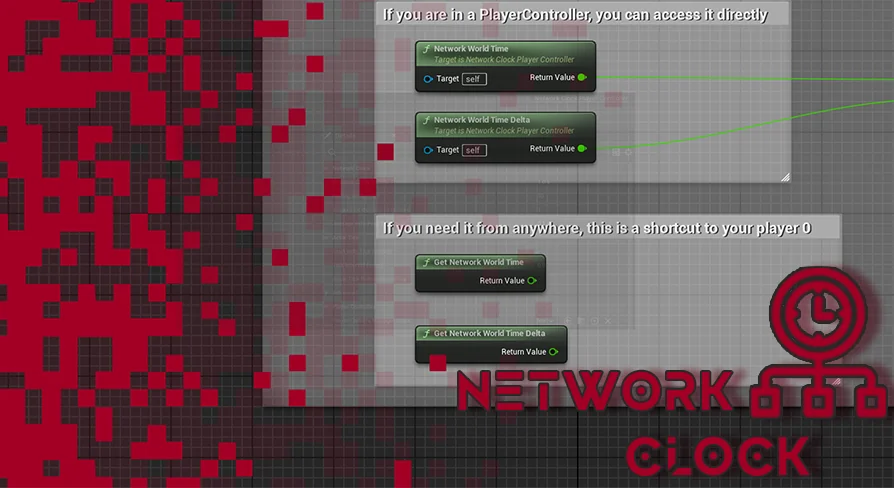
Network Clock works directly as an improvement over the standard GetServerWorldTimeSeconds Implementation. Instead of relying purely on intermittent updates or uncompensated server pings, the plugin monitors and updates the relationship between local machine time and server authority. This focus on improving the base engine call gives developers a more reliable timing foundation across all network gameplay systems that query world time.
Active Client Clock Synchronization and Latency Compensation
Establishing true synchronization across distinct machines requires ongoing management not just one handshake at connection time. Network Clock relies on active synchronization, continuously managing the client clock so that it stays anchored to the server clock throughout the duration of a match. This steady tracking prevents the client from drifting forward or backward as network conditions shift during an active play session.
To handle the physical delay of packet transmission, the plugin implements client-side techniques specifically engineered to compensate for network latency. Instead of presenting abrupt jumps or stuttering when receiving updated time updates from the host, client-side compensation smooths the adjustments. This gives a steadier timeline on the player side, removing the friction and visual or logical hitches that often accompany delayed network packets.
Custom Settings for Precise Time Synchronization
Not every multiplayer game requires the exact same timing tolerances. Fast-paced titles might need tight, frequent adjustments to keep interaction windows exact, while slower-paced projects might prioritize broader smoothing to maintain visual stability. Network Clock includes customizable settings that allow creators to fine-tune the precision of the time synchronization process.
These configuration options give teams direct control over how the client clock behaves relative to the incoming server data. By adjusting synchronization parameters, developers can dial in the ideal balance between raw precision and smooth compensation based on the specific network demands of their gameplay systems.
Maintaining Fair and Consistent Multiplayer Gameplay
When time synchronization breaks down in a multiplayer environment, the immediate consequence is an uneven playing field. Players with higher latency or jittery connections can experience desynchronized states, where interactive events, hit registration, or timed interactions do not match the server authority. Network Clock targets these exact inaccuracies, removing the discrepancies introduced by variable ping so that all participants operate under the same temporal baseline.
By delivering a smoother and more responsive multiplayer gaming experience, the plugin ensures that game events are evaluated fairly across diverse network environments. Eliminating timing drift makes server validation more dependable, allowing gameplay logic to resolve predictable interactions regardless of how far apart clients are physically located.
Open Source Code for Network Pipelines
Distributed as an open-source code plugin, Network Clock integrates straight into Unreal Engine projects where network timing demands transparent, inspectable systems. Having access to the underlying code allows engineering teams to study how the latency compensation operates and integrate the clock cleanly into custom netcode pipelines without dealing with black-box logic.
Teams building competitive, cooperative, or large-scale multiplayer titles benefit most from this implementation. By providing active client clock correction, direct latency compensation techniques, and flexible configuration settings, Network Clock supplies a solid solution for developers striving to achieve reliable, synchronized game sessions in Unreal Engine.
 Network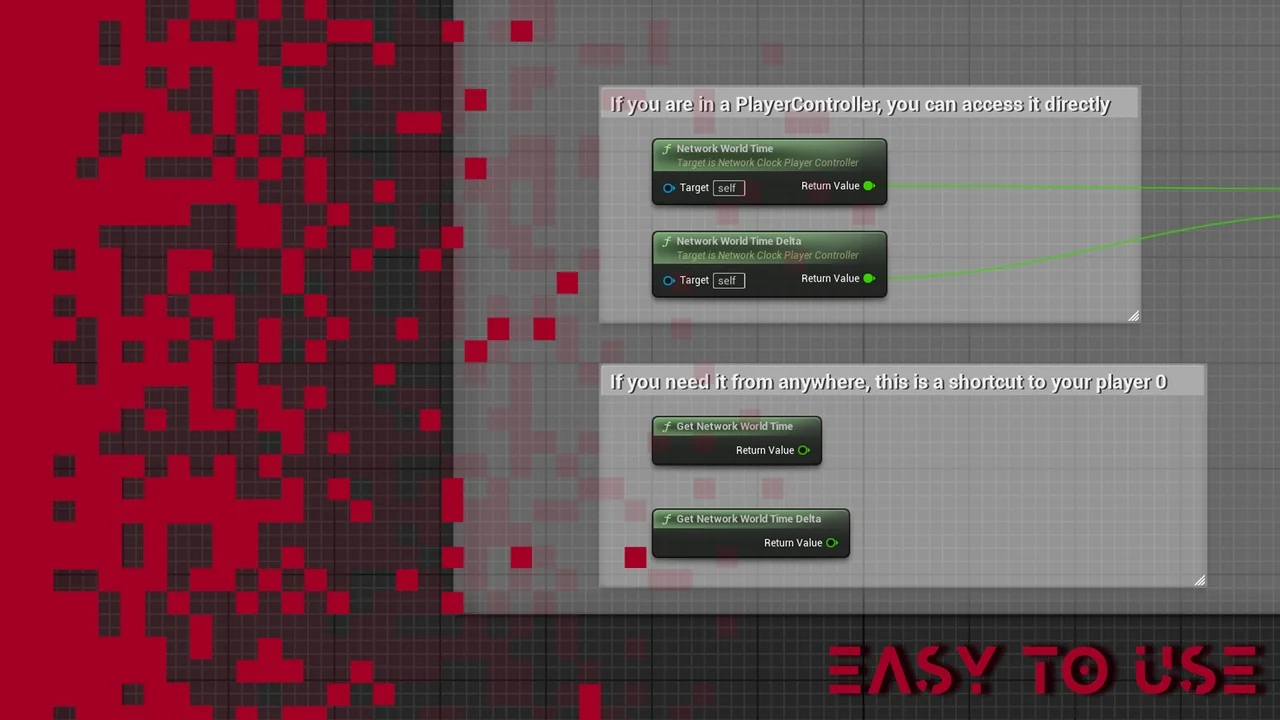
 Network
 Network
 Network