"4481da9c895ef786"{"id":"1001324","slug":"flipwidget","title":"FlipWidget","category":"Engine Tools","engine":"4.24 - 5.8","assetVersion":"Asset Version: 1.0 - 1.3","engineVersion":"Engine Version: 4.24 - 5.8","tag":"Engine Tools","accent":"blue","visual":"mech","summary":"FlipWidget brings native C++ flipbook animation to UMG, pairing runtime Blueprint nodes and Image widget parity with custom size controls.","platform":"Unreal Engine","publishedAt":"2026-10-02T09:52:09.334Z","updatedAt":"2026-10-02T09:52:09.334Z","sourceNotes":[],"fileContents":[],"compatibility":["Unreal Engine","Asset Version: 1.0 - 1.3","Engine Version: 4.24 - 5.8"],"featuredImage":{"alt":"FlipWidget","src":"/wp-content/uploads/published/2026/10/65077073d754-56e1e806-c4e0-458d-bd37-040d2fcd3882-1cb4d08f7c.webp"},"hasDownloadLink":true,"downloads":0,"terms":[{"taxonomy":"category","slug":"engine-tools-tools-and-plugins","name":"Engine Tools"}],"galleryImages":[{"src":"/wp-content/uploads/published/2026/10/37d40e038d30-6efc4468-746b-424f-9eed-8427a148f2c4-a8828d79ce.webp","alt":"FlipWidget"},{"src":"/wp-content/uploads/published/2026/10/aa04d7f7966f-f1f9410d-4876-47db-8227-ef21edcf82c5-191983f021.webp","alt":"FlipWidget"},{"src":"/wp-content/uploads/published/2026/10/52ae5b2ff4d2-a3f7cdd9-ddfc-4f4f-9197-be2ded665072-39714654cf.webp","alt":"FlipWidget"}],"accessPanel":{"kind":"resource","title":"Download this resource","eyebrow":"Free Download","message":"Log in or create a free account to start your download.","fileName":"FlipWidget.7z","safetyNote":"Resources are manually reviewed before listing to improve quality and reduce obvious risks.","actionLabel":"Download Free","resourceType":"Resource archive"},"contentHtml":"\u003ch2\u003eAnimated Interface Design Across Real-Time User Interfaces\u003c/h2\u003e\n\u003cp\u003eStylized title screens, retro-inspired user interfaces, arcade HUDs, and dynamic inventory systems regularly depend on sequenced 2D frames rather than flat, motionless iconography. When crafting game layouts, visual feedback relies heavily on crisp state changes: spinning coins, cycling status indicators, flashing interactive icons, and character portrait reactions. Incorporating frame-by-frame sequences directly into standard user interface hierarchies frequently presents structural hurdles if the underlying layout tools treat every graphic as an unmoving texture.\u003c/p\u003e\n\u003cp\u003eFlipWidget addresses this exact layout requirement by delivering flipbook animation directly inside UMG. Operating natively within the interface designer, it bridges the gap between static slate presentation and active sprite-style motion. Projects aiming for arcade clarity, animated graphic prompts, or stylized visual meters gain an immediate method to sequence multi-frame assets without building complex custom material logic or relying on cumbersome external playback loops.\u003c/p\u003e \u003ch2\u003eNative C++ Architecture and Built-In Image Widget Parity\u003c/h2\u003e\n\u003cp\u003eAt its core, FlipWidget is written in native C++ code to maintain fast execution and consistent reliability across UI draws. Because interface hierarchies can feature dozens of small widgets simultaneously—such as health pips, tactical indicators, mini-map pings, and action prompts—the overhead of interface elements directly impacts frame times. Relying on native code guarantees that the underlying display and cycling mechanics execute efficiently without introducing unnecessary Blueprint overhead into the main rendering loop.\u003c/p\u003e\n\u003cp\u003eFrom an authoring perspective, FlipWidget functions precisely like an animated version of the built-in UMG Image widget. Designers accustomed to positioning, anchoring, and scaling standard Image widgets can place FlipWidget into canvases, horizontal boxes, grid panels, and overlays using identical structural habits. Rather than forcing creators to learn an unfamiliar workflow or adapt to esoteric canvas wrappers, it fits into existing interface pipelines as a direct drop-in counterpart to the default visual elements Unreal Engine developers use every day.\u003c/p\u003e \u003ch2\u003eRuntime Animation Control Through Blueprint Nodes and C++\u003c/h2\u003e\n\u003cp\u003eInteractive interfaces demand responsiveness, meaning an animated graphic must react dynamically as gameplay states shift. FlipWidget supplies dedicated Blueprint nodes engineered to govern flipbook playback directly at runtime. Designers can start playback, pause sequences, restart visual states, or switch animation behaviors on the fly in response to player actions, menu clicks, or game events. Whether a cooldown icon reaches its expiration or a menu cursor loops while hovering over a button, runtime nodes allow precise execution directly inside widget event graphs.\u003c/p\u003e\n\u003cp\u003eThis runtime control is not limited strictly to visual scripting. Because the widget is built natively, every function and control mechanism remains accessible in pure C++. Gameplay programmers structuring high-performance user interface managers can interface directly with FlipWidget through code, bypassing Blueprints entirely when required. The dual compatibility ensures that both technical artists working inside event graphs and core systems programmers engineering complex menu frameworks interact with the same underlying animation logic without friction.\u003c/p\u003e \u003ch2\u003eVersion Evolution: Desired Sizing and Expanded Nodes\u003c/h2\u003e\n\u003cp\u003eThe progression of FlipWidget through its version history shows targeted refinements aimed at layout precision and workflow stability. The release of version 1.1 focused on core maintenance and functional expansion, resolving known bugs while providing an expanded set of Blueprint nodes to grant authors even broader command over their playback events and states.\u003c/p\u003e\n\u003cp\u003eVersion 1.3, targeted for engine version 5.1 or later, addressed a fundamental layout behavior: widget dimensioning. Previously, the dimensions of the widget were tied rigidly to the resolution of the sequence's first frame. Version 1.3 introduced functionality allowing developers to define a custom desired size instead of automatically inheriting the dimensions of the initial frame. This architectural change ensures that interface designers retain absolute control over layout sizing inside complex containers, preventing unexpectedly scaled frames from breaking auto-sizing vertical boxes or disrupting cleanly budgeted grid slots.\u003c/p\u003e \u003ch2\u003eWorkflow Placement and Interface Integration\u003c/h2\u003e\n\u003cp\u003eIn standard production workflows, FlipWidget operates alongside surrounding user interface components to deliver clear visual states. The tool maintains compatibility with SG Drag and Spawn Button, allowing animated flipbook visuals to seamlessly integrate into drag-and-drop systems, dynamic button spawning workflows, and custom hotbar structures. By pairing an animated flipbook display with interactive slot mechanics, developers can build reactive inventory slots, skill bars, and draggable visual icons that animate continuously while being manipulated by the user.\u003c/p\u003e\n\u003cp\u003eBecause the widget retains the simplicity of an ordinary Image widget while holding the runtime power of C++ flipbook sequencing, it avoids bloating interface assets with unnecessary abstractions. It fits cleanly into production pipelines where lightweight, reliable frame animation is needed across menus, game HUDs, and interactive widgets without sacrificing runtime performance.\u003c/p\u003e\n\n\u003ch2\u003eExplore Similar Assets\u003c/h2\u003e\n\u003cul\u003e\n\u003cli\u003e\u003ca href=\"https://3dcghub.com/light-explorer/\" title=\"Light Explorer\"\u003eLight Explorer\u003c/a\u003e\u003c/li\u003e\n\u003cli\u003e\u003ca href=\"https://3dcghub.com/blueprintjson/\" title=\"BlueprintJSON\"\u003eBlueprintJSON\u003c/a\u003e\u003c/li\u003e\n\u003cli\u003e\u003ca href=\"https://3dcghub.com/runtime-speech-recognizer-real-time-offline-ai/\" title=\"Runtime Speech Recognizer (Real-Time, Offline, AI)\"\u003eRuntime Speech Recognizer (Real-Time, Offline, AI)\u003c/a\u003e\u003c/li\u003e\n\u003cli\u003e\u003ca href=\"https://3dcghub.com/runtime-archiver-zip-oodle-tar-lz4-gzip/\" title=\"Runtime Archiver (Zip, Oodle, Tar, LZ4, GZip)\"\u003eRuntime Archiver (Zip, Oodle, Tar, LZ4, GZip)\u003c/a\u003e\u003c/li\u003e\n\u003cli\u003e\u003ca href=\"https://3dcghub.com/log-viewer/\" title=\"Log Viewer\"\u003eLog Viewer\u003c/a\u003e\u003c/li\u003e\n\u003c/ul\u003e","contentTextLength":5678,"navigation":{"current":16,"total":3269,"previous":{"id":"1001325","slug":"network-clock","title":"Network Clock","category":"Network \u0026 Multiplayer","platform":"Unreal Engine","updatedAt":"2026-10-02T09:54:03.857Z"},"next":{"id":"1001323","slug":"custom-details-sections","title":"Custom Details Sections","category":"Engine Tools","platform":"Unreal Engine","updatedAt":"2026-10-02T09:50:11.134Z"}},"relatedResources":[{"id":"14114","slug":"light-explorer","title":"Light Explorer","category":"Engine Tools","engine":"4.24 - 5.8","assetVersion":"Asset Version: 1.0.3 - 1.0.5","engineVersion":"Engine version: 4.24 - 5.8","tag":"Engine Tools","accent":"blue","visual":"city","summary":"Improve your scene management with Light Explorer, a dedicated tool for Unreal Editor. This resource allows developers to locate and edit light sources quickly within complex environments.","platform":"Unreal Engine","publishedAt":"2026-03-11T15:53:53.000Z","updatedAt":"2026-09-29T09:25:45.289Z","sourceNotes":[],"fileContents":[],"compatibility":["Unreal Engine","Asset Version: 1.0.3 - 1.0.5","Engine version: 4.24 - 5.8"],"featuredImage":{"alt":"Light Explorer","src":"https://3dcghub.com/wp-content/uploads/2026/03/22cb5752-76c8-4b46-8262-d60368bddf7c.webp"},"hasDownloadLink":true,"downloads":0},{"id":"13767","slug":"blueprintjson","title":"BlueprintJSON","category":"Engine Tools","engine":"4.23 - 5.8","assetVersion":"Asset Version:1.0 - 1.0.6","engineVersion":"Engine version: 4.23 - 5.8","tag":"Engine Tools","accent":"blue","visual":"mech","summary":"BlueprintJSON is a comprehensive library designed to bring JSON functionality to Unreal Engine Blueprints. It enables developers to read, parse, edit, and save JSON data efficiently using asynchronous processing.","platform":"Unreal Engine","publishedAt":"2026-03-11T09:59:29.000Z","updatedAt":"2026-09-29T08:30:49.387Z","sourceNotes":[],"fileContents":[],"compatibility":["Unreal Engine","Asset Version:1.0 - 1.0.6","Engine version: 4.23 - 5.8"],"featuredImage":{"alt":"BlueprintJSON","src":"https://3dcghub.com/wp-content/uploads/2026/03/635658e0-64f1-431f-b6f4-59f2fe39da17.webp"},"hasDownloadLink":true,"downloads":1},{"id":"14519","slug":"runtime-speech-recognizer-real-time-offline-ai","title":"Runtime Speech Recognizer (Real-Time, Offline, AI)","category":"Engine Tools","engine":"4.27 - 5.8","assetVersion":"Asset Version:1.0","engineVersion":"Engine version: 4.27 - 5.8","tag":"Engine Tools","accent":"blue","visual":"city","summary":"Enhance your project with Runtime Speech Recognizer (Real-Time, Offline, AI), a plugin that enables high-performance voice commands and speech-to-text without an internet connection. Powered by OpenAI Whisper, it supports over 95 languages and features GPU...","platform":"Unreal Engine","publishedAt":"2026-03-11T18:21:42.000Z","updatedAt":"2026-09-30T02:57:30.475Z","sourceNotes":[],"fileContents":[],"compatibility":["Unreal Engine","Asset Version:1.0","Engine version: 4.27 - 5.8"],"featuredImage":{"alt":"Runtime Speech Recognizer (Real-Time, Offline, AI)","src":"https://3dcghub.com/wp-content/uploads/2026/03/865b5e7a-61c2-4de8-83da-c2cc3aa6c0a4.webp"},"hasDownloadLink":true,"downloads":1}]}
Engine Tools
FlipWidget
FlipWidget brings native C++ flipbook animation to UMG, pairing runtime Blueprint nodes and Image widget parity with custom size controls.
Animated Interface Design Across Real-Time User Interfaces
Stylized title screens, retro-inspired user interfaces, arcade HUDs, and dynamic inventory systems regularly depend on sequenced 2D frames rather than flat, motionless iconography. When crafting game layouts, visual feedback relies heavily on crisp state changes: spinning coins, cycling status indicators, flashing interactive icons, and character portrait reactions. Incorporating frame-by-frame sequences directly into standard user interface hierarchies frequently presents structural hurdles if the underlying layout tools treat every graphic as an unmoving texture.
FlipWidget addresses this exact layout requirement by delivering flipbook animation directly inside UMG. Operating natively within the interface designer, it bridges the gap between static slate presentation and active sprite-style motion. Projects aiming for arcade clarity, animated graphic prompts, or stylized visual meters gain an immediate method to sequence multi-frame assets without building complex custom material logic or relying on cumbersome external playback loops.
Native C++ Architecture and Built-In Image Widget Parity
At its core, FlipWidget is written in native C++ code to maintain fast execution and consistent reliability across UI draws. Because interface hierarchies can feature dozens of small widgets simultaneously—such as health pips, tactical indicators, mini-map pings, and action prompts—the overhead of interface elements directly impacts frame times. Relying on native code guarantees that the underlying display and cycling mechanics execute efficiently without introducing unnecessary Blueprint overhead into the main rendering loop.
From an authoring perspective, FlipWidget functions precisely like an animated version of the built-in UMG Image widget. Designers accustomed to positioning, anchoring, and scaling standard Image widgets can place FlipWidget into canvases, horizontal boxes, grid panels, and overlays using identical structural habits. Rather than forcing creators to learn an unfamiliar workflow or adapt to esoteric canvas wrappers, it fits into existing interface pipelines as a direct drop-in counterpart to the default visual elements Unreal Engine developers use every day.
Runtime Animation Control Through Blueprint Nodes and C++
Interactive interfaces demand responsiveness, meaning an animated graphic must react dynamically as gameplay states shift. FlipWidget supplies dedicated Blueprint nodes engineered to govern flipbook playback directly at runtime. Designers can start playback, pause sequences, restart visual states, or switch animation behaviors on the fly in response to player actions, menu clicks, or game events. Whether a cooldown icon reaches its expiration or a menu cursor loops while hovering over a button, runtime nodes allow precise execution directly inside widget event graphs.
This runtime control is not limited strictly to visual scripting. Because the widget is built natively, every function and control mechanism remains accessible in pure C++. Gameplay programmers structuring high-performance user interface managers can interface directly with FlipWidget through code, bypassing Blueprints entirely when required. The dual compatibility ensures that both technical artists working inside event graphs and core systems programmers engineering complex menu frameworks interact with the same underlying animation logic without friction.
Version Evolution: Desired Sizing and Expanded Nodes
The progression of FlipWidget through its version history shows targeted refinements aimed at layout precision and workflow stability. The release of version 1.1 focused on core maintenance and functional expansion, resolving known bugs while providing an expanded set of Blueprint nodes to grant authors even broader command over their playback events and states.
Version 1.3, targeted for engine version 5.1 or later, addressed a fundamental layout behavior: widget dimensioning. Previously, the dimensions of the widget were tied rigidly to the resolution of the sequence's first frame. Version 1.3 introduced functionality allowing developers to define a custom desired size instead of automatically inheriting the dimensions of the initial frame. This architectural change ensures that interface designers retain absolute control over layout sizing inside complex containers, preventing unexpectedly scaled frames from breaking auto-sizing vertical boxes or disrupting cleanly budgeted grid slots.
Workflow Placement and Interface Integration
In standard production workflows, FlipWidget operates alongside surrounding user interface components to deliver clear visual states. The tool maintains compatibility with SG Drag and Spawn Button, allowing animated flipbook visuals to seamlessly integrate into drag-and-drop systems, dynamic button spawning workflows, and custom hotbar structures. By pairing an animated flipbook display with interactive slot mechanics, developers can build reactive inventory slots, skill bars, and draggable visual icons that animate continuously while being manipulated by the user.
Because the widget retains the simplicity of an ordinary Image widget while holding the runtime power of C++ flipbook sequencing, it avoids bloating interface assets with unnecessary abstractions. It fits cleanly into production pipelines where lightweight, reliable frame animation is needed across menus, game HUDs, and interactive widgets without sacrificing runtime performance.
 Engine Tools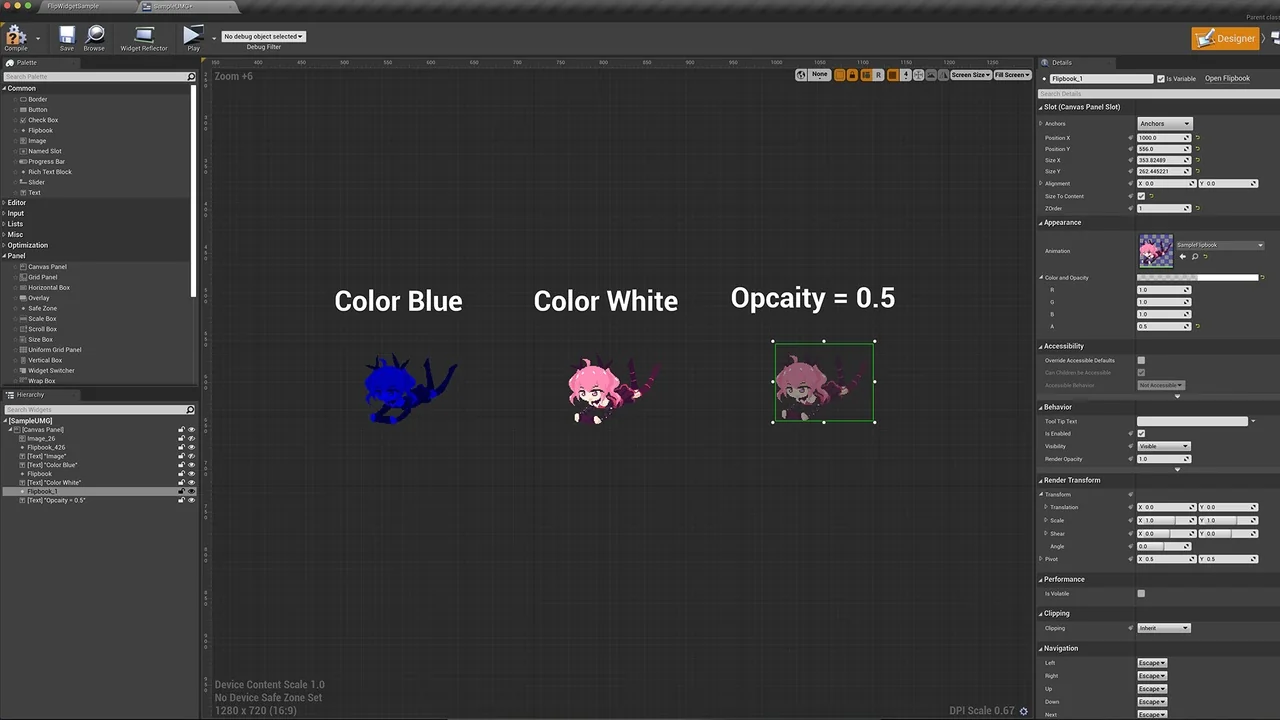
 Engine Tools
 Engine Tools
 Engine Tools