"e9c335e082208b17"{"id":"1002884","slug":"pak-loader-plugin","title":"Pak Loader Plugin","category":"Engine Tools","engine":"4.24 - 5.5","assetVersion":"Asset Version: 1.2 - 1.7","engineVersion":"Engine Version: 4.24 - 5.5","tag":"Engine Tools","accent":"blue","visual":"mech","summary":"Load Unreal Engine pak files at runtime using Blueprint or C++ with HTTP downloads, mount point management, and asset validation utilities.","platform":"Unreal Engine","indexPolicy":"index","publishedAt":"2026-11-21T01:51:42.694Z","updatedAt":"2026-11-21T01:51:42.694Z","sourceNotes":[],"fileContents":[],"compatibility":["Unreal Engine","Asset Version: 1.2 - 1.7","Engine Version: 4.24 - 5.5"],"featuredImage":{"alt":"Pak Loader Plugin","src":"/wp-content/uploads/published/2026/11/6fb11927f86c-86c5aec4-1791-4bcd-bb67-789c5fe2184b-e75a759da4.webp"},"fileSizeBytes":173356999,"hasDownloadLink":true,"downloads":0,"terms":[{"taxonomy":"category","slug":"engine-tools-tools-and-plugins","name":"Engine Tools"}],"galleryImages":[{"src":"/wp-content/uploads/published/2026/11/b44004ef4db9-24659e62-6abe-4328-82ad-6ef748ad9e8b-4603929475.webp","alt":"Pak Loader Plugin"},{"src":"/wp-content/uploads/published/2026/11/c5d0fb8ef175-1568e458-7d47-4854-998d-fff0f98392fe-369340dc51.webp","alt":"Pak Loader Plugin"},{"src":"/wp-content/uploads/published/2026/11/f8ab8ced6205-c109a811-9a2b-41b7-b23a-8474858363a9-d14c3f0378.webp","alt":"Pak Loader Plugin"}],"contentHtml":"\u003ch2\u003eRuntime Delivery and Modding Scenarios for the Pak Loader Plugin\u003c/h2\u003e\n\u003cp\u003eInteractive software often requires dynamic content updates that bypass the traditional cycle of repackaging an entire client application. Projects developed for community-driven modding depend on user-created packages that supply custom gameplay maps, structural props, character skins, or level variants. In architectural visualization scenarios, a minimal client build can function as a core viewing space, retrieving supplemental furniture catalogs, texture variations, and detailed architectural meshes on demand. The Pak Loader Plugin addresses these needs by exposing Unreal Engine's internal pak mounting systems directly to runtime environments.\u003c/p\u003e\n\u003cp\u003eThrough this setup, external \u003ccode\u003e.pak\u003c/code\u003e Files become accessible while an application is actively running. Once a pak file mounts into the active file tree, the engine treats the assets inside as if they were resident in the original build. Because paks can store any asset type recognized by the engine, developers can load entire playable levels, static meshes, materials, and scripted actors on the fly. The workflow shifts project design from monolithic packaging toward a modular distribution model where content is fetched and mounted as needed.\u003c/p\u003e \u003ch2\u003eMounting Blueprint Classes and Content Inside Packaged Projects\u003c/h2\u003e\n\u003cp\u003eThe plugin establishes pathways in both Blueprints and C++ to access encapsulated assets. In Blueprint scripting, developers can execute mounting calls and subsequently load specific objects or classes by path. The distinction between object loading and class loading is critical when handling runtime content: raw data assets, textures, and static meshes are retrieved as standard objects, whereas interactive gameplay actors and logic require class loading to instantiate Blueprints properly.\u003c/p\u003e\n\u003cp\u003eUnderlying this functionality is a strict operational boundary inherent to Unreal Engine itself: loading assets from mounted pak files functions only within packaged builds. In-editor execution cannot load assets out of external mounted paks due to the way the editor resolves internal references and content registries. Developers building and testing systems with the plugin must stage their testing workflows around packaged release builds. For creating the external packages destined for dynamic loading, the developer points to a companion tool, the PakCreator plugin, which formats the target assets into compatible pak files.\u003c/p\u003e \u003ch2\u003eNetwork Downloads and Reference Management via the Pak Loader\u003c/h2\u003e\n\u003cp\u003eDeploying modular content often requires moving files over local networks or the public internet before mounting occurs. The plugin includes native HTTP download functionality designed to retrieve remote \u003ccode\u003e.pak\u003c/code\u003e Files directly to the local device storage. Once retrieved, files can be passed straight into the mounting pipeline without leaving the engine runtime.\u003c/p\u003e\n\u003cp\u003eA frequent challenge in runtime asset management involves inter-asset dependencies. When a mesh in an external pak depends on a material located in the base game, or two dynamic paks share textures, asset references can break if paths fall out of alignment. The plugin provides dedicated registration for mount points to resolve this issue. By establishing explicit mount points during runtime execution, the engine accurately resolves internal package paths, preserving object linkages, texture assignments, and component references across mounted archives.\u003c/p\u003e \u003ch2\u003eVerification Routines and Filesystem Inspection\u003c/h2\u003e\n\u003cp\u003eExternal file intake introduces risks of data corruption, incomplete downloads, or missing directory references. To prevent runtime crashes and ensure stability before triggering engine load calls, the plugin exposes several utility and verification functions:\u003c/p\u003e\n\u003cul\u003e \u003cli\u003e\u003cstrong\u003eIsValidPakFile:\u003c/strong\u003e Checks whether a targeted file is a structurally sound Unreal pak archive before any mounting operation is attempted.\u003c/li\u003e \u003cli\u003e\u003cstrong\u003eSHA1SUM:\u003c/strong\u003e Calculates and returns cryptographic hash signatures to verify file integrity against remote checksums, ensuring network transfers completed without packet loss or tampering.\u003c/li\u003e \u003cli\u003e\u003cstrong\u003eGetMountedPakFilenames:\u003c/strong\u003e Returns an array containing the file paths of all currently mounted pak archives in the active session.\u003c/li\u003e \u003cli\u003e\u003cstrong\u003eGetFilesInPakDirectory:\u003c/strong\u003e Scans the internal hierarchy of a mounted pak file, returning asset paths within specific directories so UI menus, asset pickers, and level selectors can populate dynamically.\u003c/li\u003e \u003cli\u003e\u003cstrong\u003eUnmount Routines:\u003c/strong\u003e Detaches mounted archives to clean up memory footprints and release file locks when specific dynamic zones or assets are no longer required.\u003c/li\u003e\n\u003c/ul\u003e \u003ch2\u003eIoStore Rules, Pak Signing, and Platform Boundaries\u003c/h2\u003e\n\u003cp\u003eIntegrating runtime pak loading requires careful attention to project packaging configurations. A primary architectural constraint involves IoStore. While the plugin supports IoStore containers, this feature is mutually exclusive across the project environment: either every pak file in the pipeline must utilize IoStore, or none of them can. Mixing IoStore-enabled archives with standard legacy pak archives will cause mounting conflicts and asset resolution failures.\u003c/p\u003e\n\u003cp\u003eSecurity and engine versioning enforce further technical limitations. If a project has pak signing enabled in its packaging settings, the engine rejects unsigned third-party pak files. Community modding pipelines using this plugin must account for pak signing policies during project setup, as unsigned content will not mount in signed environments. Furthermore, engine version parity is essential: pak files generated in a different version of Unreal Engine than the host application frequently fail to load. The plugin supports Unreal Engine versions spanning 4.22 through 5.4 with dedicated example setups. While testing has focused on Windows x64, the underlying system is functional across Linux, macOS, and mobile deployments.\u003c/p\u003e \u003ch2\u003eAssessing Technical Readiness and Workflow Fit\u003c/h2\u003e\n\u003cp\u003eRuntime pak mounting is inherently complex, sitting deep within Unreal Engine's low-level virtual file system and serialization layers. Developers new to the engine or unfamiliar with asset registries, dependency trees, and packaged build behaviors will encounter a steep learning curve. Success with the plugin requires an established understanding of cook pipelines, reference management, and the architectural differences between editor sessions and standalone packaged binaries.\u003c/p\u003e\n\u003cp\u003eTeams building expandable sandbox games, user-generated content hubs, episodic applications, or dynamic architectural viewers will find the plugin's combined Blueprint nodes, HTTP delivery mechanisms, and verification checks a solid foundation for runtime asset streaming.\u003c/p\u003e\n\n\u003ch2\u003eExplore Similar Assets\u003c/h2\u003e\n\u003cul\u003e\n\u003cli\u003e\u003ca href=\"https://3dcghub.com/pak-creator-plugin/\" rel=\"noopener noreferrer\"\u003ePak Creator Plugin\u003c/a\u003e\u003c/li\u003e\n\u003cli\u003e\u003ca href=\"https://3dcghub.com/chunk-downloader-nodes/\" rel=\"noopener noreferrer\"\u003eChunk Downloader Nodes\u003c/a\u003e\u003c/li\u003e\n\u003cli\u003e\u003ca href=\"https://3dcghub.com/magic-spline-plugin/\" rel=\"noopener noreferrer\"\u003eMagic Spline Plugin\u003c/a\u003e\u003c/li\u003e\n\u003cli\u003e\u003ca href=\"https://3dcghub.com/actor-pool-manager-plugin/\" rel=\"noopener noreferrer\"\u003eActor Pool Manager Plugin\u003c/a\u003e\u003c/li\u003e\n\u003cli\u003e\u003ca href=\"https://3dcghub.com/mesh-ops-mesh-operations-plugin/\" rel=\"noopener noreferrer\"\u003eMesh Ops - Mesh Operations Plugin\u003c/a\u003e\u003c/li\u003e\n\u003c/ul\u003e","contentTextLength":6755,"navigation":{"current":51,"total":4839,"previous":{"id":"1002885","slug":"runtime-image-loader","title":"Runtime Image Loader","category":"Engine Tools","platform":"Unreal Engine","updatedAt":"2026-11-21T01:53:31.218Z"},"next":{"id":"1002883","slug":"le-socket-connection","title":"LE Socket Connection","category":"Engine Tools","platform":"Unreal Engine","updatedAt":"2026-11-21T01:51:11.356Z"}},"relatedResources":[{"id":"1002885","slug":"runtime-image-loader","title":"Runtime Image Loader","category":"Engine Tools","engine":"4.27 - 5.5","assetVersion":"Asset Version: 1.0","engineVersion":"Engine Version: 4.27 - 5.5","tag":"Engine Tools","accent":"blue","visual":"mech","summary":"Load PNG, JPEG, ICO, BMP, and TGA files from URLs or disk asynchronously in editor and packaged builds using Runtime Image Loader.","platform":"Unreal Engine","indexPolicy":"index","publishedAt":"2026-11-21T01:53:31.218Z","updatedAt":"2026-11-21T01:53:31.218Z","sourceNotes":[],"fileContents":[],"compatibility":["Unreal Engine","Asset Version: 1.0","Engine Version: 4.27 - 5.5"],"featuredImage":{"alt":"Runtime Image Loader","src":"/wp-content/uploads/published/2026/11/a3993a199094-4d95d076-4de5-4a03-a6be-84b3413d9d70-422258fd44.webp"},"fileSizeBytes":319589013,"hasDownloadLink":true,"downloads":0},{"id":"14323","slug":"pak-creator-plugin","title":"Pak Creator Plugin","category":"Engine Tools","engine":"4.27,5.0 - 5.7","assetVersion":"Engine version: 4.27,5.0 - 5.7","engineVersion":"Asset Version:1.7.1","tag":"Engine Tools","accent":"blue","visual":"luts","summary":"The Pak Creator Plugin simplifies the process of creating independent .pak files from content plugins in Unreal Engine. It is an ideal solution for developers looking to distribute assets for modding or architectural visualization.","platform":"Unreal Engine","indexPolicy":"noindex","publishedAt":"2026-03-11T17:41:02.000Z","updatedAt":"2026-04-19T15:45:48.000Z","sourceNotes":[],"fileContents":[],"compatibility":["Unreal Engine","Engine version: 4.27,5.0 - 5.7","Asset Version: 1.7.1"],"featuredImage":{"alt":"Pak Creator Plugin","src":"https://3dcghub.com/wp-content/uploads/2026/03/791550ef-8520-4427-86de-d70ce899e2ee.webp"},"fileSizeBytes":76888165,"hasDownloadLink":true,"downloads":0},{"id":"13785","slug":"chunk-downloader-nodes","title":"Chunk Downloader Nodes","category":"Engine Tools","engine":"5.6","assetVersion":"Engine version: 5.6","engineVersion":"Asset Version:1.0","tag":"Engine Tools","accent":"blue","visual":"animation","summary":"Streamline your content delivery with Chunk Downloader Nodes, a professional Blueprint wrapper for Epic's official plugin. This tool enables efficient content streaming and PAK file management without C++ requirements.","platform":"Unreal Engine","indexPolicy":"noindex","publishedAt":"2026-03-11T10:02:01.000Z","updatedAt":"2026-04-19T15:46:22.000Z","sourceNotes":[],"fileContents":[],"compatibility":["Unreal Engine","Engine version: 5.6","Asset Version: 1.0"],"featuredImage":{"alt":"Chunk Downloader Nodes","src":"https://3dcghub.com/wp-content/uploads/2026/03/efb2c9d0-ead4-4949-8fda-f55747fa16fe-1.webp"},"fileSizeBytes":4680917,"hasDownloadLink":true,"downloads":0}]}
Resource screenshots
1 / 3
Join our channel
Follow 3DCGHUB on Telegram for new resource drops, migration updates, and community notices.
Runtime Delivery and Modding Scenarios for the Pak Loader Plugin
Interactive software often requires dynamic content updates that bypass the traditional cycle of repackaging an entire client application. Projects developed for community-driven modding depend on user-created packages that supply custom gameplay maps, structural props, character skins, or level variants. In architectural visualization scenarios, a minimal client build can function as a core viewing space, retrieving supplemental furniture catalogs, texture variations, and detailed architectural meshes on demand. The Pak Loader Plugin addresses these needs by exposing Unreal Engine's internal pak mounting systems directly to runtime environments.
Through this setup, external .pak Files become accessible while an application is actively running. Once a pak file mounts into the active file tree, the engine treats the assets inside as if they were resident in the original build. Because paks can store any asset type recognized by the engine, developers can load entire playable levels, static meshes, materials, and scripted actors on the fly. The workflow shifts project design from monolithic packaging toward a modular distribution model where content is fetched and mounted as needed.
Mounting Blueprint Classes and Content Inside Packaged Projects
The plugin establishes pathways in both Blueprints and C++ to access encapsulated assets. In Blueprint scripting, developers can execute mounting calls and subsequently load specific objects or classes by path. The distinction between object loading and class loading is critical when handling runtime content: raw data assets, textures, and static meshes are retrieved as standard objects, whereas interactive gameplay actors and logic require class loading to instantiate Blueprints properly.
Underlying this functionality is a strict operational boundary inherent to Unreal Engine itself: loading assets from mounted pak files functions only within packaged builds. In-editor execution cannot load assets out of external mounted paks due to the way the editor resolves internal references and content registries. Developers building and testing systems with the plugin must stage their testing workflows around packaged release builds. For creating the external packages destined for dynamic loading, the developer points to a companion tool, the PakCreator plugin, which formats the target assets into compatible pak files.
Network Downloads and Reference Management via the Pak Loader
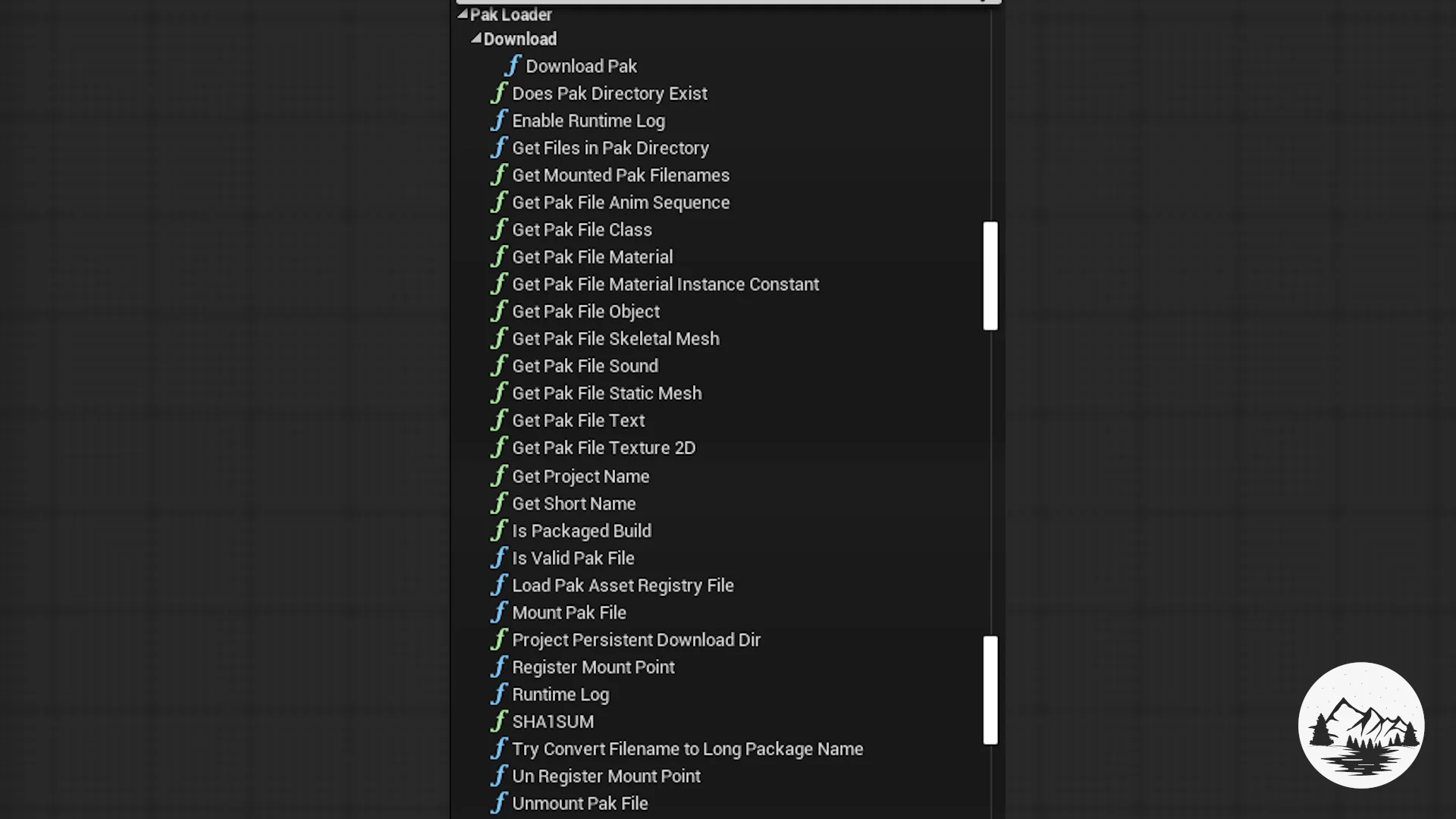
Deploying modular content often requires moving files over local networks or the public internet before mounting occurs. The plugin includes native HTTP download functionality designed to retrieve remote .pak Files directly to the local device storage. Once retrieved, files can be passed straight into the mounting pipeline without leaving the engine runtime.
A frequent challenge in runtime asset management involves inter-asset dependencies. When a mesh in an external pak depends on a material located in the base game, or two dynamic paks share textures, asset references can break if paths fall out of alignment. The plugin provides dedicated registration for mount points to resolve this issue. By establishing explicit mount points during runtime execution, the engine accurately resolves internal package paths, preserving object linkages, texture assignments, and component references across mounted archives.
Verification Routines and Filesystem Inspection
External file intake introduces risks of data corruption, incomplete downloads, or missing directory references. To prevent runtime crashes and ensure stability before triggering engine load calls, the plugin exposes several utility and verification functions:
IsValidPakFile: Checks whether a targeted file is a structurally sound Unreal pak archive before any mounting operation is attempted.
SHA1SUM: Calculates and returns cryptographic hash signatures to verify file integrity against remote checksums, ensuring network transfers completed without packet loss or tampering.
GetMountedPakFilenames: Returns an array containing the file paths of all currently mounted pak archives in the active session.
GetFilesInPakDirectory: Scans the internal hierarchy of a mounted pak file, returning asset paths within specific directories so UI menus, asset pickers, and level selectors can populate dynamically.
Unmount Routines: Detaches mounted archives to clean up memory footprints and release file locks when specific dynamic zones or assets are no longer required.
IoStore Rules, Pak Signing, and Platform Boundaries
Integrating runtime pak loading requires careful attention to project packaging configurations. A primary architectural constraint involves IoStore. While the plugin supports IoStore containers, this feature is mutually exclusive across the project environment: either every pak file in the pipeline must utilize IoStore, or none of them can. Mixing IoStore-enabled archives with standard legacy pak archives will cause mounting conflicts and asset resolution failures.
Security and engine versioning enforce further technical limitations. If a project has pak signing enabled in its packaging settings, the engine rejects unsigned third-party pak files. Community modding pipelines using this plugin must account for pak signing policies during project setup, as unsigned content will not mount in signed environments. Furthermore, engine version parity is essential: pak files generated in a different version of Unreal Engine than the host application frequently fail to load. The plugin supports Unreal Engine versions spanning 4.22 through 5.4 with dedicated example setups. While testing has focused on Windows x64, the underlying system is functional across Linux, macOS, and mobile deployments.
Assessing Technical Readiness and Workflow Fit
Runtime pak mounting is inherently complex, sitting deep within Unreal Engine's low-level virtual file system and serialization layers. Developers new to the engine or unfamiliar with asset registries, dependency trees, and packaged build behaviors will encounter a steep learning curve. Success with the plugin requires an established understanding of cook pipelines, reference management, and the architectural differences between editor sessions and standalone packaged binaries.
Teams building expandable sandbox games, user-generated content hubs, episodic applications, or dynamic architectural viewers will find the plugin's combined Blueprint nodes, HTTP delivery mechanisms, and verification checks a solid foundation for runtime asset streaming.
 Engine Tools
 Engine Tools
 Engine Tools