"7b46a695175d8694"{"id":"1001493","slug":"mesh-ops-mesh-operations-plugin","title":"Mesh Ops - Mesh Operations Plugin","category":"Engine Tools","engine":"5.4","assetVersion":"Asset Version: 1.06","engineVersion":"Engine Version: 5.4","tag":"Engine Tools","accent":"blue","visual":"mech","summary":"Explore Mesh Ops for Unreal Engine, featuring over 300 Blueprint nodes, runtime procedural mesh generation, mesh booleans, and decoupled mesh data structures.","platform":"Unreal Engine","publishedAt":"2026-10-08T12:57:50.878Z","updatedAt":"2026-10-08T12:57:50.878Z","sourceNotes":[],"fileContents":[],"compatibility":["Unreal Engine","Asset Version: 1.06","Engine Version: 5.4"],"featuredImage":{"alt":"Mesh Ops - Mesh Operations Plugin","src":"/wp-content/uploads/published/2026/10/5651ec88feb3-03acd46c-7f60-4653-b597-c698c58d1dc1-c9693dc857.webp"},"hasDownloadLink":true,"downloads":0,"terms":[{"taxonomy":"category","slug":"engine-tools-tools-and-plugins","name":"Engine Tools"}],"galleryImages":[{"src":"/wp-content/uploads/published/2026/10/cb06353bafd2-69596357-d53a-49a4-bca1-1b5cf8a1b921-a2e22ca2b1.webp","alt":"Mesh Ops - Mesh Operations Plugin"},{"src":"/wp-content/uploads/published/2026/10/2b4e01853e20-687a6c1d-6615-4097-9099-47714653d386-2ccc620744.webp","alt":"Mesh Ops - Mesh Operations Plugin"},{"src":"/wp-content/uploads/published/2026/10/40e46e570fc7-4485f5b6-1584-49a7-bcd4-a115f0d7013d-97939afc83.webp","alt":"Mesh Ops - Mesh Operations Plugin"},{"src":"/wp-content/uploads/published/2026/10/144204cd360f-09f5a091-7dc7-4c05-acf2-50ccfeb4a3a6-cf37fcf23d.webp","alt":"Mesh Ops - Mesh Operations Plugin"},{"src":"/wp-content/uploads/published/2026/10/edafd15e3096-57f13f76-485b-409d-95b7-1ec90ca784e6-719735fae7.webp","alt":"Mesh Ops - Mesh Operations Plugin"},{"src":"/wp-content/uploads/published/2026/10/3fcd7d2b3d9e-464c677d-5749-468e-a9e9-08a3cb4339b1-c373a86f50.webp","alt":"Mesh Ops - Mesh Operations Plugin"},{"src":"/wp-content/uploads/published/2026/10/20e8341d5422-8ffa6b88-ae57-4579-8179-b96c5fc0ab85-0e1c124e7f.webp","alt":"Mesh Ops - Mesh Operations Plugin"},{"src":"/wp-content/uploads/published/2026/10/541df0398fe6-3e11a41d-e231-4577-be71-3a6bab416ff1-d3385a6de4.webp","alt":"Mesh Ops - Mesh Operations Plugin"},{"src":"/wp-content/uploads/published/2026/10/f328031fef99-10af57a9-5160-4b1e-bc67-f7c201f2cdcf-d671867b30.webp","alt":"Mesh Ops - Mesh Operations Plugin"}],"accessPanel":{"kind":"resource","title":"Download this resource","eyebrow":"Free Download","message":"Log in or create a free account to start your download.","fileName":"Mesh Ops - Mesh Operations Plugin.7z","safetyNote":"Resources are manually reviewed before listing to improve quality and reduce obvious risks.","actionLabel":"Download Free","resourceType":"Resource archive"},"contentHtml":"\u003cp\u003eMesh Ops supplies a foundational runtime geometry toolkit comprising over 300 Blueprint nodes built on more than 6,000 lines of custom C++. The toolset focuses on dynamic procedural mesh manipulation, topological modification, and generation that operates directly on any mesh asset inside an Unreal Engine project. Instead of locking operations behind proprietary external frameworks, the system packages full C++ source code with zero external third-party dependencies, giving developers unhindered control over how geometry is generated and updated during gameplay or editor construction scripts.\u003c/p\u003e \u003ch2\u003eBlueprint Library Architecture and the Mesh Data Structure\u003c/h2\u003e\n\u003cp\u003eAt the center of the plugin lies the \u003ccode\u003eMesh Data\u003c/code\u003e Structure, an architectural format engineered to store procedural vertex and index information independently from engine component bindings. Because \u003ccode\u003eMesh Data\u003c/code\u003e Is completely decoupled from the standard Unreal Procedural Mesh Component, any procedural mesh replacement or custom pipeline relying on parallel arrays for vertex positions, triangles, normals, and UVs can consume and feed into the library's functions seamlessly.\u003c/p\u003e\n\u003cp\u003eVisual scripting integration allows developers to right-click anywhere in a Blueprint graph and search under Mesh Ops to expose the complete collection of nodes. These functions are accompanied by example Blueprints that demonstrate how to chain operations together to execute complex algorithmic transformations. Rather than focusing on micro-level vertex modeling or interactive brush-based sculpting, the library is oriented around batch and systemic transformations. Most operations evaluate across an entire mesh simultaneously or step through procedural vertex loops to reshape geometry efficiently.\u003c/p\u003e \u003ch2\u003eReal-Time Mesh Booleans and Procedural Mesh Generation\u003c/h2\u003e\n\u003cp\u003eAdvanced constructive solid geometry is handled through Unreal Engine's underlying Geometry Processing plugin. While Geometry Processing has been packaged with the engine since version 4.26, its low-level mesh boolean capabilities are not exposed to Blueprints natively. Mesh Ops surfaces these algorithms directly to visual scripting graphs, enabling dynamic union, intersection, and subtraction operations directly in game logic.\u003c/p\u003e\n\u003cp\u003ePerformance during boolean calculation scales with topological density. On low-poly and simple primitive forms, boolean operations run fast enough to update dynamically on a per-frame basis. When dealing with high-density meshes where mathematical intersection demands heavier calculation times, continuous real-time calculation is not practical. To prevent gameplay hitches, the plugin includes specialized functions designed to save and load computed mesh data directly. This serialization allows projects to cache expensive procedural outcomes rather than recomputing heavy geometric calculations at runtime.\u003c/p\u003e \u003ch2\u003eGameplay Mechanics in the Cut Game Demonstration\u003c/h2\u003e\n\u003cp\u003ePractical integration of dynamic topology is demonstrated through an included playable sample project labeled 'Cut Game'. This project showcases how procedural carving nodes translate into interactive game mechanics. Players control a rolling actor that cuts slices into the floor plane during movement. Whenever the player loops back and intersects their own travel path, the system severs the enclosed geometry, causing that section of the floor to drop away for a temporary window of time.\u003c/p\u003e\n\u003cp\u003eThe interactive mechanics demonstrate how runtime geometry edits link to gameplay rules. Spheres with varying properties populate the arena: green spheres award points when knocked into cutouts, red spheres penalize the player's score, and blue spheres award extra time. Developers exploring the plugin content directory can launch the \u003ccode\u003eContent/Maps/MeshOpsDemo\u003c/code\u003e Map to test interactive features, or inspect the \u003ccode\u003eContent/READ_ME\u003c/code\u003e Blueprint to analyze how the demo chains individual operations together to track slicing paths, reconstruct hole boundaries, and manage dynamic collision updates.\u003c/p\u003e \u003ch2\u003eC++ Integration and Geometry Processing Dependencies\u003c/h2\u003e\n\u003cp\u003eProgrammers working directly in code can access the full feature set natively. Setting up a project requires adding \u003ccode\u003eMeshOpsPlugin\u003c/code\u003e To the \u003ccode\u003ePublicDependencyModuleNames\u003c/code\u003e Array in the project's \u003ccode\u003e.build.cs\u003c/code\u003e File and including \u003ccode\u003eMeshOpsPluginBPLibrary.h\u003c/code\u003e Within project headers. All node routines can be executed directly using either the \u003ccode\u003eMeshOps::\u003c/code\u003e Namespace or the \u003ccode\u003eUMeshOpsPluginBPLibrary::\u003c/code\u003e Static function calls.\u003c/p\u003e\n\u003cp\u003eEnabling the plugin requires active support from native engine modules. Both the Procedural Mesh Component and the Geometry Processing plugin must be activated in the engine settings, which typically occurs automatically when enabling Mesh Ops. Projects utilizing custom C++ compilation alongside the plugin may also need to explicitly declare \u003ccode\u003eProceduralMeshComponent\u003c/code\u003e, \u003ccode\u003eGeometryCore\u003c/code\u003e, and \u003ccode\u003eDynamicMesh\u003c/code\u003e Inside their module dependencies. Version compatibility targets Unreal Engine 5.5 as the main development branch receiving new features first, alongside confirmed support for version 5.7. In legacy setups such as 4.26, an engine-level incompatibility exists between the plugin and Geometry Processing; versions 4.27 and newer resolve this conflict entirely. For data-driven architectures, the system also operates alongside dynamic data extensions such as Dynamic Datatable runtime replacements.\u003c/p\u003e \u003ch2\u003eConstruction Script Safety and Experimental Pipeline Features\u003c/h2\u003e\n\u003cp\u003eThe node library extends beyond runtime game loops into editor-side generation. The majority of included functions are tested and validated for safe execution inside Actor Construction Scripts, allowing procedural meshes to be configured, shaped, and evaluated directly in the viewport prior to runtime compilation, provided sensible safety backups are maintained during complex multi-node operations.\u003c/p\u003e\n\u003cp\u003eActive development branches include several experimental capabilities expanding into character pipelines and asset preparation. Experimental builds introduce skeletal mesh editing routines, enabling vertex and bone-adjacent transformations on skinned assets. Parallel development includes a CPU-based mesh icon rendering pipeline, allowing automated 2D icon generation directly from procedural geometry data without needing GPU viewport capture rigs. These expanding experimental routines operate alongside the core library of mathematical, slicing, and mesh assembly nodes.\u003c/p\u003e\n\n\u003ch2\u003eMore From The Same Workflow\u003c/h2\u003e\n\u003cul\u003e\n\u003cli\u003e\u003ca href=\"https://3dcghub.com/quick-merge-skeletal-mesh/\" title=\"Quick Merge Skeletal Mesh\"\u003eQuick Merge Skeletal Mesh\u003c/a\u003e\u003c/li\u003e\n\u003cli\u003e\u003ca href=\"https://3dcghub.com/blueprint-mesh-extractor/\" title=\"Blueprint Mesh Extractor\"\u003eBlueprint Mesh Extractor\u003c/a\u003e\u003c/li\u003e\n\u003cli\u003e\u003ca href=\"https://3dcghub.com/make-modular-skeletal-mesh/\" title=\"Make Modular Skeletal Mesh\"\u003eMake Modular Skeletal Mesh\u003c/a\u003e\u003c/li\u003e\n\u003cli\u003e\u003ca href=\"https://3dcghub.com/simple-instanced-spline-mesh/\" title=\"Simple Instanced Spline Mesh\"\u003eSimple Instanced Spline Mesh\u003c/a\u003e\u003c/li\u003e\n\u003cli\u003e\u003ca href=\"https://3dcghub.com/web-browser-for-video/\" title=\"Web Browser For Video\"\u003eWeb Browser For Video\u003c/a\u003e\u003c/li\u003e\n\u003c/ul\u003e","contentTextLength":6514,"navigation":{"current":54,"total":3481,"previous":{"id":"15092","slug":"tile-based-minimap","title":"Tile Based Minimap","category":"Gameplay Features","platform":"Unreal Engine","updatedAt":"2026-10-08T12:57:55.645Z"},"next":{"id":"1001492","slug":"kitbash3d-warfare","title":"KitBash3D Warfare","category":"Military / Warzone","platform":"Unreal Engine","updatedAt":"2026-10-08T12:49:54.024Z"}},"relatedResources":[{"id":"14379","slug":"quick-merge-skeletal-mesh","title":"Quick Merge Skeletal Mesh","category":"Engine Tools","engine":"5.4 - 5.8","assetVersion":"Asset Version:1.0","engineVersion":"Engine version: 5.4 - 5.8","tag":"Engine Tools","accent":"blue","visual":"character","summary":"Streamline your Unreal Engine 5 workflow by combining multiple skeletal meshes into a single asset. This tool ensures efficient asset management while maintaining skeleton consistency across your project.","platform":"Unreal Engine","publishedAt":"2026-03-11T17:51:53.000Z","updatedAt":"2026-09-07T14:11:56.503Z","sourceNotes":[],"fileContents":[],"compatibility":["Unreal Engine","Asset Version:1.0","Engine version: 5.4 - 5.8"],"featuredImage":{"alt":"Quick Merge Skeletal Mesh","src":"https://3dcghub.com/wp-content/uploads/2026/03/8b1e8a33-5fdf-4566-af9c-54f93949ddf6.webp"},"hasDownloadLink":true,"downloads":2},{"id":"1000796","slug":"blueprint-mesh-extractor","title":"Blueprint Mesh Extractor","category":"Engine Tools","engine":"5.7","assetVersion":"Asset Version: 1.0","engineVersion":"Engine Version: 5.7","tag":"Engine Tools","accent":"blue","visual":"mech","summary":"Blueprint Mesh Extractor breaks Blueprint Actors into separate Static Mesh Actors, preserving transforms, materials, and child actors, with bulk extraction from","platform":"Unreal Engine","publishedAt":"2026-07-30T14:29:11.117Z","updatedAt":"2026-07-30T14:29:11.117Z","sourceNotes":[],"fileContents":[],"compatibility":["Unreal Engine","Asset Version: 1.0","Engine Version: 5.7"],"featuredImage":{"alt":"Blueprint Mesh Extractor","src":"/wp-content/uploads/published/2026/07/4565c5f72c93-3a93b647-ac5f-43a0-8e2d-6754dccb9d34-aa8b0957a6.webp"},"hasDownloadLink":true,"downloads":2},{"id":"14147","slug":"make-modular-skeletal-mesh","title":"Make Modular Skeletal Mesh","category":"Engine Tools","engine":"5.3 - 5.4","assetVersion":"Engine version: 5.3 - 5.4","engineVersion":"5.3","tag":"Engine Tools","accent":"blue","visual":"mech","summary":"Enhance your asset creation process with the Make Modular Skeletal Mesh subsystem. This tool enables developers to modify and combine skeletal mesh parts directly within the UE editor.","platform":"Unreal Engine","publishedAt":"2026-03-11T16:00:04.000Z","updatedAt":"2026-04-19T15:45:52.000Z","sourceNotes":[],"fileContents":[],"compatibility":["Unreal Engine","Engine version: 5.3 - 5.4"],"featuredImage":{"alt":"Make Modular Skeletal Mesh","src":"https://3dcghub.com/wp-content/uploads/2026/03/8090ef9f-f5d3-428e-940c-ad1f4ed77720.webp"},"hasDownloadLink":true,"downloads":1}]}
Engine Tools
Mesh Ops - Mesh Operations Plugin
Explore Mesh Ops for Unreal Engine, featuring over 300 Blueprint nodes, runtime procedural mesh generation, mesh booleans, and decoupled mesh data structures.
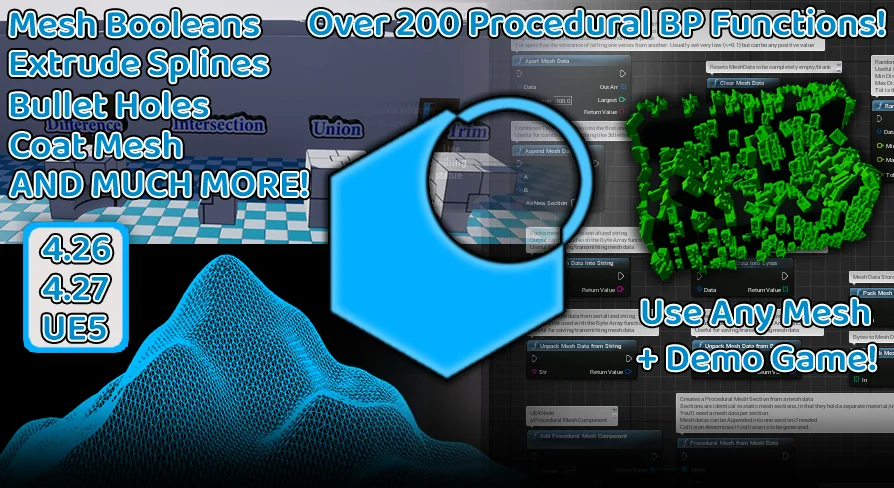
Mesh Ops supplies a foundational runtime geometry toolkit comprising over 300 Blueprint nodes built on more than 6,000 lines of custom C++. The toolset focuses on dynamic procedural mesh manipulation, topological modification, and generation that operates directly on any mesh asset inside an Unreal Engine project. Instead of locking operations behind proprietary external frameworks, the system packages full C++ source code with zero external third-party dependencies, giving developers unhindered control over how geometry is generated and updated during gameplay or editor construction scripts.
Blueprint Library Architecture and the Mesh Data Structure
At the center of the plugin lies the Mesh Data Structure, an architectural format engineered to store procedural vertex and index information independently from engine component bindings. Because Mesh Data Is completely decoupled from the standard Unreal Procedural Mesh Component, any procedural mesh replacement or custom pipeline relying on parallel arrays for vertex positions, triangles, normals, and UVs can consume and feed into the library's functions seamlessly.
Visual scripting integration allows developers to right-click anywhere in a Blueprint graph and search under Mesh Ops to expose the complete collection of nodes. These functions are accompanied by example Blueprints that demonstrate how to chain operations together to execute complex algorithmic transformations. Rather than focusing on micro-level vertex modeling or interactive brush-based sculpting, the library is oriented around batch and systemic transformations. Most operations evaluate across an entire mesh simultaneously or step through procedural vertex loops to reshape geometry efficiently.
Real-Time Mesh Booleans and Procedural Mesh Generation
Advanced constructive solid geometry is handled through Unreal Engine's underlying Geometry Processing plugin. While Geometry Processing has been packaged with the engine since version 4.26, its low-level mesh boolean capabilities are not exposed to Blueprints natively. Mesh Ops surfaces these algorithms directly to visual scripting graphs, enabling dynamic union, intersection, and subtraction operations directly in game logic.
Performance during boolean calculation scales with topological density. On low-poly and simple primitive forms, boolean operations run fast enough to update dynamically on a per-frame basis. When dealing with high-density meshes where mathematical intersection demands heavier calculation times, continuous real-time calculation is not practical. To prevent gameplay hitches, the plugin includes specialized functions designed to save and load computed mesh data directly. This serialization allows projects to cache expensive procedural outcomes rather than recomputing heavy geometric calculations at runtime.
Gameplay Mechanics in the Cut Game Demonstration
Practical integration of dynamic topology is demonstrated through an included playable sample project labeled 'Cut Game'. This project showcases how procedural carving nodes translate into interactive game mechanics. Players control a rolling actor that cuts slices into the floor plane during movement. Whenever the player loops back and intersects their own travel path, the system severs the enclosed geometry, causing that section of the floor to drop away for a temporary window of time.
The interactive mechanics demonstrate how runtime geometry edits link to gameplay rules. Spheres with varying properties populate the arena: green spheres award points when knocked into cutouts, red spheres penalize the player's score, and blue spheres award extra time. Developers exploring the plugin content directory can launch the Content/Maps/MeshOpsDemo Map to test interactive features, or inspect the Content/READ_ME Blueprint to analyze how the demo chains individual operations together to track slicing paths, reconstruct hole boundaries, and manage dynamic collision updates.
C++ Integration and Geometry Processing Dependencies
Programmers working directly in code can access the full feature set natively. Setting up a project requires adding MeshOpsPlugin To the PublicDependencyModuleNames Array in the project's .build.cs File and including MeshOpsPluginBPLibrary.h Within project headers. All node routines can be executed directly using either the MeshOps:: Namespace or the UMeshOpsPluginBPLibrary:: Static function calls.
Enabling the plugin requires active support from native engine modules. Both the Procedural Mesh Component and the Geometry Processing plugin must be activated in the engine settings, which typically occurs automatically when enabling Mesh Ops. Projects utilizing custom C++ compilation alongside the plugin may also need to explicitly declare ProceduralMeshComponent, GeometryCore, and DynamicMesh Inside their module dependencies. Version compatibility targets Unreal Engine 5.5 as the main development branch receiving new features first, alongside confirmed support for version 5.7. In legacy setups such as 4.26, an engine-level incompatibility exists between the plugin and Geometry Processing; versions 4.27 and newer resolve this conflict entirely. For data-driven architectures, the system also operates alongside dynamic data extensions such as Dynamic Datatable runtime replacements.
Construction Script Safety and Experimental Pipeline Features
The node library extends beyond runtime game loops into editor-side generation. The majority of included functions are tested and validated for safe execution inside Actor Construction Scripts, allowing procedural meshes to be configured, shaped, and evaluated directly in the viewport prior to runtime compilation, provided sensible safety backups are maintained during complex multi-node operations.
Active development branches include several experimental capabilities expanding into character pipelines and asset preparation. Experimental builds introduce skeletal mesh editing routines, enabling vertex and bone-adjacent transformations on skinned assets. Parallel development includes a CPU-based mesh icon rendering pipeline, allowing automated 2D icon generation directly from procedural geometry data without needing GPU viewport capture rigs. These expanding experimental routines operate alongside the core library of mathematical, slicing, and mesh assembly nodes.
 Engine Tools
 Engine Tools
 Engine Tools
 Engine Tools