"0341a2901a4ae9aa"{"id":"14379","slug":"quick-merge-skeletal-mesh","title":"Quick Merge Skeletal Mesh","category":"Engine Tools","engine":"5.4 - 5.8","assetVersion":"Asset Version:1.0","engineVersion":"Engine version: 5.4 - 5.8","tag":"Engine Tools","accent":"blue","visual":"character","summary":"Streamline your Unreal Engine 5 workflow by combining multiple skeletal meshes into a single asset. This tool ensures efficient asset management while maintaining skeleton consistency across your project.","platform":"Unreal Engine","publishedAt":"2026-03-11T17:51:53.000Z","updatedAt":"2026-09-07T14:11:56.503Z","sourceNotes":[],"fileContents":[],"compatibility":["Unreal Engine","Asset Version:1.0","Engine version: 5.4 - 5.8"],"featuredImage":{"alt":"Quick Merge Skeletal Mesh","src":"https://3dcghub.com/wp-content/uploads/2026/03/8b1e8a33-5fdf-4566-af9c-54f93949ddf6.webp"},"hasDownloadLink":true,"downloads":2,"terms":[{"taxonomy":"category","slug":"engine-tools-tools-and-plugins","name":"Engine Tools"},{"taxonomy":"post_tag","slug":"mesh-merging","name":"Mesh Merging"},{"taxonomy":"post_tag","slug":"plugins","name":"Plugins"},{"taxonomy":"post_tag","slug":"skeletal-mesh","name":"Skeletal Mesh"},{"taxonomy":"post_tag","slug":"tools","name":"Tools"},{"taxonomy":"post_tag","slug":"unreal-engine-5","name":"Unreal Engine 5"},{"taxonomy":"post_tag","slug":"utilities","name":"Utilities"}],"galleryImages":[{"src":"https://3dcghub.com/wp-content/uploads/2026/03/1c422a870d88_22c64d51-aea6-4d29-a835-71b6bec30037.webp","alt":"Quick Merge Skeletal Mesh"}],"accessPanel":{"kind":"resource","title":"Download this resource","eyebrow":"Free Download","message":"Log in or create a free account to start your download.","fileName":"Quick Merge Skeletal Mesh.7z","safetyNote":"Resources are manually reviewed before listing to improve quality and reduce obvious risks.","actionLabel":"Download Free","resourceType":"Resource archive"},"contentHtml":"\u003ch2\u003eOptimize Your Workflow with Quick Merge Skeletal Mesh\u003c/h2\u003e\n\u003cp\u003eQuick Merge Skeletal Mesh is a specialized utility designed to streamline asset management within Unreal Engine 5. This tool allows developers to combine multiple skeletal meshes into a single, unified asset directly within the editor. By simplifying the merging process, the tool helps maintain a cleaner project structure and more efficient asset handling.\u003c/p\u003e\n\n\u003cp\u003eThe developer has ensured that this tool remains compatible across all versions of Unreal Engine 5. Consequently, creators working on various iterations of the engine can integrate this functionality into their production pipelines. The primary goal of the tool is to provide a fast and reliable way to consolidate character or object components into one mesh.\u003c/p\u003e\n\n\u003ch2\u003eKey Features and Recent Upgrades\u003c/h2\u003e\n\u003cp\u003eThe latest version 1.2 upgrade introduced significant improvements to the core functionality of Quick Merge Skeletal Mesh. One of the most important updates involves the handling of Level of Detail (LOD) settings. The developer has fixed LOD issues, ensuring that the merged assets maintain their visual integrity across different distances.\u003c/p\u003e\n\n\u003cp\u003eAlso, the update addresses a critical stability fix regarding asset accessibility. Previously, some users encountered issues where assets could not be opened after restarting the editor. This has been resolved, providing a more stable environment for long-term project development. Therefore, users can merge their assets with confidence, knowing the files will remain accessible throughout the development cycle.\u003c/p\u003e\n\n\u003ch2\u003eSimple Integration and Usage\u003c/h2\u003e\n\u003cp\u003eUsing the Quick Merge Skeletal Mesh tool is straightforward and requires no complex configuration. To begin, users simply navigate to their skeletal meshes within the content browser. After selecting the desired meshes, a right-click opens the context menu where the merge option is located.\u003c/p\u003e\n\n\u003cul\u003e\n \u003cli\u003eSelect multiple skeletal meshes in the content browser.\u003c/li\u003e\n \u003cli\u003eRight-click the selected assets.\u003c/li\u003e\n \u003cli\u003eChoose the merge option to create a single mesh.\u003c/li\u003e\n\u003c/ul\u003e\n\n\u003cp\u003eHowever, it is vital to note that the tool relies on skeleton consistency. The merging process is based entirely on the first skeletal mesh selected by the user. Because the tool requires a shared structure, different skeletons will not be merged. Consequently, users must ensure that all selected meshes share the same skeleton for the operation to succeed.\u003c/p\u003e\n\n\u003ch2\u003eBest Fit\u003c/h2\u003e\n\u003cp\u003eQuick Merge Skeletal Mesh provides a practical solution for Unreal Engine 5 developers looking to consolidate their skeletal assets. By offering a simple right-click workflow and addressing previous technical bugs, it serves as a reliable utility for project optimization. As long as the meshes share a common skeleton, this tool offers a rapid way to transform multiple components into a single, functional asset.\u003c/p\u003e\n\n\u003ch2\u003eRelated Resources Worth Checking\u003c/h2\u003e\n\u003cul\u003e\n\u003cli\u003e\u003ca href=\"https://3dcghub.com/make-modular-skeletal-mesh/\" title=\"Make Modular Skeletal Mesh\"\u003eMake Modular Skeletal Mesh\u003c/a\u003e\u003c/li\u003e\n\u003cli\u003e\u003ca href=\"https://3dcghub.com/meshblend-next-generation-mesh-blending-without-rvt/\" title=\"MeshBlend – Next generation mesh blending without RVT\"\u003eMeshBlend – Next generation mesh blending without RVT\u003c/a\u003e\u003c/li\u003e\n\u003cli\u003e\u003ca href=\"https://3dcghub.com/real-shape-shifting-mesh-morph-system/\" title=\"Real Shape Shifting – Mesh Morph System\"\u003eReal Shape Shifting – Mesh Morph System\u003c/a\u003e\u003c/li\u003e\n\u003cli\u003e\u003ca href=\"https://3dcghub.com/slice-mesh-shoot-matrix-slow-bullet/\" title=\"Slice Mesh Shoot Matrix Slow Bullet\"\u003eSlice Mesh Shoot Matrix Slow Bullet\u003c/a\u003e\u003c/li\u003e\n\u003cli\u003e\u003ca href=\"https://3dcghub.com/fade-anything/\" title=\"Fade Anything\"\u003eFade Anything\u003c/a\u003e\u003c/li\u003e\n\u003c/ul\u003e\n\n\u003ch2\u003eAsset Gallery\u003c/h2\u003e","contentTextLength":3041,"navigation":{"current":1012,"total":4017,"previous":{"id":"1000444","slug":"trail-hunter-pro-footprints-and-tracks-with-multiplayer-and-worldpartition","title":"Trail Hunter PRO - Footprints and Tracks with Multiplayer \u0026 WorldPartition","category":"Game Mechanics","platform":"Unreal Engine","updatedAt":"2026-09-07T16:47:15.348Z"},"next":{"id":"1001128","slug":"victorian-interior-environment-victorian-steampunk-vintage-antique-interior","title":"Victorian Interior Environment ( Victorian Steampunk Vintage Antique Interior )","category":"Historical","platform":"Unreal Engine","updatedAt":"2026-09-07T13:46:41.075Z"}},"relatedResources":[{"id":"14147","slug":"make-modular-skeletal-mesh","title":"Make Modular Skeletal Mesh","category":"Engine Tools","engine":"5.3 - 5.4","assetVersion":"Engine version: 5.3 - 5.4","engineVersion":"5.3","tag":"Engine Tools","accent":"blue","visual":"mech","summary":"Enhance your asset creation process with the Make Modular Skeletal Mesh subsystem. This tool enables developers to modify and combine skeletal mesh parts directly within the UE editor.","platform":"Unreal Engine","publishedAt":"2026-03-11T16:00:04.000Z","updatedAt":"2026-04-19T15:45:52.000Z","sourceNotes":[],"fileContents":[],"compatibility":["Unreal Engine","Engine version: 5.3 - 5.4"],"featuredImage":{"alt":"Make Modular Skeletal Mesh","src":"https://3dcghub.com/wp-content/uploads/2026/03/8090ef9f-f5d3-428e-940c-ad1f4ed77720.webp"},"hasDownloadLink":true,"downloads":1},{"id":"14185","slug":"meshblend-next-generation-mesh-blending-without-rvt","title":"MeshBlend - Next generation mesh blending without RVT","category":"Engine Tools","engine":"5.5 - 5.7","assetVersion":"Engine version: 5.5 - 5.7","engineVersion":"Asset Version:2.1","tag":"Engine Tools","accent":"blue","visual":"mech","summary":"MeshBlend provides a powerful alternative to RVT for blending meshes and landscapes in Unreal Engine. This battle-tested tool supports Nanite, skeletal meshes, and high-performance workflows for indie and AAA projects alike.","platform":"Unreal Engine","publishedAt":"2026-03-11T16:07:49.000Z","updatedAt":"2026-04-19T15:45:51.000Z","sourceNotes":[],"fileContents":[],"compatibility":["Unreal Engine","Engine version: 5.5 - 5.7","Asset Version: 2.1"],"featuredImage":{"alt":"MeshBlend - Next generation mesh blending without RVT","src":"https://3dcghub.com/wp-content/uploads/2026/03/27abd930-9ae5-4b08-b6d7-1482b1ebf68a.webp"},"hasDownloadLink":true,"downloads":1},{"id":"1000883","slug":"skmodular-plugin-blueprint","title":"SKModular Plugin [Blueprint]","category":"Engine Tools","engine":"5.7","assetVersion":"Asset Version:1.1.0","engineVersion":"Engine Version: 5.7","tag":"Engine Tools","accent":"blue","visual":"mech","summary":"Blueprint plugin that merges modular skeletal meshes into a single mesh, reducing drawcalls and boosting GPU performance in Unreal Engine projects.","platform":"Unreal Engine","publishedAt":"2026-08-05T16:17:14.210Z","updatedAt":"2026-08-05T16:17:14.210Z","sourceNotes":[],"fileContents":[],"compatibility":["Unreal Engine","Asset Version:1.1.0","Engine Version: 5.7"],"featuredImage":{"alt":"SKModular Plugin [Blueprint]","src":"/wp-content/uploads/published/2026/08/cc5057bed94d-9d0b791d-8f34-4202-bd64-b7e021485f20-2f33dab909.webp"},"hasDownloadLink":true,"downloads":3}]}
Engine Tools
Quick Merge Skeletal Mesh
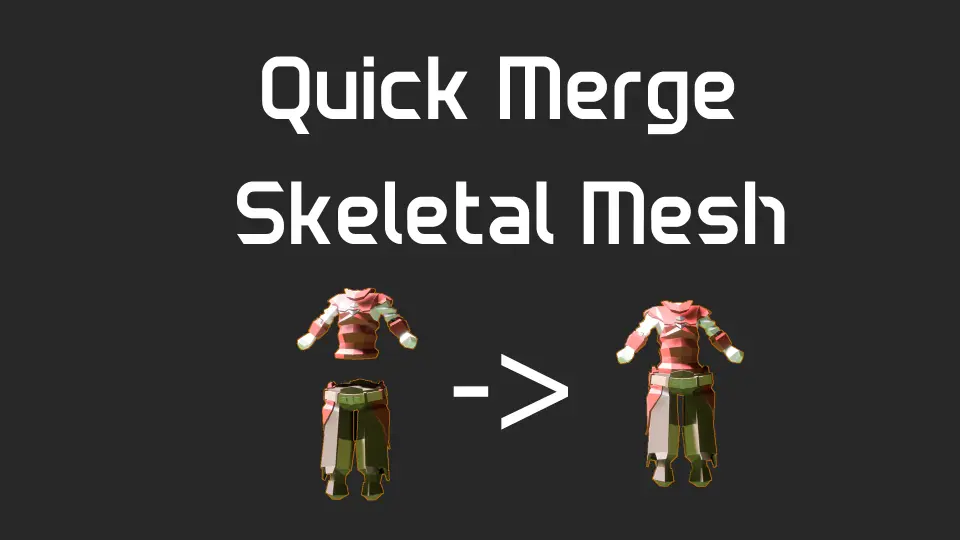
Streamline your Unreal Engine 5 workflow by combining multiple skeletal meshes into a single asset. This tool ensures efficient asset management while maintaining skeleton consistency across your project.
Optimize Your Workflow with Quick Merge Skeletal Mesh
Quick Merge Skeletal Mesh is a specialized utility designed to streamline asset management within Unreal Engine 5. This tool allows developers to combine multiple skeletal meshes into a single, unified asset directly within the editor. By simplifying the merging process, the tool helps maintain a cleaner project structure and more efficient asset handling.
The developer has ensured that this tool remains compatible across all versions of Unreal Engine 5. Consequently, creators working on various iterations of the engine can integrate this functionality into their production pipelines. The primary goal of the tool is to provide a fast and reliable way to consolidate character or object components into one mesh.
Key Features and Recent Upgrades
The latest version 1.2 upgrade introduced significant improvements to the core functionality of Quick Merge Skeletal Mesh. One of the most important updates involves the handling of Level of Detail (LOD) settings. The developer has fixed LOD issues, ensuring that the merged assets maintain their visual integrity across different distances.
Also, the update addresses a critical stability fix regarding asset accessibility. Previously, some users encountered issues where assets could not be opened after restarting the editor. This has been resolved, providing a more stable environment for long-term project development. Therefore, users can merge their assets with confidence, knowing the files will remain accessible throughout the development cycle.
Simple Integration and Usage
Using the Quick Merge Skeletal Mesh tool is straightforward and requires no complex configuration. To begin, users simply navigate to their skeletal meshes within the content browser. After selecting the desired meshes, a right-click opens the context menu where the merge option is located.
Select multiple skeletal meshes in the content browser.
Right-click the selected assets.
Choose the merge option to create a single mesh.
However, it is vital to note that the tool relies on skeleton consistency. The merging process is based entirely on the first skeletal mesh selected by the user. Because the tool requires a shared structure, different skeletons will not be merged. Consequently, users must ensure that all selected meshes share the same skeleton for the operation to succeed.
Best Fit
Quick Merge Skeletal Mesh provides a practical solution for Unreal Engine 5 developers looking to consolidate their skeletal assets. By offering a simple right-click workflow and addressing previous technical bugs, it serves as a reliable utility for project optimization. As long as the meshes share a common skeleton, this tool offers a rapid way to transform multiple components into a single, functional asset.
 Engine Tools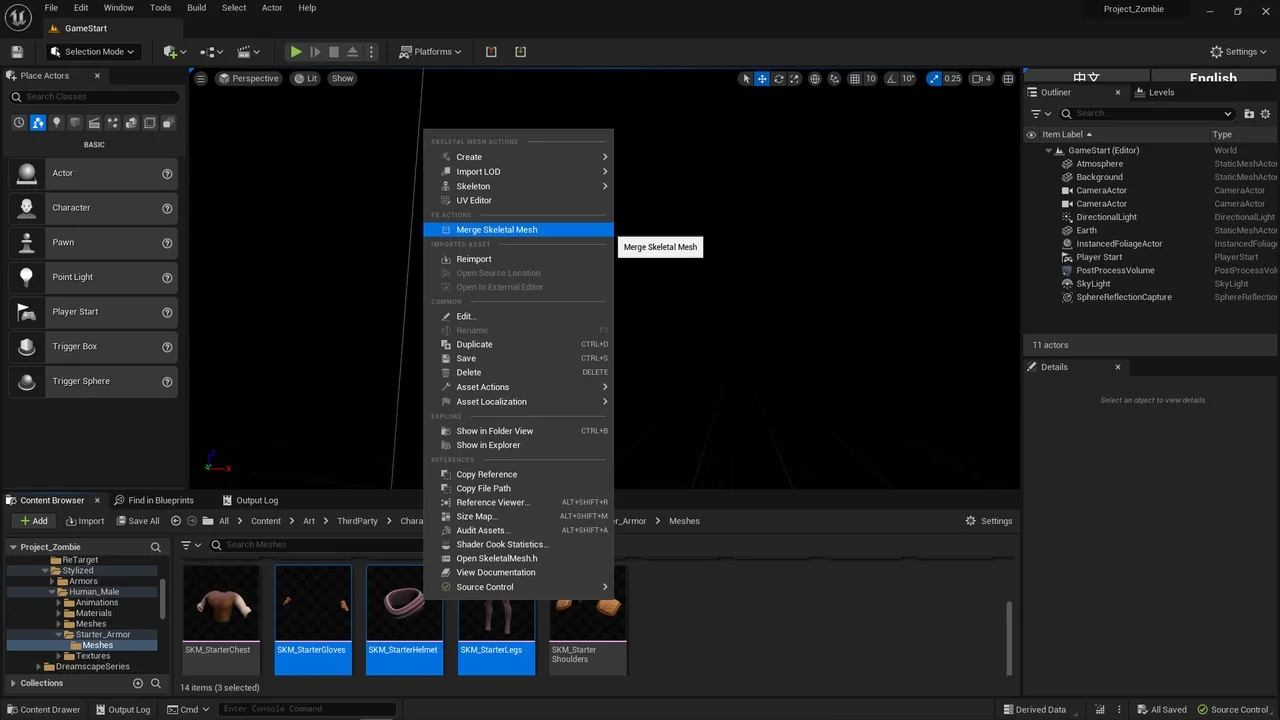
 Engine Tools
 Engine Tools
![SKModular Plugin [Blueprint]](/_img/360/wp-content/uploads/published/2026/08/cc5057bed94d-9d0b791d-8f34-4202-bd64-b7e021485f20-2f33dab909.webp) Engine Tools
Engine Tools