"0341a2901a4ae9aa"{"id":"10320","slug":"fade-anything","title":"Fade Anything","category":"Automations","engine":"5.3+","assetVersion":"Engine version: 5.3+","engineVersion":"4.26","tag":"Automations","accent":"blue","visual":"luts","summary":"Fade Anything offers a complete solution for managing object visibility and camera clipping. This system supports Nanite, foliage, and skeletal meshes with highly customizable parameters.","platform":"Unreal Engine","publishedAt":"2026-03-03T15:03:43.000Z","updatedAt":"2026-04-19T15:50:04.000Z","sourceNotes":[],"fileContents":[],"compatibility":["Unreal Engine","Engine version: 5.3+"],"featuredImage":{"alt":"Fade Anything","src":"https://3dcghub.com/wp-content/uploads/2026/03/6512ab26-a625-4276-a449-6f44d93ae89e.webp"},"hasDownloadLink":true,"downloads":1,"terms":[{"taxonomy":"category","slug":"automations","name":"Automations"},{"taxonomy":"post_tag","slug":"fade-anything","name":"Fade Anything"},{"taxonomy":"post_tag","slug":"foliage-occlusion","name":"foliage occlusion"},{"taxonomy":"post_tag","slug":"nanite-mesh-fading","name":"Nanite mesh fading"},{"taxonomy":"post_tag","slug":"skeletal-mesh-transparency","name":"skeletal mesh transparency"},{"taxonomy":"post_tag","slug":"unreal-engine-fading-system","name":"Unreal Engine fading system"}],"galleryImages":[{"src":"https://3dcghub.com/wp-content/uploads/2026/03/5b2b65ececb4_7a90d92d-53ce-4475-9891-25f055a9ec6b.webp","alt":"Fade Anything"},{"src":"https://3dcghub.com/wp-content/uploads/2026/03/9f3cee643d63_c56b7159-b960-4597-9543-bf0f8754ce59.webp","alt":"Fade Anything"},{"src":"https://3dcghub.com/wp-content/uploads/2026/03/cdaec9688b91_efa19173-5442-4840-af5a-de7c0f3a16bd.webp","alt":"Fade Anything"},{"src":"https://3dcghub.com/wp-content/uploads/2026/03/d0233caa2a4b_ca506029-c2f4-4ff4-97ed-e4e3066f2543.webp","alt":"Fade Anything"},{"src":"https://3dcghub.com/wp-content/uploads/2026/03/0f2fd8617e51_66edea67-ad22-40fc-93d4-0afc124f83f7.webp","alt":"Fade Anything"},{"src":"https://3dcghub.com/wp-content/uploads/2026/03/c25a37ba621e_fc3e9d4e-6225-47e6-8f2b-bc2ac881f54b.webp","alt":"Fade Anything"},{"src":"https://3dcghub.com/wp-content/uploads/2026/03/2e61cdce6789_f32dcbb6-cdb5-45e8-959b-5e8458b5a214.webp","alt":"Fade Anything"},{"src":"https://3dcghub.com/wp-content/uploads/2026/03/9c09827c6f0c_b21b3dd5-5264-49d4-8e79-3faeb00e38ab.webp","alt":"Fade Anything"},{"src":"https://3dcghub.com/wp-content/uploads/2026/03/57bf42d6ea48_a375ee79-a279-4f60-b412-6245d0d73d10.webp","alt":"Fade Anything"},{"src":"https://3dcghub.com/wp-content/uploads/2026/03/c0d7141f2833_585f35f2-9fdb-4738-9846-ca447058d618.webp","alt":"Fade Anything"},{"src":"https://3dcghub.com/wp-content/uploads/2026/03/6016da10c47e_c02c66d2-9820-4c1a-b769-1ccb4fa0a1da.webp","alt":"Fade Anything"},{"src":"https://3dcghub.com/wp-content/uploads/2026/03/70208afe7636_02bb90c1-a5b1-4557-90f3-410aaaf120b3.webp","alt":"Fade Anything"},{"src":"https://3dcghub.com/wp-content/uploads/2026/03/e0caa0956f92_72db7cda-1d6c-46a9-a71b-bd95587356ac.webp","alt":"Fade Anything"},{"src":"https://3dcghub.com/wp-content/uploads/2026/03/0ec19c29bec7_a986c965-c725-4a29-970e-fa4ad07177d2.webp","alt":"Fade Anything"},{"src":"https://3dcghub.com/wp-content/uploads/2026/03/4922ff115e1d_d0c430df-96c8-4649-a226-0a00cee72c2f.webp","alt":"Fade Anything"}],"accessPanel":{"kind":"resource","title":"Access this resource","eyebrow":"Free Download","message":"Log in or create a free account to start your download.","fileName":"Fade Anything 5.3 .7z","safetyNote":"All resources are 100% manually reviewed to eliminate all risks.","actionLabel":"Download Free","resourceType":"Resource archive"},"contentHtml":"\u003ch2\u003eIntroduction to Advanced Mesh Fading\u003c/h2\u003e\n\u003cp\u003eFade Anything provides a comprehensive solution for managing object visibility in Unreal Engine projects. Furthermore, it addresses common development hurdles like camera clipping and poor viewing angles. This tool allows developers to fade static meshes, skeletal meshes, and even foliage seamlessly. Consequently, it has become a highly versatile resource for modern game environments.\u003c/p\u003e\n\n\u003ch2\u003eFlexible Implementation Methods\u003c/h2\u003e\n\u003cp\u003eThe developer designed Fade Anything to be exceptionally easy to implement. You can simply add a \"FadeThisMesh\" component to any mesh. Alternatively, you can apply the \"FadethisMaterial\" function directly to a material. Because both solutions work together, there are zero conflicts when using them simultaneously. This flexibility allows you to choose the best approach for your specific workflow.\u003c/p\u003e\n\n\u003ch2\u003eWide Range of Asset Support\u003c/h2\u003e\n\u003cp\u003eThis system supports a wide range of assets, including walls, roofs, and vehicles. Moreover, it handles complex elements like landscape foliage and grass with ease. It also includes an \"Occlude Any Mesh\" feature for better scene management. Therefore, it is suitable for both small objects and large structures like houses. You can even fade enemies to prevent camera angle problems during intense gameplay.\u003c/p\u003e\n\n\u003ch3\u003eKey Features and Compatibility\u003c/h3\u003e\n\u003cul\u003e\n \u003cli\u003e\u003cstrong\u003eNanite Support:\u003c/strong\u003e Fade Nanite objects with or without specific toggles (UE5.1+).\u003c/li\u003e\n \u003cli\u003e\u003cstrong\u003eDynamic Fading:\u003c/strong\u003e Works with both static and skeletal meshes.\u003c/li\u003e\n \u003cli\u003e\u003cstrong\u003eShadow Control:\u003c/strong\u003e Toggle shadows on or off for faded objects to maintain lighting consistency.\u003c/li\u003e\n \u003cli\u003e\u003cstrong\u003eFoliage Integration:\u003c/strong\u003e Specifically designed to handle landscape foliage and grass.\u003c/li\u003e\n \u003cli\u003e\u003cstrong\u003ePlayer Clipping:\u003c/strong\u003e Automatically fades the player character if it gets too close to the camera.\u003c/li\u003e\n\u003c/ul\u003e\n\n\u003ch2\u003eAdvanced Customization and Optimization\u003c/h2\u003e\n\u003cp\u003eEvery \"FadeThisMesh\" component includes detailed parameters for individual settings. For example, you can adjust transition speeds and transparency levels. You may also change textures, colors, or the size of the fade effect around the player. Additionally, the system supports noise-based opacity masks for gradual transitions. These options are clearly explained within comment bubbles for advanced editing.\u003c/p\u003e\n\n\u003cp\u003eThe system has seen continuous improvements through several updates. Version 3.3 introduced new optimizations for better performance. Later, version 4.1 added support for fading Blueprint static mesh instances. Finally, the latest version 4.2 focuses on further system improvements. These updates ensure the tool remains efficient for various camera setups, including first-person perspectives.\u003c/p\u003e\n\n\u003ch2\u003eBest Fit\u003c/h2\u003e\n\u003cp\u003eFade Anything is a robust tool for any developer looking to improve camera-to-object interactions. It offers flexibility through its dual-method approach and extensive customization options. By using this system, you can create a more polished and immersive gameplay experience. It effectively eliminates the technical frustrations of camera clipping and obstructed views.\u003c/p\u003e\n\n\u003ch2\u003eExplore Similar Assets\u003c/h2\u003e\n\u003cul\u003e\n\u003cli\u003e\u003ca href=\"https://3dcghub.com/foliage-vol-13-southern-oak-trees-nanite-and-low-poly/\" title=\"Foliage VOL.13 – Southern Oak Trees (Nanite and Low Poly)\"\u003eFoliage VOL.13 – Southern Oak Trees (Nanite and Low Poly)\u003c/a\u003e\u003c/li\u003e\n\u003cli\u003e\u003ca href=\"https://3dcghub.com/foliage-vol-9-coyote-bushes-nanite-and-low-poly/\" title=\"Foliage VOL.9 – Coyote Bushes (Nanite and Low Poly)\"\u003eFoliage VOL.9 – Coyote Bushes (Nanite and Low Poly)\u003c/a\u003e\u003c/li\u003e\n\u003cli\u003e\u003ca href=\"https://3dcghub.com/american-suburban-house-environment/\" title=\"American Suburban House Environment\"\u003eAmerican Suburban House Environment\u003c/a\u003e\u003c/li\u003e\n\u003cli\u003e\u003ca href=\"https://3dcghub.com/brushify-natural-roads-pack/\" title=\"Brushify – Natural Roads Pack\"\u003eBrushify – Natural Roads Pack\u003c/a\u003e\u003c/li\u003e\n\u003cli\u003e\u003ca href=\"https://3dcghub.com/brushify-moon-pack/\" title=\"Brushify – Moon Pack\"\u003eBrushify – Moon Pack\u003c/a\u003e\u003c/li\u003e\n\u003c/ul\u003e","contentTextLength":3213,"navigation":{"current":3130,"total":4017,"previous":{"id":"10329","slug":"fps-booster-static-mesh-optimizer","title":"FPS Booster: Static Mesh Optimizer","category":"Automations","platform":"Unreal Engine","updatedAt":"2026-04-19T15:50:04.000Z"},"next":{"id":"10302","slug":"dissolve-anything","title":"Dissolve Anything","category":"Automations","platform":"Unreal Engine","updatedAt":"2026-04-19T15:50:04.000Z"}},"relatedResources":[{"id":"10302","slug":"dissolve-anything","title":"Dissolve Anything","category":"Automations","engine":"5.1+","assetVersion":"Engine version: 5.1+","engineVersion":"4.26","tag":"Automations","accent":"blue","visual":"animation","summary":"Streamline your development process with Dissolve Anything, a versatile Blueprint system designed for rapid implementation of disintegration effects across various mesh types.","platform":"Unreal Engine","publishedAt":"2026-03-03T14:59:59.000Z","updatedAt":"2026-04-19T15:50:04.000Z","sourceNotes":[],"fileContents":[],"compatibility":["Unreal Engine","Engine version: 5.1+"],"featuredImage":{"alt":"Dissolve Anything","src":"https://3dcghub.com/wp-content/uploads/2026/03/07d888fd-a172-4d2d-8101-310c51fbc146.webp"},"hasDownloadLink":true,"downloads":0},{"id":"10277","slug":"234-advanced-light-function","title":"234 Advanced Light Function","category":"Automations","engine":"5.1+","assetVersion":"Engine version: 5.1+","engineVersion":"4.26","tag":"Automations","accent":"blue","visual":"mech","summary":"The 234 Advanced Light Function pack offers a comprehensive solution for game-ready lighting and sound effects. It features 234 materials and over 170 sound cue systems for total immersion.","platform":"Unreal Engine","publishedAt":"2026-03-03T14:54:31.000Z","updatedAt":"2026-04-19T15:50:05.000Z","sourceNotes":[],"fileContents":[],"compatibility":["Unreal Engine","Engine version: 5.1+"],"featuredImage":{"alt":"234 Advanced Light Function","src":"https://3dcghub.com/wp-content/uploads/2026/03/e34c31a9-64b0-45bb-9a54-a83939e404eb.webp"},"hasDownloadLink":true,"downloads":0},{"id":"10292","slug":"advanced-working-computer","title":"Advanced Working Computer","category":"Automations","engine":"5.0+","assetVersion":"Engine version: 5.0+","engineVersion":"5.0","tag":"Automations","accent":"blue","visual":"character","summary":"The Advanced Working Computer pack brings a realistic desktop experience to Unreal Engine. It includes features like virtual banking, web browsing, and system management for immersive gameplay.","platform":"Unreal Engine","publishedAt":"2026-03-03T14:57:20.000Z","updatedAt":"2026-04-19T15:50:04.000Z","sourceNotes":[],"fileContents":[],"compatibility":["Unreal Engine","Engine version: 5.0+"],"featuredImage":{"alt":"Advanced Working Computer","src":"https://3dcghub.com/wp-content/uploads/2026/03/78cdff63-54fc-47a6-98f0-68108ba0fa49.webp"},"hasDownloadLink":true,"downloads":0}]}
Automations
Fade Anything
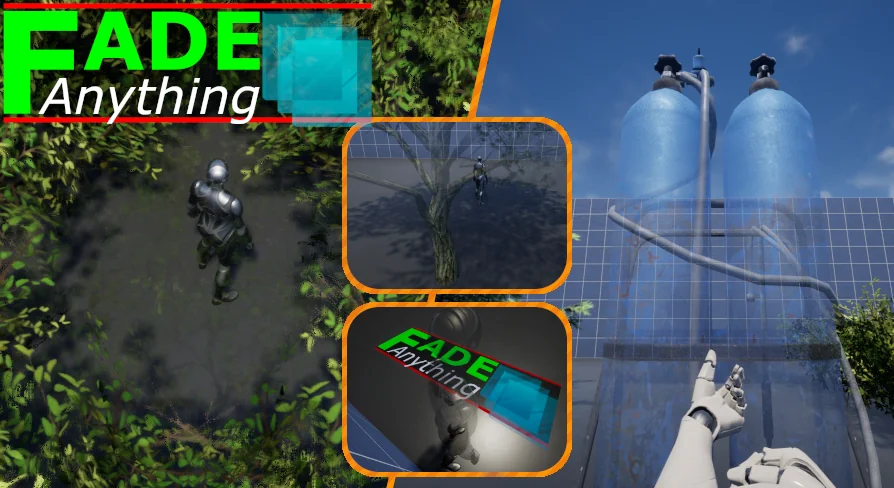
Fade Anything offers a complete solution for managing object visibility and camera clipping. This system supports Nanite, foliage, and skeletal meshes with highly customizable parameters.
Fade Anything provides a comprehensive solution for managing object visibility in Unreal Engine projects. Furthermore, it addresses common development hurdles like camera clipping and poor viewing angles. This tool allows developers to fade static meshes, skeletal meshes, and even foliage seamlessly. Consequently, it has become a highly versatile resource for modern game environments.
Flexible Implementation Methods
The developer designed Fade Anything to be exceptionally easy to implement. You can simply add a "FadeThisMesh" component to any mesh. Alternatively, you can apply the "FadethisMaterial" function directly to a material. Because both solutions work together, there are zero conflicts when using them simultaneously. This flexibility allows you to choose the best approach for your specific workflow.
Wide Range of Asset Support
This system supports a wide range of assets, including walls, roofs, and vehicles. Moreover, it handles complex elements like landscape foliage and grass with ease. It also includes an "Occlude Any Mesh" feature for better scene management. Therefore, it is suitable for both small objects and large structures like houses. You can even fade enemies to prevent camera angle problems during intense gameplay.
Key Features and Compatibility
Nanite Support: Fade Nanite objects with or without specific toggles (UE5.1+).
Dynamic Fading: Works with both static and skeletal meshes.
Shadow Control: Toggle shadows on or off for faded objects to maintain lighting consistency.
Foliage Integration: Specifically designed to handle landscape foliage and grass.
Player Clipping: Automatically fades the player character if it gets too close to the camera.
Advanced Customization and Optimization
Every "FadeThisMesh" component includes detailed parameters for individual settings. For example, you can adjust transition speeds and transparency levels. You may also change textures, colors, or the size of the fade effect around the player. Additionally, the system supports noise-based opacity masks for gradual transitions. These options are clearly explained within comment bubbles for advanced editing.
The system has seen continuous improvements through several updates. Version 3.3 introduced new optimizations for better performance. Later, version 4.1 added support for fading Blueprint static mesh instances. Finally, the latest version 4.2 focuses on further system improvements. These updates ensure the tool remains efficient for various camera setups, including first-person perspectives.
Best Fit
Fade Anything is a robust tool for any developer looking to improve camera-to-object interactions. It offers flexibility through its dual-method approach and extensive customization options. By using this system, you can create a more polished and immersive gameplay experience. It effectively eliminates the technical frustrations of camera clipping and obstructed views.
 Automations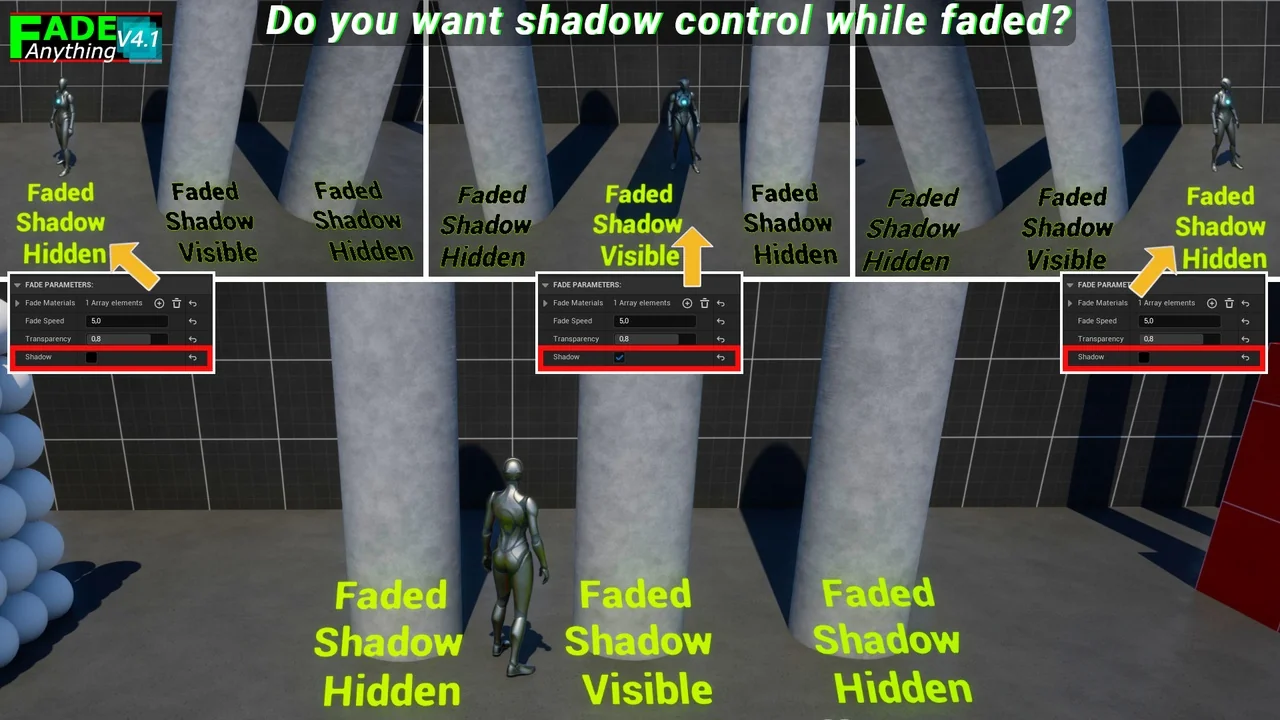
 Automations
 Automations
 Automations