"0341a2901a4ae9aa"{"id":"10329","slug":"fps-booster-static-mesh-optimizer","title":"FPS Booster: Static Mesh Optimizer","category":"Automations","engine":"5.3+","assetVersion":"Engine version: 5.3+","engineVersion":"4.26","tag":"Automations","accent":"blue","visual":"city","summary":"Improve your project performance with the FPS Booster: Static Mesh Optimizer. This tool converts static mesh actors into instanced versions to significantly reduce lighting build times.","platform":"Unreal Engine","publishedAt":"2026-03-03T15:05:39.000Z","updatedAt":"2026-04-19T15:50:04.000Z","sourceNotes":[],"fileContents":[],"compatibility":["Unreal Engine"],"featuredImage":{"alt":"FPS Booster: Static Mesh Optimizer","src":"https://3dcghub.com/wp-content/uploads/2026/03/0713c682-b5a8-4676-9fc5-e7e2477a6083.webp"},"hasDownloadLink":true,"downloads":0,"terms":[{"taxonomy":"category","slug":"automations","name":"Automations"},{"taxonomy":"post_tag","slug":"editor-utility-widget","name":"editor utility widget"},{"taxonomy":"post_tag","slug":"fps-booster-static-mesh-optimizer","name":"FPS Booster: Static Mesh Optimizer"},{"taxonomy":"post_tag","slug":"instanced-static-mesh","name":"instanced static mesh"},{"taxonomy":"post_tag","slug":"lighting-build-time","name":"lighting build time"},{"taxonomy":"post_tag","slug":"static-mesh-optimization","name":"static mesh optimization"}],"galleryImages":[{"src":"https://3dcghub.com/wp-content/uploads/2026/03/f20a13a5d31a_a8131e6c-842f-4e9c-af4f-d312943c5a20.webp","alt":"FPS Booster: Static Mesh Optimizer"},{"src":"https://3dcghub.com/wp-content/uploads/2026/03/e79bb9b09693_517ea2df-a402-4515-aad5-e691bad990cc.webp","alt":"FPS Booster: Static Mesh Optimizer"},{"src":"https://3dcghub.com/wp-content/uploads/2026/03/37721db02abf_b6899162-76bb-4221-940d-36bafd5e4844.webp","alt":"FPS Booster: Static Mesh Optimizer"},{"src":"https://3dcghub.com/wp-content/uploads/2026/03/5d1e782c2809_dbeac508-e228-44e6-b214-00c1be4df085.webp","alt":"FPS Booster: Static Mesh Optimizer"},{"src":"https://3dcghub.com/wp-content/uploads/2026/03/3805c976ee20_5ef9ef83-ac70-4912-be0e-4e400d17f8d2.webp","alt":"FPS Booster: Static Mesh Optimizer"},{"src":"https://3dcghub.com/wp-content/uploads/2026/03/2025b3c809d2_2413777c-166f-4779-a7bf-48764e973552.webp","alt":"FPS Booster: Static Mesh Optimizer"}],"accessPanel":{"kind":"resource","title":"Access this resource","eyebrow":"Free Download","message":"Log in or create a free account to start your download.","fileName":"FPS Booster Static Mesh Optimizer.7z","safetyNote":"All resources are 100% manually reviewed to eliminate all risks.","actionLabel":"Download Free","resourceType":"Resource archive"},"contentHtml":"\u003ch2\u003eIntroduction to Scene Optimization\u003c/h2\u003e\n\u003cp\u003eFPS Booster: Static Mesh Optimizer is a powerful tool designed to enhance performance in your game levels. It provides a significant optimization by turning off specific shadows. Consequently, users can expect a much smoother development experience.\u003c/p\u003e\n\n\u003ch2\u003eDramatic Reductions in Build Times\u003c/h2\u003e\n\u003cp\u003eOne of the most impressive features of the FPS Booster: Static Mesh Optimizer is the reduction in lighting build times. For instance, the creator reported a 98% decrease in build time on a level with 6,000 meshes. This specific test saw the time drop from ten minutes to just ten seconds.\u003c/p\u003e\n\u003cp\u003eHowever, the initial optimization process itself can take some time. For example, a level with 6,000 meshes might take 40 minutes to process. This investment pays off during the subsequent lighting phases.\u003c/p\u003e\n\n\u003ch2\u003eUsing the Editor Utility Widget\u003c/h2\u003e\n\u003cp\u003eThis package includes an editor utility widget. You can think of this as a specialized tool within your editor environment. To use it, simply select your Static Mesh Actors and click the convert button. The tool then optimizes these actors by transforming them into Instanced Static Meshes.\u003c/p\u003e\n\n\u003ch2\u003eA Two-Stage Optimization Process\u003c/h2\u003e\n\u003cp\u003eThe optimization happens in two distinct stages. First, the tool collects and destroys the existing Static Mesh information. Second, it places an instanced static mesh that looks identical to the original. This ensures the visual integrity remains while the performance improves.\u003c/p\u003e\n\u003cp\u003eAs a result, your meshes are placed back in the same locations in a more optimized way. This method effectively groups multiple actors under a few optimized actors. This is a key function of the FPS Booster: Static Mesh Optimizer.\u003c/p\u003e\n\n\u003ch2\u003eMonitoring Progress and Results\u003c/h2\u003e\n\u003cp\u003eThe process duration depends on the total mesh count. You should wait while the \"Working\" status is displayed in the upper-left corner. Once finished, the tool displays a \"Success\" message and plays a few sounds. Furthermore, this workflow helps maintain an organized and efficient project environment.\u003c/p\u003e\n\n\u003ch2\u003eFinal Take\u003c/h2\u003e\n\u003cp\u003eTaken together, the FPS Booster: Static Mesh Optimizer is an essential resource for developers. It streamlines the optimization process through an easy-to-use blueprint-based tool. Consequently, it allows for faster iteration times and better overall performance.\u003c/p\u003e\n\n\u003ch2\u003eContinue Browsing Similar Packs\u003c/h2\u003e\n\u003cul\u003e\n\u003cli\u003e\u003ca href=\"https://3dcghub.com/fade-anything/\" title=\"Fade Anything\"\u003eFade Anything\u003c/a\u003e\u003c/li\u003e\n\u003cli\u003e\u003ca href=\"https://3dcghub.com/modular-night-market-market-environment-food-market-bazaar-grocery-market/\" title=\"Modular Night Market (Market Environment, Food Market, Bazaar, Grocery Market)\"\u003eModular Night Market (Market Environment, Food Market, Bazaar, Grocery Market)\u003c/a\u003e\u003c/li\u003e\n\u003cli\u003e\u003ca href=\"https://3dcghub.com/desert-science-fiction-city-modular-pack/\" title=\"Desert Science Fiction City Modular Pack\"\u003eDesert Science Fiction City Modular Pack\u003c/a\u003e\u003c/li\u003e\n\u003cli\u003e\u003ca href=\"https://3dcghub.com/crashed-starship-pack/\" title=\"Crashed Starship Pack\"\u003eCrashed Starship Pack\u003c/a\u003e\u003c/li\u003e\n\u003cli\u003e\u003ca href=\"https://3dcghub.com/warzone-aftermath-destroyed-buildings-pack/\" title=\"Warzone Aftermath – Destroyed Buildings Pack\"\u003eWarzone Aftermath – Destroyed Buildings Pack\u003c/a\u003e\u003c/li\u003e\n\u003c/ul\u003e\n\n\u003ch2\u003eAsset Gallery\u003c/h2\u003e","contentTextLength":2557,"navigation":{"current":3129,"total":4017,"previous":{"id":"10337","slug":"liquid-bottle-simulation-vfx","title":"Liquid Bottle Simulation VFX","category":"Automations","platform":"Unreal Engine","updatedAt":"2026-04-19T15:50:04.000Z"},"next":{"id":"10320","slug":"fade-anything","title":"Fade Anything","category":"Automations","platform":"Unreal Engine","updatedAt":"2026-04-19T15:50:04.000Z"}},"relatedResources":[{"id":"10320","slug":"fade-anything","title":"Fade Anything","category":"Automations","engine":"5.3+","assetVersion":"Engine version: 5.3+","engineVersion":"4.26","tag":"Automations","accent":"blue","visual":"luts","summary":"Fade Anything offers a complete solution for managing object visibility and camera clipping. This system supports Nanite, foliage, and skeletal meshes with highly customizable parameters.","platform":"Unreal Engine","publishedAt":"2026-03-03T15:03:43.000Z","updatedAt":"2026-04-19T15:50:04.000Z","sourceNotes":[],"fileContents":[],"compatibility":["Unreal Engine","Engine version: 5.3+"],"featuredImage":{"alt":"Fade Anything","src":"https://3dcghub.com/wp-content/uploads/2026/03/6512ab26-a625-4276-a449-6f44d93ae89e.webp"},"hasDownloadLink":true,"downloads":1},{"id":"10302","slug":"dissolve-anything","title":"Dissolve Anything","category":"Automations","engine":"5.1+","assetVersion":"Engine version: 5.1+","engineVersion":"4.26","tag":"Automations","accent":"blue","visual":"animation","summary":"Streamline your development process with Dissolve Anything, a versatile Blueprint system designed for rapid implementation of disintegration effects across various mesh types.","platform":"Unreal Engine","publishedAt":"2026-03-03T14:59:59.000Z","updatedAt":"2026-04-19T15:50:04.000Z","sourceNotes":[],"fileContents":[],"compatibility":["Unreal Engine","Engine version: 5.1+"],"featuredImage":{"alt":"Dissolve Anything","src":"https://3dcghub.com/wp-content/uploads/2026/03/07d888fd-a172-4d2d-8101-310c51fbc146.webp"},"hasDownloadLink":true,"downloads":0},{"id":"10615","slug":"blutility-plus-material-and-instance-options","title":"Blutility Plus - Material and Instance Options","category":"Gameplay Features","engine":"4.26+,5.0+","assetVersion":"Engine version: 4.26+,5.0+","engineVersion":"5.1","tag":"Gameplay Features","accent":"blue","visual":"luts","summary":"Blutility Plus - Material and Instance Options is a lightweight toolset designed to automate material management in Unreal Engine. It offers five key quality-of-life improvements to handle batch assignments and parameter overrides efficiently.","platform":"Unreal Engine","publishedAt":"2026-03-03T15:48:27.000Z","updatedAt":"2026-04-19T15:49:58.000Z","sourceNotes":[],"fileContents":[],"compatibility":["Unreal Engine","Engine version: 4.26+,5.0+"],"featuredImage":{"alt":"Blutility Plus - Material and Instance Options","src":"https://3dcghub.com/wp-content/uploads/2026/03/f710c205-d4fe-4128-af2a-71a87387a310.webp"},"hasDownloadLink":true,"downloads":0}]}
Automations
FPS Booster: Static Mesh Optimizer
Improve your project performance with the FPS Booster: Static Mesh Optimizer. This tool converts static mesh actors into instanced versions to significantly reduce lighting build times.
FPS Booster: Static Mesh Optimizer is a powerful tool designed to enhance performance in your game levels. It provides a significant optimization by turning off specific shadows. Consequently, users can expect a much smoother development experience.
Dramatic Reductions in Build Times
One of the most impressive features of the FPS Booster: Static Mesh Optimizer is the reduction in lighting build times. For instance, the creator reported a 98% decrease in build time on a level with 6,000 meshes. This specific test saw the time drop from ten minutes to just ten seconds.
However, the initial optimization process itself can take some time. For example, a level with 6,000 meshes might take 40 minutes to process. This investment pays off during the subsequent lighting phases.
Using the Editor Utility Widget
This package includes an editor utility widget. You can think of this as a specialized tool within your editor environment. To use it, simply select your Static Mesh Actors and click the convert button. The tool then optimizes these actors by transforming them into Instanced Static Meshes.
A Two-Stage Optimization Process
The optimization happens in two distinct stages. First, the tool collects and destroys the existing Static Mesh information. Second, it places an instanced static mesh that looks identical to the original. This ensures the visual integrity remains while the performance improves.
As a result, your meshes are placed back in the same locations in a more optimized way. This method effectively groups multiple actors under a few optimized actors. This is a key function of the FPS Booster: Static Mesh Optimizer.
Monitoring Progress and Results
The process duration depends on the total mesh count. You should wait while the "Working" status is displayed in the upper-left corner. Once finished, the tool displays a "Success" message and plays a few sounds. Furthermore, this workflow helps maintain an organized and efficient project environment.
Final Take
Taken together, the FPS Booster: Static Mesh Optimizer is an essential resource for developers. It streamlines the optimization process through an easy-to-use blueprint-based tool. Consequently, it allows for faster iteration times and better overall performance.
 Automations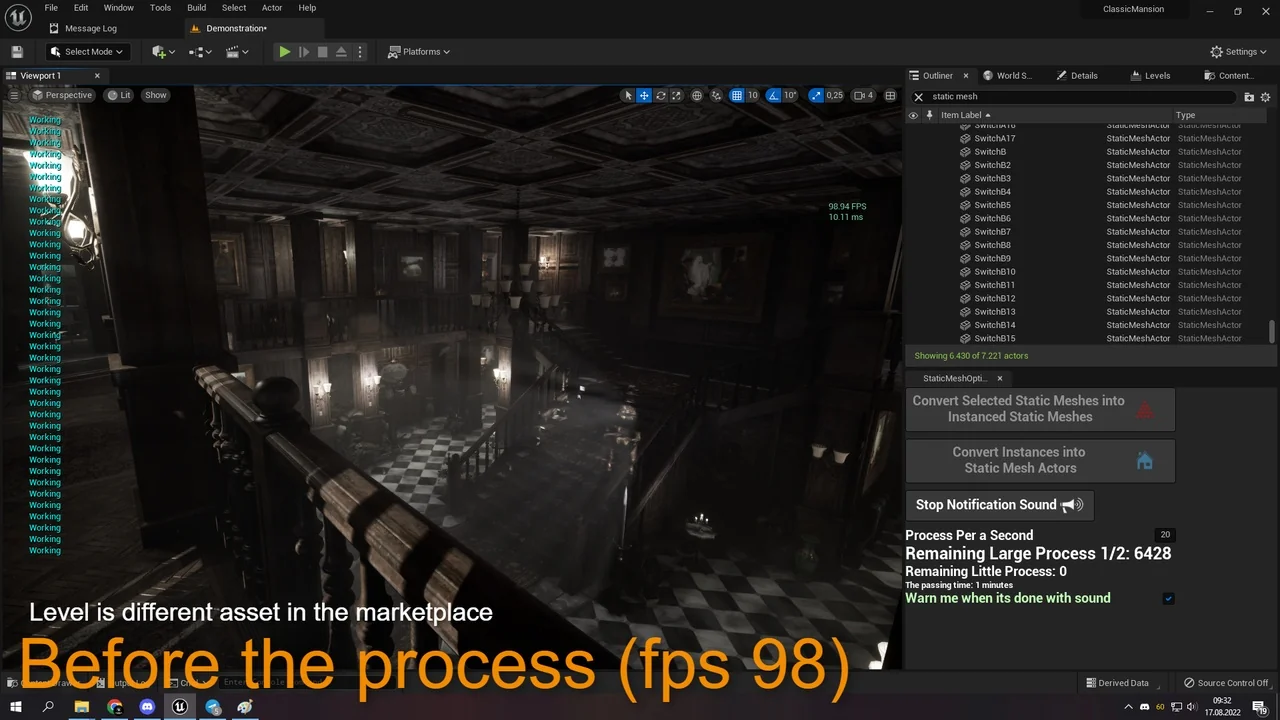
 Automations
 Automations
 Gameplay Features