"0341a2901a4ae9aa"{"id":"10615","slug":"blutility-plus-material-and-instance-options","title":"Blutility Plus - Material and Instance Options","category":"Gameplay Features","engine":"4.26+,5.0+","assetVersion":"Engine version: 4.26+,5.0+","engineVersion":"5.1","tag":"Gameplay Features","accent":"blue","visual":"luts","summary":"Blutility Plus - Material and Instance Options is a lightweight toolset designed to automate material management in Unreal Engine. It offers five key quality-of-life improvements to handle batch assignments and parameter overrides efficiently.","platform":"Unreal Engine","publishedAt":"2026-03-03T15:48:27.000Z","updatedAt":"2026-04-19T15:49:58.000Z","sourceNotes":[],"fileContents":[],"compatibility":["Unreal Engine","Engine version: 4.26+,5.0+"],"featuredImage":{"alt":"Blutility Plus - Material and Instance Options","src":"https://3dcghub.com/wp-content/uploads/2026/03/f710c205-d4fe-4128-af2a-71a87387a310.webp"},"hasDownloadLink":true,"downloads":0,"terms":[{"taxonomy":"category","slug":"gameplay-features","name":"Gameplay Features"},{"taxonomy":"post_tag","slug":"blutility-plus","name":"Blutility Plus"},{"taxonomy":"post_tag","slug":"material-instance-management","name":"Material Instance management"},{"taxonomy":"post_tag","slug":"static-mesh-materials","name":"Static Mesh materials"},{"taxonomy":"post_tag","slug":"unreal-engine-automation","name":"Unreal Engine automation"},{"taxonomy":"post_tag","slug":"unreal-engine-materials","name":"Unreal Engine materials"}],"galleryImages":[{"src":"https://3dcghub.com/wp-content/uploads/2026/03/f9dec4919069_d72a43b9-69ed-4a59-b776-813bd8920773.webp","alt":"Blutility Plus - Material and Instance Options"}],"accessPanel":{"kind":"resource","title":"Access this resource","eyebrow":"Free Download","message":"Log in or create a free account to start your download.","fileName":"Blutility Plus - Material and Instance Options.7z","safetyNote":"All resources are 100% manually reviewed to eliminate all risks.","actionLabel":"Download Free","resourceType":"Resource archive"},"contentHtml":"\u003ch2\u003eOptimizing Unreal Engine Material Workflows\u003c/h2\u003e\n\u003cp\u003eBlutility Plus - Material and Instance Options is an essential asset designed for Unreal Engine developers. It focuses on removing the tedious parts of the development pipeline. For instance, managing hundreds of material instances can often become overwhelming. This tool provides five quality-of-life improvements that the developer uses daily to maintain efficiency. Consequently, it is perfect for projects where design switches require massive updates to textures or parameters.\u003c/p\u003e\n\u003cp\u003eThe asset is lightweight and non-intrusive. It consists of a single blueprint that you can store anywhere in your project. Furthermore, the documentation folder can be deleted once you are familiar with the tool. To use the functions, you simply right-click on your assets to access the scripted actions. This streamlined approach ensures that your project remains clean while gaining powerful automation features.\u003c/p\u003e\n\n\u003ch2\u003eAssigning Materials by Index\u003c/h2\u003e\n\u003cp\u003eOne of the primary features is the ability to assign materials to a selected mesh by index. To use this, you must select one or more master materials or material instances along with your static meshes. The function then assigns these materials based on your selection order. Specifically, it uses an integer array called \"IndexOverride\" to determine the target material index. This array is easily accessible and can be set within a window prompt.\u003c/p\u003e\n\u003cp\u003eAlso, the tool offers flexibility during the assignment process. If a material slot does not exist on a mesh, the system will trigger a warning. This warning identifies which materials failed to apply and to which static mesh. However, the function will continue to run for the remaining valid selections. This allows for diverse combinations and selections without stopping the workflow.\u003c/p\u003e\n\n\u003ch2\u003eManaging Master Materials and Instances\u003c/h2\u003e\n\u003cp\u003eChanging the master material for a large group of instances is often a manual chore. Blutility Plus - Material and Instance Options simplifies this through a dedicated function. By selecting multiple material instances, you can change their master material simultaneously. You simply select the new master material in the window prompt provided by the tool. This is particularly useful when a design switch necessitates a different base logic for your assets.\u003c/p\u003e\n\u003cp\u003eOn top of that, the tool includes a feature to assign selected materials to selected meshes more broadly. Similar to the index-based assignment, it relies on selection order to determine the material slot index. This ensures that the materials are placed exactly where intended across multiple static meshes. If a slot is missing, the system provides a warning but continues processing the rest of the batch.\u003c/p\u003e\n\n\u003ch2\u003eBatch Parameter Updates and Resets\u003c/h2\u003e\n\u003cp\u003eUpdating material instance parameters is another area where this tool excels. It supports the modification of scalar, vector, and texture material parameters. This is highly beneficial when you need to modify a group of instances with the same value but lack a global controller. You can define these overrides inside the \"BP_BlutilityPlus_MaterialOptions\" blueprint or through the window prompt for repeat use.\u003c/p\u003e\n\u003cp\u003eFinally, the tool provides a function to reset all selected material instance parameters to their default values. This is a powerful feature that works exclusively with material instances. Because it resets all parameters at once, the creator recommends using it with caution. Nevertheless, it remains a vital utility for quickly cleaning up instances after experimentation or design changes.\u003c/p\u003e\n\n\u003ch2\u003eBest Fit\u003c/h2\u003e\n\u003cp\u003eThe clearest takeaway is that Blutility Plus - Material and Instance Options provides a robust set of tools for Unreal Engine developers. It automates the assignment of materials, the updating of parameters, and the management of master materials. By integrating these scripted actions into your right-click menu, you can save significant time on repetitive tasks. Whether you are fixing incorrect master materials or updating detail maps across a project, this asset offers a professional and lightweight solution.\u003c/p\u003e\n\n\u003ch2\u003eExplore Similar Assets\u003c/h2\u003e\n\u003cul\u003e\n\u003cli\u003e\u003ca href=\"https://3dcghub.com/sci-fi-environment-engine-room/\" title=\"Sci-fi Environment Engine Room\"\u003eSci-fi Environment Engine Room\u003c/a\u003e\u003c/li\u003e\n\u003cli\u003e\u003ca href=\"https://3dcghub.com/town-buildings-vol-1-mooses-dockhouse/\" title=\"Town Buildings VOL.1 – Moose’s Dockhouse\"\u003eTown Buildings VOL.1 – Moose’s Dockhouse\u003c/a\u003e\u003c/li\u003e\n\u003cli\u003e\u003ca href=\"https://3dcghub.com/a-japanese-alley-environment-pack/\" title=\"A Japanese alley environment pack\"\u003eA Japanese alley environment pack\u003c/a\u003e\u003c/li\u003e\n\u003cli\u003e\u003ca href=\"https://3dcghub.com/the-sacred-threshold-asian-temple-interior-environment-kit/\" title=\"The Sacred Threshold – Asian Temple Interior Environment Kit\"\u003eThe Sacred Threshold – Asian Temple Interior Environment Kit\u003c/a\u003e\u003c/li\u003e\n\u003cli\u003e\u003ca href=\"https://3dcghub.com/brushify-natural-roads-pack/\" title=\"Brushify – Natural Roads Pack\"\u003eBrushify – Natural Roads Pack\u003c/a\u003e\u003c/li\u003e\n\u003c/ul\u003e","contentTextLength":4337,"navigation":{"current":3157,"total":4017,"previous":{"id":"10628","slug":"book-generator","title":"Book Generator","category":"Gameplay Features","platform":"Unreal Engine","updatedAt":"2026-04-19T15:49:58.000Z"},"next":{"id":"10611","slug":"blockout-starter-pack","title":"Blockout Starter Pack","category":"Gameplay Features","platform":"Unreal Engine","updatedAt":"2026-04-19T15:49:58.000Z"}},"relatedResources":[{"id":"1000033","slug":"working-night-vision-goggles","title":"Working Night Vision Goggles","category":"Gameplay Features","engine":"4.27,5.0+","assetVersion":"","engineVersion":"4.27,5.0+","tag":"Gameplay Features","accent":"blue","visual":"mech","summary":"Working Night Vision Goggles combines night, thermal, and FLIR vision with a laser designator, plus a tactical helmet and country flags.","platform":"Unreal Engine","publishedAt":"2026-05-21T09:41:07.954Z","updatedAt":"2026-05-21T09:41:07.954Z","sourceNotes":[],"fileContents":[],"compatibility":["Unreal Engine","Engine version: 4.27,5.0+"],"featuredImage":{"alt":"Working Night Vision Goggles","src":"/wp-content/uploads/published/2026/05/e1148ed3e237-51eeb853-a558-47a4-b347-132365f9c162-7b512e67c6.webp"},"hasDownloadLink":true,"downloads":0},{"id":"24720","slug":"modular-staircase-blueprint","title":"Modular Staircase Blueprint","category":"Gameplay Features","engine":"4.26+,5.0+","assetVersion":"Engine version: 4.26+,5.0+","engineVersion":"","tag":"Gameplay Features","accent":"blue","visual":"city","summary":"This blueprint helps place stairs in a scene without treating every setup the same way. It exposes a wide range of variables, updates as you scale it, and includes a separate tool for checking asset size against its pivot and bounds. It fits naturally into...","platform":"Unreal Engine","publishedAt":"2026-04-16T15:46:19.000Z","updatedAt":"2026-04-20T06:12:39.000Z","sourceNotes":[],"fileContents":[],"compatibility":["Unreal Engine","Engine version: 4.26+,5.0+"],"featuredImage":{"alt":"Modular Staircase Blueprint","src":"https://3dcghub.com/wp-content/uploads/2026/04/253cf5903660_d8a8b49c-75fc-44c8-bc57-79a7ab1fc79b.webp"},"hasDownloadLink":true,"downloads":1},{"id":"11043","slug":"path-tracer-toolkit","title":"Path Tracer Toolkit","category":"Gameplay Features","engine":"4.27,5.0+","assetVersion":"Engine version: 4.27,5.0+","engineVersion":"4.27","tag":"Gameplay Features","accent":"blue","visual":"city","summary":"The Path Tracer Toolkit provides a comprehensive Blueprint solution for generating paths and borders manually or via runtime point arrays. It includes advanced customization, procedural materials, and performance-optimizing texture baking.","platform":"Unreal Engine","publishedAt":"2026-03-03T16:47:08.000Z","updatedAt":"2026-04-19T15:49:51.000Z","sourceNotes":[],"fileContents":[],"compatibility":["Unreal Engine","Engine version: 4.27,5.0+"],"featuredImage":{"alt":"Path Tracer Toolkit","src":"https://3dcghub.com/wp-content/uploads/2026/03/fd42f630-b95d-4396-bf4a-af676428ed24.webp"},"hasDownloadLink":true,"downloads":1}]}
Gameplay Features
Blutility Plus - Material and Instance Options
Blutility Plus - Material and Instance Options is a lightweight toolset designed to automate material management in Unreal Engine. It offers five key quality-of-life improvements to handle batch assignments and parameter overrides efficiently.
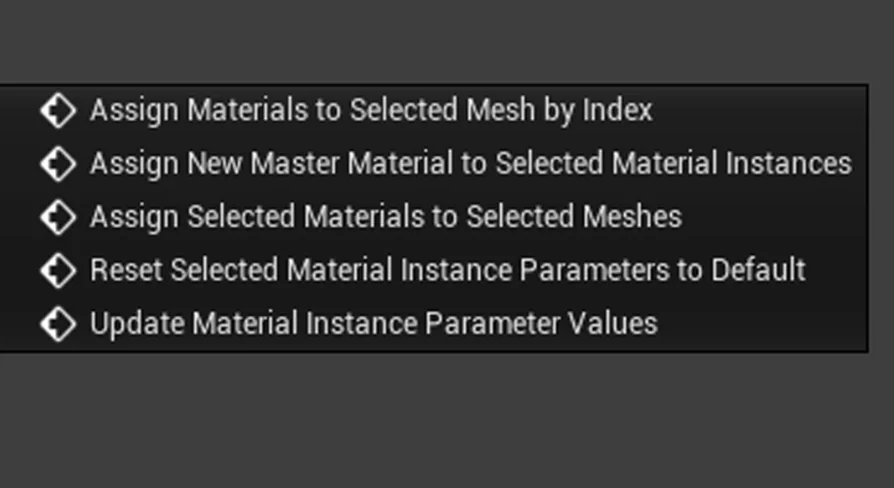
Blutility Plus - Material and Instance Options is an essential asset designed for Unreal Engine developers. It focuses on removing the tedious parts of the development pipeline. For instance, managing hundreds of material instances can often become overwhelming. This tool provides five quality-of-life improvements that the developer uses daily to maintain efficiency. Consequently, it is perfect for projects where design switches require massive updates to textures or parameters.
The asset is lightweight and non-intrusive. It consists of a single blueprint that you can store anywhere in your project. Furthermore, the documentation folder can be deleted once you are familiar with the tool. To use the functions, you simply right-click on your assets to access the scripted actions. This streamlined approach ensures that your project remains clean while gaining powerful automation features.
Assigning Materials by Index
One of the primary features is the ability to assign materials to a selected mesh by index. To use this, you must select one or more master materials or material instances along with your static meshes. The function then assigns these materials based on your selection order. Specifically, it uses an integer array called "IndexOverride" to determine the target material index. This array is easily accessible and can be set within a window prompt.
Also, the tool offers flexibility during the assignment process. If a material slot does not exist on a mesh, the system will trigger a warning. This warning identifies which materials failed to apply and to which static mesh. However, the function will continue to run for the remaining valid selections. This allows for diverse combinations and selections without stopping the workflow.
Managing Master Materials and Instances
Changing the master material for a large group of instances is often a manual chore. Blutility Plus - Material and Instance Options simplifies this through a dedicated function. By selecting multiple material instances, you can change their master material simultaneously. You simply select the new master material in the window prompt provided by the tool. This is particularly useful when a design switch necessitates a different base logic for your assets.
On top of that, the tool includes a feature to assign selected materials to selected meshes more broadly. Similar to the index-based assignment, it relies on selection order to determine the material slot index. This ensures that the materials are placed exactly where intended across multiple static meshes. If a slot is missing, the system provides a warning but continues processing the rest of the batch.
Batch Parameter Updates and Resets
Updating material instance parameters is another area where this tool excels. It supports the modification of scalar, vector, and texture material parameters. This is highly beneficial when you need to modify a group of instances with the same value but lack a global controller. You can define these overrides inside the "BP_BlutilityPlus_MaterialOptions" blueprint or through the window prompt for repeat use.
Finally, the tool provides a function to reset all selected material instance parameters to their default values. This is a powerful feature that works exclusively with material instances. Because it resets all parameters at once, the creator recommends using it with caution. Nevertheless, it remains a vital utility for quickly cleaning up instances after experimentation or design changes.
Best Fit
The clearest takeaway is that Blutility Plus - Material and Instance Options provides a robust set of tools for Unreal Engine developers. It automates the assignment of materials, the updating of parameters, and the management of master materials. By integrating these scripted actions into your right-click menu, you can save significant time on repetitive tasks. Whether you are fixing incorrect master materials or updating detail maps across a project, this asset offers a professional and lightweight solution.
 Gameplay Features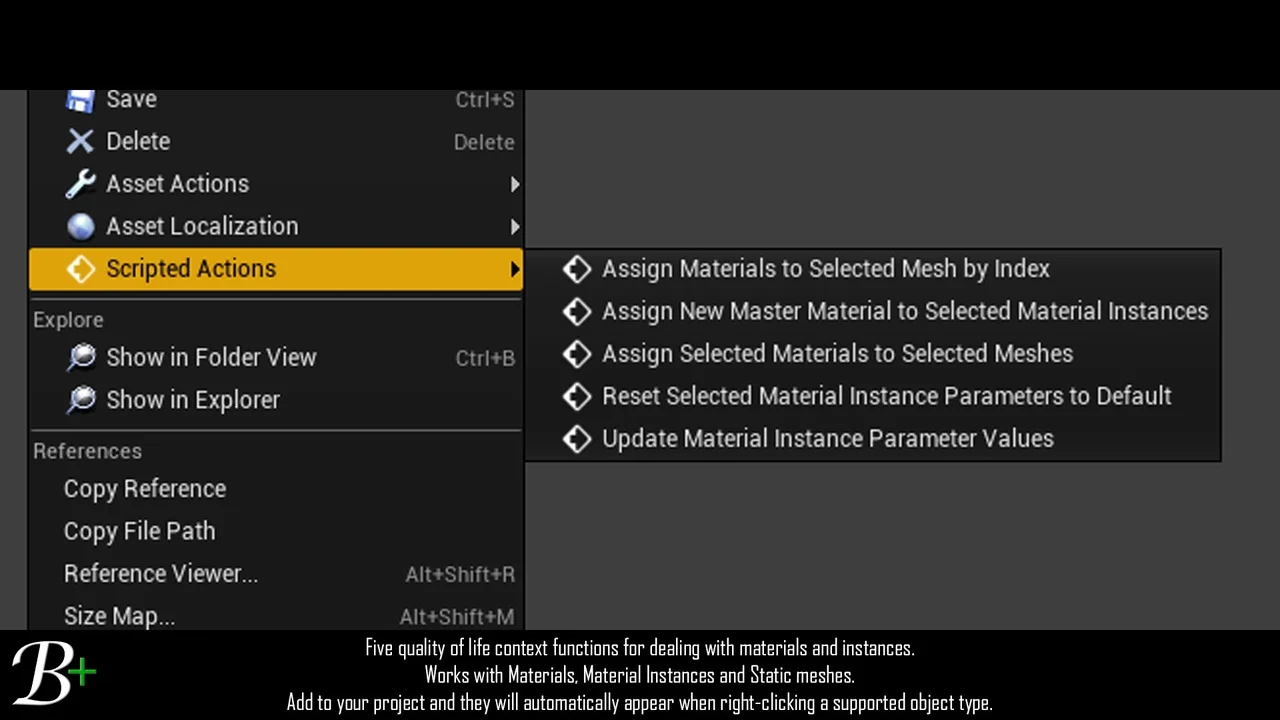
 Gameplay Features
 Gameplay Features
 Gameplay Features