"0341a2901a4ae9aa"{"id":"10628","slug":"book-generator","title":"Book Generator","category":"Gameplay Features","engine":"4.26+,5.0+","assetVersion":"Engine version: 4.26+,5.0+","engineVersion":"4.24","tag":"Gameplay Features","accent":"blue","visual":"character","summary":"Speed up your level design with the Book Generator, a versatile blueprint tool for creating realistic book arrangements. Customize colors, scale, and placement modes to build detailed libraries and interiors with ease.","platform":"Unreal Engine","publishedAt":"2026-03-03T15:50:23.000Z","updatedAt":"2026-04-19T15:49:58.000Z","sourceNotes":[],"fileContents":[],"compatibility":["Unreal Engine","Engine version: 4.26+,5.0+"],"featuredImage":{"alt":"Book Generator","src":"https://3dcghub.com/wp-content/uploads/2026/03/c771ab39-5a63-44a9-89f1-92d651b3e8f6.webp"},"hasDownloadLink":true,"downloads":0,"terms":[{"taxonomy":"category","slug":"gameplay-features","name":"Gameplay Features"},{"taxonomy":"post_tag","slug":"3d-environment-assets","name":"3D environment assets"},{"taxonomy":"post_tag","slug":"book-generator","name":"Book Generator"},{"taxonomy":"post_tag","slug":"level-design-tool","name":"level design tool"},{"taxonomy":"post_tag","slug":"procedural-book-placement","name":"procedural book placement"}],"galleryImages":[{"src":"https://3dcghub.com/wp-content/uploads/2026/03/3ac8dd21c792_49c65579-75e7-47af-b8b4-8edd83d0dbf6.webp","alt":"Book Generator"},{"src":"https://3dcghub.com/wp-content/uploads/2026/03/ea16de4f9327_6e40c352-e2b6-44f1-9435-c2f1f3434837.webp","alt":"Book Generator"},{"src":"https://3dcghub.com/wp-content/uploads/2026/03/81061214adcd_608fcda0-2d59-4669-b8e1-cad43c878a63.webp","alt":"Book Generator"},{"src":"https://3dcghub.com/wp-content/uploads/2026/03/62ebed6c0318_4be78fdf-dada-412a-9434-20633f2913e0.webp","alt":"Book Generator"},{"src":"https://3dcghub.com/wp-content/uploads/2026/03/25e23113412c_4151c18d-571f-4fcf-bf8a-8e6651f7c89d.webp","alt":"Book Generator"},{"src":"https://3dcghub.com/wp-content/uploads/2026/03/1040cb727555_f0e4c915-d9b0-45be-9118-95cb65d3babd.webp","alt":"Book Generator"},{"src":"https://3dcghub.com/wp-content/uploads/2026/03/e21f392b1f28_4870310b-e888-4382-be8d-bcf7ef029365.webp","alt":"Book Generator"},{"src":"https://3dcghub.com/wp-content/uploads/2026/03/06776fa7f1a3_f1738727-e65f-400e-8eea-746c642c7353.webp","alt":"Book Generator"},{"src":"https://3dcghub.com/wp-content/uploads/2026/03/edf25dcab875_df6e5db6-e6b4-4b16-bb1a-90d71a5f2e82.webp","alt":"Book Generator"},{"src":"https://3dcghub.com/wp-content/uploads/2026/03/ca60715aa0af_fd59b9d7-ab9a-431d-b420-532fed6305b1.webp","alt":"Book Generator"}],"accessPanel":{"kind":"resource","title":"Access this resource","eyebrow":"Free Download","message":"Log in or create a free account to start your download.","fileName":"Book Generator.7z","safetyNote":"All resources are 100% manually reviewed to eliminate all risks.","actionLabel":"Download Free","resourceType":"Resource archive"},"contentHtml":"\u003ch2\u003eEfficient Book Placement with the Book Generator\u003c/h2\u003e\n\u003cp\u003eThe \u003cstrong\u003eBook Generator\u003c/strong\u003e is a specialized blueprint tool designed to simplify the process of populating 3D environments with realistic book arrangements. Originally developed for the Gothic Interior Megapack, this standalone version offers a highly efficient workflow for level designers and environment artists. By using this tool, creators can significantly speed up their level creation process while maintaining high visual quality across their scenes. Consequently, it reduces the manual labor required to fill shelves and bookcases.\u003c/p\u003e\n\n\u003ch2\u003eVersatile Placement Modes\u003c/h2\u003e\n\u003cp\u003eThis tool provides two distinct placement types to suit different environmental needs. Users can choose between aligned or piled up arrangements depending on the specific context of their level. For instance, the aligned mode is ideal for creating organized library shelves or formal bookcases. Conversely, the piled up mode works perfectly for simulating cluttered, lived-in spaces or messy workstations. Therefore, these modes provide the versatility needed to build diverse interior settings quickly.\u003c/p\u003e\n\n\u003ch2\u003eAdvanced Customization Options\u003c/h2\u003e\n\u003cp\u003eOne of the core benefits of the \u003cstrong\u003eBook Generator\u003c/strong\u003e is its high level of customizability. The developer has ensured that users can easily modify various parameters to achieve a specific aesthetic. You can adjust the colors, position, and rotation of the generated books with minimal effort. Furthermore, the blueprint allows for precise control over alignment and scale. This flexibility ensures that every book arrangement feels unique, preventing repetitive patterns in large-scale environments.\u003c/p\u003e\n\n\u003ch2\u003eScalability and Extensibility\u003c/h2\u003e\n\u003cp\u003eThe tool is built to be highly scalable to meet different project requirements. Therefore, you can easily integrate your own book static meshes into the system. This feature allows the tool to adapt to various art styles or specific project themes beyond its original design. Additionally, the creator has designed the blueprint so that users can add new functionality or extra features and use them immediately. This makes it a robust choice for developers who need a tool that grows with their project needs.\u003c/p\u003e\n\n\u003ch2\u003eTechnical Integration and Updates\u003c/h2\u003e\n\u003cp\u003eThe developer continues to refine the \u003cstrong\u003eBook Generator\u003c/strong\u003e to maintain compatibility and performance. For example, a bug was recently fixed in version 5.4.2 to ensure a smoother user experience. For those working with Unreal Engine 5.3, there is a specific technical requirement to enable Nanite for spline meshes. To implement this, you must add the line \"r.Nanite.AllowSplineMeshes=1\" under the renderer settings in your project's configuration folder. This step is essential for leveraging modern rendering features within the tool.\u003c/p\u003e\n\n\u003ch2\u003eBest Fit\u003c/h2\u003e\n\u003cp\u003eFor teams considering it, the \u003cstrong\u003eBook Generator\u003c/strong\u003e offers an efficient and flexible solution for level designers looking to add intricate detail to their interiors. With its versatile placement modes, deep customization options, and scalability, it serves as a valuable asset for any library, study, or messy room project. By utilizing this blueprint, you can save significant time on manual placement and focus on the broader creative aspects of your world-building.\u003c/p\u003e\n\n\u003ch2\u003eExplore Similar Assets\u003c/h2\u003e\n\u003cul\u003e\n\u003cli\u003e\u003ca href=\"https://3dcghub.com/footsteps-sounds-with-blueprint-setup/\" title=\"Footsteps Sounds with Blueprint Setup\"\u003eFootsteps Sounds with Blueprint Setup\u003c/a\u003e\u003c/li\u003e\n\u003cli\u003e\u003ca href=\"https://3dcghub.com/26-zombie-animations-starter-pack-with-blueprints/\" title=\"26 Zombie Animations Starter Pack With Blueprints\"\u003e26 Zombie Animations Starter Pack With Blueprints\u003c/a\u003e\u003c/li\u003e\n\u003cli\u003e\u003ca href=\"https://3dcghub.com/blutility-plus-material-and-instance-options/\" title=\"Blutility Plus – Material and Instance Options\"\u003eBlutility Plus – Material and Instance Options\u003c/a\u003e\u003c/li\u003e\n\u003cli\u003e\u003ca href=\"https://3dcghub.com/advanced-fuel-system-multiplayer-vehicle-addon/\" title=\"Advanced Fuel System: Multiplayer Vehicle Addon\"\u003eAdvanced Fuel System: Multiplayer Vehicle Addon\u003c/a\u003e\u003c/li\u003e\n\u003cli\u003e\u003ca href=\"https://3dcghub.com/envirosense-immersive-hand-ik/\" title=\"EnviroSense: Immersive Hand IK\"\u003eEnviroSense: Immersive Hand IK\u003c/a\u003e\u003c/li\u003e\n\u003c/ul\u003e","contentTextLength":3482,"navigation":{"current":3156,"total":4017,"previous":{"id":"10637","slug":"cinematic-cutscene-system","title":"Cinematic Cutscene System","category":"Gameplay Features","platform":"Unreal Engine","updatedAt":"2026-04-19T15:49:58.000Z"},"next":{"id":"10615","slug":"blutility-plus-material-and-instance-options","title":"Blutility Plus - Material and Instance Options","category":"Gameplay Features","platform":"Unreal Engine","updatedAt":"2026-04-19T15:49:58.000Z"}},"relatedResources":[{"id":"10834","slug":"flag-generator","title":"Flag Generator","category":"Gameplay Features","engine":"4.26+,5.0+","assetVersion":"Engine version: 4.26+,5.0+","engineVersion":"4.24","tag":"Gameplay Features","accent":"blue","visual":"animation","summary":"Originally developed for the Medieval Village Megapack, this standalone Flag Generator blueprint automates the creation of catenary-shaped flags between surfaces using advanced ray tracing.","platform":"Unreal Engine","publishedAt":"2026-03-03T16:22:04.000Z","updatedAt":"2026-04-19T15:49:55.000Z","sourceNotes":[],"fileContents":[],"compatibility":["Unreal Engine","Engine version: 4.26+,5.0+"],"featuredImage":{"alt":"Flag Generator","src":"https://3dcghub.com/wp-content/uploads/2026/03/65ae707b-07b4-4ff1-b37c-ef387ebcdb5f.webp"},"hasDownloadLink":true,"downloads":0},{"id":"1001297","slug":"advanced-grid-inventory-system","title":"Advanced Grid Inventory System","category":"Gameplay Features","engine":"5.3+","assetVersion":"","engineVersion":"Engine Version: 5.3+","tag":"Gameplay Features","accent":"blue","visual":"mech","summary":"Explore the Advanced Grid Inventory System, featuring replicated online Blueprint architecture, AGIS_Concepts documentation, and thumbnail generator support.","platform":"Unreal Engine","publishedAt":"2026-10-02T05:59:13.116Z","updatedAt":"2026-10-02T05:59:13.116Z","sourceNotes":[],"fileContents":[],"compatibility":["Unreal Engine","Engine Version: 5.3+"],"featuredImage":{"alt":"Advanced Grid Inventory System","src":"/wp-content/uploads/published/2026/10/bcf827f64dee-dfe1d14a-861c-486b-b4dd-df1ea83de3a7-865c48df7f.webp"},"hasDownloadLink":true,"downloads":0},{"id":"1000767","slug":"decal-forge-v1-1-procedural-decal-generator","title":"Decal Forge v1.1 - Procedural Decal Generator","category":"Gameplay Features","engine":"5.3+","assetVersion":"","engineVersion":"Engine Version: 5.3+","tag":"Gameplay Features","accent":"blue","visual":"mech","summary":"Decal Forge v1.1 brings blueprint-driven procedural decal authoring to Unreal Engine with Parallax Occlusion Mapping, triplanar projection, and angle-masking.","platform":"Unreal Engine","publishedAt":"2026-07-28T17:10:32.912Z","updatedAt":"2026-07-28T17:10:32.912Z","sourceNotes":[],"fileContents":[],"compatibility":["Unreal Engine","Engine Version: 5.3+"],"featuredImage":{"alt":"Decal Forge v1.1 - Procedural Decal Generator","src":"/wp-content/uploads/published/2026/07/48b6778b325d-e1514445-c8b5-4488-a099-c5900a600ae6-538f30b42c.webp"},"hasDownloadLink":true,"downloads":0}]}
Gameplay Features
Book Generator
Speed up your level design with the Book Generator, a versatile blueprint tool for creating realistic book arrangements. Customize colors, scale, and placement modes to build detailed libraries and interiors with ease.
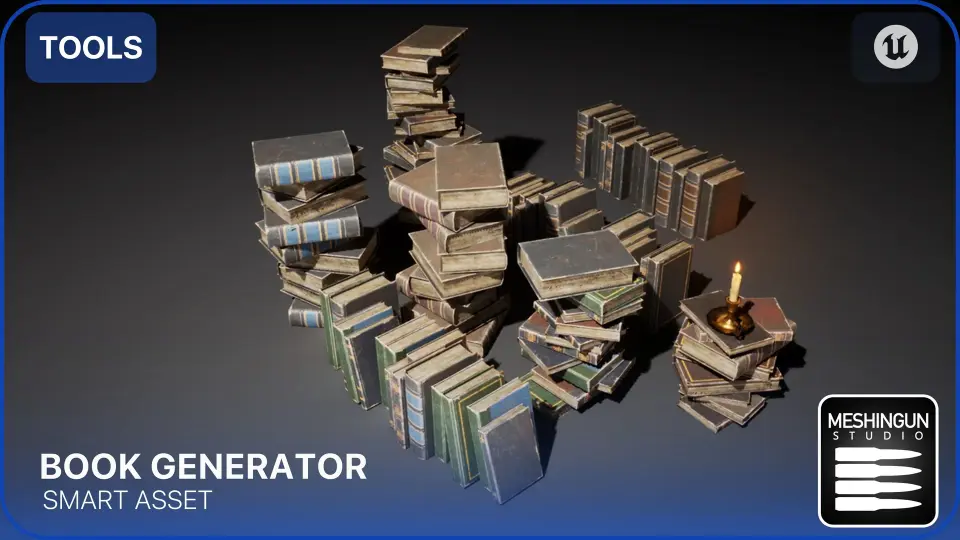
The Book Generator is a specialized blueprint tool designed to simplify the process of populating 3D environments with realistic book arrangements. Originally developed for the Gothic Interior Megapack, this standalone version offers a highly efficient workflow for level designers and environment artists. By using this tool, creators can significantly speed up their level creation process while maintaining high visual quality across their scenes. Consequently, it reduces the manual labor required to fill shelves and bookcases.
Versatile Placement Modes
This tool provides two distinct placement types to suit different environmental needs. Users can choose between aligned or piled up arrangements depending on the specific context of their level. For instance, the aligned mode is ideal for creating organized library shelves or formal bookcases. Conversely, the piled up mode works perfectly for simulating cluttered, lived-in spaces or messy workstations. Therefore, these modes provide the versatility needed to build diverse interior settings quickly.
Advanced Customization Options
One of the core benefits of the Book Generator is its high level of customizability. The developer has ensured that users can easily modify various parameters to achieve a specific aesthetic. You can adjust the colors, position, and rotation of the generated books with minimal effort. Furthermore, the blueprint allows for precise control over alignment and scale. This flexibility ensures that every book arrangement feels unique, preventing repetitive patterns in large-scale environments.
Scalability and Extensibility
The tool is built to be highly scalable to meet different project requirements. Therefore, you can easily integrate your own book static meshes into the system. This feature allows the tool to adapt to various art styles or specific project themes beyond its original design. Additionally, the creator has designed the blueprint so that users can add new functionality or extra features and use them immediately. This makes it a robust choice for developers who need a tool that grows with their project needs.
Technical Integration and Updates
The developer continues to refine the Book Generator to maintain compatibility and performance. For example, a bug was recently fixed in version 5.4.2 to ensure a smoother user experience. For those working with Unreal Engine 5.3, there is a specific technical requirement to enable Nanite for spline meshes. To implement this, you must add the line "r.Nanite.AllowSplineMeshes=1" under the renderer settings in your project's configuration folder. This step is essential for leveraging modern rendering features within the tool.
Best Fit
For teams considering it, the Book Generator offers an efficient and flexible solution for level designers looking to add intricate detail to their interiors. With its versatile placement modes, deep customization options, and scalability, it serves as a valuable asset for any library, study, or messy room project. By utilizing this blueprint, you can save significant time on manual placement and focus on the broader creative aspects of your world-building.
 Gameplay Features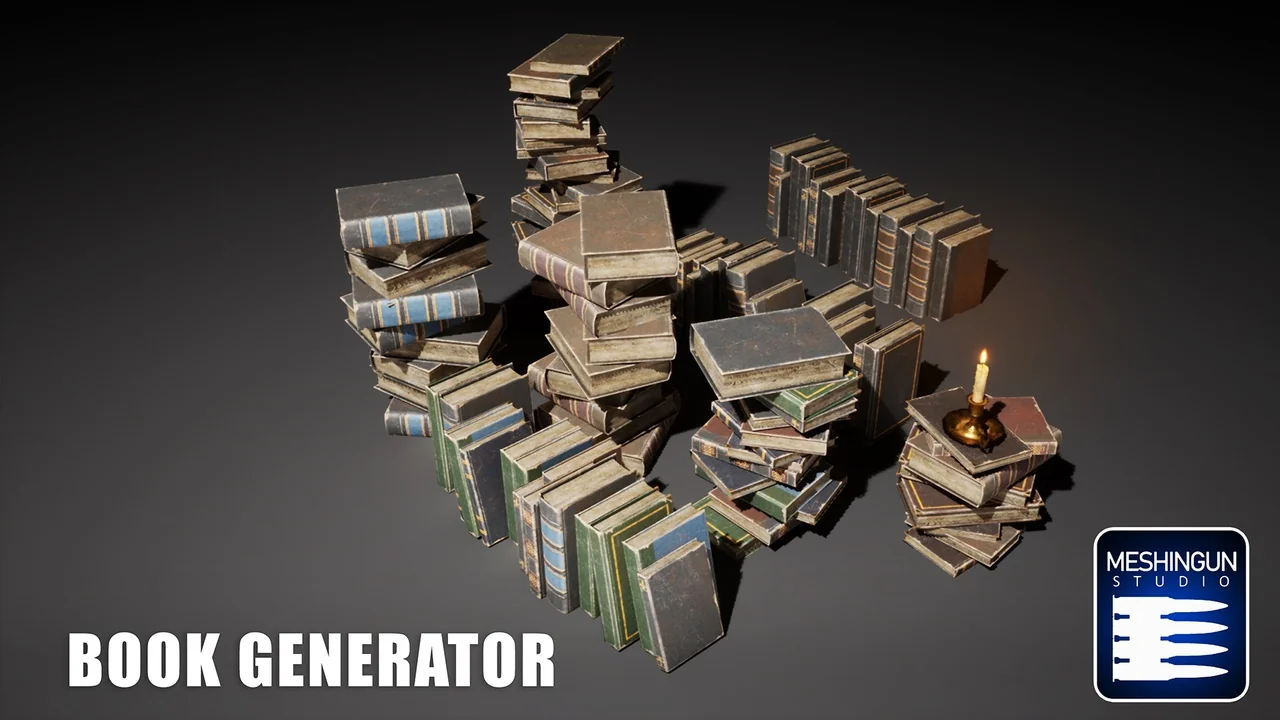
 Gameplay Features
 Gameplay Features
 Gameplay Features