"4481da9c895ef786"{"id":"1001297","slug":"advanced-grid-inventory-system","title":"Advanced Grid Inventory System","category":"Gameplay Features","engine":"5.3+","assetVersion":"","engineVersion":"Engine Version: 5.3+","tag":"Gameplay Features","accent":"blue","visual":"mech","summary":"Explore the Advanced Grid Inventory System, featuring replicated online Blueprint architecture, AGIS_Concepts documentation, and thumbnail generator support.","platform":"Unreal Engine","publishedAt":"2026-10-02T05:59:13.116Z","updatedAt":"2026-10-02T05:59:13.116Z","sourceNotes":[],"fileContents":[],"compatibility":["Unreal Engine","Engine Version: 5.3+"],"featuredImage":{"alt":"Advanced Grid Inventory System","src":"/wp-content/uploads/published/2026/10/bcf827f64dee-dfe1d14a-861c-486b-b4dd-df1ea83de3a7-865c48df7f.webp"},"hasDownloadLink":true,"downloads":0,"terms":[{"taxonomy":"category","slug":"gameplay-features","name":"Gameplay Features"}],"galleryImages":[{"src":"/wp-content/uploads/published/2026/10/9060ee89726c-35521f0d-f8e6-403d-9a47-92381306c5da-984799becd.webp","alt":"Advanced Grid Inventory System"},{"src":"/wp-content/uploads/published/2026/10/93a259906af5-f2a449be-7760-4038-a3b8-b03d91ed2ac3-7f1c85f1c7.webp","alt":"Advanced Grid Inventory System"},{"src":"/wp-content/uploads/published/2026/10/f529557b33b2-e38b3148-e23a-4adb-9918-79e47dd83344-8dd0e477ca.webp","alt":"Advanced Grid Inventory System"},{"src":"/wp-content/uploads/published/2026/10/ab5a7f23e600-595e491d-3156-4f0c-a684-6e0a8ce7e6ba-c4b9f1e0f6.webp","alt":"Advanced Grid Inventory System"},{"src":"/wp-content/uploads/published/2026/10/91a0ddcb6cc9-346c1940-e13c-4c40-aabd-a9eb6d07d903-4ea8284160.webp","alt":"Advanced Grid Inventory System"},{"src":"/wp-content/uploads/published/2026/10/dc36f4c85275-75e67cd3-e39a-4b21-a063-daebd9d96640-29e4b606c6.webp","alt":"Advanced Grid Inventory System"},{"src":"/wp-content/uploads/published/2026/10/33236594255c-69276c20-cdf2-4814-8e87-4cc981694cfd-56f67680b8.webp","alt":"Advanced Grid Inventory System"},{"src":"/wp-content/uploads/published/2026/10/4959fa51ec7c-a0c31c96-f458-4ef4-aaee-61b06b8464ef-3f4eb7bbde.webp","alt":"Advanced Grid Inventory System"},{"src":"/wp-content/uploads/published/2026/10/337fd01c82ad-c6a120b1-9a93-4910-81ec-ed262b90775a-2511462e5e.webp","alt":"Advanced Grid Inventory System"},{"src":"/wp-content/uploads/published/2026/10/2b8f68c8002e-36e4eeb5-4c0a-4c34-bafc-f270fce9516a-95658b0373.webp","alt":"Advanced Grid Inventory System"}],"accessPanel":{"kind":"resource","title":"Download this resource","eyebrow":"Free Download","message":"Log in or create a free account to start your download.","fileName":"AGIS_7.7z","safetyNote":"Resources are manually reviewed before listing to improve quality and reduce obvious risks.","actionLabel":"Download Free","resourceType":"Resource archive"},"contentHtml":"\u003ch2\u003eSetting Up the Blueprint Architecture for Online Replication\u003c/h2\u003e\u003cp\u003eIntegrating an inventory framework into a multiplayer environment demands clean network authority and clear data flow. Advanced Grid Inventory System is constructed entirely through Blueprints, providing full visual scripting access to the underlying logic without requiring native C++ compilation. Because the framework is fully replicated for online play, state changes across inventory slots—such as moving an item, rotating an object within a container, or transferring assets between players—are handled to keep the client and server states synchronized.\u003c/p\u003e\u003cp\u003eMultiplayer network replication requires strict ownership validation to prevent desynchronization between player clients and authoritative game servers. In a Blueprint-driven setup, this means Remote Procedure Calls (RPCs) and replicated properties work in tandem to track which entity owns a given grid container. When an item is moved within a grid, the client initiates the request, but the server validates the spatial availability of the target coordinates before updating the replicated inventory state. This server-authoritative structure ensures that grid transactions remain consistent in online matches, reducing discrepancies or duplicated item states across connected users.\u003c/p\u003e\u003ch2\u003eSpatial Logic in the Advanced Grid Inventory System\u003c/h2\u003e\u003cp\u003eGrid-based storage relies on spatial coordinate math rather than simple numerical array indexing. Within the Advanced Grid Inventory System, spatial slots correspond to two-dimensional coordinates where items occupy specific width and height footprints. The system checks boundary limits, collision across already occupied coordinates, and orientation states to determine whether an item can drop into a target position.\u003c/p\u003e\u003cp\u003eManaging spatial dimensions in Blueprint graphs involves calculating offsets from the initial drop coordinate. If an item spans multiple cells, the underlying logic cross-references each required slot index against the active inventory data array. If any coordinate intersects with an occupied cell or exceeds the grid boundary, the drop operation is rejected, restoring the item to its previous valid position. Replicating this behavior online requires transmitting coordinate payloads rather than raw visual transformations, keeping network bandwidth minimal while maintaining precision across all connected game clients.\u003c/p\u003e\u003ch2\u003eEvaluating System Architecture with the AGIS_Concepts Document\u003c/h2\u003e\u003cp\u003eA distinctive feature of the development workflow for the Advanced Grid Inventory System is the inclusion of the \u003ccode\u003eAGIS_Concepts.md\u003c/code\u003e File. Comprising 2,500 lines of structured technical reference text, this document details the core mechanics, structural relationships, variables, and architectural choices that govern the system. Instead of navigating an unfamiliar Blueprint network blind, developers can review the complete architectural map directly.\u003c/p\u003e\u003cp\u003eThe extensive 2,500-line markdown file is specifically formatted for ingestion by modern large language models, including ChatGPT, Gemini, and Claude. By loading \u003ccode\u003eAGIS_Concepts.md\u003c/code\u003e Into an AI model, developers can run project-specific inquiries before or during integration. This workflow enables questions such as:\u003c/p\u003e\u003cul\u003e\u003cli\u003eHow does the system validate server-authoritative item placement across client boundaries?\u003c/li\u003e\u003cli\u003eWhere are the specific Blueprint execution hooks located for custom item attributes?\u003c/li\u003e\u003cli\u003eWhat data structures track multi-cell item dimensions and rotation states across network ticks?\u003c/li\u003e\u003cli\u003eHow does the replication model handle rapid inventory interaction during high network latency?\u003c/li\u003e\u003c/ul\u003e\u003cp\u003eUsing this documentation pipeline shortens onboarding time. Instead of dissecting every node network manually, engineers can query the precise functional flow, confirm system suitability for their production needs, and understand how the Blueprint logic interfaces with their broader gameplay code.\u003c/p\u003e\u003ch2\u003eVisual Asset Pipelines and Advanced Thumbnail Generator Integration\u003c/h2\u003e\u003cp\u003eGrid inventories rely heavily on visual clarity, as players must immediately recognize item silhouettes, orientations, and states across coordinate tiles. The Advanced Grid Inventory System features compatibility with Advanced Thumbnail Generator, streamlining the generation and display of dynamic item icons.\u003c/p\u003e\u003cp\u003ePairing the grid framework with a dedicated thumbnail generation workflow eliminates the manual burden of rendering, exporting, and managing static 2D icons for every piece of gear. Because the inventory tracks spatial dimensions, the generated thumbnails align with the multi-slot footprints defined in the item data. This compatibility maintains visual consistency across inventory screens, equipment slots, and ground pickups, allowing artists and technical designers to configure item visuals directly alongside the structural Blueprint data.\u003c/p\u003e\u003ch2\u003eValidation via Demos, Patch Notes, and Technical Support\u003c/h2\u003e\u003cp\u003eVerifying how an inventory feels during real-time interaction is critical prior to deep project implementation. A downloadable playable demo provides direct access to the system in action, demonstrating grid manipulation, drag-and-drop mechanics, item rotations, and interface responsiveness. Testing the compiled demo allows developers to evaluate input latency, UI layout reactivity, and general operational flow in a clean environment.\u003c/p\u003e\u003cp\u003eLong-term maintenance is backed by comprehensive patch notes and complete technical documentation. The patch notes track modifications, system updates, and optimizations across revisions, giving developers clear visibility into changes when updating their project files. For issues that extend beyond standard documentation and the 2,500-line concept file, technical support is maintained through dedicated community channels and email communication, providing a direct path to resolve implementation queries and edge-case networking behaviors.\u003c/p\u003e\n\n\u003ch2\u003eMore From The Same Workflow\u003c/h2\u003e\n\u003cul\u003e\n\u003cli\u003e\u003ca href=\"https://3dcghub.com/inventory-system-pro/\" title=\"Inventory System Pro\"\u003eInventory System Pro\u003c/a\u003e\u003c/li\u003e\n\u003cli\u003e\u003ca href=\"https://3dcghub.com/third-person-story-adventure-template/\" title=\"Third Person Story Adventure Template\"\u003eThird Person Story Adventure Template\u003c/a\u003e\u003c/li\u003e\n\u003cli\u003e\u003ca href=\"https://3dcghub.com/gasp-basic-template-for-fps-with-spatial-inventory/\" title=\"GASP: Basic Template for FPS with Spatial Inventory\"\u003eGASP: Basic Template for FPS with Spatial Inventory\u003c/a\u003e\u003c/li\u003e\n\u003cli\u003e\u003ca href=\"https://3dcghub.com/modular-gameplay-blueprint-systems/\" title=\"Modular Gameplay Blueprint Systems\"\u003eModular Gameplay Blueprint Systems\u003c/a\u003e\u003c/li\u003e\n\u003cli\u003e\u003ca href=\"https://3dcghub.com/the-flashlight-toolkit/\" title=\"The Flashlight Toolkit\"\u003eThe Flashlight Toolkit\u003c/a\u003e\u003c/li\u003e\n\u003c/ul\u003e","contentTextLength":6063,"navigation":{"current":39,"total":3269,"previous":{"id":"1001298","slug":"advanced-phone-system-v3-replicated","title":"Advanced Phone System V3 Replicated","category":"Game Mechanics","platform":"Unreal Engine","updatedAt":"2026-10-02T06:00:01.725Z"},"next":{"id":"1001296","slug":"slash-trail-fx-elemental","title":"Slash Trail FX Elemental","category":"Spells \u0026 Combat","platform":"Unreal Engine","updatedAt":"2026-10-01T16:47:44.135Z"}},"relatedResources":[{"id":"1001302","slug":"inventory-system","title":"Inventory System","category":"Gameplay Features","engine":"5.2+","assetVersion":"","engineVersion":"Engine Version: 5.2+","tag":"Gameplay Features","accent":"blue","visual":"mech","summary":"Examine the Inventory System featuring single-player and multiplayer support, crafting, typewriter saves, dynamic weapon blueprints, and shop modules.","platform":"Unreal Engine","publishedAt":"2026-10-02T06:05:08.067Z","updatedAt":"2026-10-02T06:05:08.067Z","sourceNotes":[],"fileContents":[],"compatibility":["Unreal Engine","Engine Version: 5.2+"],"featuredImage":{"alt":"Inventory System","src":"/wp-content/uploads/published/2026/10/3bb3f4c53928-ce3f6f81-1040-479c-90a1-7486c3e9f958-2f64db60f3.webp"},"hasDownloadLink":true,"downloads":0},{"id":"1000843","slug":"inventory-system-pro","title":"Inventory System Pro","category":"Gameplay Features","engine":"5.3+","assetVersion":"","engineVersion":"Engine Version: 5.3+","tag":"Gameplay Features","accent":"blue","visual":"mech","summary":"Blueprint-based inventory system with containers, items, currency, password locks, pickups, placement, attributes, save and load, debug, and full gamepad suppor","platform":"Unreal Engine","publishedAt":"2026-08-04T07:04:21.447Z","updatedAt":"2026-08-04T07:04:21.447Z","sourceNotes":[],"fileContents":[],"compatibility":["Unreal Engine","Engine Version: 5.3+"],"featuredImage":{"alt":"Inventory System Pro","src":"/wp-content/uploads/published/2026/08/0272982d06f7-73374eb4-ee1a-45be-8136-70fe8fcd8780-540b7cdf52.webp"},"hasDownloadLink":true,"downloads":1},{"id":"1001305","slug":"pawnshop-system","title":"Pawnshop System","category":"Gameplay Features","engine":"5.0+","assetVersion":"","engineVersion":"Engine Version: 5.0+","tag":"Gameplay Features","accent":"blue","visual":"mech","summary":"Explore the Pawnshop System mechanics, covering interactive shopkeeper trading, scrollable inventory, physical cash loops, and ATM banking.","platform":"Unreal Engine","publishedAt":"2026-10-02T06:19:35.935Z","updatedAt":"2026-10-02T06:19:35.935Z","sourceNotes":[],"fileContents":[],"compatibility":["Unreal Engine","Engine Version: 5.0+"],"featuredImage":{"alt":"Pawnshop System","src":"/wp-content/uploads/published/2026/10/e352621da4aa-7a59cc2b-4082-4c34-b972-400682a443f4-bd5c698f69.webp"},"hasDownloadLink":true,"downloads":0}]}
Gameplay Features
Advanced Grid Inventory System
Explore the Advanced Grid Inventory System, featuring replicated online Blueprint architecture, AGIS_Concepts documentation, and thumbnail generator support.
Setting Up the Blueprint Architecture for Online Replication
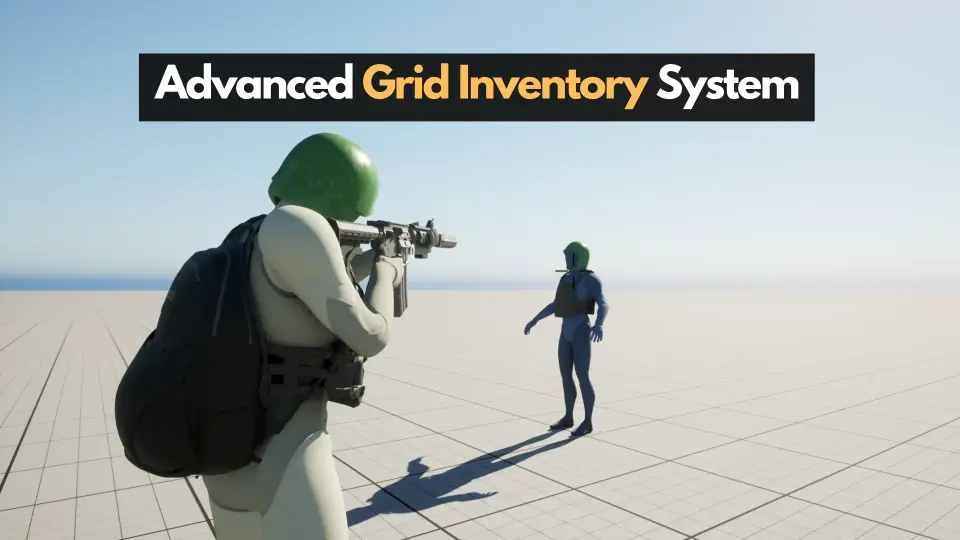
Integrating an inventory framework into a multiplayer environment demands clean network authority and clear data flow. Advanced Grid Inventory System is constructed entirely through Blueprints, providing full visual scripting access to the underlying logic without requiring native C++ compilation. Because the framework is fully replicated for online play, state changes across inventory slots—such as moving an item, rotating an object within a container, or transferring assets between players—are handled to keep the client and server states synchronized.
Multiplayer network replication requires strict ownership validation to prevent desynchronization between player clients and authoritative game servers. In a Blueprint-driven setup, this means Remote Procedure Calls (RPCs) and replicated properties work in tandem to track which entity owns a given grid container. When an item is moved within a grid, the client initiates the request, but the server validates the spatial availability of the target coordinates before updating the replicated inventory state. This server-authoritative structure ensures that grid transactions remain consistent in online matches, reducing discrepancies or duplicated item states across connected users.
Spatial Logic in the Advanced Grid Inventory System
Grid-based storage relies on spatial coordinate math rather than simple numerical array indexing. Within the Advanced Grid Inventory System, spatial slots correspond to two-dimensional coordinates where items occupy specific width and height footprints. The system checks boundary limits, collision across already occupied coordinates, and orientation states to determine whether an item can drop into a target position.
Managing spatial dimensions in Blueprint graphs involves calculating offsets from the initial drop coordinate. If an item spans multiple cells, the underlying logic cross-references each required slot index against the active inventory data array. If any coordinate intersects with an occupied cell or exceeds the grid boundary, the drop operation is rejected, restoring the item to its previous valid position. Replicating this behavior online requires transmitting coordinate payloads rather than raw visual transformations, keeping network bandwidth minimal while maintaining precision across all connected game clients.
Evaluating System Architecture with the AGIS_Concepts Document
A distinctive feature of the development workflow for the Advanced Grid Inventory System is the inclusion of the AGIS_Concepts.md File. Comprising 2,500 lines of structured technical reference text, this document details the core mechanics, structural relationships, variables, and architectural choices that govern the system. Instead of navigating an unfamiliar Blueprint network blind, developers can review the complete architectural map directly.
The extensive 2,500-line markdown file is specifically formatted for ingestion by modern large language models, including ChatGPT, Gemini, and Claude. By loading AGIS_Concepts.md Into an AI model, developers can run project-specific inquiries before or during integration. This workflow enables questions such as:
How does the system validate server-authoritative item placement across client boundaries?
Where are the specific Blueprint execution hooks located for custom item attributes?
What data structures track multi-cell item dimensions and rotation states across network ticks?
How does the replication model handle rapid inventory interaction during high network latency?
Using this documentation pipeline shortens onboarding time. Instead of dissecting every node network manually, engineers can query the precise functional flow, confirm system suitability for their production needs, and understand how the Blueprint logic interfaces with their broader gameplay code.
Visual Asset Pipelines and Advanced Thumbnail Generator Integration
Grid inventories rely heavily on visual clarity, as players must immediately recognize item silhouettes, orientations, and states across coordinate tiles. The Advanced Grid Inventory System features compatibility with Advanced Thumbnail Generator, streamlining the generation and display of dynamic item icons.
Pairing the grid framework with a dedicated thumbnail generation workflow eliminates the manual burden of rendering, exporting, and managing static 2D icons for every piece of gear. Because the inventory tracks spatial dimensions, the generated thumbnails align with the multi-slot footprints defined in the item data. This compatibility maintains visual consistency across inventory screens, equipment slots, and ground pickups, allowing artists and technical designers to configure item visuals directly alongside the structural Blueprint data.
Validation via Demos, Patch Notes, and Technical Support
Verifying how an inventory feels during real-time interaction is critical prior to deep project implementation. A downloadable playable demo provides direct access to the system in action, demonstrating grid manipulation, drag-and-drop mechanics, item rotations, and interface responsiveness. Testing the compiled demo allows developers to evaluate input latency, UI layout reactivity, and general operational flow in a clean environment.
Long-term maintenance is backed by comprehensive patch notes and complete technical documentation. The patch notes track modifications, system updates, and optimizations across revisions, giving developers clear visibility into changes when updating their project files. For issues that extend beyond standard documentation and the 2,500-line concept file, technical support is maintained through dedicated community channels and email communication, providing a direct path to resolve implementation queries and edge-case networking behaviors.
 Gameplay Features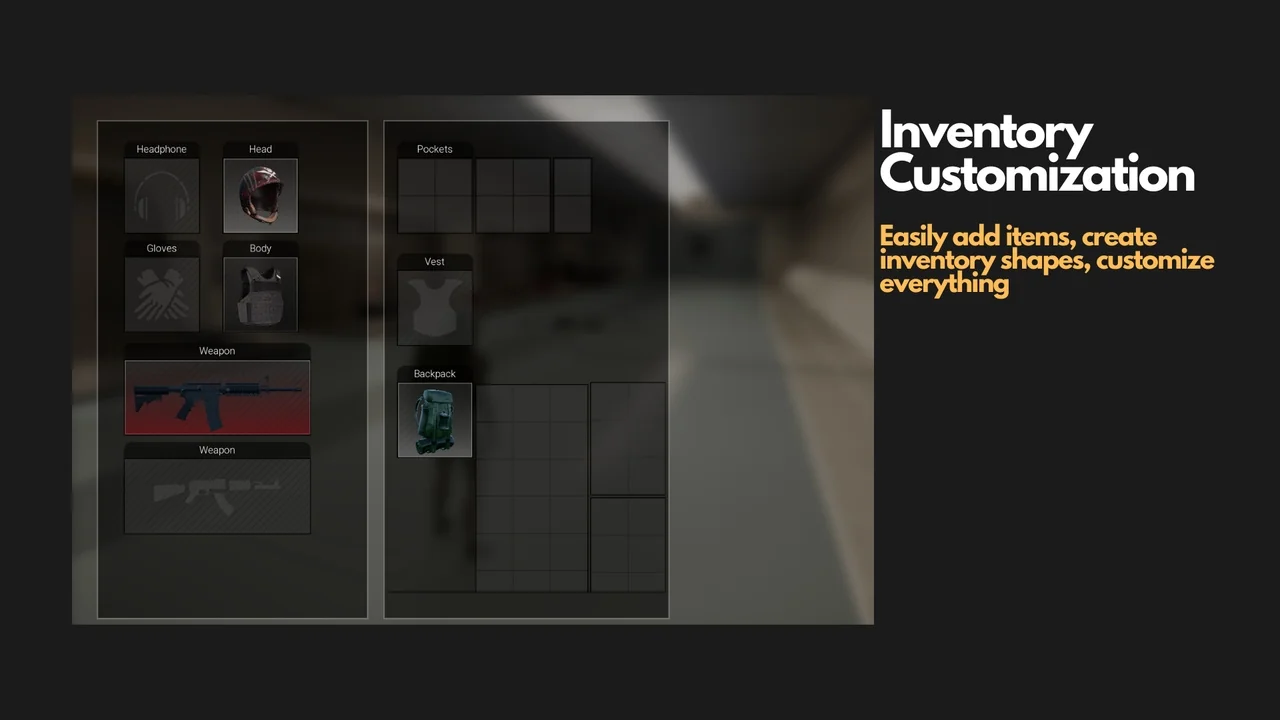
 Gameplay Features
 Gameplay Features
 Gameplay Features