"a19e0535960bd083"{"id":"11018","slug":"modular-gameplay-blueprint-systems","title":"Modular Gameplay Blueprint Systems","category":"Gameplay Features","engine":"5.4+","assetVersion":"Engine version: 5.4+","engineVersion":"5.4","tag":"Gameplay Features","accent":"blue","visual":"animation","summary":"Streamline your Unreal Engine development with a modular, 100% Blueprint-based toolkit. Build inventory, status, and weapon systems using efficient, data-driven components.","platform":"Unreal Engine","publishedAt":"2026-03-03T16:41:56.000Z","updatedAt":"2026-04-19T15:49:52.000Z","sourceNotes":[],"fileContents":[],"compatibility":["Unreal Engine","Engine version: 5.4+"],"featuredImage":{"alt":"Modular Gameplay Blueprint Systems","src":"https://3dcghub.com/wp-content/uploads/2026/03/927f3849-8bfa-411f-b057-702bc70af0a8.webp"},"hasDownloadLink":true,"downloads":0,"terms":[{"taxonomy":"category","slug":"gameplay-features","name":"Gameplay Features"},{"taxonomy":"post_tag","slug":"game-development-toolkit","name":"Game Development Toolkit"},{"taxonomy":"post_tag","slug":"modular-gameplay-blueprint-systems","name":"Modular Gameplay Blueprint Systems"},{"taxonomy":"post_tag","slug":"rapid-prototyping-ue","name":"Rapid Prototyping UE"},{"taxonomy":"post_tag","slug":"ue-inventory-system","name":"UE Inventory System"}],"galleryImages":[{"src":"https://3dcghub.com/wp-content/uploads/2026/03/2af34f600a78_ad63edeb-b75c-4361-8599-4f8689ba554b.webp","alt":"Modular Gameplay Blueprint Systems"},{"src":"https://3dcghub.com/wp-content/uploads/2026/03/6964e2d51e97_5ff02847-8c80-46ae-a2fb-c28175fe1f5c.webp","alt":"Modular Gameplay Blueprint Systems"},{"src":"https://3dcghub.com/wp-content/uploads/2026/03/83a28576655e_72954700-3e82-4b54-b8ec-9b106af9cbdc.webp","alt":"Modular Gameplay Blueprint Systems"},{"src":"https://3dcghub.com/wp-content/uploads/2026/03/fd819e88f646_80d46d69-e13f-415d-b0a7-634aabc74023.webp","alt":"Modular Gameplay Blueprint Systems"},{"src":"https://3dcghub.com/wp-content/uploads/2026/03/d3c84c162397_01679c4f-e98c-44da-b8ec-c15bd81bce29.webp","alt":"Modular Gameplay Blueprint Systems"},{"src":"https://3dcghub.com/wp-content/uploads/2026/03/def2b5cb0c62_1a3ad4de-0d50-422c-8787-ad883c7c48f9.webp","alt":"Modular Gameplay Blueprint Systems"},{"src":"https://3dcghub.com/wp-content/uploads/2026/03/b88c7e46109f_f826ce63-2c59-451e-b532-0df58eca994b.webp","alt":"Modular Gameplay Blueprint Systems"},{"src":"https://3dcghub.com/wp-content/uploads/2026/03/32d8d00ff0b0_cc29e53d-70da-45a7-a28a-abb39fe88782.webp","alt":"Modular Gameplay Blueprint Systems"},{"src":"https://3dcghub.com/wp-content/uploads/2026/03/1fe5397071ec_a1e51c74-d177-4887-b8ff-36300429e983.webp","alt":"Modular Gameplay Blueprint Systems"},{"src":"https://3dcghub.com/wp-content/uploads/2026/03/dd91000aab1d_ad3a8ce2-3218-4f18-bb2f-46f4e7acaa3e.webp","alt":"Modular Gameplay Blueprint Systems"},{"src":"https://3dcghub.com/wp-content/uploads/2026/03/1045bc658fa4_d4631684-d773-4e50-bf8d-6b888f4162c1.webp","alt":"Modular Gameplay Blueprint Systems"},{"src":"https://3dcghub.com/wp-content/uploads/2026/03/7685bedecfc3_c39eb695-7501-4d0b-b366-c6ca184c0dd8.webp","alt":"Modular Gameplay Blueprint Systems"}],"accessPanel":{"kind":"resource","title":"Access this resource","eyebrow":"Free Download","message":"Log in or create a free account to start your download.","fileName":"Content.7z","safetyNote":"All resources are 100% manually reviewed to eliminate all risks.","actionLabel":"Download Free","resourceType":"Resource archive"},"contentHtml":"\u003ch2\u003eAccelerate Development with Modular Gameplay Blueprint Systems\u003c/h2\u003e\n\u003cp\u003eModular Gameplay Blueprint Systems offer a powerful, data-driven toolkit for creators looking to accelerate their Unreal Engine projects. This collection of modular systems allows you to build complex mechanics using simple drag-and-drop Actor Components. Consequently, developers can focus on their unique vision rather than writing boilerplate code from scratch. The system is built entirely in Blueprints, meaning no C++ knowledge is required.\u003c/p\u003e\n\n\u003ch2\u003eComponent-Based and Data-Driven Architecture\u003c/h2\u003e\n\u003cp\u003eThe toolkit uses a modern, data-driven architecture that allows for rapid iteration through Data Assets. Furthermore, users can easily add or remove systems as components to suit their specific needs. As a result, you can configure items and mechanics without diving deep into complex logic. This streamlined workflow ensures that your project remains scalable and easy to manage.\u003c/p\u003e\n\n\u003ch3\u003eAdvanced Item and Status Management\u003c/h3\u003e\n\u003cp\u003eThe reworked item system is highly flexible and natively supports both Static and Skeletal meshes. Additionally, it includes integrated sounds, animation hooks, and precise socket attachments. Therefore, managing diverse game assets becomes much more efficient. The status system is equally robust, managing health, shields, and stamina with built-in regeneration logic. Moreover, a configurable UI is included to display player status automatically.\u003c/p\u003e\n\n\u003ch3\u003eOptimized Interaction and Combat Systems\u003c/h3\u003e\n\u003cp\u003eThe interaction and container systems within the Modular Gameplay Blueprint Systems are also highly optimized for performance. The interaction system now checks only for hover changes to ensure smooth gameplay. Meanwhile, the container system supports inventory, hotbars, and chests with item stacking functionality. For combat-focused projects, the customizable trigger system supports various fire modes like single, burst, auto, and charge. Furthermore, it handles ammo and event-based feedback efficiently.\u003c/p\u003e\n\n\u003ch2\u003eVersatile Tools for Every Creator\u003c/h2\u003e\n\u003cp\u003eThis system is ideal for indie developers, software engineers, and even Arch Viz creators. Because it uses Unreal Engine's Enhanced Input, handling controls is clean and modern. The developer has also included a demo room to showcase how all systems work together. In conclusion, Modular Gameplay Blueprint Systems provide a versatile foundation for any interactive experience. Ultimately, this toolkit empowers you to build faster and smarter without reinventing the wheel.\u003c/p\u003e\n\n\u003ch2\u003eExplore Similar Assets\u003c/h2\u003e\n\u003cul\u003e\n\u003cli\u003e\u003ca href=\"https://3dcghub.com/dynamic-flight-with-blueprints/\" title=\"Dynamic Flight with Blueprints\"\u003eDynamic Flight with Blueprints\u003c/a\u003e\u003c/li\u003e\n\u003cli\u003e\u003ca href=\"https://3dcghub.com/assetsville-town-2-modular-county/\" title=\"Assetsville Town 2 – Modular County\"\u003eAssetsville Town 2 – Modular County\u003c/a\u003e\u003c/li\u003e\n\u003cli\u003e\u003ca href=\"https://3dcghub.com/kind-witch-game-ready-stylized-mmorpg-fps-realistic-modular-character/\" title=\"Kind Witch – Game Ready Stylized MMORPG FPS Realistic Modular Character\"\u003eKind Witch – Game Ready Stylized MMORPG FPS Realistic Modular Character\u003c/a\u003e\u003c/li\u003e\n\u003cli\u003e\u003ca href=\"https://3dcghub.com/dynamic-combat-system-archery/\" title=\"Dynamic Combat System – Archery\"\u003eDynamic Combat System – Archery\u003c/a\u003e\u003c/li\u003e\n\u003cli\u003e\u003ca href=\"https://3dcghub.com/advanced-jigsaw-inventory-system/\" title=\"Advanced Jigsaw Inventory system\"\u003eAdvanced Jigsaw Inventory system\u003c/a\u003e\u003c/li\u003e\n\u003c/ul\u003e","contentTextLength":2746,"navigation":{"current":3192,"total":4026,"previous":{"id":"11024","slug":"multiplayer-xp-system","title":"Multiplayer XP System","category":"Gameplay Features","platform":"Unreal Engine","updatedAt":"2026-04-19T15:49:52.000Z"},"next":{"id":"11003","slug":"leveling-system-x","title":"Leveling System X","category":"Gameplay Features","platform":"Unreal Engine","updatedAt":"2026-04-19T15:49:52.000Z"}},"relatedResources":[{"id":"1000048","slug":"customizable-bodycam-component","title":"Customizable Bodycam Component","category":"Gameplay Features","engine":"5.1+","assetVersion":"","engineVersion":"Engine Version: 5.1+","tag":"Gameplay Features","accent":"blue","visual":"mech","summary":"A Blueprint-driven camera component designed to deliver photorealistic, character-mirrored motion, exposed material parameters, and customizable VHS effects.","platform":"Unreal Engine","publishedAt":"2026-05-22T11:03:34.875Z","updatedAt":"2026-10-24T07:39:32.861Z","sourceNotes":[],"fileContents":[],"compatibility":["Unreal Engine","Engine Version: 5.1+"],"featuredImage":{"alt":"Customizable Bodycam Component","src":"/wp-content/uploads/published/2026/05/a8f60f9cccc0-8a5f4ac1-11c7-49f2-9fb6-a21c09403ba4-65699f7637.webp"},"hasDownloadLink":true,"downloads":5},{"id":"15092","slug":"tile-based-minimap","title":"Tile Based Minimap","category":"Gameplay Features","engine":"5.3 - 5.5","assetVersion":"Asset Version: 1.2.2 - 2.1.1","engineVersion":"Engine Version: 5.3 - 5.5","tag":"Gameplay Features","accent":"blue","visual":"mech","summary":"The Tile Based Minimap system provides a robust solution for creating tiled in-game maps using pre-rendered level images. It features GPS-style routing, multi-grid support, and full Blueprint extensibility.","platform":"Unreal Engine","publishedAt":"2026-03-12T07:51:23.000Z","updatedAt":"2026-10-08T12:57:55.645Z","sourceNotes":[],"fileContents":[],"compatibility":["Unreal Engine","Asset Version: 1.2.2 - 2.1.1","Engine Version: 5.3 - 5.5"],"featuredImage":{"alt":"Tile Based Minimap","src":"https://3dcghub.com/wp-content/uploads/2026/03/768cc7d5-0ca5-439b-b02a-f4807a2c39bd.webp"},"hasDownloadLink":true,"downloads":5},{"id":"1001032","slug":"action-adventure-movement-system","title":"Action-Adventure Movement System","category":"Gameplay Features","engine":"5.3+","assetVersion":"Asset Version: 1.3.3","engineVersion":"Engine Version: 5.3+","tag":"Gameplay Features","accent":"blue","visual":"mech","summary":"A 100% Blueprint Unreal Engine framework with 475+ animations covering parkour, climbing, swimming, grappling, ropes, rail grinding, interactions, and multiplay","platform":"Unreal Engine","publishedAt":"2026-08-23T13:56:31.671Z","updatedAt":"2026-08-23T13:56:31.671Z","sourceNotes":[],"fileContents":[],"compatibility":["Unreal Engine","Asset Version: 1.3.3","Engine Version: 5.3+"],"featuredImage":{"alt":"Action-Adventure Movement System","src":"/wp-content/uploads/published/2026/08/f6ca4747d539-f55a9c3a-5939-4fc7-b9c9-20258a3197bf-86a0ba7a37.webp"},"hasDownloadLink":true,"downloads":13}]}
Gameplay Features
Modular Gameplay Blueprint Systems
Streamline your Unreal Engine development with a modular, 100% Blueprint-based toolkit. Build inventory, status, and weapon systems using efficient, data-driven components.
Accelerate Development with Modular Gameplay Blueprint Systems
Modular Gameplay Blueprint Systems offer a powerful, data-driven toolkit for creators looking to accelerate their Unreal Engine projects. This collection of modular systems allows you to build complex mechanics using simple drag-and-drop Actor Components. Consequently, developers can focus on their unique vision rather than writing boilerplate code from scratch. The system is built entirely in Blueprints, meaning no C++ knowledge is required.
Component-Based and Data-Driven Architecture
The toolkit uses a modern, data-driven architecture that allows for rapid iteration through Data Assets. Furthermore, users can easily add or remove systems as components to suit their specific needs. As a result, you can configure items and mechanics without diving deep into complex logic. This streamlined workflow ensures that your project remains scalable and easy to manage.
Advanced Item and Status Management
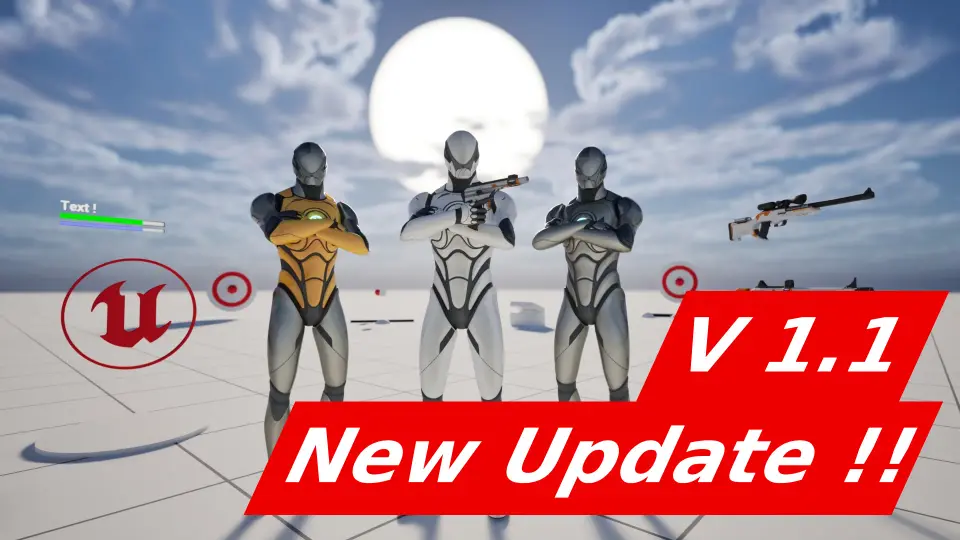
The reworked item system is highly flexible and natively supports both Static and Skeletal meshes. Additionally, it includes integrated sounds, animation hooks, and precise socket attachments. Therefore, managing diverse game assets becomes much more efficient. The status system is equally robust, managing health, shields, and stamina with built-in regeneration logic. Moreover, a configurable UI is included to display player status automatically.
Optimized Interaction and Combat Systems
The interaction and container systems within the Modular Gameplay Blueprint Systems are also highly optimized for performance. The interaction system now checks only for hover changes to ensure smooth gameplay. Meanwhile, the container system supports inventory, hotbars, and chests with item stacking functionality. For combat-focused projects, the customizable trigger system supports various fire modes like single, burst, auto, and charge. Furthermore, it handles ammo and event-based feedback efficiently.
Versatile Tools for Every Creator
This system is ideal for indie developers, software engineers, and even Arch Viz creators. Because it uses Unreal Engine's Enhanced Input, handling controls is clean and modern. The developer has also included a demo room to showcase how all systems work together. In conclusion, Modular Gameplay Blueprint Systems provide a versatile foundation for any interactive experience. Ultimately, this toolkit empowers you to build faster and smarter without reinventing the wheel.
 Gameplay Features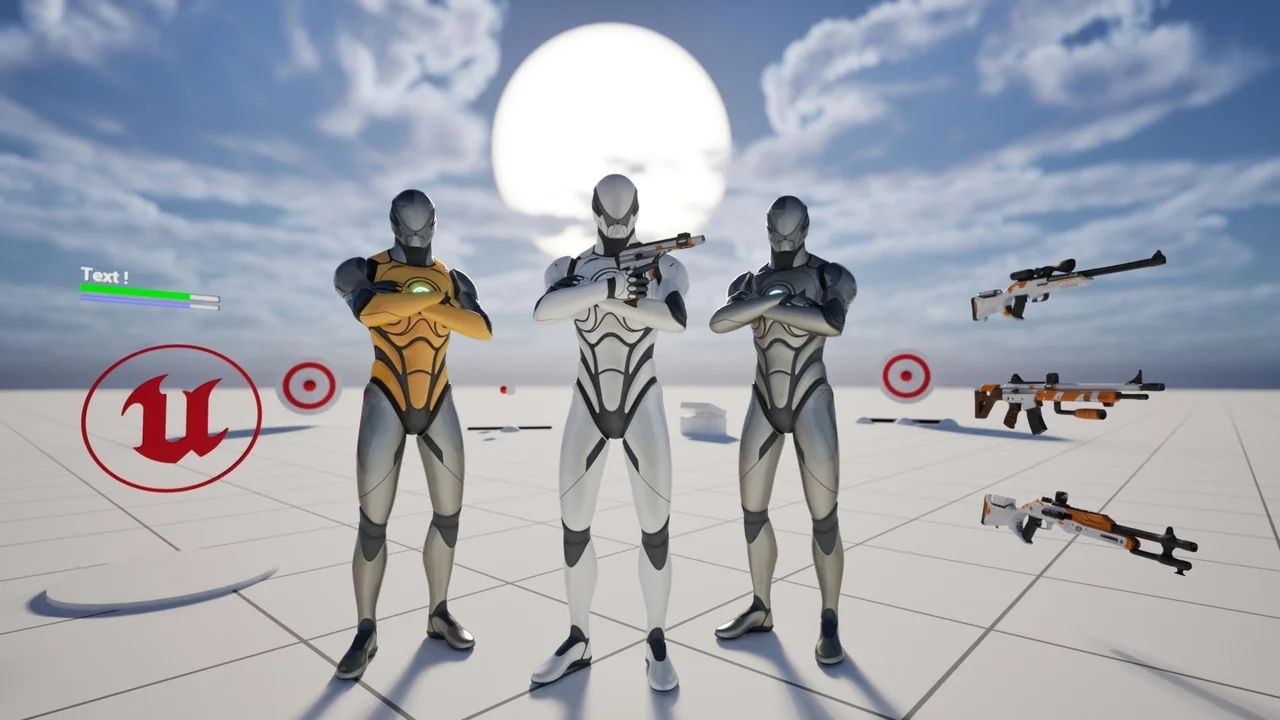
 Gameplay Features
 Gameplay Features
 Gameplay Features