"0341a2901a4ae9aa"{"id":"15092","slug":"tile-based-minimap","title":"Tile Based Minimap","category":"Gameplay Features","engine":"5.3 - 5.5","assetVersion":"Asset Version: 1.2.2 - 2.1.1","engineVersion":"Engine Version: 5.3 - 5.5","tag":"Gameplay Features","accent":"blue","visual":"mech","summary":"The Tile Based Minimap system provides a robust solution for creating tiled in-game maps using pre-rendered level images. It features GPS-style routing, multi-grid support, and full Blueprint extensibility.","platform":"Unreal Engine","publishedAt":"2026-03-12T07:51:23.000Z","updatedAt":"2026-10-08T12:57:55.645Z","sourceNotes":[],"fileContents":[],"compatibility":["Unreal Engine","Asset Version: 1.2.2 - 2.1.1","Engine Version: 5.3 - 5.5"],"featuredImage":{"alt":"Tile Based Minimap","src":"https://3dcghub.com/wp-content/uploads/2026/03/768cc7d5-0ca5-439b-b02a-f4807a2c39bd.webp"},"hasDownloadLink":true,"downloads":5,"terms":[{"taxonomy":"category","slug":"gameplay-features","name":"Gameplay Features"},{"taxonomy":"category","slug":"gameplay-features-tools-and-plugins","name":"Gameplay Features"},{"taxonomy":"post_tag","slug":"environment","name":"Environment"},{"taxonomy":"post_tag","slug":"game-systems","name":"Game Systems"},{"taxonomy":"post_tag","slug":"materials","name":"Materials"},{"taxonomy":"post_tag","slug":"plugins","name":"Plugins"},{"taxonomy":"post_tag","slug":"tools","name":"Tools"},{"taxonomy":"post_tag","slug":"ui","name":"UI"}],"galleryImages":[{"src":"https://3dcghub.com/wp-content/uploads/2026/03/19a906be7a00_18a329ed-ed9a-4f74-80d4-daa1a9ac8957.webp","alt":"Tile Based Minimap"},{"src":"https://3dcghub.com/wp-content/uploads/2026/03/e1c4bae35639_f124459f-8911-4099-80af-27fd134f5017.webp","alt":"Tile Based Minimap"},{"src":"https://3dcghub.com/wp-content/uploads/2026/03/80ac0929358f_4337f7c6-2c7c-4afa-83b1-e13b15fc56c5.webp","alt":"Tile Based Minimap"},{"src":"https://3dcghub.com/wp-content/uploads/2026/03/1fe085893b48_d6295a30-c117-4d13-bc19-738741f3f4a9.webp","alt":"Tile Based Minimap"},{"src":"https://3dcghub.com/wp-content/uploads/2026/03/fe6b0a4c9a08_0da6bb2a-47bd-4b0f-aec7-085ac3c36606.webp","alt":"Tile Based Minimap"},{"src":"https://3dcghub.com/wp-content/uploads/2026/03/8dc8289ca73c_99ecd28b-d494-45ae-abbd-f22cd3c390c3.webp","alt":"Tile Based Minimap"},{"src":"https://3dcghub.com/wp-content/uploads/2026/03/f0d8e7e5d44d_e180a37a-0757-461d-8d02-d8529feae8ee.webp","alt":"Tile Based Minimap"},{"src":"https://3dcghub.com/wp-content/uploads/2026/03/1603edd582ba_09e39a28-ee2c-44d8-9448-887f7f7a325e.webp","alt":"Tile Based Minimap"},{"src":"https://3dcghub.com/wp-content/uploads/2026/03/0d25d55fe272_50508f83-6d94-43fc-89fa-6be037d18e95.webp","alt":"Tile Based Minimap"},{"src":"https://3dcghub.com/wp-content/uploads/2026/03/e1c2533f14b0_21bb0558-ec73-49ad-9b0f-637a3aca40ba.webp","alt":"Tile Based Minimap"},{"src":"https://3dcghub.com/wp-content/uploads/2026/03/856e982b64e9_ca51ff6b-f8cb-4309-baa3-70bd57bf9b1a.webp","alt":"Tile Based Minimap"},{"src":"https://3dcghub.com/wp-content/uploads/2026/03/5e638c1ae682_4429a0dd-ce34-492a-b8ed-40982cf9b4ad.webp","alt":"Tile Based Minimap"},{"src":"https://3dcghub.com/wp-content/uploads/2026/03/8a8838e5e167_4ace31cc-8741-45af-a03d-3d2e7f5bc9f7.webp","alt":"Tile Based Minimap"},{"src":"https://3dcghub.com/wp-content/uploads/2026/03/e63e9ec00c0d_a0e3e476-d8b7-45fe-aa32-2c4148d84bb3.webp","alt":"Tile Based Minimap"}],"accessPanel":{"kind":"resource","title":"Download this resource","eyebrow":"Free Download","message":"Log in or create a free account to start your download.","fileName":"Tile Based Minimap.7z","safetyNote":"Resources are manually reviewed before listing to improve quality and reduce obvious risks.","actionLabel":"Download Free","resourceType":"Resource archive"},"contentHtml":"\u003ch2\u003eEfficient Level Mapping with Tile Based Minimap\u003c/h2\u003e\u003cp\u003eThe \u003cstrong\u003eTile Based Minimap\u003c/strong\u003e is a comprehensive solution for creating high-quality navigation systems within the Unreal Editor. This tool allows developers to generate in-game maps based on pre-rendered images taken directly from their levels. By breaking these images into tiles, the system loads them dynamically during gameplay to ensure optimal performance. Furthermore, the developer designed this plugin to be highly versatile for various project types.\u003c/p\u003e\u003ch3\u003eAdvanced Rendering and Customization\u003c/h3\u003e\u003cp\u003eUsers can render top-down images of their levels within the editor for immediate use or export them to external software. Consequently, this flexibility simplifies the workflow for creating detailed environments. The \u003cstrong\u003eTile Based Minimap\u003c/strong\u003e also allows for extensive UI customization. You can easily change map shapes, zoom levels, and tilt settings. Additionally, the system supports both fixed and dynamic rotation modes to suit your gameplay needs.\u003c/p\u003e\u003ch3\u003eDynamic Blips and Icon Management\u003c/h3\u003e\u003cp\u003eManaging map icons is straightforward and efficient. Users can create blips using data tables and a single function from the provided subsystem. Moreover, multiple widgets can source information from a single blip simultaneously. Because the system does not require specific actors for blips, transform data is sourced directly from scene components. For non-interactable widgets, UI calculations can be handled directly through the material to optimize performance.\u003c/p\u003e\u003ch3\u003eNavigation and Multi-Grid Support\u003c/h3\u003e\u003cp\u003eThe \u003cstrong\u003eTile Based Minimap\u003c/strong\u003e excels in complex environments. It supports multiple grids within a single level, allowing the system to switch between them based on player location. Therefore, it is an ideal choice for games featuring intricate interiors or varying heights. Additionally, the system can take world locations and draw a route on the grid, functioning similarly to a GPS. Users can also mark specific zones or place symbols to guide players effectively.\u003c/p\u003e\u003ch3\u003eReplication and Visual Quality\u003c/h3\u003e\u003cp\u003eFor multiplayer projects, the Blip Replicator component handles both static and dynamic replication. Client-side blips can bind to their local sources or use replicated values as needed. To improve visual fidelity, the system offers optional material-based transformations to reduce pixel jitter. Furthermore, you can set blip scale and opacity based on their distance to the map border for smooth fading effects. Finally, the entire plugin is exposed to Blueprints, ensuring developers can customize every aspect of the system.\u003c/p\u003e\n\n\u003ch2\u003eRelated Resources Worth Checking\u003c/h2\u003e\n\u003cul\u003e\n\u003cli\u003e\u003ca href=\"https://3dcghub.com/uiws-unified-interactive-water-system/\" rel=\"noopener noreferrer\"\u003eUIWS – Unified Interactive Water System\u003c/a\u003e\u003c/li\u003e\n\u003cli\u003e\u003ca href=\"https://3dcghub.com/uipf-unified-interactive-physical-foliage/\" rel=\"noopener noreferrer\"\u003eUIPF – Unified Interactive Physical Foliage\u003c/a\u003e\u003c/li\u003e\n\u003cli\u003e\u003ca href=\"https://3dcghub.com/quick-merge-skeletal-mesh/\" rel=\"noopener noreferrer\"\u003eQuick Merge Skeletal Mesh\u003c/a\u003e\u003c/li\u003e\n\u003cli\u003e\u003ca href=\"https://3dcghub.com/hand-painted-weapon-equipment-icons-weapon-icons-equipment-icons-rpg-icons/\" rel=\"noopener noreferrer\"\u003eHand Painted Weapon \u0026amp; Equipment Icons (Weapon Icons, Equipment Icons, RPG Icons)\u003c/a\u003e\u003c/li\u003e\n\u003cli\u003e\u003ca href=\"https://3dcghub.com/motionui/\" rel=\"noopener noreferrer\"\u003eMotionUI\u003c/a\u003e\u003c/li\u003e\n\u003c/ul\u003e","contentTextLength":2778,"navigation":{"current":612,"total":4017,"previous":{"id":"1001494","slug":"suburbs-vol-9-kitchen-appliances-nanite-and-low-poly","title":"Suburbs VOL.9 - Kitchen Appliances (Nanite and Low Poly)","category":"Tools, Objects \u0026 Decor","platform":"Unreal Engine","updatedAt":"2026-10-08T12:59:10.109Z"},"next":{"id":"1001493","slug":"mesh-ops-mesh-operations-plugin","title":"Mesh Ops - Mesh Operations Plugin","category":"Engine Tools","platform":"Unreal Engine","updatedAt":"2026-10-08T12:57:50.878Z"}},"relatedResources":[{"id":"15061","slug":"map-system-worldmap-minimap","title":"Map System – WorldMap \u0026 Minimap","category":"Gameplay Features","engine":"Engine Version: 1.3","assetVersion":"Engine version: 5.2 - 5.6","engineVersion":"Engine Version: 1.3","tag":"Gameplay Features","accent":"blue","visual":"mech","summary":"Enhance your project with a fully customizable Map System – WorldMap \u0026 Minimap. This tool offers essential navigation features like pathfinding, indoor navigation, and fog of war for any game genre.","platform":"Unreal Engine","publishedAt":"2026-03-12T07:37:44.000Z","updatedAt":"2026-06-05T13:14:26.831Z","sourceNotes":[],"fileContents":[],"compatibility":["Unreal Engine","Engine version: 5.2 - 5.6","Engine Version: 1.3"],"featuredImage":{"alt":"Map System – WorldMap \u0026 Minimap","src":"https://3dcghub.com/wp-content/uploads/2026/03/d64f7518-f352-4858-bfdf-74f3aab05c49.webp"},"hasDownloadLink":true,"downloads":3},{"id":"14967","slug":"advanced-fade-objects-pro-object-fading-with-tags-colors-and-multiplayer","title":"Advanced Fade Objects PRO – Object Fading with Tags, Colors and Multiplayer","category":"Gameplay Features","engine":"4.26 - 5.8","assetVersion":"Asset Version: 1.1 - 1.4.1","engineVersion":"Engine version: 4.26 - 5.8","tag":"Gameplay Features","accent":"blue","visual":"audio","summary":"Enhance your game's visibility with Advanced Fade Objects PRO. This C++ powered plugin automates object transparency between the camera and character for a smoother player experience.","platform":"Unreal Engine","publishedAt":"2026-03-12T07:09:41.000Z","updatedAt":"2026-07-29T12:55:52.438Z","sourceNotes":[],"fileContents":[],"compatibility":["Unreal Engine","Asset Version: 1.1 - 1.4.1","Engine version: 4.26 - 5.8"],"featuredImage":{"alt":"Advanced Fade Objects PRO – Object Fading with Tags, Colors and Multiplayer","src":"https://3dcghub.com/wp-content/uploads/2026/03/b42cd28c-8fea-4b0f-a37a-48aa5fe8a212.webp"},"hasDownloadLink":true,"downloads":1},{"id":"28262","slug":"hologram-vfx-with-niagara-2","title":"HOLOGRAM VFX With Niagara 2","category":"Gameplay Features","engine":"5.0+","assetVersion":"Engine version: 5.0+","engineVersion":"","tag":"Gameplay Features","accent":"blue","visual":"mech","summary":"HOLOGRAM VFX With Niagara Pack 2 gathers hologram effects, materials, UI imagery, sci-fi modules, and display props into one production-ready set. It is aimed at projects that need customizable hologram visuals for screens, devices, props, and futuristic en...","platform":"Unreal Engine","publishedAt":"2026-05-06T15:41:40.000Z","updatedAt":"2026-05-06T15:41:42.000Z","sourceNotes":[],"fileContents":[],"compatibility":["Unreal Engine","Engine version: 5.0+"],"featuredImage":{"alt":"HOLOGRAM VFX With Niagara 2","src":"https://3dcghub.com/wp-content/uploads/2026/05/4afc48995ce4_429769af-bbda-4040-96aa-1cb94942512e.webp"},"hasDownloadLink":true,"downloads":0}]}
Gameplay Features
Tile Based Minimap
The Tile Based Minimap system provides a robust solution for creating tiled in-game maps using pre-rendered level images. It features GPS-style routing, multi-grid support, and full Blueprint extensibility.
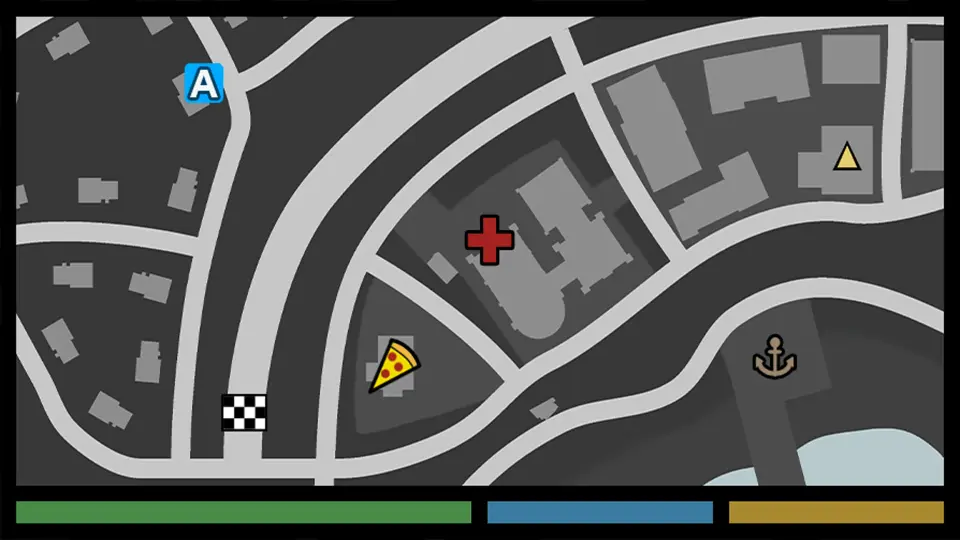
The Tile Based Minimap is a comprehensive solution for creating high-quality navigation systems within the Unreal Editor. This tool allows developers to generate in-game maps based on pre-rendered images taken directly from their levels. By breaking these images into tiles, the system loads them dynamically during gameplay to ensure optimal performance. Furthermore, the developer designed this plugin to be highly versatile for various project types.
Advanced Rendering and Customization
Users can render top-down images of their levels within the editor for immediate use or export them to external software. Consequently, this flexibility simplifies the workflow for creating detailed environments. The Tile Based Minimap also allows for extensive UI customization. You can easily change map shapes, zoom levels, and tilt settings. Additionally, the system supports both fixed and dynamic rotation modes to suit your gameplay needs.
Dynamic Blips and Icon Management
Managing map icons is straightforward and efficient. Users can create blips using data tables and a single function from the provided subsystem. Moreover, multiple widgets can source information from a single blip simultaneously. Because the system does not require specific actors for blips, transform data is sourced directly from scene components. For non-interactable widgets, UI calculations can be handled directly through the material to optimize performance.
Navigation and Multi-Grid Support
The Tile Based Minimap excels in complex environments. It supports multiple grids within a single level, allowing the system to switch between them based on player location. Therefore, it is an ideal choice for games featuring intricate interiors or varying heights. Additionally, the system can take world locations and draw a route on the grid, functioning similarly to a GPS. Users can also mark specific zones or place symbols to guide players effectively.
Replication and Visual Quality
For multiplayer projects, the Blip Replicator component handles both static and dynamic replication. Client-side blips can bind to their local sources or use replicated values as needed. To improve visual fidelity, the system offers optional material-based transformations to reduce pixel jitter. Furthermore, you can set blip scale and opacity based on their distance to the map border for smooth fading effects. Finally, the entire plugin is exposed to Blueprints, ensuring developers can customize every aspect of the system.
 Gameplay Features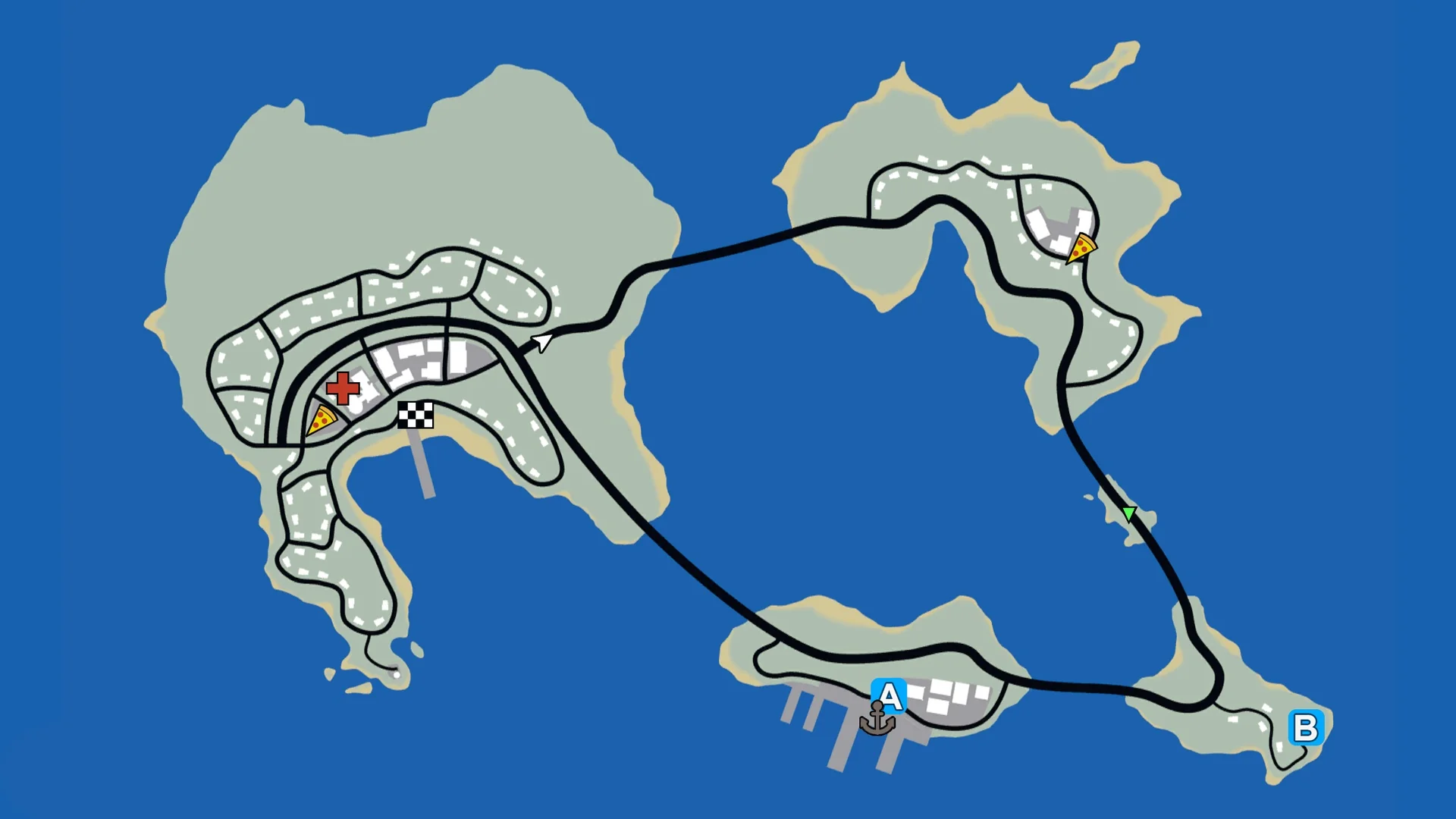
 Gameplay Features
 Gameplay Features
 Gameplay Features