"216a1d817ec3ca8a"{"id":"28262","slug":"hologram-vfx-with-niagara-2","title":"HOLOGRAM VFX With Niagara 2","category":"Gameplay Features","engine":"5.0+","assetVersion":"Engine version: 5.0+","engineVersion":"","tag":"Gameplay Features","accent":"blue","visual":"mech","summary":"HOLOGRAM VFX With Niagara Pack 2 gathers hologram effects, materials, UI imagery, sci-fi modules, and display props into one production-ready set. It is aimed at projects that need customizable hologram visuals for screens, devices, props, and futuristic en...","platform":"Unreal Engine","indexPolicy":"index","publishedAt":"2026-05-06T15:41:40.000Z","updatedAt":"2026-05-06T15:41:42.000Z","sourceNotes":[],"fileContents":[],"compatibility":["Unreal Engine","Engine version: 5.0+"],"featuredImage":{"alt":"HOLOGRAM VFX With Niagara 2","src":"https://3dcghub.com/wp-content/uploads/2026/05/4afc48995ce4_429769af-bbda-4040-96aa-1cb94942512e.webp"},"hasDownloadLink":true,"downloads":0,"terms":[{"taxonomy":"category","slug":"gameplay-features","name":"Gameplay Features"},{"taxonomy":"post_tag","slug":"materials","name":"Materials"},{"taxonomy":"post_tag","slug":"ui","name":"UI"},{"taxonomy":"post_tag","slug":"vfx","name":"VFX"}],"galleryImages":[{"src":"https://3dcghub.com/wp-content/uploads/2026/05/e9c0c7a75b98_28016b80-e9ac-489a-8972-ab6b36f9a99d.webp","alt":"HOLOGRAM VFX With Niagara 2"},{"src":"https://3dcghub.com/wp-content/uploads/2026/05/a39670aae189_c96660e3-6491-4665-b378-c3ebd9894988.webp","alt":"HOLOGRAM VFX With Niagara 2"},{"src":"https://3dcghub.com/wp-content/uploads/2026/05/754483fd32ef_c272302f-26be-4a33-9277-c239883fd5ba.webp","alt":"HOLOGRAM VFX With Niagara 2"},{"src":"https://3dcghub.com/wp-content/uploads/2026/05/77fb33e0539f_8ba87993-19fd-435a-9f8f-4aecc4499728.webp","alt":"HOLOGRAM VFX With Niagara 2"},{"src":"https://3dcghub.com/wp-content/uploads/2026/05/62bba6dbc142_dc9b2fb6-09b3-4154-b3bc-2e646b9b0451.webp","alt":"HOLOGRAM VFX With Niagara 2"},{"src":"https://3dcghub.com/wp-content/uploads/2026/05/22362fc89228_860f7306-414a-4519-9272-0d7de451ab63.webp","alt":"HOLOGRAM VFX With Niagara 2"},{"src":"https://3dcghub.com/wp-content/uploads/2026/05/f545b75f7ae2_201ee967-3aea-4cd5-bf8f-ad83d04bf874.webp","alt":"HOLOGRAM VFX With Niagara 2"},{"src":"https://3dcghub.com/wp-content/uploads/2026/05/65ae6b1265ec_99f3bb0f-16ea-4838-9cc3-0d1ae0d27cb2.webp","alt":"HOLOGRAM VFX With Niagara 2"},{"src":"https://3dcghub.com/wp-content/uploads/2026/05/0c722059315c_10c6e0f1-145f-4916-be00-032a92692184.webp","alt":"HOLOGRAM VFX With Niagara 2"},{"src":"https://3dcghub.com/wp-content/uploads/2026/05/2b6f239dca74_c4325a3c-28ea-4798-883c-9a3e0a6e8b47.webp","alt":"HOLOGRAM VFX With Niagara 2"}],"accessPanel":{"kind":"resource","title":"Get this resource","eyebrow":"Free resource","message":"3DCGHUB is the service provider for this listing. Access is fulfilled through the official publisher channel.","fileName":"Content.7z","safetyNote":"All resources are 100% manually reviewed to eliminate all risks.","actionLabel":"Get this resource","resourceType":"Resource archive","versions":[]},"contentHtml":"\u003cp\u003eProjects built around futuristic control rooms, robotic displays, wearable interfaces, or sci-fi set dressing usually need more than a single effect. They need visuals that can move from floating screens to object projections to environmental accents without feeling disconnected. HOLOGRAM VFX With Niagara Pack 2 sits in that space as a hologram-focused package that combines visual effects, materials, supporting imagery, scene modules, and display models.\u003c/p\u003e\u003cp\u003eThe package centers on fully functional hologram visual effects and material sets. Instead of treating holograms as one isolated effect, it spreads the idea across several production layers: effect examples, reusable materials and material instances, Niagara particles and modules, interface imagery, level design modules, display props, and a space skybox. That mix makes it relevant not just for a single shot, but for scenes that need a consistent holographic language across multiple assets.\u003c/p\u003e\u003ch2\u003eWhere HOLOGRAM VFX With Niagara Pack 2 fits in a sci-fi production\u003c/h2\u003e\u003cp\u003eThis kind of package fits best when a scene needs holograms to appear in several forms at once. A command center might need projected displays, graphic overlays, and illuminated surfaces. A robot-focused scene might need a projector source that visually explains where the hologram is coming from. A wearable or desktop setup might need smaller display elements that still match the rest of the environment.\u003c/p\u003e\u003cp\u003eThat broader use is supported here by the included asset mix. The package contains 26+ hologram VFX examples, which gives a range of starting points instead of a single preset look. It also includes 47+ UI images, so interface-style visuals can sit alongside the effects rather than being treated as a separate design task. For environment support, there are 4+ sci-fi level design modules and 1+ space skybox, helping the hologram work feel placed within a larger scene rather than floating without context.\u003c/p\u003e\u003cp\u003eThere is also a display model set with 4+ items, including a trackable 3-axis projector robot arm, a watch, and desks. Those pieces matter in practical scene building. They give the holograms visible anchors, which is often what sells the effect in motion and in stills. A projected display tends to read better when the viewer can immediately identify the device or surface generating it.\u003c/p\u003e\u003ch2\u003e26+ Hologram VFX Examples and 47+ Materials for iteration\u003c/h2\u003e\u003cp\u003eThe package leans heavily on variation and reuse. Alongside the 26+ hologram VFX examples, it includes 47+ materials and material instances with 7+ material functions. That is useful in production because hologram work often needs to be adjusted scene by scene. One interface may call for a cleaner panel-like look, while another may need something brighter, more animated, or more layered.\u003c/p\u003e\u003cp\u003eMaterial instances and material functions are especially relevant when the goal is to keep a shared visual identity while changing the presentation. A team can take an existing hologram direction and adapt it across different props or displays without rebuilding the effect language from scratch each time. In this package, that flexibility is reinforced by the fact that all hologram VFX examples can be customized.\u003c/p\u003e\u003cp\u003eThe customizable areas named here are specific and practical: Niagara, model, texture, color, timing, emissive, and gradation. That means the package is not locked to a single color scheme or pacing. It can be tuned for quieter ambient displays, more aggressive projected readouts, or brighter focal-point effects depending on the scene. Timing and emissive control are particularly useful when holograms need to match a shot’s rhythm or stand out under different lighting conditions.\u003c/p\u003e\u003ch2\u003eNiagara particles, Niagara modules, and display models in the same workflow\u003c/h2\u003e\u003cp\u003eHOLOGRAM VFX With Niagara Pack 2 includes 4+ Niagara particles with 4+ Niagara modules. In workflow terms, that helps place the package beyond static materials. It supports the moving side of hologram presentation, where particles, transitions, and effect behavior are part of the look rather than an afterthought.\u003c/p\u003e\u003cp\u003eHaving Niagara content next to materials and display models also makes the package easier to use as a scene-building toolkit. A projected interface is rarely just one component. It often needs a source prop, a surface treatment, and a motion layer. Here, the trackable 3-axis projector robot arm stands out because it gives a direct mechanical source for holographic projection. The watch and desks add other scales of presentation, from personal display to workstation setup.\u003c/p\u003e\u003cp\u003eThat scale range makes the package useful across different shot types. A close-up can focus on the watch or projector arm. A medium shot can use desks and display imagery to establish a functional workspace. A larger environment can layer in the sci-fi modules and the space skybox to extend the same visual idea outward.\u003c/p\u003e\u003ch2\u003e47+ UI Images, sci-fi modules, and the space skybox as scene support\u003c/h2\u003e\u003cp\u003eNot every hologram package accounts for the surrounding scene language. This one does by including 47+ UI images, 4+ sci-fi level design modules, and 1+ space skybox. Those elements help connect the effects to an actual setting.\u003c/p\u003e\u003cp\u003eThe UI images can support display readouts, interface framing, or screen-style overlays that match the hologram theme. The sci-fi level design modules give structural support for placing those visuals inside a futuristic environment. The space skybox extends that context outward, which can be useful when the hologram work needs to feel at home in a broader science fiction setting instead of existing in isolation.\u003c/p\u003e\u003cp\u003eBecause all hologram VFX examples can be customized, these supporting assets are not just decorative extras. They can participate in a more unified look across props, environment pieces, and interface moments. That is where the pack becomes especially practical for artists assembling a complete hologram-heavy scene rather than hunting for separate effect, material, and support elements.\u003c/p\u003e\u003cp\u003eFor creators working on sci-fi displays, robotic projection setups, holographic interfaces, or futuristic workspaces, the strongest benefit here is the combination of range and adjustability. The package provides examples to start from, materials to modify, Niagara elements for motion, and enough supporting scene content to make the holograms feel like part of a world.\u003c/p\u003e\n\n\u003ch2\u003eRelated Resources Worth Checking\u003c/h2\u003e\n\u003cul\u003e\n\u003cli\u003e\u003ca href=\"https://3dcghub.com/galaxy-materials-skybox-update/\" rel=\"noopener noreferrer\"\u003eGalaxy Materials (Skybox Update)\u003c/a\u003e\u003c/li\u003e\n\u003cli\u003e\u003ca href=\"https://3dcghub.com/niagara-realistic-starter-vfx-pack-2/\" rel=\"noopener noreferrer\"\u003eNiagara Realistic Starter VFX Pack 2\u003c/a\u003e\u003c/li\u003e\n\u003cli\u003e\u003ca href=\"https://3dcghub.com/realistic-water-vfx/\" rel=\"noopener noreferrer\"\u003eRealistic Water VFX\u003c/a\u003e\u003c/li\u003e\n\u003cli\u003e\u003ca href=\"https://3dcghub.com/unreal-engine-5-one-course-solution-for-niagara-vfx/\" rel=\"noopener noreferrer\"\u003eUnreal Engine 5: One Course Solution For Niagara VFX\u003c/a\u003e\u003c/li\u003e\n\u003cli\u003e\u003ca href=\"https://3dcghub.com/volcano-land-environment-w-terrain-scatter-tool-exterior-natural-vfx/\" rel=\"noopener noreferrer\"\u003eVolcano Land Environment w/ Terrain Scatter Tool (Exterior, Natural, VFX)\u003c/a\u003e\u003c/li\u003e\n\u003c/ul\u003e\n\n\u003ch2\u003eAsset Gallery\u003c/h2\u003e","contentTextLength":6629,"navigation":{"current":2408,"total":4230,"previous":{"id":"28275","slug":"horror-and-decay-vol-5-urban-surfaces","title":"Horror and Decay VOL.5 - Urban Surfaces","category":"Damage \u0026 Grunge","platform":"Unreal Engine","updatedAt":"2026-05-06T15:45:05.000Z"},"next":{"id":"28248","slug":"holidays-vol-1-halloween-decor-nanite-and-low-poly","title":"Holidays VOL.1 - Halloween Decor (Nanite and Low Poly)","category":"Holiday","platform":"Unreal Engine","updatedAt":"2026-05-06T15:39:52.000Z"}},"relatedResources":[{"id":"27841","slug":"teleportation-and-portal","title":"Teleportation and Portal","category":"Gameplay Features","engine":"5.0+","assetVersion":"Engine version: 5.0+","engineVersion":"4.22","tag":"Gameplay Features","accent":"blue","visual":"mech","summary":"Teleportation and Portal centers on one clear job: moving characters through portals without manual friction. Its strongest practical angle is online multiplayer, with a replicated, customizable, and automatic setup backed by Blueprint, Niagara, particles,...","platform":"Unreal Engine","indexPolicy":"index","publishedAt":"2026-04-29T10:56:20.000Z","updatedAt":"2026-04-29T10:56:21.000Z","sourceNotes":[],"fileContents":[],"compatibility":["Unreal Engine","Engine version: 5.0+"],"featuredImage":{"alt":"Teleportation and Portal","src":"https://3dcghub.com/wp-content/uploads/2026/04/b75b5cbdd2e1_e4771e4d-77b5-48e2-8b4f-31654a1f53e7.webp"},"hasDownloadLink":true,"downloads":0},{"id":"13199","slug":"motionui","title":"MotionUI","category":"Variety","engine":"4.26+,5.0+","assetVersion":"Engine version: 4.26+,5.0+","engineVersion":"4.25","tag":"Variety","accent":"blue","visual":"luts","summary":"MotionUI provides a comprehensive library of material functions specifically designed for motion design and advanced dynamic UI development. It is an ideal solution for creators working with UMG across various platforms.","platform":"Unreal Engine","indexPolicy":"index","publishedAt":"2026-03-10T16:29:12.000Z","updatedAt":"2026-04-19T15:46:30.000Z","sourceNotes":[],"fileContents":[],"compatibility":["Unreal Engine","Engine version: 4.26+,5.0+"],"featuredImage":{"alt":"MotionUI","src":"https://3dcghub.com/wp-content/uploads/2026/03/064b082b-4a54-4d21-bf1d-0a7ccc4a8b23.webp"},"hasDownloadLink":true,"downloads":0},{"id":"1001004","slug":"next-gen-destruction-toolkit","title":"Next Gen Destruction Toolkit","category":"Gameplay Features","engine":"5.3+","assetVersion":"","engineVersion":"Engine Version: 5.3+","tag":"Gameplay Features","accent":"blue","visual":"mech","summary":"A UE5 Chaos Destruction framework using data assets, surface-driven VFX and sound, with 15 Blueprints and 14 Niagara systems. Built for Nanite/Lumen.","platform":"Unreal Engine","indexPolicy":"index","publishedAt":"2026-08-22T10:54:47.045Z","updatedAt":"2026-08-22T10:54:47.045Z","sourceNotes":[],"fileContents":[],"compatibility":["Unreal Engine","Engine Version: 5.3+"],"featuredImage":{"alt":"Next Gen Destruction Toolkit","src":"/wp-content/uploads/published/2026/08/ae98b282cc03-ed3bc7a2-1533-4764-9cea-bf9d64a790d8-8eb923473f.webp"},"hasDownloadLink":true,"downloads":5}]}
Gameplay Features
HOLOGRAM VFX With Niagara 2
HOLOGRAM VFX With Niagara Pack 2 gathers hologram effects, materials, UI imagery, sci-fi modules, and display props into one production-ready set. It is aimed at projects that need customizable hologram visuals for screens, devices, props, and futuristic en...
Projects built around futuristic control rooms, robotic displays, wearable interfaces, or sci-fi set dressing usually need more than a single effect. They need visuals that can move from floating screens to object projections to environmental accents without feeling disconnected. HOLOGRAM VFX With Niagara Pack 2 sits in that space as a hologram-focused package that combines visual effects, materials, supporting imagery, scene modules, and display models.
The package centers on fully functional hologram visual effects and material sets. Instead of treating holograms as one isolated effect, it spreads the idea across several production layers: effect examples, reusable materials and material instances, Niagara particles and modules, interface imagery, level design modules, display props, and a space skybox. That mix makes it relevant not just for a single shot, but for scenes that need a consistent holographic language across multiple assets.
Where HOLOGRAM VFX With Niagara Pack 2 fits in a sci-fi production
This kind of package fits best when a scene needs holograms to appear in several forms at once. A command center might need projected displays, graphic overlays, and illuminated surfaces. A robot-focused scene might need a projector source that visually explains where the hologram is coming from. A wearable or desktop setup might need smaller display elements that still match the rest of the environment.
That broader use is supported here by the included asset mix. The package contains 26+ hologram VFX examples, which gives a range of starting points instead of a single preset look. It also includes 47+ UI images, so interface-style visuals can sit alongside the effects rather than being treated as a separate design task. For environment support, there are 4+ sci-fi level design modules and 1+ space skybox, helping the hologram work feel placed within a larger scene rather than floating without context.
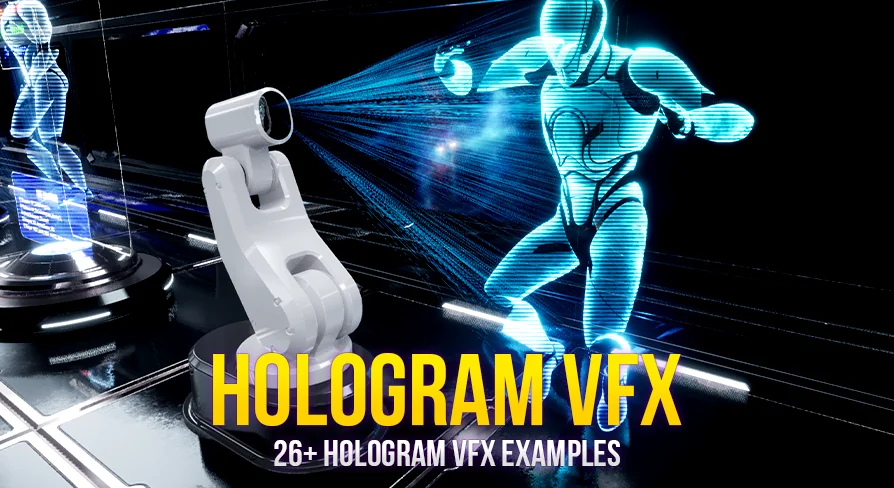
There is also a display model set with 4+ items, including a trackable 3-axis projector robot arm, a watch, and desks. Those pieces matter in practical scene building. They give the holograms visible anchors, which is often what sells the effect in motion and in stills. A projected display tends to read better when the viewer can immediately identify the device or surface generating it.
26+ Hologram VFX Examples and 47+ Materials for iteration
The package leans heavily on variation and reuse. Alongside the 26+ hologram VFX examples, it includes 47+ materials and material instances with 7+ material functions. That is useful in production because hologram work often needs to be adjusted scene by scene. One interface may call for a cleaner panel-like look, while another may need something brighter, more animated, or more layered.
Material instances and material functions are especially relevant when the goal is to keep a shared visual identity while changing the presentation. A team can take an existing hologram direction and adapt it across different props or displays without rebuilding the effect language from scratch each time. In this package, that flexibility is reinforced by the fact that all hologram VFX examples can be customized.
The customizable areas named here are specific and practical: Niagara, model, texture, color, timing, emissive, and gradation. That means the package is not locked to a single color scheme or pacing. It can be tuned for quieter ambient displays, more aggressive projected readouts, or brighter focal-point effects depending on the scene. Timing and emissive control are particularly useful when holograms need to match a shot’s rhythm or stand out under different lighting conditions.
Niagara particles, Niagara modules, and display models in the same workflow
HOLOGRAM VFX With Niagara Pack 2 includes 4+ Niagara particles with 4+ Niagara modules. In workflow terms, that helps place the package beyond static materials. It supports the moving side of hologram presentation, where particles, transitions, and effect behavior are part of the look rather than an afterthought.
Having Niagara content next to materials and display models also makes the package easier to use as a scene-building toolkit. A projected interface is rarely just one component. It often needs a source prop, a surface treatment, and a motion layer. Here, the trackable 3-axis projector robot arm stands out because it gives a direct mechanical source for holographic projection. The watch and desks add other scales of presentation, from personal display to workstation setup.
That scale range makes the package useful across different shot types. A close-up can focus on the watch or projector arm. A medium shot can use desks and display imagery to establish a functional workspace. A larger environment can layer in the sci-fi modules and the space skybox to extend the same visual idea outward.
47+ UI Images, sci-fi modules, and the space skybox as scene support
Not every hologram package accounts for the surrounding scene language. This one does by including 47+ UI images, 4+ sci-fi level design modules, and 1+ space skybox. Those elements help connect the effects to an actual setting.
The UI images can support display readouts, interface framing, or screen-style overlays that match the hologram theme. The sci-fi level design modules give structural support for placing those visuals inside a futuristic environment. The space skybox extends that context outward, which can be useful when the hologram work needs to feel at home in a broader science fiction setting instead of existing in isolation.
Because all hologram VFX examples can be customized, these supporting assets are not just decorative extras. They can participate in a more unified look across props, environment pieces, and interface moments. That is where the pack becomes especially practical for artists assembling a complete hologram-heavy scene rather than hunting for separate effect, material, and support elements.
For creators working on sci-fi displays, robotic projection setups, holographic interfaces, or futuristic workspaces, the strongest benefit here is the combination of range and adjustability. The package provides examples to start from, materials to modify, Niagara elements for motion, and enough supporting scene content to make the holograms feel like part of a world.
 Gameplay Features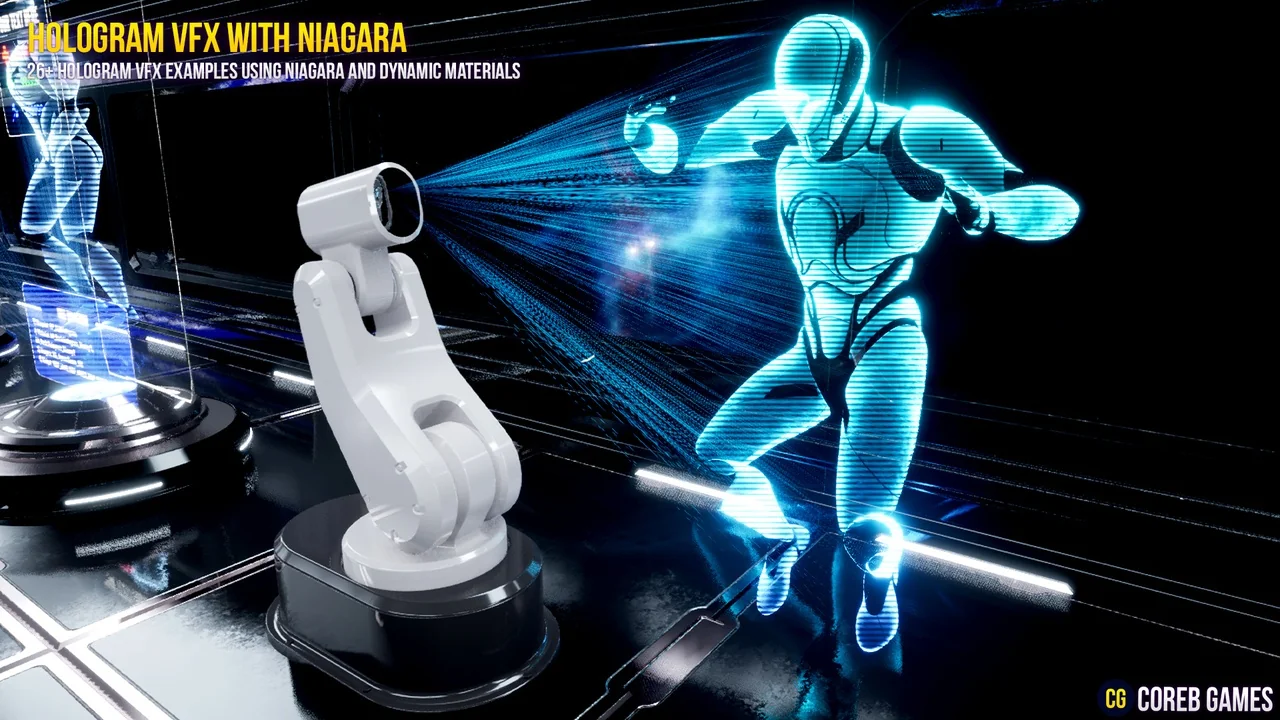
 Gameplay Features
 Variety
 Gameplay Features