"7066dd76da796369"{"id":"27841","slug":"teleportation-and-portal","title":"Teleportation and Portal","category":"Gameplay Features","engine":"5.0+","assetVersion":"Engine version: 5.0+","engineVersion":"4.22","tag":"Gameplay Features","accent":"blue","visual":"mech","summary":"Teleportation and Portal centers on one clear job: moving characters through portals without manual friction. Its strongest practical angle is online multiplayer, with a replicated, customizable, and automatic setup backed by Blueprint, Niagara, particles,...","platform":"Unreal Engine","publishedAt":"2026-04-29T10:56:20.000Z","updatedAt":"2026-04-29T10:56:21.000Z","sourceNotes":[],"fileContents":[],"compatibility":["Unreal Engine","Engine version: 5.0+"],"featuredImage":{"alt":"Teleportation and Portal","src":"https://3dcghub.com/wp-content/uploads/2026/04/b75b5cbdd2e1_e4771e4d-77b5-48e2-8b4f-31654a1f53e7.webp"},"hasDownloadLink":true,"downloads":0,"terms":[{"taxonomy":"category","slug":"gameplay-features","name":"Gameplay Features"},{"taxonomy":"post_tag","slug":"game-systems","name":"Game Systems"},{"taxonomy":"post_tag","slug":"unreal-engine-5","name":"Unreal Engine 5"},{"taxonomy":"post_tag","slug":"vfx","name":"VFX"}],"galleryImages":[{"src":"https://3dcghub.com/wp-content/uploads/2026/04/76aeffcb8edb_f303b29b-beb9-41a3-ac43-15051c574dab.webp","alt":"Teleportation and Portal"},{"src":"https://3dcghub.com/wp-content/uploads/2026/04/ac56af04d700_6e4b4bf7-8a11-44d8-92d4-bcf0524afd04.webp","alt":"Teleportation and Portal"},{"src":"https://3dcghub.com/wp-content/uploads/2026/04/ad83651f3572_6e2d0b09-8551-487a-88ad-ab8bd7f0454f.webp","alt":"Teleportation and Portal"},{"src":"https://3dcghub.com/wp-content/uploads/2026/04/a71e4e09a5cf_461eb30d-e015-4206-9f05-64a36f34ead7.webp","alt":"Teleportation and Portal"},{"src":"https://3dcghub.com/wp-content/uploads/2026/04/0c27e7c2ec31_d0491fd5-610d-4682-826f-00c2f9170d4e.webp","alt":"Teleportation and Portal"},{"src":"https://3dcghub.com/wp-content/uploads/2026/04/1c1b4be9aed4_1f334288-f339-4542-b3b0-8cdbf1d37e0c.webp","alt":"Teleportation and Portal"},{"src":"https://3dcghub.com/wp-content/uploads/2026/04/7ac6430dfa8b_3d064181-a2d2-45a7-ab4d-70ce1412e4f4.webp","alt":"Teleportation and Portal"},{"src":"https://3dcghub.com/wp-content/uploads/2026/04/3c00e605444d_df66c9df-3d58-4a63-9041-10faafdfb48c.webp","alt":"Teleportation and Portal"},{"src":"https://3dcghub.com/wp-content/uploads/2026/04/37109a39f0d0_22c6278b-c570-4e06-8527-64c45f0ba51c.webp","alt":"Teleportation and Portal"}],"accessPanel":{"kind":"resource","title":"Access this resource","eyebrow":"Free Download","message":"Log in or create a free account to start your download.","fileName":"TeleportationandPortal.7z","safetyNote":"All resources are 100% manually reviewed to eliminate all risks.","actionLabel":"Download Free","resourceType":"Resource archive"},"contentHtml":"\u003cp\u003eProjects that need fast character movement between spaces, stylized portal moments, or network-ready traversal are the clearest fit for \u003cstrong\u003eTeleportation and Portal\u003c/strong\u003e. The package focuses on an automatic teleportation and portal system, and its biggest practical strength is that it works perfectly for online multiplayer.\u003c/p\u003e \u003cp\u003eThat makes it useful in scenes where teleportation is not just a visual gimmick, but part of the flow. Multiplayer arenas, cooperative maps, character traversal set pieces, and portal-driven level logic all benefit from a system that is already framed around replication and network use.\u003c/p\u003e \u003ch2\u003eTeleportation and Portal in multiplayer scenes\u003c/h2\u003e\n\u003cp\u003eThe most concrete promise here is multiplayer behavior. \u003cstrong\u003eTeleportation and Portal\u003c/strong\u003e Is marked as replicated, network-focused, and multiplayer-ready, with the description stating that it works perfectly for online multiplayer. For developers building traversal into connected play, that matters more than visual flair alone.\u003c/p\u003e \u003cp\u003ePortals can be tricky when characters, timing, and state all need to stay in sync. This package is positioned directly around that kind of use, rather than treating multiplayer as an afterthought. If a project needs teleport points or portal transitions to function cleanly in networked play, this is the area where the resource is most clearly aimed.\u003c/p\u003e \u003ch2\u003eAutomatic teleport and customizable portal behavior\u003c/h2\u003e\n\u003cp\u003eThe system is both \u003cstrong\u003eFully customizable\u003c/strong\u003e And \u003cstrong\u003eAutomatic\u003c/strong\u003e. Those two points define how it would slot into production.\u003c/p\u003e \u003cp\u003eAutomatic behavior points to a setup where teleportation and portal actions are meant to happen with minimal manual handling during gameplay. Customization points to the opposite side of the workflow: the developer is not locked into a single preset behavior or presentation. Together, those details suggest a package that tries to reduce repetitive setup while still leaving room to shape the result to a specific project.\u003c/p\u003e \u003cp\u003eFor practical use cases, that suits games where portal traversal needs to feel like part of the world rather than a one-off scripted trick. It also fits teams that want to reuse the same core system across multiple scenes, portals, or characters while keeping the behavior adjustable.\u003c/p\u003e \u003ch2\u003eBlueprint, Niagara, materials, particles, and sound\u003c/h2\u003e\n\u003cp\u003eThe tagged workflow around this package points to several concrete implementation areas: \u003cstrong\u003eBlueprint\u003c/strong\u003e, script, \u003cstrong\u003eNiagara\u003c/strong\u003e, materials, particles, sound, and character-related use. That combination places the portal system at the intersection of gameplay logic and presentation.\u003c/p\u003e \u003cp\u003eBlueprint and script tags tie it to gameplay setup and system behavior. Niagara, particle, and material tags point toward the visual side of the portal effect. Sound adds another layer to how teleportation events can be presented in-game. The stylized tag also gives a clue about the kind of visual direction this system can sit alongside.\u003c/p\u003e \u003cp\u003eNone of those pieces stand alone in a portal setup. Teleportation usually needs logic, feedback, and visual readability at the same time. Here, the tagged focus covers each of those areas without drifting away from the core purpose of moving characters through portals.\u003c/p\u003e \u003ch2\u003eWhere Teleportation and Portal fits best\u003c/h2\u003e\n\u003cp\u003eThis is most useful for developers who need a game-ready portal system instead of a loose collection of effects. The tags point toward a resource that connects character interaction, replicated gameplay, and effect-driven presentation in one teleport-focused package.\u003c/p\u003e \u003cp\u003eTeams working on stylized multiplayer projects are an especially strong match, but the broader appeal is simple: if a game needs customizable, automatic portal travel with online multiplayer support, this package is aimed directly at that job.\u003c/p\u003e\n\n\u003ch2\u003eMore From The Same Workflow\u003c/h2\u003e\n\u003cul\u003e\n\u003cli\u003e\u003ca href=\"https://3dcghub.com/ue5-character-absorb-vfx/\" title=\"UE5 Character Absorb VFX\"\u003eUE5 Character Absorb VFX\u003c/a\u003e\u003c/li\u003e\n\u003cli\u003e\u003ca href=\"https://3dcghub.com/unreal-engine-5-one-course-solution-for-niagara-vfx/\" title=\"Unreal Engine 5: One Course Solution For Niagara VFX\"\u003eUnreal Engine 5: One Course Solution For Niagara VFX\u003c/a\u003e\u003c/li\u003e\n\u003cli\u003e\u003ca href=\"https://3dcghub.com/environment-vfx-pack-high-quality/\" title=\"Environment VFX Pack – High Quality\"\u003eEnvironment VFX Pack – High Quality\u003c/a\u003e\u003c/li\u003e\n\u003cli\u003e\u003ca href=\"https://3dcghub.com/impact-vfx-pack/\" title=\"Impact VFX Pack\"\u003eImpact VFX Pack\u003c/a\u003e\u003c/li\u003e\n\u003cli\u003e\u003ca href=\"https://3dcghub.com/magical-staff-auras-vfx-pack/\" title=\"Magical Staff Auras VFX Pack\"\u003eMagical Staff Auras VFX Pack\u003c/a\u003e\u003c/li\u003e\n\u003c/ul\u003e","contentTextLength":3913,"navigation":{"current":2227,"total":4016,"previous":{"id":"27854","slug":"swarms-vfx","title":"Swarms VFX","category":"Variety","platform":"Unreal Engine","updatedAt":"2026-04-29T13:14:55.000Z"},"next":{"id":"27826","slug":"tempest-ninja-shadows-series-stealth","title":"Tempest Ninja - Shadows Series Stealth","category":"Humans","platform":"Unreal Engine","updatedAt":"2026-04-29T09:04:39.000Z"}},"relatedResources":[{"id":"27803","slug":"true-fighting-game-engine","title":"TRUE Fighting Game Engine","category":"Gameplay Features","engine":"5.5+","assetVersion":"Engine version: 5.5+","engineVersion":"Asset Version:1.6.2","tag":"Gameplay Features","accent":"blue","visual":"animation","summary":"TRUE Fighting Game Engine focuses on getting a fighting game scene moving quickly, from character selection to attacks, hit reactions, and multiplayer play. Its feature set covers both setup work and the moment-to-moment feel of combat, with support for 2.5...","platform":"Unreal Engine","publishedAt":"2026-04-29T06:07:36.000Z","updatedAt":"2026-04-29T06:07:37.000Z","sourceNotes":[],"fileContents":[],"compatibility":["Unreal Engine","Engine version: 5.5+","Asset Version: 1.6.2"],"featuredImage":{"alt":"TRUE Fighting Game Engine","src":"https://3dcghub.com/wp-content/uploads/2026/04/bd8f97d07537_6587df2c-727a-45b1-892a-3f3ed68e341b.webp"},"hasDownloadLink":true,"downloads":2},{"id":"28394","slug":"advanced-framework-vr-mobile-desktop","title":"Advanced Framework - VR, Mobile \u0026 Desktop","category":"Gameplay Features","engine":"5.0+","assetVersion":"Engine version: 5.0+","engineVersion":"","tag":"Gameplay Features","accent":"blue","visual":"luts","summary":"Advanced Framework is a production-ready foundation for VR, desktop, and mobile applications. It combines first-person control setups, interaction systems, multiplayer replication, navigation modes, and adaptable UI tools in one package.","platform":"Unreal Engine","publishedAt":"2026-05-12T09:33:53.000Z","updatedAt":"2026-05-12T09:33:54.000Z","sourceNotes":[],"fileContents":[],"compatibility":["Unreal Engine","Engine version: 5.0+"],"featuredImage":{"alt":"Advanced Framework - VR, Mobile \u0026 Desktop","src":"https://3dcghub.com/wp-content/uploads/2026/05/98ecd66b1773_1af6d69e-fbe1-435d-abdf-cc772ef3b31f.webp"},"hasDownloadLink":true,"downloads":0},{"id":"1000048","slug":"customizable-bodycam-component","title":"Customizable Bodycam Component","category":"Gameplay Features","engine":"5.1+","assetVersion":"","engineVersion":"Engine Version: 5.1+","tag":"Gameplay Features","accent":"blue","visual":"mech","summary":"A Blueprint-driven camera component designed to deliver photorealistic, character-mirrored motion, exposed material parameters, and customizable VHS effects.","platform":"Unreal Engine","publishedAt":"2026-05-22T11:03:34.875Z","updatedAt":"2026-10-24T07:39:32.861Z","sourceNotes":[],"fileContents":[],"compatibility":["Unreal Engine","Engine Version: 5.1+"],"featuredImage":{"alt":"Customizable Bodycam Component","src":"/wp-content/uploads/published/2026/05/a8f60f9cccc0-8a5f4ac1-11c7-49f2-9fb6-a21c09403ba4-65699f7637.webp"},"hasDownloadLink":true,"downloads":5}]}
Gameplay Features
Teleportation and Portal
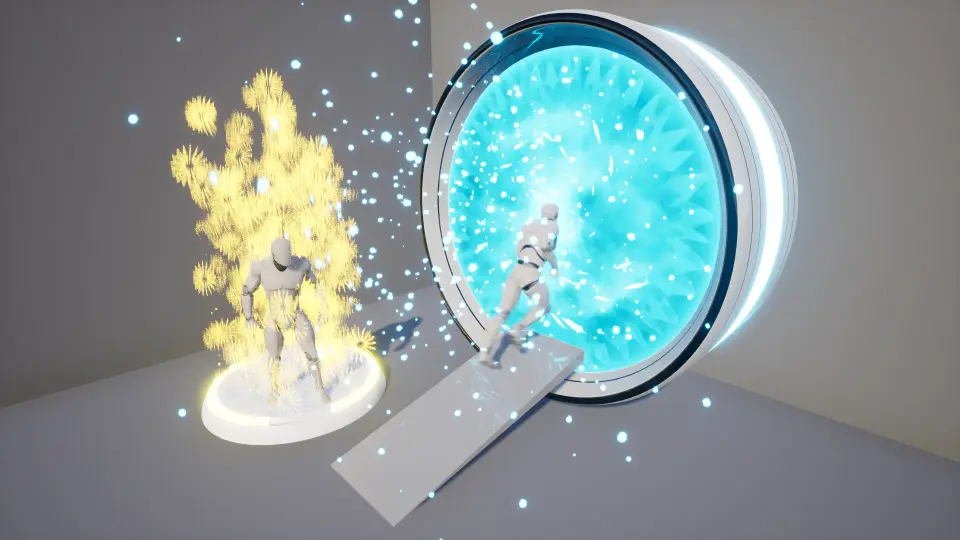
Teleportation and Portal centers on one clear job: moving characters through portals without manual friction. Its strongest practical angle is online multiplayer, with a replicated, customizable, and automatic setup backed by Blueprint, Niagara, particles,...
Projects that need fast character movement between spaces, stylized portal moments, or network-ready traversal are the clearest fit for Teleportation and Portal. The package focuses on an automatic teleportation and portal system, and its biggest practical strength is that it works perfectly for online multiplayer.
That makes it useful in scenes where teleportation is not just a visual gimmick, but part of the flow. Multiplayer arenas, cooperative maps, character traversal set pieces, and portal-driven level logic all benefit from a system that is already framed around replication and network use.
Teleportation and Portal in multiplayer scenes
The most concrete promise here is multiplayer behavior. Teleportation and Portal Is marked as replicated, network-focused, and multiplayer-ready, with the description stating that it works perfectly for online multiplayer. For developers building traversal into connected play, that matters more than visual flair alone.
Portals can be tricky when characters, timing, and state all need to stay in sync. This package is positioned directly around that kind of use, rather than treating multiplayer as an afterthought. If a project needs teleport points or portal transitions to function cleanly in networked play, this is the area where the resource is most clearly aimed.
Automatic teleport and customizable portal behavior
The system is both Fully customizable And Automatic. Those two points define how it would slot into production.
Automatic behavior points to a setup where teleportation and portal actions are meant to happen with minimal manual handling during gameplay. Customization points to the opposite side of the workflow: the developer is not locked into a single preset behavior or presentation. Together, those details suggest a package that tries to reduce repetitive setup while still leaving room to shape the result to a specific project.
For practical use cases, that suits games where portal traversal needs to feel like part of the world rather than a one-off scripted trick. It also fits teams that want to reuse the same core system across multiple scenes, portals, or characters while keeping the behavior adjustable.
Blueprint, Niagara, materials, particles, and sound
The tagged workflow around this package points to several concrete implementation areas: Blueprint, script, Niagara, materials, particles, sound, and character-related use. That combination places the portal system at the intersection of gameplay logic and presentation.
Blueprint and script tags tie it to gameplay setup and system behavior. Niagara, particle, and material tags point toward the visual side of the portal effect. Sound adds another layer to how teleportation events can be presented in-game. The stylized tag also gives a clue about the kind of visual direction this system can sit alongside.
None of those pieces stand alone in a portal setup. Teleportation usually needs logic, feedback, and visual readability at the same time. Here, the tagged focus covers each of those areas without drifting away from the core purpose of moving characters through portals.
Where Teleportation and Portal fits best
This is most useful for developers who need a game-ready portal system instead of a loose collection of effects. The tags point toward a resource that connects character interaction, replicated gameplay, and effect-driven presentation in one teleport-focused package.
Teams working on stylized multiplayer projects are an especially strong match, but the broader appeal is simple: if a game needs customizable, automatic portal travel with online multiplayer support, this package is aimed directly at that job.
 Gameplay Features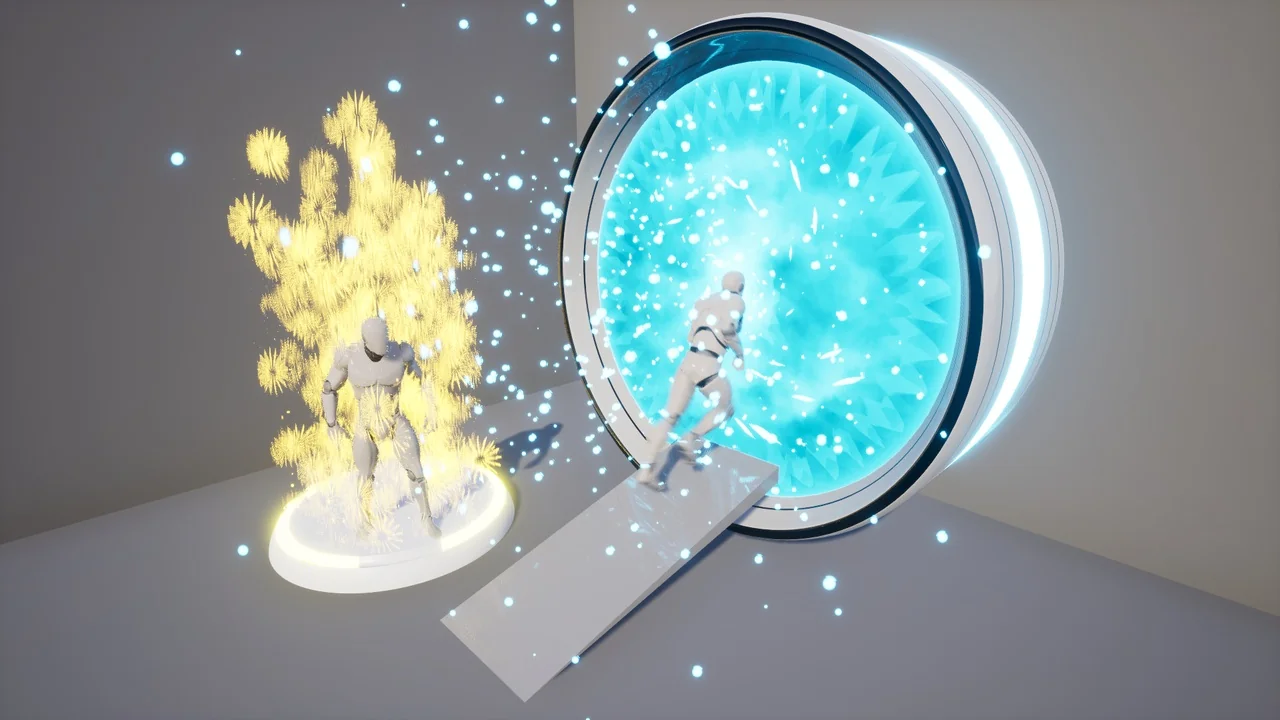
 Gameplay Features
 Gameplay Features
 Gameplay Features