"c68a05d5e51405b3"{"id":"27061","slug":"ue5-character-absorb-vfx","title":"UE5 Character Absorb VFX","category":"Spells \u0026 Combat","engine":"5.3+","assetVersion":"Engine version: 5.3+","engineVersion":"","tag":"Spells \u0026 Combat","accent":"blue","visual":"character","summary":"UE5 Character Absorb VFX focuses on dissolve and absorption effects for skeletal meshes and static meshes. It uses Niagara and material parameters, with one setup note for custom meshes.","platform":"Unreal Engine","publishedAt":"2026-04-21T08:24:21.000Z","updatedAt":"2026-04-21T08:24:22.000Z","sourceNotes":[],"fileContents":[],"compatibility":["Unreal Engine","Engine version: 5.3+"],"featuredImage":{"alt":"UE5 Character Absorb VFX","src":"https://3dcghub.com/wp-content/uploads/2026/04/2cc4ebced433_10a97d36-e2d0-49b4-b90c-e5e2862e6208.webp"},"hasDownloadLink":true,"downloads":0,"terms":[{"taxonomy":"category","slug":"spells-and-combat","name":"Spells \u0026 Combat"},{"taxonomy":"post_tag","slug":"characters","name":"Characters"},{"taxonomy":"post_tag","slug":"unreal-engine-5","name":"Unreal Engine 5"},{"taxonomy":"post_tag","slug":"vfx","name":"VFX"}],"galleryImages":[{"src":"https://3dcghub.com/wp-content/uploads/2026/04/aca579098132_60a0d7eb-e37d-4d63-885d-523f7940371f.webp","alt":"UE5 Character Absorb VFX"},{"src":"https://3dcghub.com/wp-content/uploads/2026/04/29be6a2ce76a_9db36484-7298-498c-a55d-f92f7704051c.webp","alt":"UE5 Character Absorb VFX"},{"src":"https://3dcghub.com/wp-content/uploads/2026/04/8c0fa5461d3d_57142bc1-8587-459d-b6c6-45b7802b5c23.webp","alt":"UE5 Character Absorb VFX"},{"src":"https://3dcghub.com/wp-content/uploads/2026/04/7774c6e37e66_d083a909-3f5d-4c44-b326-e673255a0379.webp","alt":"UE5 Character Absorb VFX"},{"src":"https://3dcghub.com/wp-content/uploads/2026/04/bbaf290e87bf_8ec92fa1-40e2-41b2-99a4-db4ee26020a4.webp","alt":"UE5 Character Absorb VFX"},{"src":"https://3dcghub.com/wp-content/uploads/2026/04/69601130bb44_ff5f9ba1-9b04-42bb-b084-068a50100477.webp","alt":"UE5 Character Absorb VFX"},{"src":"https://3dcghub.com/wp-content/uploads/2026/04/92a6d56dd787_46206419-328f-41c6-99ef-b435f788133a.webp","alt":"UE5 Character Absorb VFX"}],"accessPanel":{"kind":"resource","title":"Access this resource","eyebrow":"Free Download","message":"Log in or create a free account to start your download.","fileName":"Content.7z","safetyNote":"All resources are 100% manually reviewed to eliminate all risks.","actionLabel":"Download Free","resourceType":"Resource archive"},"contentHtml":"\u003ch2\u003eSkeletal Mesh and Static Mesh Dissolve\u003c/h2\u003e\u003cp\u003eUE5 Character Absorb VFX centers on dissolve and absorption effects for both skeletal meshes and static meshes. That gives the same visual language to an animated character and to a non-animated mesh, which is useful when a scene needs a controlled disappearance instead of an instant cut.\u003c/p\u003e\u003cp\u003eThe core idea is simple and specific: the mesh goes through a dissolve and absorption look. That makes the effect a fit for moments where a character, creature, or object is meant to read as being removed from the scene with a stylized visual process rather than a hard vanish. The package does not need to be framed as a general-purpose VFX library to be useful; it already has a clear job inside a game scene.\u003c/p\u003e\u003cp\u003eBecause it covers both skeletal and static meshes, the same treatment can carry across different kinds of assets. A team does not have to treat character-only moments and object-only moments as separate visual problems if the intended look is the same. That helps keep the scene language consistent when the project calls for a dissolve or absorption cue in more than one place.\u003c/p\u003e\u003ch2\u003eNiagara and Material Parameters\u003c/h2\u003e\u003cp\u003eThe effect is controlled by Niagara and material parameters. That places it in the usual Unreal Engine VFX workflow, where the visible behavior is driven through the particle and material layers instead of being locked into a single fixed result. In practical terms, that means the dissolve and absorption are not just a static appearance; they are part of a controllable system.\u003c/p\u003e\u003cp\u003eNiagara control matters when the effect needs to be tied to a gameplay event or a scripted moment. A character death, a magical removal, or an absorption beat can be driven through the effect system so the visual change happens in step with the scene. Material parameters add another level of control by connecting the look of the mesh itself to the effect, which is important for a dissolve that has to feel attached to the surface rather than floating separately from it.\u003c/p\u003e\u003cp\u003eThis combination also makes the package easier to place in production work where timing and appearance both matter. The visual result can sit close to the event that triggers it, while the material side handles the way the mesh actually appears to break down or fade. That is a practical setup for teams that want a visible, readable transition without changing the basic effect language every time the mesh changes.\u003c/p\u003e\u003ch2\u003eUsing a Custom Mesh\u003c/h2\u003e\u003cp\u003eThere is one clear setup note for custom meshes: “Allow CPUAccess” needs to be enabled in the mesh detail panel. That is the explicit step to check before trying the effect on a custom mesh.\u003c/p\u003e\u003cp\u003eThis matters when the asset is being moved from a sample setup into a project’s own characters or objects. If the mesh is not the default one, the setup still depends on that detail-panel setting. It is a small technical requirement, but it is the kind of requirement that can stop the effect from working as expected if it is missed.\u003c/p\u003e\u003cp\u003eFor production use, that means the package is not just something to drop in and ignore. It has a specific mesh-side requirement for custom content, and that should be part of the normal setup pass before the effect is used in a scene. Once that is handled, the dissolve and absorption behavior can be applied to the chosen mesh type as intended.\u003c/p\u003e\u003ch2\u003eWhere the Effect Fits in a Game Scene\u003c/h2\u003e\u003cp\u003eThe theme tags point toward videogame use, along with death, magic, fantastic, and dead. Those tags line up with the kind of scene this effect suits best: character deaths, magical vanish moments, absorption sequences, and fantasy-style transitions where a mesh needs a visible exit from the world.\u003c/p\u003e\u003cp\u003eThat makes the package a good match for combat scenes, spell-driven scenes, or any moment that needs a stylized disappearance. A character can be dissolved or absorbed instead of simply hidden, which gives the moment more visual weight. The same treatment can also be applied to a static mesh when the scene calls for the same kind of removal or transformation.\u003c/p\u003e\u003cp\u003eBecause the effect spans both skeletal and static meshes, it can support a project that mixes character beats with environment or object beats. The visual language stays consistent across those moments, even if the underlying mesh type changes. That is useful when a game wants one recognizable dissolve or absorption style for more than one kind of scene event.\u003c/p\u003e\u003cp\u003eIn a real production workflow, this kind of asset fits where the team needs a clear mesh-based vanish effect that can be triggered through Niagara and tuned through material parameters. It is set up to handle character and object dissolves, with one custom-mesh requirement to keep in mind before use.\u003c/p\u003e\n\n\u003ch2\u003eExplore Similar Assets\u003c/h2\u003e\n\u003cul\u003e\n\u003cli\u003e\u003ca href=\"https://3dcghub.com/shootlikeme-unreal-engine-third-person-shooter-template/\" title=\"ShootLikeMe – Unreal Engine Third Person Shooter Template\"\u003eShootLikeMe – Unreal Engine Third Person Shooter Template\u003c/a\u003e\u003c/li\u003e\n\u003cli\u003e\u003ca href=\"https://3dcghub.com/advanced-unreal-engine-5-multiplayer-gameplay-programming/\" title=\"Advanced Unreal Engine 5 Multiplayer Gameplay Programming\"\u003eAdvanced Unreal Engine 5 Multiplayer Gameplay Programming\u003c/a\u003e\u003c/li\u003e\n\u003cli\u003e\u003ca href=\"https://3dcghub.com/niagara-beginners-to-advanced-in-unreal-engine-5/\" title=\"Niagara Beginners to advanced in Unreal Engine 5\"\u003eNiagara Beginners to advanced in Unreal Engine 5\u003c/a\u003e\u003c/li\u003e\n\u003cli\u003e\u003ca href=\"https://3dcghub.com/create-zelda-like-skills-with-c-in-unreal-engine-5-2/\" title=\"Create Zelda-like skills with C++ in unreal engine 5\"\u003eCreate Zelda-like skills with C++ in unreal engine 5\u003c/a\u003e\u003c/li\u003e\n\u003cli\u003e\u003ca href=\"https://3dcghub.com/main-menus-beginner-class-unreal-engine-5/\" title=\"Main Menus Beginner Class – Unreal Engine 5\"\u003eMain Menus Beginner Class – Unreal Engine 5\u003c/a\u003e\u003c/li\u003e\n\u003c/ul\u003e","contentTextLength":4999,"navigation":{"current":2126,"total":3860,"previous":{"id":"27084","slug":"defender-top-down-shooter-v3-3","title":"Defender: Top-Down Shooter v3.3","category":"Shooter","platform":"Unreal Engine","updatedAt":"2026-04-21T08:45:52.000Z"},"next":{"id":"27051","slug":"asian-fire-stage-arena","title":"ASIAN - Fire Stage Arena","category":"Towns \u0026 Villages","platform":"Unreal Engine","updatedAt":"2026-04-21T08:14:33.000Z"}},"relatedResources":[{"id":"16636","slug":"realistic-blood-vfx-niagara-blood-effects-blood-vfx-blood-blood-vfx","title":"Realistic Blood VFX (Niagara Blood Effects, Blood VFX, Blood, Blood VFX)","category":"Spells \u0026 Combat","engine":"5.2+","assetVersion":"Engine version: 5.2+","engineVersion":"5.0","tag":"Spells \u0026 Combat","accent":"blue","visual":"luts","summary":"Enhance your project with Realistic Blood VFX, a comprehensive Niagara-based system featuring dynamic splatters, arterial bleeding, and PBR-compatible decals for high-fidelity results.","platform":"Unreal Engine","publishedAt":"2026-03-12T17:37:05.000Z","updatedAt":"2026-04-19T15:43:44.000Z","sourceNotes":[],"fileContents":[],"compatibility":["Unreal Engine","Engine version: 5.2+"],"featuredImage":{"alt":"Realistic Blood VFX (Niagara Blood Effects, Blood VFX, Blood, Blood VFX)","src":"https://3dcghub.com/wp-content/uploads/2026/03/436dc969-0b81-4830-9180-0a4919a2a247.webp"},"hasDownloadLink":true,"downloads":14},{"id":"16838","slug":"water-magic-niagara","title":"Water Magic Niagara","category":"Spells \u0026 Combat","engine":"5.0+","assetVersion":"Engine version: 5.0+","engineVersion":"5.0","tag":"Spells \u0026 Combat","accent":"blue","visual":"animation","summary":"Enhance your project with Water Magic Niagara, a specialized collection of aquatic visual effects. This pack allows for easy customization of size and color to fit any magical gameplay scenario.","platform":"Unreal Engine","publishedAt":"2026-03-12T18:03:54.000Z","updatedAt":"2026-04-19T15:43:41.000Z","sourceNotes":[],"fileContents":[],"compatibility":["Unreal Engine","Engine version: 5.0+"],"featuredImage":{"alt":"Water Magic Niagara","src":"https://3dcghub.com/wp-content/uploads/2026/03/cb921e64-127c-40c5-869f-c9c1dbc93b27.webp"},"hasDownloadLink":true,"downloads":7},{"id":"16455","slug":"magic-projectiles-vol-2-niagara","title":"Magic Projectiles Vol. 2 - Niagara","category":"Spells \u0026 Combat","engine":"5.0+","assetVersion":"Engine version: 5.0+","engineVersion":"4.17","tag":"Spells \u0026 Combat","accent":"blue","visual":"animation","summary":"Enhance your game's combat with Magic Projectiles Vol. 2 - Niagara. This pack features 60 diverse effects, from elemental spells to dark orbs, designed for easy customization and cross-platform performance.","platform":"Unreal Engine","publishedAt":"2026-03-12T17:15:57.000Z","updatedAt":"2026-04-19T15:44:33.000Z","sourceNotes":[],"fileContents":[],"compatibility":["Unreal Engine","Engine version: 5.0+"],"featuredImage":{"alt":"Magic Projectiles Vol. 2 - Niagara","src":"https://3dcghub.com/wp-content/uploads/2026/03/073d96c4-a677-48a6-a0a4-6a24ea560b05.webp"},"hasDownloadLink":true,"downloads":5}]}
Spells & Combat
UE5 Character Absorb VFX
UE5 Character Absorb VFX focuses on dissolve and absorption effects for skeletal meshes and static meshes. It uses Niagara and material parameters, with one setup note for custom meshes.
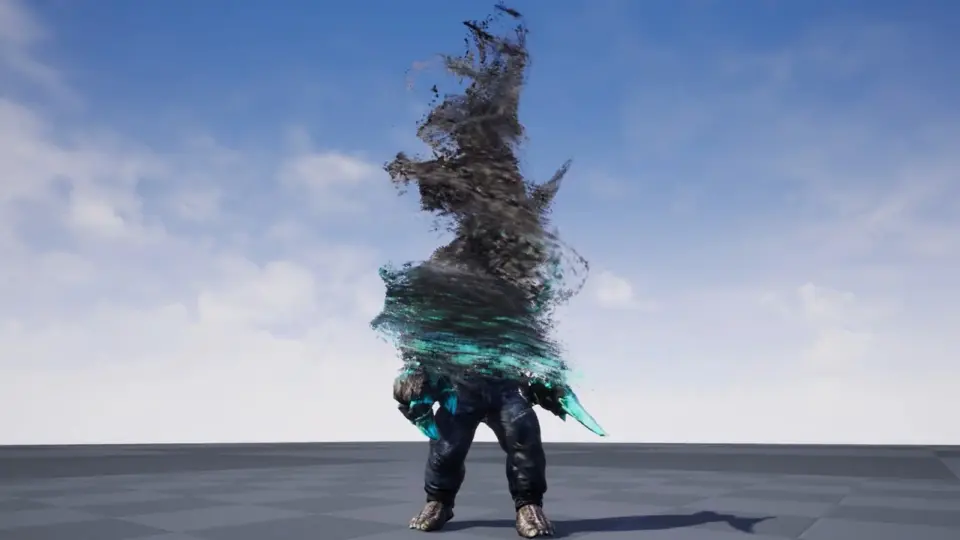
UE5 Character Absorb VFX centers on dissolve and absorption effects for both skeletal meshes and static meshes. That gives the same visual language to an animated character and to a non-animated mesh, which is useful when a scene needs a controlled disappearance instead of an instant cut.
The core idea is simple and specific: the mesh goes through a dissolve and absorption look. That makes the effect a fit for moments where a character, creature, or object is meant to read as being removed from the scene with a stylized visual process rather than a hard vanish. The package does not need to be framed as a general-purpose VFX library to be useful; it already has a clear job inside a game scene.
Because it covers both skeletal and static meshes, the same treatment can carry across different kinds of assets. A team does not have to treat character-only moments and object-only moments as separate visual problems if the intended look is the same. That helps keep the scene language consistent when the project calls for a dissolve or absorption cue in more than one place.
Niagara and Material Parameters
The effect is controlled by Niagara and material parameters. That places it in the usual Unreal Engine VFX workflow, where the visible behavior is driven through the particle and material layers instead of being locked into a single fixed result. In practical terms, that means the dissolve and absorption are not just a static appearance; they are part of a controllable system.
Niagara control matters when the effect needs to be tied to a gameplay event or a scripted moment. A character death, a magical removal, or an absorption beat can be driven through the effect system so the visual change happens in step with the scene. Material parameters add another level of control by connecting the look of the mesh itself to the effect, which is important for a dissolve that has to feel attached to the surface rather than floating separately from it.
This combination also makes the package easier to place in production work where timing and appearance both matter. The visual result can sit close to the event that triggers it, while the material side handles the way the mesh actually appears to break down or fade. That is a practical setup for teams that want a visible, readable transition without changing the basic effect language every time the mesh changes.
Using a Custom Mesh
There is one clear setup note for custom meshes: “Allow CPUAccess” needs to be enabled in the mesh detail panel. That is the explicit step to check before trying the effect on a custom mesh.
This matters when the asset is being moved from a sample setup into a project’s own characters or objects. If the mesh is not the default one, the setup still depends on that detail-panel setting. It is a small technical requirement, but it is the kind of requirement that can stop the effect from working as expected if it is missed.
For production use, that means the package is not just something to drop in and ignore. It has a specific mesh-side requirement for custom content, and that should be part of the normal setup pass before the effect is used in a scene. Once that is handled, the dissolve and absorption behavior can be applied to the chosen mesh type as intended.
Where the Effect Fits in a Game Scene
The theme tags point toward videogame use, along with death, magic, fantastic, and dead. Those tags line up with the kind of scene this effect suits best: character deaths, magical vanish moments, absorption sequences, and fantasy-style transitions where a mesh needs a visible exit from the world.
That makes the package a good match for combat scenes, spell-driven scenes, or any moment that needs a stylized disappearance. A character can be dissolved or absorbed instead of simply hidden, which gives the moment more visual weight. The same treatment can also be applied to a static mesh when the scene calls for the same kind of removal or transformation.
Because the effect spans both skeletal and static meshes, it can support a project that mixes character beats with environment or object beats. The visual language stays consistent across those moments, even if the underlying mesh type changes. That is useful when a game wants one recognizable dissolve or absorption style for more than one kind of scene event.
In a real production workflow, this kind of asset fits where the team needs a clear mesh-based vanish effect that can be triggered through Niagara and tuned through material parameters. It is set up to handle character and object dissolves, with one custom-mesh requirement to keep in mind before use.
 Spells & Combat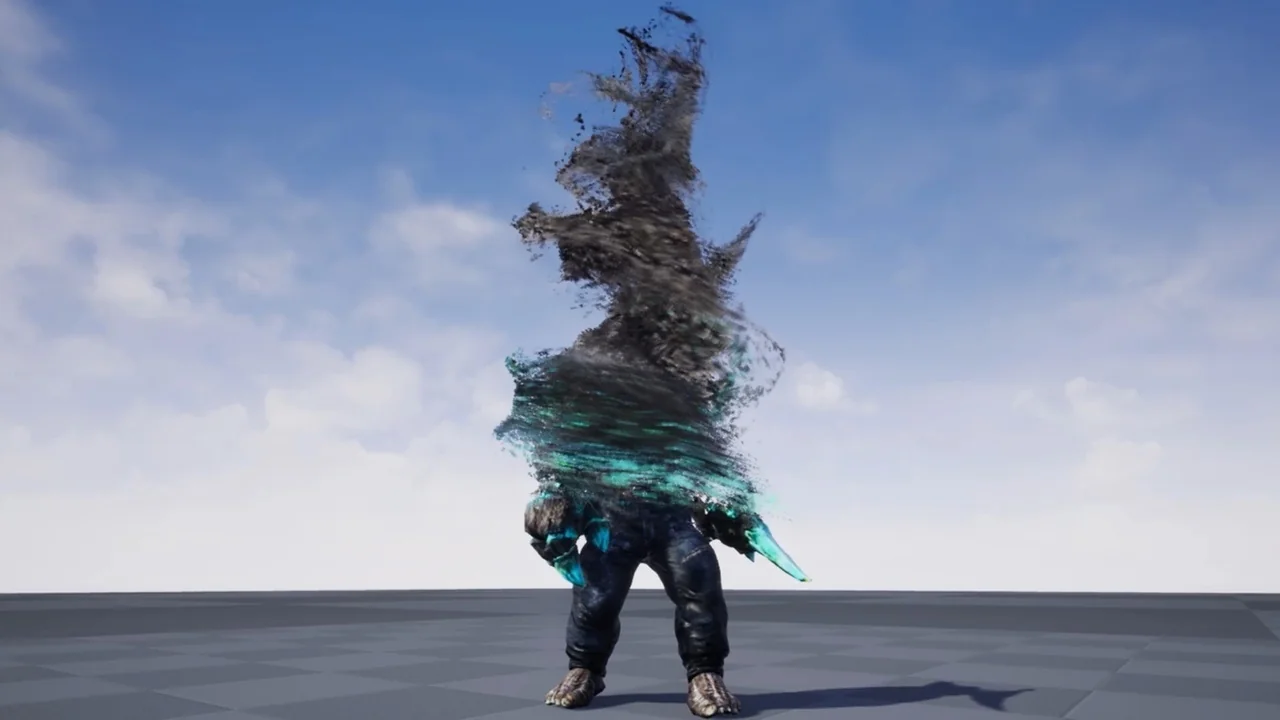
 Spells & Combat
 Spells & Combat
 Spells & Combat