"a19e0535960bd083"{"id":"25032","slug":"summon-creatures-vol-1-niagara","title":"Summon Creatures Vol.1 - Niagara","category":"Spells \u0026 Combat","engine":"5.0+","assetVersion":"Engine version: 5.0+","engineVersion":"","tag":"Spells \u0026 Combat","accent":"blue","visual":"mech","summary":"Summon Creatures Vol.1 - Niagara gathers 15 creature-summoning abilities into a single VFX package. Color, scale, erode rate, follow ground, and slow down controls make it easier to fit each effect to the shot.","platform":"Unreal Engine","publishedAt":"2026-04-18T16:08:42.000Z","updatedAt":"2026-04-20T06:12:34.000Z","sourceNotes":[],"fileContents":[],"compatibility":["Unreal Engine","Engine version: 5.0+"],"featuredImage":{"alt":"Summon Creatures Vol.1 - Niagara","src":"https://3dcghub.com/wp-content/uploads/2026/04/6322aa7f72a8_c1505363-766d-4d51-8898-851d7df6f3b4.webp"},"hasDownloadLink":true,"downloads":1,"terms":[{"taxonomy":"category","slug":"spells-and-combat","name":"Spells \u0026 Combat"},{"taxonomy":"post_tag","slug":"characters","name":"Characters"},{"taxonomy":"post_tag","slug":"unreal-engine-5","name":"Unreal Engine 5"},{"taxonomy":"post_tag","slug":"vfx","name":"VFX"}],"galleryImages":[{"src":"https://3dcghub.com/wp-content/uploads/2026/04/c7f24e2f451f_06dbc4ea-3a95-4037-b75e-3ae558fecc06.webp","alt":"Summon Creatures Vol.1 - Niagara"},{"src":"https://3dcghub.com/wp-content/uploads/2026/04/3f8095787f03_6f544d8d-4fb9-4b7b-8d3b-4f28db8a76f3.webp","alt":"Summon Creatures Vol.1 - Niagara"},{"src":"https://3dcghub.com/wp-content/uploads/2026/04/565c75bcbdd0_74637626-b9e5-42c6-bca2-0d6a2d6ff41d.webp","alt":"Summon Creatures Vol.1 - Niagara"},{"src":"https://3dcghub.com/wp-content/uploads/2026/04/e331542c81bf_c695b947-2e78-41dc-8b7d-a835d359d6dc.webp","alt":"Summon Creatures Vol.1 - Niagara"},{"src":"https://3dcghub.com/wp-content/uploads/2026/04/9947f2f0aa26_30e7cf12-cfe6-44bd-a2ba-1f10511dd31c.webp","alt":"Summon Creatures Vol.1 - Niagara"},{"src":"https://3dcghub.com/wp-content/uploads/2026/04/20ef0fd6e295_fd3f01a1-c803-4d0e-ba06-88f81022cff9.webp","alt":"Summon Creatures Vol.1 - Niagara"},{"src":"https://3dcghub.com/wp-content/uploads/2026/04/d7f9932c83c8_5c54f216-ca92-4212-a8c8-409bb42a8ca6.webp","alt":"Summon Creatures Vol.1 - Niagara"},{"src":"https://3dcghub.com/wp-content/uploads/2026/04/e6ee225fe31d_81938086-4acc-48f9-93c1-e036605c71c3.webp","alt":"Summon Creatures Vol.1 - Niagara"},{"src":"https://3dcghub.com/wp-content/uploads/2026/04/232bafe7e0cd_60651ad4-230b-4384-99e5-b646553e1ecb.webp","alt":"Summon Creatures Vol.1 - Niagara"},{"src":"https://3dcghub.com/wp-content/uploads/2026/04/8754485ef5c7_94dade82-73e8-49f6-a483-a64d48865d7b.webp","alt":"Summon Creatures Vol.1 - Niagara"}],"accessPanel":{"kind":"resource","title":"Access this resource","eyebrow":"Free Download","message":"Log in or create a free account to start your download.","fileName":"Content.7z","safetyNote":"All resources are 100% manually reviewed to eliminate all risks.","actionLabel":"Download Free","resourceType":"Resource archive"},"contentHtml":"\u003ch2\u003eCreature summons that can carry a scene\u003c/h2\u003e \u003cp\u003eSummon Creatures Vol.1 - Niagara focuses on one specific kind of visual effect: the moment a creature appears. That makes it a useful fit for scenes that need a clear summoning cue, an animated reveal, or a creature arrival that needs to read immediately on screen. The pack stays narrow in purpose, which is useful when a project needs a set of effects that all speak the same visual language.\u003c/p\u003e \u003cp\u003eThe collection contains 15 summon creature abilities, so the emphasis is on variation within a single theme rather than a broad mix of unrelated effects. In production terms, that gives a team a range of creature-focused options without leaving the same visual category.\u003c/p\u003e \u003ch2\u003eFifteen abilities instead of one fixed effect\u003c/h2\u003e \u003cp\u003eThe main strength here is not just the number of abilities, but the way each one can be adjusted. The pack includes customizable options such as color, scale, erode rate, follow ground, and slow down. Those controls matter because a summon effect often needs to sit next to different characters, different environments, and different scene sizes.\u003c/p\u003e \u003cul\u003e \u003cli\u003e\u003cstrong\u003eColor\u003c/strong\u003e Lets the effect shift to match the tone of the scene.\u003c/li\u003e \u003cli\u003e\u003cstrong\u003eScale\u003c/strong\u003e Helps the same effect read in tighter or wider shots.\u003c/li\u003e \u003cli\u003e\u003cstrong\u003eErode rate\u003c/strong\u003e Changes how quickly the effect breaks down or fades away.\u003c/li\u003e \u003cli\u003e\u003cstrong\u003eFollow ground\u003c/strong\u003e Keeps the effect aligned with the terrain.\u003c/li\u003e \u003cli\u003e\u003cstrong\u003eSlow down\u003c/strong\u003e Gives the motion a softer or more controlled finish.\u003c/li\u003e \u003c/ul\u003e \u003cp\u003eThese controls make the pack useful when a single summon needs to be repeated in different contexts. One effect can be adjusted instead of replaced, which keeps the visual idea consistent while still leaving room for scene-specific changes.\u003c/p\u003e \u003ch2\u003eHow it fits into a Niagara workflow\u003c/h2\u003e \u003cp\u003eBecause the package is tied to Niagara, it fits into a workflow where the effect itself needs tuning rather than a one-off static look. The listed controls point to a practical setup for iteration: adjust the size, color, movement, and breakdown of the summon until it sits properly in the shot. That makes the pack a sensible tool for building and refining creature arrival moments during production.\u003c/p\u003e \u003cp\u003eThe note that the abilities are easy to scale, customize, and change color is especially important in day-to-day use. A summon effect often has to be adapted quickly to a different camera distance, a different character size, or a different palette. Those are the kinds of changes this pack is already set up to handle.\u003c/p\u003e \u003cp\u003eThe \u003cstrong\u003eFollow ground\u003c/strong\u003e Option gives the effects a practical edge in scenes where the action happens close to the floor or terrain. The effect can stay anchored to the environment instead of feeling detached from it. \u003cstrong\u003eSlow down\u003c/strong\u003e Serves a similar practical role by letting the motion settle more gently when a sharp finish would feel too abrupt.\u003c/p\u003e \u003ch2\u003eA focused tool for creature and animal-themed effects\u003c/h2\u003e \u003cp\u003eThe tagging around creature and animal themes points to a clear use case: effects that support summoned beings rather than generic explosions or projectiles. That focus makes the package easier to place in a production library. When a scene calls for a creature appearance, this is the kind of asset that can answer that need without requiring a broader search through unrelated effects.\u003c/p\u003e \u003cp\u003eA showcase video is also part of the package, which helps show how the summon abilities read in motion. For VFX work, that kind of motion reference can be useful when deciding which version of an effect fits a shot best.\u003c/p\u003e \u003cp\u003eFor projects that need a compact set of creature summons with room to tune color, scale, erosion, ground behavior, and motion timing, Summon Creatures Vol.1 - Niagara stays tightly aligned with that task. It is most practical when the goal is to place a summon effect into a scene and adjust it until it matches the shot instead of starting from scratch.\u003c/p\u003e\n\n\u003ch2\u003eExplore Similar Assets\u003c/h2\u003e\n\u003cul\u003e\n\u003cli\u003e\u003ca href=\"https://3dcghub.com/advanced-unreal-engine-5-multiplayer-gameplay-programming/\" title=\"Advanced Unreal Engine 5 Multiplayer Gameplay Programming\"\u003eAdvanced Unreal Engine 5 Multiplayer Gameplay Programming\u003c/a\u003e\u003c/li\u003e\n\u003cli\u003e\u003ca href=\"https://3dcghub.com/niagara-beginners-to-advanced-in-unreal-engine-5/\" title=\"Niagara Beginners to advanced in Unreal Engine 5\"\u003eNiagara Beginners to advanced in Unreal Engine 5\u003c/a\u003e\u003c/li\u003e\n\u003cli\u003e\u003ca href=\"https://3dcghub.com/create-zelda-like-skills-with-c-in-unreal-engine-5-2/\" title=\"Create Zelda-like skills with C++ in unreal engine 5\"\u003eCreate Zelda-like skills with C++ in unreal engine 5\u003c/a\u003e\u003c/li\u003e\n\u003cli\u003e\u003ca href=\"https://3dcghub.com/main-menus-beginner-class-unreal-engine-5/\" title=\"Main Menus Beginner Class – Unreal Engine 5\"\u003eMain Menus Beginner Class – Unreal Engine 5\u003c/a\u003e\u003c/li\u003e\n\u003cli\u003e\u003ca href=\"https://3dcghub.com/create-zelda-like-skills-with-c-in-unreal-engine-5/\" title=\"Create Zelda-like skills with C++ in unreal engine 5\"\u003eCreate Zelda-like skills with C++ in unreal engine 5\u003c/a\u003e\u003c/li\u003e\n\u003c/ul\u003e\n\n\u003ch2\u003eAsset Gallery\u003c/h2\u003e","contentTextLength":4074,"navigation":{"current":2374,"total":4026,"previous":{"id":"24918","slug":"primrose-deluxe-version-game-ready","title":"Primrose Deluxe Version - Game Ready","category":"Humans","platform":"Unreal Engine","updatedAt":"2026-04-20T06:12:35.000Z"},"next":{"id":"25015","slug":"stylized-eye-material","title":"Stylized Eye Material","category":"Eyes","platform":"Unreal Engine","updatedAt":"2026-04-20T06:12:34.000Z"}},"relatedResources":[{"id":"16636","slug":"realistic-blood-vfx-niagara-blood-effects-blood-vfx-blood-blood-vfx","title":"Realistic Blood VFX (Niagara Blood Effects, Blood VFX, Blood, Blood VFX)","category":"Spells \u0026 Combat","engine":"5.2+","assetVersion":"Engine version: 5.2+","engineVersion":"5.0","tag":"Spells \u0026 Combat","accent":"blue","visual":"luts","summary":"Enhance your project with Realistic Blood VFX, a comprehensive Niagara-based system featuring dynamic splatters, arterial bleeding, and PBR-compatible decals for high-fidelity results.","platform":"Unreal Engine","publishedAt":"2026-03-12T17:37:05.000Z","updatedAt":"2026-04-19T15:43:44.000Z","sourceNotes":[],"fileContents":[],"compatibility":["Unreal Engine","Engine version: 5.2+"],"featuredImage":{"alt":"Realistic Blood VFX (Niagara Blood Effects, Blood VFX, Blood, Blood VFX)","src":"https://3dcghub.com/wp-content/uploads/2026/03/436dc969-0b81-4830-9180-0a4919a2a247.webp"},"hasDownloadLink":true,"downloads":14},{"id":"16838","slug":"water-magic-niagara","title":"Water Magic Niagara","category":"Spells \u0026 Combat","engine":"5.0+","assetVersion":"Engine version: 5.0+","engineVersion":"5.0","tag":"Spells \u0026 Combat","accent":"blue","visual":"animation","summary":"Enhance your project with Water Magic Niagara, a specialized collection of aquatic visual effects. This pack allows for easy customization of size and color to fit any magical gameplay scenario.","platform":"Unreal Engine","publishedAt":"2026-03-12T18:03:54.000Z","updatedAt":"2026-04-19T15:43:41.000Z","sourceNotes":[],"fileContents":[],"compatibility":["Unreal Engine","Engine version: 5.0+"],"featuredImage":{"alt":"Water Magic Niagara","src":"https://3dcghub.com/wp-content/uploads/2026/03/cb921e64-127c-40c5-869f-c9c1dbc93b27.webp"},"hasDownloadLink":true,"downloads":7},{"id":"16455","slug":"magic-projectiles-vol-2-niagara","title":"Magic Projectiles Vol. 2 - Niagara","category":"Spells \u0026 Combat","engine":"5.0+","assetVersion":"Engine version: 5.0+","engineVersion":"4.17","tag":"Spells \u0026 Combat","accent":"blue","visual":"animation","summary":"Enhance your game's combat with Magic Projectiles Vol. 2 - Niagara. This pack features 60 diverse effects, from elemental spells to dark orbs, designed for easy customization and cross-platform performance.","platform":"Unreal Engine","publishedAt":"2026-03-12T17:15:57.000Z","updatedAt":"2026-04-19T15:44:33.000Z","sourceNotes":[],"fileContents":[],"compatibility":["Unreal Engine","Engine version: 5.0+"],"featuredImage":{"alt":"Magic Projectiles Vol. 2 - Niagara","src":"https://3dcghub.com/wp-content/uploads/2026/03/073d96c4-a677-48a6-a0a4-6a24ea560b05.webp"},"hasDownloadLink":true,"downloads":6}]}
Spells & Combat
Summon Creatures Vol.1 - Niagara
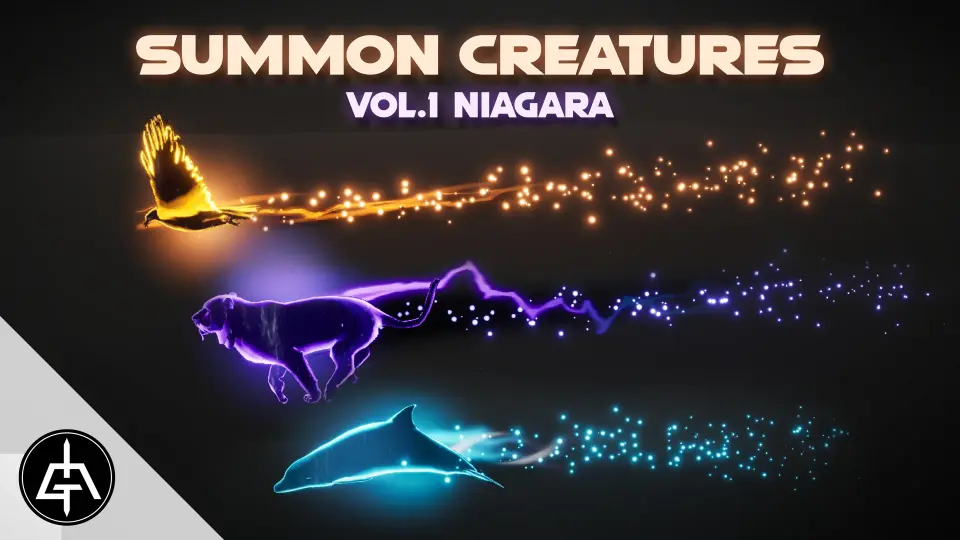
Summon Creatures Vol.1 - Niagara gathers 15 creature-summoning abilities into a single VFX package. Color, scale, erode rate, follow ground, and slow down controls make it easier to fit each effect to the shot.
Summon Creatures Vol.1 - Niagara focuses on one specific kind of visual effect: the moment a creature appears. That makes it a useful fit for scenes that need a clear summoning cue, an animated reveal, or a creature arrival that needs to read immediately on screen. The pack stays narrow in purpose, which is useful when a project needs a set of effects that all speak the same visual language.
The collection contains 15 summon creature abilities, so the emphasis is on variation within a single theme rather than a broad mix of unrelated effects. In production terms, that gives a team a range of creature-focused options without leaving the same visual category.
Fifteen abilities instead of one fixed effect
The main strength here is not just the number of abilities, but the way each one can be adjusted. The pack includes customizable options such as color, scale, erode rate, follow ground, and slow down. Those controls matter because a summon effect often needs to sit next to different characters, different environments, and different scene sizes.
Color Lets the effect shift to match the tone of the scene.
Scale Helps the same effect read in tighter or wider shots.
Erode rate Changes how quickly the effect breaks down or fades away.
Follow ground Keeps the effect aligned with the terrain.
Slow down Gives the motion a softer or more controlled finish.
These controls make the pack useful when a single summon needs to be repeated in different contexts. One effect can be adjusted instead of replaced, which keeps the visual idea consistent while still leaving room for scene-specific changes.
How it fits into a Niagara workflow
Because the package is tied to Niagara, it fits into a workflow where the effect itself needs tuning rather than a one-off static look. The listed controls point to a practical setup for iteration: adjust the size, color, movement, and breakdown of the summon until it sits properly in the shot. That makes the pack a sensible tool for building and refining creature arrival moments during production.
The note that the abilities are easy to scale, customize, and change color is especially important in day-to-day use. A summon effect often has to be adapted quickly to a different camera distance, a different character size, or a different palette. Those are the kinds of changes this pack is already set up to handle.
The Follow ground Option gives the effects a practical edge in scenes where the action happens close to the floor or terrain. The effect can stay anchored to the environment instead of feeling detached from it. Slow down Serves a similar practical role by letting the motion settle more gently when a sharp finish would feel too abrupt.
A focused tool for creature and animal-themed effects
The tagging around creature and animal themes points to a clear use case: effects that support summoned beings rather than generic explosions or projectiles. That focus makes the package easier to place in a production library. When a scene calls for a creature appearance, this is the kind of asset that can answer that need without requiring a broader search through unrelated effects.
A showcase video is also part of the package, which helps show how the summon abilities read in motion. For VFX work, that kind of motion reference can be useful when deciding which version of an effect fits a shot best.
For projects that need a compact set of creature summons with room to tune color, scale, erosion, ground behavior, and motion timing, Summon Creatures Vol.1 - Niagara stays tightly aligned with that task. It is most practical when the goal is to place a summon effect into a scene and adjust it until it matches the shot instead of starting from scratch.
 Spells & Combat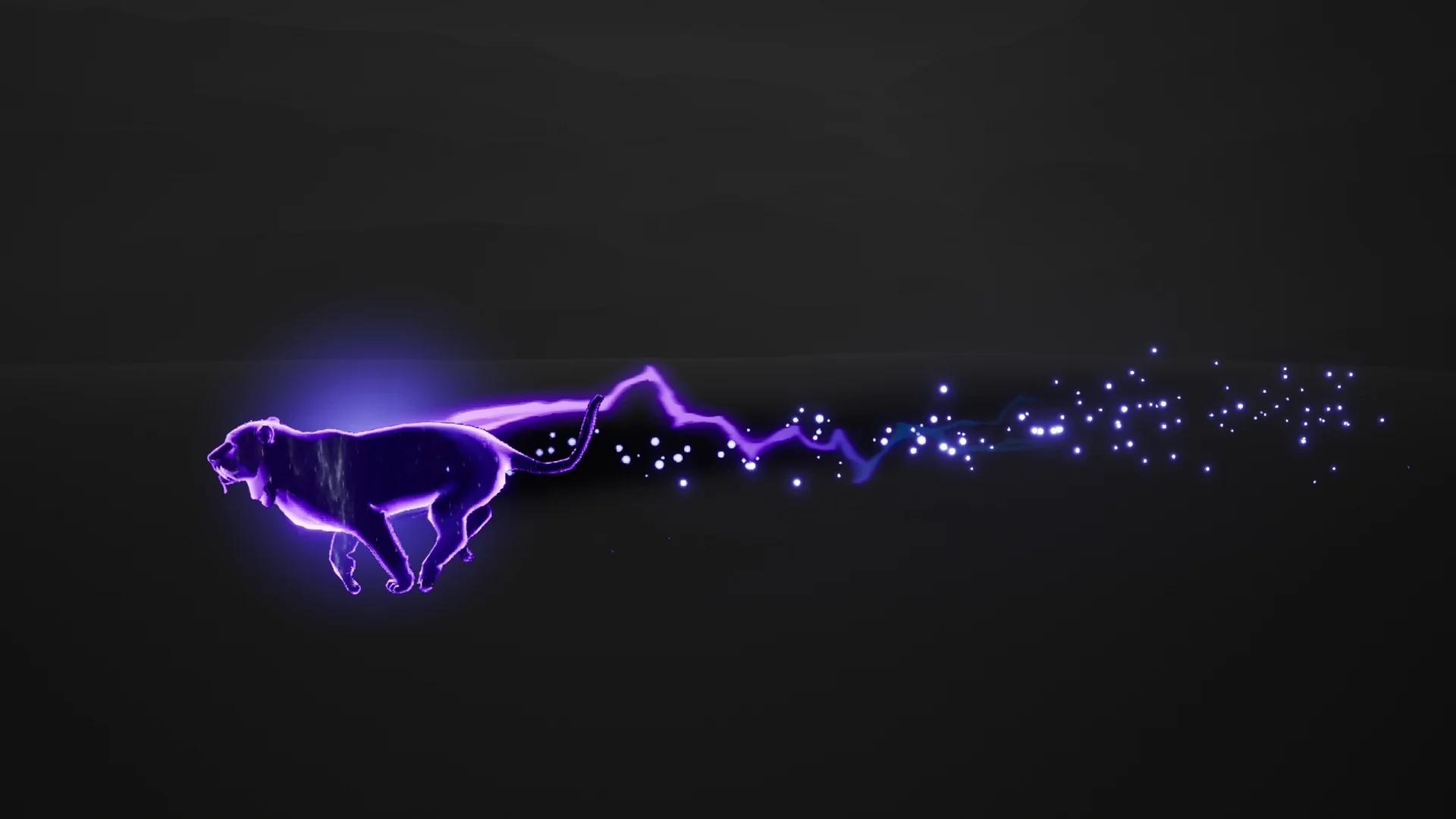
 Spells & Combat
 Spells & Combat
 Spells & Combat