"0341a2901a4ae9aa"{"id":"25015","slug":"stylized-eye-material","title":"Stylized Eye Material","category":"Eyes","engine":"5.0+","assetVersion":"Engine version: 5.0+","engineVersion":"","tag":"Eyes","accent":"blue","visual":"luts","summary":"Stylized Eye Material brings humanoid and animal eye looks into one customizable template, including support for cat-shaped pupils. It can be set up procedurally inside the Unreal Editor or through a texture-based workflow, with animated pupils and depth ef...","platform":"Unreal Engine","publishedAt":"2026-04-18T15:53:03.000Z","updatedAt":"2026-04-20T06:12:34.000Z","sourceNotes":[],"fileContents":[],"compatibility":["Unreal Engine","Engine version: 5.0+"],"featuredImage":{"alt":"Stylized Eye Material","src":"https://3dcghub.com/wp-content/uploads/2026/04/c1b39b83fca4_c98141e0-80ed-47c8-8097-b2c8d137dce9.webp"},"hasDownloadLink":true,"downloads":1,"terms":[{"taxonomy":"category","slug":"eyes","name":"Eyes"},{"taxonomy":"post_tag","slug":"characters","name":"Characters"},{"taxonomy":"post_tag","slug":"materials","name":"Materials"},{"taxonomy":"post_tag","slug":"unreal-engine-5","name":"Unreal Engine 5"}],"galleryImages":[{"src":"https://3dcghub.com/wp-content/uploads/2026/04/4197781434c0_0ba69123-01ee-42f4-af6f-b53c0581613b.webp","alt":"Stylized Eye Material"},{"src":"https://3dcghub.com/wp-content/uploads/2026/04/4ebf29fcde0d_76645af0-eef1-4e64-b883-ae8c116a70ff.webp","alt":"Stylized Eye Material"},{"src":"https://3dcghub.com/wp-content/uploads/2026/04/a6a861a96410_37099316-edaa-423f-9f07-abac346185fa.webp","alt":"Stylized Eye Material"},{"src":"https://3dcghub.com/wp-content/uploads/2026/04/0239908d6d92_669f8222-c875-45e6-bf63-7f6e1918165a.webp","alt":"Stylized Eye Material"},{"src":"https://3dcghub.com/wp-content/uploads/2026/04/1f7918275b7f_f57da95f-19a6-4f6d-a9aa-56c709d558ec.webp","alt":"Stylized Eye Material"},{"src":"https://3dcghub.com/wp-content/uploads/2026/04/cbe0cf85f90d_1d303dc1-0151-43f5-aca1-e56e1ba079f9.webp","alt":"Stylized Eye Material"},{"src":"https://3dcghub.com/wp-content/uploads/2026/04/008b8880b758_067fc115-4764-451c-a146-37bd7a2a1fc0.webp","alt":"Stylized Eye Material"},{"src":"https://3dcghub.com/wp-content/uploads/2026/04/48697c6c487e_73c030e0-d3bc-4b00-9050-ee544fd35c2a.webp","alt":"Stylized Eye Material"},{"src":"https://3dcghub.com/wp-content/uploads/2026/04/fbfdc865ce87_01adb9b0-f897-4548-98a8-785ac2c5c299.webp","alt":"Stylized Eye Material"},{"src":"https://3dcghub.com/wp-content/uploads/2026/04/56894cf53699_7d710290-0560-40a4-ad65-f70179ddba69.webp","alt":"Stylized Eye Material"}],"accessPanel":{"kind":"resource","title":"Access this resource","eyebrow":"Free Download","message":"Log in or create a free account to start your download.","fileName":"Content.7z","safetyNote":"All resources are 100% manually reviewed to eliminate all risks.","actionLabel":"Download Free","resourceType":"Resource archive"},"contentHtml":"\u003ch2\u003eOne template for humanoid and animal eyes\u003c/h2\u003e\u003cp\u003eStylized Eye Material combines many different eye styles into a single template material, giving character artists one place to shape a wide range of looks. It supports humanoid and animal characters, and it also includes custom settings for cat-shaped pupils, which makes it easier to adapt the same base material to very different creatures.\u003c/p\u003e\u003cp\u003eThe material is built around customization from the start. Many parameters are already exposed, and it comes with textures that can be used as starting points for unique designs. Sample Material Instances are included as ready-made examples, so the material can be used immediately or adjusted further to match a specific character.\u003c/p\u003e\u003ch2\u003eProcedural control or a texture-based path\u003c/h2\u003e\u003cp\u003eTwo approaches are available, and they serve different production needs. The procedural route is highly configurable directly inside the Unreal Editor, which makes it useful when the eye look needs to be shaped through parameters and adjusted during development. The texture-based route is quicker to set up and offers optimal performance.\u003c/p\u003e\u003cp\u003eThat flexibility extends to the texture side as well. Custom textures can be used freely, and a wide variety of formats is supported. The newest version is fully compatible with the Stylized Eye Texture Generator and includes a few samples that show different configuration possibilities. That makes the material easier to fold into a broader character workflow without forcing a single way of working.\u003c/p\u003e\u003ch2\u003eDepth, refraction, and animated pupils\u003c/h2\u003e\u003cp\u003eThe eye surface is built to read as more than a flat texture. Refraction and a depth function give the eyes the appearance of a 3D interior without requiring special mesh setup or additional polygons. For characters that need expressive eyes without extra mesh complexity, that approach keeps the look focused while avoiding unnecessary geometry.\u003c/p\u003e\u003cp\u003ePupil motion is handled in real time, and the rest of the material adjusts accordingly. When the setup is procedural, the material can hold up to extreme close-ups without pixelation, which makes it a strong fit for animations and cutscenes. The visual response is not limited to the pupil, either: fake lighting, reflection, and shadow options are included so the level of realism can be scaled gradually rather than all at once.\u003c/p\u003e\u003cp\u003eOverlay textures can be static or animated, with animatable parameters that allow custom logos and animations inside the eye or on its exterior. That gives the material room for stylized details without changing the base eye system.\u003c/p\u003e\u003ch2\u003eMesh setup, UV guidance, and performance controls\u003c/h2\u003e\u003cp\u003eThere is one important setup note: for the depth effect to work, each eye needs to be its own separate static mesh. A demo character blueprint is included with the correct setup, which helps show how the material is meant to be arranged in a project. A guide for UV setup on custom meshes is also included.\u003c/p\u003e\u003cp\u003eThe material can work with any mesh of any shape without manual UVs. Optional real-time UVs are available, though they come with a small performance impact. That makes the setup flexible enough for unusual eye shapes while still keeping the performance implications clear. Four eye mesh LODs are included, along with an additional Auto-LOD mesh.\u003c/p\u003e\u003cp\u003ePerformance control is handled through a large set of switches and material options. There are 33 material switches for customization and optimization, and the idea is simple: only the features used incur the performance cost. Sample materials fall between 229 and 427 instructions, with most sitting between 300 and 330. Mobile support reaches down to Android ES 3.1, although performance depends on the material configuration. Supported target platforms are Desktop, Console, and Mobile.\u003c/p\u003e\u003cp\u003eIn practice, the material is set up for character eyes that need a clear mesh layout, flexible customization, and either a fast texture-based path or a more hands-on procedural setup.\u003c/p\u003e\n\n\u003ch2\u003eMore From The Same Workflow\u003c/h2\u003e\n\u003cul\u003e\n\u003cli\u003e\u003ca href=\"https://3dcghub.com/advanced-unreal-engine-5-multiplayer-gameplay-programming/\" title=\"Advanced Unreal Engine 5 Multiplayer Gameplay Programming\"\u003eAdvanced Unreal Engine 5 Multiplayer Gameplay Programming\u003c/a\u003e\u003c/li\u003e\n\u003cli\u003e\u003ca href=\"https://3dcghub.com/niagara-beginners-to-advanced-in-unreal-engine-5/\" title=\"Niagara Beginners to advanced in Unreal Engine 5\"\u003eNiagara Beginners to advanced in Unreal Engine 5\u003c/a\u003e\u003c/li\u003e\n\u003cli\u003e\u003ca href=\"https://3dcghub.com/create-zelda-like-skills-with-c-in-unreal-engine-5-2/\" title=\"Create Zelda-like skills with C++ in unreal engine 5\"\u003eCreate Zelda-like skills with C++ in unreal engine 5\u003c/a\u003e\u003c/li\u003e\n\u003cli\u003e\u003ca href=\"https://3dcghub.com/main-menus-beginner-class-unreal-engine-5/\" title=\"Main Menus Beginner Class – Unreal Engine 5\"\u003eMain Menus Beginner Class – Unreal Engine 5\u003c/a\u003e\u003c/li\u003e\n\u003cli\u003e\u003ca href=\"https://3dcghub.com/create-zelda-like-skills-with-c-in-unreal-engine-5/\" title=\"Create Zelda-like skills with C++ in unreal engine 5\"\u003eCreate Zelda-like skills with C++ in unreal engine 5\u003c/a\u003e\u003c/li\u003e\n\u003c/ul\u003e","contentTextLength":4255,"navigation":{"current":2368,"total":4017,"previous":{"id":"25032","slug":"summon-creatures-vol-1-niagara","title":"Summon Creatures Vol.1 - Niagara","category":"Spells \u0026 Combat","platform":"Unreal Engine","updatedAt":"2026-04-20T06:12:34.000Z"},"next":{"id":"25001","slug":"simple-procedural-walk","title":"Simple Procedural Walk","category":"Engine Tools","platform":"Unreal Engine","updatedAt":"2026-04-20T06:12:34.000Z"}},"relatedResources":[{"id":"13277","slug":"stylized-animated-lava-material-pack-85-pcs","title":"Stylized Animated Lava Material Pack 85 Pcs","category":"Variety","engine":"5.0+","assetVersion":"Engine version: 5.0+","engineVersion":"5.0","tag":"Variety","accent":"blue","visual":"luts","summary":"Discover a comprehensive collection of 85 high-quality, animated lava materials. These 4K tilable textures are perfect for environmental and character design in games and movies.","platform":"Unreal Engine","publishedAt":"2026-03-10T16:38:40.000Z","updatedAt":"2026-04-19T15:46:30.000Z","sourceNotes":[],"fileContents":[],"compatibility":["Unreal Engine","Engine version: 5.0+"],"featuredImage":{"alt":"Stylized Animated Lava Material Pack 85 Pcs","src":"https://3dcghub.com/wp-content/uploads/2026/03/e021cdf5-7000-4c8d-befc-b88f953326ae.webp"},"hasDownloadLink":true,"downloads":0},{"id":"15951","slug":"stylized-rendering-system-cel-shader","title":"Stylized Rendering System (Cel-Shader)","category":"Shaders","engine":"5.0+","assetVersion":"Engine version: 5.0+","engineVersion":"4.26","tag":"Shaders","accent":"blue","visual":"city","summary":"Transform your project with the Stylized Rendering System (Cel-Shader), featuring 25 outline styles and easy drag-and-drop setup for anime and manga aesthetics.","platform":"Unreal Engine","publishedAt":"2026-03-12T13:33:25.000Z","updatedAt":"2026-04-19T15:44:38.000Z","sourceNotes":[],"fileContents":[],"compatibility":["Unreal Engine","Engine version: 5.0+"],"featuredImage":{"alt":"Stylized Rendering System (Cel-Shader)","src":"https://3dcghub.com/wp-content/uploads/2026/03/e9e51600-f665-4ee5-95a5-93a70a539615.webp"},"hasDownloadLink":true,"downloads":5},{"id":"27939","slug":"stylized-female-character-janedoe","title":"Stylized Female Character - JaneDoe","category":"Characters \u0026 Creatures","engine":"5.1+","assetVersion":"Engine version: 5.1+","engineVersion":"","tag":"Characters","accent":"blue","visual":"character","summary":"Stylized Female Character - JaneDoe targets lightweight shooter game scenes while still offering options for higher-end presentation. The package combines visual variants, two texture tiers, and a long list of added bones and sockets for equipment, hair, an...","platform":"Unreal Engine","publishedAt":"2026-04-30T07:21:57.000Z","updatedAt":"2026-04-30T07:21:58.000Z","sourceNotes":[],"fileContents":[],"compatibility":["Unreal Engine","Engine version: 5.1+"],"featuredImage":{"alt":"Stylized Female Character - JaneDoe","src":"https://3dcghub.com/wp-content/uploads/2026/04/e16e0492c5f0_a690c11e-1151-4699-b304-b82988d38382.webp"},"hasDownloadLink":true,"downloads":0}]}
Eyes
Stylized Eye Material
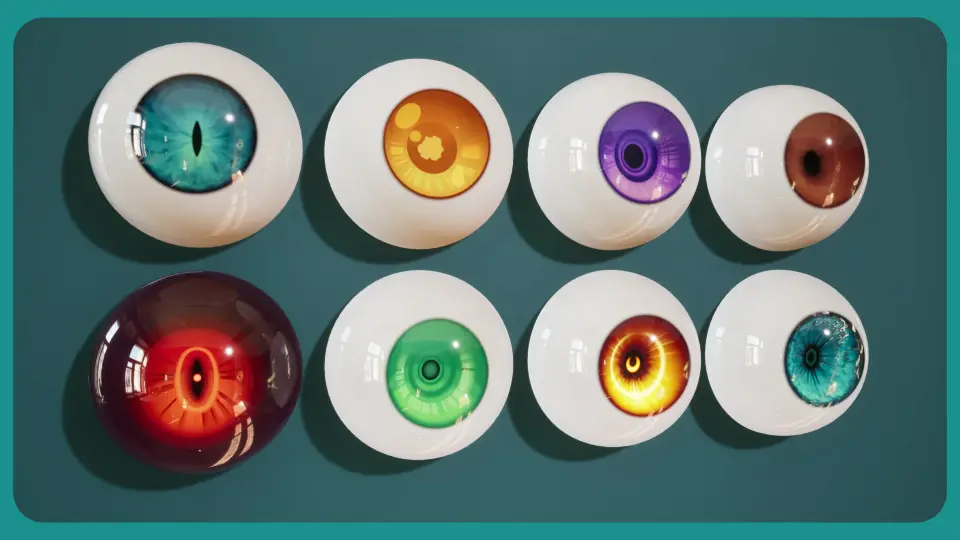
Stylized Eye Material brings humanoid and animal eye looks into one customizable template, including support for cat-shaped pupils. It can be set up procedurally inside the Unreal Editor or through a texture-based workflow, with animated pupils and depth ef...
Stylized Eye Material combines many different eye styles into a single template material, giving character artists one place to shape a wide range of looks. It supports humanoid and animal characters, and it also includes custom settings for cat-shaped pupils, which makes it easier to adapt the same base material to very different creatures.
The material is built around customization from the start. Many parameters are already exposed, and it comes with textures that can be used as starting points for unique designs. Sample Material Instances are included as ready-made examples, so the material can be used immediately or adjusted further to match a specific character.
Procedural control or a texture-based path
Two approaches are available, and they serve different production needs. The procedural route is highly configurable directly inside the Unreal Editor, which makes it useful when the eye look needs to be shaped through parameters and adjusted during development. The texture-based route is quicker to set up and offers optimal performance.
That flexibility extends to the texture side as well. Custom textures can be used freely, and a wide variety of formats is supported. The newest version is fully compatible with the Stylized Eye Texture Generator and includes a few samples that show different configuration possibilities. That makes the material easier to fold into a broader character workflow without forcing a single way of working.
Depth, refraction, and animated pupils
The eye surface is built to read as more than a flat texture. Refraction and a depth function give the eyes the appearance of a 3D interior without requiring special mesh setup or additional polygons. For characters that need expressive eyes without extra mesh complexity, that approach keeps the look focused while avoiding unnecessary geometry.
Pupil motion is handled in real time, and the rest of the material adjusts accordingly. When the setup is procedural, the material can hold up to extreme close-ups without pixelation, which makes it a strong fit for animations and cutscenes. The visual response is not limited to the pupil, either: fake lighting, reflection, and shadow options are included so the level of realism can be scaled gradually rather than all at once.
Overlay textures can be static or animated, with animatable parameters that allow custom logos and animations inside the eye or on its exterior. That gives the material room for stylized details without changing the base eye system.
Mesh setup, UV guidance, and performance controls
There is one important setup note: for the depth effect to work, each eye needs to be its own separate static mesh. A demo character blueprint is included with the correct setup, which helps show how the material is meant to be arranged in a project. A guide for UV setup on custom meshes is also included.
The material can work with any mesh of any shape without manual UVs. Optional real-time UVs are available, though they come with a small performance impact. That makes the setup flexible enough for unusual eye shapes while still keeping the performance implications clear. Four eye mesh LODs are included, along with an additional Auto-LOD mesh.
Performance control is handled through a large set of switches and material options. There are 33 material switches for customization and optimization, and the idea is simple: only the features used incur the performance cost. Sample materials fall between 229 and 427 instructions, with most sitting between 300 and 330. Mobile support reaches down to Android ES 3.1, although performance depends on the material configuration. Supported target platforms are Desktop, Console, and Mobile.
In practice, the material is set up for character eyes that need a clear mesh layout, flexible customization, and either a fast texture-based path or a more hands-on procedural setup.
 Eyes
Eyes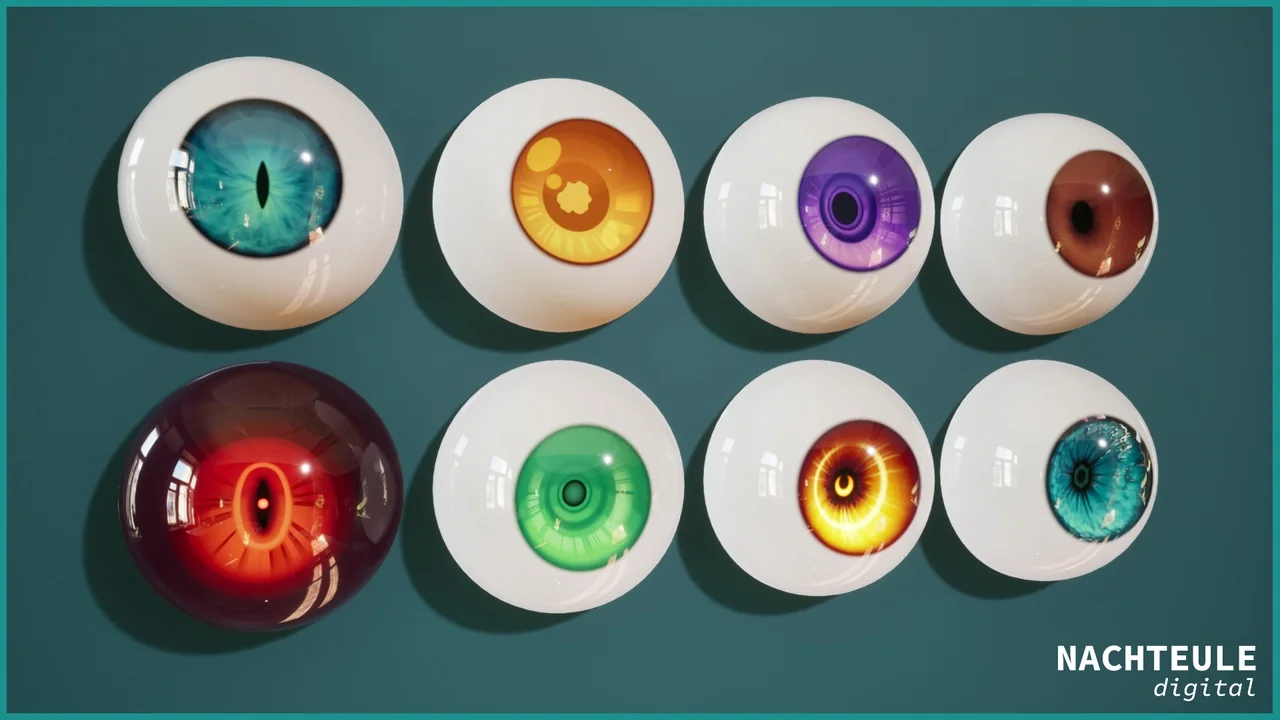
 Variety
 Shaders
 Characters