"6ac84fdb0bd06614"{"id":"28150","slug":"ue5-spawn-character-mesh-vfx","title":"UE5 Spawn Character/Mesh VFX","category":"Spells \u0026 Combat","engine":"5.3+","assetVersion":"Engine version: 5.3+","engineVersion":"","tag":"Spells \u0026 Combat","accent":"blue","visual":"character","summary":"UE5 Spawn Character/Mesh VFX focuses on different styles of actor Niagara respawn effects for characters and meshes. It also includes a few practical setup notes that matter when you want synchronized playback, separate control, or support for a custom mesh.","platform":"Unreal Engine","publishedAt":"2026-05-04T15:44:10.000Z","updatedAt":"2026-05-04T15:44:11.000Z","sourceNotes":[],"fileContents":[],"compatibility":["Unreal Engine","Engine version: 5.3+"],"featuredImage":{"alt":"UE5 Spawn Character/Mesh VFX","src":"https://3dcghub.com/wp-content/uploads/2026/05/6ff1f3f0d592_967f907f-0766-4dee-a077-d00d0f682d1f.webp"},"hasDownloadLink":true,"downloads":1,"terms":[{"taxonomy":"category","slug":"spells-and-combat","name":"Spells \u0026 Combat"},{"taxonomy":"post_tag","slug":"characters","name":"Characters"},{"taxonomy":"post_tag","slug":"unreal-engine-5","name":"Unreal Engine 5"},{"taxonomy":"post_tag","slug":"vfx","name":"VFX"}],"galleryImages":[{"src":"https://3dcghub.com/wp-content/uploads/2026/05/3fcff6a6a9f4_ff0e3182-7201-4d03-a251-57829af43f02.webp","alt":"UE5 Spawn Character/Mesh VFX"},{"src":"https://3dcghub.com/wp-content/uploads/2026/05/d2ae779eb4da_d9b607a5-f8b2-42bf-a5e5-63cb7b2f4a60.webp","alt":"UE5 Spawn Character/Mesh VFX"},{"src":"https://3dcghub.com/wp-content/uploads/2026/05/fc7c26356f1f_f6290a96-0ec5-4009-89e1-ba991d4a879c.webp","alt":"UE5 Spawn Character/Mesh VFX"},{"src":"https://3dcghub.com/wp-content/uploads/2026/05/16a4d59c55d4_e1796b87-2925-4b9d-8dfc-136f3fe9888b.webp","alt":"UE5 Spawn Character/Mesh VFX"},{"src":"https://3dcghub.com/wp-content/uploads/2026/05/30fa6f2b300d_4a977bad-352a-4c2f-94ed-07e4ca4f0b5d.webp","alt":"UE5 Spawn Character/Mesh VFX"},{"src":"https://3dcghub.com/wp-content/uploads/2026/05/197f0452d9fb_0ea9c7a7-ca0a-48e6-a781-7abb007f7a3a.webp","alt":"UE5 Spawn Character/Mesh VFX"},{"src":"https://3dcghub.com/wp-content/uploads/2026/05/c097e9b22445_82761f8f-e48c-41d9-9322-8aa9fdaa236a.webp","alt":"UE5 Spawn Character/Mesh VFX"}],"accessPanel":{"kind":"resource","title":"Access this resource","eyebrow":"Free Download","message":"Log in or create a free account to start your download.","fileName":"NiagaraReSpawn.7z","safetyNote":"All resources are 100% manually reviewed to eliminate all risks.","actionLabel":"Download Free","resourceType":"Resource archive"},"contentHtml":"\u003cp\u003eSpawn and respawn moments can feel abrupt if a character or prop simply appears in place. UE5 Spawn Character/Mesh VFX addresses that gap with different styles of actor Niagara re-spawn effects, giving artists and developers a way to turn a functional event into a visible beat.\u003c/p\u003e\u003cp\u003eThat makes it useful anywhere a scene needs a more deliberate entrance or return. A character can reappear with a stylized effect instead of a hard cut. A mesh can feel like it is being introduced into the world rather than toggled on. The core identity here is not a single look, but a set of different spawn effect styles centered on actor-based Niagara visuals.\u003c/p\u003e\u003ch2\u003eUsing UE5 Spawn Character/Mesh VFX for character and mesh entrances\u003c/h2\u003e\u003cp\u003eThe resource covers both character and mesh-oriented spawning, which gives it a broad practical range inside a scene. The name itself points directly at that split: character and mesh.\u003c/p\u003e\u003cp\u003eIn practice, that means the effect can be applied to moments where an actor returns, appears, or is revealed. For character work, the obvious use is a respawn sequence. For meshes, it can support a more staged introduction of an object already placed in the scene flow. Because the emphasis is on different styles, the pack is less about a single locked presentation and more about giving you several visual options for how that reappearance should read.\u003c/p\u003e\u003ch2\u003eActor Niagara re-spawn effects and synchronized playback\u003c/h2\u003e\u003cp\u003eOne of the clearest implementation details is the use of an MPC in the example setup. The character and chair are driven by the same MPC, so they execute simultaneously.\u003c/p\u003e\u003cp\u003eThat detail affects how you might stage a shot or interaction. If a seated scene, prop reveal, or linked actor moment needs both elements to trigger together, using the same MPC keeps them in step. It creates a single coordinated event rather than two separately timed spawns. For artists blocking out a sequence, that can be a simple way to keep a character and nearby mesh locked to the same visual timing.\u003c/p\u003e\u003cp\u003eAt the same time, the setup note also clarifies the limitation of that shared control. When multiple meshes need their own timing, a single MPC is not the answer. Separate control requires a new MPC.\u003c/p\u003e\u003ch2\u003eCreating a new MPC for separate mesh control\u003c/h2\u003e\u003cp\u003eWhen the effect needs to reach more than one mesh, separate behavior matters. The workflow note is straightforward: create a new MPC if you want those meshes controlled independently.\u003c/p\u003e\u003cp\u003eThis changes how the effect can be used creatively across a level or sequence. Instead of one global trigger causing every assigned element to play at once, each controlled group can have its own behavior. That opens the door to staggered reveals, isolated respawn beats, or one-off object appearances that do not interfere with another actor using the same effect family. The key point is not a complex toolset, but a clear control method: shared MPC for simultaneous execution, new MPCs for separation.\u003c/p\u003e\u003ch2\u003eCustom mesh setup with Allow CPUAccess\u003c/h2\u003e\u003cp\u003eThere is also one important requirement for using the effect with a custom mesh. The mesh needs \u003cstrong\u003eAllow CPUAccess\u003c/strong\u003e Enabled in its detail panel.\u003c/p\u003e\u003cp\u003eThis is the main pipeline note attached to custom mesh use, and it is specific enough to matter. If you are swapping out the example content for your own asset, that checkbox is not optional in this setup. It defines the step needed before the effect can be used with that custom mesh. The requirement is small, but it is the kind of detail that saves time during implementation because it tells you exactly what to check in the mesh settings.\u003c/p\u003e\u003ch2\u003eWhere Spawn, Niagara, VisualEffect, Fantasy, and Particle fit together\u003c/h2\u003e\u003cp\u003eThe tagged focus of the resource points to spawn, Niagara, visual effects, fantasy, and particle work. Those terms frame the style space it naturally sits in.\u003c/p\u003e\u003cp\u003eThat makes the effect set a comfortable fit for scenes that want a more stylized or magical appearance rather than a neutral technical transition. The combination of spawn and particle-driven Niagara visuals suggests a strong role in moments where appearance itself is part of the presentation. Whether the actor is a character or another mesh in the scene, the effect is positioned as a visible event instead of a hidden system action.\u003c/p\u003e\u003cp\u003eFor production use, the strongest fit is any UE5 setup that needs a more expressive actor or mesh re-entry, while still keeping control straightforward. Use one MPC when two elements should fire together. Create a new MPC when they should not. If a custom mesh is involved, enable \u003cstrong\u003eAllow CPUAccess\u003c/strong\u003e Before bringing it into the effect flow.\u003c/p\u003e\n\n\u003ch2\u003eContinue Browsing Similar Packs\u003c/h2\u003e\n\u003cul\u003e\n\u003cli\u003e\u003ca href=\"https://3dcghub.com/ue5-character-absorb-vfx/\" title=\"UE5 Character Absorb VFX\"\u003eUE5 Character Absorb VFX\u003c/a\u003e\u003c/li\u003e\n\u003cli\u003e\u003ca href=\"https://3dcghub.com/unreal-engine-5-one-course-solution-for-niagara-vfx/\" title=\"Unreal Engine 5: One Course Solution For Niagara VFX\"\u003eUnreal Engine 5: One Course Solution For Niagara VFX\u003c/a\u003e\u003c/li\u003e\n\u003cli\u003e\u003ca href=\"https://3dcghub.com/1950s-characters-bundle-1950s-characters-bundle-1950-character-gangster-3d/\" title=\"1950s Characters Bundle ( 1950s Characters Bundle 1950 Character Gangster 3D )\"\u003e1950s Characters Bundle ( 1950s Characters Bundle 1950 Character Gangster 3D )\u003c/a\u003e\u003c/li\u003e\n\u003cli\u003e\u003ca href=\"https://3dcghub.com/character-rigged-npc-character-rigged-npc-rig-characters-animated-3d/\" title=\"Character / Rigged / NPC ( Character Rigged NPC Rig Characters Animated 3D )\"\u003eCharacter / Rigged / NPC ( Character Rigged NPC Rig Characters Animated 3D )\u003c/a\u003e\u003c/li\u003e\n\u003cli\u003e\u003ca href=\"https://3dcghub.com/mixed-magic-3-spell-vfx-pack/\" title=\"Mixed Magic 3 – Spell VFX Pack\"\u003eMixed Magic 3 – Spell VFX Pack\u003c/a\u003e\u003c/li\u003e\n\u003c/ul\u003e","contentTextLength":4883,"navigation":{"current":1327,"total":3181,"previous":{"id":"28163","slug":"nature-set","title":"Nature Set","category":"Nature \u0026 Plants","platform":"Unreal Engine","updatedAt":"2026-05-04T15:50:52.000Z"},"next":{"id":"28140","slug":"office-space-megapack","title":"Office Space Megapack","category":"Industrial","platform":"Unreal Engine","updatedAt":"2026-05-04T15:40:17.000Z"}},"relatedResources":[{"id":"16274","slug":"elemental-auras-vfx-pack","title":"Elemental Auras VFX Pack","category":"Spells \u0026 Combat","engine":"4.27,5.0+","assetVersion":"Engine version: 4.27,5.0+","engineVersion":"4.27","tag":"Spells \u0026 Combat","accent":"blue","visual":"animation","summary":"Enhance your project with the Elemental Auras VFX Pack, featuring 10 unique magical effects for characters and wizard hats. These game-ready assets include customizable material instances and a realistic wizard hat mesh.","platform":"Unreal Engine","publishedAt":"2026-03-12T16:46:47.000Z","updatedAt":"2026-04-19T15:44:35.000Z","sourceNotes":[],"fileContents":[],"compatibility":["Unreal Engine","Engine version: 4.27,5.0+"],"featuredImage":{"alt":"Elemental Auras VFX Pack","src":"https://3dcghub.com/wp-content/uploads/2026/03/6b6ea723-9028-41b7-b25c-a13aca50d660.webp"},"hasDownloadLink":true,"downloads":2},{"id":"16636","slug":"realistic-blood-vfx-niagara-blood-effects-blood-vfx-blood-blood-vfx","title":"Realistic Blood VFX (Niagara Blood Effects, Blood VFX, Blood, Blood VFX)","category":"Spells \u0026 Combat","engine":"5.2+","assetVersion":"Engine version: 5.2+","engineVersion":"5.0","tag":"Spells \u0026 Combat","accent":"blue","visual":"luts","summary":"Enhance your project with Realistic Blood VFX, a comprehensive Niagara-based system featuring dynamic splatters, arterial bleeding, and PBR-compatible decals for high-fidelity results.","platform":"Unreal Engine","publishedAt":"2026-03-12T17:37:05.000Z","updatedAt":"2026-04-19T15:43:44.000Z","sourceNotes":[],"fileContents":[],"compatibility":["Unreal Engine","Engine version: 5.2+"],"featuredImage":{"alt":"Realistic Blood VFX (Niagara Blood Effects, Blood VFX, Blood, Blood VFX)","src":"https://3dcghub.com/wp-content/uploads/2026/03/436dc969-0b81-4830-9180-0a4919a2a247.webp"},"hasDownloadLink":true,"downloads":9},{"id":"16838","slug":"water-magic-niagara","title":"Water Magic Niagara","category":"Spells \u0026 Combat","engine":"5.0+","assetVersion":"Engine version: 5.0+","engineVersion":"5.0","tag":"Spells \u0026 Combat","accent":"blue","visual":"animation","summary":"Enhance your project with Water Magic Niagara, a specialized collection of aquatic visual effects. This pack allows for easy customization of size and color to fit any magical gameplay scenario.","platform":"Unreal Engine","publishedAt":"2026-03-12T18:03:54.000Z","updatedAt":"2026-04-19T15:43:41.000Z","sourceNotes":[],"fileContents":[],"compatibility":["Unreal Engine","Engine version: 5.0+"],"featuredImage":{"alt":"Water Magic Niagara","src":"https://3dcghub.com/wp-content/uploads/2026/03/cb921e64-127c-40c5-869f-c9c1dbc93b27.webp"},"hasDownloadLink":true,"downloads":6}]}
Spells & Combat
UE5 Spawn Character/Mesh VFX
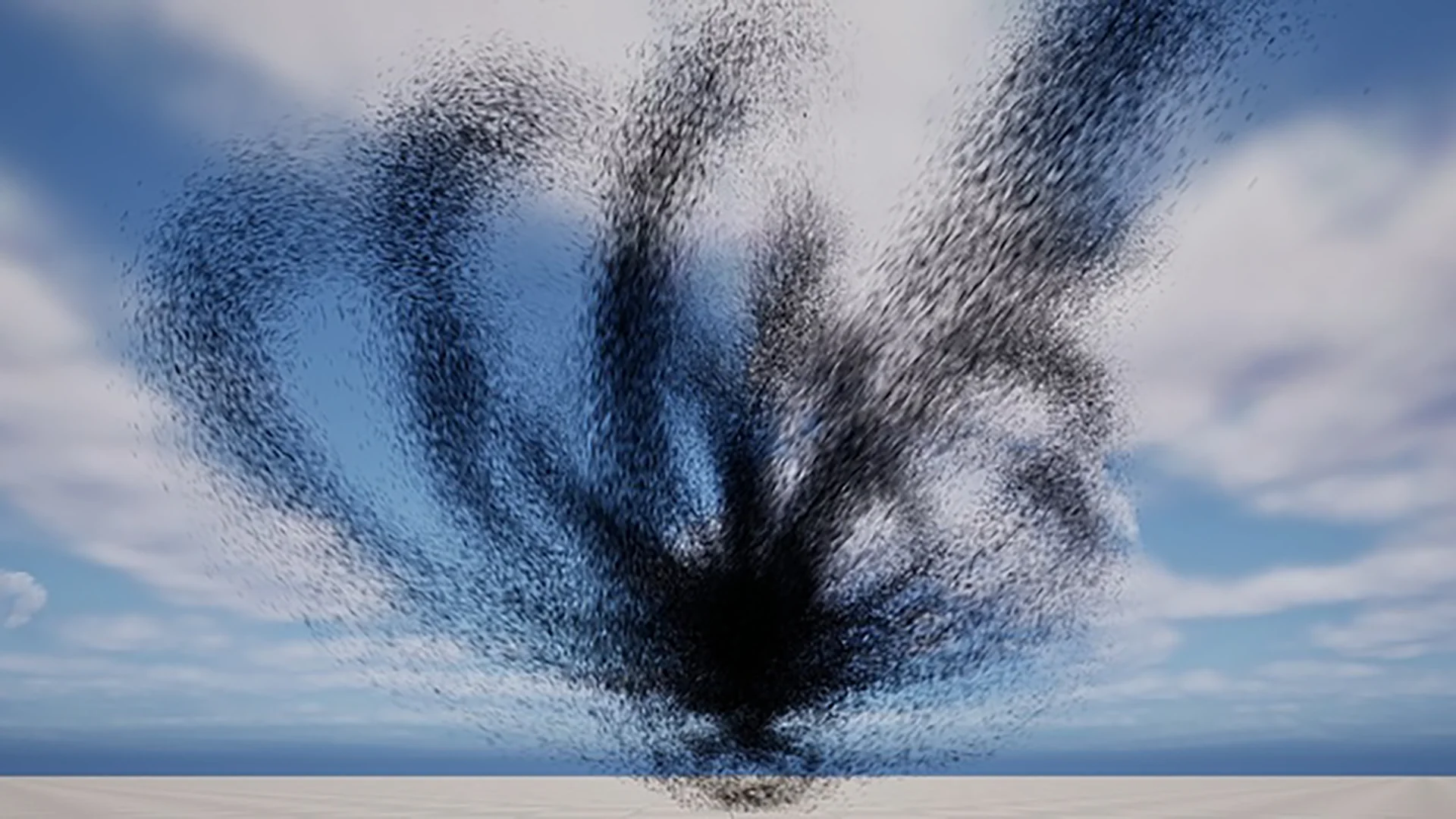
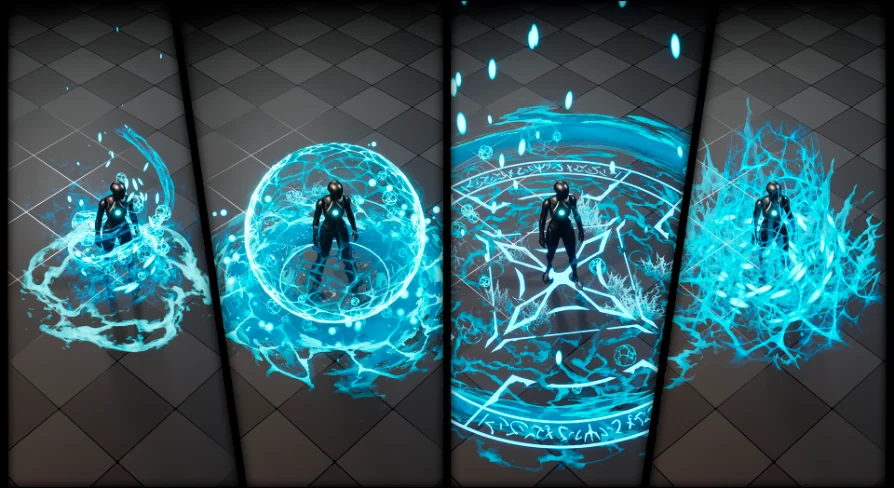
UE5 Spawn Character/Mesh VFX focuses on different styles of actor Niagara respawn effects for characters and meshes. It also includes a few practical setup notes that matter when you want synchronized playback, separate control, or support for a custom mesh.
Spawn and respawn moments can feel abrupt if a character or prop simply appears in place. UE5 Spawn Character/Mesh VFX addresses that gap with different styles of actor Niagara re-spawn effects, giving artists and developers a way to turn a functional event into a visible beat.
That makes it useful anywhere a scene needs a more deliberate entrance or return. A character can reappear with a stylized effect instead of a hard cut. A mesh can feel like it is being introduced into the world rather than toggled on. The core identity here is not a single look, but a set of different spawn effect styles centered on actor-based Niagara visuals.
Using UE5 Spawn Character/Mesh VFX for character and mesh entrances
The resource covers both character and mesh-oriented spawning, which gives it a broad practical range inside a scene. The name itself points directly at that split: character and mesh.
In practice, that means the effect can be applied to moments where an actor returns, appears, or is revealed. For character work, the obvious use is a respawn sequence. For meshes, it can support a more staged introduction of an object already placed in the scene flow. Because the emphasis is on different styles, the pack is less about a single locked presentation and more about giving you several visual options for how that reappearance should read.
Actor Niagara re-spawn effects and synchronized playback
One of the clearest implementation details is the use of an MPC in the example setup. The character and chair are driven by the same MPC, so they execute simultaneously.
That detail affects how you might stage a shot or interaction. If a seated scene, prop reveal, or linked actor moment needs both elements to trigger together, using the same MPC keeps them in step. It creates a single coordinated event rather than two separately timed spawns. For artists blocking out a sequence, that can be a simple way to keep a character and nearby mesh locked to the same visual timing.
At the same time, the setup note also clarifies the limitation of that shared control. When multiple meshes need their own timing, a single MPC is not the answer. Separate control requires a new MPC.
Creating a new MPC for separate mesh control
When the effect needs to reach more than one mesh, separate behavior matters. The workflow note is straightforward: create a new MPC if you want those meshes controlled independently.
This changes how the effect can be used creatively across a level or sequence. Instead of one global trigger causing every assigned element to play at once, each controlled group can have its own behavior. That opens the door to staggered reveals, isolated respawn beats, or one-off object appearances that do not interfere with another actor using the same effect family. The key point is not a complex toolset, but a clear control method: shared MPC for simultaneous execution, new MPCs for separation.
Custom mesh setup with Allow CPUAccess
There is also one important requirement for using the effect with a custom mesh. The mesh needs Allow CPUAccess Enabled in its detail panel.
This is the main pipeline note attached to custom mesh use, and it is specific enough to matter. If you are swapping out the example content for your own asset, that checkbox is not optional in this setup. It defines the step needed before the effect can be used with that custom mesh. The requirement is small, but it is the kind of detail that saves time during implementation because it tells you exactly what to check in the mesh settings.
Where Spawn, Niagara, VisualEffect, Fantasy, and Particle fit together
The tagged focus of the resource points to spawn, Niagara, visual effects, fantasy, and particle work. Those terms frame the style space it naturally sits in.
That makes the effect set a comfortable fit for scenes that want a more stylized or magical appearance rather than a neutral technical transition. The combination of spawn and particle-driven Niagara visuals suggests a strong role in moments where appearance itself is part of the presentation. Whether the actor is a character or another mesh in the scene, the effect is positioned as a visible event instead of a hidden system action.
For production use, the strongest fit is any UE5 setup that needs a more expressive actor or mesh re-entry, while still keeping control straightforward. Use one MPC when two elements should fire together. Create a new MPC when they should not. If a custom mesh is involved, enable Allow CPUAccess Before bringing it into the effect flow.
 Spells & Combat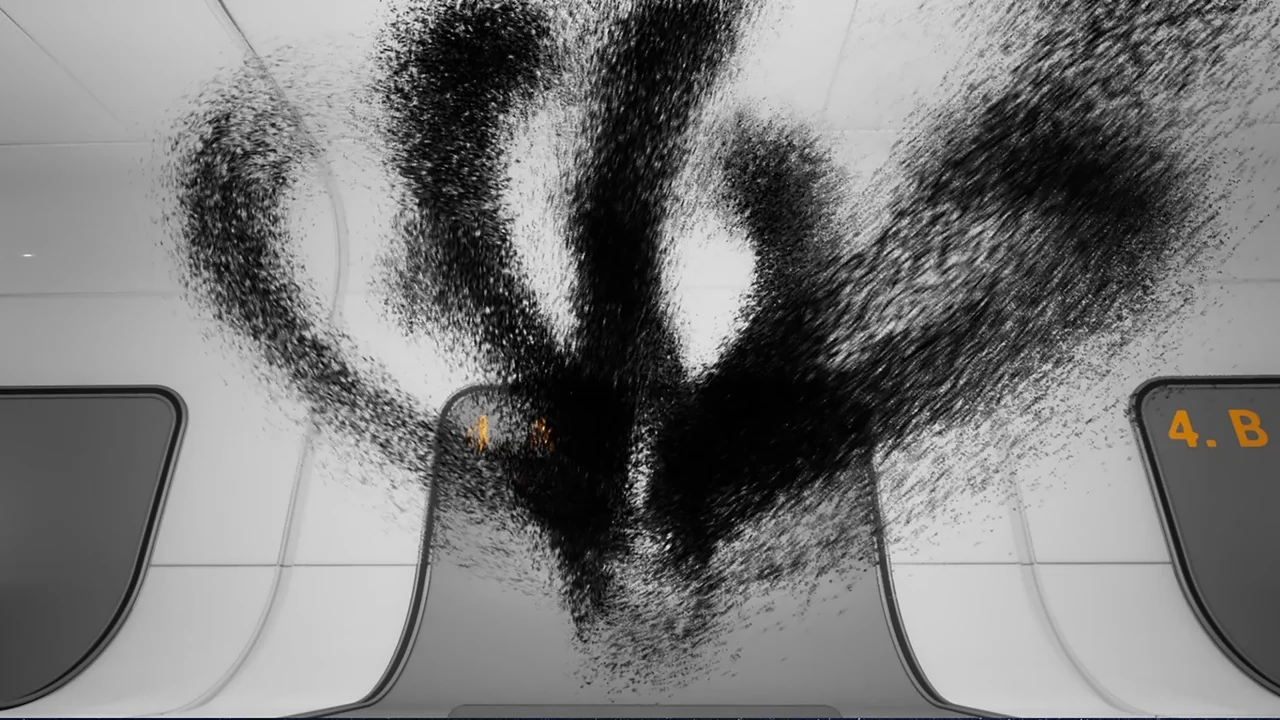
 Spells & Combat
 Spells & Combat
 Spells & Combat