"a19e0535960bd083"{"id":"27714","slug":"gasp-basic-template-for-fps-with-spatial-inventory","title":"GASP: Basic Template for FPS with Spatial Inventory","category":"Gameplay Features","engine":"5.5+","assetVersion":"Engine version: 5.5+","engineVersion":"","tag":"Gameplay Features","accent":"blue","visual":"audio","summary":"GASP: Basic Template for FPS with Spatial Inventory combines a spatial inventory system, a basic weapon system, and GASP content in one FPS-focused package. Its main draw is a configurable inventory layout where item size and shape affect how gear is arrang...","platform":"Unreal Engine","publishedAt":"2026-04-28T15:48:38.000Z","updatedAt":"2026-04-28T15:48:40.000Z","sourceNotes":[],"fileContents":[],"compatibility":["Unreal Engine","Engine version: 5.5+"],"featuredImage":{"alt":"GASP: Basic Template for FPS with Spatial Inventory","src":"https://3dcghub.com/wp-content/uploads/2026/04/d5a9310af048_7c263bb3-7b8e-48cc-a0b6-b062efafc7d1.webp"},"hasDownloadLink":true,"downloads":0,"terms":[{"taxonomy":"category","slug":"gameplay-features","name":"Gameplay Features"},{"taxonomy":"post_tag","slug":"game-systems","name":"Game Systems"},{"taxonomy":"post_tag","slug":"templates","name":"Templates"},{"taxonomy":"post_tag","slug":"weapons","name":"Weapons"}],"galleryImages":[{"src":"https://3dcghub.com/wp-content/uploads/2026/04/0e1236a77cfd_8c670b41-ad60-40ca-914b-e556667aec05.webp","alt":"GASP: Basic Template for FPS with Spatial Inventory"},{"src":"https://3dcghub.com/wp-content/uploads/2026/04/5ad53a578481_08451d86-4536-493f-b89d-d89a131c4d60.webp","alt":"GASP: Basic Template for FPS with Spatial Inventory"},{"src":"https://3dcghub.com/wp-content/uploads/2026/04/4ee0b7d9a1ff_5be277c2-1da3-4799-b7a0-a42af43569ab.webp","alt":"GASP: Basic Template for FPS with Spatial Inventory"},{"src":"https://3dcghub.com/wp-content/uploads/2026/04/126caa5d7171_a90bfa35-a3a4-4978-8941-207062353c78.webp","alt":"GASP: Basic Template for FPS with Spatial Inventory"},{"src":"https://3dcghub.com/wp-content/uploads/2026/04/4437c83b6326_e636e0fe-3459-47c0-952a-df5a3496b6d2.webp","alt":"GASP: Basic Template for FPS with Spatial Inventory"},{"src":"https://3dcghub.com/wp-content/uploads/2026/04/4a2bf8b776d5_98f93393-14e1-4a88-b71f-be47b766925b.webp","alt":"GASP: Basic Template for FPS with Spatial Inventory"},{"src":"https://3dcghub.com/wp-content/uploads/2026/04/827d12769723_a8b079c0-7417-4422-8959-b3f4e8f7a9a3.webp","alt":"GASP: Basic Template for FPS with Spatial Inventory"},{"src":"https://3dcghub.com/wp-content/uploads/2026/04/9a277d0130a5_5ff22953-27ba-4409-92d2-be719d0d6f59.webp","alt":"GASP: Basic Template for FPS with Spatial Inventory"},{"src":"https://3dcghub.com/wp-content/uploads/2026/04/8f36c818a8dd_e310b0e7-8b0c-49d5-b7c8-9c9533570998.webp","alt":"GASP: Basic Template for FPS with Spatial Inventory"}],"accessPanel":{"kind":"resource","title":"Access this resource","eyebrow":"Free Download","message":"Log in or create a free account to start your download.","fileName":"GASPBasicTemplateforFPSwi.7z","safetyNote":"All resources are 100% manually reviewed to eliminate all risks.","actionLabel":"Download Free","resourceType":"Resource archive"},"contentHtml":"\u003cp\u003eGASP: Basic Template for FPS with Spatial Inventory combines three clear parts in one package: a spatial inventory system, a basic weapon system, and GASP content from the Game Animation Sample Project. The setup is aimed at first-person projects where inventory management is not just a list of icons, but a space that has to be arranged with intention.\u003c/p\u003e\n\u003cp\u003eThe package also comes with a notable project requirement list. It uses Military Weapon Silver, which is noted as no longer available on FAB, along with Game Animation Sample, Animation Warping, Rig Logic, Live Link, Pose Search, Animation Locomotion Library, Motion Warping, Chooser, and Network Prediction. That matters during setup because the template is tied to a specific group of plugins and assets rather than standing alone as a single isolated system.\u003c/p\u003e \u003ch2\u003eSpatial Inventory layout and item shapes\u003c/h2\u003e\n\u003cp\u003eThe inventory system focuses on layout control. Users can define the number of slots and change the dimensions of each slot, which makes the inventory structure adjustable instead of fixed. That flexibility changes how implementation works: the inventory is not limited to one predetermined grid, and the arrangement can be reshaped to fit the needs of a project.\u003c/p\u003e\n\u003cp\u003eItems inside that inventory are represented by uniquely shaped blocks. The purpose is to reflect the form of the actual object more closely, giving the inventory a more physical feel than a standard same-size slot setup. In use, that means inventory decisions are tied to the shape and footprint of the item, not just its name or icon.\u003c/p\u003e\n\u003cp\u003eThere is one important tradeoff in this approach. Item shapes have to be configured manually. The system does not remove that step, so implementation includes shape setup as part of the content workflow. For teams or solo developers testing different item types, this creates a direct relationship between how an object should appear in the inventory and how it must be configured before use.\u003c/p\u003e\n\u003cp\u003eThat manual step also points to the kind of project this template suits best. It favors creators who want control over the feel of inventory arrangement and are willing to define object shapes item by item. The result is a more specific inventory behavior, but it asks for hands-on setup instead of automatic abstraction.\u003c/p\u003e \u003ch2\u003ePrimary, Secondary, and Melee weapon slots\u003c/h2\u003e\n\u003cp\u003eThe weapon side of the template is structured around three dedicated slots: Primary, Secondary, and Melee. This is not presented as a broad all-purpose combat framework. It is a basic weapon system with a straightforward slot structure that maps weapon categories to clear positions in the interface and on the character.\u003c/p\u003e\n\u003cp\u003eWhen a compatible weapon is dragged into the correct slot, it is automatically equipped to the character. That behavior gives the inventory and weapon systems a direct connection. The slot is not only a storage destination; it also acts as an equip trigger when the item type matches the slot.\u003c/p\u003e\n\u003cp\u003eThis creates a workflow that is easy to read during implementation. A weapon enters the inventory, the player drags it to the appropriate location, and the template handles the equip action. The logic is grounded in compatibility and slot type, which keeps the interaction readable for both prototyping and structured gameplay tests.\u003c/p\u003e\n\u003cp\u003eEquipped weapons can also be toggled on or off at any time. That adds another layer to how the weapon slots function in practice. The template is not only about placing items into a category, but also about controlling the active state of those equipped weapons after placement. For an FPS prototype, this gives enough structure to test carrying and switching behaviors without presenting itself as a full combat suite.\u003c/p\u003e \u003ch2\u003eGASP and project setup requirements\u003c/h2\u003e\n\u003cp\u003eThe template explicitly states its focus: spatial inventory and a basic weapon system within an FPS template, while also containing GASP content. That keeps expectations in check. It is not framed as a complete game framework covering every gameplay layer. Its center of gravity is inventory behavior, item arrangement, and simple weapon handling.\u003c/p\u003e\n\u003cp\u003eThe project requirement list is a practical part of that picture. Alongside Game Animation Sample, it uses Animation Warping, Rig Logic, Live Link, Pose Search, Animation Locomotion Library, Motion Warping, Chooser, and Network Prediction. These dependencies shape setup planning before any customization work begins. Anyone integrating the template needs to account for the fact that the package is connected to a broader set of animation and gameplay-related components.\u003c/p\u003e\n\u003cp\u003eMilitary Weapon Silver is also listed among the used assets, with a note that it is no longer available on FAB. That does not change the template's stated inventory and weapon features, but it is an important implementation detail because it affects the asset context around the project.\u003c/p\u003e \u003ch2\u003eWhere the FPS template fits in practice\u003c/h2\u003e\n\u003cp\u003eThis package is best understood as a short, focused framework for testing and shaping how an FPS inventory behaves. The included demo is described as a short showcase for trying some of the system's key features in action, which fits the overall scope. The emphasis stays on interaction: adjusting slot layouts, configuring item shapes manually, moving compatible weapons into specific slots, and toggling equipped weapons as needed.\u003c/p\u003e\n\u003cp\u003eFrom a creative usage standpoint, the strongest idea here is the move away from uniform inventory cells. Because slot dimensions can be adjusted and item blocks can reflect object shape, the inventory becomes part of moment-to-moment decision making rather than a neutral container. A weapon or item is not only something the player owns; it is something that occupies space in a particular way.\u003c/p\u003e\n\u003cp\u003eThat makes the template useful for projects where physicality in inventory handling matters as much as simple storage. At the same time, the scope remains controlled. The package is set up to handle an FPS inventory workflow with spatial arrangement, manual item-shape definition, and three weapon slots that feed directly into basic equip behavior.\u003c/p\u003e\n\n\u003ch2\u003eMore From The Same Workflow\u003c/h2\u003e\n\u003cul\u003e\n\u003cli\u003e\u003ca href=\"https://3dcghub.com/black-iron-ice-weapons/\" title=\"Black Iron Ice Weapons\"\u003eBlack Iron Ice Weapons\u003c/a\u003e\u003c/li\u003e\n\u003cli\u003e\u003ca href=\"https://3dcghub.com/medieval-viking-weapons-and-shields-set-medieval-viking-weapons-shield-old/\" title=\"Medieval / Viking Weapons and Shields Set ( Medieval Viking Weapons Shield Old )\"\u003eMedieval / Viking Weapons and Shields Set ( Medieval Viking Weapons Shield Old )\u003c/a\u003e\u003c/li\u003e\n\u003cli\u003e\u003ca href=\"https://3dcghub.com/medieval-siege-weapons/\" title=\"Medieval Siege Weapons\"\u003eMedieval Siege Weapons\u003c/a\u003e\u003c/li\u003e\n\u003cli\u003e\u003ca href=\"https://3dcghub.com/stylized-shields-rpg-weapons/\" title=\"Stylized Shields – RPG Weapons\"\u003eStylized Shields – RPG Weapons\u003c/a\u003e\u003c/li\u003e\n\u003cli\u003e\u003ca href=\"https://3dcghub.com/weapons-armor-pbr-pack-1-fantasy-rpg/\" title=\"Weapons \u0026amp;amp; Armor PBR Pack #1 – Fantasy RPG\"\u003eWeapons \u0026amp; Armor PBR Pack #1 – Fantasy RPG\u003c/a\u003e\u003c/li\u003e\n\u003c/ul\u003e","contentTextLength":6316,"navigation":{"current":2245,"total":4026,"previous":{"id":"27726","slug":"world-spawner-global-spawning-system","title":"World Spawner - Global Spawning System","category":"Engine Tools","platform":"Unreal Engine","updatedAt":"2026-04-28T16:02:08.000Z"},"next":{"id":"27702","slug":"fruit-tree-collection","title":"Fruit Tree Collection","category":"Trees","platform":"Unreal Engine","updatedAt":"2026-04-28T15:14:10.000Z"}},"relatedResources":[{"id":"1001617","slug":"inventory-system-pro-by-moonville","title":"Inventory System Pro by Moonville","category":"Gameplay Features","engine":"5.4+","assetVersion":"","engineVersion":"Engine Version: 5.4+","tag":"Gameplay Features","accent":"blue","visual":"mech","summary":"Inventory System Pro delivers a Blueprint-only toolkit featuring uniform and jigsaw grids, survival mechanics, and combat equipment for Unreal Engine.","platform":"Unreal Engine","publishedAt":"2026-10-11T01:45:57.813Z","updatedAt":"2026-10-11T01:45:57.813Z","sourceNotes":[],"fileContents":[],"compatibility":["Unreal Engine","Engine Version: 5.4+"],"featuredImage":{"alt":"Inventory System Pro by Moonville","src":"/wp-content/uploads/published/2026/10/cff3dc4ff029-f198679a-e82f-4dd8-b6af-a92f2cff2487-78f73d85b7.webp"},"hasDownloadLink":true,"downloads":1},{"id":"1002065","slug":"inventory-and-stat-system","title":"Inventory and Stat System","category":"Gameplay Features","engine":"5.0+","assetVersion":"","engineVersion":"Engine Version: 5.0+","tag":"Gameplay Features","accent":"blue","visual":"mech","summary":"Examine the Inventory and Stat System, featuring data table storage, DRS stat effects, simple crafting, multi-currency shops, and server-side replication.","platform":"Unreal Engine","publishedAt":"2026-10-26T15:23:17.162Z","updatedAt":"2026-10-26T15:23:17.162Z","sourceNotes":[],"fileContents":[],"compatibility":["Unreal Engine","Engine Version: 5.0+"],"featuredImage":{"alt":"Inventory and Stat System","src":"/wp-content/uploads/published/2026/10/52b372526cbb-99321cab-8384-4288-92dd-778a616e1b11-4417077d12.webp"},"hasDownloadLink":true,"downloads":0},{"id":"1000980","slug":"basic-locomotion-system-replicated","title":"Basic Locomotion System (REPLICATED)","category":"Gameplay Features","engine":"5.0+","assetVersion":"","engineVersion":"Engine Version: 5.0+","tag":"Gameplay Features","accent":"blue","visual":"animation","summary":"A ground-up locomotion system for the UE5 Skeleton using Lyra animations, built as a simple third-person template with MetaHuman integration and multiplayer inv","platform":"Unreal Engine","publishedAt":"2026-08-18T05:57:51.717Z","updatedAt":"2026-08-18T05:57:51.717Z","sourceNotes":[],"fileContents":[],"compatibility":["Unreal Engine","Engine Version: 5.0+"],"featuredImage":{"alt":"Basic Locomotion System (REPLICATED)","src":"/wp-content/uploads/published/2026/08/497370037da8-24315aeb-c8a9-4077-aa37-d1119fdcf17d-0970e54182.webp"},"hasDownloadLink":true,"downloads":4}]}
Gameplay Features
GASP: Basic Template for FPS with Spatial Inventory
GASP: Basic Template for FPS with Spatial Inventory combines a spatial inventory system, a basic weapon system, and GASP content in one FPS-focused package. Its main draw is a configurable inventory layout where item size and shape affect how gear is arrang...
GASP: Basic Template for FPS with Spatial Inventory combines three clear parts in one package: a spatial inventory system, a basic weapon system, and GASP content from the Game Animation Sample Project. The setup is aimed at first-person projects where inventory management is not just a list of icons, but a space that has to be arranged with intention.
The package also comes with a notable project requirement list. It uses Military Weapon Silver, which is noted as no longer available on FAB, along with Game Animation Sample, Animation Warping, Rig Logic, Live Link, Pose Search, Animation Locomotion Library, Motion Warping, Chooser, and Network Prediction. That matters during setup because the template is tied to a specific group of plugins and assets rather than standing alone as a single isolated system.
Spatial Inventory layout and item shapes
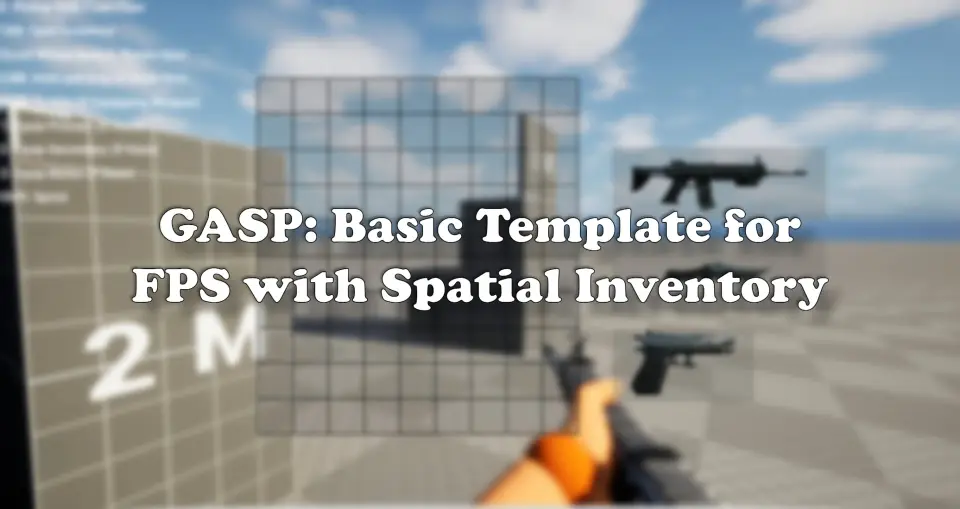
The inventory system focuses on layout control. Users can define the number of slots and change the dimensions of each slot, which makes the inventory structure adjustable instead of fixed. That flexibility changes how implementation works: the inventory is not limited to one predetermined grid, and the arrangement can be reshaped to fit the needs of a project.
Items inside that inventory are represented by uniquely shaped blocks. The purpose is to reflect the form of the actual object more closely, giving the inventory a more physical feel than a standard same-size slot setup. In use, that means inventory decisions are tied to the shape and footprint of the item, not just its name or icon.
There is one important tradeoff in this approach. Item shapes have to be configured manually. The system does not remove that step, so implementation includes shape setup as part of the content workflow. For teams or solo developers testing different item types, this creates a direct relationship between how an object should appear in the inventory and how it must be configured before use.
That manual step also points to the kind of project this template suits best. It favors creators who want control over the feel of inventory arrangement and are willing to define object shapes item by item. The result is a more specific inventory behavior, but it asks for hands-on setup instead of automatic abstraction.
Primary, Secondary, and Melee weapon slots
The weapon side of the template is structured around three dedicated slots: Primary, Secondary, and Melee. This is not presented as a broad all-purpose combat framework. It is a basic weapon system with a straightforward slot structure that maps weapon categories to clear positions in the interface and on the character.
When a compatible weapon is dragged into the correct slot, it is automatically equipped to the character. That behavior gives the inventory and weapon systems a direct connection. The slot is not only a storage destination; it also acts as an equip trigger when the item type matches the slot.
This creates a workflow that is easy to read during implementation. A weapon enters the inventory, the player drags it to the appropriate location, and the template handles the equip action. The logic is grounded in compatibility and slot type, which keeps the interaction readable for both prototyping and structured gameplay tests.
Equipped weapons can also be toggled on or off at any time. That adds another layer to how the weapon slots function in practice. The template is not only about placing items into a category, but also about controlling the active state of those equipped weapons after placement. For an FPS prototype, this gives enough structure to test carrying and switching behaviors without presenting itself as a full combat suite.
GASP and project setup requirements
The template explicitly states its focus: spatial inventory and a basic weapon system within an FPS template, while also containing GASP content. That keeps expectations in check. It is not framed as a complete game framework covering every gameplay layer. Its center of gravity is inventory behavior, item arrangement, and simple weapon handling.
The project requirement list is a practical part of that picture. Alongside Game Animation Sample, it uses Animation Warping, Rig Logic, Live Link, Pose Search, Animation Locomotion Library, Motion Warping, Chooser, and Network Prediction. These dependencies shape setup planning before any customization work begins. Anyone integrating the template needs to account for the fact that the package is connected to a broader set of animation and gameplay-related components.
Military Weapon Silver is also listed among the used assets, with a note that it is no longer available on FAB. That does not change the template's stated inventory and weapon features, but it is an important implementation detail because it affects the asset context around the project.
Where the FPS template fits in practice
This package is best understood as a short, focused framework for testing and shaping how an FPS inventory behaves. The included demo is described as a short showcase for trying some of the system's key features in action, which fits the overall scope. The emphasis stays on interaction: adjusting slot layouts, configuring item shapes manually, moving compatible weapons into specific slots, and toggling equipped weapons as needed.
From a creative usage standpoint, the strongest idea here is the move away from uniform inventory cells. Because slot dimensions can be adjusted and item blocks can reflect object shape, the inventory becomes part of moment-to-moment decision making rather than a neutral container. A weapon or item is not only something the player owns; it is something that occupies space in a particular way.
That makes the template useful for projects where physicality in inventory handling matters as much as simple storage. At the same time, the scope remains controlled. The package is set up to handle an FPS inventory workflow with spatial arrangement, manual item-shape definition, and three weapon slots that feed directly into basic equip behavior.
 Gameplay Features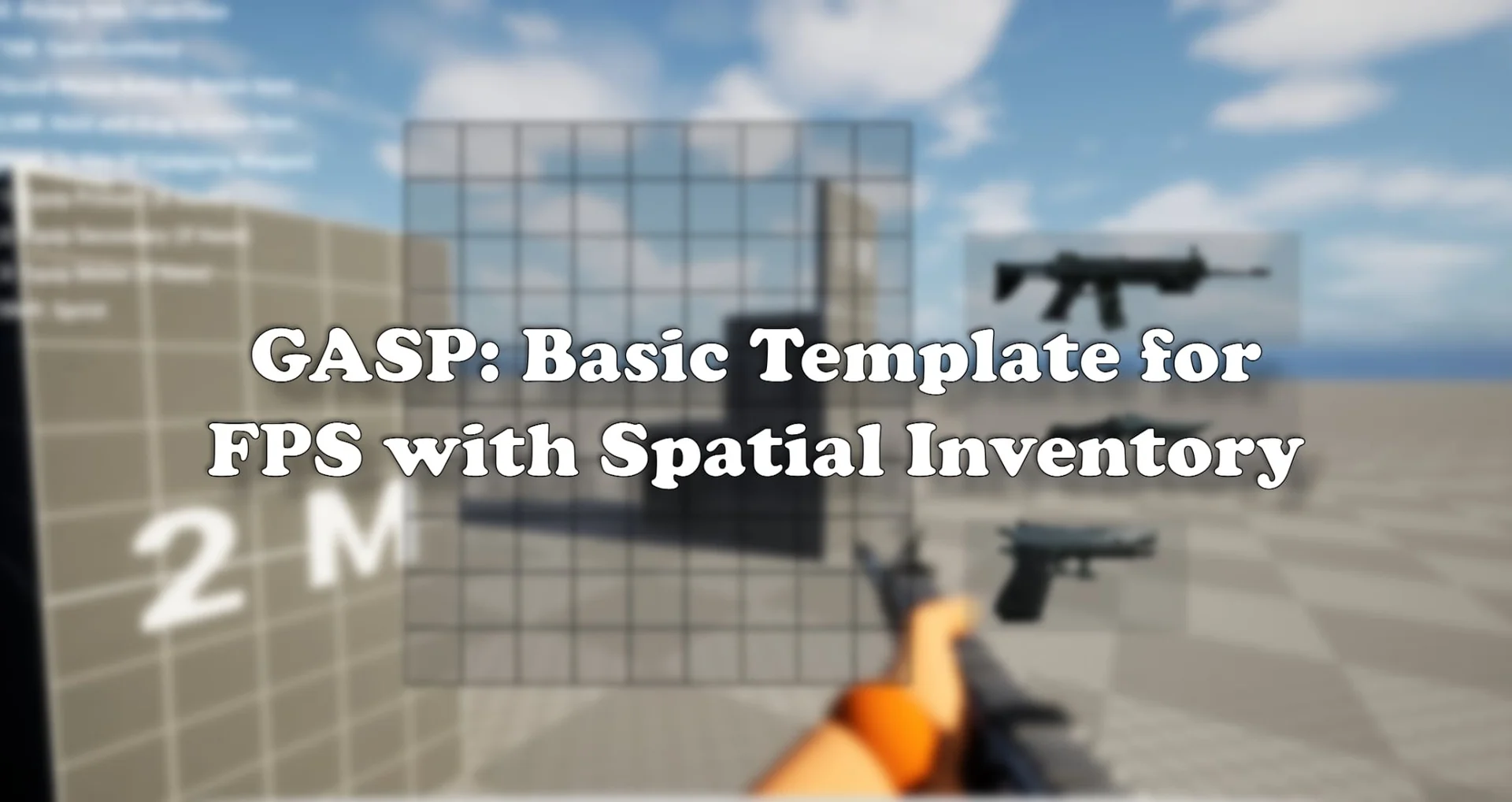
 Gameplay Features
 Gameplay Features
 Gameplay Features