"0341a2901a4ae9aa"{"id":"27726","slug":"world-spawner-global-spawning-system","title":"World Spawner - Global Spawning System","category":"Engine Tools","engine":"5.2","assetVersion":"Engine version: 5.2","engineVersion":"Asset Version:1.2","tag":"Engine Tools","accent":"blue","visual":"character","summary":"World Spawner centers on three connected systems: fast population, optimization, and path and waypoint control. It targets projects that need large-scale spawning of NPCs, loot, and items while keeping movement, persistence, and performance management in th...","platform":"Unreal Engine","publishedAt":"2026-04-28T16:02:07.000Z","updatedAt":"2026-04-28T16:02:08.000Z","sourceNotes":[],"fileContents":[],"compatibility":["Unreal Engine","Engine version: 5.2","Asset Version: 1.2"],"featuredImage":{"alt":"World Spawner - Global Spawning System","src":"https://3dcghub.com/wp-content/uploads/2026/04/3d28a92bdd03_7520a099-82c4-46c0-93bf-585380c35f1e.webp"},"hasDownloadLink":true,"downloads":0,"terms":[{"taxonomy":"category","slug":"engine-tools-tools-and-plugins","name":"Engine Tools"},{"taxonomy":"post_tag","slug":"game-systems","name":"Game Systems"},{"taxonomy":"post_tag","slug":"tools","name":"Tools"},{"taxonomy":"post_tag","slug":"unreal-engine-5","name":"Unreal Engine 5"}],"galleryImages":[{"src":"https://3dcghub.com/wp-content/uploads/2026/04/3a1e7a74466a_afbcf91a-50b2-48f2-bad2-f0a96a000330.webp","alt":"World Spawner - Global Spawning System"},{"src":"https://3dcghub.com/wp-content/uploads/2026/04/4c33d230ce8e_759060f3-3cf7-42fb-9235-195433d23635.webp","alt":"World Spawner - Global Spawning System"},{"src":"https://3dcghub.com/wp-content/uploads/2026/04/1a60bf95320f_b42ca3ef-b2e2-420a-8965-53dba9782acd.webp","alt":"World Spawner - Global Spawning System"},{"src":"https://3dcghub.com/wp-content/uploads/2026/04/45443a891644_874ad9de-3aa3-4026-99cf-75d7bd26b348.webp","alt":"World Spawner - Global Spawning System"},{"src":"https://3dcghub.com/wp-content/uploads/2026/04/d11481d6ea6f_345c5f90-f197-4220-9aad-f015c2e99e5d.webp","alt":"World Spawner - Global Spawning System"},{"src":"https://3dcghub.com/wp-content/uploads/2026/04/f844884544bb_e343cb8f-c1d6-4393-aead-b0a779b8e8dc.webp","alt":"World Spawner - Global Spawning System"},{"src":"https://3dcghub.com/wp-content/uploads/2026/04/fecc1793296f_d16bf4d6-b571-4249-a00e-eea4f649295c.webp","alt":"World Spawner - Global Spawning System"},{"src":"https://3dcghub.com/wp-content/uploads/2026/04/151b02d6c1cd_51d7c71f-6a16-48cf-a627-d24799bcc3a7.webp","alt":"World Spawner - Global Spawning System"}],"accessPanel":{"kind":"resource","title":"Access this resource","eyebrow":"Free Download","message":"Log in or create a free account to start your download.","fileName":"World Spawner.7z","safetyNote":"All resources are 100% manually reviewed to eliminate all risks.","actionLabel":"Download Free","resourceType":"Resource archive"},"contentHtml":"\u003cp\u003eWorld Spawner is structured around three main parts: \u003cstrong\u003eFast Population\u003c/strong\u003e, \u003cstrong\u003eOptimization\u003c/strong\u003e, and \u003cstrong\u003ePath and Waypoint\u003c/strong\u003e. Together they cover the practical work of filling levels with NPCs, loot, and items, then keeping those actors manageable through streaming, LOD control, and movement systems that can continue across different optimization levels.\u003c/p\u003e\u003cp\u003eThat combination gives the tool a broad creative range. A dense survival map can use it to scatter interactive objects and roaming actors, while an RPG or MMO-style space can lean on the same systems to keep populations active over a larger area. The package is built with multiplayer in mind, and it is presented as easy to integrate with other AI behavior systems.\u003c/p\u003e\u003ch2\u003eFast Population for NPCs, loot and items\u003c/h2\u003e\u003cp\u003eThe spawning side is not limited to one rigid setup. World Spawner supports both \u003cstrong\u003eAuto and manual spawning\u003c/strong\u003e, which makes it possible to shape population rules to the needs of a particular project. For developers, that means one area can be handled as a procedural population pass while another can stay tightly directed.\u003c/p\u003e\u003cp\u003eSeveral options reinforce that flexibility. \u003cstrong\u003eCollision detection\u003c/strong\u003e Includes adjustable parameters for surface detection and blocking, helping placement behave more predictably in different environments. \u003cstrong\u003eRandomization settings\u003c/strong\u003e Add variation through random rotation and location, which is useful when repeated actors or items need to avoid looking too uniform. \u003cstrong\u003eCollection creation\u003c/strong\u003e Allows multiple spawner data setups to be reused across different levels, making it easier to carry a consistent population logic from one map to another.\u003c/p\u003e\u003cp\u003eWorld Spawner also includes \u003cstrong\u003eTemporary data storage\u003c/strong\u003e For handling game data such as health and states. In practice, that makes the system more than a one-time placement tool. It can support actors that need to retain gameplay-relevant information while still passing through optimization controls.\u003c/p\u003e\u003ch2\u003eOptimization modes and sector-based streaming\u003c/h2\u003e\u003cp\u003eThe optimization side focuses on keeping larger populations practical. It includes a \u003cstrong\u003eSector-based streaming system\u003c/strong\u003e, a \u003cstrong\u003eCustomizable LOD system\u003c/strong\u003e, and \u003cstrong\u003eFOV for actors\u003c/strong\u003e. There are also multiple optimization modes and levels, so the performance setup can be adjusted rather than treated as a single fixed behavior.\u003c/p\u003e\u003cp\u003eFor projects with many active actors, this matters as much as the actual spawning. World Spawner is not just placing characters and objects into a scene; it is also handling how those actors are maintained as the player moves through the level. That is especially relevant when the same map mixes close-up gameplay spaces with wider background population.\u003c/p\u003e\u003cp\u003eThe system includes \u003cstrong\u003eSynchronized movement\u003c/strong\u003e To keep movement coordinated between levels of optimization. That helps preserve continuity instead of making actors feel disconnected whenever performance controls become more aggressive. The package also supports \u003cstrong\u003eVertex animation\u003c/strong\u003e For objects and NPCs as a cheaper animation option, although this specific feature does not work in multiplayer.\u003c/p\u003e\u003ch2\u003ePath and Waypoint movement across optimization levels\u003c/h2\u003e\u003cp\u003eThe third major piece is the \u003cstrong\u003ePath and Waypoint\u003c/strong\u003e System. It has its own movement and avoidance system, with the stated goal of guaranteeing seamless transitions between optimization levels for both ground and flying AI. This is a notable part of the tool’s identity because it connects spawning and optimization to actual motion in the world instead of leaving path behavior entirely separate.\u003c/p\u003e\u003cp\u003eCompatibility covers \u003cstrong\u003eCharacter\u003c/strong\u003e Using Character Movement Component, \u003cstrong\u003ePawn\u003c/strong\u003e Using Floating Pawn Movement, and \u003cstrong\u003eSimple actors\u003c/strong\u003e, each with multiple settings. That broadens the kinds of entities that can be managed through the same framework, from standard characters to simpler ambient actors.\u003c/p\u003e\u003cp\u003eThe movement toolset includes a \u003cstrong\u003eWaypoint system\u003c/strong\u003e For wander behavior inside defined areas and a \u003cstrong\u003ePath system\u003c/strong\u003e For traversal along random-width spline paths. A \u003cstrong\u003eTag and weight system\u003c/strong\u003e Adds another layer of control by setting movement priorities through tagged waypoints and paths. Used creatively, those features can shape very different behaviors: loose ambient wandering in one zone, more guided route-based movement in another, or weighted travel through specific hubs of activity.\u003c/p\u003e\u003ch2\u003eWorld Spawner updates that expand control\u003c/h2\u003e\u003cp\u003eThe later updates add several functions that push the system beyond basic spawning. \u003cstrong\u003eUpdate 2.0\u003c/strong\u003e Adds a function library for the creation and management of actors, updates the path system to avoid obstacles through nav mesh, introduces a new distance-based LOD system, and adds an ID system for spawners and agents.\u003c/p\u003e\u003cp\u003eThose changes strengthen both organization and behavior. A function library for actor creation and management suggests a more direct way to work with spawned actors inside a project’s logic. Obstacle avoidance through nav mesh makes the path system more practical in navigable spaces where movement needs to react to level geometry or blocked routes. The distance-based LOD system and ID system further refine how populations are tracked and optimized.\u003c/p\u003e\u003cp\u003e\u003cstrong\u003eUpdate 1.3\u003c/strong\u003e Adds agent parameters for initializing custom data from each spawner, which opens more room for differentiated actor behavior at spawn time. It also adds two examples centered on \u003cstrong\u003eSelf-registration\u003c/strong\u003e And \u003cstrong\u003eCustom Data Object\u003c/strong\u003e, and improves self-registration so an object is not destroyed when registered in the system.\u003c/p\u003e\u003cp\u003e\u003cstrong\u003eUpdates 1.1 and 1.2\u003c/strong\u003e Focus heavily on control and movement quality. Self-registration was added for use without Spawner Manager, which is described as useful for inventory systems where dropped objects on the ground are automatically registered in the optimization control system and remain persistent without affecting performance. The movement system was updated to \u003cstrong\u003eSpherical interpolation\u003c/strong\u003e, reducing sharp turns in reverse directions and making rotation smoother and more realistic. Rotation towards speed was added for Character and Pawn, the Try Fill Up option was updated for \u003cstrong\u003e100 times faster processing\u003c/strong\u003e, and MaterialParameterAssociation was added for vertex animations to make integration with material functions easier. There are also high actor class position fixes for debugging.\u003c/p\u003e\u003ch2\u003eWhere World Spawner fits best\u003c/h2\u003e\u003cp\u003eWorld Spawner is set up for projects that need population, movement, and optimization to work as one connected system rather than as separate tools. It can populate levels quickly, manage persistence and actor state, support waypoint and path-based motion, and keep those actors moving through optimization changes for ground and flying AI. With multiplayer in mind and integration support for Behavior Trees and Blueprints, it is aimed at teams that want a flexible spawning framework capable of handling busy game spaces without giving up control over how those spaces behave.\u003c/p\u003e\n\n\u003ch2\u003eRelated Resources Worth Checking\u003c/h2\u003e\n\u003cul\u003e\n\u003cli\u003e\u003ca href=\"https://3dcghub.com/edge-decal-tools-1-2/\" title=\"Edge Decal Tools 1.2\"\u003eEdge Decal Tools 1.2\u003c/a\u003e\u003c/li\u003e\n\u003c/ul\u003e","contentTextLength":6829,"navigation":{"current":2238,"total":4017,"previous":{"id":"27739","slug":"working-safes-minigame","title":"Working Safes Minigame","category":"Tools, Objects \u0026 Decor","platform":"Unreal Engine","updatedAt":"2026-04-28T16:10:59.000Z"},"next":{"id":"27714","slug":"gasp-basic-template-for-fps-with-spatial-inventory","title":"GASP: Basic Template for FPS with Spatial Inventory","category":"Gameplay Features","platform":"Unreal Engine","updatedAt":"2026-04-28T15:48:40.000Z"}},"relatedResources":[{"id":"15266","slug":"global-world-optimization-framework-pro-max-high-performance-for-large-worlds","title":"Global World Optimization Framework PRO MAX - High Performance for Large Worlds","category":"Procedural Systems","engine":"1.0.5 - 1.3","assetVersion":"Engine version: 5.3,5.6","engineVersion":"Asset Version:1.0.5 - 1.3","tag":"Procedural Systems","accent":"blue","visual":"animation","summary":"Manage thousands of actors and millions of objects with the Global World Optimization Framework PRO MAX. This system ensures high FPS and persistent world states for large-scale projects.","platform":"Unreal Engine","publishedAt":"2026-03-12T08:27:50.000Z","updatedAt":"2026-07-11T05:24:34.488Z","sourceNotes":[],"fileContents":[],"compatibility":["Unreal Engine","Engine version: 5.3,5.6","Asset Version:1.0.5 - 1.3"],"featuredImage":{"alt":"Global World Optimization Framework PRO MAX - High Performance for Large Worlds","src":"https://3dcghub.com/wp-content/uploads/2026/03/e6a4ffeb-2e66-4d5c-a559-94a10f521a84.webp"},"hasDownloadLink":true,"downloads":0},{"id":"14499","slug":"roadmap-navigation","title":"Roadmap Navigation","category":"Engine Tools","engine":"4.26 - 5.8","assetVersion":"Version:1.1.1 - 1.1.5","engineVersion":"Engine version: 4.26 - 5.8","tag":"Engine Tools","accent":"blue","visual":"mech","summary":"Roadmap Navigation is a specialized multi-threaded tool built for pathfinding in expansive environments. It operates on a custom grid system independent of standard engine navigation.","platform":"Unreal Engine","publishedAt":"2026-03-11T18:15:43.000Z","updatedAt":"2026-09-30T02:26:26.897Z","sourceNotes":[],"fileContents":[],"compatibility":["Unreal Engine","Version:1.1.1 - 1.1.5","Engine version: 4.26 - 5.8"],"featuredImage":{"alt":"Roadmap Navigation","src":"https://3dcghub.com/wp-content/uploads/2026/03/51fb9767-8e64-4a39-8425-f983478affcb.webp"},"hasDownloadLink":true,"downloads":0},{"id":"1001044","slug":"ai-optimizer","title":"AI Optimizer","category":"Engine Tools","engine":"5.0 - 5.3","assetVersion":"Asset Version: 1.0","engineVersion":"Engine Version: 5.0 - 5.3","tag":"Engine Tools","accent":"blue","visual":"mech","summary":"Plugin for fast actor spawner setup and AI agent optimization in any world size. Includes docs, example project, and Souls-Like spawner tutorial.","platform":"Unreal Engine","publishedAt":"2026-08-27T14:42:21.040Z","updatedAt":"2026-08-27T14:42:21.040Z","sourceNotes":[],"fileContents":[],"compatibility":["Unreal Engine","Asset Version: 1.0","Engine Version: 5.0 - 5.3"],"featuredImage":{"alt":"AI Optimizer","src":"/wp-content/uploads/published/2026/08/4fcf26f0294d-60c1ee24-5897-4094-8d67-0f105ad9143c-ee39e12bef.webp"},"hasDownloadLink":true,"downloads":0}]}
Engine Tools
World Spawner - Global Spawning System
World Spawner centers on three connected systems: fast population, optimization, and path and waypoint control. It targets projects that need large-scale spawning of NPCs, loot, and items while keeping movement, persistence, and performance management in th...
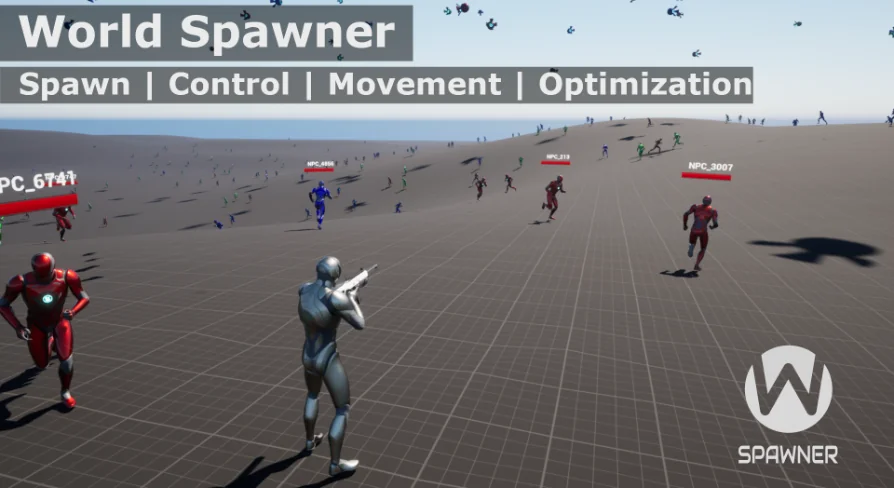
World Spawner is structured around three main parts: Fast Population, Optimization, and Path and Waypoint. Together they cover the practical work of filling levels with NPCs, loot, and items, then keeping those actors manageable through streaming, LOD control, and movement systems that can continue across different optimization levels.
That combination gives the tool a broad creative range. A dense survival map can use it to scatter interactive objects and roaming actors, while an RPG or MMO-style space can lean on the same systems to keep populations active over a larger area. The package is built with multiplayer in mind, and it is presented as easy to integrate with other AI behavior systems.
Fast Population for NPCs, loot and items
The spawning side is not limited to one rigid setup. World Spawner supports both Auto and manual spawning, which makes it possible to shape population rules to the needs of a particular project. For developers, that means one area can be handled as a procedural population pass while another can stay tightly directed.
Several options reinforce that flexibility. Collision detection Includes adjustable parameters for surface detection and blocking, helping placement behave more predictably in different environments. Randomization settings Add variation through random rotation and location, which is useful when repeated actors or items need to avoid looking too uniform. Collection creation Allows multiple spawner data setups to be reused across different levels, making it easier to carry a consistent population logic from one map to another.
World Spawner also includes Temporary data storage For handling game data such as health and states. In practice, that makes the system more than a one-time placement tool. It can support actors that need to retain gameplay-relevant information while still passing through optimization controls.
Optimization modes and sector-based streaming
The optimization side focuses on keeping larger populations practical. It includes a Sector-based streaming system, a Customizable LOD system, and FOV for actors. There are also multiple optimization modes and levels, so the performance setup can be adjusted rather than treated as a single fixed behavior.
For projects with many active actors, this matters as much as the actual spawning. World Spawner is not just placing characters and objects into a scene; it is also handling how those actors are maintained as the player moves through the level. That is especially relevant when the same map mixes close-up gameplay spaces with wider background population.
The system includes Synchronized movement To keep movement coordinated between levels of optimization. That helps preserve continuity instead of making actors feel disconnected whenever performance controls become more aggressive. The package also supports Vertex animation For objects and NPCs as a cheaper animation option, although this specific feature does not work in multiplayer.
Path and Waypoint movement across optimization levels
The third major piece is the Path and Waypoint System. It has its own movement and avoidance system, with the stated goal of guaranteeing seamless transitions between optimization levels for both ground and flying AI. This is a notable part of the tool’s identity because it connects spawning and optimization to actual motion in the world instead of leaving path behavior entirely separate.
Compatibility covers Character Using Character Movement Component, Pawn Using Floating Pawn Movement, and Simple actors, each with multiple settings. That broadens the kinds of entities that can be managed through the same framework, from standard characters to simpler ambient actors.
The movement toolset includes a Waypoint system For wander behavior inside defined areas and a Path system For traversal along random-width spline paths. A Tag and weight system Adds another layer of control by setting movement priorities through tagged waypoints and paths. Used creatively, those features can shape very different behaviors: loose ambient wandering in one zone, more guided route-based movement in another, or weighted travel through specific hubs of activity.
World Spawner updates that expand control
The later updates add several functions that push the system beyond basic spawning. Update 2.0 Adds a function library for the creation and management of actors, updates the path system to avoid obstacles through nav mesh, introduces a new distance-based LOD system, and adds an ID system for spawners and agents.
Those changes strengthen both organization and behavior. A function library for actor creation and management suggests a more direct way to work with spawned actors inside a project’s logic. Obstacle avoidance through nav mesh makes the path system more practical in navigable spaces where movement needs to react to level geometry or blocked routes. The distance-based LOD system and ID system further refine how populations are tracked and optimized.
Update 1.3 Adds agent parameters for initializing custom data from each spawner, which opens more room for differentiated actor behavior at spawn time. It also adds two examples centered on Self-registration And Custom Data Object, and improves self-registration so an object is not destroyed when registered in the system.
Updates 1.1 and 1.2 Focus heavily on control and movement quality. Self-registration was added for use without Spawner Manager, which is described as useful for inventory systems where dropped objects on the ground are automatically registered in the optimization control system and remain persistent without affecting performance. The movement system was updated to Spherical interpolation, reducing sharp turns in reverse directions and making rotation smoother and more realistic. Rotation towards speed was added for Character and Pawn, the Try Fill Up option was updated for 100 times faster processing, and MaterialParameterAssociation was added for vertex animations to make integration with material functions easier. There are also high actor class position fixes for debugging.
Where World Spawner fits best
World Spawner is set up for projects that need population, movement, and optimization to work as one connected system rather than as separate tools. It can populate levels quickly, manage persistence and actor state, support waypoint and path-based motion, and keep those actors moving through optimization changes for ground and flying AI. With multiplayer in mind and integration support for Behavior Trees and Blueprints, it is aimed at teams that want a flexible spawning framework capable of handling busy game spaces without giving up control over how those spaces behave.
 Engine Tools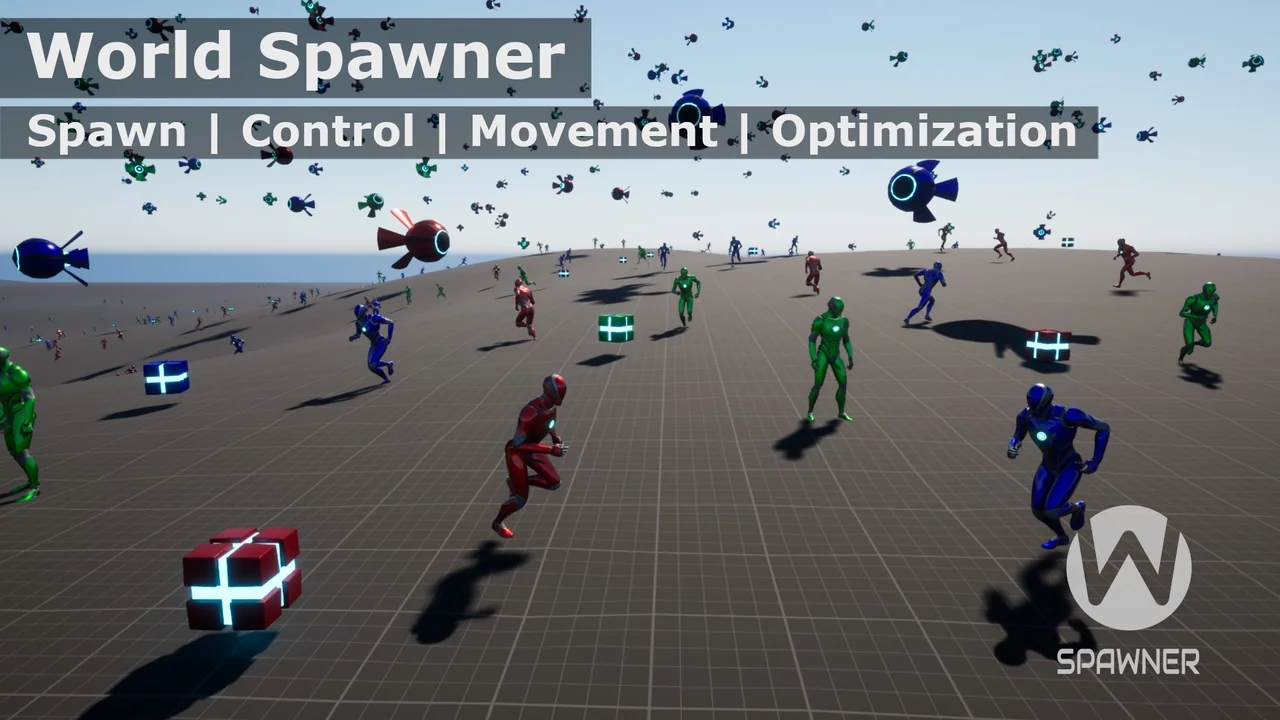
 Procedural Systems
 Engine Tools
 Engine Tools