"0341a2901a4ae9aa"{"id":"27739","slug":"working-safes-minigame","title":"Working Safes Minigame","category":"Tools, Objects \u0026 Decor","engine":"5.1+","assetVersion":"Engine version: 5.1+","engineVersion":"","tag":"Tools","accent":"blue","visual":"animation","summary":"Working Safes Minigame is a small interactive safe package for scene builders who want usable safes without digging into blueprint work. It combines premade safes, extra dial and handle parts, and a simple input setup that can be dropped into a level and ad...","platform":"Unreal Engine","publishedAt":"2026-04-28T16:10:58.000Z","updatedAt":"2026-04-28T16:10:59.000Z","sourceNotes":[],"fileContents":[],"compatibility":["Unreal Engine","Engine version: 5.1+"],"featuredImage":{"alt":"Working Safes Minigame","src":"https://3dcghub.com/wp-content/uploads/2026/04/167f20a5acf6_0a2ad28a-8919-4216-806c-efc0b87b6afe.webp"},"hasDownloadLink":true,"downloads":0,"terms":[{"taxonomy":"category","slug":"tools-objects-and-decor","name":"Tools, Objects \u0026 Decor"},{"taxonomy":"post_tag","slug":"environment","name":"Environment"},{"taxonomy":"post_tag","slug":"materials","name":"Materials"},{"taxonomy":"post_tag","slug":"unreal-engine-5","name":"Unreal Engine 5"}],"galleryImages":[{"src":"https://3dcghub.com/wp-content/uploads/2026/04/5ced553f3b9b_aaed0e18-339a-4d5c-a49d-7069467370f0.webp","alt":"Working Safes Minigame"},{"src":"https://3dcghub.com/wp-content/uploads/2026/04/9f5c34d41340_fd7fa013-c272-4f13-8e9a-e55e51ccac9e.webp","alt":"Working Safes Minigame"},{"src":"https://3dcghub.com/wp-content/uploads/2026/04/dee9cbd286f6_28950f1f-6eeb-4b99-a05a-2816ce40a934.webp","alt":"Working Safes Minigame"},{"src":"https://3dcghub.com/wp-content/uploads/2026/04/be46c5d2720b_d869622c-7bd8-479e-a70d-1081a5675d9e.webp","alt":"Working Safes Minigame"},{"src":"https://3dcghub.com/wp-content/uploads/2026/04/732aadb5ac42_b113d405-0a8f-4bc9-b670-d3e59611b350.webp","alt":"Working Safes Minigame"},{"src":"https://3dcghub.com/wp-content/uploads/2026/04/c32340882c92_9e54c31e-4b12-4dbc-9f03-068c6de6a270.webp","alt":"Working Safes Minigame"},{"src":"https://3dcghub.com/wp-content/uploads/2026/04/c63f58701df0_6bb5a105-4566-4b79-8573-d3ce170210f5.webp","alt":"Working Safes Minigame"},{"src":"https://3dcghub.com/wp-content/uploads/2026/04/a4f8bc7ec93e_31970fce-bdd0-40c1-8d1e-75b79ac5e6c5.webp","alt":"Working Safes Minigame"},{"src":"https://3dcghub.com/wp-content/uploads/2026/04/98c032157f19_cde28aa5-cff8-4a3f-ae00-50281005eb90.webp","alt":"Working Safes Minigame"},{"src":"https://3dcghub.com/wp-content/uploads/2026/04/1f3d569703a1_8d85dfa7-24b9-4cb0-a296-a90185e6f883.webp","alt":"Working Safes Minigame"}],"accessPanel":{"kind":"resource","title":"Access this resource","eyebrow":"Free Download","message":"Log in or create a free account to start your download.","fileName":"Content.7z","safetyNote":"All resources are 100% manually reviewed to eliminate all risks.","actionLabel":"Download Free","resourceType":"Resource archive"},"contentHtml":"\u003cp\u003eEscape rooms, stealth levels, heist scenes, and any environment that needs a lock-picking style interaction can use a safe that actually functions instead of sitting in the background as static set dressing. Working Safes Minigame focuses on that exact gap. It is a collection of working safes that can be placed into a scene quickly, with interaction already in place and no required blueprint editing just to get the system running.\u003c/p\u003e\n\u003cp\u003eThe package keeps the setup light. You drag the needed blueprint into the scene, place one or more safes from the Blueprints folder, and then adjust a few gameplay values such as dial speed, door speed, and the target numbers the player needs to discover. That makes it suitable for teams or solo creators who want a playable prop without turning a simple environmental interaction into a longer scripting task.\u003c/p\u003e \u003ch2\u003eWorking Safes Minigame fits best when a scene needs usable props fast\u003c/h2\u003e\n\u003cp\u003eThe main appeal here is speed. The safes are described as a simple way to populate game worlds with working safe interactions, and the workflow reflects that. Instead of starting from a generic static safe model and then adding custom logic later, the interaction is already part of the package.\u003c/p\u003e\n\u003cp\u003eThat changes where it fits in production. It makes sense during graybox-to-polish stages when an area already needs a puzzle or reward container, but the interaction should not eat up time. A developer can place a safe into a room, decide how many target numbers the player must solve, and tune how quickly the dial and door move. Because more than one safe can be dragged into the scene, it also works for levels where several safes appear in different rooms or where one mechanic gets reused across the map.\u003c/p\u003e\n\u003cp\u003eThe package includes 10 premade safes, so there is already a pool of ready-to-place options. On top of that, there are 7 extra parts made up of dials and handles. Those additions matter in practical scene work because they give some room to vary the look of individual safes without changing the overall interaction system.\u003c/p\u003e \u003ch2\u003eWhat is included in Working Safes Minigame\u003c/h2\u003e\n\u003cp\u003eThe package contains 10 premade safes, 7 extra parts for dials and handles, 1 \u003cem\u003eSafe_input_sender\u003c/em\u003e Blueprint, 1 \u003cem\u003eSafeInputInterface\u003c/em\u003e, and 4 materials listed as 4K. The focus stays narrow: this is not a broad vault-building set or a generic puzzle framework. It is a specific interaction package centered on safes.\u003c/p\u003e\n\u003cp\u003eOne useful detail is that the blueprints are commented for convenience, even though blueprint editing is not required to use the asset. That gives it two different roles in a workflow. For someone who just wants the interaction working, it stays drag-and-drop. For someone who does want to inspect or tweak the setup more deeply, the comments make that easier.\u003c/p\u003e\n\u003cp\u003eThe presence of a separate input sender blueprint also keeps the interaction logic more organized at scene level. Inputs can be changed by editing that blueprint, rather than having every safe require its own custom input work from the start.\u003c/p\u003e \u003ch2\u003eSafe_input_sender and the drag-and-drop scene setup\u003c/h2\u003e\n\u003cp\u003eThe setup process is straightforward. First, the \u003cem\u003eSafe_input_sender\u003c/em\u003e Blueprint gets dragged into the scene, and its placement can be anywhere. After that, any safe from the Blueprints folder can be added to the level. From there, the interaction can be tuned through a few exposed values rather than a larger rewrite.\u003c/p\u003e\n\u003cp\u003eThose editable values are specific to the safe puzzle itself. Dial speed and door speed can be changed to match the feel of the level. A slower dial may suit a more deliberate puzzle scene, while a faster one may work better when the safe is only a brief interactive beat. The number of dial targets can also be set, with a maximum of 5. The target values are whole numbers, and those become the numbers the player needs to guess correctly in sequence.\u003c/p\u003e\n\u003cp\u003eThat makes the package easy to slot into different pacing needs. One safe can act as a short side interaction with only a small sequence to solve. Another can be tuned into a more involved lock by using more dial targets. The core interaction stays the same, but the amount of friction can be adjusted inside the scene.\u003c/p\u003e\n\u003cp\u003eThere is also one implementation note for the demo scene: arrow inputs were removed from \u003cem\u003eFirstPerson \u0026gt; input \u0026gt; IMC_Default\u003c/em\u003e. That is a practical detail for anyone checking the included setup and trying to understand the control behavior in context.\u003c/p\u003e \u003ch2\u003eHow the safe dial minigame plays\u003c/h2\u003e\n\u003cp\u003eThe actual operation is clear and mechanical, which is useful for both implementation and level planning. The player needs to get close to a safe while using a player controller. Left and right arrow keys move the dial number, with a range from 0 to 360. While the safe is still locked, pressing the down arrow key moves the dial faster.\u003c/p\u003e\n\u003cp\u003eProgress through the lock depends on matching the current dial target. When the dial number matches that target, pressing the up arrow key advances the dial target to the next one. If the wrong number is used, the dial target moves back by 1. That gives the minigame a simple penalty without adding extra systems on top of it.\u003c/p\u003e\n\u003cp\u003eOnce all dial targets have been guessed correctly, the dial stops moving and the safe becomes unlocked. At that point, the interaction changes from puzzle input to object control. Pressing the F key opens or closes the safe. If needed, pressing the down arrow key again can lock the safe once more.\u003c/p\u003e\n\u003cp\u003eThis sequence makes the package easy to read from a gameplay standpoint. Before unlock, the player is manipulating a combination dial and stepping through targets. After unlock, the same object becomes a usable door. That split helps the asset function as more than just an animated prop. It can serve as a repeatable gameplay beat inside a room, hallway, office, bunker, or any other space where a safe should do something meaningful.\u003c/p\u003e \u003ch2\u003eWhere these interactive safes make the most sense\u003c/h2\u003e\n\u003cp\u003eWorking Safes Minigame is most useful for developers who want a contained interaction that can be added directly to a scene with little setup overhead. The package suits projects where environmental objects need to carry gameplay rather than only decoration. It also fits workflows where one person is handling level assembly and wants a puzzle-ready object that can be tuned in place.\u003c/p\u003e\n\u003cp\u003eThe included premade safes, extra dial and handle parts, commented blueprints, and editable target settings all point in the same direction: quick deployment with room for small adjustments. If a project needs a safe that players can approach, solve, unlock, open, close, and relock, this package covers that loop without requiring a fresh interaction system to be built first.\u003c/p\u003e\n\n\u003ch2\u003eMore From The Same Workflow\u003c/h2\u003e\n\u003cul\u003e\n\u003cli\u003e\u003ca href=\"https://3dcghub.com/56-fabric-textile-materials-4k-pbr-collection/\" title=\"56 Fabric \u0026amp;amp; Textile Materials (4K PBR Collection)\"\u003e56 Fabric \u0026amp; Textile Materials (4K PBR Collection)\u003c/a\u003e\u003c/li\u003e\n\u003cli\u003e\u003ca href=\"https://3dcghub.com/advanced-road-materials/\" title=\"Advanced road materials\"\u003eAdvanced road materials\u003c/a\u003e\u003c/li\u003e\n\u003cli\u003e\u003ca href=\"https://3dcghub.com/master-materials-and-layer-system-for-daz3d-imports/\" title=\"Master Materials and Layer System for Daz3D Imports\"\u003eMaster Materials and Layer System for Daz3D Imports\u003c/a\u003e\u003c/li\u003e\n\u003cli\u003e\u003ca href=\"https://3dcghub.com/realistic-materials-vol-7-water-ice-25-materials/\" title=\"Realistic Materials Vol. 7 – Water \u0026amp;amp; Ice (25+ Materials)\"\u003eRealistic Materials Vol. 7 – Water \u0026amp; Ice (25+ Materials)\u003c/a\u003e\u003c/li\u003e\n\u003cli\u003e\u003ca href=\"https://3dcghub.com/stylized-250-materials-bundle/\" title=\"Stylized 250 Materials Bundle\"\u003eStylized 250 Materials Bundle\u003c/a\u003e\u003c/li\u003e\n\u003c/ul\u003e","contentTextLength":6931,"navigation":{"current":2237,"total":4017,"previous":{"id":"27752","slug":"venice-italian-city","title":"Venice - Italian City","category":"Cities","platform":"Unreal Engine","updatedAt":"2026-04-28T17:14:54.000Z"},"next":{"id":"27726","slug":"world-spawner-global-spawning-system","title":"World Spawner - Global Spawning System","category":"Engine Tools","platform":"Unreal Engine","updatedAt":"2026-04-28T16:02:08.000Z"}},"relatedResources":[{"id":"1001494","slug":"suburbs-vol-9-kitchen-appliances-nanite-and-low-poly","title":"Suburbs VOL.9 - Kitchen Appliances (Nanite and Low Poly)","category":"Tools, Objects \u0026 Decor","engine":"5.1+","assetVersion":"","engineVersion":"Engine Version: 5.1+","tag":"Tools","accent":"blue","visual":"mech","summary":"Explore Suburbs VOL.9 - Kitchen Appliances featuring 100 Nanite and low-poly meshes, 4K channel-packed textures, master materials, and Lumen support in UE5.","platform":"Unreal Engine","publishedAt":"2026-10-08T12:59:10.109Z","updatedAt":"2026-10-08T12:59:10.109Z","sourceNotes":[],"fileContents":[],"compatibility":["Unreal Engine","Engine Version: 5.1+"],"featuredImage":{"alt":"Suburbs VOL.9 - Kitchen Appliances (Nanite and Low Poly)","src":"/wp-content/uploads/published/2026/10/3979285da268-cfab6cc0-906e-4d64-b5c0-261f887167a6-7b5e04d362.webp"},"hasDownloadLink":true,"downloads":1},{"id":"1001457","slug":"suburbs-vol-1-wall-decor-nanite-and-low-poly","title":"Suburbs VOL.1 - Wall Decor (Nanite and Low Poly)","category":"Tools, Objects \u0026 Decor","engine":"5.1+","assetVersion":"","engineVersion":"Engine Version: 5.1+","tag":"Tools","accent":"blue","visual":"mech","summary":"Suburbs VOL.1 - Wall Decor provides 130 Unreal Engine meshes split between Nanite and low-poly versions with 4K textures and full Lumen support.","platform":"Unreal Engine","publishedAt":"2026-10-08T00:59:33.447Z","updatedAt":"2026-10-08T00:59:33.447Z","sourceNotes":[],"fileContents":[],"compatibility":["Unreal Engine","Engine Version: 5.1+"],"featuredImage":{"alt":"Suburbs VOL.1 - Wall Decor (Nanite and Low Poly)","src":"/wp-content/uploads/published/2026/10/74ebc1534289-9813391a-2ad8-44af-9171-1001780b8321-c5e3107822.webp"},"hasDownloadLink":true,"downloads":1},{"id":"1002086","slug":"dragon-portal","title":"Dragon Portal","category":"Tools, Objects \u0026 Decor","engine":"5.1+","assetVersion":"","engineVersion":"Engine Version: 5.1+","tag":"Tools","accent":"blue","visual":"mech","summary":"Dragon Portal is a stylized low-poly fantasy asset featuring five modular meshes, animated materials, subtle FX lighting, and Actor Blueprint control.","platform":"Unreal Engine","publishedAt":"2026-10-26T15:55:41.873Z","updatedAt":"2026-10-26T15:55:41.873Z","sourceNotes":[],"fileContents":[],"compatibility":["Unreal Engine","Engine Version: 5.1+"],"featuredImage":{"alt":"Dragon Portal","src":"/wp-content/uploads/published/2026/10/9fa51ea71e56-846788fe-d927-45a5-9aff-070579ba8509-dd08c66a88.webp"},"hasDownloadLink":true,"downloads":0}]}
Tools
Working Safes Minigame
Working Safes Minigame is a small interactive safe package for scene builders who want usable safes without digging into blueprint work. It combines premade safes, extra dial and handle parts, and a simple input setup that can be dropped into a level and ad...
Escape rooms, stealth levels, heist scenes, and any environment that needs a lock-picking style interaction can use a safe that actually functions instead of sitting in the background as static set dressing. Working Safes Minigame focuses on that exact gap. It is a collection of working safes that can be placed into a scene quickly, with interaction already in place and no required blueprint editing just to get the system running.
The package keeps the setup light. You drag the needed blueprint into the scene, place one or more safes from the Blueprints folder, and then adjust a few gameplay values such as dial speed, door speed, and the target numbers the player needs to discover. That makes it suitable for teams or solo creators who want a playable prop without turning a simple environmental interaction into a longer scripting task.
Working Safes Minigame fits best when a scene needs usable props fast
The main appeal here is speed. The safes are described as a simple way to populate game worlds with working safe interactions, and the workflow reflects that. Instead of starting from a generic static safe model and then adding custom logic later, the interaction is already part of the package.
That changes where it fits in production. It makes sense during graybox-to-polish stages when an area already needs a puzzle or reward container, but the interaction should not eat up time. A developer can place a safe into a room, decide how many target numbers the player must solve, and tune how quickly the dial and door move. Because more than one safe can be dragged into the scene, it also works for levels where several safes appear in different rooms or where one mechanic gets reused across the map.
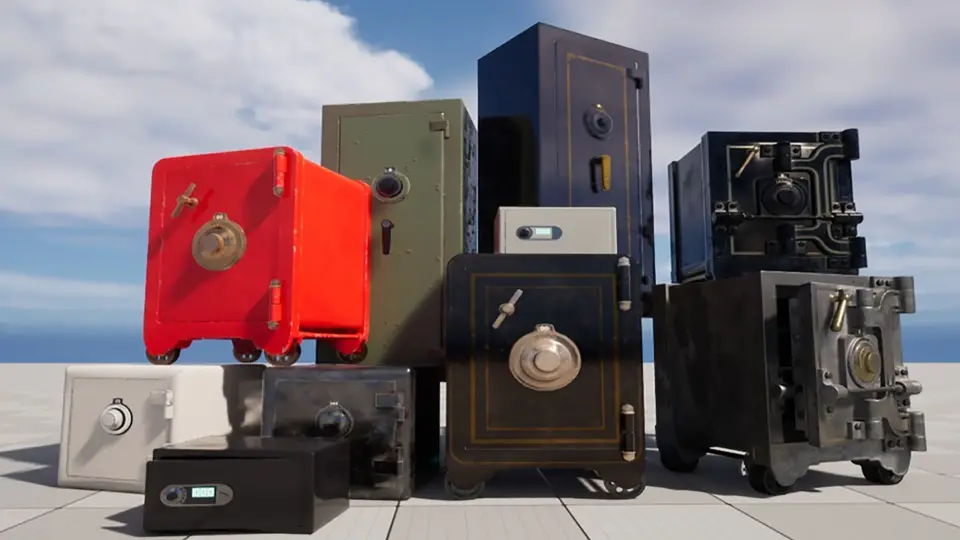
The package includes 10 premade safes, so there is already a pool of ready-to-place options. On top of that, there are 7 extra parts made up of dials and handles. Those additions matter in practical scene work because they give some room to vary the look of individual safes without changing the overall interaction system.
What is included in Working Safes Minigame
The package contains 10 premade safes, 7 extra parts for dials and handles, 1 Safe_input_sender Blueprint, 1 SafeInputInterface, and 4 materials listed as 4K. The focus stays narrow: this is not a broad vault-building set or a generic puzzle framework. It is a specific interaction package centered on safes.
One useful detail is that the blueprints are commented for convenience, even though blueprint editing is not required to use the asset. That gives it two different roles in a workflow. For someone who just wants the interaction working, it stays drag-and-drop. For someone who does want to inspect or tweak the setup more deeply, the comments make that easier.
The presence of a separate input sender blueprint also keeps the interaction logic more organized at scene level. Inputs can be changed by editing that blueprint, rather than having every safe require its own custom input work from the start.
Safe_input_sender and the drag-and-drop scene setup
The setup process is straightforward. First, the Safe_input_sender Blueprint gets dragged into the scene, and its placement can be anywhere. After that, any safe from the Blueprints folder can be added to the level. From there, the interaction can be tuned through a few exposed values rather than a larger rewrite.
Those editable values are specific to the safe puzzle itself. Dial speed and door speed can be changed to match the feel of the level. A slower dial may suit a more deliberate puzzle scene, while a faster one may work better when the safe is only a brief interactive beat. The number of dial targets can also be set, with a maximum of 5. The target values are whole numbers, and those become the numbers the player needs to guess correctly in sequence.
That makes the package easy to slot into different pacing needs. One safe can act as a short side interaction with only a small sequence to solve. Another can be tuned into a more involved lock by using more dial targets. The core interaction stays the same, but the amount of friction can be adjusted inside the scene.
There is also one implementation note for the demo scene: arrow inputs were removed from FirstPerson > input > IMC_Default. That is a practical detail for anyone checking the included setup and trying to understand the control behavior in context.
How the safe dial minigame plays
The actual operation is clear and mechanical, which is useful for both implementation and level planning. The player needs to get close to a safe while using a player controller. Left and right arrow keys move the dial number, with a range from 0 to 360. While the safe is still locked, pressing the down arrow key moves the dial faster.
Progress through the lock depends on matching the current dial target. When the dial number matches that target, pressing the up arrow key advances the dial target to the next one. If the wrong number is used, the dial target moves back by 1. That gives the minigame a simple penalty without adding extra systems on top of it.
Once all dial targets have been guessed correctly, the dial stops moving and the safe becomes unlocked. At that point, the interaction changes from puzzle input to object control. Pressing the F key opens or closes the safe. If needed, pressing the down arrow key again can lock the safe once more.
This sequence makes the package easy to read from a gameplay standpoint. Before unlock, the player is manipulating a combination dial and stepping through targets. After unlock, the same object becomes a usable door. That split helps the asset function as more than just an animated prop. It can serve as a repeatable gameplay beat inside a room, hallway, office, bunker, or any other space where a safe should do something meaningful.
Where these interactive safes make the most sense
Working Safes Minigame is most useful for developers who want a contained interaction that can be added directly to a scene with little setup overhead. The package suits projects where environmental objects need to carry gameplay rather than only decoration. It also fits workflows where one person is handling level assembly and wants a puzzle-ready object that can be tuned in place.
The included premade safes, extra dial and handle parts, commented blueprints, and editable target settings all point in the same direction: quick deployment with room for small adjustments. If a project needs a safe that players can approach, solve, unlock, open, close, and relock, this package covers that loop without requiring a fresh interaction system to be built first.
 Tools
Tools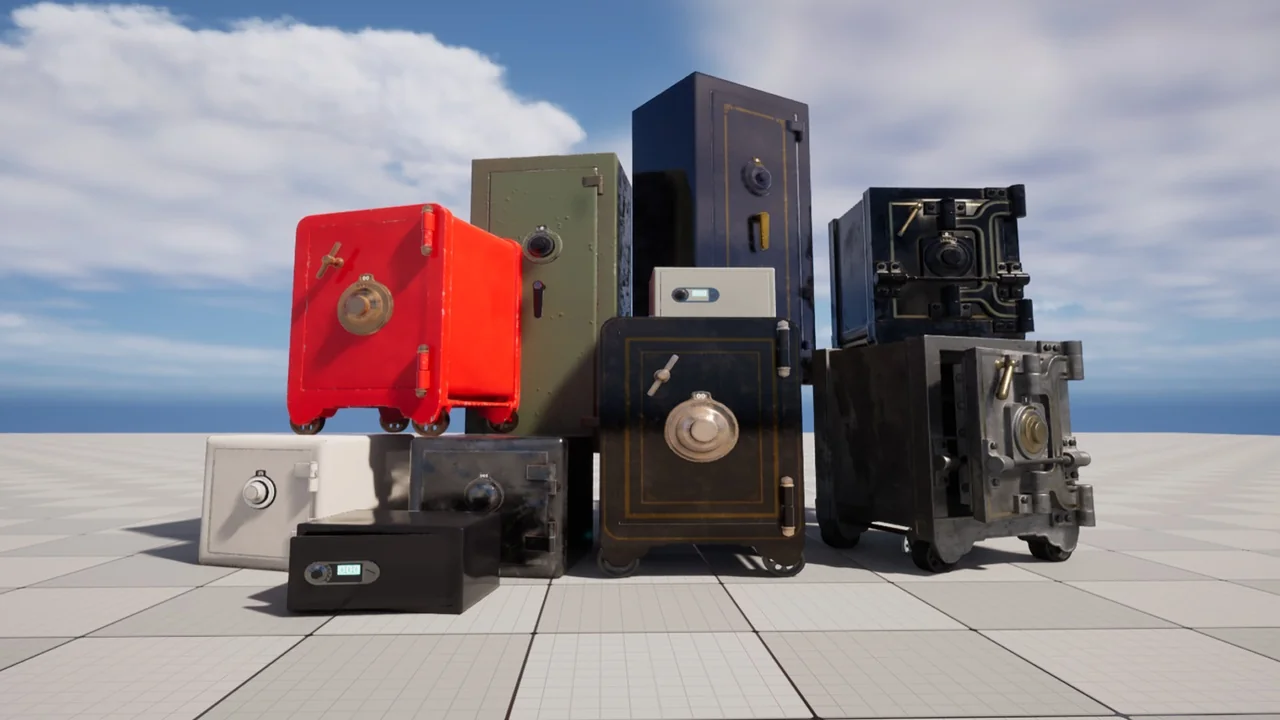
 Tools
Tools Tools
Tools Tools
Tools