"c68a05d5e51405b3"{"id":"27270","slug":"advanced-road-materials","title":"Advanced road materials","category":"Asphalt","engine":"4.26+,5.0+","assetVersion":"Engine version: 4.26+,5.0+","engineVersion":"","tag":"Asphalt","accent":"blue","visual":"luts","summary":"Advanced Road Materials is built for street and road scenes that need adjustable markings, dirt, and wet patches. It combines two master materials, 17 ready-to-use instances, and modular meshes for road building.","platform":"Unreal Engine","publishedAt":"2026-04-23T16:08:11.000Z","updatedAt":"2026-04-23T16:08:13.000Z","sourceNotes":[],"fileContents":[],"compatibility":["Unreal Engine","Engine version: 4.26+,5.0+"],"featuredImage":{"alt":"Advanced road materials","src":"https://3dcghub.com/wp-content/uploads/2026/04/b21517f9dd21_a1bd06f7-1302-4644-9ff3-e21c95cfd189.webp"},"hasDownloadLink":true,"downloads":1,"terms":[{"taxonomy":"category","slug":"asphalt","name":"Asphalt"},{"taxonomy":"post_tag","slug":"environment","name":"Environment"},{"taxonomy":"post_tag","slug":"materials","name":"Materials"},{"taxonomy":"post_tag","slug":"unreal-engine-5","name":"Unreal Engine 5"}],"galleryImages":[{"src":"https://3dcghub.com/wp-content/uploads/2026/04/0e4e45adef5a_2e9cdf82-7a46-4fa5-bdee-dc609490ff90.webp","alt":"Advanced road materials"},{"src":"https://3dcghub.com/wp-content/uploads/2026/04/58a46209407e_524edb31-efba-4061-b94f-5d23532efbd7.webp","alt":"Advanced road materials"},{"src":"https://3dcghub.com/wp-content/uploads/2026/04/09964c5efa26_9ad5999f-57c8-457e-89a1-c44bb72ea7a6.webp","alt":"Advanced road materials"},{"src":"https://3dcghub.com/wp-content/uploads/2026/04/8b05b7682853_8531a586-98a8-46d3-9d9e-e124d543fa91.webp","alt":"Advanced road materials"},{"src":"https://3dcghub.com/wp-content/uploads/2026/04/212033ea9e09_3e768f7d-1879-4120-9f05-d96361654182.webp","alt":"Advanced road materials"},{"src":"https://3dcghub.com/wp-content/uploads/2026/04/2ecaf37efc87_473e6d11-7edb-4f2e-8c1d-ef6c1da7cdf1.webp","alt":"Advanced road materials"},{"src":"https://3dcghub.com/wp-content/uploads/2026/04/c68268067e02_85d07583-bfd6-4fdf-a978-00fc87c3b94c.webp","alt":"Advanced road materials"},{"src":"https://3dcghub.com/wp-content/uploads/2026/04/20bfe96c23ef_658caa93-e1d1-492b-95ed-b2afe0d3b0c2.webp","alt":"Advanced road materials"},{"src":"https://3dcghub.com/wp-content/uploads/2026/04/605c64d29b66_141abb9c-2a1f-488f-a290-1b057599a7c5.webp","alt":"Advanced road materials"},{"src":"https://3dcghub.com/wp-content/uploads/2026/04/5e5313d86648_bb05f2d2-02cf-4b11-b24d-72dbcd2431fc.webp","alt":"Advanced road materials"}],"accessPanel":{"kind":"resource","title":"Access this resource","eyebrow":"Free Download","message":"Log in or create a free account to start your download.","fileName":"Content.7z","safetyNote":"All resources are 100% manually reviewed to eliminate all risks.","actionLabel":"Download Free","resourceType":"Resource archive"},"contentHtml":"\u003cp\u003eAdvanced Road Materials is aimed at road and street scenes that need editable markings, dirt, and wet patches without changing the whole setup every time. It combines reusable materials with compact road meshes, so the same package can support a simple asphalt strip, a road with side blending, or a section with visible wear and moisture.\u003c/p\u003e \u003ch2\u003eRoad surfaces that can shift from clean to worn\u003c/h2\u003e\n\u003cp\u003eThe pack is centered on two master materials and 17 ready-to-use instances. The first material supports a single type of road surface with an opacity mask. The second material supports two road surfaces blended by mask, along with additional road markings.\u003c/p\u003e\n\u003cp\u003eThat split gives the setup a clear structure. One material is for simpler road sections where a single surface is enough, while the other is for layouts that need a second surface layer and separate road markings. The materials also use Color, Normal, and Height textures, plus an additional mask for blending the main road surface with the road sides and another mask for the markings.\u003c/p\u003e \u003ch2\u003eControls for dirt, moisture, and painted lines\u003c/h2\u003e\n\u003cp\u003eThe update adds two practical adjustments that make the pack more flexible in scene work. Road lines can now change color in up to three different colors, and custom dirt textures can be used with control over each texture channel's color and size.\u003c/p\u003e\n\u003cp\u003eDirt settings allow changes to dirt normal intensity, scale, opacity, size, color, roughness, and metalness. Moisture settings go further by letting the material take on overall wetness, water puddles, roughness influence, Fresnel effect, surface darkening, and water color. The pack also supports dirt, moisture, and water puddles based on mask and height map distance, which keeps the surface treatment tied to the material setup rather than sitting on top as a separate layer.\u003c/p\u003e\n\u003cp\u003eThose controls keep the road from feeling locked into one state. A section can stay dry and clean, then move toward dirtier edges, damp patches, or stronger puddle coverage when the scene needs it. The line color adjustment also makes the road markings easier to adapt when a project needs a different visual treatment across multiple segments.\u003c/p\u003e \u003ch2\u003eMeshes made for road building\u003c/h2\u003e\n\u003cp\u003eAlongside the materials, the pack includes two base meshes for road building: one flat and one raised up. Their triangle counts are listed as 60 and 80, which keeps them very small and direct for road construction.\u003c/p\u003e\n\u003cp\u003eThere are also derived meshes with preapplied materials, with 10 meshes of each type. That gives the setup a quicker starting point for building out a road layout, since some meshes already carry the material treatment instead of requiring every piece to be assembled from scratch.\u003c/p\u003e\n\u003cp\u003eThe included meshes are sized at 9 by 9 meters. A.psd file is also provided with all the supplied masks, which helps keep the material organization tied to the same set of texture and mask inputs used in the pack.\u003c/p\u003e \u003ch2\u003eWhere this kind of setup fits best\u003c/h2\u003e\n\u003cp\u003eThis material pack is a strong match for road building, street networks, industrial environments, and simulation scenes where surface treatment needs to be adjusted directly on the material. It also suits spline-based road work, since the focus stays on repeatable road pieces with controllable edges, markings, dirt, and moisture.\u003c/p\u003e\n\u003cp\u003eThe overall setup is especially useful when a scene needs several states of the same road surface without moving to a different asset every time. A clean road, a blended two-surface road, and a wetter or dirtier version can all come from the same material system and mesh group. For projects that rely on compact road pieces and editable surface variation, Advanced Road Materials keeps the workflow focused on the surface itself.\u003c/p\u003e\n\n\u003ch2\u003eRelated Resources Worth Checking\u003c/h2\u003e\n\u003cul\u003e\n\u003cli\u003e\u003ca href=\"https://3dcghub.com/shootlikeme-unreal-engine-third-person-shooter-template/\" title=\"ShootLikeMe – Unreal Engine Third Person Shooter Template\"\u003eShootLikeMe – Unreal Engine Third Person Shooter Template\u003c/a\u003e\u003c/li\u003e\n\u003cli\u003e\u003ca href=\"https://3dcghub.com/advanced-unreal-engine-5-multiplayer-gameplay-programming/\" title=\"Advanced Unreal Engine 5 Multiplayer Gameplay Programming\"\u003eAdvanced Unreal Engine 5 Multiplayer Gameplay Programming\u003c/a\u003e\u003c/li\u003e\n\u003cli\u003e\u003ca href=\"https://3dcghub.com/niagara-beginners-to-advanced-in-unreal-engine-5/\" title=\"Niagara Beginners to advanced in Unreal Engine 5\"\u003eNiagara Beginners to advanced in Unreal Engine 5\u003c/a\u003e\u003c/li\u003e\n\u003cli\u003e\u003ca href=\"https://3dcghub.com/create-zelda-like-skills-with-c-in-unreal-engine-5-2/\" title=\"Create Zelda-like skills with C++ in unreal engine 5\"\u003eCreate Zelda-like skills with C++ in unreal engine 5\u003c/a\u003e\u003c/li\u003e\n\u003cli\u003e\u003ca href=\"https://3dcghub.com/main-menus-beginner-class-unreal-engine-5/\" title=\"Main Menus Beginner Class – Unreal Engine 5\"\u003eMain Menus Beginner Class – Unreal Engine 5\u003c/a\u003e\u003c/li\u003e\n\u003c/ul\u003e","contentTextLength":4020,"navigation":{"current":2113,"total":3860,"previous":{"id":"27283","slug":"advanced-universal-spawner","title":"Advanced Universal Spawner","category":"Procedural Systems","platform":"Unreal Engine","updatedAt":"2026-04-23T16:08:23.000Z"},"next":{"id":"27242","slug":"abandoned-russian-building","title":"Abandoned Russian Building","category":"Abandoned","platform":"Unreal Engine","updatedAt":"2026-04-23T04:12:13.000Z"}},"relatedResources":[{"id":"12435","slug":"procedural-road-markings","title":"PROCEDURAL ROAD MARKINGS","category":"Asphalt","engine":"4.26+,5.0+","assetVersion":"Engine version: 4.26+,5.0+","engineVersion":"4.19","tag":"Asphalt","accent":"blue","visual":"luts","summary":"Enhance your game environments with a library of 120 unique, fully customizable road markings. This asset pack features advanced weathering, damage controls, and Blueprint support for infinite splines.","platform":"Unreal Engine","publishedAt":"2026-03-07T12:28:13.000Z","updatedAt":"2026-04-19T15:47:57.000Z","sourceNotes":[],"fileContents":[],"compatibility":["Unreal Engine","Engine version: 4.26+,5.0+"],"featuredImage":{"alt":"PROCEDURAL ROAD MARKINGS","src":"https://3dcghub.com/wp-content/uploads/2026/03/7a9cef6d-29ef-4b6f-be3d-5586784c44f4.webp"},"hasDownloadLink":true,"downloads":1},{"id":"1001730","slug":"fire-hydrant-package","title":"Fire Hydrant Package","category":"Street / Road","engine":"4.26+,5.0+","assetVersion":"","engineVersion":"Engine Version: 4.26+,5.0+","tag":"Street / Road","accent":"blue","visual":"mech","summary":"Explore the Fire Hydrant Package featuring 6 realistic models, 124 2K texture variations, Substance material controls, custom collision, and two LOD stages.","platform":"Unreal Engine","publishedAt":"2026-10-20T02:36:25.870Z","updatedAt":"2026-10-20T02:36:25.870Z","sourceNotes":[],"fileContents":[],"compatibility":["Unreal Engine","Engine Version: 4.26+,5.0+"],"featuredImage":{"alt":"Fire Hydrant Package","src":"/wp-content/uploads/published/2026/10/ddca3ad4cc15-4cd5bb82-c969-49f8-800a-df2b35666274-a1fb7084d6.webp"},"hasDownloadLink":true,"downloads":0},{"id":"1001754","slug":"roads-n-streets","title":"Roads n Streets","category":"Streets \u0026 Construction","engine":"4.26+,5.0+","assetVersion":"","engineVersion":"Engine Version: 4.26+,5.0+","tag":"Streets","accent":"blue","visual":"mech","summary":"Roads n Streets provides procedural asphalt and cobblestone materials, spline meshes, and static parts designed for the Landscape Spline Tool.","platform":"Unreal Engine","publishedAt":"2026-10-20T02:59:39.016Z","updatedAt":"2026-10-20T02:59:39.016Z","sourceNotes":[],"fileContents":[],"compatibility":["Unreal Engine","Engine Version: 4.26+,5.0+"],"featuredImage":{"alt":"Roads n Streets","src":"/wp-content/uploads/published/2026/10/e21e2124a741-f3836343-9a61-44fc-a959-973c424de309-50ea50d7a7.webp"},"hasDownloadLink":true,"downloads":0}]}
Asphalt
Advanced road materials
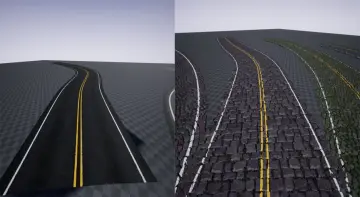
Advanced Road Materials is built for street and road scenes that need adjustable markings, dirt, and wet patches. It combines two master materials, 17 ready-to-use instances, and modular meshes for road building.
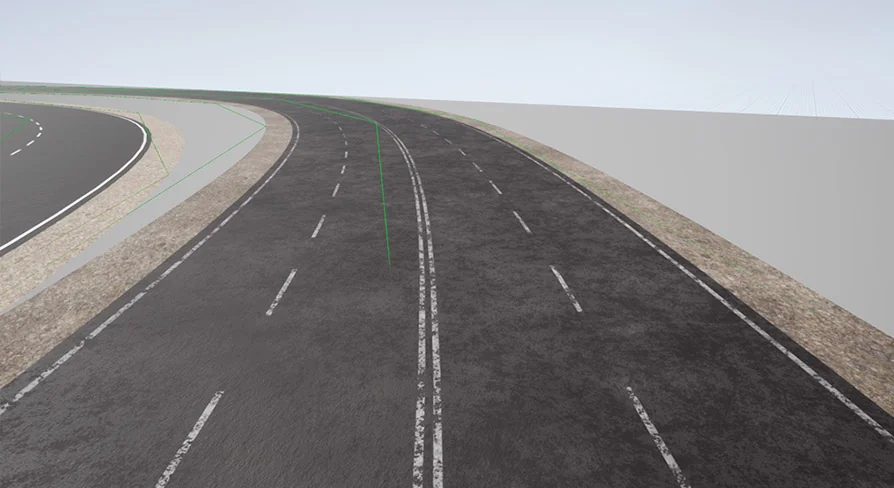
Advanced Road Materials is aimed at road and street scenes that need editable markings, dirt, and wet patches without changing the whole setup every time. It combines reusable materials with compact road meshes, so the same package can support a simple asphalt strip, a road with side blending, or a section with visible wear and moisture.
Road surfaces that can shift from clean to worn
The pack is centered on two master materials and 17 ready-to-use instances. The first material supports a single type of road surface with an opacity mask. The second material supports two road surfaces blended by mask, along with additional road markings.
That split gives the setup a clear structure. One material is for simpler road sections where a single surface is enough, while the other is for layouts that need a second surface layer and separate road markings. The materials also use Color, Normal, and Height textures, plus an additional mask for blending the main road surface with the road sides and another mask for the markings.
Controls for dirt, moisture, and painted lines
The update adds two practical adjustments that make the pack more flexible in scene work. Road lines can now change color in up to three different colors, and custom dirt textures can be used with control over each texture channel's color and size.
Dirt settings allow changes to dirt normal intensity, scale, opacity, size, color, roughness, and metalness. Moisture settings go further by letting the material take on overall wetness, water puddles, roughness influence, Fresnel effect, surface darkening, and water color. The pack also supports dirt, moisture, and water puddles based on mask and height map distance, which keeps the surface treatment tied to the material setup rather than sitting on top as a separate layer.
Those controls keep the road from feeling locked into one state. A section can stay dry and clean, then move toward dirtier edges, damp patches, or stronger puddle coverage when the scene needs it. The line color adjustment also makes the road markings easier to adapt when a project needs a different visual treatment across multiple segments.
Meshes made for road building
Alongside the materials, the pack includes two base meshes for road building: one flat and one raised up. Their triangle counts are listed as 60 and 80, which keeps them very small and direct for road construction.
There are also derived meshes with preapplied materials, with 10 meshes of each type. That gives the setup a quicker starting point for building out a road layout, since some meshes already carry the material treatment instead of requiring every piece to be assembled from scratch.
The included meshes are sized at 9 by 9 meters. A.psd file is also provided with all the supplied masks, which helps keep the material organization tied to the same set of texture and mask inputs used in the pack.
Where this kind of setup fits best
This material pack is a strong match for road building, street networks, industrial environments, and simulation scenes where surface treatment needs to be adjusted directly on the material. It also suits spline-based road work, since the focus stays on repeatable road pieces with controllable edges, markings, dirt, and moisture.
The overall setup is especially useful when a scene needs several states of the same road surface without moving to a different asset every time. A clean road, a blended two-surface road, and a wetter or dirtier version can all come from the same material system and mesh group. For projects that rely on compact road pieces and editable surface variation, Advanced Road Materials keeps the workflow focused on the surface itself.
 Asphalt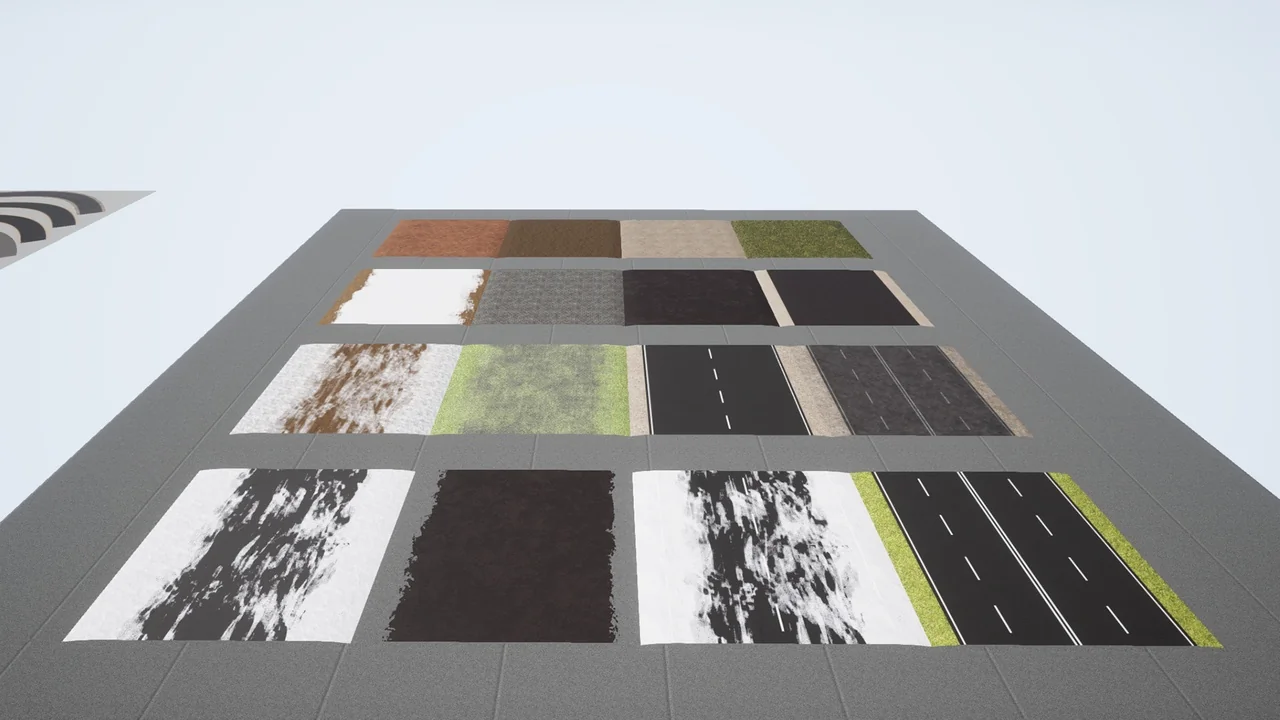
 Asphalt
 Street / Road
 Streets