"0341a2901a4ae9aa"{"id":"13961","slug":"edge-decal-tools-1-2","title":"Edge Decal Tools 1.2","category":"Engine Tools","engine":"5.6 - 5.7","assetVersion":"Engine version: 5.6 - 5.7","engineVersion":"Asset Version:1.2","tag":"Engine Tools","accent":"blue","visual":"character","summary":"Transform your environment detailing workflow with Edge Decal Tools 1.2. This script-based solution automates placement on complex geometry, ensuring high performance without the need for splines.","platform":"Unreal Engine","publishedAt":"2026-03-11T10:47:18.000Z","updatedAt":"2026-04-19T15:46:19.000Z","sourceNotes":[],"fileContents":[],"compatibility":["Unreal Engine","Engine version: 5.6 - 5.7","Asset Version: 1.2"],"featuredImage":{"alt":"Edge Decal Tools 1.2","src":"https://3dcghub.com/wp-content/uploads/2026/03/1e4e1085-5e0d-49f5-b659-ba804caa0bea.webp"},"hasDownloadLink":true,"downloads":0,"terms":[{"taxonomy":"category","slug":"engine-tools-tools-and-plugins","name":"Engine Tools"},{"taxonomy":"post_tag","slug":"environment","name":"Environment"},{"taxonomy":"post_tag","slug":"game-systems","name":"Game Systems"},{"taxonomy":"post_tag","slug":"materials","name":"Materials"},{"taxonomy":"post_tag","slug":"textures","name":"Textures"},{"taxonomy":"post_tag","slug":"tools","name":"Tools"},{"taxonomy":"post_tag","slug":"unreal-engine-5","name":"Unreal Engine 5"}],"galleryImages":[{"src":"https://3dcghub.com/wp-content/uploads/2026/03/19812b47e059_c215a0c8-e9bb-4d5c-a850-4ae872470375.webp","alt":"Edge Decal Tools 1.2"},{"src":"https://3dcghub.com/wp-content/uploads/2026/03/386738072ede_1ab9b443-e746-49aa-a1fc-da32ff662b04.webp","alt":"Edge Decal Tools 1.2"},{"src":"https://3dcghub.com/wp-content/uploads/2026/03/619779b7d2d5_e8d0d1e1-2e85-4a3c-945b-3ab02972810d.webp","alt":"Edge Decal Tools 1.2"},{"src":"https://3dcghub.com/wp-content/uploads/2026/03/45c7a286e8af_864478b9-cd35-4f06-80a3-ab3f0ee302a7.webp","alt":"Edge Decal Tools 1.2"},{"src":"https://3dcghub.com/wp-content/uploads/2026/03/e12bd22a7925_4e82fba0-8f95-4a17-8246-797bbb66b2d7.webp","alt":"Edge Decal Tools 1.2"},{"src":"https://3dcghub.com/wp-content/uploads/2026/03/0a9827183dc0_02e39b5e-d261-428a-9deb-f0d2a1ac630e.webp","alt":"Edge Decal Tools 1.2"},{"src":"https://3dcghub.com/wp-content/uploads/2026/03/e586160e0837_5e6d455d-0765-4788-a08d-fb2a20e166d4.webp","alt":"Edge Decal Tools 1.2"},{"src":"https://3dcghub.com/wp-content/uploads/2026/03/d62d69bc4fed_02f1b90b-5dc5-4844-b3f6-ac132e612306.webp","alt":"Edge Decal Tools 1.2"},{"src":"https://3dcghub.com/wp-content/uploads/2026/03/c2251a6d3de6_6b78b38e-5a1f-4d6d-9711-0e32ccb7276e.webp","alt":"Edge Decal Tools 1.2"},{"src":"https://3dcghub.com/wp-content/uploads/2026/03/67ba4bfe2fe8_39ad99fd-b03f-47c1-8650-48565e035ef2.webp","alt":"Edge Decal Tools 1.2"},{"src":"https://3dcghub.com/wp-content/uploads/2026/03/dac31a22011d_8edb10a1-b6e1-40cc-9c0d-2bd8f4128708.webp","alt":"Edge Decal Tools 1.2"},{"src":"https://3dcghub.com/wp-content/uploads/2026/03/b88d559d27ab_73b2881b-4ab0-4956-9e77-c65128558b68.webp","alt":"Edge Decal Tools 1.2"},{"src":"https://3dcghub.com/wp-content/uploads/2026/03/05cf3027dbf7_6b51757d-fa19-4f2b-85fb-d7955ef6e568.webp","alt":"Edge Decal Tools 1.2"},{"src":"https://3dcghub.com/wp-content/uploads/2026/03/4da9510b5046_89643d19-eb21-43ff-965d-adba228e19b2.webp","alt":"Edge Decal Tools 1.2"},{"src":"https://3dcghub.com/wp-content/uploads/2026/03/dabf132bf4ea_a634804a-8cd9-41ac-9a9c-0810ccd00914.webp","alt":"Edge Decal Tools 1.2"},{"src":"https://3dcghub.com/wp-content/uploads/2026/03/34e68c02c2df_1d352ed7-0c64-4933-bbbe-ea13abe9cee8.webp","alt":"Edge Decal Tools 1.2"},{"src":"https://3dcghub.com/wp-content/uploads/2026/03/5666dbf49cd8_addcc0c9-3de1-4f92-8487-d1bd8d3cf2b1.webp","alt":"Edge Decal Tools 1.2"},{"src":"https://3dcghub.com/wp-content/uploads/2026/03/04f0ddf6608f_202e07e7-1d34-4d7c-a4a0-5b97e4d51c89.webp","alt":"Edge Decal Tools 1.2"},{"src":"https://3dcghub.com/wp-content/uploads/2026/03/4598d9a0a5b1_8186b5e0-9be9-4380-a544-3c4b575cc58b.webp","alt":"Edge Decal Tools 1.2"},{"src":"https://3dcghub.com/wp-content/uploads/2026/03/e5ccfe4dd0f3_d9c365ff-c341-46b9-b528-b4e7e7d429eb.webp","alt":"Edge Decal Tools 1.2"}],"accessPanel":{"kind":"resource","title":"Access this resource","eyebrow":"Free Download","message":"Log in or create a free account to start your download.","fileName":"Edge Decal Tools 5.6 - 5.7,v1.2.7z","safetyNote":"All resources are 100% manually reviewed to eliminate all risks.","actionLabel":"Download Free","resourceType":"Resource archive"},"contentHtml":"\u003ch2\u003eAutomated Detailing for Unreal Engine\u003c/h2\u003e\n\u003cp\u003eEdge Decal Tools 1.2 is a powerful script-based asset designed to simplify the placement of decals on geometry. Placing details manually often requires significant time and effort. However, this tool handles all orientation and alignment tasks automatically. Consequently, environment artists can save hours or even days of work during the polishing phase. This efficiency makes it an essential addition to any production pipeline.\u003c/p\u003e\n\n\u003cp\u003eThe system is built to detail assets and polish environments with precision. Furthermore, the script handles the tedious placement work so users do not have to perform manual tweaks. The package includes a library of 11 high-quality edge decal examples to help users begin immediately. Therefore, you can achieve professional results right out of the box.\u003c/p\u003e\n\n\u003ch2\u003eThe Versatile Mesh Decal Tool\u003c/h2\u003e\n\u003cp\u003eIn addition to edge decals, the developer has included a bonus Mesh Decal Tool. This tool allows you to place static meshes across surfaces using an intuitive workflow. Specifically, these mesh decals can function as regular static meshes or instanced static meshes. This flexibility is vital for performance optimization in dense game environments. Moreover, the tool is perfect for modular or layered detail work.\u003c/p\u003e\n\n\u003cp\u003eThe Mesh Decal Tool is highly customizable to fit various project needs. Initially, the tool provided four sample mesh decals. However, the Edge Decal Tools 1.2 update has expanded this library significantly. Specifically, 15 new mesh decals have been added, bringing more variety to your modular detailing options.\u003c/p\u003e\n\n\u003ch2\u003eAdvanced Geometry and Material Support\u003c/h2\u003e\n\u003cp\u003eEdge Decal Tools 1.2 excels at handling complex and messy geometry. It can place decals on uneven surfaces, overlapping geometry, and areas prone to Z-fighting. Additionally, the tool works effectively on both outer and inner corners. Consequently, you can detail protruding edges as well as indented or inset surfaces with ease.\u003c/p\u003e\n\n\u003cp\u003eThe system is compatible with any surface or material type, including brick, stucco, and concrete. If you change the underlying material, the decals remain intact and continue to function flawlessly. Furthermore, a smart material scaling system prevents texture stretching. Decals automatically adapt their scale based on the edge length, which maintains visual consistency across the scene.\u003c/p\u003e\n\n\u003ch2\u003ePerformance and Optimization\u003c/h2\u003e\n\u003cp\u003eOne of the primary benefits of this tool is its efficiency. Unlike many alternatives, it does not use splines. Therefore, it is significantly more performant and easier to control than spline-based systems. Additionally, the tool includes fade-out controls to ensure smooth visual transitions. This feature helps minimize visual noise in highly detailed environments.\u003c/p\u003e\n\n\u003cp\u003eThe 1.2 update introduces several improvements to the core experience. Along with the new mesh decals, the developer implemented general bug fixes to enhance stability. Furthermore, a new option allows users to change the Z Scale of mesh decals. This addition provides even more control over the final look of your environment details.\u003c/p\u003e\n\n\u003ch2\u003eClosing Notes\u003c/h2\u003e\n\u003cp\u003eEdge Decal Tools 1.2 is an essential resource for environment artists, level designers, and technical artists. By automating the placement of edge and mesh decals, it eliminates repetitive tasks without sacrificing quality. Whether you are working with clean meshes or poorly aligned geometry, this tool ensures a polished and professional finish for your Unreal Engine projects.\u003c/p\u003e\n\n\u003ch2\u003eMore From The Same Workflow\u003c/h2\u003e\n\u003cul\u003e\n\u003cli\u003e\u003ca href=\"https://3dcghub.com/blockout-tools-plugin/\" title=\"Blockout Tools Plugin\"\u003eBlockout Tools Plugin\u003c/a\u003e\u003c/li\u003e\n\u003cli\u003e\u003ca href=\"https://3dcghub.com/virtual-animation-tools-v6/\" title=\"Virtual Animation Tools V6\"\u003eVirtual Animation Tools V6\u003c/a\u003e\u003c/li\u003e\n\u003cli\u003e\u003ca href=\"https://3dcghub.com/power-tools-pack/\" title=\"Power Tools Pack\"\u003ePower Tools Pack\u003c/a\u003e\u003c/li\u003e\n\u003cli\u003e\u003ca href=\"https://3dcghub.com/dynamic-triangulation/\" title=\"Dynamic Triangulation\"\u003eDynamic Triangulation\u003c/a\u003e\u003c/li\u003e\n\u003cli\u003e\u003ca href=\"https://3dcghub.com/dynamic-ai-system/\" title=\"Dynamic AI System\"\u003eDynamic AI System\u003c/a\u003e\u003c/li\u003e\n\u003c/ul\u003e\n\n\u003ch2\u003eAsset Gallery\u003c/h2\u003e","contentTextLength":3642,"navigation":{"current":3365,"total":4017,"previous":{"id":"13888","slug":"dynamic-triangulation","title":"Dynamic Triangulation","category":"Engine Tools","platform":"Unreal Engine","updatedAt":"2026-04-19T15:46:20.000Z"},"next":{"id":"13900","slug":"easy-localization-translation","title":"Easy Localization Translation","category":"Engine Tools","platform":"Unreal Engine","updatedAt":"2026-04-19T15:46:19.000Z"}},"relatedResources":[{"id":"13799","slug":"cinematographer-pro-a-cinematic-photorealistic-camera-system","title":"Cinematographer PRO - A Cinematic Photorealistic Camera System","category":"Engine Tools","engine":"5.1 - 5.7","assetVersion":"1.03 - 1.2","engineVersion":"5.1 - 5.7","tag":"Engine Tools","accent":"blue","visual":"character","summary":"Enhance your Unreal Engine workflow with Cinematographer PRO. This system offers realistic camera gear and streamlined settings to achieve instant photorealistic results for any project.","platform":"Unreal Engine","publishedAt":"2026-03-11T10:06:56.000Z","updatedAt":"2026-07-26T15:56:12.234Z","sourceNotes":[],"fileContents":[],"compatibility":["Unreal Engine","Asset Version: 1.03 - 1.2","Engine version: 5.1 - 5.7"],"featuredImage":{"alt":"Cinematographer PRO - A Cinematic Photorealistic Camera System","src":"https://3dcghub.com/wp-content/uploads/2026/03/45c81bf9-4e58-4b53-b6f6-e8802264d091.webp"},"hasDownloadLink":true,"downloads":2},{"id":"14623","slug":"skinned-decal-component","title":"Skinned Decal Component","category":"Engine Tools","engine":"2.3 - 3.0","assetVersion":"Engine version: 4.26 - 5.6","engineVersion":"Asset Version:2.3 - 3.0","tag":"Engine Tools","accent":"blue","visual":"character","summary":"Enhance your character rendering with the Skinned Decal Component, a lightweight tool designed to project decals that deform perfectly with skeletal meshes and morph targets.","platform":"Unreal Engine","publishedAt":"2026-03-11T18:41:59.000Z","updatedAt":"2026-06-20T04:53:55.480Z","sourceNotes":[],"fileContents":[],"compatibility":["Unreal Engine","Engine version: 4.26 - 5.6","Asset Version:2.3 - 3.0"],"featuredImage":{"alt":"Skinned Decal Component","src":"https://3dcghub.com/wp-content/uploads/2026/03/fb675630-276b-4dc3-85a6-b52b12e7aaad.webp"},"hasDownloadLink":true,"downloads":1},{"id":"14185","slug":"meshblend-next-generation-mesh-blending-without-rvt","title":"MeshBlend - Next generation mesh blending without RVT","category":"Engine Tools","engine":"5.5 - 5.7","assetVersion":"Engine version: 5.5 - 5.7","engineVersion":"Asset Version:2.1","tag":"Engine Tools","accent":"blue","visual":"mech","summary":"MeshBlend provides a powerful alternative to RVT for blending meshes and landscapes in Unreal Engine. This battle-tested tool supports Nanite, skeletal meshes, and high-performance workflows for indie and AAA projects alike.","platform":"Unreal Engine","publishedAt":"2026-03-11T16:07:49.000Z","updatedAt":"2026-04-19T15:45:51.000Z","sourceNotes":[],"fileContents":[],"compatibility":["Unreal Engine","Engine version: 5.5 - 5.7","Asset Version: 2.1"],"featuredImage":{"alt":"MeshBlend - Next generation mesh blending without RVT","src":"https://3dcghub.com/wp-content/uploads/2026/03/27abd930-9ae5-4b08-b6d7-1482b1ebf68a.webp"},"hasDownloadLink":true,"downloads":1}]}
Engine Tools
Edge Decal Tools 1.2
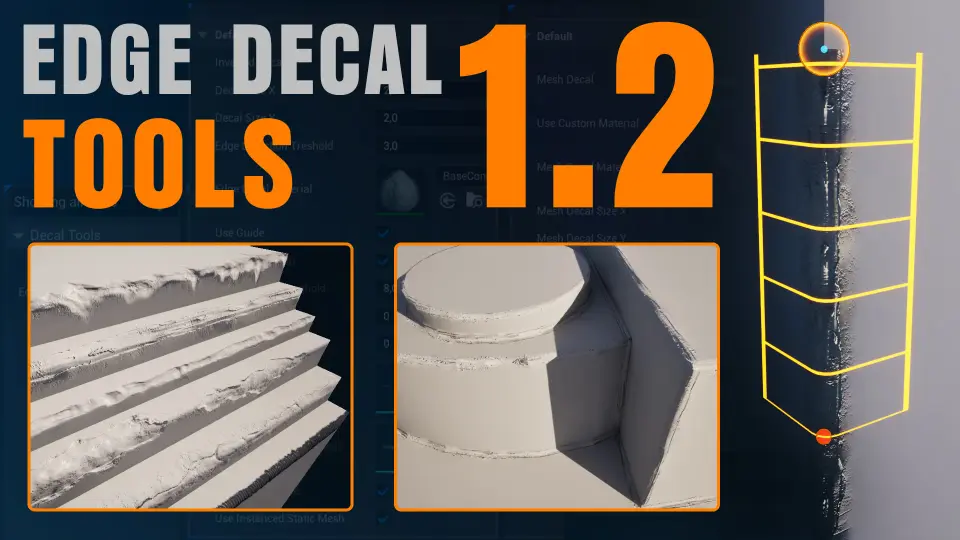
Transform your environment detailing workflow with Edge Decal Tools 1.2. This script-based solution automates placement on complex geometry, ensuring high performance without the need for splines.
Edge Decal Tools 1.2 is a powerful script-based asset designed to simplify the placement of decals on geometry. Placing details manually often requires significant time and effort. However, this tool handles all orientation and alignment tasks automatically. Consequently, environment artists can save hours or even days of work during the polishing phase. This efficiency makes it an essential addition to any production pipeline.
The system is built to detail assets and polish environments with precision. Furthermore, the script handles the tedious placement work so users do not have to perform manual tweaks. The package includes a library of 11 high-quality edge decal examples to help users begin immediately. Therefore, you can achieve professional results right out of the box.
The Versatile Mesh Decal Tool
In addition to edge decals, the developer has included a bonus Mesh Decal Tool. This tool allows you to place static meshes across surfaces using an intuitive workflow. Specifically, these mesh decals can function as regular static meshes or instanced static meshes. This flexibility is vital for performance optimization in dense game environments. Moreover, the tool is perfect for modular or layered detail work.
The Mesh Decal Tool is highly customizable to fit various project needs. Initially, the tool provided four sample mesh decals. However, the Edge Decal Tools 1.2 update has expanded this library significantly. Specifically, 15 new mesh decals have been added, bringing more variety to your modular detailing options.
Advanced Geometry and Material Support
Edge Decal Tools 1.2 excels at handling complex and messy geometry. It can place decals on uneven surfaces, overlapping geometry, and areas prone to Z-fighting. Additionally, the tool works effectively on both outer and inner corners. Consequently, you can detail protruding edges as well as indented or inset surfaces with ease.
The system is compatible with any surface or material type, including brick, stucco, and concrete. If you change the underlying material, the decals remain intact and continue to function flawlessly. Furthermore, a smart material scaling system prevents texture stretching. Decals automatically adapt their scale based on the edge length, which maintains visual consistency across the scene.
Performance and Optimization
One of the primary benefits of this tool is its efficiency. Unlike many alternatives, it does not use splines. Therefore, it is significantly more performant and easier to control than spline-based systems. Additionally, the tool includes fade-out controls to ensure smooth visual transitions. This feature helps minimize visual noise in highly detailed environments.
The 1.2 update introduces several improvements to the core experience. Along with the new mesh decals, the developer implemented general bug fixes to enhance stability. Furthermore, a new option allows users to change the Z Scale of mesh decals. This addition provides even more control over the final look of your environment details.
Closing Notes
Edge Decal Tools 1.2 is an essential resource for environment artists, level designers, and technical artists. By automating the placement of edge and mesh decals, it eliminates repetitive tasks without sacrificing quality. Whether you are working with clean meshes or poorly aligned geometry, this tool ensures a polished and professional finish for your Unreal Engine projects.
 Engine Tools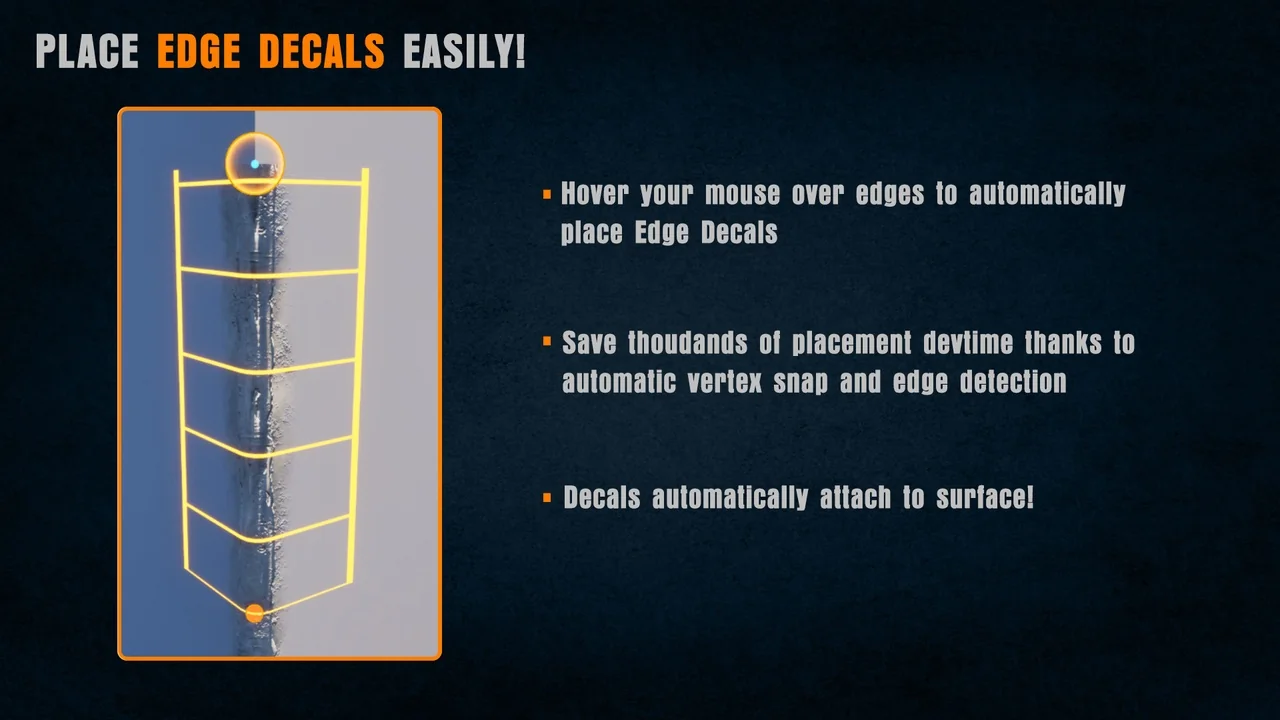
 Engine Tools
 Engine Tools
 Engine Tools