"0341a2901a4ae9aa"{"id":"13523","slug":"virtual-animation-tools-v6","title":"Virtual Animation Tools V6","category":"Animations","engine":"5.5 - 5.6","assetVersion":"Engine version: 5.5 - 5.6","engineVersion":"Asset Version:6.5.0","tag":"Animations","accent":"blue","visual":"animation","summary":"Virtual Animation Tools V6 is a powerful utility designed to eliminate repetitive manual configurations in large animation datasets. It offers advanced bone management, automatic footstep notifies, and seamless motion data conversion.","platform":"Unreal Engine","publishedAt":"2026-03-10T17:29:07.000Z","updatedAt":"2026-04-19T15:46:26.000Z","sourceNotes":[],"fileContents":[],"compatibility":["Unreal Engine","Engine version: 5.5 - 5.6","Asset Version: 6.5.0"],"featuredImage":{"alt":"Virtual Animation Tools V6","src":"https://3dcghub.com/wp-content/uploads/2026/03/edd72256-8c33-4840-92ac-abdb69fc6afe.webp"},"hasDownloadLink":true,"downloads":0,"terms":[{"taxonomy":"category","slug":"animations-tools-and-plugins","name":"Animations"},{"taxonomy":"post_tag","slug":"animation","name":"Animation"},{"taxonomy":"post_tag","slug":"audio","name":"Audio"},{"taxonomy":"post_tag","slug":"characters","name":"Characters"},{"taxonomy":"post_tag","slug":"root-motion-conversion","name":"Root Motion Conversion"},{"taxonomy":"post_tag","slug":"tools","name":"Tools"},{"taxonomy":"post_tag","slug":"weapons","name":"Weapons"}],"galleryImages":[{"src":"https://3dcghub.com/wp-content/uploads/2026/03/46590e5fd4c5_463919a2-6d93-4594-a792-bf7120688560.webp","alt":"Virtual Animation Tools V6"},{"src":"https://3dcghub.com/wp-content/uploads/2026/03/d919d86e7810_87bfc485-37a6-4c48-95dc-08f5e4440192.webp","alt":"Virtual Animation Tools V6"},{"src":"https://3dcghub.com/wp-content/uploads/2026/03/8704cfea43da_aecd6ff5-ed4a-4909-bd6e-d8bd110b3221.webp","alt":"Virtual Animation Tools V6"},{"src":"https://3dcghub.com/wp-content/uploads/2026/03/5f3689ffe924_99a5eae1-c30f-425b-b95f-3d2a2a3618a4.webp","alt":"Virtual Animation Tools V6"},{"src":"https://3dcghub.com/wp-content/uploads/2026/03/8e1b2aec0d96_440d3d3d-05f7-4795-925f-9b8b0789add0.webp","alt":"Virtual Animation Tools V6"},{"src":"https://3dcghub.com/wp-content/uploads/2026/03/7bd90f085818_1d05f938-30e2-49da-b49d-1c9b490c2cd5.webp","alt":"Virtual Animation Tools V6"},{"src":"https://3dcghub.com/wp-content/uploads/2026/03/5491c8d8c3e8_55727a88-c345-4c52-a6f7-3714be68a2cc.webp","alt":"Virtual Animation Tools V6"},{"src":"https://3dcghub.com/wp-content/uploads/2026/03/15005986a6a4_70f19dd9-64e4-4982-9918-0c31cfa3cf66.webp","alt":"Virtual Animation Tools V6"},{"src":"https://3dcghub.com/wp-content/uploads/2026/03/0c55991ee379_bd54a6a0-05ad-40a0-92c2-9ccc0c3299fc.webp","alt":"Virtual Animation Tools V6"},{"src":"https://3dcghub.com/wp-content/uploads/2026/03/c3370b978c10_ca07b3aa-c068-4867-b68d-ebf4d8c81373.webp","alt":"Virtual Animation Tools V6"},{"src":"https://3dcghub.com/wp-content/uploads/2026/03/28084b44c346_e0e3c369-f3c6-428e-8312-4671cbccb891.webp","alt":"Virtual Animation Tools V6"},{"src":"https://3dcghub.com/wp-content/uploads/2026/03/44539172d876_7b6e168b-a8be-4c02-a8e9-81b7d6479603.webp","alt":"Virtual Animation Tools V6"},{"src":"https://3dcghub.com/wp-content/uploads/2026/03/77c9cf51c321_5ee5348b-a5e8-4fec-82ab-991eed5be520.webp","alt":"Virtual Animation Tools V6"},{"src":"https://3dcghub.com/wp-content/uploads/2026/03/5886b9c8f130_b0336b64-e0d4-483a-86c9-1337aed4a952.webp","alt":"Virtual Animation Tools V6"},{"src":"https://3dcghub.com/wp-content/uploads/2026/03/2593eb435d72_3bd3eddd-b56a-4d9a-8b44-ec96bb490c0f.webp","alt":"Virtual Animation Tools V6"},{"src":"https://3dcghub.com/wp-content/uploads/2026/03/a270e4266596_7a7c65c6-99b7-4baf-9210-8fda172841ab.webp","alt":"Virtual Animation Tools V6"},{"src":"https://3dcghub.com/wp-content/uploads/2026/03/4267fc6e1310_2de940d2-1aa9-4722-bd1b-356092a8a965.webp","alt":"Virtual Animation Tools V6"},{"src":"https://3dcghub.com/wp-content/uploads/2026/03/1a6caef23a8a_278d6ef5-a3d2-4f9a-9402-666d897879f5.webp","alt":"Virtual Animation Tools V6"},{"src":"https://3dcghub.com/wp-content/uploads/2026/03/4ccf0862eaf1_043ec1df-e58c-4b2d-b852-f73ab4d35f2a.webp","alt":"Virtual Animation Tools V6"},{"src":"https://3dcghub.com/wp-content/uploads/2026/03/25cc2f5746ed_4b1ff5ce-546d-4990-b541-b618f40bf4c0.webp","alt":"Virtual Animation Tools V6"},{"src":"https://3dcghub.com/wp-content/uploads/2026/03/86dab43d4ce6_0ead003f-f728-4986-85f1-1fb1f3a5e6ee.webp","alt":"Virtual Animation Tools V6"},{"src":"https://3dcghub.com/wp-content/uploads/2026/03/b99470b7cf34_98f4839a-7776-4c4d-9e10-6e6613a819b3.webp","alt":"Virtual Animation Tools V6"}],"accessPanel":{"kind":"resource","title":"Access this resource","eyebrow":"Free Download","message":"Log in or create a free account to start your download.","fileName":"Virtual Animation Tools 5.5-5.6,v6.5.0.7z","safetyNote":"All resources are 100% manually reviewed to eliminate all risks.","actionLabel":"Download Free","resourceType":"Resource archive"},"contentHtml":"\u003ch2\u003eOptimize Your Workflow with Virtual Animation Tools V6\u003c/h2\u003e\n\u003cp\u003eVirtual Animation Tools V6 is a comprehensive solution designed for developers working with massive animation libraries. If you are tired of repetitive manual configurations, this toolset offers automation for bone layering, distance matching, and footstep curve generation. It serves as a central hub for all essential animation features required in modern game development.\u003c/p\u003e\n\n\u003cp\u003eManaging tens of thousands of animations can be a daunting task. However, this tool simplifies the process by providing specialized modules for bone manipulation and data baking. Consequently, developers can focus on creative tasks rather than technical hurdles.\u003c/p\u003e\n\n\u003ch2\u003eAdvanced Bone and Layer Management\u003c/h2\u003e\n\u003cp\u003eThe BoneTools module allows for precise control over skeletal structures. You can easily add weapon bones, IK bones, and camera bones without unskinned weight issues. Furthermore, the developer has included features to modify or remove animation bone data on a per-frame basis to fix jumping values.\u003c/p\u003e\n\n\u003cp\u003eKey features of the bone management system include:\u003c/p\u003e\n\u003cul\u003e\n \u003cli\u003e\u003cstrong\u003eBaking Bone Data:\u003c/strong\u003e Bake attack frames for low frame rate clients or simulate torso positions on the server.\u003c/li\u003e\n \u003cli\u003e\u003cstrong\u003eLayer Blending:\u003c/strong\u003e Convert arm-only animations into full-body movements, which is ideal for transitioning from FPS to TPS.\u003c/li\u003e\n \u003cli\u003e\u003cstrong\u003eConstraints:\u003c/strong\u003e Constrain IK and FK bones or copy data from weapon bones directly to hand bones.\u003c/li\u003e\n\u003c/ul\u003e\n\n\u003ch2\u003eEfficient Curve and Notify Automation\u003c/h2\u003e\n\u003cp\u003eVirtual Animation Tools V6 excels at handling complex curves and notifications. The CurveTools module supports motion curves for distance matching and samples per-axis data on the root bone. Additionally, you can export these curves to external assets or sort them to maintain project organization.\u003c/p\u003e\n\n\u003cp\u003eThe Notify Tools are equally robust, allowing you to generate footstep sounds automatically. You can modify custom variable data within notifies or delete notification tracks in batches. This automation significantly reduces the time spent on manual audio and visual syncing.\u003c/p\u003e\n\n\u003ch2\u003eAsset Manipulation and Motion Conversion\u003c/h2\u003e\n\u003cp\u003eThe Asset Tools provide essential utilities for cropping, resizing, and merging animation assets. For instance, you can insert specific poses into any frame or resize sample rates to match your project requirements. Moreover, the tool includes a rate modifier to output assets at a consistent play rate.\u003c/p\u003e\n\n\u003cp\u003eMotion data conversion is another standout feature. You can convert motion capture data into root motion animation or vice versa. This flexibility allows for secondary adjustments and scaling of root motion data to fit different character sizes.\u003c/p\u003e\n\n\u003ch2\u003eSpecialized GameFramework and Mirroring Tools\u003c/h2\u003e\n\u003cp\u003eTo ensure high-quality character movement, the GameFramework tools generate alpha curves for Foot IK and Foot Lock. These curves help determine footstep offsets and positions, distinguishing between left and right feet accurately. Furthermore, the Mirror Tools can automatically generate a mirrored bone tree, eliminating the need for manual configuration.\u003c/p\u003e\n\n\u003cp\u003eFinally, the tool includes PoseSearch capabilities that generate unique compressed values for poses. This feature facilitates efficient animation matching and frame mapping between different assets. Whether you are generating LODs for skeletal meshes or retargeting poses, Virtual Animation Tools V6 provides the necessary utility to enhance your production pipeline.\u003c/p\u003e\n\n\u003ch2\u003eFinal Take\u003c/h2\u003e\n\u003cp\u003eVirtual Animation Tools V6 is a versatile asset for any developer looking to automate complex animation tasks. By offering tools for bone blending, curve management, and motion conversion, it ensures a smoother and more efficient development cycle. This toolkit is essential for maintaining high-quality animations across large-scale projects.\u003c/p\u003e\n\n\u003ch2\u003eMore From The Same Workflow\u003c/h2\u003e\n\u003cul\u003e\n\u003cli\u003e\u003ca href=\"https://3dcghub.com/root-motion-fix-tool-mocap-animations-root-motion-cleaner-and-fixer/\" title=\"Root Motion Fix Tool | Mocap animations root motion cleaner and fixer\"\u003eRoot Motion Fix Tool | Mocap animations root motion cleaner and fixer\u003c/a\u003e\u003c/li\u003e\n\u003cli\u003e\u003ca href=\"https://3dcghub.com/mixamo-animation-retargeting-2/\" title=\"Mixamo Animation Retargeting 2\"\u003eMixamo Animation Retargeting 2\u003c/a\u003e\u003c/li\u003e\n\u003cli\u003e\u003ca href=\"https://3dcghub.com/the-cultist-animations/\" title=\"The Cultist Animations\"\u003eThe Cultist Animations\u003c/a\u003e\u003c/li\u003e\n\u003cli\u003e\u003ca href=\"https://3dcghub.com/rolls-and-dodges-animation-set/\" title=\"Rolls and Dodges Animation Set\"\u003eRolls and Dodges Animation Set\u003c/a\u003e\u003c/li\u003e\n\u003cli\u003e\u003ca href=\"https://3dcghub.com/pool-dives-animation-set/\" title=\"Pool Dives Animation Set\"\u003ePool Dives Animation Set\u003c/a\u003e\u003c/li\u003e\n\u003c/ul\u003e","contentTextLength":3975,"navigation":{"current":3349,"total":4017,"previous":{"id":"13550","slug":"advanced-sight","title":"Advanced Sight","category":"Artificial Intelligence","platform":"Unreal Engine","updatedAt":"2026-04-19T15:46:26.000Z"},"next":{"id":"13498","slug":"vertex-animator","title":"Vertex Animator","category":"Animations","platform":"Unreal Engine","updatedAt":"2026-04-19T15:46:26.000Z"}},"relatedResources":[{"id":"13487","slug":"runtime-metahuman-lip-sync-ai-for-npcs-cc4-genesis-arkit-and-more","title":"Runtime MetaHuman Lip Sync (AI for NPCs) (+ CC4, Genesis, ARKit, and more)","category":"Animations","engine":"1.0 - 1.18","assetVersion":"Engine version: 5.5 - 5.7","engineVersion":"Asset Version: 1.0 - 1.18","tag":"Animations","accent":"blue","visual":"animation","summary":"Enhance your digital characters with zero-latency, real-time lip synchronization that works completely offline. This plugin supports MetaHumans, CC4, and Genesis characters across multiple platforms.","platform":"Unreal Engine","publishedAt":"2026-03-10T17:28:41.000Z","updatedAt":"2026-07-05T07:03:46.447Z","sourceNotes":[],"fileContents":[],"compatibility":["Unreal Engine","Engine version: 5.5 - 5.7","Asset Version: 1.0 - 1.18"],"featuredImage":{"alt":"Runtime MetaHuman Lip Sync (AI for NPCs) (+ CC4, Genesis, ARKit, and more)","src":"https://3dcghub.com/wp-content/uploads/2026/03/b4351251-5c6e-4b55-9c60-117d4a331ef7.webp"},"hasDownloadLink":true,"downloads":7},{"id":"13473","slug":"root-motion-fix-tool-mocap-animations-root-motion-cleaner-and-fixer","title":"Root Motion Fix Tool | Mocap animations root motion cleaner and fixer","category":"Animations","engine":"5.3 - 5.5","assetVersion":"Engine version: 5.3 - 5.5","engineVersion":"Asset Version:2.0","tag":"Animations","accent":"blue","visual":"animation","summary":"The Root Motion Fix Tool is a comprehensive plugin designed by an animator to streamline the process of fixing, creating, and cleaning root motion data for any skeleton.","platform":"Unreal Engine","publishedAt":"2026-03-10T17:21:37.000Z","updatedAt":"2026-04-19T15:46:27.000Z","sourceNotes":[],"fileContents":[],"compatibility":["Unreal Engine","Engine version: 5.3 - 5.5","Asset Version: 2.0"],"featuredImage":{"alt":"Root Motion Fix Tool | Mocap animations root motion cleaner and fixer","src":"https://3dcghub.com/wp-content/uploads/2026/03/5427a3c2-c08e-4097-a763-1ae719d725d9.webp"},"hasDownloadLink":true,"downloads":1},{"id":"13464","slug":"mixamo-animation-retargeting-2","title":"Mixamo Animation Retargeting 2","category":"Animations","engine":"5.0 - 5.3","assetVersion":"Engine version: 5.0 - 5.3","engineVersion":"Asset Version:","tag":"Animations","accent":"blue","visual":"animation","summary":"Mixamo Animation Retargeting 2 is a powerful editor plugin designed to bridge the gap between Mixamo assets and Unreal Engine 5. It automates the configuration of IK Rigs and Retargeters for seamless animation sharing.","platform":"Unreal Engine","publishedAt":"2026-03-10T17:20:05.000Z","updatedAt":"2026-04-19T15:46:27.000Z","sourceNotes":[],"fileContents":[],"compatibility":["Unreal Engine","Engine version: 5.0 - 5.3"],"featuredImage":{"alt":"Mixamo Animation Retargeting 2","src":"https://3dcghub.com/wp-content/uploads/2026/03/02a8b8ec-eb03-41d9-a9f4-f17bc2d31420.webp"},"hasDownloadLink":true,"downloads":0}]}
Animations
Virtual Animation Tools V6
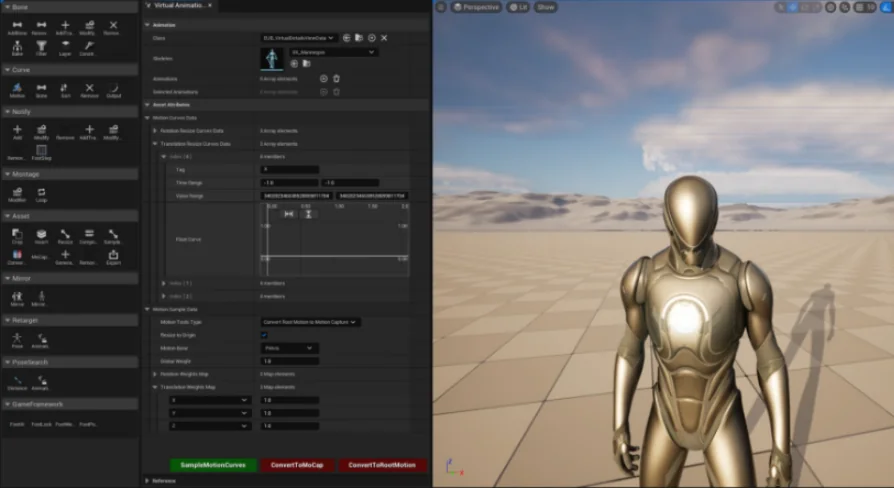
Virtual Animation Tools V6 is a powerful utility designed to eliminate repetitive manual configurations in large animation datasets. It offers advanced bone management, automatic footstep notifies, and seamless motion data conversion.
Optimize Your Workflow with Virtual Animation Tools V6
Virtual Animation Tools V6 is a comprehensive solution designed for developers working with massive animation libraries. If you are tired of repetitive manual configurations, this toolset offers automation for bone layering, distance matching, and footstep curve generation. It serves as a central hub for all essential animation features required in modern game development.
Managing tens of thousands of animations can be a daunting task. However, this tool simplifies the process by providing specialized modules for bone manipulation and data baking. Consequently, developers can focus on creative tasks rather than technical hurdles.
Advanced Bone and Layer Management
The BoneTools module allows for precise control over skeletal structures. You can easily add weapon bones, IK bones, and camera bones without unskinned weight issues. Furthermore, the developer has included features to modify or remove animation bone data on a per-frame basis to fix jumping values.
Key features of the bone management system include:
Baking Bone Data: Bake attack frames for low frame rate clients or simulate torso positions on the server.
Layer Blending: Convert arm-only animations into full-body movements, which is ideal for transitioning from FPS to TPS.
Constraints: Constrain IK and FK bones or copy data from weapon bones directly to hand bones.
Efficient Curve and Notify Automation
Virtual Animation Tools V6 excels at handling complex curves and notifications. The CurveTools module supports motion curves for distance matching and samples per-axis data on the root bone. Additionally, you can export these curves to external assets or sort them to maintain project organization.
The Notify Tools are equally robust, allowing you to generate footstep sounds automatically. You can modify custom variable data within notifies or delete notification tracks in batches. This automation significantly reduces the time spent on manual audio and visual syncing.
Asset Manipulation and Motion Conversion
The Asset Tools provide essential utilities for cropping, resizing, and merging animation assets. For instance, you can insert specific poses into any frame or resize sample rates to match your project requirements. Moreover, the tool includes a rate modifier to output assets at a consistent play rate.
Motion data conversion is another standout feature. You can convert motion capture data into root motion animation or vice versa. This flexibility allows for secondary adjustments and scaling of root motion data to fit different character sizes.
Specialized GameFramework and Mirroring Tools
To ensure high-quality character movement, the GameFramework tools generate alpha curves for Foot IK and Foot Lock. These curves help determine footstep offsets and positions, distinguishing between left and right feet accurately. Furthermore, the Mirror Tools can automatically generate a mirrored bone tree, eliminating the need for manual configuration.
Finally, the tool includes PoseSearch capabilities that generate unique compressed values for poses. This feature facilitates efficient animation matching and frame mapping between different assets. Whether you are generating LODs for skeletal meshes or retargeting poses, Virtual Animation Tools V6 provides the necessary utility to enhance your production pipeline.
Final Take
Virtual Animation Tools V6 is a versatile asset for any developer looking to automate complex animation tasks. By offering tools for bone blending, curve management, and motion conversion, it ensures a smoother and more efficient development cycle. This toolkit is essential for maintaining high-quality animations across large-scale projects.
 Animations
 Animations
 Animations
 Animations