"0341a2901a4ae9aa"{"id":"13498","slug":"vertex-animator","title":"Vertex Animator","category":"Animations","engine":"5.2 - 5.5","assetVersion":"Engine version: 5.2 - 5.5","engineVersion":"Asset Version:1.0","tag":"Animations","accent":"blue","visual":"animation","summary":"Discover Vertex Animator, a specialized tool that enhances performance by delegating animation data to the GPU. This plugin is an ideal solution for developers looking to optimize large crowds using Nanite and LODs.","platform":"Unreal Engine","publishedAt":"2026-03-10T17:28:49.000Z","updatedAt":"2026-04-19T15:46:26.000Z","sourceNotes":[],"fileContents":[],"compatibility":["Unreal Engine","Engine version: 5.2 - 5.5","Asset Version: 1.0"],"featuredImage":{"alt":"Vertex Animator","src":"https://3dcghub.com/wp-content/uploads/2026/03/4e7b6094-29ce-4e3e-a19c-236fa7b8c704.webp"},"hasDownloadLink":true,"downloads":0,"terms":[{"taxonomy":"category","slug":"animations-tools-and-plugins","name":"Animations"},{"taxonomy":"post_tag","slug":"animation","name":"Animation"},{"taxonomy":"post_tag","slug":"materials","name":"Materials"},{"taxonomy":"post_tag","slug":"plugins","name":"Plugins"},{"taxonomy":"post_tag","slug":"tools","name":"Tools"},{"taxonomy":"post_tag","slug":"unreal-engine-5","name":"Unreal Engine 5"},{"taxonomy":"post_tag","slug":"vertex-animator","name":"Vertex Animator"}],"galleryImages":[{"src":"https://3dcghub.com/wp-content/uploads/2026/03/f8cdc9cd7581_eb59cdb8-9c17-487b-a5e0-68c1c9a8163d.webp","alt":"Vertex Animator"},{"src":"https://3dcghub.com/wp-content/uploads/2026/03/4bf86537db39_a340b523-b237-41d3-a604-028ee1f78402.webp","alt":"Vertex Animator"},{"src":"https://3dcghub.com/wp-content/uploads/2026/03/489d6fa890ba_19ef3920-4266-44f7-bb25-b0a0e2e36a54.webp","alt":"Vertex Animator"},{"src":"https://3dcghub.com/wp-content/uploads/2026/03/89aa8a8d480e_16bc1439-7a87-4bfc-854e-717406787d7f.webp","alt":"Vertex Animator"},{"src":"https://3dcghub.com/wp-content/uploads/2026/03/4f8d5733a8df_29dce295-89f0-4d7c-b6ca-850ef034cd17.webp","alt":"Vertex Animator"},{"src":"https://3dcghub.com/wp-content/uploads/2026/03/771a4f934a65_a464ed2d-284e-4f32-a52d-8930063db88e.webp","alt":"Vertex Animator"},{"src":"https://3dcghub.com/wp-content/uploads/2026/03/5e50773ec404_300013a9-bcf3-4317-b19e-6cae55609b3b.webp","alt":"Vertex Animator"},{"src":"https://3dcghub.com/wp-content/uploads/2026/03/42f76571912b_5bf52075-2dce-4aae-abd1-1b976c6c1962.webp","alt":"Vertex Animator"}],"accessPanel":{"kind":"resource","title":"Access this resource","eyebrow":"Free Download","message":"Log in or create a free account to start your download.","fileName":"Vertex Animator 5.2 - 5.5;V1.0.7z","safetyNote":"All resources are 100% manually reviewed to eliminate all risks.","actionLabel":"Download Free","resourceType":"Resource archive"},"contentHtml":"\u003ch2\u003eHigh-Performance Animation for Large Crowds\u003c/h2\u003e\n\u003cp\u003eVertex Animator provides a specialized workflow for developers seeking high-performance animation solutions in Unreal Engine. It serves as a robust alternative to standard skeletal meshes. Consequently, it provides a more optimized approach compared to traditional vertex animation methods that bake every vertex position. This optimization allows developers to maintain high frame rates even when rendering numerous characters on screen.\u003c/p\u003e\n\n\u003cp\u003eThe plugin is specifically designed to handle the complexities of large-scale environments. Therefore, it is an ideal solution for projects featuring massive crowds. While there is a trade-off in visual quality, the performance gains are substantial. Most of the animation information is delegated to the GPU at runtime, as the system utilizes a shader to read the baked data.\u003c/p\u003e\n\n\u003ch2\u003eWorkflow and Integration with 3D Software\u003c/h2\u003e\n\u003cp\u003eUsing Vertex Animator requires a standard character rig and a few initial steps. First, the developer suggests making minor adjustments in your preferred 3D modeling software. Afterward, the remaining configuration takes place directly within the plugin interface. This streamlined setup ensures that the tool fits into existing production pipelines without requiring entirely new assets.\u003c/p\u003e\n\n\u003cp\u003eThe plugin offers several utility features to speed up development. For instance, it allows users to bake several animations at once. This batch processing capability significantly reduces the time spent on manual exports. Moreover, users can edit StaticMesh bounds and reduction settings within the tool to further refine their assets.\u003c/p\u003e\n\n\u003ch2\u003eAdvanced Engine Features and Nanite Support\u003c/h2\u003e\n\u003cp\u003eOne of the primary benefits of this tool is its compatibility with modern engine features. Unlike many traditional animation techniques, this system allows for the use of Level of Detail (LOD) settings. Furthermore, it supports Nanite, providing developers with more flexibility when managing complex scenes. These features ensure that the assets remain efficient even as the distance from the camera changes.\u003c/p\u003e\n\n\u003cp\u003eBy shifting the workload to the GPU, the plugin reduces the overhead typically associated with skeletal mesh transformations. Although the visual fidelity might be slightly lower than standard methods, the efficiency is unmatched for background characters. As a result, the Vertex Animator workflow is a preferred choice for those prioritizing performance in dense scenes.\u003c/p\u003e\n\n\u003ch2\u003eFinal Take\u003c/h2\u003e\n\u003cp\u003eFor teams considering it, Vertex Animator offers a powerful set of tools for optimizing character animations. By leveraging GPU-based shaders and supporting Nanite, it overcomes the limitations of traditional skeletal meshes for crowd rendering. The developer has ensured that the plugin is compatible with version 5.0, providing a modern solution for high-density environments. Ultimately, this tool is essential for any developer looking to balance visual scale with technical efficiency.\u003c/p\u003e\n\n\u003ch2\u003eRelated Resources Worth Checking\u003c/h2\u003e\n\u003cul\u003e\n\u003cli\u003e\u003ca href=\"https://3dcghub.com/extile-plus-ultimate-non-tiling-material-toolkit-for-unreal-engine-environments/\" title=\"EXTILE PLUS -Ultimate Non-Tiling Material Toolkit for Unreal Engine Environments\"\u003eEXTILE PLUS -Ultimate Non-Tiling Material Toolkit for Unreal Engine Environments\u003c/a\u003e\u003c/li\u003e\n\u003cli\u003e\u003ca href=\"https://3dcghub.com/ultimate-template-unrealengine-2d-dialogue-inventory-system-save/\" title=\"ULTIMATE Template UnrealEngine || 2D + Dialogue + Inventory system + Save | |\"\u003eULTIMATE Template UnrealEngine || 2D + Dialogue + Inventory system + Save | |\u003c/a\u003e\u003c/li\u003e\n\u003cli\u003e\u003ca href=\"https://3dcghub.com/sci-fi-environment-engine-room/\" title=\"Sci-fi Environment Engine Room\"\u003eSci-fi Environment Engine Room\u003c/a\u003e\u003c/li\u003e\n\u003cli\u003e\u003ca href=\"https://3dcghub.com/mixamo-animation-retargeting-2/\" title=\"Mixamo Animation Retargeting 2\"\u003eMixamo Animation Retargeting 2\u003c/a\u003e\u003c/li\u003e\n\u003cli\u003e\u003ca href=\"https://3dcghub.com/cinematic-clouds-bp/\" title=\"Cinematic Clouds BP\"\u003eCinematic Clouds BP\u003c/a\u003e\u003c/li\u003e\n\u003c/ul\u003e","contentTextLength":3264,"navigation":{"current":3350,"total":4017,"previous":{"id":"13523","slug":"virtual-animation-tools-v6","title":"Virtual Animation Tools V6","category":"Animations","platform":"Unreal Engine","updatedAt":"2026-04-19T15:46:26.000Z"},"next":{"id":"13643","slug":"3d-gaussians-plugin","title":"3D Gaussians Plugin","category":"Engine Tools","platform":"Unreal Engine","updatedAt":"2026-04-19T15:46:25.000Z"}},"relatedResources":[{"id":"13473","slug":"root-motion-fix-tool-mocap-animations-root-motion-cleaner-and-fixer","title":"Root Motion Fix Tool | Mocap animations root motion cleaner and fixer","category":"Animations","engine":"5.3 - 5.5","assetVersion":"Engine version: 5.3 - 5.5","engineVersion":"Asset Version:2.0","tag":"Animations","accent":"blue","visual":"animation","summary":"The Root Motion Fix Tool is a comprehensive plugin designed by an animator to streamline the process of fixing, creating, and cleaning root motion data for any skeleton.","platform":"Unreal Engine","publishedAt":"2026-03-10T17:21:37.000Z","updatedAt":"2026-04-19T15:46:27.000Z","sourceNotes":[],"fileContents":[],"compatibility":["Unreal Engine","Engine version: 5.3 - 5.5","Asset Version: 2.0"],"featuredImage":{"alt":"Root Motion Fix Tool | Mocap animations root motion cleaner and fixer","src":"https://3dcghub.com/wp-content/uploads/2026/03/5427a3c2-c08e-4097-a763-1ae719d725d9.webp"},"hasDownloadLink":true,"downloads":1},{"id":"1000446","slug":"vertex-animation-manager","title":"Vertex Animation Manager","category":"Animations","engine":"5.1 - 5.7","assetVersion":"Asset Version: 1.14 - 2.4","engineVersion":"Engine Version: 5.1 - 5.7","tag":"Animations","accent":"blue","visual":"animation","summary":"Unreal Engine plugin baking vertex animation textures in-editor, driving Static Mesh, ISM, HISM playback, and GPU Skeletal Mesh with compute shader aim-offset a","platform":"Unreal Engine","publishedAt":"2026-07-11T00:22:10.116Z","updatedAt":"2026-07-11T00:22:10.116Z","sourceNotes":[],"fileContents":[],"compatibility":["Unreal Engine","Asset Version: 1.14 - 2.4","Engine Version: 5.1 - 5.7"],"featuredImage":{"alt":"Vertex Animation Manager","src":"/wp-content/uploads/published/2026/07/7dbb46de8137-a2695728-017e-441b-b830-0dc03787a192-7428da0786.webp"},"hasDownloadLink":true,"downloads":0},{"id":"13464","slug":"mixamo-animation-retargeting-2","title":"Mixamo Animation Retargeting 2","category":"Animations","engine":"5.0 - 5.3","assetVersion":"Engine version: 5.0 - 5.3","engineVersion":"Asset Version:","tag":"Animations","accent":"blue","visual":"animation","summary":"Mixamo Animation Retargeting 2 is a powerful editor plugin designed to bridge the gap between Mixamo assets and Unreal Engine 5. It automates the configuration of IK Rigs and Retargeters for seamless animation sharing.","platform":"Unreal Engine","publishedAt":"2026-03-10T17:20:05.000Z","updatedAt":"2026-04-19T15:46:27.000Z","sourceNotes":[],"fileContents":[],"compatibility":["Unreal Engine","Engine version: 5.0 - 5.3"],"featuredImage":{"alt":"Mixamo Animation Retargeting 2","src":"https://3dcghub.com/wp-content/uploads/2026/03/02a8b8ec-eb03-41d9-a9f4-f17bc2d31420.webp"},"hasDownloadLink":true,"downloads":0}]}
Animations
Vertex Animator
Discover Vertex Animator, a specialized tool that enhances performance by delegating animation data to the GPU. This plugin is an ideal solution for developers looking to optimize large crowds using Nanite and LODs.
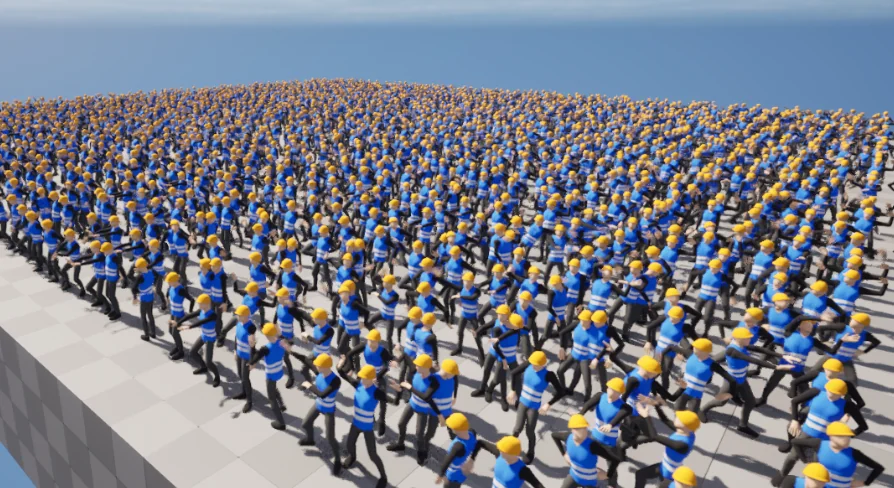
Vertex Animator provides a specialized workflow for developers seeking high-performance animation solutions in Unreal Engine. It serves as a robust alternative to standard skeletal meshes. Consequently, it provides a more optimized approach compared to traditional vertex animation methods that bake every vertex position. This optimization allows developers to maintain high frame rates even when rendering numerous characters on screen.
The plugin is specifically designed to handle the complexities of large-scale environments. Therefore, it is an ideal solution for projects featuring massive crowds. While there is a trade-off in visual quality, the performance gains are substantial. Most of the animation information is delegated to the GPU at runtime, as the system utilizes a shader to read the baked data.
Workflow and Integration with 3D Software
Using Vertex Animator requires a standard character rig and a few initial steps. First, the developer suggests making minor adjustments in your preferred 3D modeling software. Afterward, the remaining configuration takes place directly within the plugin interface. This streamlined setup ensures that the tool fits into existing production pipelines without requiring entirely new assets.
The plugin offers several utility features to speed up development. For instance, it allows users to bake several animations at once. This batch processing capability significantly reduces the time spent on manual exports. Moreover, users can edit StaticMesh bounds and reduction settings within the tool to further refine their assets.
Advanced Engine Features and Nanite Support
One of the primary benefits of this tool is its compatibility with modern engine features. Unlike many traditional animation techniques, this system allows for the use of Level of Detail (LOD) settings. Furthermore, it supports Nanite, providing developers with more flexibility when managing complex scenes. These features ensure that the assets remain efficient even as the distance from the camera changes.
By shifting the workload to the GPU, the plugin reduces the overhead typically associated with skeletal mesh transformations. Although the visual fidelity might be slightly lower than standard methods, the efficiency is unmatched for background characters. As a result, the Vertex Animator workflow is a preferred choice for those prioritizing performance in dense scenes.
Final Take
For teams considering it, Vertex Animator offers a powerful set of tools for optimizing character animations. By leveraging GPU-based shaders and supporting Nanite, it overcomes the limitations of traditional skeletal meshes for crowd rendering. The developer has ensured that the plugin is compatible with version 5.0, providing a modern solution for high-density environments. Ultimately, this tool is essential for any developer looking to balance visual scale with technical efficiency.
 Animations
 Animations
 Animations
 Animations