"7066dd76da796369"{"id":"13372","slug":"cinematic-clouds-bp","title":"Cinematic Clouds BP","category":"Environments","engine":"5.1+","assetVersion":"Engine version: 5.1+","engineVersion":"5.1","tag":"Environments","accent":"blue","visual":"city","summary":"Enhance your Unreal Engine environments with Cinematic Clouds BP, featuring 131 high-resolution cloud flipbooks. This user-friendly tool allows for rapid customization of speed, color, and emissive power through a simple drag-and-drop system.","platform":"Unreal Engine","publishedAt":"2026-03-10T16:54:45.000Z","updatedAt":"2026-04-19T15:46:28.000Z","sourceNotes":[],"fileContents":[],"compatibility":["Unreal Engine","Engine version: 5.1+"],"featuredImage":{"alt":"Cinematic Clouds BP","src":"https://3dcghub.com/wp-content/uploads/2026/03/952344cb-e73c-4ffc-80c0-9c0091d98ee5.webp"},"hasDownloadLink":true,"downloads":1,"terms":[{"taxonomy":"category","slug":"environments-sprites-and-flipbooks","name":"Environments"},{"taxonomy":"post_tag","slug":"blueprint","name":"Blueprint"},{"taxonomy":"post_tag","slug":"cinematic-clouds-bp","name":"Cinematic Clouds BP"},{"taxonomy":"post_tag","slug":"environment","name":"Environment"},{"taxonomy":"post_tag","slug":"high-resolution-clouds","name":"High-resolution Clouds"},{"taxonomy":"post_tag","slug":"unreal-engine-5","name":"Unreal Engine 5"},{"taxonomy":"post_tag","slug":"vfx","name":"VFX"}],"galleryImages":[{"src":"https://3dcghub.com/wp-content/uploads/2026/03/4f7fa7c47712_e6ae3b7c-6e04-48f5-b556-9ac53b20ac63.webp","alt":"Cinematic Clouds BP"},{"src":"https://3dcghub.com/wp-content/uploads/2026/03/183377ec43fd_79979534-ece6-429b-87e1-340dce11caa1.webp","alt":"Cinematic Clouds BP"},{"src":"https://3dcghub.com/wp-content/uploads/2026/03/0d278c1b6acf_d8a6889f-e6eb-460b-b6db-820f12c97bf1.webp","alt":"Cinematic Clouds BP"},{"src":"https://3dcghub.com/wp-content/uploads/2026/03/7f5ec135c3bc_69deacf1-4803-4e3f-b2b6-36166067e89e.webp","alt":"Cinematic Clouds BP"},{"src":"https://3dcghub.com/wp-content/uploads/2026/03/cd39af2f8808_cd80fb13-cb97-4e84-bb8b-8cb487d71e8c.webp","alt":"Cinematic Clouds BP"},{"src":"https://3dcghub.com/wp-content/uploads/2026/03/0a8ffdaa203a_753f4d92-b9b5-47f0-9574-a58b6fc7a189.webp","alt":"Cinematic Clouds BP"},{"src":"https://3dcghub.com/wp-content/uploads/2026/03/73a356b8b51f_1cfb1db7-970c-4613-b78a-7fcfd2119b82.webp","alt":"Cinematic Clouds BP"},{"src":"https://3dcghub.com/wp-content/uploads/2026/03/6d071317ce0e_0c20d992-5677-4535-88e8-eaa032e8394c.webp","alt":"Cinematic Clouds BP"},{"src":"https://3dcghub.com/wp-content/uploads/2026/03/e19709dda942_84dbd81b-7976-4aa9-bfd5-46da8bdc060b.webp","alt":"Cinematic Clouds BP"},{"src":"https://3dcghub.com/wp-content/uploads/2026/03/d1cc04f2df1e_e9f76ade-e38b-46ed-b3f4-1ab532529546.webp","alt":"Cinematic Clouds BP"},{"src":"https://3dcghub.com/wp-content/uploads/2026/03/e14bac7eab8c_8880a1ef-4ecb-4415-ae96-3c40989d7eb8.webp","alt":"Cinematic Clouds BP"},{"src":"https://3dcghub.com/wp-content/uploads/2026/03/d6a4d34d07d3_9f5c329b-930c-4774-ac02-ce044fc52a79.webp","alt":"Cinematic Clouds BP"},{"src":"https://3dcghub.com/wp-content/uploads/2026/03/3a402a29014f_d8d38b07-bd15-4e5c-9b96-a97552989dd0.webp","alt":"Cinematic Clouds BP"},{"src":"https://3dcghub.com/wp-content/uploads/2026/03/4d57d300a297_70bc4861-8814-4f3c-aeca-d4072bc545ec.webp","alt":"Cinematic Clouds BP"},{"src":"https://3dcghub.com/wp-content/uploads/2026/03/2fcc23a18289_3b0dd082-2312-495e-90f0-758abe051379.webp","alt":"Cinematic Clouds BP"},{"src":"https://3dcghub.com/wp-content/uploads/2026/03/ea91abfc61ac_98189649-a880-4c69-99c9-d0538e876d6d.webp","alt":"Cinematic Clouds BP"},{"src":"https://3dcghub.com/wp-content/uploads/2026/03/4e876aa9b3f8_20d13fb1-e405-4b03-966e-c0407553dd3c.webp","alt":"Cinematic Clouds BP"}],"accessPanel":{"kind":"resource","title":"Access this resource","eyebrow":"Free Download","message":"Log in or create a free account to start your download.","fileName":"Cinematic Clouds BP.zip","safetyNote":"All resources are 100% manually reviewed to eliminate all risks.","actionLabel":"Download Free","resourceType":"Resource archive"},"contentHtml":"\u003ch2\u003eAdvanced Atmospheric Control with Cinematic Clouds BP\u003c/h2\u003e\n\u003cp\u003eCinematic Clouds BP provides a comprehensive system for integrating high-quality atmospheric elements into Unreal Engine projects. This asset includes 131 different high-resolution clouds, allowing for a wide variety of sky conditions. Consequently, developers can achieve a professional look without manual asset creation.\u003c/p\u003e\n\n\u003cp\u003eThe system is designed around two core blueprints that simplify the implementation process. Specifically, these blueprints allow users to access flipbooks through a single, unified interface. This streamlined approach ensures that high-resolution visuals are accessible even for those new to the engine. Furthermore, the developer focused on making the workflow as efficient as possible.\u003c/p\u003e\n\n\u003ch2\u003eEase of Use and Workflow Integration\u003c/h2\u003e\n\u003cp\u003eEase of use is a primary benefit of this resource. The creator implemented a drag-and-drop workflow that saves significant development time. Therefore, users can quickly populate their scenes with realistic cloud formations. There is no need for complex setup procedures to get started.\u003c/p\u003e\n\n\u003cp\u003eCustomization is handled through intuitive controls within the blueprint. For instance, you can simply enter a specific number or use a slider to change the cloud type. This interactive method makes it easy to cycle through the 131 available options. Moreover, the visual feedback is instantaneous, allowing for rapid iteration during scene dressing.\u003c/p\u003e\n\n\u003ch3\u003eKey Features of Cinematic Clouds BP\u003c/h3\u003e\n\u003cul\u003e\n \u003cli\u003e\u003cstrong\u003eHigh-Resolution Library:\u003c/strong\u003e Contains 131 unique cloud flipbooks for diverse visual styles.\u003c/li\u003e\n \u003cli\u003e\u003cstrong\u003eSimplified Blueprints:\u003c/strong\u003e Includes 2 blueprints designed for easy integration.\u003c/li\u003e\n \u003cli\u003e\u003cstrong\u003eUser-Friendly Interface:\u003c/strong\u003e Selection is handled via simple numerical input or sliders.\u003c/li\u003e\n \u003cli\u003e\u003cstrong\u003eDrag-and-Drop:\u003c/strong\u003e Designed for immediate placement within your Unreal Engine environment.\u003c/li\u003e\n\u003c/ul\u003e\n\n\u003ch2\u003eDynamic Customization Options\u003c/h2\u003e\n\u003cp\u003eBeyond selection, Cinematic Clouds BP offers deep visual control. Users can modify the color of the clouds to match specific lighting conditions or artistic directions. Consequently, you can create anything from bright daylight scenes to moody, overcast environments. Moreover, the emissive power setting allows for glowing or highly illuminated effects.\u003c/p\u003e\n\n\u003cp\u003eMovement is another critical factor in realistic environment design. This asset includes speed controls to adjust how the clouds behave within the scene. Additionally, the mask settings provide further refinement for the final visual output. Therefore, the clouds can be tailored to fit the specific needs of any cinematic sequence.\u003c/p\u003e\n\n\u003ch3\u003eCustomizable Parameters\u003c/h3\u003e\n\u003cul\u003e\n \u003cli\u003e\u003cstrong\u003eColor:\u003c/strong\u003e Change the hue to match your scene's lighting.\u003c/li\u003e\n \u003cli\u003e\u003cstrong\u003eEmissive Power:\u003c/strong\u003e Adjust the brightness and glow of the cloud assets.\u003c/li\u003e\n \u003cli\u003e\u003cstrong\u003eMask:\u003c/strong\u003e Refine the visibility and blending of the flipbooks.\u003c/li\u003e\n \u003cli\u003e\u003cstrong\u003eSpeed:\u003c/strong\u003e Control the rate of movement for dynamic skyboxes.\u003c/li\u003e\n\u003c/ul\u003e\n\n\u003ch2\u003eFinal Take\u003c/h2\u003e\n\u003cp\u003eThe clearest takeaway is that Cinematic Clouds BP is a versatile tool for any Unreal Engine developer. It combines a massive library of 131 high-resolution assets with a user-friendly blueprint system. As a result, creating cinematic and realistic skies becomes a much faster and more efficient process. Whether you are building a game or a cinematic render, this asset provides the tools necessary for high-quality atmospheric effects.\u003c/p\u003e\n\n\u003ch2\u003eMore From The Same Workflow\u003c/h2\u003e\n\u003cul\u003e\n\u003cli\u003e\u003ca href=\"https://3dcghub.com/hdri-into-the-clouds-panoramas-2/\" title=\"HDRI Into The Clouds Panoramas\"\u003eHDRI Into The Clouds Panoramas\u003c/a\u003e\u003c/li\u003e\n\u003cli\u003e\u003ca href=\"https://3dcghub.com/hdri-into-the-clouds-panoramas/\" title=\"HDRI Into The Clouds Panoramas\"\u003eHDRI Into The Clouds Panoramas\u003c/a\u003e\u003c/li\u003e\n\u003cli\u003e\u003ca href=\"https://3dcghub.com/cloud-forge-complete-vdb-clouds-1-4-3/\" title=\"Cloud Forge Complete – VDB Clouds 1.4.3\"\u003eCloud Forge Complete – VDB Clouds 1.4.3\u003c/a\u003e\u003c/li\u003e\n\u003cli\u003e\u003ca href=\"https://3dcghub.com/quick-cloud-vdb-cloud-volumetric-cinematic-clouds/\" title=\"Quick Cloud – VDB Cloud Volumetric Cinematic Clouds\"\u003eQuick Cloud – VDB Cloud Volumetric Cinematic Clouds\u003c/a\u003e\u003c/li\u003e\n\u003cli\u003e\u003ca href=\"https://3dcghub.com/soa-cloudsmaker/\" title=\"SOA CloudsMaker\"\u003eSOA CloudsMaker\u003c/a\u003e\u003c/li\u003e\n\u003c/ul\u003e","contentTextLength":3475,"navigation":{"current":3341,"total":4016,"previous":{"id":"13389","slug":"destruction-decal-bp","title":"Destruction Decal BP","category":"Environments","platform":"Unreal Engine","updatedAt":"2026-04-19T15:46:28.000Z"},"next":{"id":"13473","slug":"root-motion-fix-tool-mocap-animations-root-motion-cleaner-and-fixer","title":"Root Motion Fix Tool | Mocap animations root motion cleaner and fixer","category":"Animations","platform":"Unreal Engine","updatedAt":"2026-04-19T15:46:27.000Z"}},"relatedResources":[{"id":"13389","slug":"destruction-decal-bp","title":"Destruction Decal BP","category":"Environments","engine":"5.1+","assetVersion":"Engine version: 5.1+","engineVersion":"5.1","tag":"Environments","accent":"blue","visual":"city","summary":"Destruction Decal BP is a versatile tool featuring 450 high-resolution destruction decals and flipbooks. This single Blueprint system offers easy customization and seamless sequencer integration for realistic damage effects.","platform":"Unreal Engine","publishedAt":"2026-03-10T16:57:06.000Z","updatedAt":"2026-04-19T15:46:28.000Z","sourceNotes":[],"fileContents":[],"compatibility":["Unreal Engine","Engine version: 5.1+"],"featuredImage":{"alt":"Destruction Decal BP","src":"https://3dcghub.com/wp-content/uploads/2026/03/0d70a7c5-63ff-4fe6-8fd6-977d0fc251d6.webp"},"hasDownloadLink":true,"downloads":0},{"id":"1000894","slug":"stylized-volumetric-clouds-shader","title":"Stylized Volumetric Clouds Shader","category":"Shaders","engine":"5.0+","assetVersion":"","engineVersion":"Engine Version: 5.0+","tag":"Shaders","accent":"blue","visual":"mech","summary":"A stylized volumetric cloud shader with dynamic controls for color, density, movement, and lighting, built for games, cinematics, and immersive scenes.","platform":"Unreal Engine","publishedAt":"2026-08-06T04:43:20.840Z","updatedAt":"2026-08-06T04:43:20.840Z","sourceNotes":[],"fileContents":[],"compatibility":["Unreal Engine","Engine Version: 5.0+"],"featuredImage":{"alt":"Stylized Volumetric Clouds Shader","src":"/wp-content/uploads/published/2026/08/71d33757280e-2287f8a8-713f-42a2-951b-9f5332b68bb4-ac24eb472e.webp"},"hasDownloadLink":true,"downloads":0},{"id":"17543","slug":"clouds-generator-niagara-fluids","title":"Clouds Generator - Niagara Fluids","category":"Weather","engine":"5.3+","assetVersion":"Engine version: 5.3+","engineVersion":"5.3","tag":"Weather","accent":"blue","visual":"city","summary":"Enhance your digital environments with Clouds Generator - Niagara Fluids. This package offers 11 advanced systems for creating dynamic, realistic cloud effects from meshes and splines.","platform":"Unreal Engine","publishedAt":"2026-03-13T14:51:34.000Z","updatedAt":"2026-04-19T15:43:30.000Z","sourceNotes":[],"fileContents":[],"compatibility":["Unreal Engine","Engine version: 5.3+"],"featuredImage":{"alt":"Clouds Generator - Niagara Fluids","src":"https://3dcghub.com/wp-content/uploads/2026/03/7331d1dc-1b2f-4f31-a50d-5301426f101f.webp"},"hasDownloadLink":true,"downloads":2}]}
Environments
Cinematic Clouds BP
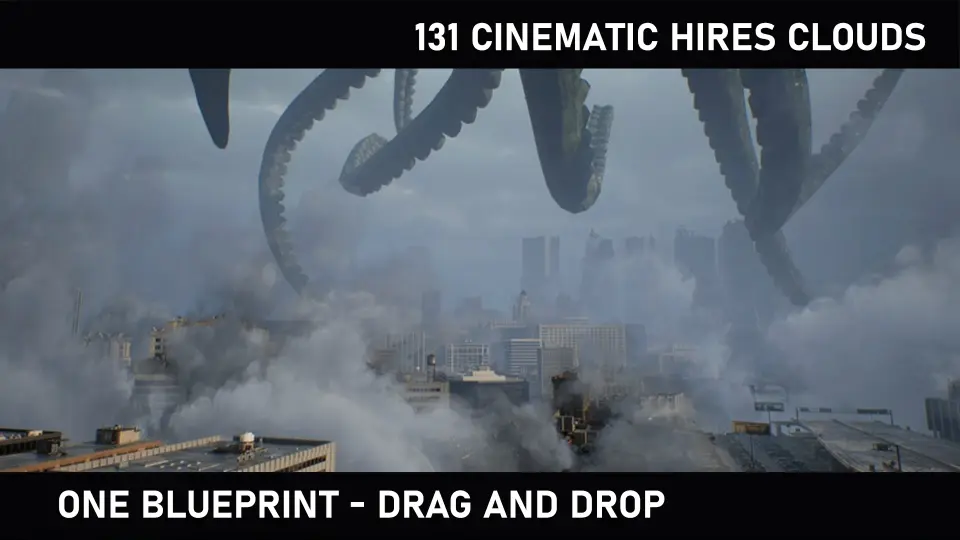
Enhance your Unreal Engine environments with Cinematic Clouds BP, featuring 131 high-resolution cloud flipbooks. This user-friendly tool allows for rapid customization of speed, color, and emissive power through a simple drag-and-drop system.
Advanced Atmospheric Control with Cinematic Clouds BP
Cinematic Clouds BP provides a comprehensive system for integrating high-quality atmospheric elements into Unreal Engine projects. This asset includes 131 different high-resolution clouds, allowing for a wide variety of sky conditions. Consequently, developers can achieve a professional look without manual asset creation.
The system is designed around two core blueprints that simplify the implementation process. Specifically, these blueprints allow users to access flipbooks through a single, unified interface. This streamlined approach ensures that high-resolution visuals are accessible even for those new to the engine. Furthermore, the developer focused on making the workflow as efficient as possible.
Ease of Use and Workflow Integration
Ease of use is a primary benefit of this resource. The creator implemented a drag-and-drop workflow that saves significant development time. Therefore, users can quickly populate their scenes with realistic cloud formations. There is no need for complex setup procedures to get started.
Customization is handled through intuitive controls within the blueprint. For instance, you can simply enter a specific number or use a slider to change the cloud type. This interactive method makes it easy to cycle through the 131 available options. Moreover, the visual feedback is instantaneous, allowing for rapid iteration during scene dressing.
Key Features of Cinematic Clouds BP
High-Resolution Library: Contains 131 unique cloud flipbooks for diverse visual styles.
Simplified Blueprints: Includes 2 blueprints designed for easy integration.
User-Friendly Interface: Selection is handled via simple numerical input or sliders.
Drag-and-Drop: Designed for immediate placement within your Unreal Engine environment.
Dynamic Customization Options
Beyond selection, Cinematic Clouds BP offers deep visual control. Users can modify the color of the clouds to match specific lighting conditions or artistic directions. Consequently, you can create anything from bright daylight scenes to moody, overcast environments. Moreover, the emissive power setting allows for glowing or highly illuminated effects.
Movement is another critical factor in realistic environment design. This asset includes speed controls to adjust how the clouds behave within the scene. Additionally, the mask settings provide further refinement for the final visual output. Therefore, the clouds can be tailored to fit the specific needs of any cinematic sequence.
Customizable Parameters
Color: Change the hue to match your scene's lighting.
Emissive Power: Adjust the brightness and glow of the cloud assets.
Mask: Refine the visibility and blending of the flipbooks.
Speed: Control the rate of movement for dynamic skyboxes.
Final Take
The clearest takeaway is that Cinematic Clouds BP is a versatile tool for any Unreal Engine developer. It combines a massive library of 131 high-resolution assets with a user-friendly blueprint system. As a result, creating cinematic and realistic skies becomes a much faster and more efficient process. Whether you are building a game or a cinematic render, this asset provides the tools necessary for high-quality atmospheric effects.
 Environments
 Environments
 Shaders
 Weather