"216a1d817ec3ca8a"{"id":"1000894","slug":"stylized-volumetric-clouds-shader","title":"Stylized Volumetric Clouds Shader","category":"Shaders","engine":"5.0+","assetVersion":"","engineVersion":"Engine Version: 5.0+","tag":"Shaders","accent":"blue","visual":"mech","summary":"A stylized volumetric cloud shader with dynamic controls for color, density, movement, and lighting, built for games, cinematics, and immersive scenes.","platform":"Unreal Engine","indexPolicy":"index","publishedAt":"2026-08-06T04:43:20.840Z","updatedAt":"2026-08-06T04:43:20.840Z","sourceNotes":[],"fileContents":[],"compatibility":["Unreal Engine","Engine Version: 5.0+"],"featuredImage":{"alt":"Stylized Volumetric Clouds Shader","src":"/wp-content/uploads/published/2026/08/71d33757280e-2287f8a8-713f-42a2-951b-9f5332b68bb4-ac24eb472e.webp"},"hasDownloadLink":true,"downloads":0,"terms":[{"taxonomy":"category","slug":"shaders","name":"Shaders"}],"galleryImages":[{"src":"/wp-content/uploads/published/2026/08/d523edd01853-f90c7c33-db93-4eea-82af-36e8b0103c23-cf9e429fb5.webp","alt":"Stylized Volumetric Clouds Shader"},{"src":"/wp-content/uploads/published/2026/08/38c1ae1cf39a-c2c7c869-dd37-4169-b7ab-fd33450d25fd-dc3d8ddd11.webp","alt":"Stylized Volumetric Clouds Shader"},{"src":"/wp-content/uploads/published/2026/08/9fb80631c377-f4ef73eb-cd84-4c5e-9cd6-0ad653cce736-7ac4fc92ec.webp","alt":"Stylized Volumetric Clouds Shader"},{"src":"/wp-content/uploads/published/2026/08/6f95e8c15211-1b87db31-2c58-41e0-9227-ecac092afbee-1fae2ad047.webp","alt":"Stylized Volumetric Clouds Shader"},{"src":"/wp-content/uploads/published/2026/08/82fce3e54b45-9a8f4815-9964-4307-b8c2-c87e3d64e3af-cdc46ceb32.webp","alt":"Stylized Volumetric Clouds Shader"},{"src":"/wp-content/uploads/published/2026/08/ff94320b72df-04d609b6-de37-4bf4-b22e-7e628f99fb3b-fb605ff7e8.webp","alt":"Stylized Volumetric Clouds Shader"},{"src":"/wp-content/uploads/published/2026/08/07fa59925111-e44b12e3-fec3-497a-b027-2b05243807cc-06c5c12c10.webp","alt":"Stylized Volumetric Clouds Shader"}],"accessPanel":{"kind":"resource","title":"Get this resource","eyebrow":"Free resource","message":"3DCGHUB is the service provider for this listing. Access is fulfilled through the official publisher channel.","fileName":"Content.7z","safetyNote":"Resources are manually reviewed before listing to improve quality and reduce obvious risks.","actionLabel":"Get this resource","resourceType":"Resource archive","versions":[]},"contentHtml":"\u003cp\u003eClouds are often a background afterthought. You drop in a \u003ccode\u003eSkybox\u003c/code\u003e, tweak the lighting, and move on. But when a scene calls for a distinct atmosphere—something hand-crafted, painterly, or deliberately artistic—generic cloud Textures stop being enough. That's where the \u003cem\u003eStylized Volumetric Clouds Shader\u003c/em\u003e steps in. It's built to give you cloud formations that look intentionally stylized, with real volume and motion, without forcing you to build a full volumetric system from scratch.\u003c/p\u003e\n\n\u003ch2\u003eCloud Shapes That Read as Stylized, Not Realistic\u003c/h2\u003e\n\n\u003cp\u003eThe Shader is designed specifically for stylized volumetric clouds. That's not a small distinction. Instead of chasing physically accurate scattering, this approach leans into visual artistry, producing clouds that feel crafted for a particular look rather than sampled from a real sky. That leaves a unique atmosphere that can instantly change the mood of a game Level, a Cinematic shot, or a Virtual Reality (VR) environment.\u003c/p\u003e\n\n\u003cp\u003eBecause the clouds are customizable, you're not stuck with 1 silhouette. The Shader lets you shape your own artistic cloud formations, so the same asset can read as soft cartoonish puffs, dramatic queued shapes, or something entirely original. It's a flexible tool for environments that need a strong visual identity.\u003c/p\u003e\n\n\u003ch2\u003eColor, Density, Movement, and Light: The 4 Controls\u003c/h2\u003e\n\n\u003cp\u003eWhat makes this Shader practical is the degree of direct control. The key features list 4 parameters that cover most of the visual tuning you'll want: \u003ccode\u003eColor\u003c/code\u003e, \u003ccode\u003eDensity\u003c/code\u003e, \u003ccode\u003eMovement\u003c/code\u003e, and \u003ccode\u003eLighting\u003c/code\u003e.\u003c/p\u003e\n\n\u003cp\u003e\u003ccode\u003eColor\u003c/code\u003e control lets you match the clouds to your palette—sunset oranges, night blues, toxic greens, or anything your scene demands. This is especially useful for stylized projects where the sky is part of the art direction rather than a neutral backdrop.\u003c/p\u003e\n\n\u003cp\u003e\u003ccode\u003eDensity\u003c/code\u003e shapes how solid the clouds feel. Crank it up for heavy, opaque banks of clouds; bring it down for thin, wispy trails. That 1 slider can drastically change the atmosphere, from stormy to serene.\u003c/p\u003e\n\n\u003cp\u003e\u003ccode\u003eMovement\u003c/code\u003e is where the volumetric quality really shows. Static clouds are fine for a distant backdrop, but when they drift and roll with their own pace, the world feels alive. This Shader gives you control over that movement, so you can dial in the exact speed and direction for your scene.\u003c/p\u003e\n\n\u003cp\u003e\u003ccode\u003eLighting\u003c/code\u003e ties it all together. With controllable lighting, the clouds can catch the sun, transition through a Day-Night Cycle, or glow from within. That makes the Shader suitable for more than just ambient decoration—it can become the dominant light source in a composition.\u003c/p\u003e\n\n\u003ch2\u003eHigh-Quality Visuals for Cinematic and Stylized Projects\u003c/h2\u003e\n\n\u003cp\u003eThe Shader is marketed as ideal for Cinematic or stylized projects, and that's a useful distinction. If you're building a realistic flight simulator, this may not be the right tool. But if you're working on an animated film, a stylized game, an art installation, or an immersive experience where the visuals need to carry emotional weight, this type of cloud effect can anchor the entire scene.\u003c/p\u003e\n\n\u003cp\u003eGames benefit from stylized clouds that match the character and environment design. Cinematics benefit from clouds that look good from multiple angles and hold up under close inspection. Immersive environments, like VR or projection-mapped spaces, need atmosphere that doesn't break the illusion. Because the Shader emphasizes artistic effect, it fits all 3 places without fighting the rest of the art direction.\u003c/p\u003e\n\n\u003ch2\u003eThe Performance Trade-Off and How to Manage It\u003c/h2\u003e\n\n\u003cp\u003eThe listing is upfront about 1 thing: this Shader may come with a higher performance cost because of its complexity. That's a common trade-off when you step away from baked Textures toward real-time volumetric effects. The visual richness comes from calculating volume, lighting, and motion on the fly, which can eat into your frame budget.\u003c/p\u003e\n\n\u003cp\u003eThe developer recommends 2 things: optimize your scene, and use the Shader selectively. In practice, that means planning where these clouds appear and how much of the screen they cover. Instead of covering the entire sky with volumetric clouds, you might place them in a specific region where they have the most impact—above a landmark, during a key Cutscene, or in a short transition sequence.\u003c/p\u003e\n\n\u003cp\u003eOptimizing the scene also means paying attention to what else is running. If the clouds are the heavy visual feature, you may need to lighten other Post-Processing effects, reduce geometry Draw Calls, or adjust Shadow Cascades. The point is not to avoid the Shader, but to treat it as a camera-ready effect that you bring in when the composition calls for it.\u003c/p\u003e\n\n\u003ch2\u003eA Production-Ready Cloud Solution\u003c/h2\u003e\n\n\u003cp\u003eWhat makes the \u003cem\u003eStylized Volumetric Clouds Shader\u003c/em\u003e stand out is its deliberate focus on style. It's not a generic volumetric system you have to tweak endlessly to look stylized—it's already designed with that artistic direction in mind. The included controls for \u003ccode\u003eColor\u003c/code\u003e, \u003ccode\u003eDensity\u003c/code\u003e, \u003ccode\u003eMovement\u003c/code\u003e, and \u003ccode\u003eLighting\u003c/code\u003e give you a clear set of levers to match your scene's mood, while the performance warning keeps expectations grounded.\u003c/p\u003e\n\n\u003cp\u003eFor developers and Environment Artists working on games, Cinematics, or immersive spaces, this Shader offers a practical way to push atmosphere forward. Just budget for the performance cost and use it where it counts.\u003c/p\u003e\n\n\u003ch2\u003eMore From The Same Workflow\u003c/h2\u003e\n\u003cul\u003e\n\u003cli\u003e\u003ca href=\"https://3dcghub.com/post-process-pro-pack/\" rel=\"noopener noreferrer\"\u003ePost Process Pro Pack\u003c/a\u003e\u003c/li\u003e\n\u003cli\u003e\u003ca href=\"https://3dcghub.com/stylized-rendering-system-cel-shader/\" rel=\"noopener noreferrer\"\u003eStylized Rendering System (Cel-Shader)\u003c/a\u003e\u003c/li\u003e\n\u003cli\u003e\u003ca href=\"https://3dcghub.com/slime-vfx/\" rel=\"noopener noreferrer\"\u003eSlime VFX\u003c/a\u003e\u003c/li\u003e\n\u003cli\u003e\u003ca href=\"https://3dcghub.com/wall-fx-pack/\" rel=\"noopener noreferrer\"\u003eWall FX pack\u003c/a\u003e\u003c/li\u003e\n\u003cli\u003e\u003ca href=\"https://3dcghub.com/volumetric-glass/\" rel=\"noopener noreferrer\"\u003eVolumetric Glass\u003c/a\u003e\u003c/li\u003e\n\u003c/ul\u003e","contentTextLength":5357,"navigation":{"current":1480,"total":4230,"previous":{"id":"1000895","slug":"thermodynamic-chart","title":"Thermodynamic Chart","category":"Engine Tools","platform":"Unreal Engine","updatedAt":"2026-08-06T04:45:48.733Z"},"next":{"id":"1000893","slug":"stylized-swordslinger-skill-set-niagara-vfx","title":"Stylized Swordslinger Skill Set (Niagara Vfx)","category":"Spells \u0026 Combat","platform":"Unreal Engine","updatedAt":"2026-08-06T04:40:43.645Z"}},"relatedResources":[{"id":"15922","slug":"post-process-pro-pack","title":"Post Process Pro Pack","category":"Shaders","engine":"5.2+","assetVersion":"Engine version: 5.2+","engineVersion":"4.25","tag":"Shaders","accent":"blue","visual":"animation","summary":"Enhance your project's visuals with the Post Process Pro Pack. This collection features customizable master materials, 34 LUT files, and a bonus stylized water material.","platform":"Unreal Engine","indexPolicy":"index","publishedAt":"2026-03-12T13:29:14.000Z","updatedAt":"2026-04-19T15:44:39.000Z","sourceNotes":[],"fileContents":[],"compatibility":["Unreal Engine","Engine version: 5.2+"],"featuredImage":{"alt":"Post Process Pro Pack","src":"https://3dcghub.com/wp-content/uploads/2026/03/5547d228-7286-422e-8e00-494312ae8338.webp"},"hasDownloadLink":true,"downloads":2},{"id":"15951","slug":"stylized-rendering-system-cel-shader","title":"Stylized Rendering System (Cel-Shader)","category":"Shaders","engine":"5.0+","assetVersion":"Engine version: 5.0+","engineVersion":"4.26","tag":"Shaders","accent":"blue","visual":"city","summary":"Transform your project with the Stylized Rendering System (Cel-Shader), featuring 25 outline styles and easy drag-and-drop setup for anime and manga aesthetics.","platform":"Unreal Engine","indexPolicy":"index","publishedAt":"2026-03-12T13:33:25.000Z","updatedAt":"2026-04-19T15:44:38.000Z","sourceNotes":[],"fileContents":[],"compatibility":["Unreal Engine","Engine version: 5.0+"],"featuredImage":{"alt":"Stylized Rendering System (Cel-Shader)","src":"https://3dcghub.com/wp-content/uploads/2026/03/e9e51600-f665-4ee5-95a5-93a70a539615.webp"},"hasDownloadLink":true,"downloads":5},{"id":"15832","slug":"energy-ball-vfx-pack","title":"Energy Ball VFX Pack","category":"Shaders","engine":"5.0+","assetVersion":"Engine version: 5.0+","engineVersion":"5.0","tag":"Shaders","accent":"blue","visual":"audio","summary":"Enhance your project with the Energy Ball VFX Pack, a comprehensive collection of over 25 customizable Niagara systems. This pack offers a wide variety of styles, including fantasy, realistic, and stylized effects.","platform":"Unreal Engine","indexPolicy":"index","publishedAt":"2026-03-12T13:21:49.000Z","updatedAt":"2026-04-19T15:44:40.000Z","sourceNotes":[],"fileContents":[],"compatibility":["Unreal Engine","Engine version: 5.0+"],"featuredImage":{"alt":"Energy Ball VFX Pack","src":"https://3dcghub.com/wp-content/uploads/2026/03/c8c405b3-fb98-49a7-a221-1e3e95334d7a.webp"},"hasDownloadLink":true,"downloads":2}]}
Shaders
Stylized Volumetric Clouds Shader
A stylized volumetric cloud shader with dynamic controls for color, density, movement, and lighting, built for games, cinematics, and immersive scenes.
Category:Unreal Engine,ShadersPlatform: Unreal EngineEngine Version: 5.0+Published: Aug 6, 2026
Shaders
Resource overview
Clouds are often a background afterthought. You drop in a Skybox, tweak the lighting, and move on. But when a scene calls for a distinct atmosphere—something hand-crafted, painterly, or deliberately artistic—generic cloud Textures stop being enough. That's where the Stylized Volumetric Clouds Shader steps in. It's built to give you cloud formations that look intentionally stylized, with real volume and motion, without forcing you to build a full volumetric system from scratch.
Cloud Shapes That Read as Stylized, Not Realistic
The Shader is designed specifically for stylized volumetric clouds. That's not a small distinction. Instead of chasing physically accurate scattering, this approach leans into visual artistry, producing clouds that feel crafted for a particular look rather than sampled from a real sky. That leaves a unique atmosphere that can instantly change the mood of a game Level, a Cinematic shot, or a Virtual Reality (VR) environment.
Because the clouds are customizable, you're not stuck with 1 silhouette. The Shader lets you shape your own artistic cloud formations, so the same asset can read as soft cartoonish puffs, dramatic queued shapes, or something entirely original. It's a flexible tool for environments that need a strong visual identity.
Color, Density, Movement, and Light: The 4 Controls
What makes this Shader practical is the degree of direct control. The key features list 4 parameters that cover most of the visual tuning you'll want: Color, Density, Movement, and Lighting.
Color control lets you match the clouds to your palette—sunset oranges, night blues, toxic greens, or anything your scene demands. This is especially useful for stylized projects where the sky is part of the art direction rather than a neutral backdrop.
Density shapes how solid the clouds feel. Crank it up for heavy, opaque banks of clouds; bring it down for thin, wispy trails. That 1 slider can drastically change the atmosphere, from stormy to serene.
Movement is where the volumetric quality really shows. Static clouds are fine for a distant backdrop, but when they drift and roll with their own pace, the world feels alive. This Shader gives you control over that movement, so you can dial in the exact speed and direction for your scene.
Lighting ties it all together. With controllable lighting, the clouds can catch the sun, transition through a Day-Night Cycle, or glow from within. That makes the Shader suitable for more than just ambient decoration—it can become the dominant light source in a composition.
High-Quality Visuals for Cinematic and Stylized Projects
The Shader is marketed as ideal for Cinematic or stylized projects, and that's a useful distinction. If you're building a realistic flight simulator, this may not be the right tool. But if you're working on an animated film, a stylized game, an art installation, or an immersive experience where the visuals need to carry emotional weight, this type of cloud effect can anchor the entire scene.
Games benefit from stylized clouds that match the character and environment design. Cinematics benefit from clouds that look good from multiple angles and hold up under close inspection. Immersive environments, like VR or projection-mapped spaces, need atmosphere that doesn't break the illusion. Because the Shader emphasizes artistic effect, it fits all 3 places without fighting the rest of the art direction.
The Performance Trade-Off and How to Manage It
The listing is upfront about 1 thing: this Shader may come with a higher performance cost because of its complexity. That's a common trade-off when you step away from baked Textures toward real-time volumetric effects. The visual richness comes from calculating volume, lighting, and motion on the fly, which can eat into your frame budget.
The developer recommends 2 things: optimize your scene, and use the Shader selectively. In practice, that means planning where these clouds appear and how much of the screen they cover. Instead of covering the entire sky with volumetric clouds, you might place them in a specific region where they have the most impact—above a landmark, during a key Cutscene, or in a short transition sequence.
Optimizing the scene also means paying attention to what else is running. If the clouds are the heavy visual feature, you may need to lighten other Post-Processing effects, reduce geometry Draw Calls, or adjust Shadow Cascades. The point is not to avoid the Shader, but to treat it as a camera-ready effect that you bring in when the composition calls for it.
A Production-Ready Cloud Solution
What makes the Stylized Volumetric Clouds Shader stand out is its deliberate focus on style. It's not a generic volumetric system you have to tweak endlessly to look stylized—it's already designed with that artistic direction in mind. The included controls for Color, Density, Movement, and Lighting give you a clear set of levers to match your scene's mood, while the performance warning keeps expectations grounded.
For developers and Environment Artists working on games, Cinematics, or immersive spaces, this Shader offers a practical way to push atmosphere forward. Just budget for the performance cost and use it where it counts.
 Shaders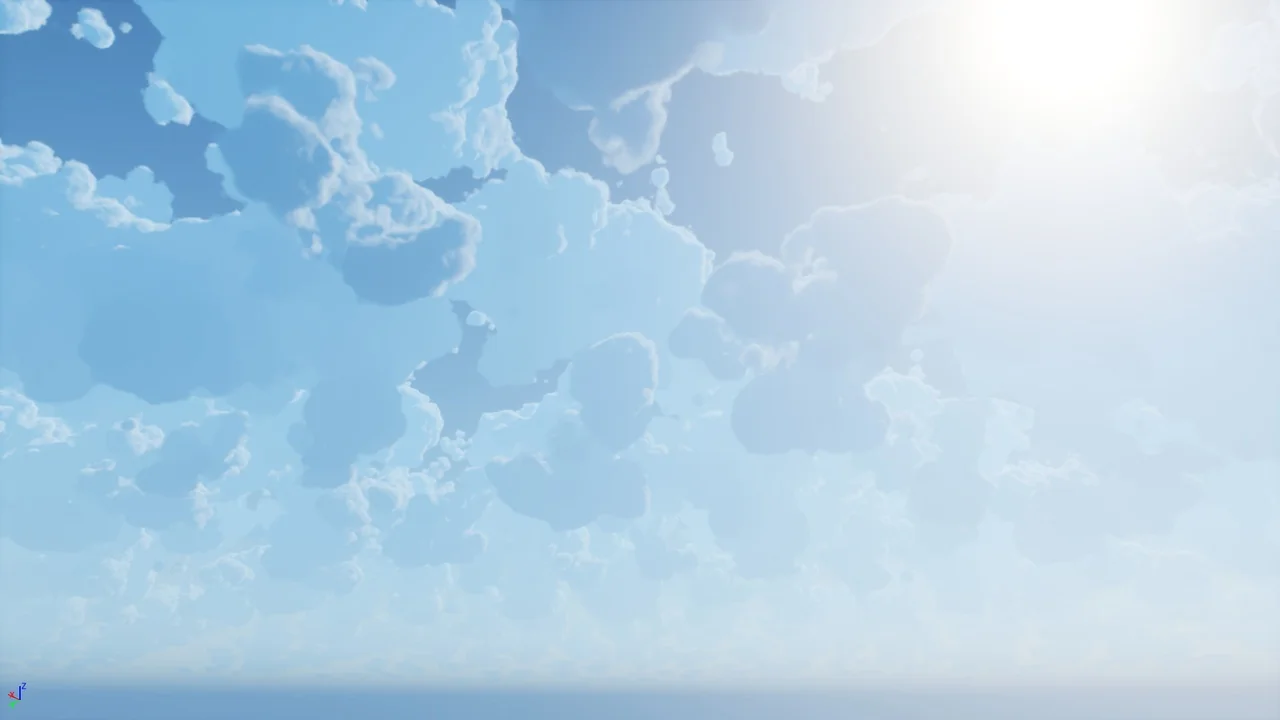
 Shaders
 Shaders
 Shaders