"0341a2901a4ae9aa"{"id":"13742","slug":"blockout-tools-plugin","title":"Blockout Tools Plugin","category":"Engine Tools","engine":"1.51 - 4.5.3","assetVersion":"Engine version: 4.26 - 5.7","engineVersion":"Asset Version:1.51 - 4.5.3","tag":"Engine Tools","accent":"blue","visual":"luts","summary":"Streamline your environment design with the Blockout Tools Plugin. This lightweight toolset features 15 primitive elements and triplanar grid materials for rapid level prototyping in Unreal Engine.","platform":"Unreal Engine","publishedAt":"2026-03-11T09:52:02.000Z","updatedAt":"2026-07-29T16:09:39.794Z","sourceNotes":[],"fileContents":[],"compatibility":["Unreal Engine","Engine version: 4.26 - 5.7","Asset Version:1.51 - 4.5.3"],"featuredImage":{"alt":"Blockout Tools Plugin","src":"https://3dcghub.com/wp-content/uploads/2026/03/2e655f33-dfec-4888-9b31-c0aaa5b72ba1.webp"},"hasDownloadLink":true,"downloads":2,"terms":[{"taxonomy":"category","slug":"engine-tools-tools-and-plugins","name":"Engine Tools"},{"taxonomy":"post_tag","slug":"environment","name":"Environment"},{"taxonomy":"post_tag","slug":"materials","name":"Materials"},{"taxonomy":"post_tag","slug":"plugins","name":"Plugins"},{"taxonomy":"post_tag","slug":"tools","name":"Tools"},{"taxonomy":"post_tag","slug":"ui","name":"UI"},{"taxonomy":"post_tag","slug":"unreal-engine-5","name":"Unreal Engine 5"}],"galleryImages":[{"src":"https://3dcghub.com/wp-content/uploads/2026/03/bdebc36ad636_a11371f7-92d8-43b8-ad46-41cdad241531.webp","alt":"Blockout Tools Plugin"},{"src":"https://3dcghub.com/wp-content/uploads/2026/03/c4f0cd8ad020_3bd22d71-73b2-4b02-aa7e-8269e3f939c2.webp","alt":"Blockout Tools Plugin"},{"src":"https://3dcghub.com/wp-content/uploads/2026/03/5930b312de3f_ceb05280-2989-4bf9-b58a-22d636ec27db.webp","alt":"Blockout Tools Plugin"},{"src":"https://3dcghub.com/wp-content/uploads/2026/03/2cb61f1f9d3c_11e5062e-2ee2-4ede-bd05-27bc7aeb4cac.webp","alt":"Blockout Tools Plugin"},{"src":"https://3dcghub.com/wp-content/uploads/2026/03/3cb4d4d488f4_1e9b70e1-b10e-4954-88f5-f545df770030.webp","alt":"Blockout Tools Plugin"},{"src":"https://3dcghub.com/wp-content/uploads/2026/03/2c3380c30d0f_dabf5aaf-28bd-43e5-ae15-f33a9863b48b.webp","alt":"Blockout Tools Plugin"},{"src":"https://3dcghub.com/wp-content/uploads/2026/03/ffa1de676a3e_db3ed5dc-a78e-4270-a4a7-4efa6682a667.webp","alt":"Blockout Tools Plugin"}],"accessPanel":{"kind":"resource","title":"Download this resource","eyebrow":"Free Download","message":"Log in or create a free account to start your download.","fileName":"Blockout Tools Plugin.7z","safetyNote":"Resources are manually reviewed before listing to improve quality and reduce obvious risks.","actionLabel":"Download Free","resourceType":"Resource archive"},"contentHtml":"\u003ch2\u003eDropping Blockouts into a Level\u003c/h2\u003e\n\u003cp\u003eThe setup path for \u003cem\u003eBlockout Tools Plugin\u003c/em\u003e begins in \u003ccode\u003ePlace Mode\u003c/code\u003e, where a custom category surfaces every available primitive for quick dragging into a scene. Fifteen blockouts form the core set, each carrying custom editor icons so they remain visually distinguishable inside the editor panel. The workflow is intentionally limited in scope: these are primitives meant for sketching space, volume, and proportion, not for modeling geometry or performing boolean operations. Creators who treat greyboxing as the first readable draft of a level can populate a scene without leaving the placement workflow or switching to a separate modeling tool.\u003c/p\u003e\n\n\u003cp\u003eAn example map lives inside the plugin content at \u003ccode\u003eBlockoutToolsPlugin Content/Maps\u003c/code\u003e, giving a concrete look at how primitives sit in a scene once placed. It serves as a reference rather than a template, showing how the pieces compose in real level-space before any art pass.\u003c/p\u003e\n\n\u003ch2\u003eScaling and Transforming Primitives\u003c/h2\u003e\n\u003cp\u003eEach blockout exposes scale controls through two paths: a \u003ccode\u003eVector 3D\u003c/code\u003e widget directly in the viewport, and the standard **Details** panel for typed values. This dual approach suits different working speeds—viewport handles suit quick spatial adjustments, while the **Details** panel suits precise, repeatable dimensions. Settings across the plugin are described as self-explanatory, which keeps the focus on iteration rather than property discovery. Transforms behave like conventional Unreal Actors, so existing editor muscle memory carries over without retraining.\u003c/p\u003e\n\n\u003cp\u003eBecause the plugin explicitly avoids boolean operations, level designers thinking in terms of subtractive carving or complex cutouts need to plan compositions additively. The blockouts define rooms, corridors, platforms, and bounding volumes through placement rather than shape editing. This keeps the tool lightweight and stable, but also means the creative discipline shifts toward arrangement and proportion rather than geometric sculpting.\u003c/p\u003e\n\n\u003ch3\u003eDefaults Configured in Project Settings\u003c/h3\u003e\n\u003cp\u003eRepetitive configuration gets reduced by surfacing key defaults at the project level. \u003ccode\u003eDefault Blockout Color\u003c/code\u003e and \u003ccode\u003eGrid Size\u003c/code\u003e can be pinned in **Project Settings**, so every new blockout placed in a level inherits those values automatically. For teams standardizing on a particular visual language during greybox—say, a specific shade of grey and a grid resolution that matches their measurement conventions—these centralized defaults remove the need to hand-tune each primitive after placement. Individual blockouts still carry configurable look and color overrides, so project-wide defaults do not lock out per-instance adjustments when a scene requires variation.\u003c/p\u003e\n\n\u003ch2\u003eTriplanar Grid Materials on Primitives\u003c/h2\u003e\n\u003cp\u003eVisual readability during greyboxing depends heavily on consistent grid feedback, and the plugin ships two triplanar grid Materials to cover different spatial contexts. A local-aligned variant tracks object rotation, meaning the grid moves with the blockout as it spins, which helps when measuring primitives in their own local space. A world-aligned variant keeps the grid locked to world axes regardless of how individual blockouts rotate, producing a continuous measurement reference across an entire level.\u003c/p\u003e\n\n\u003cp\u003eBoth grid Materials respond to the \u003ccode\u003eGrid Size\u003c/code\u003e default configurable in **Project Settings**, keeping visual scale consistent between primitives and across scenes. The plugin also supports custom Materials, so creators who want a different visual treatment during greybox—or who need a specific shader look for team review captures—can substitute their own Material assignment rather than relying solely on the included grid shaders.\u003c/p\u003e\n\n\u003ch3\u003eConfigurable Appearance Per Blockout\u003c/h3\u003e\n\u003cp\u003eColor and look remain adjustable per instance, giving level designers control over visual grouping without leaving the plugin's ecosystem. A corridor section can take one color to distinguish it from a combat arena volume; a platform can contrast with surrounding walls. Combined with the default color set in **Project Settings**, this per-instance flexibility lets a greybox read clearly during internal review without any external art or post-processing.\u003c/p\u003e\n\n\u003ch2\u003eWeight, Scope, and Pipeline Position\u003c/h2\u003e\n\u003cp\u003eThe plugin is built as a lightweight addition, which matters for projects that want to keep editor overhead minimal during early production when scenes change rapidly. It targets Unreal Engine 4 and 5, so projects migrating between versions or maintaining cross-generation builds can keep the same greyboxing workflow intact. It was selected as a Monthly Unreal Engine Sponsored Content product for December 2020.\u003c/p\u003e\n\n\u003cp\u003eIts intended purpose is explicit: blocking out levels. The plugin does not attempt to replace modeling tools, and the absence of boolean support reinforces that boundary. Creators who push primitives beyond simple spatial sketching—trying to treat them as final geometry—will hit that limit quickly. For sketching layout ideas before committing to greybox meshes and production assets, the plugin's scope aligns with how level design drafts actually evolve.\u003c/p\u003e\n\n\u003cp\u003eThe plugin sits comfortably before the art pass in a typical pipeline. A designer drops blockouts to test sightlines, pacing, and scale, then replaces or references them once production geometry arrives. The included example map demonstrates this mid-stride state where primitives already communicate layout intent but carry no final surface detail.\u003c/p\u003e\n\n\u003ch2\u003eReference Material and Support\u003c/h2\u003e\n\u003cp\u003eBeyond the plugin itself, documentation and a customer FAQ are available, along with video demos that show the tools in motion. A showcase trailer provides a compressed look at greyboxing results achievable with the included primitive set. These resources help frame expectations before integration and answer common configuration questions without requiring trial-and-error inside the editor.\u003c/p\u003e\n\n\u003cp\u003eThe plugin is tagged across concepts including \u003cem\u003eGreyboxing\u003c/em\u003e, \u003cem\u003ePrototyping\u003c/em\u003e, \u003cem\u003eProcedural Workflow\u003c/em\u003e, \u003cem\u003eBlueprint\u003c/em\u003e, \u003cem\u003eGrid\u003c/em\u003e, and \u003cem\u003eLevel Design\u003c/em\u003e, reflecting its position as a workflow accelerator rather than a content pack. For teams evaluating whether it fits their pipeline, the example map and demo footage provide the clearest signal of how the blockouts behave in practice and where they stop short of heavier geometry tools.\u003c/p\u003e","contentTextLength":6277,"navigation":{"current":1382,"total":4017,"previous":{"id":"22041","slug":"2d-action-rpg-engine-mythril2d","title":"2D Action RPG Engine: Mythril2D","category":"Systems","platform":"Unity","updatedAt":"2026-07-29T16:30:08.036Z"},"next":{"id":"1000780","slug":"48-hdri-alien-places","title":"48 HDRI Alien Places","category":"Outdoors","platform":"Unreal Engine","updatedAt":"2026-07-29T15:59:08.453Z"}},"relatedResources":[{"id":"14592","slug":"shadersource-waterfall-tool-2","title":"SHADERSOURCE - Waterfall Tool 2","category":"Engine Tools","engine":"5.2 - 5.7","assetVersion":"Asset Version: 1.0a - 1.0d","engineVersion":"Engine Version: 5.2 - 5.7","tag":"Engine Tools","accent":"blue","visual":"animation","summary":"The SHADERSOURCE - Waterfall Tool 2 introduces a specialized Editor Mode for generating realistic waterfalls through dynamic meshes and spline paths. This tool offers both Simple and Advanced modes to provide full control over fluid paths and VFX generation.","platform":"Unreal Engine","publishedAt":"2026-03-11T18:36:22.000Z","updatedAt":"2026-10-04T08:27:42.401Z","sourceNotes":[],"fileContents":[],"compatibility":["Unreal Engine","Asset Version: 1.0a - 1.0d","Engine Version: 5.2 - 5.7"],"featuredImage":{"alt":"SHADERSOURCE - Waterfall Tool 2","src":"https://3dcghub.com/wp-content/uploads/2026/03/79d82bd8-c7cf-4877-9519-16f36c4a03c4.webp"},"hasDownloadLink":true,"downloads":1},{"id":"14467","slug":"rdtextools-rd-tools-pro","title":"rdTexTools (rd Tools Pro)","category":"Engine Tools","engine":"4.26 - 5.8","assetVersion":"Asset Version: 1.0.3 - 1.4.0","engineVersion":"Engine version: 4.26 - 5.8","tag":"Engine Tools","accent":"blue","visual":"mech","summary":"rdTexTools (rd Tools Pro) is a powerful C++ plugin for Unreal Engine that simplifies texture analysis and optimization through a streamlined, integrated interface.","platform":"Unreal Engine","publishedAt":"2026-03-11T18:07:25.000Z","updatedAt":"2026-08-05T17:10:19.438Z","sourceNotes":[],"fileContents":[],"compatibility":["Unreal Engine","Asset Version: 1.0.3 - 1.4.0","Engine version: 4.26 - 5.8"],"featuredImage":{"alt":"rdTexTools (rd Tools Pro)","src":"https://3dcghub.com/wp-content/uploads/2026/03/ce4c6b29-272d-46de-b3e4-9f7b6457de50.webp"},"hasDownloadLink":true,"downloads":2},{"id":"13732","slug":"blend-file-importer","title":"Blend File Importer","category":"Engine Tools","engine":"4.27 - 5.8","assetVersion":"Asset Version: 1.5 - 1.9.4","engineVersion":"Engine version: 4.27 - 5.8","tag":"Engine Tools","accent":"blue","visual":"animation","summary":"The Blend File Importer plugin enables a seamless connection between Blender and Unreal Engine. By allowing direct .blend file imports and automatic re-importing, it significantly speeds up the 3D asset pipeline.","platform":"Unreal Engine","publishedAt":"2026-03-11T09:51:51.000Z","updatedAt":"2026-07-30T10:55:24.261Z","sourceNotes":[],"fileContents":[],"compatibility":["Unreal Engine","Asset Version: 1.5 - 1.9.4","Engine version: 4.27 - 5.8"],"featuredImage":{"alt":"Blend File Importer","src":"https://3dcghub.com/wp-content/uploads/2026/03/800a0491-1743-4f2e-bd98-be5a1b0d2cae.webp"},"hasDownloadLink":true,"downloads":2}]}
Engine Tools
Blockout Tools Plugin
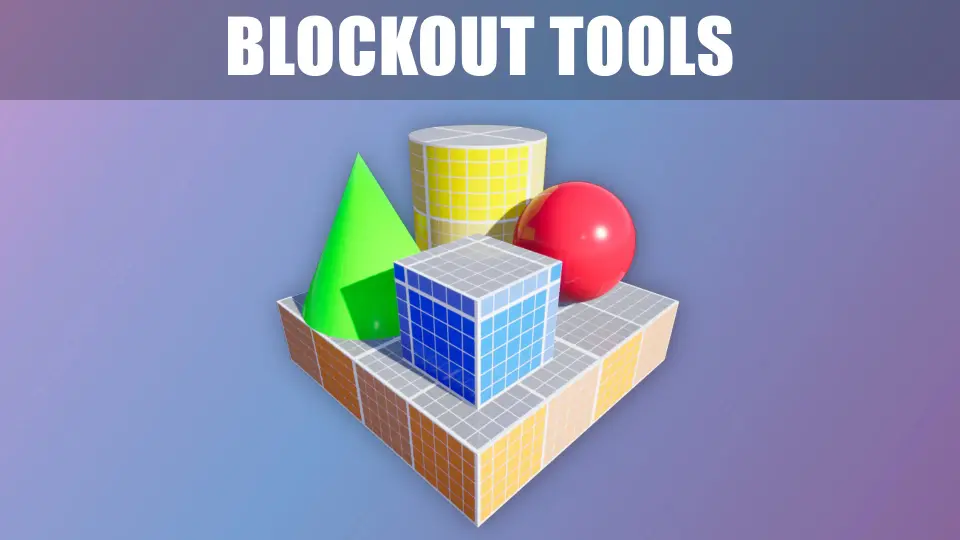
Streamline your environment design with the Blockout Tools Plugin. This lightweight toolset features 15 primitive elements and triplanar grid materials for rapid level prototyping in Unreal Engine.
The setup path for Blockout Tools Plugin begins in Place Mode, where a custom category surfaces every available primitive for quick dragging into a scene. Fifteen blockouts form the core set, each carrying custom editor icons so they remain visually distinguishable inside the editor panel. The workflow is intentionally limited in scope: these are primitives meant for sketching space, volume, and proportion, not for modeling geometry or performing boolean operations. Creators who treat greyboxing as the first readable draft of a level can populate a scene without leaving the placement workflow or switching to a separate modeling tool.
An example map lives inside the plugin content at BlockoutToolsPlugin Content/Maps, giving a concrete look at how primitives sit in a scene once placed. It serves as a reference rather than a template, showing how the pieces compose in real level-space before any art pass.
Scaling and Transforming Primitives
Each blockout exposes scale controls through two paths: a Vector 3D widget directly in the viewport, and the standard **Details** panel for typed values. This dual approach suits different working speeds—viewport handles suit quick spatial adjustments, while the **Details** panel suits precise, repeatable dimensions. Settings across the plugin are described as self-explanatory, which keeps the focus on iteration rather than property discovery. Transforms behave like conventional Unreal Actors, so existing editor muscle memory carries over without retraining.
Because the plugin explicitly avoids boolean operations, level designers thinking in terms of subtractive carving or complex cutouts need to plan compositions additively. The blockouts define rooms, corridors, platforms, and bounding volumes through placement rather than shape editing. This keeps the tool lightweight and stable, but also means the creative discipline shifts toward arrangement and proportion rather than geometric sculpting.
Defaults Configured in Project Settings
Repetitive configuration gets reduced by surfacing key defaults at the project level. Default Blockout Color and Grid Size can be pinned in **Project Settings**, so every new blockout placed in a level inherits those values automatically. For teams standardizing on a particular visual language during greybox—say, a specific shade of grey and a grid resolution that matches their measurement conventions—these centralized defaults remove the need to hand-tune each primitive after placement. Individual blockouts still carry configurable look and color overrides, so project-wide defaults do not lock out per-instance adjustments when a scene requires variation.
Triplanar Grid Materials on Primitives
Visual readability during greyboxing depends heavily on consistent grid feedback, and the plugin ships two triplanar grid Materials to cover different spatial contexts. A local-aligned variant tracks object rotation, meaning the grid moves with the blockout as it spins, which helps when measuring primitives in their own local space. A world-aligned variant keeps the grid locked to world axes regardless of how individual blockouts rotate, producing a continuous measurement reference across an entire level.
Both grid Materials respond to the Grid Size default configurable in **Project Settings**, keeping visual scale consistent between primitives and across scenes. The plugin also supports custom Materials, so creators who want a different visual treatment during greybox—or who need a specific shader look for team review captures—can substitute their own Material assignment rather than relying solely on the included grid shaders.
Configurable Appearance Per Blockout
Color and look remain adjustable per instance, giving level designers control over visual grouping without leaving the plugin's ecosystem. A corridor section can take one color to distinguish it from a combat arena volume; a platform can contrast with surrounding walls. Combined with the default color set in **Project Settings**, this per-instance flexibility lets a greybox read clearly during internal review without any external art or post-processing.
Weight, Scope, and Pipeline Position
The plugin is built as a lightweight addition, which matters for projects that want to keep editor overhead minimal during early production when scenes change rapidly. It targets Unreal Engine 4 and 5, so projects migrating between versions or maintaining cross-generation builds can keep the same greyboxing workflow intact. It was selected as a Monthly Unreal Engine Sponsored Content product for December 2020.
Its intended purpose is explicit: blocking out levels. The plugin does not attempt to replace modeling tools, and the absence of boolean support reinforces that boundary. Creators who push primitives beyond simple spatial sketching—trying to treat them as final geometry—will hit that limit quickly. For sketching layout ideas before committing to greybox meshes and production assets, the plugin's scope aligns with how level design drafts actually evolve.
The plugin sits comfortably before the art pass in a typical pipeline. A designer drops blockouts to test sightlines, pacing, and scale, then replaces or references them once production geometry arrives. The included example map demonstrates this mid-stride state where primitives already communicate layout intent but carry no final surface detail.
Reference Material and Support
Beyond the plugin itself, documentation and a customer FAQ are available, along with video demos that show the tools in motion. A showcase trailer provides a compressed look at greyboxing results achievable with the included primitive set. These resources help frame expectations before integration and answer common configuration questions without requiring trial-and-error inside the editor.
The plugin is tagged across concepts including Greyboxing, Prototyping, Procedural Workflow, Blueprint, Grid, and Level Design, reflecting its position as a workflow accelerator rather than a content pack. For teams evaluating whether it fits their pipeline, the example map and demo footage provide the clearest signal of how the blockouts behave in practice and where they stop short of heavier geometry tools.
Preview Gallery
Resource screenshots
7 curated preview images
1 / 7
Free Download
Download this resource
Log in or create a free account to start your download.
Resources are manually reviewed before listing to improve quality and reduce obvious risks.
 Engine Tools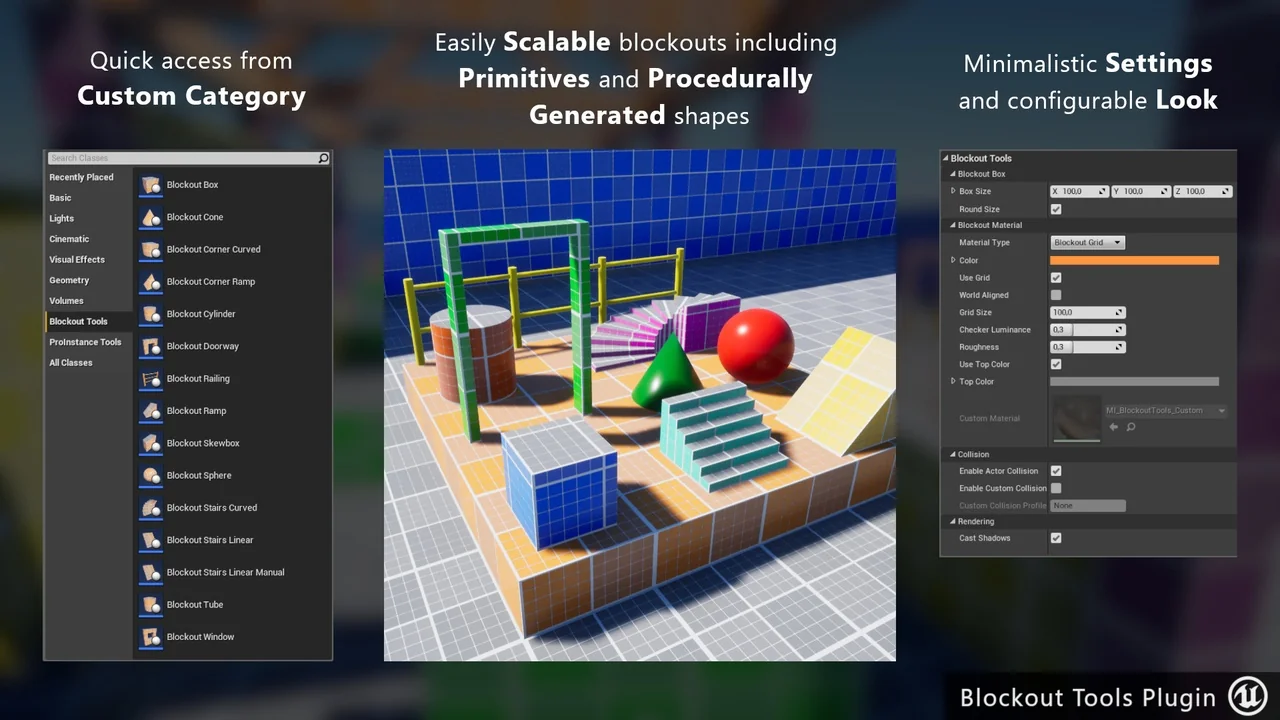
 Engine Tools
 Engine Tools
 Engine Tools